Figma Weave is worth learning if your team rebuilds the same visual pipeline on a weekly production cycle, and a poor buy if you expect it to design UI screens. Agency testing documented by Overs needed about eight renders to keep one photo, and the cheapest paid plan can buy 1,500 GPT Image 2.5 images or three Runway Aleph generations.
Verdict: a production system for assets, not screens
Figma Weave is a node-based media-production system for repeatable image, video, 3D, and audio workflows, and it earns its place when one specialist builds a pipeline and teammates rerun it with new inputs.
The boundary is sharp. Figma Weave creates and refines the media placed inside a design, not editable UI screens, components, spacing systems, or production-ready code. Reviews from UXMagic, Imaginode, and Overs plus Reddit production reports agree on that split, and Figma's own October 31, 2026 overview frames Weave as asset pipelines connected back to Figma Design, not as a layout tool.
"I tried it and I gonnabe honest, I wasn't impressed. I wanted to mockup a mark embroidered on fabric and I kept getting broken or just straight up incorrect outputs." — u/pocket-ghost922 on r/FigmaDesign
Constrained, exact work fails first. Repeatable brand variations work best.
What Figma Weave is
Figma Weave is the renamed Weavy platform for AI-native media generation and editing. Figma announced the Weavy acquisition in October 2025, rebranded the product as Figma Weave, and now runs it as a standalone product at weave.figma.com, per the Figma Weave FAQ.
Figma's "TL;DR on Figma Weave" uses four terms consistently:
- Node: one building block, such as a prompt, reference image, model call, mask, relight, upscale, or video step.
- Workflow: connected nodes that turn starting material into a finished result.
- Branch: a separate path from the same starting point to explore a different direction.
- Weave tool: a packaged workflow that another person runs by uploading an input and clicking Generate, without touching nodes.
Weave remains separate from Figma Design. The FAQ states that personal data and AI-feature content are not shared across platforms, with no committed date for deeper integration.
How a repeatable workflow runs on the canvas
Figma Weave runs on an infinite canvas where wires carry outputs between steps. A typical campaign branch starts from one product photo, fans out into two or three edit directions, and keeps each version attached to the steps that made it.
Figma's hiking-brand example shows one backpack image branching into forest and mountain edits, then color correction or image-to-video, with both versions visible for comparison.
What makes this different from a single prompt box:
- Parallel model comparison. The same prompt can feed Nano Banana Pro, GPT Image 2.5, Flux 3, Seedance 2.5, Kling 3.0, Wan 3.0, LTX 2.3, or Runway Aleph 2.0 on one canvas. UXMagic's comparison finds models differ most on text rendering, photorealism, and style control, so side-by-side runs replace guesswork.
- Editing nodes instead of re-prompting. Color correction, compositor, levels, trim, crop, and painter nodes handle deterministic fixes. Figma's guide recommends direct edits for small changes because repeated prompting burns credits for no reason.
- Variables and prompt assistance. Prompt variables change one slot without rewriting the whole prompt. A Run Any LLM node and Prompt Enhancer node review or rewrite instructions before generation.
- Packaged tools for teammates. A finished graph becomes an app-like interface with a few fields and a run button. In June 2026 Figma added publishing of these tools to Figma Community, and any builder can test whether a non-builder understands the inputs.
Test each node before chaining video or compositing, as Figma's guide warns. A weak early image contaminates each downstream node, so checking an edit first saves the most credits.
Connected to Figma Design, but still two products
Figma Weave connects to Figma Design through two distinct features described in Figma's June 24, 2026 integration post. The two products still require separate accounts, separate subscriptions, and separate credit balances.
| Where work runs | What it uses | Credit pool |
|---|---|---|
Full canvas at weave.figma.com | Figma Weave credits | Weave plan allocation |
| Weave tools inside Figma Design | Figma AI credits | Figma plan allocation |
Weave tools inside Figma Design include 20+ ready-made image tasks such as mockup generation, style transfer, and background replacement. These tools run from the Tools menu in Figma Design on Professional, Organization, and Enterprise plans with file edit access.
The Figma node works in the opposite direction. A designer copies a frame from Figma Design and pastes it into a Weave workflow. The pasted Figma node preserves fonts, colors, and styles, accepts text or image inputs wired to individual layers, and pushes results back with a Connect action. Both accounts must be linked under Weave Settings to Profile to Linked accounts, and the original Figma file is untouched until Connect runs.
"The node-based workflow is where it gets interesting. Piping outputs from different models into each other." — u/tefansay on r/FigmaDesign
"Image to video without leaving your agent chat — via @figma. Weave models now run through Figma MCP. Catch: Weave credits, a linked workspace, no graph editing from the agent yet." — @Nervo on X
For availability details, see the Figma help center.
What it costs when you count generations, not subscriptions
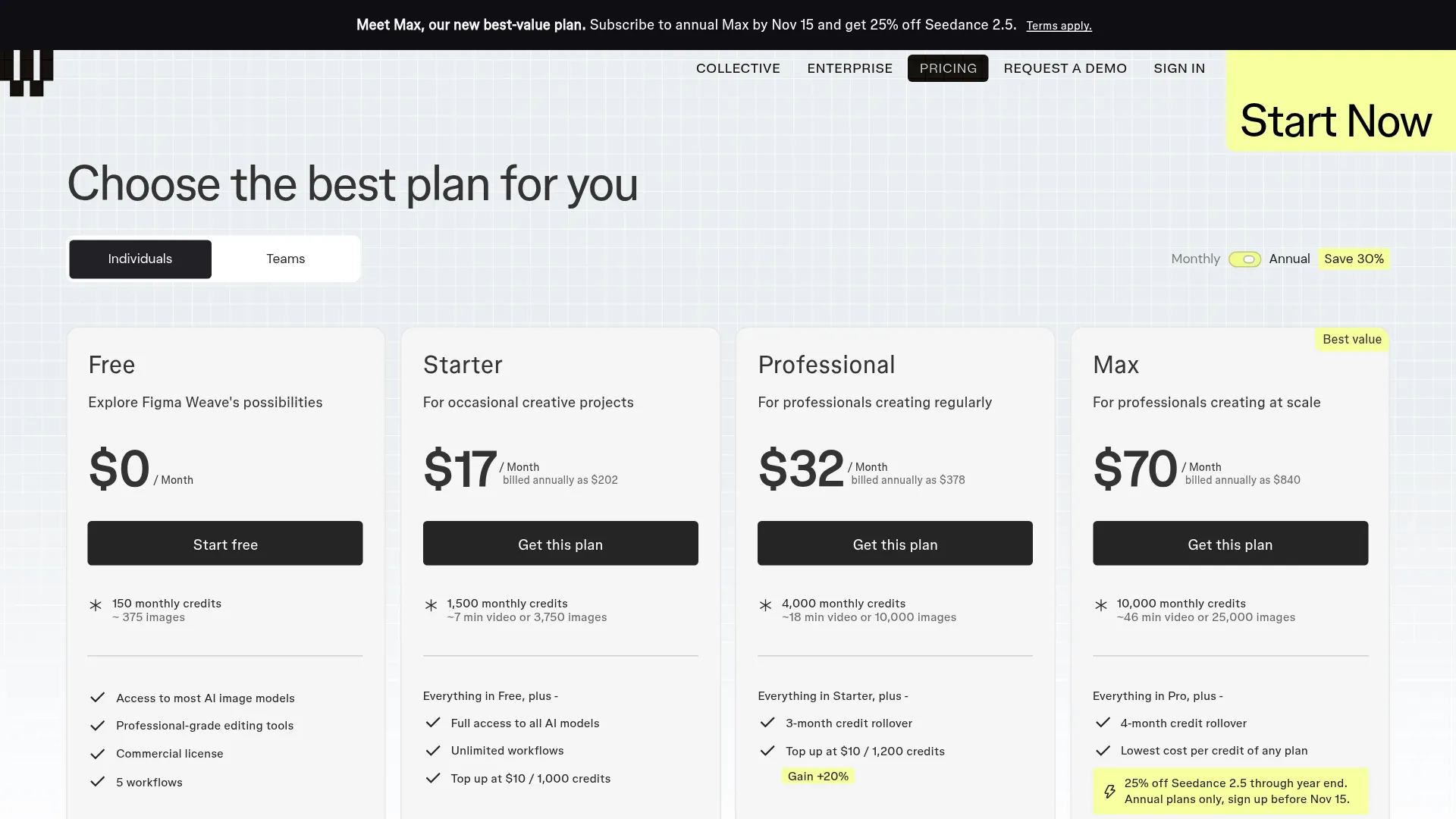
Pricing snapshot: October 31, 2026, in US dollars from the Figma Weave pricing page. Annual billing saves a stated 30% (Team annual works out to $42 per user per month).
| Plan | Monthly | Annual total | Credits and rollover | Best for |
|---|---|---|---|---|
| Free | $0 | $0 | 150, no rollover or top-ups | Trying the canvas |
| Starter | $24 | $202 | 1,500, no rollover | Occasional projects |
| Professional | $45 | $378 | 4,000, rollover to 3x | Regular solo production |
| Max | $100 | $840 | 10,000, rollover to 4x | Heavy individual volume |
| Team | $60 per user | $504 per user | 4,500 per user pooled, rollover to 3x | Shared studio pool |
| Enterprise | Custom | Custom | Custom, own API keys and API workflows | Coded automation |
Top-ups cost $10 per 1,000 credits on Starter and $10 per 1,200 credits on Professional, Max, and Team. Top-up credits last 12 months. Paid fees are non-refundable and cancellation takes effect at term end.
Starter's 1,500 credits translate very differently by model, derived from the pricing page model table:
| Model | What 1,500 Starter credits produce | Implied credits each |
|---|---|---|
| GPT Image 2.5 | 1,500 images | ~1 |
| Flux Fast | 3,750 images | ~0.4 |
| Nano Banana 2.1 | 214 images | ~7 |
| Seedance 2.5 video | 115 generations | ~13 |
| Runway Aleph 2.0 | 3 generations | ~500 |
Source: Figma Weave pricing model table, October 31, 2026.
At monthly Starter rates around $0.016 per credit versus about $0.007 per credit on annual Max, one 500-credit Runway Aleph run costs roughly $8 on Starter. Model choice matters more than plan choice, as Imaginode notes.
Two subscriptions are the hidden cost. A paid Figma plan does not include a paid Weave plan. Teams budgeting production must add Figma plus Weave together; the pricing page limits free-tier users to five workflows with commercial use but no video models or top-ups.
Where production breaks
Iteration counts run high
Agency operator Overs built four product campaigns in Weave during 2026 with a locked three-zone canvas (inputs, fixed-role AI critics, per-shot output fan-out). The result was 361 renders to keep 45 photos, or about eight renders per keeper, with 140-200-word prompts on Nano Banana models and about 300-word prompts on GPT Image models.
Design-system adherence fails
Reddit production users report the same pattern independently:
"I spent quite a while trying to get it to use established systems and patterns as a base and then design one-off requests for new components or adapt components for new scenarios and it goes rogue despite the best prompts." — u/sandopsio on r/FigmaDesign
Speed complaints recur in the broader Figma AI thread, where several users say manual work or a narrower tool is faster for mechanical tasks. The Imaginode review, citing Figma forum reports, also notes small node click targets and a Windows app display issue directed to legacy Weavy support.
Commercial rights are broad, not blanket
Figma Weave offers full commercial rights at platform level, states it does not train on customer work, holds SOC 2 Type II, and says most models are cleared for commercial use, with per-model terms differing by provider. The pricing page directs buyers to the model list and Trust Center for model-specific status before client work.
Build in Weave or call the models directly?
Figma Weave pays off when the same pipeline runs dozens of times. Direct model APIs pay off when each asset is a one-off or must run inside code.
| Situation | Better pick |
|---|---|
| Product catalog with fixed brand treatment across SKUs and ratios | Weave workflow with locked references |
| Non-technical teammates must produce on-brand variants | Packaged Weave tool or Community tool |
| Heavy compositing: mask, relight, depth, channels, blend | Weave canvas |
| Single hero image with no reuse | Single-model generator or API call |
| Batch jobs inside software (hundreds of assets, retries, logging) | Enterprise API workflows or raw model APIs |
| Team already lives in Figma and needs in-file edits | Weave tools inside Figma Design |
Enterprise is the only tier explicitly listed as offering customer-owned API keys and API workflow execution, per the pricing page; Overs likewise notes own keys are Enterprise-only. Other plans pay per model call in Weave credits. Developers automating at scale should compare that against calling image and video models through an aggregator with per-request billing, where retries and logging are explicit.
| Tool | Best for | Trade-off |
|---|---|---|
| Flora | Managed node canvas, dollar-denominated model pricing | Canvas learning curve, no Figma Community path |
| Krea | Hosted multi-model nodes with templates | Less documented compositing depth |
| ComfyUI | Free, local, maximum control | You own setup and GPUs |
Figma Weave FAQ
Is Figma Weave included in a Figma subscription?
No, separate subscriptions and credit pools; see the integration table above.
How do Figma Weave credits work?
Each plan grants a monthly pool, each model charges a different amount; base-credit rollover is Professional (3x), Team (3x), and Max (4x), and paid top-ups last 12 months.
Can Figma Weave design UI screens?
No. Weave generates pixels and media, not editable layouts, components, or code.
Does Figma Weave train on my work?
Figma states Weave does not train on customer work and does not share personal data or AI-feature content across Figma and Weave. Per-model commercial clearance still varies, so confirm terms before client delivery.
Is there a Figma Weave API?
Workflow API execution and customer-owned keys are listed as Enterprise features. Standard plans run workflows in the canvas or as packaged tools, with Community publishing available.