 AIREITER
SeaArt AI is worth trying if you want a large community model library, LoRA support, and lots of image tools without setting up a GPU. It is a weaker default for client work: the platform’s daily stamina resets, video costs can jump sharply, and “commercial use” does not clear every model, LoRA, likeness, or community upload.
What SeaArt AI is actually good at
SeaArt combines image generation with community checkpoints, LoRAs, editing, training, video, and cloud node workflows. The official AI Creation Agent page documents image/video creation and model use; Cybernews’ interface review documents LoRA training and ComfyUI controls.
SeaArt favors breadth over predictability: model access, moderation, queues, and stamina costs may differ by task or account, according to real-user reports and reviewer tests. It behaves more like a hosted creative sandbox than one tightly controlled model.
Model and LoRA depth
The community library is SeaArt’s clearest advantage. ScruTool describes hundreds of thousands of checkpoints and LoRAs, while Cybernews documents hosted LoRA training with roughly 20–30 reference images. On a model page, inspect the license, sample outputs, trigger words, recommended strength, and recent availability.
That flexibility is useful for character sheets, visual exploration, and repeatable style experiments. It is not the same as a license guarantee. A community LoRA may have its own author terms, training-data questions, or restrictions that are separate from SeaArt’s general statement about user-generated output.
Image, editing, and video workflow
SeaArt is strongest when the task is still-image exploration. ScruTool’s hands-on test reported four Z Image Turbo portraits for 20 stamina, or about 5 stamina per image. FirmCritics’ controlled review scored prompt fidelity 4/5 and the built-in editing toolkit 4.5/5, while noting that realistic skin could look smooth or synthetic on close inspection.
Video is a different proposition. ScruTool’s test recorded a 675-stamina quote for a video from an image run that cost 20 stamina. That is roughly 34 times the cost of the four-image test. FirmCritics describes 5–10 second clips as useful for concepts and social assets, but less reliable for long, coherent cinematic sequences.
The free tier and paid economy: what to verify before paying
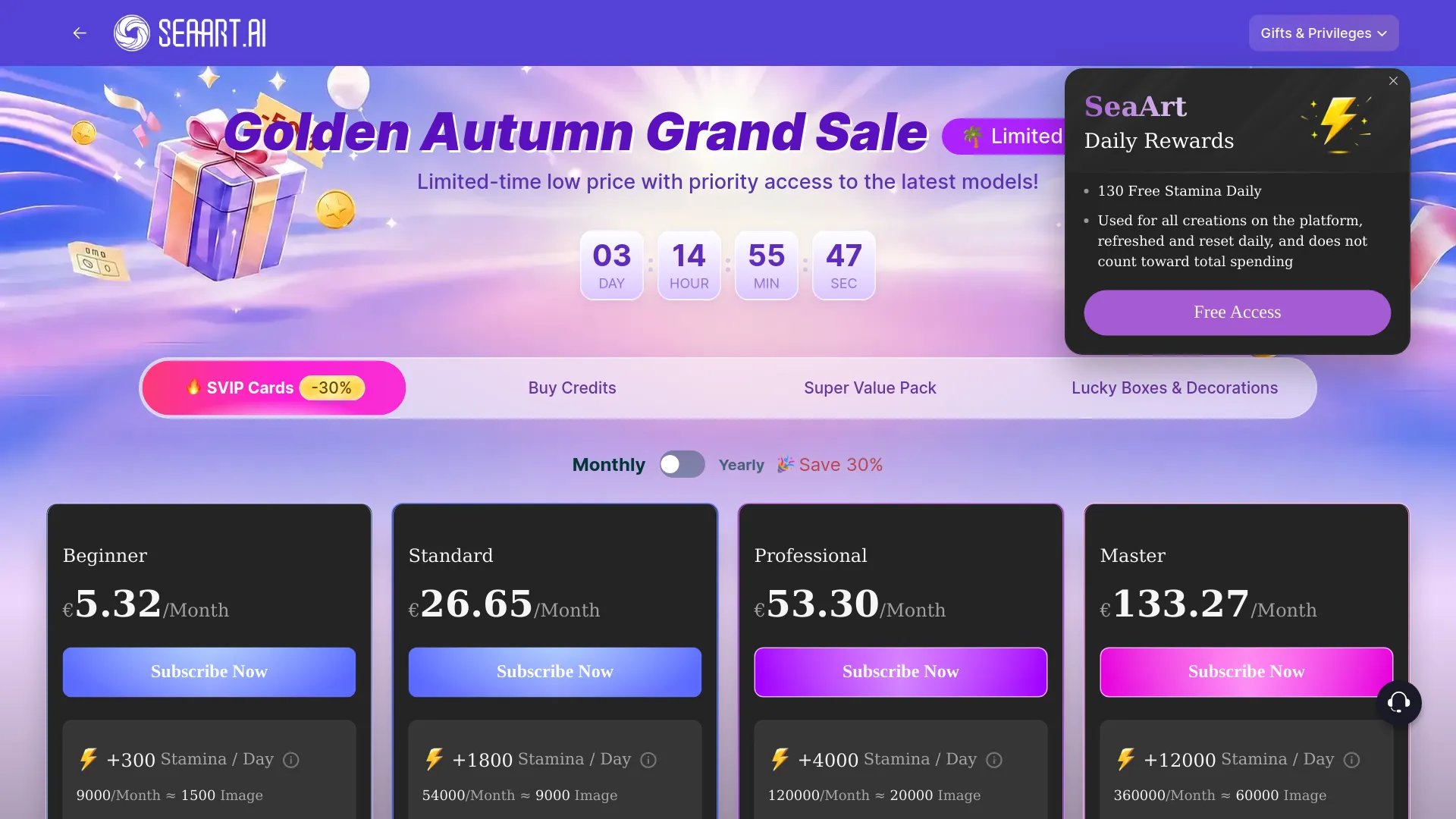
SeaArt has a genuine free tier, but the free allowance is a daily operating budget rather than a banked balance. ScruTool’s July 2026 snapshot listed Free at about 130 stamina/day, Beginner at $5.99/month, Standard at $25.49/month, Professional at $50.99/month, and Master at $127.49/month. Treat those figures as a dated verification checklist, not a permanent quote.
| Item | What the available evidence indicates | What to check |
|---|---|---|
| Free access | About 130 stamina/day in ScruTool’s July 2026 snapshot; watermarked output | The exact stamina shown after sign-in |
| Paid tiers | $5.99 / $25.49 / $50.99 / $127.49 monthly in that snapshot | Monthly versus annual price and regional taxes |
| Stamina | Daily allowance used for generation and refreshed on a schedule | Expiry time and per-model quote before Generate |
| Credits | Separate balance that may be used after stamina, depending on the task | Purchase date, validity, and whether an event credit differs |
| Video | Can consume hundreds of stamina or credits in reviewer tests | Resolution, duration, model, and final quote |
| Trial | ScruTool reports a three-day trial, early charge warning, and automatic renewal terms | Renewal time zone, cancellation deadline, and confirmation screen |
The practical rule is simple: never estimate image capacity from the plan-card headline alone. Select the exact model, resolution, duration, and batch size first, then record the quote. A cheap image workflow and an expensive video workflow can coexist under the same subscription.
Daily stamina is not stored value
ScruTool’s account test found that daily stamina expires rather than accumulating, while purchased and event credits can follow different validity rules. Check the current SeaArt Mall and the terms attached to each purchase.
Before starting a trial, capture the plan name, renewal date, and cancellation status. Do not rely on a browser tab or an email receipt as proof that renewal was disabled. This matters because users have described refund and cancellation confusion, while ScruTool reports that trial charges may arrive hours early because of timing rules.
Commercial-use terms are a rights checklist, not a blanket clearance
SeaArt’s official FAQ and AI Creation Agent page support commercial use of a user’s own generated work. Its English Terms of Service make a separate distinction for other users’ content: community UGC is not automatically cleared for commercial reuse without permission or another applicable license.
Use this checklist before publishing paid work:
- Confirm that the asset is your own generation, not a downloaded community image or remix.
- Open the selected model and LoRA page and read its creator license.
- Check whether the image contains a recognizable person, trademark, copyrighted character, or client-provided likeness.
- Save the relevant SeaArt terms, model license, and plan receipt with the project files.
- For high-value campaigns, ask SeaArt support for written clarification tied to the exact plan and workflow.
“Commercial use allowed” should therefore be read as permission from the platform, not a universal copyright, likeness, or training-data clearance.
Selected user reports about moderation and refunds
Community reports are useful for finding operational risk, but they are not proof that SeaArt’s policy says the same thing. In Reddit discussions, users have described disappearing models or LoRAs, inconsistent visibility of ordinary images, and difficulty obtaining refunds. For example, u/AirInternational6928 wrote that “over 100 of my non-NSFW pictures disappeared” in a discussion about hidden images (Reddit, r/SeaArtAI).
A separate commenter, u/Sea-Year8733, wrote: “The customer service is also terrible,once you have a problem,they refusing to give you a refund” (Reddit, r/SeaArtAI). These are individual user reports, not verified findings. They do justify a low-risk test: avoid sensitive uploads, verify the model remains available, and do not buy an annual plan until the free workflow behaves as expected.
SeaArt versus simpler and more controlled alternatives
Choose by the bottleneck you need to remove rather than by raw feature count.
| If you need… | SeaArt’s fit | A better direction |
|---|---|---|
| Many styles, community checkpoints, and LoRAs | Strong | Use SeaArt’s free tier first and inspect each model license |
| A simple prompt box with fewer decisions | Mixed | Choose a focused commercial image generator |
| Repeatable node-level control without local hardware | Strong, if you can learn ComfyUI | Use SeaArt’s workflow tools and save versions frequently |
| Predictable client rights and asset provenance | Cautious | Prefer a tool with clearer model-level licensing and retain source records |
| Long, coherent video production | Weak-to-mixed | Use a dedicated video workflow and compare its per-clip pricing |
| Local control over files and models | Limited | Use a local Stable Diffusion or ComfyUI setup |
SeaArt is not a universal replacement for Midjourney, a local Stable Diffusion stack, or a dedicated video editor. It is most compelling when one account needs variety, hosted experimentation, and a large community ecosystem.
A safe way to test SeaArt in 30 minutes
- Start on the free tier with a non-sensitive prompt and no private photographs.
- Run the same brief through one built-in model and one community model; record the model names and settings.
- Check the output for unwanted objects, watermarks, identity drift, and visible metadata before sharing it.
- Open the model and LoRA license pages before treating the output as client-ready.
- Send one image into video generation, but stop at the quoted cost unless the result justifies it.
- If you start a trial, screenshot the renewal date and confirm cancellation in the account area before the final day.
- Keep your prompt, model, LoRA, plan, and export records together so a later rights question is answerable.
SeaArt AI FAQ
Is SeaArt AI free?
Yes. SeaArt offers a free tier with daily stamina, but the allowance resets and free outputs or tools may carry watermarks and limits. The exact amount can change, so verify the signed-in account display.
Can I use SeaArt images commercially?
SeaArt’s official FAQ supports commercial use of your own generated content, subject to applicable law and user responsibility. That does not automatically license another user’s UGC, a community LoRA, a recognizable likeness, a trademark, or a copyrighted character.
Does SeaArt support LoRA and ComfyUI?
Yes. SeaArt documents model and LoRA workflows, LoRA training, and browser-based node workflows. Compared with a basic prompt-only generator, the node workflow requires more setup; that is a practical trade-off rather than a published benchmark.
Why do SeaArt stamina and credits feel confusing?
They are separate usage balances with different purposes and validity rules. Stamina is commonly a daily allowance, while credits can be used for paid functions or training; the exact charge depends on the model and task.
Is SeaArt a good choice for client work?
It can work for low-risk concepting and assets whose provenance you have documented. For high-value commercial work, verify the selected model and LoRA licenses, keep the terms and receipts, and avoid assuming that a platform-wide commercial-use statement clears every downstream right.
The trade-off to keep visible
SeaArt is the better choice when breadth, free experimentation, community models, and hosted customization matter more than a quiet interface or perfectly predictable costs. Pick another workflow when the priority is private source control, stable model availability, clear asset provenance, or long-form video economics. The deciding test is not whether SeaArt can make an impressive image; it is whether you can repeat the workflow and explain the rights and cost behind the image you plan to ship.