Google put a playable world behind an API key on November 19, 2026 — but a two-minute demo costs about $12 and the world starts forgetting itself after a minute. The Genie 4 API is live via the Gemini Interactions API and Google AI Studio, and it is worth testing for short interactive prototypes, not for persistent games yet.
Genie 4 API availability: what shipped on November 19
Google announced developer access on November 19, 2026 through the Gemini API's Interactions API (v1beta) and Google AI Studio, one day after Project Genie access for AI Ultra subscribers on November 18. The model identifier is models/genie-4, per the AI Studio Genie docs.
Access requires a paid-tier Gemini API key. There is no free tier for Genie 4, and Google labels the surface v1beta, which means request shapes and quotas can still change.
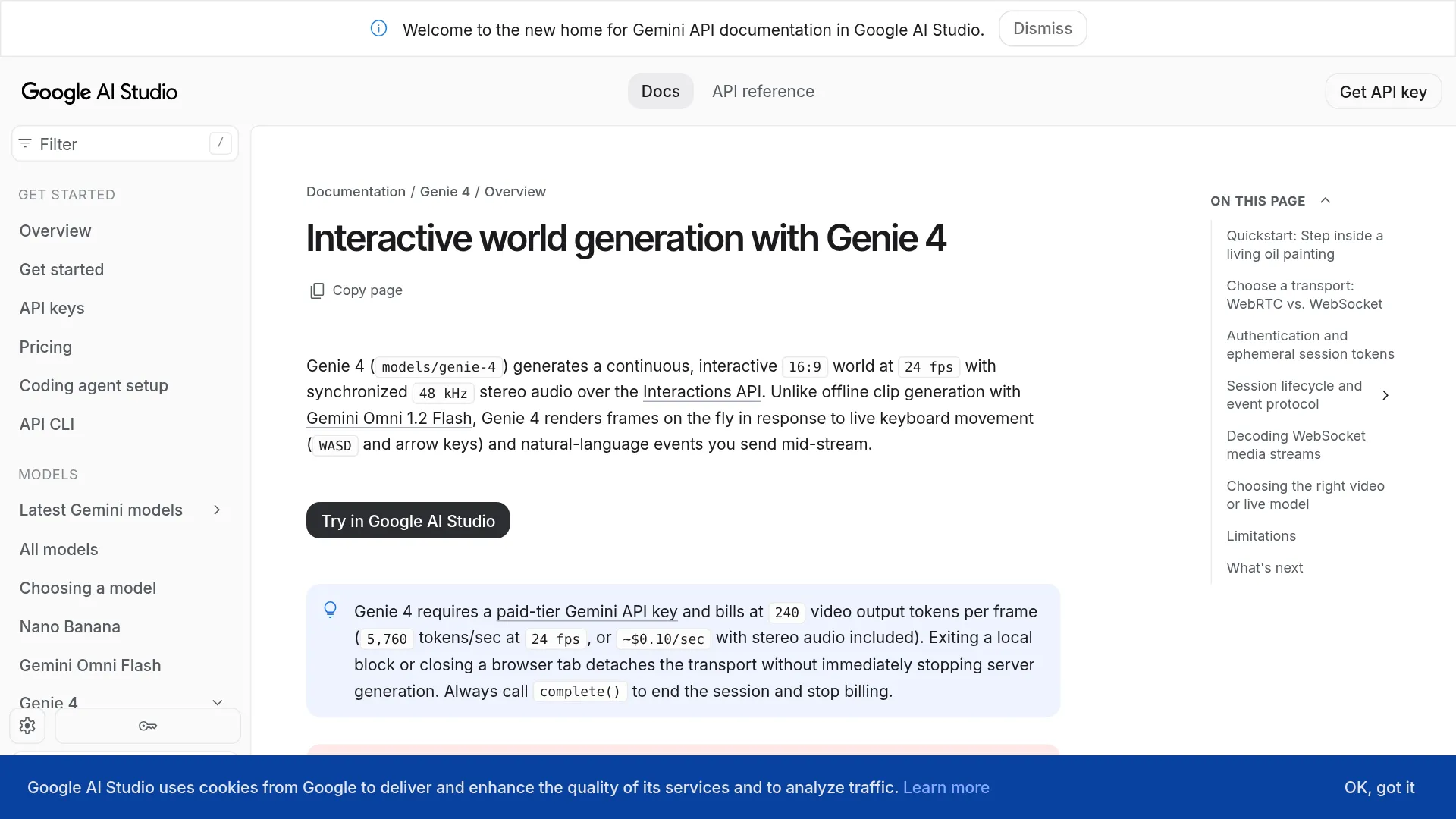
Genie 4 generates a continuous 16:9 world at 1280x720 and 24 fps with synchronized 48 kHz stereo audio, including ambience, effects, and character dialogue, according to the official announcement. A world starts from a text prompt, a 16:9 reference image, or both. Users steer it with WASD or arrow keys plus mid-session text prompts that change weather, lighting, objects, or events. Unlike offline video generation, Genie 4 renders frames in response to live input.
What a Genie 4 session actually costs
Genie 4 pricing is token-based, but the practical number is time-based. The AI Studio Genie docs list $1.50 per million input tokens, $9.00 per million text-output tokens, and $17.50 per million video-output tokens, with video billed at 240 tokens per frame. The docs quote an effective bundled estimate of ~$0.10 per second for the combined stream.
| Usage | Billed rate |
|---|---|
| Input tokens | $1.50 / 1M tokens |
| Text-output tokens | $9.00 / 1M tokens |
| Video-output tokens | $17.50 / 1M tokens |
| Video token burn at 24 fps | 240 x 24 = 5,760 tokens / second |
| Effective streaming cost | ~$0.10 / second bundled estimate per docs |
Video dominates the meter: 5,760 / 1,000,000 x $17.50 = $0.1008 per second on video tokens alone, so the docs round the combined video-plus-audio stream to ~$0.10 per second. That is about $6.05 per minute and about $12.10 for a full 120-second session, before prompt and dialogue tokens.
Budget it like this: a landing-page demo with ten 30-second visits burns ~300 seconds, roughly $30 in world generation. An hour of continuous generation is about $363. Quota is a second ceiling on top of cash: AICoder's launch breakdown reports Tier 1 at 2 concurrent sessions and 50 requests per day, Tier 2 at 5 and 250, Tier 3 at 10 and 1,000. Verify your tier in the rate-limits docs before load testing, since beta quotas change.
Even smoke tests bill, so first run in the AI Studio Live playground, then move to a keyed integration.
WebRTC or WebSocket: pick transport by where you render
| Capability | WebRTC | WebSocket |
|---|---|---|
| Best for | Browser play with keyboard control | Server processing, recording, custom media |
| SDK | @google/genai in browser JS/TS | google-genai Python async, @google/genai Node |
| Media | Native RTP video + Opus audio to <video> | JSON step.delta with base64 JPEG + 48 kHz Int16 PCM |
| Latency behavior | Lowest; UDP + jitter buffering | Higher; TCP head-of-line blocking on loss |
| Payload constraint | 64 KB SCTP limit; check final encoded seed size | Larger JSON payloads OK |
Transport comparison above follows the AI Studio Genie docs: WebRTC is positioned as the default for responsive browser play, WebSocket for capture and custom pipelines.
The secure pattern is the same either way, per the authentication section of the Genie docs. The server calls interactions.create, mints a single-session ephemeral token, and hands only the interaction ID plus that token to the browser. Never embed a long-lived key in client code. Standard browser WebSocket cannot attach the x-goog-api-key header, so browser connections use the auth_tokens/... session token.
Minimal session lifecycle, from the session lifecycle docs:
- Server:
interactions.createwithmodels/genie-4. - Server: mint single-session
auth_token, send ID + token to browser. - Client:
interactions.connectover WebRTC or WebSocket. - Client: send exactly one
world_setupwithworld_promptand optional 16:9reference_image. - Client: steer with
user_actionkey events andinputtext events. - Client or server:
complete()to stop generation and billing.
Held keys keep applying until key_up, and clients should suppress OS key-repeat. Custom actions on E, Q, or Space have no built-in jump behavior in the docs example — they are wired as descriptive text inputs instead.
The billing trap matters more than the code shape. Per the docs lifecycle section, complete() stops server generation and billing, cancel() aborts immediately, while detach() only closes the local socket and should not be relied on to stop billing. Closing a browser tab detaches transport but does not guarantee generation stops. Always call complete() or cancel() explicitly.
Seed images need care on WebRTC. The docs note a 64 KB SCTP cap and recommend keeping the final base64-encoded seed small (roughly half that budget after ~33% base64 expansion). Check the encoded payload size in code rather than trusting resolution alone; oversized seeds belong on WebSocket.
4 limits that will break your demo
The model holds a rolling temporal window rather than a persistent 3D scene graph, per the limitations section. Design around four constraints before promising anything to users.
1. Hard 120-second cap. Every session ends at 120 seconds, per the docs limits. Chaining fresh sessions can extend the surrounding experience but does not preserve exact scene state, since sessions do not resume. Initial world setup takes several seconds before the first frame; the docs quickstart shows ~5–9 seconds.
2. Drift after 60–90 seconds, resets on look-away. The docs warn visual stability may degrade after 60–90 seconds, and looking away for 8+ seconds or turning 360 degrees can shift landmarks, doors, or buttons. Turning 180 degrees from the canal example and returning can rearrange background buildings. Signs, gauges, clocks, and exact counts deform first. The docs recommend describing continuous changes rather than hard camera cuts, and repeating short prompts over ~1.5 seconds with a ~2 second cooldown because world planning samples text at step boundaries.
3. Latency and region sensitivity. Genie 4 serves from the US, Western Europe, and Japan, with best responsiveness under ~150 ms round-trip in North America, western/central Europe, and East Asia, per the docs. Above that threshold steering feels sluggish and frame rate can drop. Place backend relays near a serving region and test WebRTC latency from the target geography. Keyboard response is documented at ~0.2–0.5 seconds and text events at ~1–2 seconds under low round-trip time.
4. Fixed canvas and blocked content. Output is locked to 16:9, 720p, 24 fps. No portrait mode, no configurable frame rate, no live microphone or webcam input, no function calling, no Search grounding, no structured outputs, no session resume. Prompts or seeds with identifiable people, public figures, or branded IP can be blocked or terminate a stream. Every output carries imperceptible SynthID watermarking.
"Looks good, not slop, but I don't care about Googles curated specific examples... I want to see some random dude named Steve using it live on youtube, possibly taking ideas from his chat, and see how well it does there without cherry picked examples" — u/RobXSIQ, asking for unscripted live testing instead of curated demos
Run that unscripted walk before launch: enter, look away for 10 seconds, spin 360 degrees, issue three conflicting text events in a row, and watch what moves.
Should you build on Genie 4 this week?
Genie 4 fits short, steerable, disposable worlds. Google's own docs comparison draws the boundary against two siblings: Gemini Omni 1.2 Flash for offline clips and Gemini 3.8 Live for voice agents.
| Job | Use this | Why |
|---|---|---|
| Playable prototype, spatial walkthrough, browser toy, agent playground | Genie 4 via Interactions API | Live 24 fps steering + native audio; the option in this comparison that supports WASD plus mid-run text |
| Polished 3–15 s clip, edit/extend to 30 s, 1080p/4K upscale | Gemini Omni 1.2 Flash via Interactions API | Offline edit loop with up to 6 reference images; offline editing and higher output resolution |
| Voice agent with mic/camera, tools, grounding | Gemini 3.8 Live via Live API | Bidirectional audio/video understanding + tool calling; Genie 4 has none of these |
Good first uses are interactive moodboards, level-design spikes, robotics or agent sandboxes where a safe fake world beats a real one, and event demos under two minutes. Poor fits are persistent multiplayer state, exact inventory or signage, long training runs, portrait mobile full-screen, and anything needing reproducible seeds.
Is there a free tier for the Genie 4 API?
No. Genie 4 requires a paid-tier Gemini API key, and the docs put the effective cost at about $0.10 per second of streamed world with audio.
Can browsers call Genie 4 without exposing the API key?
Yes, with ephemeral tokens. The server creates the interaction and mints a single-session token; the browser connects with that short-lived token, never the long-lived key.
Can a Genie 4 session run longer than 2 minutes?
No. Sessions cap at 120 seconds, stability often softens after 60–90 seconds, and sessions do not resume. Chain fresh sessions for longer flows, knowing scene state will not carry over exactly.
Does closing the tab stop Genie 4 billing?
Not reliably. Per the docs, tab close detaches transport while server generation may continue. Always call complete() or cancel() to end billing.
Operational checklist before launch: create interactions server-side, mint per-session tokens, send one world_setup, suppress OS key-repeat, budget ~$0.10/sec plus dialogue tokens, pin relays near US/EU/JP serving, and end every session with complete(). The trade-off is "walk inside the prompt" feel against short memory and per-second metering.