 AIREITER
You've probably been paying frontier prices for typo fixes: by Cursor's own count, about 60% of its developers pick one model and leave it there. Cursor Router, launched July 22, 2026, ends that — it reads each request and hands it to the cheapest model that can do the job, matching frontier quality at 60% lower cost in Cursor's A/B tests.
The catch: Teams and Enterprise plans only, and you have to trust a classifier with your model choice.
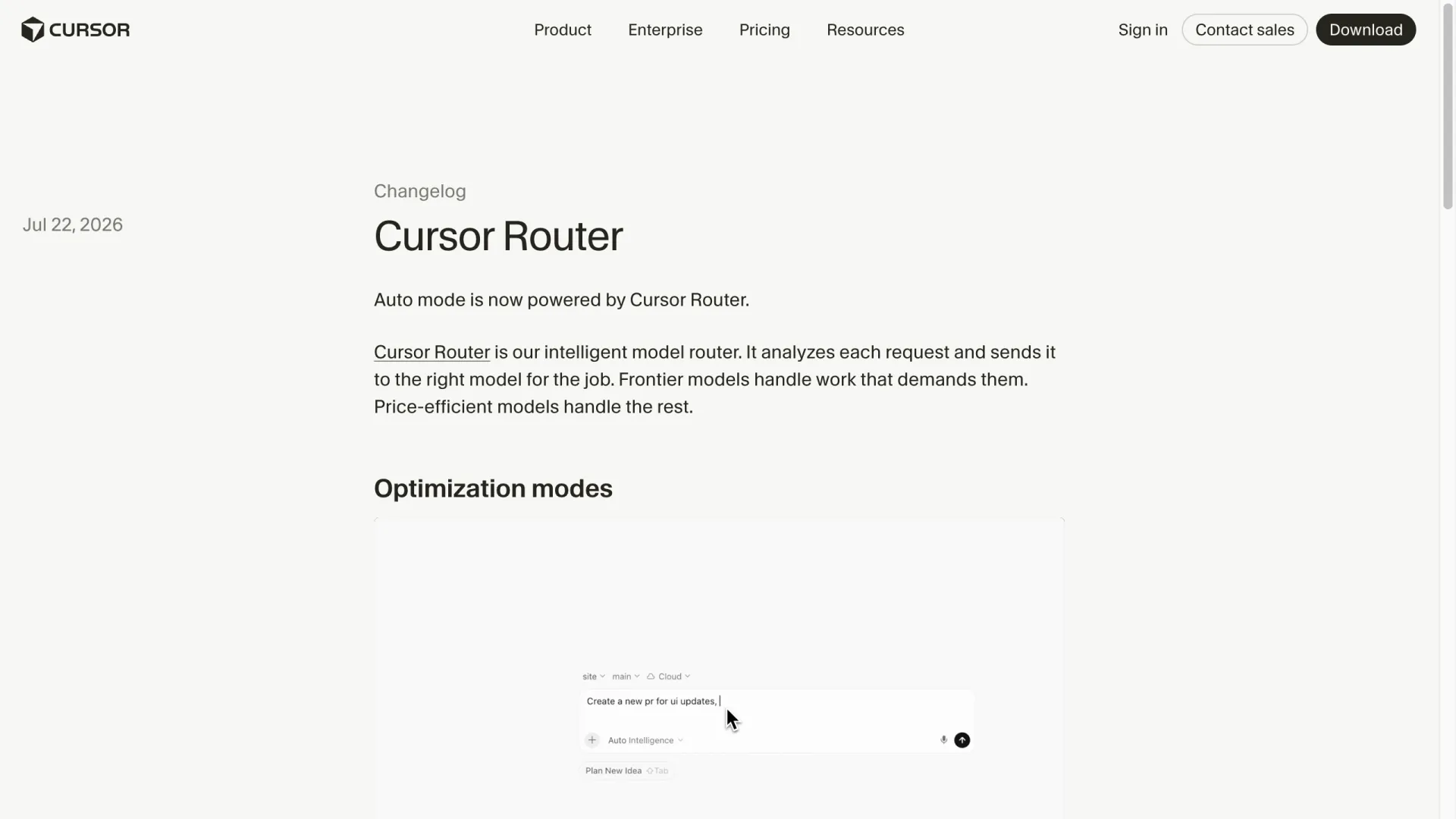
How Cursor Router decides which model handles your prompt
Cursor Router is a classifier that runs before any model does. According to Cursor's launch post, it scores each request on four signals — the query itself, the attached context, task complexity, and domain — then dispatches it:
- Routine edits go to price-efficient models.
- UI tweaks go to what Cursor calls "the model with the best taste."
- Long multi-file reasoning problems go to frontier models like Fable 5 or Opus 4.8.
Two design choices separate it from a simple if/else over prompt length:
- The training target. Cursor trained the classifier on more than 600,000 live requests and optimized it against user satisfaction (whether the developer moved on to the next task or had to stop and correct the agent) rather than benchmark scores.
- Cache awareness. Switching models mid-session throws away the previous model's prompt cache, and that cache miss has a real price. Router counts that cost when deciding whether a switch is worth it — a failure mode most do-it-yourself routing setups ignore.
Router now powers Cursor's existing Auto mode across desktop, web, iOS, the CLI, and the SDK. There is no separate switch: you pick Auto, then pick how it should optimize.
The three Auto modes: Intelligence, Balance, Cost
Each mode is a different point on the cost-quality curve. All numbers below come from Cursor's online A/B tests across millions of requests, published in the launch post.
| Mode | Quality target | Cursor's A/B result |
|---|---|---|
| Intelligence | Frontier quality | User satisfaction near Fable 5 at ~60% lower cost; ~15% higher satisfaction than Opus 4.8 at similar cost |
| Balance | Strong day-to-day quality | Higher satisfaction than Opus 4.8 at ~36% lower cost; matches GPT-5.6 Sol satisfaction with lower spend |
| Cost | Good quality, minimum spend | Highest usable intelligence while optimizing token spend |
Billing follows the routed model: Balance and Intelligence requests are charged at whatever rate the model that served them charges. Your bill becomes a blend — price-efficient rates for routine requests, frontier rates only when Router escalates — so per-request cost is predictable only in aggregate.
One gap in the launch material: Cursor published per-commit figures and satisfaction data for Intelligence and Balance, but only a qualitative description for Cost mode.
What "60% cheaper" actually means
The headline number is cost per commit, which Cursor measures as model spend per accepted unit of work rather than per token:
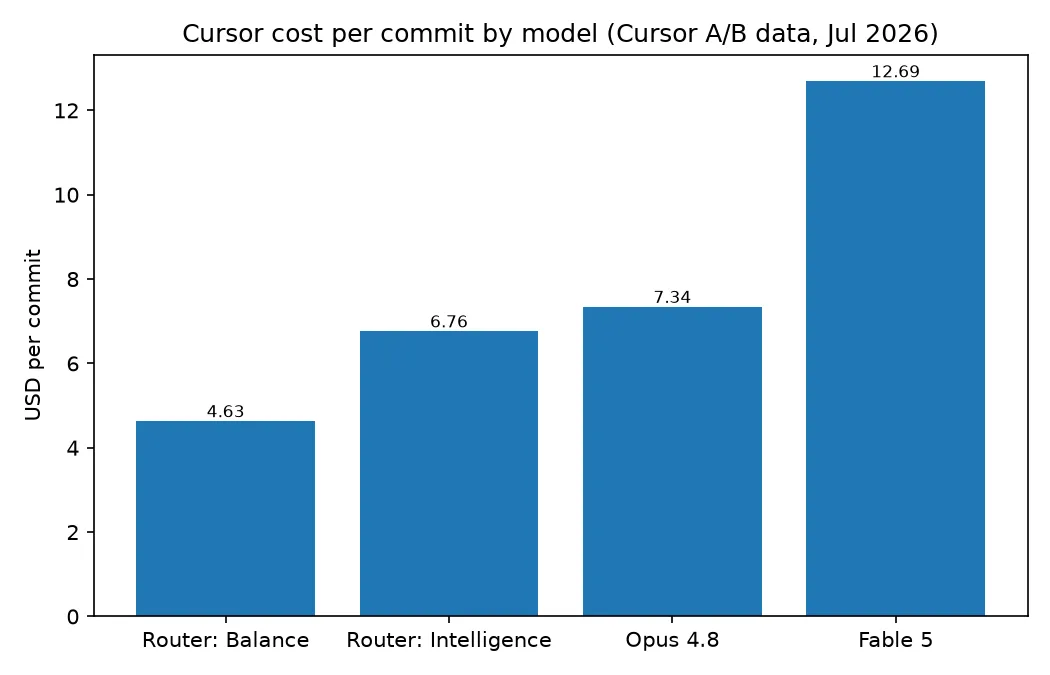
GPT-5.6 Sol matched Intelligence mode on cost but scored lower on satisfaction. Outside the lab, Cursor reports three early-access enterprise accounts — each with thousands of users — saved 30–50% versus pricing the same traffic entirely at Opus 4.8 API rates, with no reported quality drop.
Two caveats:
- These are Cursor's own numbers, measured with its own satisfaction and code-retention metrics. No third-party audit exists yet.
- The baseline is a team running everything on a frontier model. If yours already defaults to a mid-tier model, your delta will be smaller.
How to see which model Router picked
By default, Router hides which model served each request: you see the answer, not the worker. Cursor's changelog says the routed model "can be shown or hidden," but as of July 23, 2026 the documentation doesn't spell out where that setting lives in each client.
Once you find it in yours, leave it on for the first week. Watching Router's picks is the fastest way to build intuition for when it escalates and when it economizes.
Per-task visibility is already the feature's most-requested change — in r/cursor's thread on the new routing, the top ask is exactly this: "this is currently keeping me in the dark."
Team admins get more control than individual members. They can:
- enable Router per team or group
- restrict which of the three modes members may select, and set the default
- allow or block specific underlying models
- apply soft or hard enforcement to standardize everyone on Auto
If your compliance policy forbids a particular provider, blocking the model at the admin level closes that gap before routing ever sees the request.
Who gets Router today (and what Cursor costs)
Cursor Router is live for Teams and Enterprise plans only. It ships enabled by default for Teams; Enterprise admins switch it on from the dashboard. Verified against Cursor's pricing page on July 23, 2026:
| Plan | Price (monthly billing) | Router modes |
|---|---|---|
| Hobby | Free | No |
| Individual (Pro / Pro+ / Ultra) | From $20/mo | No |
| Teams (Standard / Premium) | From $40/user/mo | Yes |
| Enterprise | Custom | Yes, admin-enabled |
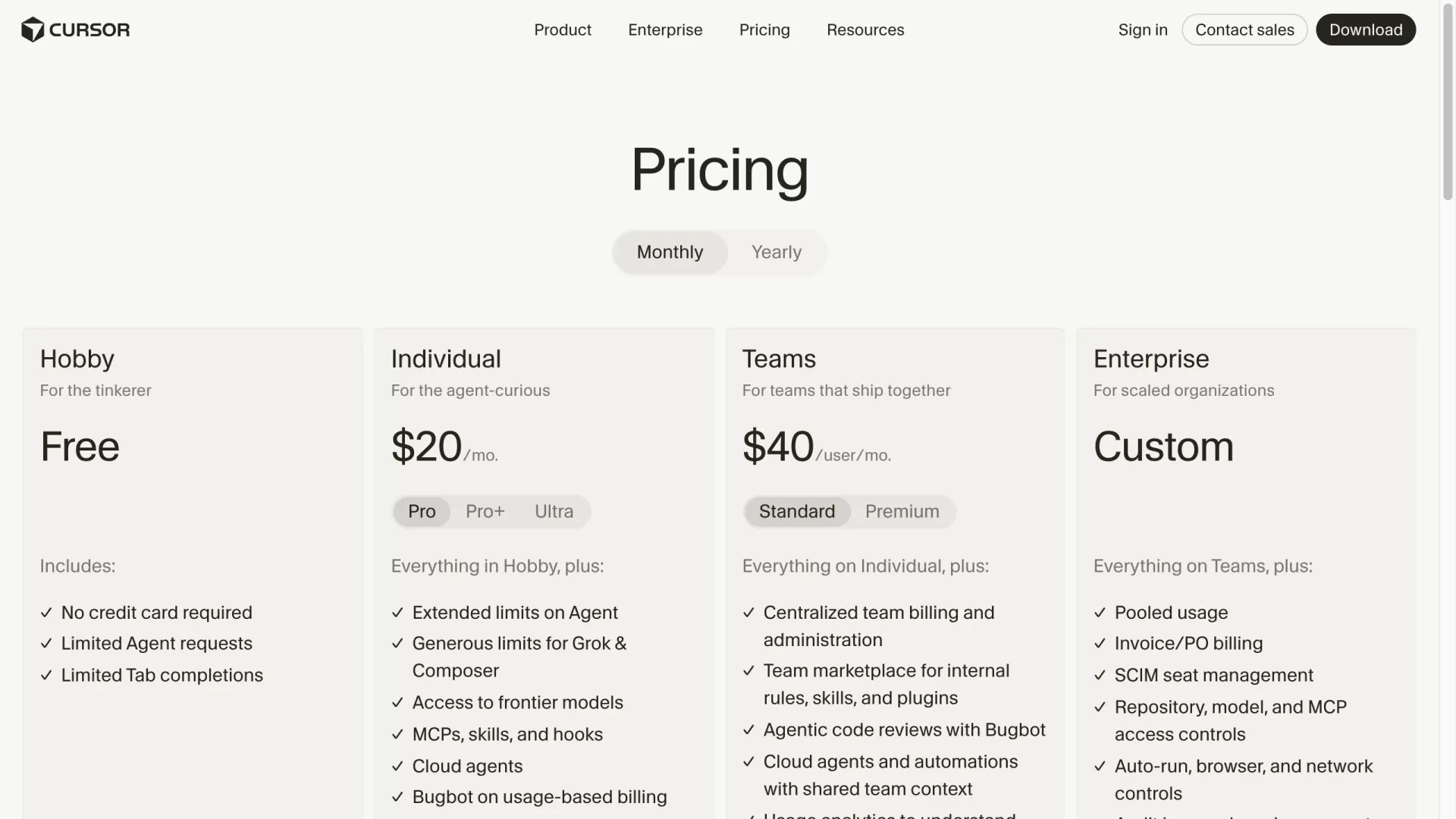
On a $20 Pro plan, the Intelligence/Balance/Cost selector is not part of your model picker — and as one early X reaction noted, 60% off Opus-class pricing is still real money for a solo budget. Your options are manual model discipline, or bringing your own routing (covered below).
Where routing can go wrong
Two critiques from X are worth weighing before you standardize a team on Auto.
The first: task complexity is not the same thing as risk. One detailed critique put it concretely — a 2,000-line refactor can be mechanical, while a two-line auth change can carry the whole outage, and a router trained to predict complexity will confidently send that two-line change to a budget model. The author asks Cursor to publish accepted-edit rates per route; Cursor has not released that data.
The second: failure shape. One engineer's benchmark for Router — does it pick correctly on the tasks where a cheap model gives a confidently wrong answer instead of failing loud? A wrong answer that looks right costs more review time than it saved in tokens.
The practical hedge is a two-bucket policy:
- Manually pin a frontier model where a plausible-but-wrong answer is expensive: auth and permission changes, payment logic, production database migrations, cryptography, CI/CD config.
- Let Balance handle the rest: routine refactors, test generation, documentation, low-risk UI work.
Admins can also block the cheapest models outright at a small cost to savings.
Cursor Router vs OpenRouter: not the same thing
The names collide, but the layers differ: Cursor Router is built in, picks from Cursor's model pool, and bills through your plan. OpenRouter is an independent API aggregator — one key, hundreds of models, billed per token (see our OpenRouter pricing guide).
You can wire OpenRouter into Cursor today, on any plan, through Cursor's Override OpenAI Base URL setting. The details matter:
- Use OpenRouter's dedicated endpoint
https://openrouter.ai/api/v1/cursor— the generic/api/v1does not handle Cursor's tool-call format. - Paste your
sk-or-key into the OpenAI API Key field.
Two hard limits apply to any bring-your-own-key setup: Tab autocomplete always runs on Cursor's built-in models, and Auto mode may bypass your key entirely.
The same override works with any OpenAI-compatible relay, which is how solo developers get routing-style economics without a Teams seat. On AIReiter, for example, Claude models run at 20% of official API pricing with credit packs from $5 (checked July 2026) — pin a mid-tier model for daily work, reserve frontier calls for hard problems. You are the classifier, though, and nothing accounts for cache misses when you switch.
FAQ
Does Cursor use OpenRouter?
No. Cursor Router is Cursor's in-house routing system, unrelated to OpenRouter. You can separately connect OpenRouter via the Override OpenAI Base URL setting and the dedicated /api/v1/cursor endpoint.
Is Cursor Router available on the Pro plan?
Not as of July 2026 — the launch post scopes Router to Teams and Enterprise plans. Individual plans keep manual model selection.
Can I turn Cursor Router off?
Yes: pick a specific model in the selector instead of Auto and Router never touches that request. Team admins can also restrict modes or block specific models org-wide.
Which models does Cursor Router route to?
Cursor's launch material names Fable 5, Opus 4.8, GPT-5.6 Sol, Grok 4.5, and its own Composer, with the pool designed to be updated as new models ship. Admins can allow or block individual models.