 AIREITER
MuseTalk runs on a 4 GB laptop GPU: the official README logs an RTX 3050 Ti Laptop in FP16 taking roughly five minutes for an eight-second clip. That gap between "it runs" and "it runs fast enough" is the real decision point for MuseTalk lipsync, and it reappears in resolution, in setup, and in the cost table below.
What MuseTalk changes in your footage, and what it leaves untouched
MuseTalk repaints the mouth and lower face of an existing video so the lips match a supplied audio track. Head position, eye movement, facial expression, background and camera motion are not regenerated; they carry over from the source. It is a local edit, not a talking-head generator: you must already have footage with a clearly visible face.
The speed comes from the architecture. The repository, published by Tencent Music's Lyra Lab, encodes the masked face with a frozen sd-vae-ft-mse VAE, extracts audio features with a frozen Whisper-tiny model, and fuses the two through cross-attention in a UNet borrowed from Stable Diffusion v1.4. It performs single-step latent-space inpainting rather than an iterative denoising loop, which is how the authors reach a claimed 30 fps or higher on an NVIDIA Tesla V100.
What the 256x256 face region means for 1080p source video
The 256x256 figure is the size of the editable face region, not the output resolution. Your 1080p clip comes back as 1080p at its original frame rate, with a 256x256 patch regenerated and blended back over the mouth area. So the smaller the face sits in frame, the better the result holds up. A tight close-up is where softness becomes visible against a sharp surrounding face.
Two mitigations exist, both with costs. Dropping --use_float16 improves quality at the price of more VRAM and longer runtimes. Running the finished clip through GFPGAN or CodeFormer face restoration sharpens the mouth region but adds a processing pass and subtly shifts the subject's appearance.
Quality in numbers: where MuseTalk wins and where Wav2Lip still beats it
MuseTalk's reported advantage is image quality rather than raw synchronisation accuracy. On the HDTF dataset, the MuseTalk technical report puts it at FID 6.43 against DI-Net's 7.27, VideoRetalking's 10.93 and Wav2Lip's 11.21.
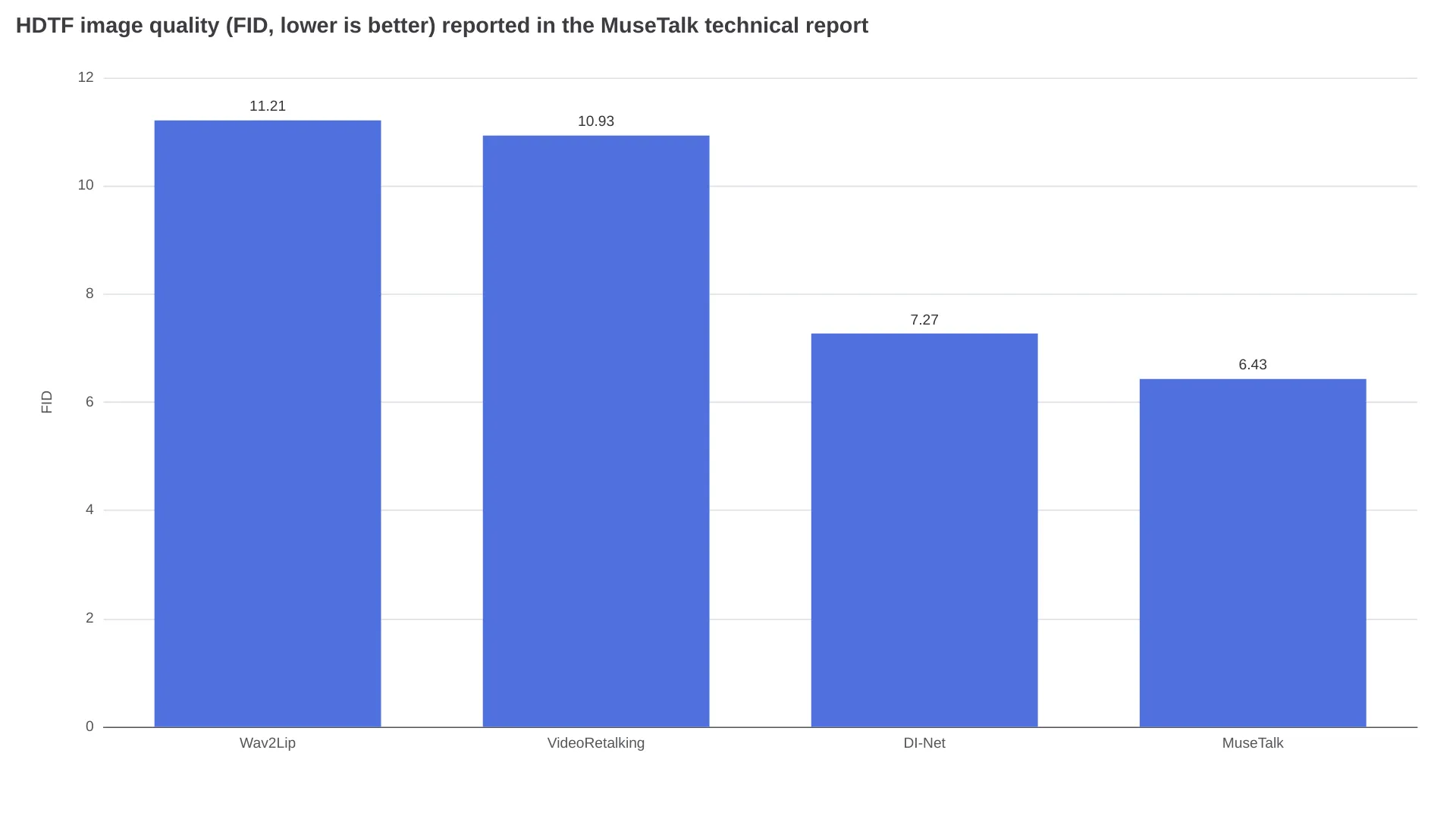
Flip to the sync metric and the ranking changes. The same report gives Wav2Lip LSE-C 7.46 against MuseTalk's 6.53, while MuseTalk edges ahead on identity similarity with CSIM 0.8225 versus 0.8184: better lip tracking from the older GAN model, better image fidelity from MuseTalk. The report's own user study lands in modest territory across the board — 3.62 out of 5 for visual quality, 3.55 for identity, 3.41 for lip sync.
Read against the 256x256 ceiling, those numbers describe a model for convincing medium shots rather than one that survives a 4K close-up.
What a minute of lip sync costs
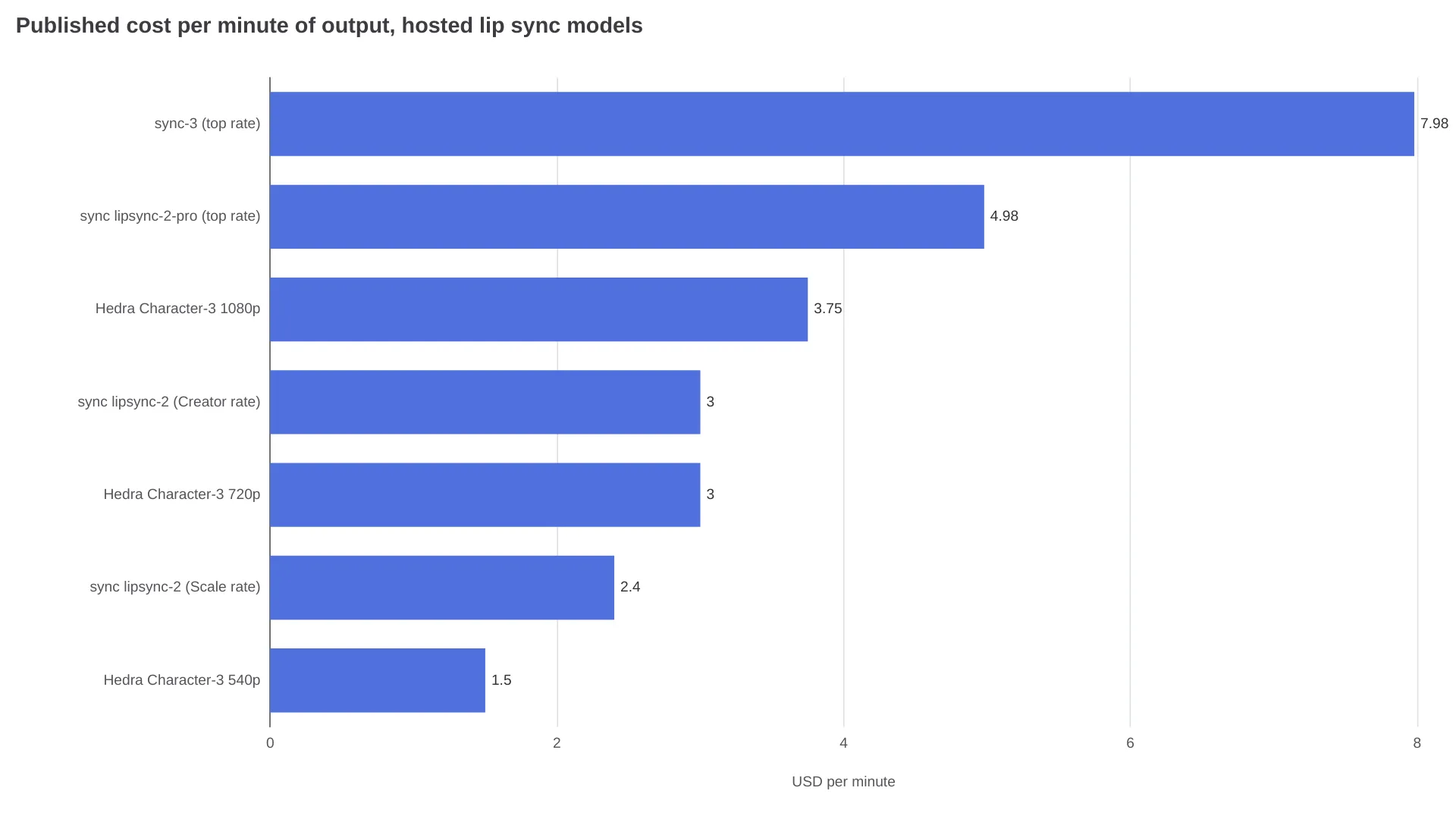
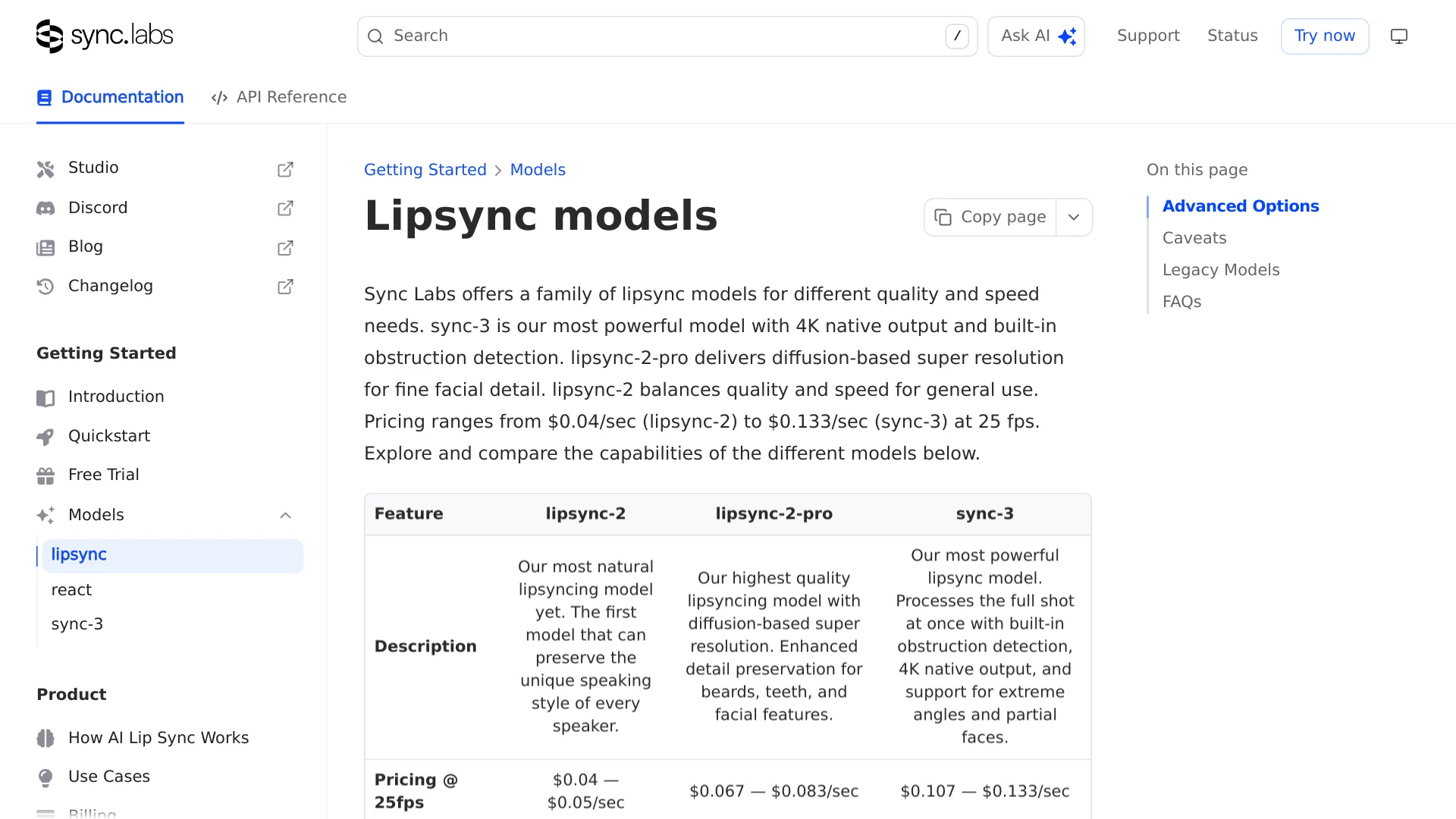
This is where the open-source route earns its keep. Published rates for hosted lip sync models sit between $1.50 and nearly $8.00 per minute of output.
| Route | Published rate (billing units differ) | Per minute of output | Face resolution |
|---|---|---|---|
| MuseTalk self-hosted, Tesla V100 rental | $0.188 / GPU-hour | ~$0.006 at 2 GPU-min per clip minute | 256x256 |
| MuseTalk on Replicate | ~$0.052 / run, 54 s typical run time per the model page | Billed per run, not per minute | 256x256 |
| MuseTalk on fal.ai | Billed per compute second | Not published on the model page | 256x256 |
| Hedra Character-3 540p / 720p / 1080p — image-to-video, not a drop-in for existing footage | 2.5¢ / 5¢ / 6.25¢ per second | $1.50 / $3.00 / $3.75 | n/a |
| sync lipsync-2 | $0.04–0.05 / sec at 25 fps | $2.40–$3.00 | 512x512 |
| sync lipsync-2-pro | $0.067–0.083 / sec | $4.02–$4.98 | 512x512 + detail pass |
| sync-3 | $0.107–0.133 / sec | $6.42–$7.98 | 4K native |
The self-hosted figure comes from NexGPU's cost walkthrough, which budgets two minutes of end-to-end GPU time per one-minute clip: inference plus DWPose detection, VAE encode/decode and FFmpeg muxing. One hundred one-minute clips land at roughly $0.63 of compute on a V100 at $0.188/hour, plus about $0.09 for setup time. Those are GPU-rental figures only: they exclude engineering time, storage and operational overhead.
Scale that to a localisation backlog and the arithmetic separates fast. Five hundred minutes of dubbed footage is roughly $3 of GPU rental through self-hosted MuseTalk and $1,200 through sync lipsync-2 at the Creator rate.
Where the free route stops being free
What the per-minute premium buys is specific:
- Face generation resolution. Per sync's model documentation, lipsync-2 and lipsync-2-pro generate faces at 512x512, double MuseTalk's region; sync-3 outputs 4K natively with built-in super resolution.
- Difficult shots. The same documentation says sync-3 handles profile views, over-the-shoulder framing and partial faces natively and detects obstructions automatically. MuseTalk runs face detection per frame instead, so a turned face or a hand across the mouth is a documented failure point.
- Multi-person footage. Active speaker detection is listed as an option across sync's three current models; MuseTalk exposes no equivalent flag.
- Setup time. You pay this once with a self-hosted deployment, and it is not small.
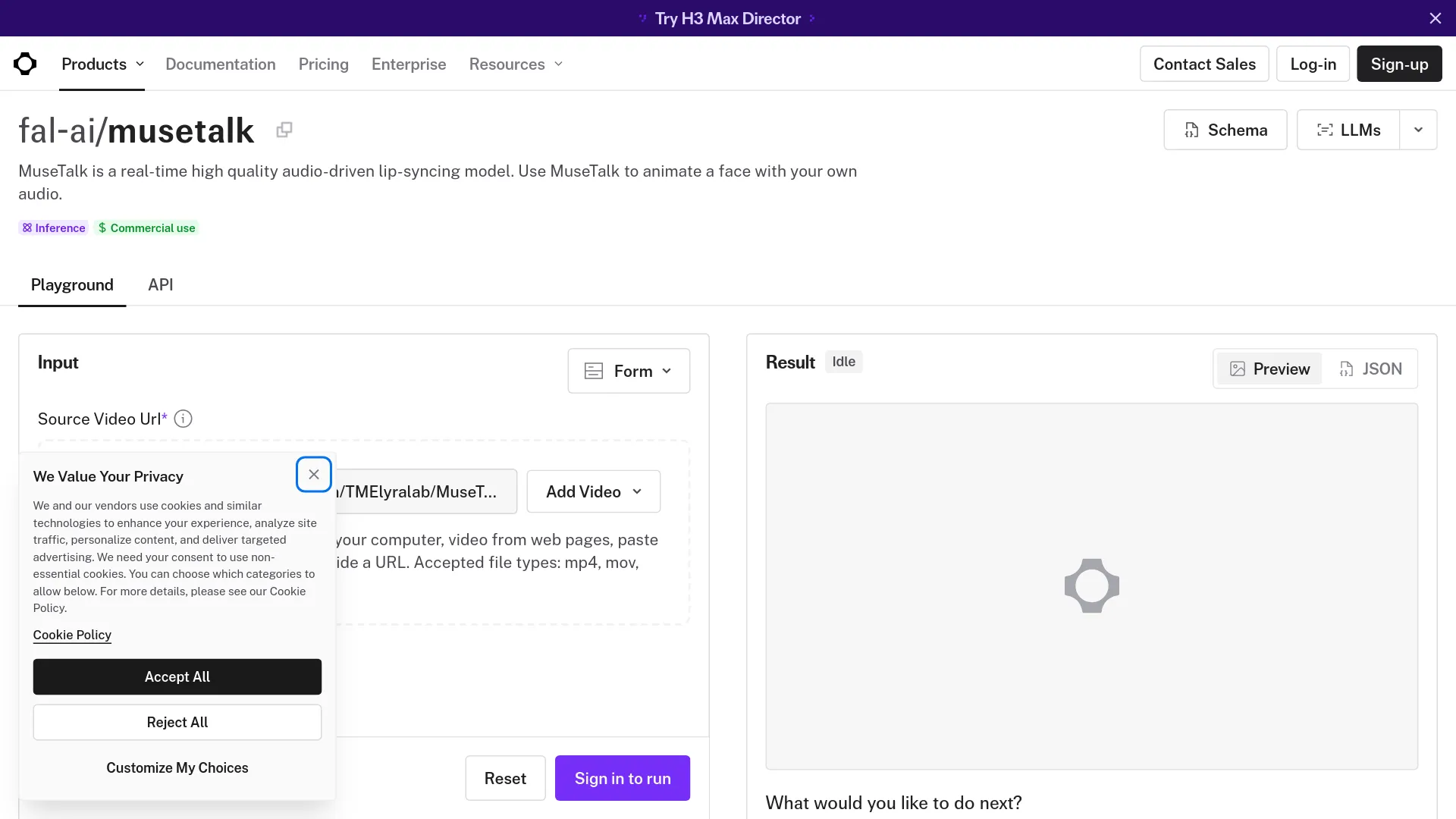
The fal.ai MuseTalk page shows what the last item buys: a source video URL, an audio URL and nothing else. No conda environment, no CUDA pins, no weight tree.
Getting MuseTalk running without fighting dependencies
A recurring complaint from people who have run the model has nothing to do with output quality. It is the OpenMMLab stack. On r/StableDiffusion, a user comparing lip sync models put it bluntly after testing both MuseTalk and LatentSync:
"LatentSync and Musetalk work and have similar performance... Musetalk is a hassle to set up since it depends on OpenMMLab libraries." — u/Traditional_Tap1708, r/StableDiffusion
Install the README's pinned versions through mim, not plain pip:
- Python 3.10 in a fresh conda environment, with PyTorch 2.0.1, torchvision 0.15.2 and torchaudio 2.0.2.
mim install mmengine "mmcv==2.0.1" "mmdet==3.1.0" "mmpose==1.1.0". A newer mmcv is the common cause of mmdet import failures.- FFmpeg on
PATH, verified withffmpeg -version, or passed explicitly via--ffmpeg_pathon Windows. sh download_weights.shfor the full tree. The UNet alone is not enough; the script also pulls sd-vae-ft-mse, Whisper, DWPose'sdw-ll_ucoco_384.pthand the BiSeNet face-parsing weights, and a missing file tends to surface as a face-detection or blending failure rather than a clear error.- Convert the source to 25 fps with
ffmpeg -i input.mp4 -r 25 output.mp4. The repository recommends 25 fps input because that is the frame rate the model was trained at, and a mismatch is the usual cause of timing drift. - Point
configs/inference/test.yamlat your video and audio, then runpython -m scripts.inference --inference_config configs/inference/test.yaml --result_dir results/test --unet_model_path models/musetalkV15/unet.pth --unet_config models/musetalkV15/musetalk.json --version v15.
For repeated generations against the same face, set preparation: true once in configs/inference/realtime.yaml, let it cache coords.pkl, latents.pt and the mask set under results/v15/avatars/, then set it back to false. Adding --skip_save_images matters more than it sounds: writing PNGs to disk can become the bottleneck instead of the model.
MuseTalk 1.5 or 1.0: which weights to download
Use 1.5. The repository lists it as the latest release, dated 28 March 2025, and credits its perceptual, GAN and sync losses plus two-stage training with better clarity, identity consistency and lip-speech alignment.
The one argument for keeping 1.0 around is bbox_shift, which only applies to that version. It moves the mask boundary vertically: positive values open the mouth wider, negative values close it.
Run the default once and the script prints the adjustable range for your clip. The README's worked example gets a range of [-9, 9] and settles on -7. Re-render inside whatever range you get, moving negative if the mouth looks exaggerated and positive if it barely opens.
Failure modes you will hit, and which ones tuning can fix
| Symptom | Cause | Fixable? |
|---|---|---|
| Run aborts, no face detected | One frame with a turned, blocked or missing face | Yes. Crop or trim the offending segment |
| Mouth barely moves | Audio buried in music, or mask boundary too high | Yes. Isolate vocals; positive bbox_shift on v1.0 |
| Lips drift out of sync midway | Source not at 25 fps | Yes. Convert before processing |
| Mouth soft against a sharp face | Face too small in frame for the 256x256 region | Partly. Crop tighter, drop fp16, add face restoration |
| Visible seam, mustache not preserved | Lower-face synthesis replaces identity detail | No. Listed as a model limitation |
| Frame-to-frame jitter | Frames generated individually | Partly. The repository credits v1.5's two-stage training with better consistency |
| Cartoon or stylised face fails | Training distribution is real faces | No |
| Energetic audio over a static speaker | MuseTalk does not touch head motion or expression | No. Reshoot or re-cast the source clip |
A user running low-VRAM tests reported MuseTalk at "171s for 7 seconds of audio" and added that it "only works with realistic images" (u/Bartholomheow, r/StableDiffusion). The "real time" headline, meanwhile, describes sustained throughput after avatar preparation rather than end-to-end latency. A developer building talking heads in r/LocalLLaMA reported that with MuseTalk, "the preparation time is too long" (u/lonyPorgrammer) for their interactive use case.
Which lip sync path fits your job
| Route | Choose it when | Main trade-off |
|---|---|---|
| Self-hosted MuseTalk | High volume, cooperative footage: localisation drafts, interactive avatars reusing one face across thousands of audio clips, internal training video | Setup runs to hours, not minutes; throughput tracks the GPU you rent |
| Hosted MuseTalk (Replicate, fal.ai) | A handful of clips, or a quality test on your own footage before committing to a deployment | Same 256x256 ceiling, no avatar-cache flag in either endpoint schema, per-run billing |
| Paid lip sync model (sync-3, lipsync-2-pro) | Client-facing output, large close-ups, profile angles, obstructions, multiple speakers, 4K delivery | $4–$8 per minute, and the footage leaves your infrastructure |
Rent a V100 to reproduce the official throughput figure, or a 4090 if you are streaming live. For the hosted-endpoint route, both platforms are covered in more depth in our Replicate review and fal.ai review.
MuseTalk lipsync FAQ
Can MuseTalk run on a 6 GB or 8 GB GPU?
Yes. The README documents a tested 4 GB RTX 3050 Ti laptop GPU in FP16, so basic inference fits in limited VRAM. Throughput is the larger practical constraint.
Is 256x256 the output resolution?
No. It is the editable face region, blended back into a video that keeps the source resolution and frame rate.
Does MuseTalk work on cartoon or anime faces?
Not reliably. The model was trained on real talking-head footage, and users testing stylised inputs report inconsistent results.
Does the "30 fps real time" figure include preprocessing?
No. It describes generation throughput on a Tesla V100 after avatar preparation. Face detection, latent encoding and the initial caching pass happen before that.
MuseTalk or LatentSync?
Reach for MuseTalk when latency and volume drive the project, since single-step inference and cached avatars remove most of the per-clip cost. The r/StableDiffusion user quoted above, who ran both, described their performance as similar, which makes throughput rather than fidelity the deciding factor.
Can MuseTalk be used commercially?
The repository licenses its code under MIT, but the dependency chain is not uniform. Whisper, the VAE, DWPose, BiSeNet face parsing and SyncNet ship under their own terms, and the repository flags separate restrictions on its sample data. Check each before shipping.
The trade-off still unsolved at this price point
MuseTalk gets you most of the way for essentially nothing. Identity under pressure is what it does not get you: mustaches, exact lip shape, a face that fills the frame, a speaker who turns their head mid-sentence.
For most teams the answer is not one tool. It is MuseTalk for the volume and a paid model for the shots that will be seen full-screen.
Related reading
- Higgsfield AI reviews and pricing vs API access
- Kokoro 82M TTS local setup guide, for generating the audio track MuseTalk consumes
- Wan 2.2 Animate guide