 AIREITER
The most useful number in this InVideo AI review is not the $17 entry price. It is 75, the monthly credit allowance on that entry plan, because InVideo's own rate card prices a minute of Pro-mode AI-generated video at 80 credits. The cheapest paid tier cannot buy a single minute of mid-tier generative video in a month, let alone the 160-credit Ultra tier. For stock-footage social videos InVideo AI remains one of the fastest workflows you can rent; for output built heavily on generative models, the credit rates quietly re-rank the entire plan ladder, and that arithmetic is worth running before you enter a card number.
Three InVideo Products, Three Different Ratings
InVideo AI is the prompt-to-video workspace at invideo.io: you give it a prompt, a script, or a URL, and it returns a script, stock or AI-generated visuals, a voiceover, subtitles, and music, which you refine through typed instructions ("shorten the intro", "swap this clip") or a conventional timeline editor. It runs in the browser and ships an iOS app alongside its Android counterpart.
The reason "invideo ai reviews" pulls up confusingly different scores is that the brand carries multiple listings. The current AI product is reviewed at ai.invideo.io, the older template-based editor "Invideo Studio" sits under invideo.io, and a third listing under invideo.ai adds to the pile. As of mid-2026 the split is stark:
| Listing | Rating | Reviews |
|---|---|---|
| Trustpilot - ai.invideo.io (current AI product) | 4.2/5 | 594 |
| Trustpilot - invideo.io (legacy Studio editor) | 2.9/5 | 891 |
| G2 - invideo | 4.5/5 | 168 |
Check which product an angry 2-star review actually describes. The legacy editor drags the brand average down; the AI product is rated materially better. That distinction frames everything below.
Verified Pricing (August 2026) - and Why Other Reviews Disagree
InVideo's individual plans cost, straight from invideo.io/pricing as checked August 16, 2026: Free, Plus at $17/month, Max at $85/month, Generative at $170/month, and Elite at $900/month. Those four figures are the annual-billing equivalents (Plus totals $200/year, Max $1,000, Generative $2,000, Elite $10,800), with the annual discount labeled 15% off on Plus through Generative and 10% on Elite; month-to-month billing prices slightly higher.
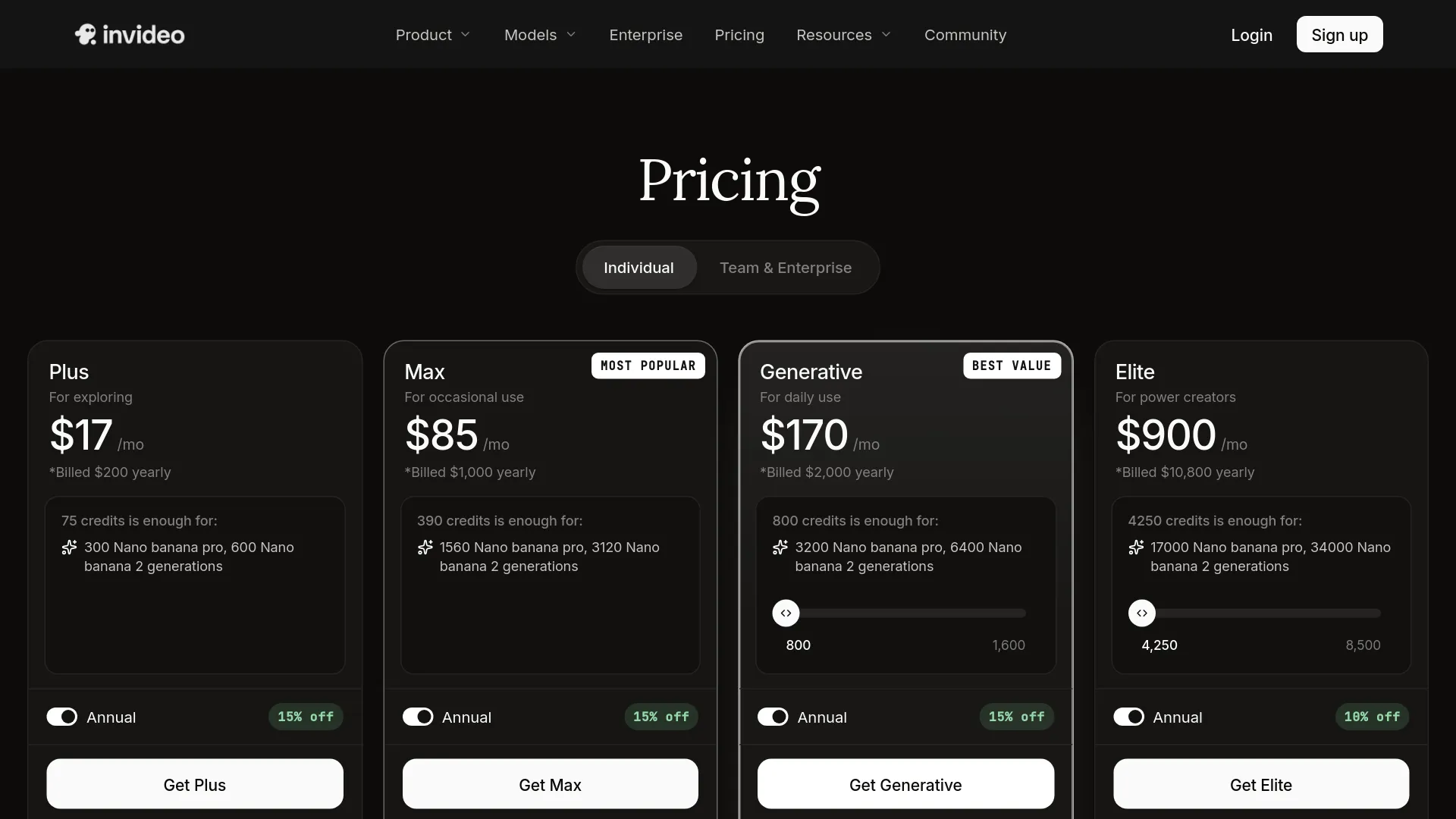
| Plan | Monthly | Annual | Credits/mo | Avatars + voice clones | Storage | iStock assets/mo | Concurrency |
|---|---|---|---|---|---|---|---|
| Free | $0 | - | "Limited" | - | - | - | - |
| Plus | $17 | $200 | 75 | 4 | 20 GB | 100 | Limited |
| Max | $85 | $1,000 | 390 | 16 | 100 GB | 200 | 2× Plus |
| Generative | $170 | $2,000 | 800 | 40 | 2 TB | 1,000 | 10× Plus |
| Elite | $900 | $10,800 | 4,250 | 200 | 10 TB | 5,000 | 20× Plus |
Team plans run 160 credits per seat (Standard) and 1,600 per seat (Premium); Enterprise is custom.
Prices you may have seen elsewhere, such as Plus at $25 or Max at $48–$60 with "200 minutes per week", are snapshots of the old minutes-based pricing, and the page warns that "model & agent prices are subject to change". Confirm in live checkout before subscribing.
The Credit Math That Decides Whether It's Worth It
Credits convert into video at wildly different rates depending on how the video is made. InVideo's Autopilot quality guide prices its generation modes at 2 credits per minute for Basic (stock-media compilation, no generative media), 80 credits per minute for Pro (generative models like Veo 3.1 Fast and Sora 2), and 160 credits per minute for Ultra (flagship Veo 3.1 / Sora 2 quality). Individual model calls are priced per second at "original API pricing": a quick Kling 2.6 standard generation runs about 0.5 credits, while a Veo 3.1 4K clip with audio costs 10+ credits.
Run those rates against the plan table and the ladder reorders itself:
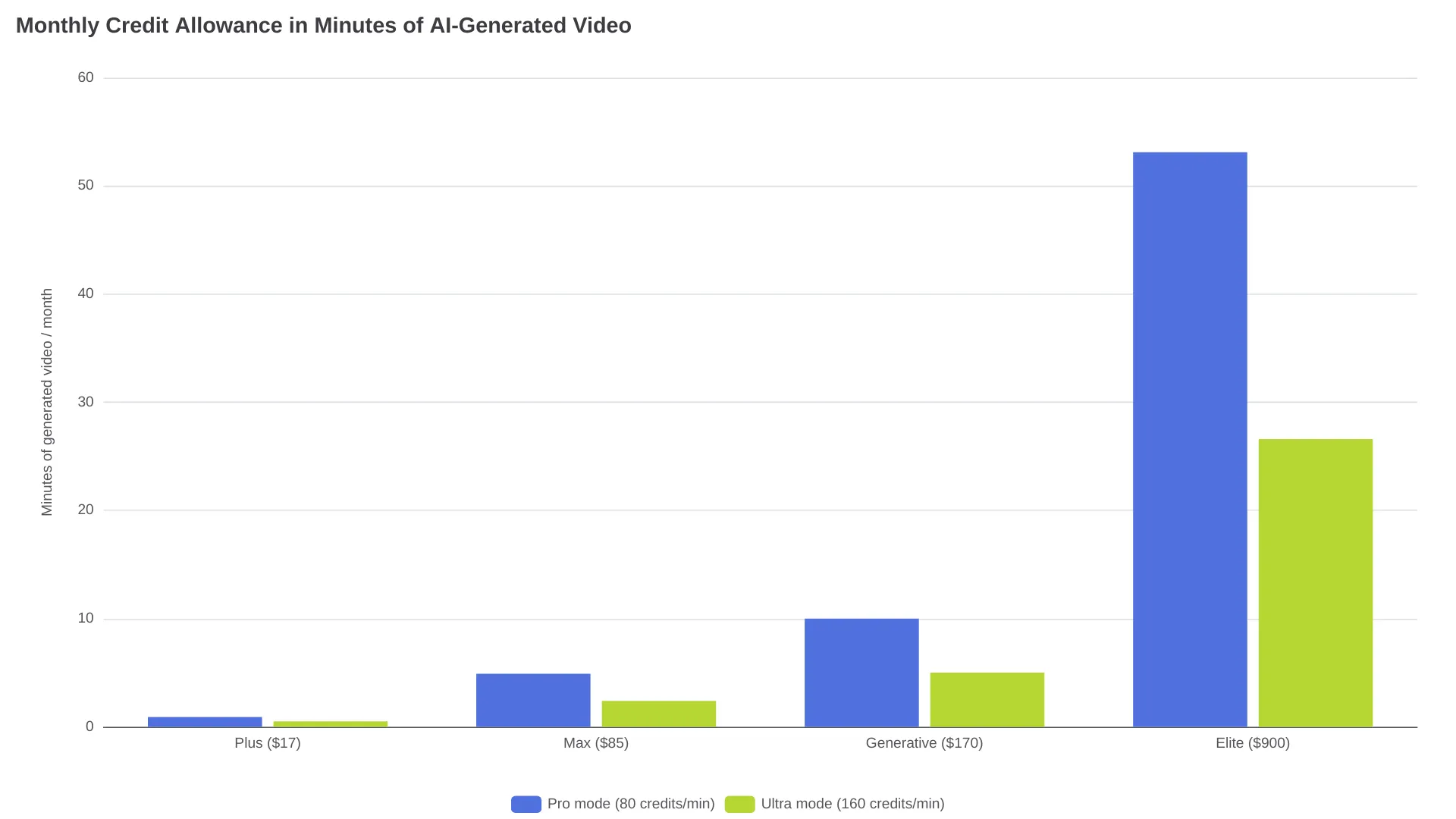
- Plus (75 credits): about 37 minutes of Basic stock-compilation video, or under one minute of Pro generative video. It is effectively a stock-footage plan.
- Max (390 credits): about 195 minutes Basic, 4.9 minutes Pro, 2.4 minutes Ultra.
- Generative (800 credits): about 400 minutes Basic, 10 minutes Pro, 5 minutes Ultra. The first tier positioned for daily generative use.
- Elite (4,250 credits): about 53 minutes Pro, 26.6 minutes Ultra.
The operating rules matter as much as the rates:
- Unused credits do not roll over; they reset on your billing date, not the calendar month.
- Top-ups start at $5, stay valid for 12 months, and expire if you cancel.
- Editing or downloading something already generated is free, but regenerating a scene or re-rolling a failed generation costs credits again. This is where heavy users get hurt.
- The free tier's credit allowance has no published number; the pricing page says only "Limited", with watermarked exports.
What Users Say: Ratings, Complaints, and the Refund Policy
Aggregator scores for the current AI product are solid: G2 4.5/5 from 168 reviews and Trustpilot 4.2/5 from 594 (figures checked mid-2026). The complaint threads tell a more specific story, and the theme is credits, not rendering quality:
"Invideo.ai. What a SCAM!!! read this before you sign up" - r/VideoEditing, a user reporting edits and regenerations drained a 100-credit allocation beyond the displayed estimate
"DIRE WARNING: Extreme Billing Trap & Deceptive Credit System (Over $250+ Lost in One session)" - r/aivideomaking, on Agent One revisions consuming credits rapidly
The same sequence repeats in the r/videography review thread: iterations and failed generations consume credits, the pre-confirmation estimate undercounts the final spend, and refund requests get declined. That last part is policy, not fluke. InVideo's terms allow a refund within seven days only if you have not used credits or premium features, which in practice means the first rough generation forfeits most of your refund leverage. The realistic counterexample also sits on Reddit: a 90-day faceless-YouTube writeup rates the workflow favorably for low-volume publishing and flags cost only as volume grows.
Where InVideo AI Works
Independent testing published this year lines up on speed. An 18-video test by The Software Brief measured first drafts at roughly 2–4 minutes each, with about one-third of auto-selected clips needing replacement, and reflowed one concept into three aspect ratios almost instantly. The AI Writer Hub estimates faceless explainer drafts land at 70–80% completion before manual touch. Conversational editing is the standout: asking for a shorter intro or different music works reliably for coarse changes, which is the whole point for non-editors.
The bundled economics help at the low end of usage. Paid plans include iStock and Storyblocks access, watermark-free unlimited exports, commercial rights, and the run of 200+ models (Seedance, Veo 3.1, Kling 3.0, Nano Banana Pro, ElevenLabs Music among them) under one login. If your videos are stock-compilation social clips with voiceover, Plus's 37 Basic-minutes plus 100 iStock assets is a coherent $17 product.
Where It Falls Short
Four failure modes recur:
- Generic look on niche prompts. Stock libraries return footage that fits popular topics and misses technical ones.
- Iteration bills you twice. Every regeneration or re-roll consumes credits, taxing exactly the trial-and-error that makes AI video usable.
- Coarse control only. Conversational edits handle "make it punchier" well and "hold this frame for 1.5 seconds" badly; the pipeline also ends at export with no scheduling or publishing.
- Compliance and throughput ceilings. No public SOC 2 certification was findable as of May 2026, per AllThingsAI's compliance check, and lower tiers have strict concurrency limits (Plus is explicitly "limited", Max is 2× Plus).
Pollo AI's hands-on test added two data points of its own: a blurry 720p first render after 10+ minutes of waiting, and an image generator that returned 2 usable images out of 4 with flat saturation.
Who Should Subscribe - and Who Should Skip It
| Your situation | Call | Why |
|---|---|---|
| Faceless YouTube, ~1 three-minute Basic video/week, few rerolls | Subscribe (Plus) | 75 credits ≈ 37 Basic-minutes, just enough at this cadence |
| 2–3 Basic videos/week or regular iterations | Subscribe (Max) | 390 credits ≈ 195 Basic-minutes, headroom for rerolls |
| Generative output up to ~10 Pro-minutes/month | Subscribe (Generative) | 800 credits buy about 10 Pro or 5 Ultra minutes before rerolls; 10× concurrency helps throughput |
| Course and training videos with a presenter | Skip -> Synthesia | You need a human face on camera, which is a different product category |
| Repurposing existing blogs and webinars | Skip -> Pictory | Your source material already exists as text, slides, or recordings |
| Technical creators, dev pipelines | Skip -> direct model APIs | You want programmatic control and per-call billing instead of a subscription wallet |
| One-off polished brand film | Skip -> human editor | Fine control and on-brand craft are what the tool trades away |
The developer row comes from InVideo's own pricing page: its models bill at "original API pricing", so the subscription bundles model access, editing, voices, and stock into one workflow. Developers who need programmatic control can weigh that bundle against calling the same model families directly - Veo 3.1, Kling 3.0 - where billing is per call rather than per subscription month.
InVideo AI vs Pictory, CapCut, Synthesia, and Runway
Four alternatives cover nearly every escape route from InVideo, each dominant in a different job:
| Tool | Best for | Why it beats InVideo there |
|---|---|---|
| Pictory | Turning existing blogs, webinars, and long-form material into clips | Built for long-form-to-clip conversion InVideo does not optimize for |
| CapCut | Free manual editing with a real timeline | No subscription for hands-on control InVideo deliberately trades away |
| Synthesia | Presenter-led training and localization video | Avatar-led video is the core product, not a side feature |
| Runway | Generative-first creators | Direct model and shot control for filmmakers willing to assemble scenes themselves |
InVideo's differentiator against all four is the single-session arc: a bare prompt goes in, and a voiced, captioned, stock-clad video comes out before you close the tab. If you mainly need free output instead, our tested free AI video generators roundup covers no-cost options with their real limits.
FAQ
Is InVideo AI worth it in 2026?
At $17/month for roughly 37 minutes of stock-compilation video plus iStock access, yes for social and faceless-YouTube volume work. For generative-model-heavy output, not until Generative at $170/month, and even then only if you publish near-daily.
Do unused InVideo credits roll over?
No. Credits reset at the start of each billing cycle based on your subscription date, and purchased top-ups expire if you cancel (they otherwise last 12 months).
Does the free plan add a watermark?
Yes. Free-tier exports are watermarked and the credit allowance is listed only as "Limited"; the exact number is not published.
Can you get a refund from InVideo?
Within seven days of payment, and only if you have not used credits or premium features. Once the AI has generated anything, expect the refund window to be effectively closed.
Is InVideo AI good for faceless YouTube channels?
It is one of the better-fit tools: drafts for explainers and listicles routinely reach 70–80% completion, with iStock B-roll and voiceover included. The catch is credit burn at 10+ videos per week, where regenerations compound costs.
Is InVideo AI a scam?
The evidence points to aggressive billing, not fraud: the AI product holds above 4/5 on G2 and Trustpilot, generates what it advertises, and the "scam" threads describe regeneration charges and the refund policy rather than non-delivery. Read the seven-day terms before paying.
What does a one-minute InVideo AI video actually cost?
In credits: 2 for Basic stock compilation, 80 for Pro generative, 160 for Ultra flagship quality, per InVideo's documented Autopilot rates. At Generative-plan pricing that works out to roughly $0.43, $17, or $34 per minute of finished video before regenerations.
A 60-Minute Test Before You Pay
Before any subscription decision, spend one hour inside the free tier with your real workload:
- Write the exact prompt you would publish from, not a demo prompt.
- Generate once, then note the credits consumed and whether the first result is usable.
- Regenerate one scene and note the additional charge; multiply by your typical rejection rate.
- Project that per-video cost across your monthly volume and compare against the plan table above.
- Then pick a tier, or conclude as many volume creators do: the workflow earns its price and the pricing model spends it.
Across the sources cited here the trade-off is stable: a fast prompt-to-draft workflow, with costs that get hard to predict once rerolls start. Those two facts are the same fact.
Related reading: best free AI video generators tested in 2026 · best AI UGC video generators · Google Flow alternatives for AI video