 AIREITER
The best AI UGC video generator depends on what you start with. My default pick for paid-social ads is ReelFlood, but Creatify is the faster choice when you have a product URL, while MakeUGC is more focused on product-in-hand variations. The catch is that a monthly credit total rarely tells you how many usable ads you will actually export.
The short answer: choose by input and output
ReelFlood is the best default for native-looking paid-social UGC because its published workflow centers on short vertical ads, product or app composition, and voice dubbing. Creatify is the better starting point for catalog teams, HeyGen for multilingual avatar production, Arcads for talking-head batches, and MakeUGC for product-demo iteration.
| Tool | Best fit | Start with | Public price checked Aug. 11, 2026 | Main watchout |
|---|---|---|---|---|
| ReelFlood | Paid-social UGC ads | Script, product/app media | Free; $29/mo Starter | The pricing page does not say how many finished videos a credit buys |
| Creatify | Ecommerce URL-to-video ads | Product URL or image | Free; $39/mo Starter | Free exports are watermarked and credit cost varies by tool and duration |
| Arcads | Talking-head actor batches | Script and actor | $49.99/mo public pricing snapshot | The public page was not fetchable in this check and its credit rollover text conflicts |
| HeyGen | Avatars and localization | Script, voice, or digital twin | Free; $29/mo Creator | Default output can look like a presenter rather than native UGC |
| MakeUGC | Product-in-hand ad variants | Product image or URL | 3-day trial; $59/mo Startup | Unlimited generation is model- and plan-specific |
What each pick is actually good at
ReelFlood: best default for paid-social UGC ads
ReelFlood's official pricing page lists a Free plan with 100 credits, Starter at $29/month with 3,000 credits, Pro at $79/month with 9,000 credits, and Business at $199/month with 30,000 credits. The paid tiers add voice dubbing, and the page describes the product around UGC ads, AI characters, and app or product composition.
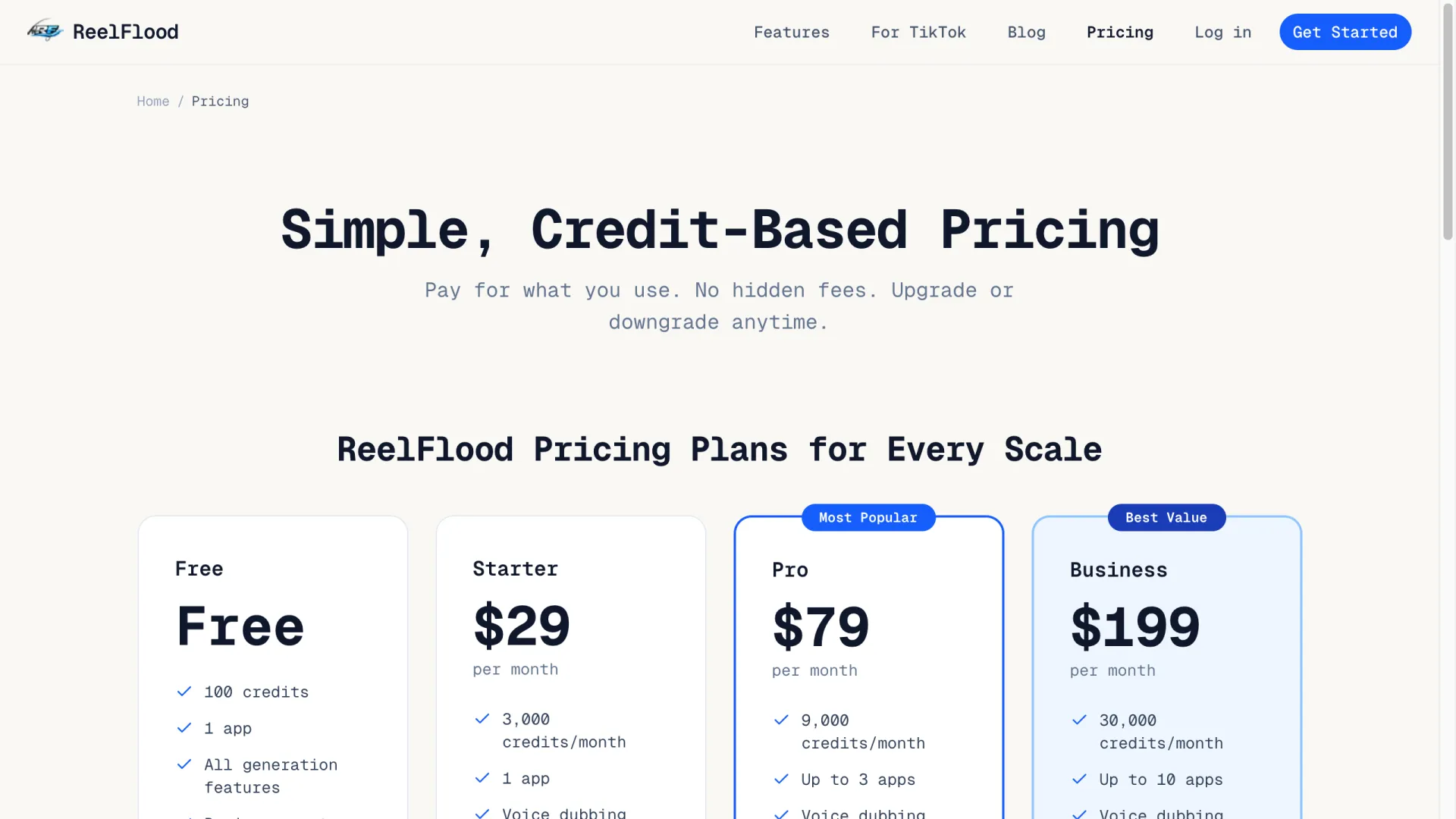
Choose ReelFlood when the deliverable is a stream of short ads for TikTok, Reels, or Shorts and you need to combine a creator-style clip with a product or app demo. The free plan is unusually useful for a first visual check because the page says it includes all generation features, but it is still only 100 credits and one app. The important limitation is missing unit economics: the public pricing page does not define the credit cost of a finished video.
Creatify: best for product URLs and catalog variants
Creatify's pricing page positions the service around generating video ads from a product URL. Its current public figures show 10 monthly credits on Free, $39/month for Starter with 100 credits, and a Pro plan starting at $99/month with 300 credits; the page also says annual billing can save up to 50%.
Creatify is the best fit when the product page already contains the copy and images that should feed the first draft. The Free plan includes 10 credits, up to two video ads or 20 image ads, and watermarked exports according to the official page. Do not treat 100 credits as 100 ads: Creatify says credit consumption varies by tool and duration, with the exact cost shown before rendering.
Arcads: best for talking-head actor batches
Arcads is the focused choice when the ad is primarily a scripted person speaking to camera and you want many actor or hook variants. The public pricing snapshot returned by Google shows a Pro plan at $49.99/month with 50 credits, no watermark, video generation, talking avatars, and commercial use.
The pricing evidence needs a warning label. The indexed page says video generation costs five credits, while its plan copy and FAQ disagree about whether monthly credits roll over; the live pricing URL also returned a 502 during this check. Use Arcads when actor variety and fast talking-head production matter more than product handling, but verify the current plan inside the checkout before budgeting a campaign.
HeyGen: best for multilingual avatars
HeyGen's official pricing page lists Free at three videos per month with a one-minute maximum, Creator at $29/month with 600 credits, and Pro starting at $49/month with 1,000 credits. The paid individual plans list 175+ languages and dialects, voice cloning, watermark removal, and longer video limits.
HeyGen is the best choice for localization, custom digital twins, and a polished spokesperson workflow. It is not my first pick for native TikTok-style UGC: a studio avatar with clean delivery can look like a presenter, so the tool needs deliberate framing, captions, and a less corporate script. Its credit system also changes by workload: the official help material lists different rates for Avatar III, Avatar IV/V, dubbing, translation, and Video Agent.
MakeUGC: best for product-in-hand ad iteration
MakeUGC's product page claims script-to-video generation in two minutes, product-image or product-URL input, testing with 10 avatars and 20+ scenes, and more than 50 languages. Its displayed platform plans are Startup at $59/month for 500 credits, Growth at $79/month for 1,000 credits, and Pro at $149/month for 2,000 credits, each with a three-day trial.
MakeUGC is the better fit when the product has to appear in an unboxing, lifestyle, or direct-response demo rather than only beside a talking head. The vendor says credit use varies by model, duration, and resolution, and that unused credits do not roll over. The page also gives two different avatar counts, so treat inventory numbers and claims such as "perfect lip-sync" as marketing claims to test, not guarantees.
Pricing is a trap unless you convert credits
AI UGC pricing is only comparable when the same output is being priced. A 30-second talking avatar, a five-second product clip, a dubbed translation, and a generated image can all consume different amounts of the same platform's credit balance.
| Tool | Public entry figures | What the figures do not prove |
|---|---|---|
| ReelFlood | Free 100 credits; $29/3,000; $79/9,000; $199/30,000 | Finished-ad count, render duration, and credit cost per generation |
| Creatify | Free 10 credits; $39/100; Pro from $99/300 | How many URL-to-video variants the plan supports across different durations |
| Arcads | $49.99/50 credits in the indexed public snapshot | Current checkout terms, rollover behavior, and whether one video always costs five credits |
| HeyGen | Free 3 x 1-minute videos; $29/600 credits; Pro from $49/1,000 | The number of Avatar IV/V minutes after other assets, translation, or edits consume credits |
| MakeUGC | $59/500; $79/1,000; $149/2,000; 3-day trial | Which models are unlimited, peak-time concurrency, and the cost of a specific 9:16 ad |
ReelFlood is the easiest plan to trial from the public numbers, but its lack of a credit-to-ad conversion makes a campaign forecast incomplete. Creatify is easier to budget from a product catalog because the URL workflow is explicit, yet its exact render cost appears before generation. HeyGen is transparent about several workload rates, while Arcads and MakeUGC need an in-product check before you compare them on cost per ad.
The test that matters: can the product survive the scene?
I ran one bounded visual test through AIReiter's nano_banana_pro: a fictional blank-label serum bottle held in a bright bathroom with a casual phone-camera composition. The job used 6 credits and produced the reference frame below. It passed the basic framing check because the bottle, hands, and intended social context are easy to see.
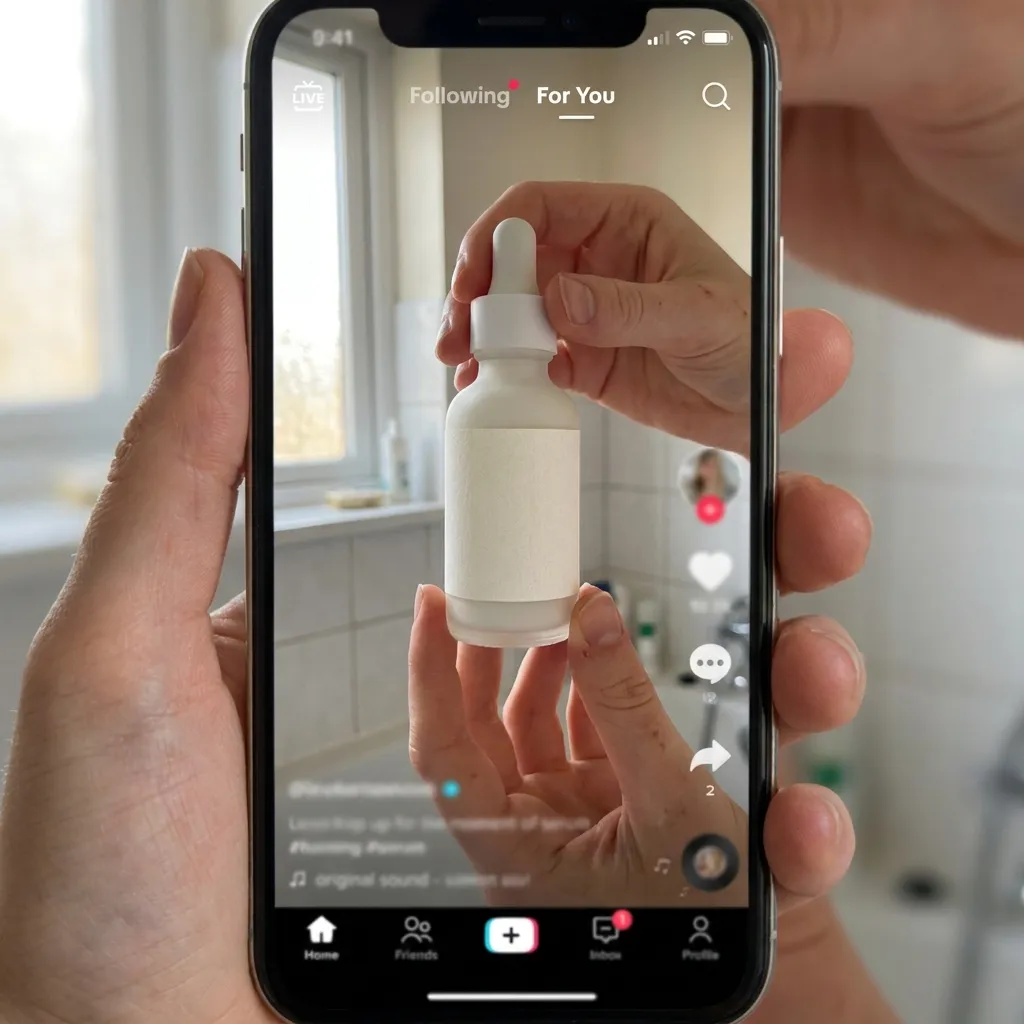
This is not a benchmark of ReelFlood, Creatify, Arcads, HeyGen, or MakeUGC. It is a visual QA example, and it does not prove motion, lip sync, voice quality, product-label consistency across frames, or ad conversion. Any platform comparison that claims those things needs the same product brief rendered in the same aspect ratio and checked frame by frame.
The four checks I would run before paying for a batch are:
- Product identity: compare label text, cap shape, color, and proportions against the supplied product asset.
- Interaction: watch the hands pick up, open, apply, or rotate the product; a static grip is not a product demo.
- Creator continuity: check face, hair, voice, mouth movement, and body position from the first frame to the last.
- Feed safety: review 9:16 cropping, captions, muted playback, text-safe margins, and the first three seconds.
A pre-publish checklist for AI UGC ads
Use one message per video. A hook about saving time, a product demo, and a discount CTA can share a video, but they should not compete for the opening sentence.
- Write the product claim in plain language and confirm that the landing page supports it.
- Generate at least three hooks or openings, then keep the scene and offer constant while comparing variants.
- Inspect product labels, hands, packaging, text overlays, and before/after imagery frame by frame.
- Export vertical video with readable captions and test it muted on the target feed.
- Confirm commercial rights for the avatar, voice, music, product assets, and any reference footage.
- Label synthetic or materially altered media where the platform or local advertising rules require it, and never present a synthetic creator as a real customer.
- Have a human approve medical, financial, performance, testimonial, and comparative claims before launch.
The recommendation by buyer type
Choose ReelFlood if the main job is producing native-looking paid-social UGC ads and combining creator footage with a product or app demo. Do not choose it from the plan table alone if you need a precise cost-per-ad forecast; ask for the credit burn for your exact format first.
Choose Creatify if the workflow starts with Shopify, Amazon, or another product URL and the priority is catalog-scale variants. Do not choose the Free plan for final paid ads if the watermark is unacceptable.
Choose MakeUGC if product-in-hand scenes and direct-response ecommerce variants matter more than a broad editing suite. Do not assume its unlimited models or avatar counts apply to every plan, resolution, or render window.
Choose Arcads if your creative is mostly a person speaking to camera and you already have a strong script and media-buying workflow. Do not use the indexed $49.99 figure as a final budget until the current checkout confirms the plan and credit rules.
Choose HeyGen if localization, digital twins, voice cloning, or longer presenter videos are the priority. Do not pick it as the default native-UGC tool unless you are willing to work against its polished-presenter look with framing, pacing, and captions.
FAQ
What is the most realistic AI UGC video generator?
There is no single reliable winner across talking heads, product handling, voice, and scene continuity. Choose the tool whose failure mode is acceptable for the ad: HeyGen for polished multilingual avatars, Arcads for actor-led variations, and MakeUGC or Creatify when the product itself must stay central.
Can I create an AI UGC ad from a product URL?
Yes. Creatify and MakeUGC both advertise URL or product-asset workflows, but URL ingestion does not guarantee accurate packaging, labels, or in-hand behavior. Treat the first render as a draft and run the product-identity checks before publishing.
Is there a free AI UGC video generator?
ReelFlood lists 100 free credits, Creatify lists 10 monthly credits, and HeyGen lists three one-minute videos per month. Check watermarks, resolution, credit burn, and commercial-use terms before calling a free plan usable for final ads.
Can AI UGC replace real creator footage?
It can replace some production steps for concept testing, localization, and ad-variant volume, but it cannot honestly replace a real customer experience or a truthful testimonial. Synthetic creators should not be presented as people who used a product when they did not.
What should I check before running an AI UGC ad?
Check the product identity, creator continuity, captions, first-three-second hook, commercial rights, platform disclosure requirements, and every product or performance claim. Keep a human approval step for any claim that could affect health, money, safety, or purchase decisions.