 AIREITER
A one-line "cinematic" description leaves every gap for the model to fill: omit camera instructions and provider prompting notes say you tend to get a locked-off shot; leave sound fields unspecified and unwanted speech creeps in. Real MiniMax H3 prompting is closer to writing a compact shooting script: the official guides define a fixed three-field format with shot timestamps, stable speaker IDs, and two dedicated sound fields, and the whole script has to fit a roughly 7,000-character prompt budget (provider-dependent) and a 15-second clip ceiling.
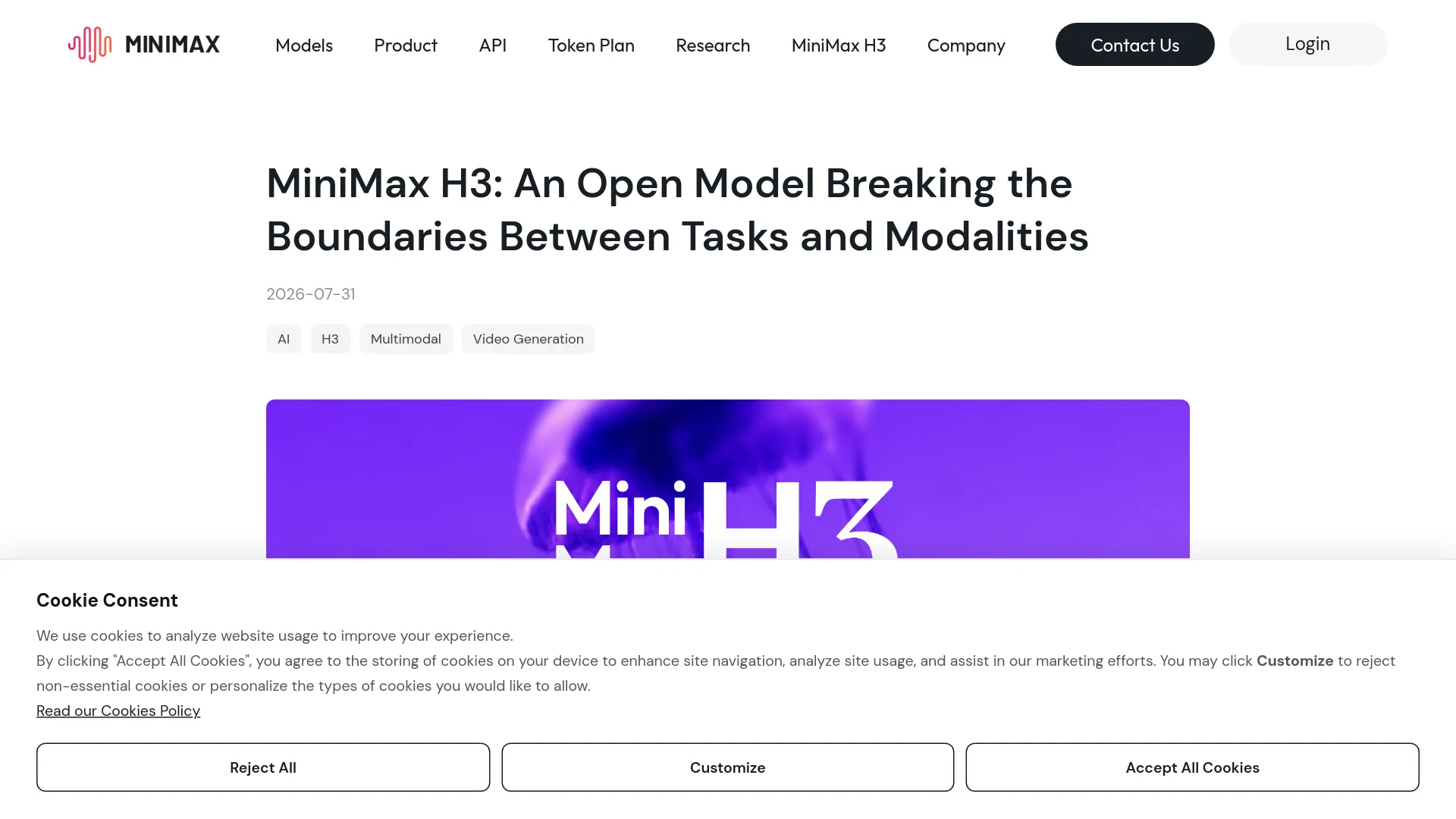
Two Guides, Four Modes: Pick Your H3 Prompt Format First
MiniMax publishes two separate prompt-writing guides inside the MiniMax-H3 repository on Hugging Face, and the two cover different workflows. The base guide covers four generation tasks with no uploaded references; the reference guide takes over as soon as any uploaded image, video, or audio clip plays a role. The four base tasks map to these modes:
| Mode | Input | Alignment instruction required in the prompt |
|---|---|---|
| T2VA | Text only | None; start directly with the core fields |
| I2VA | One first-frame image | "Picture 1 is fully referenced at 0.00 seconds and belongs to [Shot 1]" |
| FL2VA | First frame + last frame | Picture 1 at 0.00 seconds, Picture 2 at the exact end time |
| L2VA | One last-frame image | Picture 1 aligns with the video's end time and the final shot |
Both guides end with worked examples, and the MiniMax launch post frames the model the same way: you express relationships among text, image, video, and audio inputs rather than picking tasks from a menu. Hosted endpoints flatten this into three workflows (minimax/h3/text-to-video, image-to-video, and reference-to-video on fal), but the prompt structure underneath stays the same.
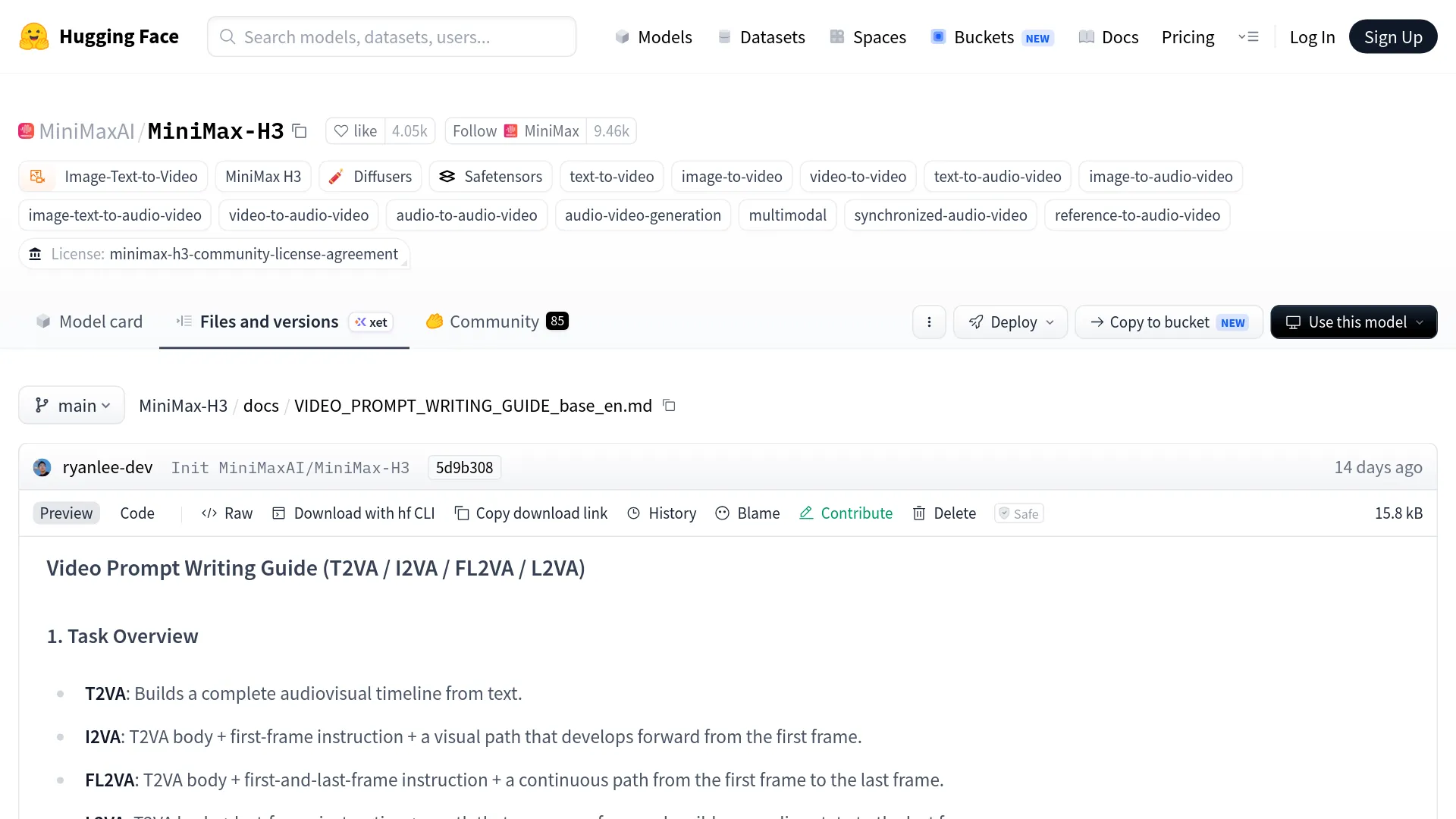
The Base Prompt, Line by Line
A base-mode MiniMax H3 prompt has exactly three required fields after the alignment instruction, separated by a blank line. Here is the skeleton:
[alignment instruction if I2VA/FL2VA/L2VA]

integrated_multimodal_description: [Shot 1] ...

overall_soundscape: ...

non_diegetic_music: ...integrated_multimodal_descriptioncarries the timeline: visual style, composition, actions, shot changes, speakers, dialogue, and diegetic sound, meaning everything visible or audible.overall_soundscapesummarizes ambience and physical sound in 1–4 sentences, one paragraph, no dialogue.non_diegetic_musicdescribes audience-only score in 1–3 sentences, orN/Aif there is none.
A filled example, adapted from the official guide's T2VA case (a bakery scene before sunrise):
integrated_multimodal_description: [Shot 1] Live-action, cinematic. A medium-wide
shot of a small bakery interior before sunrise; warm tungsten light, flour dust in
the air. A middle-aged baker (S1), grey apron, rolled sleeves, lifts the security
shutter. The camera pushes in with small amplitude at slow speed as he places
fresh bread on a wooden counter. (S1) says in a warm, mid-pitch voice <d>[English]
First batch of the day.</d> At 00:05.000, the camera cuts to a close-up of his
hands slicing a loaf; (S1)'s words carry over from the previous shot, <scenetrans>
continuing seamlessly across the cut.

overall_soundscape: The rattling shutter, metal trays set down on stone, a doorbell
chime, footsteps on tile, and the crusty sound of a knife slicing bread.

non_diegetic_music: Acoustic guitar and upright bass at a slow tempo, gentle
dynamics fading out before the final shot.
What each line controls, per the official rules:
| Prompt element | Controls | Rule |
|---|---|---|
[Shot 1] Live-action, cinematic. | Global style | Style label opens Shot 1; examples from the guide's list (partial): Cinematic, live-action, 2D-animated, 3D CG, claymation, watercolor, vintage film |
A middle-aged baker (S1), grey apron, rolled sleeves | Speaker identity | Identity attributes precede the ID; the ID stays stable across shots |
The camera pushes in with small amplitude at slow speed | Camera | Motion type + amplitude + speed, written as a natural action |
<d>[English] First batch of the day.</d> | Dialogue | Language tag plus exact words only, verbatim, never translated |
At 00:05.000, the camera cuts to... | Cut time | Strictly increasing; [Shot 1] itself never gets a timestamp |
<scenetrans> continuing seamlessly across the cut | Audio continuity | Marks dialogue crossing a cut, at both connecting points |
Shots, Cuts, and Camera Moves
Shot syntax in MiniMax H3 is positional: [Shot 1] never gets a timestamp, and every later shot starts with a strictly increasing cut time like At 00:03.500,. Approved cut language is short ("the camera cuts to", "the shot transitions to", "the shot switches to"), while cross-dissolves, fades, and wipes should appear only if you explicitly request them. If only the framing changes slightly, the guide says to use camera motion instead of a cut, because a cut should introduce new subject, space, state, or time information.
Write camera movement as a natural English action with up to three dimensions: motion type, amplitude, speed.
| Dimension | Accepted expressions |
|---|---|
| Motion type | Zoom In/Out, Push In/Pull Out, Pan Left/Right, Truck Left/Right, Tilt Up/Down, Pedestal Up/Down, Arc Shot, Tracking Shot, Static Shot, Shake Slightly/Strongly, POV, Roll Clockwise/Counterclockwise |
| Amplitude | "with small amplitude", "with large amplitude" |
| Speed | "at slow speed", "at fast speed" |
Medium amplitude and normal speed are omitted by convention. Note the difference in meaning: "Zoom In" changes focal length from a fixed position, while "Push In" physically moves the camera forward — the guide keeps the distinction on purpose.
Dialogue and Speaker Labels
Every vocal character in a MiniMax H3 prompt gets a stable ID — (S1), (S2), or a compound like (S1,S2) for synchronized speech — and keeps that ID across every shot. Characters who never speak get no ID at all. A speaker's first appearance should pin down enough identity for stable generation: on-screen or off-screen, age range, gender, vocal pitch, timbre, speaking rate, accent.
The exact syntax for one line:
A woman in her 30s (S2), on-screen, mid-pitch voice, says with quiet anger
<d>[English] You promised me the 15th.</d>
Four documented rules prevent the classic failures. Identity, action, and delivery stay outside <d>; inside <d> goes only the language tag and the exact words, punctuation preserved. Voiceover uses the literal phrase "says in an off-screen voiceover", immediately followed by a statement that the on-screen character's lips remain closed. Dialogue crossing a cut gets <scenetrans> at both connecting points plus a continuity phrase such as "continues seamlessly across the cut" or "carries over from the previous shot". Speech cut off by the video's end gets <cutoff>.
Quotation marks have a single reserved job: any text visible in the video (banners, signs, labels, neon, subtitles) appears in English double quotes, verbatim, untranslatable. Putting spoken dialogue in quotes is the documented reason H3 renders it as burned-in subtitles instead of speech.
The Two Sound Fields
The MiniMax launch post states that all H3 audio output is native stereo, generated with the video, so sound gets two dedicated fields instead of adjectives in the description. overall_soundscape covers ambience and physical sound (wind, rain, traffic, footsteps, fabric movement, impacts, breathing, laughter) in 1–4 sentences, and N/A is reserved for the explicit request of complete silence. non_diegetic_music covers score the characters cannot hear, described by instrumentation, speed, rhythm, and dynamic changes; abstract mood words ("epic", "emotional") are explicitly discouraged, and N/A is the correct value when you want none.
Diegetic audio such as singing, an in-scene radio, or a street musician does not belong in either field; it goes into integrated_multimodal_description where the timeline lives. The split is not cosmetic: the APIMODELS how-to notes that reliable results require explicit sound constraints, and leaving non_diegetic_music unspecified can let in music you never asked for.
Reference Prompts: Labels and Retention
The reference guide takes over once uploaded assets steer the generation, and it requires six sections in a fixed order: subject_definitions, summary, retention_analysis, detailed_description, overall_soundscape, non_diegetic_music. The detailed_description body is normally 350–500 English words for generation tasks, and dialogue-heavy prompts should fit the full spoken timeline even if that bends the word count.
Four label types do the work:
| Label | Use |
|---|---|
<Subject N> | Visible content actually used in the output: a person, product, scene, outfit, style, or action abstracted from any asset |
<Picture N> | An image acting as a concrete frame anchor — first frame, keyframe, last frame, composition anchor |
<Video N> | A whole-video relationship: editing source, continuation point, camera or cut structure, rhythm |
<Audio N> | An audio signal that is copied or referenced: voice timbre, lyrics, beats, sound effects |
Numbering is independent per type, so one uploaded video can be <Video 1> while its audio track is <Audio 2>. A speaking subject combines labels with speaker IDs: <Subject 3> (S1).
The summary section opens with a bracketed task prefix such as [reference generation] or [video editing + audio reuse], and a video edit must begin "The target video is an edited version of <Video 1>." Then retention_analysis assigns one marker per label: fully_preserved, partially_preserved, attribute_transfer, or weak_reference for visuals; fully_copy, partially_copy, reference, or weak_reference for audio. Those markers are how you tell H3 that the face must survive while the outfit may change.
A minimal reference-mode skeleton in the documented order:
subject_definitions:
<Subject 1>: the woman from Picture 1, long blonde hair, light-pink shirt
<Picture 1>: first frame of [Shot 1], café window seat
<Audio 1>: voice-timbre reference for <Subject 1> (S1)

summary: [reference generation + audio reference] One short paragraph naming the
task, the target video, and each reference relationship.

retention_analysis:
<Subject 1> (appears in [Shot 1], [Shot 2]): fully_preserved, same face, hair, outfit
<Picture 1> ([Shot 1] first frame): fully_preserved
<Audio 1> (S1 voice): reference, timbre only, no copied words

detailed_description: [1–2 style sentences.] [Shot 1] ... [350–500 words, dialogue
in <d> tags, <scenetrans> across cuts]

overall_soundscape: [Ambience and physical sounds.]

non_diegetic_music: N/A
When H3 Misbehaves: Symptom-to-Fix Table
| Symptom | Likely prompt cause | Fix |
|---|---|---|
| Gibberish or invented "Sims-speak" | Unstructured dialogue, no speaker IDs, or undescribed non-speaking characters | Add (S1)/(S2) IDs, wrap exact words in <d>[Language] ...</d>, and explicitly describe silent characters as not speaking |
| Burned-in subtitles on dialogue | Spoken words written in quotation marks | Reserve quotes for visible on-screen text only; move dialogue into <d> tags |
| Dialogue assigned to the wrong character | Speaker ID not tied to a described person | Give the speaker identity attributes (age, on-screen, voice) at first appearance, keep the ID stable across shots |
| Score or music you never asked for | non_diegetic_music left vague or missing | Write non_diegetic_music: N/A when you want none: a fix community threads credit for killing unwanted audio |
| Unplanned cuts | Cuts implied by scene changes without timestamps | Use [Shot N] At 00:03.500 with explicit cut phrases; request "no cuts" wording for single-take shots |
| Face, outfit, or product drifts | Reference role never declared | Add a retention_analysis line with fully_preserved for that label and repeat the label at each appearance |
The gibberish and subtitles rows come straight from the official syntax rules; community threads on r/StableDiffusion independently report the same fixes working in practice, including non_diegetic_music: N/A as one of the most-cited fixes for unwanted audio.
Limits and What a Prompt Costs to Test
The generation envelope matters because prompt length is finite and every iteration is billable. Documented limits across the official API and hosted providers:
| Parameter | Value | Note |
|---|---|---|
| Clip duration | Up to 15 s, whole seconds | Minimum is 5 s on fal/EvoLink endpoints; some V2 API docs list 4 s |
| Resolution | 768p and 2K, 24 FPS | 2K is the default output resolution per MiniMax |
| Reference files | Up to 9 images, 3 videos, 3 audio | 12 files total; audio can never be the only reference |
| Prompt length | ~7,000 characters | fal and V2 API docs; APIMODELS lists 20,480 — check your provider |
| Aspect ratios | 21:9, 16:9, 4:3, 1:1, 3:4, 9:16, adaptive | Image-to-video follows the input image's ratio |
Pricing moves by provider, so treat these as dated snapshots rather than list prices. On fal, a 2K generation cost $0.26 per second as of an August 1 pricing snapshot ($1.30 for 5 seconds, $3.90 for 15), with the first five reference images free and extra images at $0.08 each. On APIMODELS, H3 runs at $0.088 per second ($1.32 for a 15-second clip), charging only successful requests. For context, per-second prices on that same marketplace:
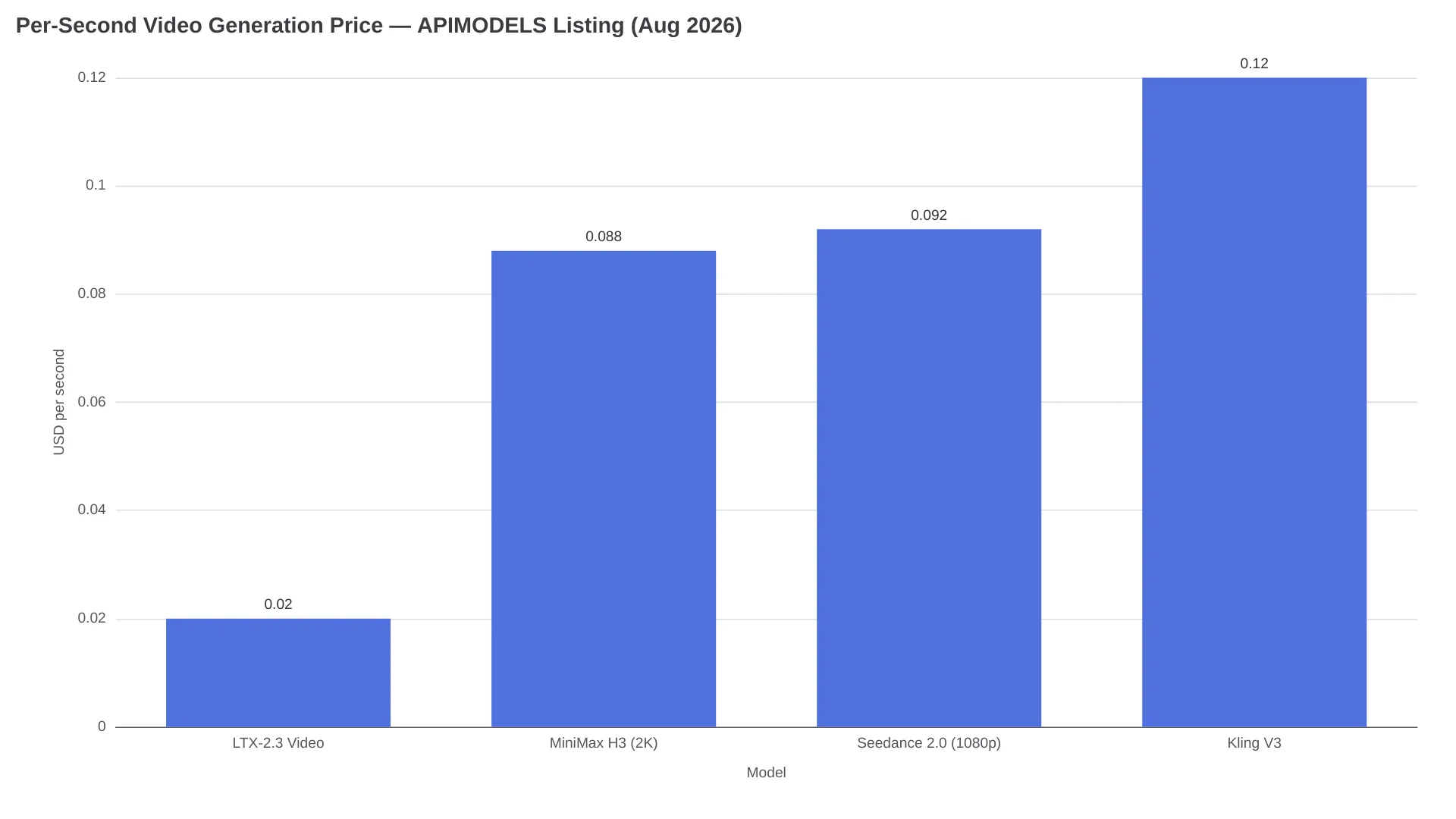
The retry math is the real budget line: a structured 15-second dialogue prompt that lands on the second attempt costs $2.64 on APIMODELS, while an unstructured prompt that takes five attempts to get one usable take costs $6.60. To iterate prompts against a hosted H3 endpoint, AIReiter's MiniMax H3 API page runs the model with current pricing on the page.
Copy-Paste Starting Points
Two base skeletons cover most short-form work. Fill the brackets, keep the field names and blank lines exactly as written:
integrated_multimodal_description: [Shot 1] [style label]. [Composition and
subject with 1–2 identity details]. [One primary action with physically
plausible pacing]. The camera [motion type] with [amplitude] at [speed].
[Character description] (S1) says in [voice description] <d>[Language]
[exact line]</d>. At [MM:SS.mmm], the camera cuts to [new subject or space],
[continuity phrase if dialogue crosses the cut].

overall_soundscape: [Ambience + physical action sounds, 1–4 sentences.]

non_diegetic_music: [Instrumentation, tempo, dynamics] or N/A
Picture 1 is fully referenced at 0.00 seconds and belongs to [Shot 1].
integrated_multimodal_description: [Shot 1] [Style consistent with Picture 1].
The scene, subject, colors, and spatial relationships of Picture 1 remain
consistent. [Action developing forward from the first frame → result or
reaction]. The camera [motion type] with [amplitude] at [speed].
overall_soundscape: [Ambience and action sounds grounded in the image.]
non_diegetic_music: N/AFor proven prompts rather than blanks, three libraries keep source links. ecomimagelab/awesome-minimax-h3-prompts: 58 prompts (39 official, 19 community-tested), each shipped with its downloadable result video under the rule "No video, no entry." imagineVid/Awesome-minimax-h3-prompts-and-skills: 28 verified cases in six workflows, from omni-reference identity continuity to native audio dialogue. The APIMODELS gallery: 226 prompts browsable by use case with clips attached; its one-line rule is "References carry identity, the prompt carries action."
Two shortcuts exist for writing the scripts themselves. Reddit users report solid results from pasting an official guide into an LLM and naming the target mode ("rewrite this idea as T2VA using the base guide"), and a ComfyUI extension, MiniMax H3 Prompt Writer v0.3, builds the structured format inside a node workflow.
FAQ
What is the difference between the MiniMax H3 base and reference prompt guides?
The base guide covers four no-reference modes (T2VA, I2VA, FL2VA, L2VA) built on three core fields; the reference guide adds six mandatory sections and <Subject>/<Picture>/<Video>/<Audio> labels whenever uploaded images, videos, or audio steer the generation.
How do I label speakers in a MiniMax H3 prompt?
Assign stable IDs (S1), (S2) in order of first vocal event, keep the same ID across shots, use (S1,S2) for simultaneous speech, and put only the language tag plus exact words inside <d> tags.
How do I stop gibberish audio in MiniMax H3?
Structure the dialogue with speaker IDs and verbatim <d> tags, describe non-speaking characters as silent, and set non_diegetic_music: N/A when no score is wanted: the documented and community-confirmed fixes.
Should MiniMax H3 dialogue go in quotation marks?
No. Quotation marks are reserved for text visible in the video; spoken dialogue belongs in <d>[Language] ...</d>, or H3 may render it as on-screen subtitles.
How long can a MiniMax H3 prompt be?
Around 7,000 characters on fal and the official V2 API docs, though APIMODELS lists 20,480 — verify the limit for your specific endpoint before writing a 10,000-character script.
What the Syntax Still Can't Fix
Structure raises the hit rate; it does not make generation deterministic. Exact identity, logo, and product fidelity stay probabilistic: community-run API wrappers explicitly refuse to promise frame-level consistency, and the strongest prompt library examples enforce identity with wordy constraint blocks rather than measured guarantees. Inline <tags> for non-verbal sounds are community-experimental and vary by generation. Judge output by cost per approved second rather than per request, and keep the official base and reference guides open in a tab while you write.
Related reading: the MiniMax H3 release overview covers what the model is, and MiniMax H3 vs LTX 2.3 compares it against the cheapest per-second alternative.