 AIREITER
Is the Kling free plan still 66 credits a day? I found three different answers in October 2026 results, and what your account currently shows determines what you can use. This Kling AI free tier review sorts the confusion, does the credit math, and gives a clear stay-or-pay call — with one catch: free credits expire fast.
October 2026 status check; all figures cited inline.
Why every free-tier guide says something different
The disagreement is real, not sloppy writing. Three snapshots describe three account realities:
| Claim you will see | Where it comes from | When it was true |
|---|---|---|
| 66 credits per day, resets midnight UTC | Nexoda Tech four-day test, June 2026 | Fresh free accounts in mid-2026 |
| About 1–2 short 720p clips from 66 daily credits | Tested Intelligence, Oct 6 2026 | Free (Basic) plan as documented early Oct 2026 |
| No guaranteed monthly credits, only promotional bonuses (e.g., 59 credits expiring Nov 6) | The Unfiltered AI, logged-out check Oct 24 2026 | What Kling's membership page showed late Oct 2026 |
Kling itself now phrases free access carefully. The official FAQ limits free access by account eligibility, credits, models, and editing options, while the VIDEO 3.0 credit-cost guide (July 28, 2026) lists Basic as "$0; free forever" with no monthly credits and no commercial use.
That shift surfaces in user reports:
"Your daily credits do not carry over to the next day." — u/BoneAppleTemu, r/KLINGAIVideo
Pair with our broader explainer: Kling AI Free Tier 2026: What 66 Credits Really Get You.
What a free account actually gives you right now
Kling's free plan is the Basic plan at $0. There is no credit card requirement (Tested Intelligence's Oct check), and there is no stated trial end date. What varies is whether your account shows a recurring daily grant or a one-off promotional grant.
Daily-66 vs promotional-59: which screen will you see?
- Lucky path: 66 credits, resetting every 24 hours (observed at midnight UTC in June tests). Use them or lose them. The earlier 166-credit allowance was cut to 66 (noted in our July explainer).
- Promotional path: a fixed bonus such as 59 free-trial credits with an expiry date, shown on the membership comparison with no monthly credit row for Basic. When those run out, there is no automatic refill date.
- Gated path: credits displayed but generation blocked, slow-queued, or redirected toward a paid plan. Reddit users describe free credits "phasing out" for newer accounts and different results when signing in with Google versus email (reporter in r/KlingAI_Videos).
Some users warn against treating any fixed number as guaranteed:
"Some days I just have to use up my free daily KlingAI credits (usually a meagre handful that they give you, like 20) before they expire." — @Nemspy
"my biggest challenge was the credit system. I initially wanted to generate a video from a prompt, but it required 150 credits while I only had 66 free credits." — @forexmusician
Practical step before you plan anything: open your own Kling account's credit balance and the per-generation cost shown on the Generate button. Do not budget from a screenshot in a tutorial. Allowances appear to differ by account; check yours directly.
What free credits buy in clips
Kling does not publish one stable per-clip price. Standard and Professional figures come from Nexoda's 15-video June log; Kling 3.0 per-second rates from Unfiltered AI's Oct 24 reading of Kling's model guide; 4K at 30 credits/sec from Kling's official VIDEO 3.0 guide:
| Generation | Credits | What 66 credits buys |
|---|---|---|
| Standard mode, 5 seconds, 720p | ~10 | ~6 clips |
| Standard mode, 10 seconds, 720p | ~20 | ~3 clips |
| Professional mode, 5 seconds | ~35 | 1 clip + 31 left over |
| Professional mode, 10 seconds | ~70 | 0 — exceeds a 66-credit day, and credits do not roll over |
| Kling 3.0, 720p, no audio, 5 seconds (6/sec) | ~30 | ~2 clips |
| Kling 3.0, 1080p + native audio, 5 seconds (12/sec) | ~60 | 0 exportable on free; ~60 reference cost on paid |
| Native 4K reference, 5 seconds (30/sec) | ~150 | 0 on free |
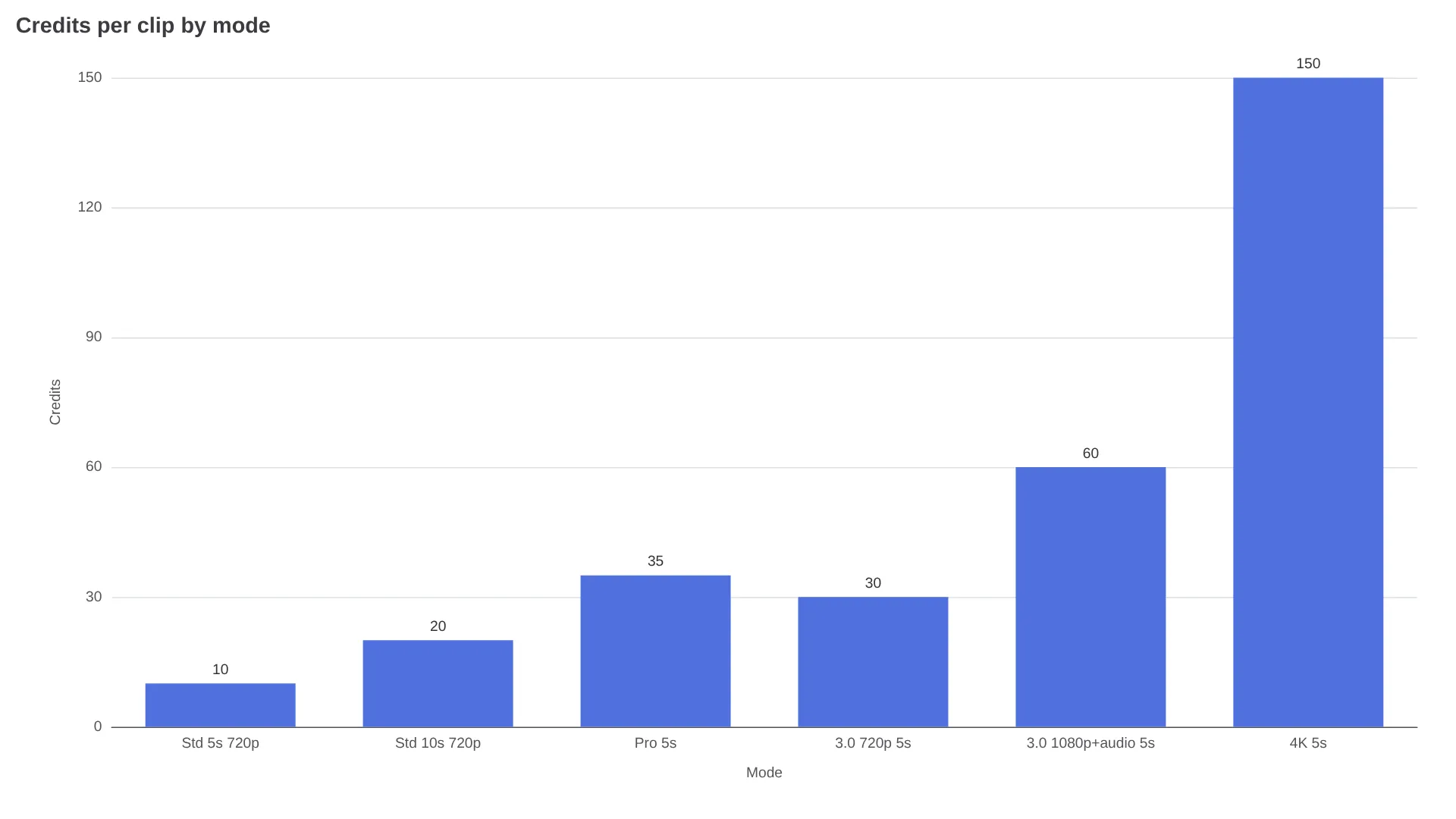
The chart makes the practical point: "6 videos a day" and "1–2 videos a day" are both correct for different settings. Free exports capped at 720p in every October check I aggregated, so treat the 1080p and 4K rows as paid-plan reference costs, not free output.
How far 66 credits go in a real session
Timing figures come from Nexoda's four-day log: about 2–3 minutes per Standard 5-second clip off-peak, 4–8 minutes for Professional or peak-time renders (full log).
On a 66-credit day, a realistic Standard-only session looks like this: one 5-second text-to-video test (10), one 10-second version (20), one image-to-video (10), one more 10-second iteration (20) — 60 credits spent, 6 stranded because the cheapest clip costs 10.
A Kling 3.0 session is shorter in practice: free exports cap at 720p, so plan on two 720p no-audio clips (30 + 30) leaving 6 stranded. A 5-second 1080p clip with native audio would cost ~60 on a paid plan, for reference. Most creators need two to four generations to get one usable clip (The Unfiltered AI's keeper-rate estimate), so a free day typically yields zero to one keeper.
Failed or stalled generations add friction. The Unfiltered AI's Oct 6 probe (reported in its Oct 24 check) was hard-blocked on a public-figure prompt with a credit refund, while a graphic-content prompt in the same test hung without a reported refund (test details). Kling's payment policy describes failed-generation refunds, so budget at least one spare generation per idea.
The four walls that stop free projects
Credits are only the first constraint. These four apply even when you have balance left:
- Watermark on every free export. Free outputs carry the KlingAI mark (Tested Intelligence). Upgrading does not retroactively clean old files; you must regenerate on a paid plan.
- Resolution cap. Free is effectively 720p (Tested Intelligence; Unfiltered AI). Check your own export menu before planning a 1080p delivery.
- Slow queue, one at a time. Free gets low-priority placement and one concurrent task (Unfiltered AI's Basic plan check); paid tiers get fast-track generation and up to four variations at once. During US evenings and weekends, free Standard renders stretch from ~2 minutes to 3–5 minutes, and Professional 5-second clips can exceed 8 minutes (Nexoda's peak/off-peak log).
- No commercial use, no API. Kling's Basic row states output is "not for commercial use" (official VIDEO 3.0 guide). Client work, monetized YouTube, and paid ads require at least Standard. There is no free API tier; the official API starts from a prepaid pack (reported at $9.80 in our Kling API pricing guide), while consumer free credits are web-app only.
The download trap nobody documents
Two operational details decide whether a free clip ever becomes a usable file:
1. The watermark toggle is hidden. Paid users in r/KLINGAIVideo's watermark thread report that watermark-free download is not a global setting but a hover control on the download button, and replies in the same thread claim only Professional mode exposes the clean-download option. If you upgraded and still see a watermark, hover the download button and check the mode you generated in before assuming the plan failed.
2. Downloads fail in confusing ways. The “can not download my creations” thread (30+ comments) documents the download button opening a browser video window instead of an MP4, empty .htm files on desktop, and different behavior on iPad and mobile. Workarounds that helped individual users: right-click the opened video and save as MP4, try desktop Chrome rather than in-app or mobile Safari, and re-check whether the clip was actually a free-tier render (which stays watermarked regardless of current plan).
If you need clean files for a client, regenerate — do not ship an upscaled free file; the license issue remains.
Stay free, pay monthly, or pay per second?
Kling's official VIDEO 3.0 guide lists these renewal anchors (first-month promos are lower; always check the live subscribe page):
| Plan | Renewal | Monthly credits | Per 100 credits | Best for |
|---|---|---|---|---|
| Basic | $0 | promotional only, no monthly grant | — | Prompt tests, motion checks |
| Standard | $8.80 | 660 | ~$1.33 | Weekly creators needing 1080p, no watermark, commercial rights |
| Pro | $32.56 | 3,000 | ~$1.09 | Regular 3.0 + audio work, ~50 five-second 1080p clips before rerolls |
| Premier | $80.96 | 8,000 | ~$1.01 | Teams, batch volume |
| Ultra | $159.99 | 26,000 | ~$0.62 | High-volume 4K pipelines |
Two decision rules cut through the table:
- If you publish weekly and hit the free queue more than twice a week, Standard may be worthwhile when queue delays matter, not just credits. Free's theoretical ~1,980 credits/month (66 × 30, if you claim daily) looks larger than Standard's 660, but free credits expire daily, lack priority, watermark everything, and cannot be used commercially.
- If you generate programmatically or only need a few API calls, skip subscriptions. The official API's prepaid minimum suits steady volume; a per-second third-party route suits occasional testing without prepay (worked example in our July explainer). See Kling API integration options before wiring anything.
Kling AI free tier review FAQ
Is Kling AI really free?
Yes, as a $0 Basic web-app plan with no card required, but "free" means limited promotional or daily credits for personal tests, not unlimited generation. Check the balance inside your account.
How many free videos can I make per day?
On a 66-credit account: roughly 3–6 Standard 720p shorts, or 1–2 Kling 3.0 720p clips; a 1080p-with-audio attempt (~60) needs a paid plan for export. On a promotional account: whatever the bonus covers — a 59-credit bonus funds about five Standard 720p shorts at ~10 each, or one 1080p-grade attempt at ~60 on a paid plan, with rerolls reducing keepers.
Do unused free credits roll over?
No. Daily credits expire at reset; promotional credits expire on the stated date. Paid Pro reportedly allows rollover for up to 7 days (Nexoda's plan table), but free never accumulates — you cannot save up for a 10-second Professional clip costing 70 credits.
Can I use free Kling videos on YouTube or for clients?
Not for monetized or client work. Free output is personal-use only (official VIDEO 3.0 guide). Monetized YouTube, ads, and client deliverables need at least Standard with commercial rights.
Can I remove the Kling watermark for free?
No. Watermark removal requires a paid plan, and you must regenerate the clip on that plan — old free files stay marked. Check the hover control on the download button and the generation mode if a paid download still shows a mark.
Is there a free Kling AI API?
No. The free tier is web-app only. Use the official prepaid API for steady volume or a pay-as-you-go API route for occasional calls.
Why do I have credits but cannot generate?
Three common causes from community reports: the free queue is busy (credits exist but the "free plan queue is busy" gate blocks new tasks), the chosen mode costs more than your balance (for example a 150-credit generation against 66), or the account is ineligible for that model. Try a cheaper Standard 5-second render off-peak, or check whether your balance covers that model.
Did Kling stop giving free credits in 2026?
Not entirely, but the guarantee weakened. Mid-2026 accounts widely showed 66/day; late-October membership pages show Basic with no monthly grant and only time-limited bonuses. New versus legacy accounts appear to be treated differently. Verify inside your account rather than relying on older guides.
Who should still claim the free tier
| Your goal | Verdict |
|---|---|
| Your account shows 66/day and you are learning prompts or testing motion | Claim it — enough for a daily experiment |
| Your account shows a promotional balance and you accept watermark + 720p | Claim it, generate off-peak, keep clips to 5 seconds Standard |
| Monetized YouTube, client work, ads, or clean 1080p/4K | Skip free — start at Standard for rights + queue + watermark removal |
| Batch renders, automation, or product integration | Skip consumer free — use the official API or a pay-per-second API route |
| One 10-second Professional or any 4K test | Skip free — a single 5-second 4K reference costs ~150 credits |
If free unblocks your test today, take it; for commercial web-app output, one month of Standard usually beats another week of fighting the free queue.