 AIREITER
Short answer: a dedicated segmentation model beats everything else. BiRefNet won my five-pipeline test, and hosted versions start around $0.51 per 1,000 images on Replicate. Proof below.
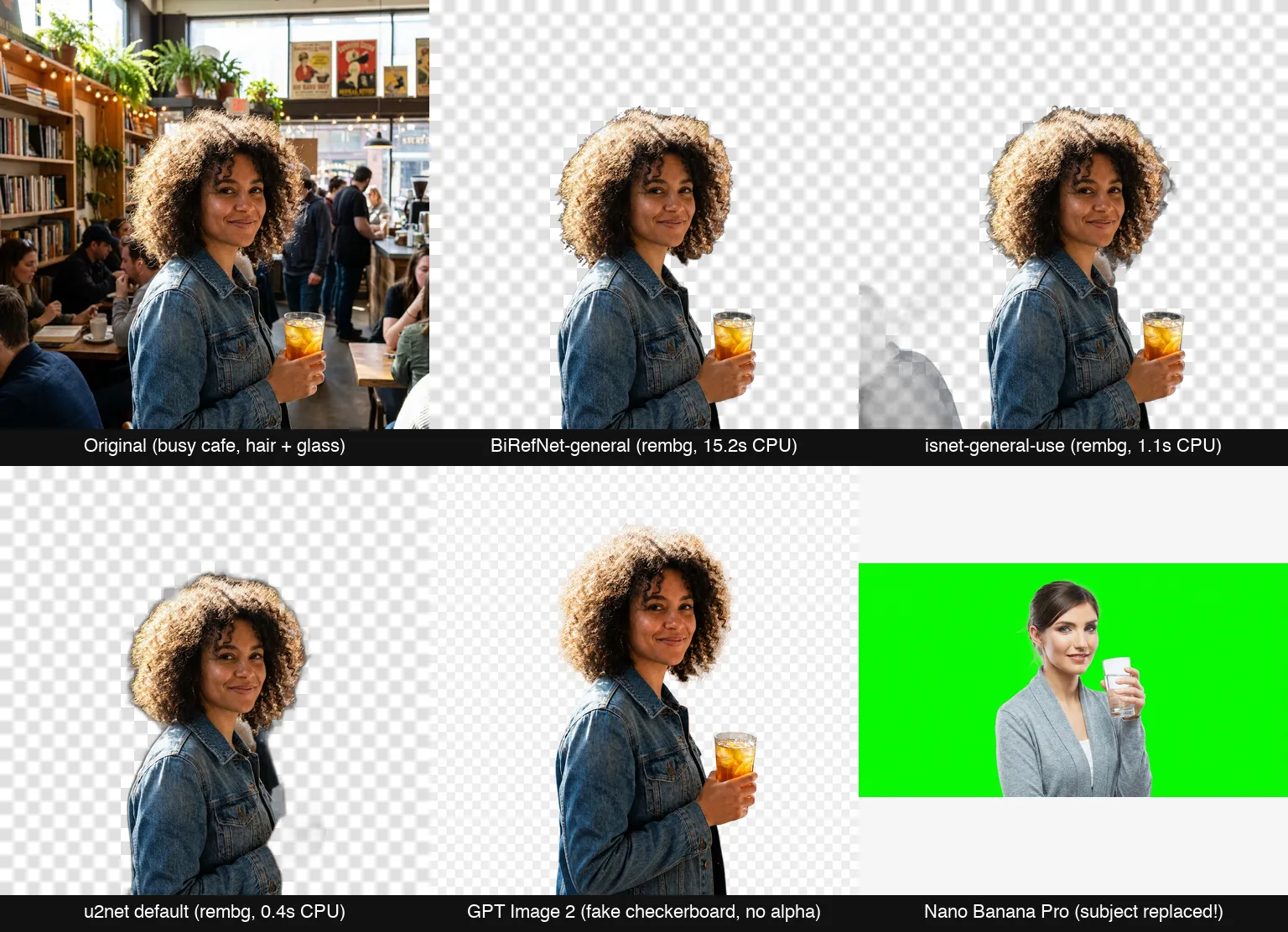
The test image is deliberately nasty: backlit curly hair, a semi-transparent glass of iced tea, and a busy café full of people and string lights behind the subject. Those are the three things that break background removal in production: fine hair strands, transparency, and cluttered scenes. I ran the exact same 1024×1024 image through three open-source models and two prompt-based image models on July 17, 2026, and put all five outputs side by side. One hard image is a smoke test, not a benchmark; treat it as the fastest way to see each pipeline's failure mode, then rerun the same trick on your own catalog.
One image, five pipelines: what actually came back
| Pipeline | Processing time | Real alpha channel? | What happened |
|---|---|---|---|
| BiRefNet-general (via rembg) | 15.2s on CPU | Yes | Hair, hand and glass all survived |
| isnet-general-use (rembg) | 1.1s on CPU | Yes | Kept the glass, left a chunk of another person in frame |
| u2net (rembg default) | 0.4s on CPU | Yes | Deleted the hand and the glass entirely |
| GPT Image 2 | 99.8s | No | Painted a fake checkerboard into the pixels |
| Nano Banana Pro | 31.4s | No | Replaced the woman with a different person |
The five pipelines above are the ones anyone can run today with a pip install or a single metered API call; the commercial SaaS APIs further down are compared on verified pricing, free tiers and licensing. BiRefNet-general was the only pipeline that handled all three traps. The flyaway hair keeps its soft edge, the iced tea stays in the cutout, and no background people leak through. The cost is compute: the ONNX model weighs 973MB, took 74 seconds to download on first run, and needed 15.2 seconds per image on an Apple Silicon CPU (M-series, rembg 2.x with onnxruntime). Hosted GPU endpoints serving this architecture family are far faster: Replicate lists typical completions around 3 seconds, and Bria's RMBG-2.0 is itself a BiRefNet derivative.
The two lighter models show the classic speed-for-accuracy trade. isnet-general-use ran in 1.1 seconds and kept the glass, but it left a gray silhouette of another café customer floating in the bottom-left of the cutout. u2net, the model rembg loads when you don't specify one, finished in 0.4 seconds and amputated the subject's hand along with her drink. If you've ever wondered why "I tried rembg and it was bad" is a common verdict while BiRefNet benchmarks look great, this is why: the default model and the best model are five years apart.
All three open-source outputs are honest RGBA files. RGBA means the image carries an alpha channel, a per-pixel transparency mask, so you can composite the cutout onto any new background. That property is the entire point of a background removal API, and it's exactly what the next two contestants failed to deliver.
Prompt-based image models are not background removal APIs
I asked Nano Banana Pro to replace the background with a chroma-key green screen and keep the subject pixel-identical. It returned a clean green background, behind a completely different woman. Different face, different hairstyle, different glass, different clothes, and the canvas silently changed from 1024×1024 to 1408×768. The output looks professional in isolation, which makes it more dangerous, not less: nothing warns you the product photo you uploaded is no longer your product.
GPT Image 2 failed in a sneakier way. Asked for a transparent background, it preserved the subject far better (same woman, same denim jacket) but delivered an RGB file with a gray-and-white checkerboard painted into the pixels. It looks exactly like transparency in a preview window. Drop it into a design tool and the checkerboard comes with it. It also took 99.8 seconds, against the roughly 3 seconds Replicate lists for a dedicated removal endpoint.
The failure is architectural, not a prompt problem. Editing models like these regenerate the frame from a compressed understanding of your image; segmentation models classify each original pixel as subject or background and hand you the original pixels back with a mask. In practice regeneration doesn't preserve identity reliably, and neither editing call returned an alpha channel in my test; both models flattened the result into RGB.
There's still a legitimate use: when you want a new scene rather than a cutout (swap a café for a studio, relight the product, generate lifestyle context), an editing model gets you there in one call, with no separate removal and compositing steps. My two calls metered at $0.06 (Nano Banana Pro) and $0.01 (GPT Image 2) through AIReiter, so experimenting with the boundary costs pennies. Keep these models out of any pipeline that promises customers their own subject back.
The real cost per 1,000 images
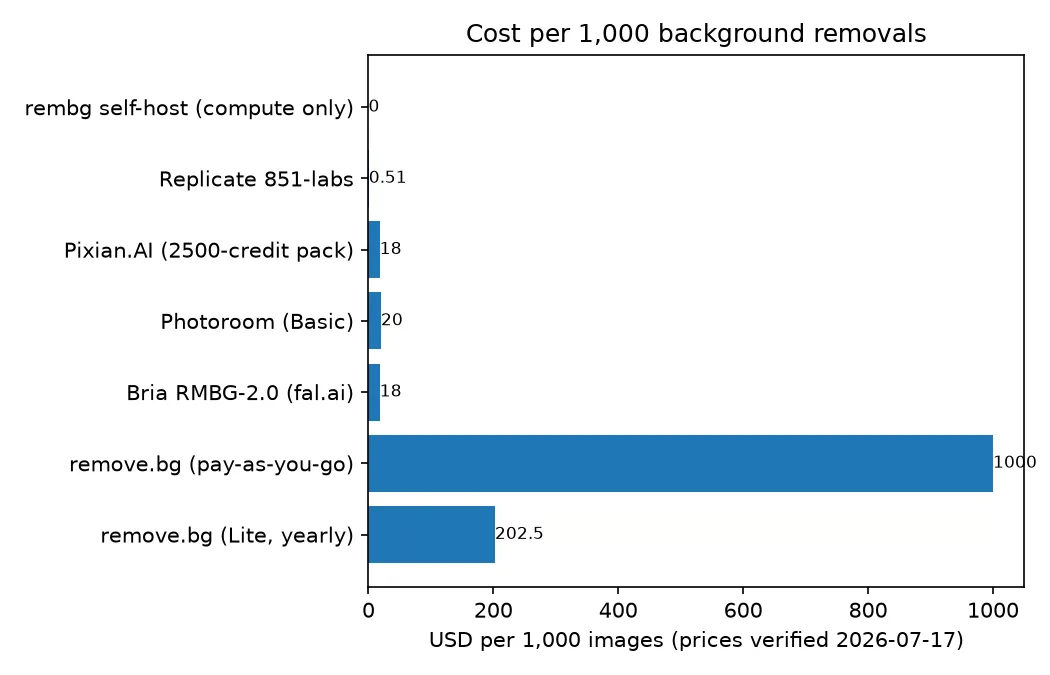
Across the options priced below, the spread is a factor of roughly 2,000. All prices were pulled from official pricing pages on July 17, 2026.
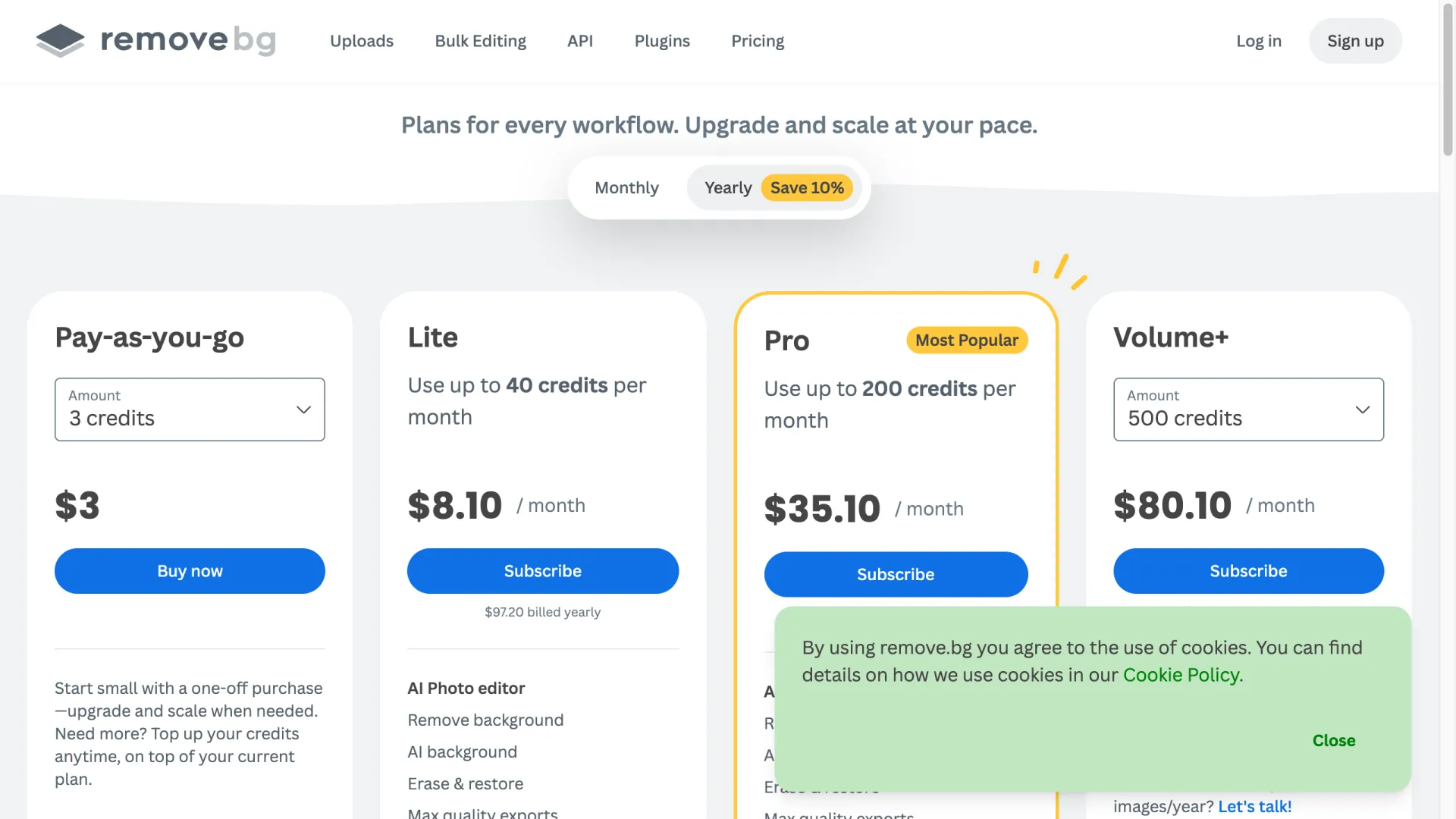
remove.bg is the most expensive mainstream option by a wide margin. Pay-as-you-go is $3 for 3 credits, one full-resolution image per credit, so a straight $1.00 per image. The Lite subscription (40 credits, billed yearly at $8.10/month) works out to $0.20 per image, and the 500-credit Volume+ plan still lands at $0.16. The free tier is one trial credit plus preview-resolution API calls.
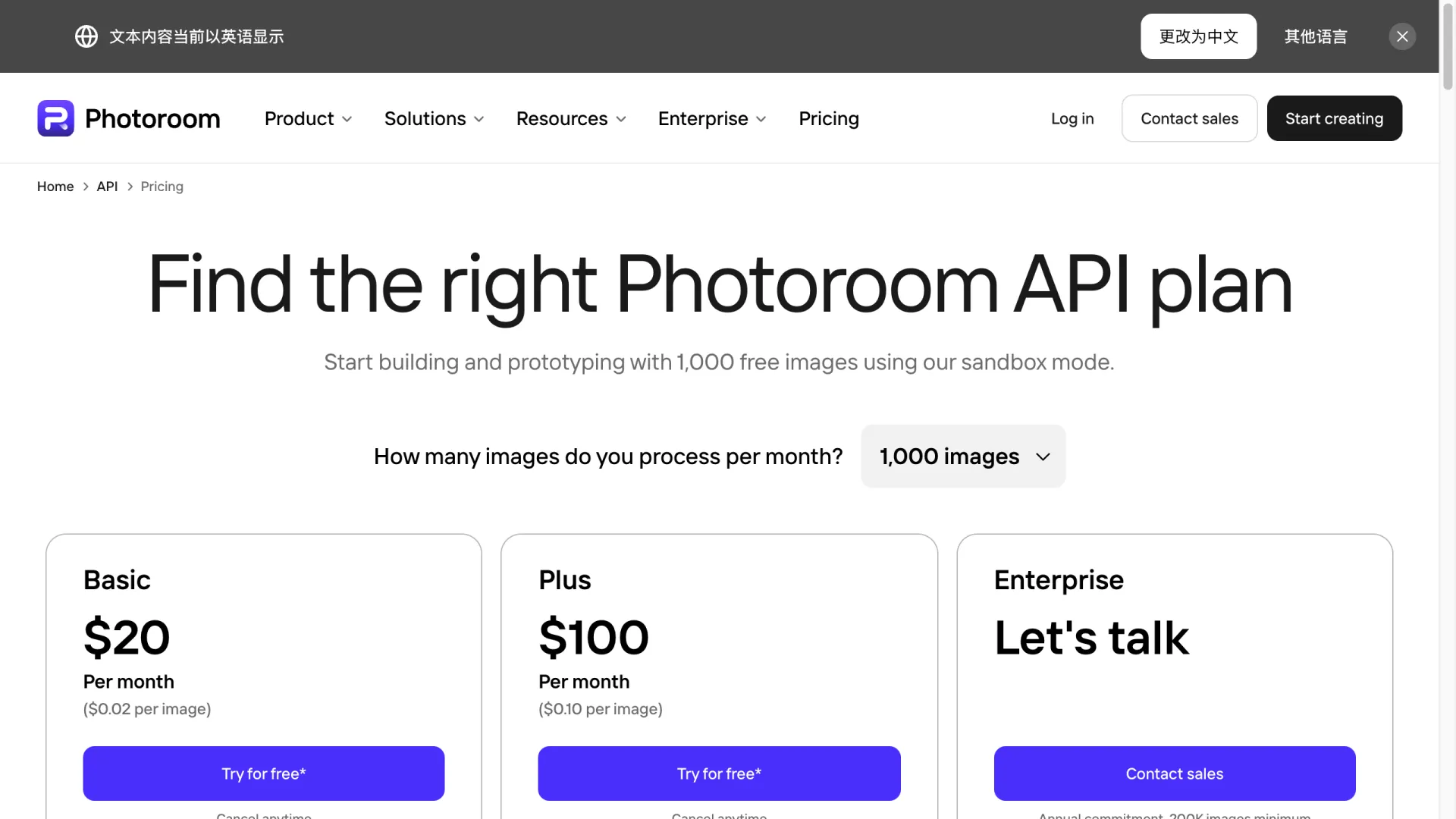
Photoroom charges a flat $0.02 per image for its Remove Background API, or $20 per 1,000. You get 1,000 watermarked sandbox calls per month to build against, plus 10 free production calls; the AI-shadows and full editing tier is $0.10 per image. Pixian.AI prices by megapixel with prepaid credit packs from $5 for 250 credits, landing between $0.0009 and $0.018 per image, and credits don't expire as long as you've purchased something within two years.
Replicate runs 851-labs/background-remover for about $0.00051 per image (1,960 removals per dollar) on Nvidia T4 hardware with typical 3-second completions. Bria's RMBG-2.0 costs $0.018 per image on fal.ai. And self-hosted rembg is $0 per image plus whatever your compute costs.
Do the math at volume before subscribing: 10,000 images a month costs about $1,600 at remove.bg's best subscription rate ($0.16 per image on Volume+), $200 at Photoroom, and roughly $5 on Replicate. Price sensitivity here is real enough that developers publicly complain about $0.03 per image and r/MachineLearning hosts community-built benchmarks for these APIs.
The license trap in "free" models
The open-source column has a licensing catch, and it changes which "free" model you can ship.
Bria's RMBG-2.0, one of the strongest open-weights models available, builds on the BiRefNet architecture with a proprietary licensed dataset. It ships its Hugging Face weights under CC BY-NC 4.0. NC means non-commercial: you can benchmark it, but shipping it in a product requires a paid agreement with Bria or their $0.018-per-image API. What the paid route buys you is a documented answer on training data: Bria states the model is trained exclusively on licensed imagery, which is exactly the question enterprise procurement teams have started asking.
BiRefNet itself is the opposite case: the official repo publishes both code and weights under MIT, free for commercial use. rembg's own code is MIT too, but rembg is a wrapper around a dozen interchangeable models, and each model's weights carry their own upstream license, and the wrapper's license tells you nothing about them. Replicate's 851-labs page doesn't state a license for the underlying model at all. The five-minute check of a weights file's license before it goes into a commercial pipeline is cheaper than the alternative.
Which background removal API to pick
If you want the cheapest working API: Replicate's 851-labs remover at ~$0.51 per 1,000 images, three-second latency, no subscription. Pixian.AI is the runner-up when you'd rather prepay small credit packs than keep a cloud account funded.
If cutout quality pays your bills: Photoroom at $0.02 per image and Bria at $0.018 are the two commercial picks, and Photoroom's 1,000 monthly sandbox calls mean you can verify edge quality on your product catalog before paying anything, which beats trusting anyone's single-image test, including mine. Bria adds the licensed-training-data paper trail. remove.bg ships official Photoshop, Figma and Zapier plugins that the cheaper APIs don't, but at 8-50x Photoroom's per-image price, the API alone is hard to justify.
If images can't leave your infrastructure: rembg with the birefnet-general model gives you the quality winner of my test at $0 per image, but budget for a GPU. My 15.2-second CPU inference is fine for a nightly batch job and useless for a checkout flow. One developer's honest self-hosting report: worse results than remove.bg, significantly slower, and the server crashed under load. Self-hosting is a real option, not a free lunch.
If you're already calling image models anyway: use them for background replacement, where a regenerated scene is the goal, not for extraction. The moment your pipeline promises the customer their own pixels back, hand the job to a segmentation model.
FAQ
Is there a completely free background removal API?
Free without caveats: self-hosted rembg (MIT-licensed code, one pip install). Free tiers on hosted APIs: Photoroom gives 1,000 watermarked sandbox calls monthly plus 10 production calls; remove.bg gives one trial credit plus unlimited preview-resolution calls.
Can ChatGPT or GPT Image remove backgrounds?
It will produce something that looks right and isn't. In my test, GPT Image 2 returned an RGB file with a checkerboard pattern painted into the pixels instead of an actual alpha channel, and took 99.8 seconds. Use it for background replacement; use a segmentation API for removal.
What's the best open-source background removal model?
BiRefNet-general. It won my five-pipeline test on hair, transparency and clutter, and both code and weights are MIT-licensed for commercial use. RMBG-2.0 refines the same architecture with better training data, but its open weights are non-commercial only.
How do I remove a background in Python?
Three lines with rembg: pip install "rembg[cpu]" onnxruntime, then:
from rembg import remove, new_session
from PIL import Image

out = remove(Image.open("in.jpg"), session=new_session("birefnet-general"))
out.save("out.png")
Skip the default u2net model and specify birefnet-general unless you need sub-second CPU speed more than you need the subject's hands.