 AIREITER
上傳照片、打出想改的內容,AI 修圖工具幾秒鐘就能重做畫面。但要讓它真的只改你指定的地方,提示詞寫法很重要。以下整理 16 組實測可直接複製的 AI 修圖提示詞;先從最常見的換背景開始:同一個人、同一張臉,只是換了一個房間。
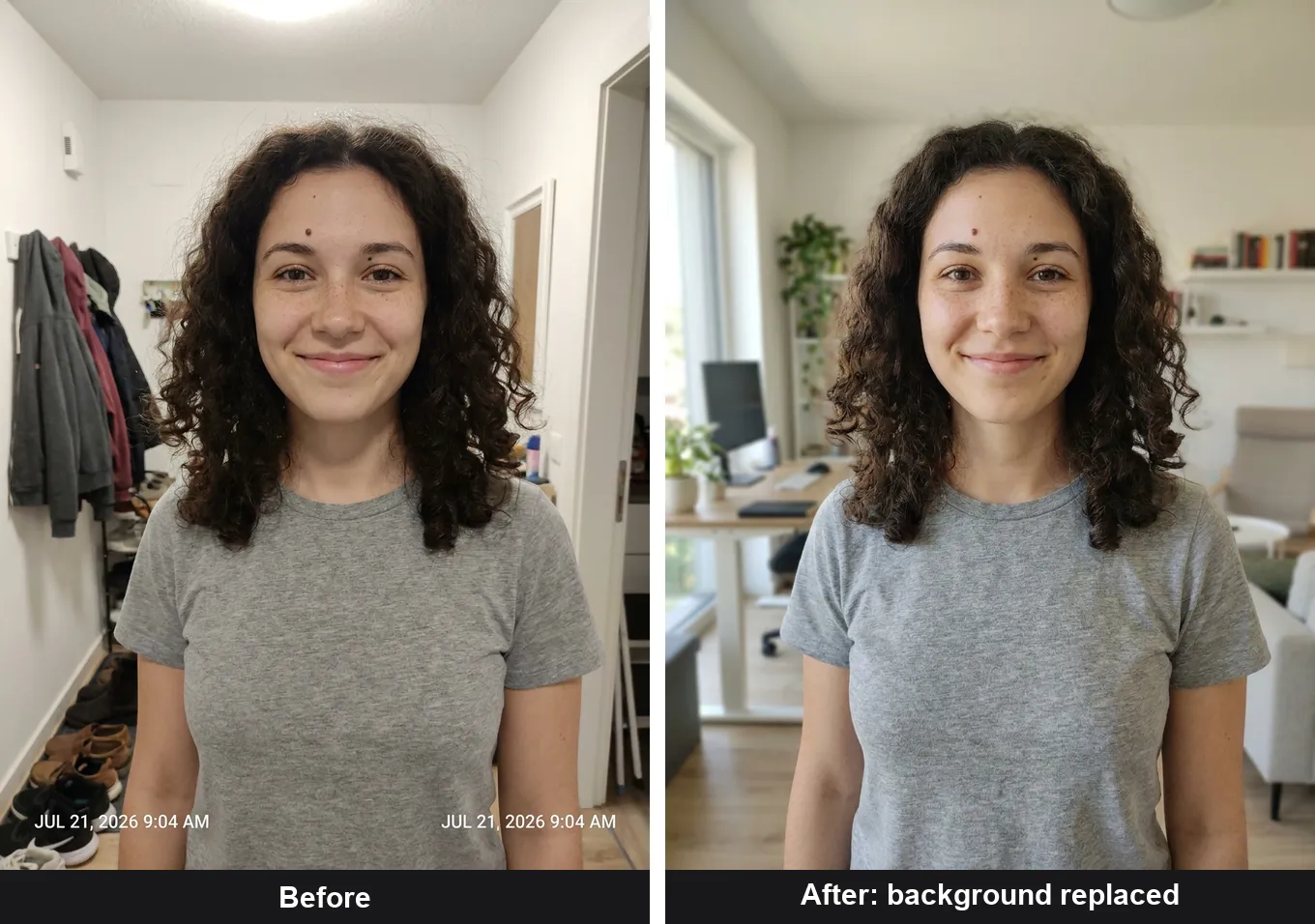
這類成果關鍵只有一件事,卻決定了幾乎所有含有人物的修圖品質:AI 修圖提示詞不是描述你想要的一張新圖片,而是清楚交代哪些地方要修改、哪些地方必須維持不變。少了後半段,模型往往會默默重畫你沒提到的部分,而臉通常最先遭殃。
本頁所有前後對照都是真實修圖結果,不是示意 mockup。我在 2026 年 7 月 21 日,透過 API 以 Google 的 Nano Banana Pro 與 ByteDance 的 Seedream 5 Pro 跑過這些提示詞。Nano Banana Pro 每次修圖約花 6 credits,約 $0.06,完成時間介於 20 至 95 秒;圖片僅為方便並排比較而縮放,皆是模型原始輸出。這是一份小規模實測,不是效能基準測試。
AI 修圖提示詞怎樣才會有效?
生成圖片與編輯圖片,是兩種不同任務。圖片生成是從零開始建立畫面,描述愈完整通常愈有幫助;但修圖的起點是一張大致已經正確的照片,寫太多反而是風險。你重新描述的任何元素,模型都可能認為自己有權重新繪製。
好用的 AI 修圖提示詞通常有五個部分,而多數效果不佳的提示詞,缺的正是最後兩項:
1. 動作:替換、移除、修復、改色、重打光、延展。2. 目標:背景、天空、襯衫、馬克杯。3. 預期效果:明亮的居家辦公室、霧面黑色、黃金時刻光線。4. 保留條件:哪些部分必須完全不動。5. 禁止條件:模型不能做什麼,例如美化、改變身形或加入人物。
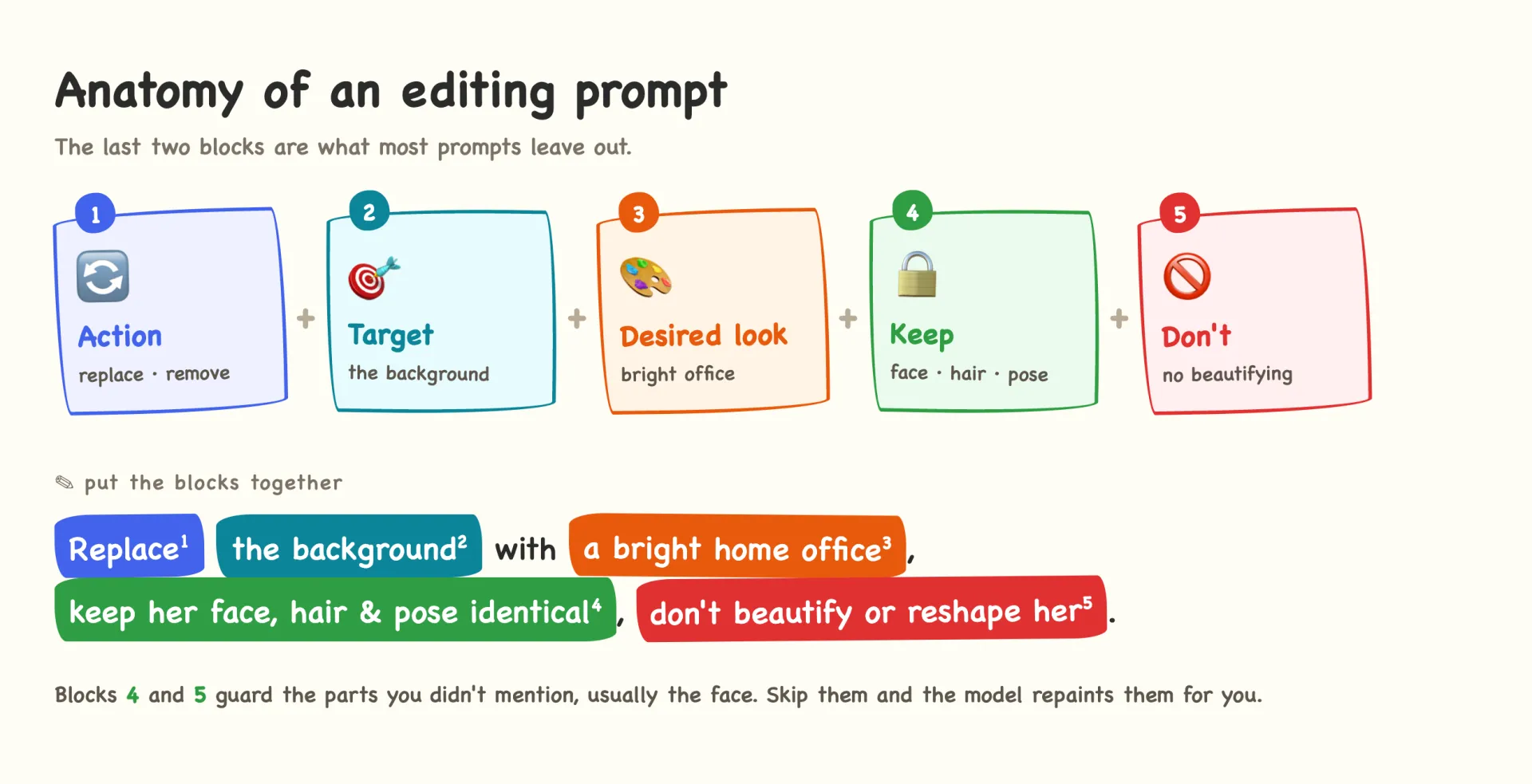
實際寫出來,就是一句明確指令,再加上保留條件:
Replace the background with a bright modern home office with a large
window and soft daylight. Keep the person's face, hair, expression, pose,
and clothing exactly identical, and match the new light onto the subject.
Do not beautify or reshape them.
身分鎖定句:防止臉部變樣的一句關鍵指令
使用 AI 修圖工具最常聽到的抱怨很直接:「我只想換背景,為什麼臉變了?」在 Reddit 上,許多修改自己照片的使用者會互相分享一整段用來鎖定身分的指令,逐一點名臉部輪廓、髮際線、雀斑、痣與疤痕。這種具體程度,正是它有效的原因。
只要畫面裡有人,請在每次修圖提示詞最後貼上這段:
Keep the person's face, facial structure, freckles, moles, hairline, skin
texture, and expression exactly the same. Do not beautify, smooth, slim,
or restyle them. Only change what I asked for above.
直接寫出特徵,例如雀斑或左眉上方的痣,會比模糊地說「保持她原本的樣子」更有效,因為模型有了具體錨點可保護。上方照片中的主角之所以能在每次修圖後保留雀斑與眉上的痣,就是因為提示詞明確列出了它們。
不同模型對這段指令的依賴程度不一樣。較強的編輯模型即使沒加這段話,也能大致保留臉部特徵,但常會重新裁切或稍微潤飾。至於那些很愛「改善」人物的模型,少了它就容易出現更平滑的皮膚、更尖瘦的下顎,最後變成一張不太像你的臉。既然加入它沒有額外成本,任何有人物的修圖都值得加上。
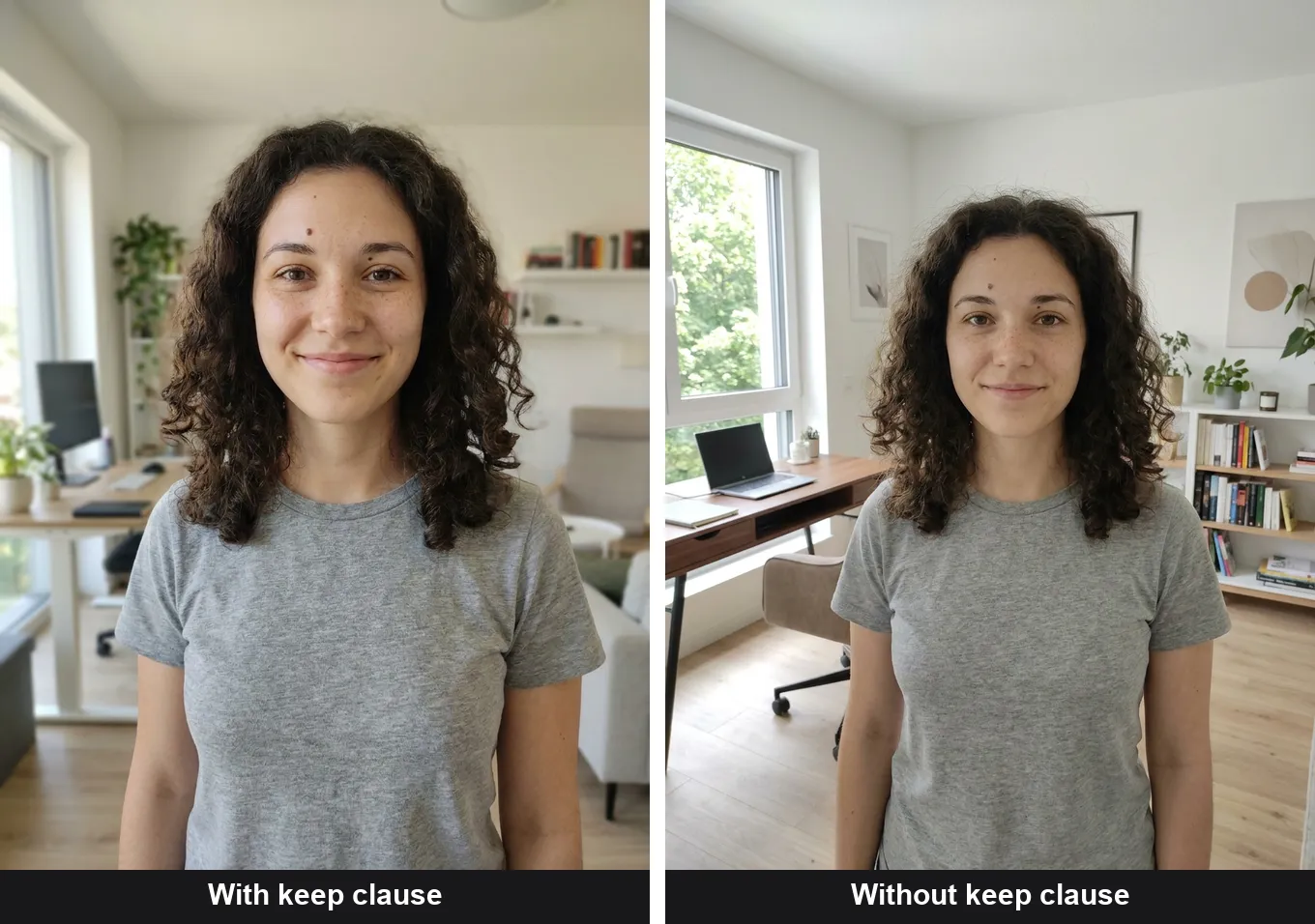
上圖就是實測結果:同一張照片、同一個模型(Nano Banana Pro)、同一段換背景提示詞,分別加入與不加入保留條件。兩張都留下了她的雀斑與眉上痣,但沒加條件的版本裁切更近,也悄悄平滑了皮膚。若換成美化傾向更強的模型,這樣的差距就可能直接變成另一張臉。
16 組可直接複製的 AI 修圖提示詞
以下依照你想完成的修圖任務分類。把中括號內換成你的需求,保留原有結構;如果照片裡有人或商品,記得在末尾加上前面提到的保留條件。
1–2:換背景或整理背景
1. Replace the background with [a bright modern home office with a large
   window]. Keep the person's face, hair, expression, pose, and clothing
   identical. Match the new ambient light onto them naturally.

2. Keep the person exactly as-is and replace only the background behind
   them with a clean, out-of-focus neutral studio grey. Do not change
   their edges, hair, or lighting on the face.
提示詞 1 產生了本頁最上方的換背景成果:主角從走廊移到辦公室,人物本身維持不變。
3:改成專業棚拍大頭照光線
Relight this photo as a professional studio headshot: soft key light from
the front-left, gentle fill, a subtle hair rim light, and a clean dark-grey
seamless backdrop. Keep the face, freckles, hair, and clothing identical.
Change only the lighting and background.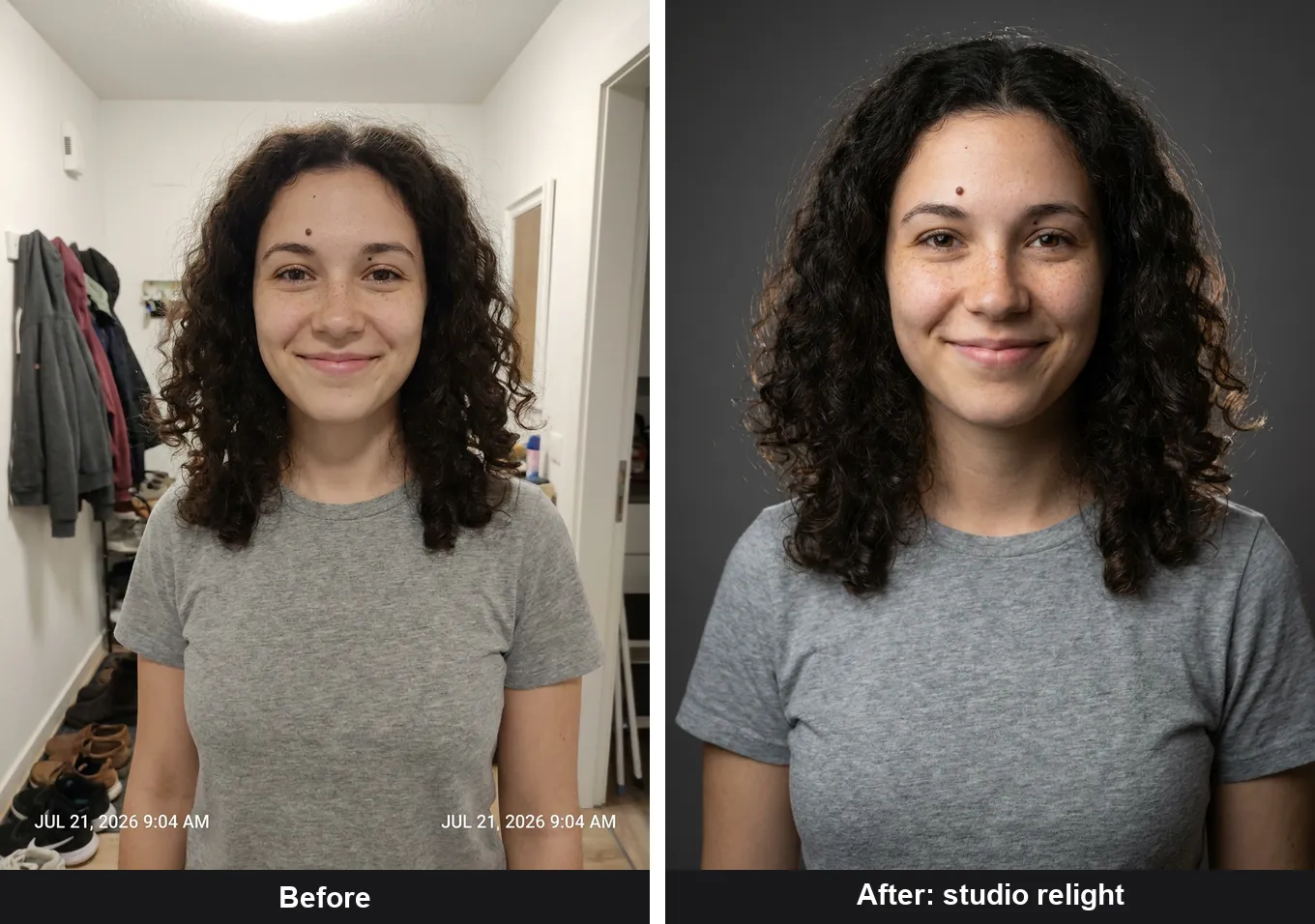
原圖只是光線平淡的手機隨拍。提示詞只要求調整光線與背景,因此人物沒有變,照片卻開始像是有意安排過的專業拍攝。
4:修復老舊或受損照片
Restore this damaged photo. Remove creases, scratches, and dust, and
rebuild any torn or missing areas naturally. Correct the faded color cast
to balanced, natural color with proper contrast. Keep every person's face,
expression, clothing, and the setting exactly the same. Do not add people
or invent details that were not there.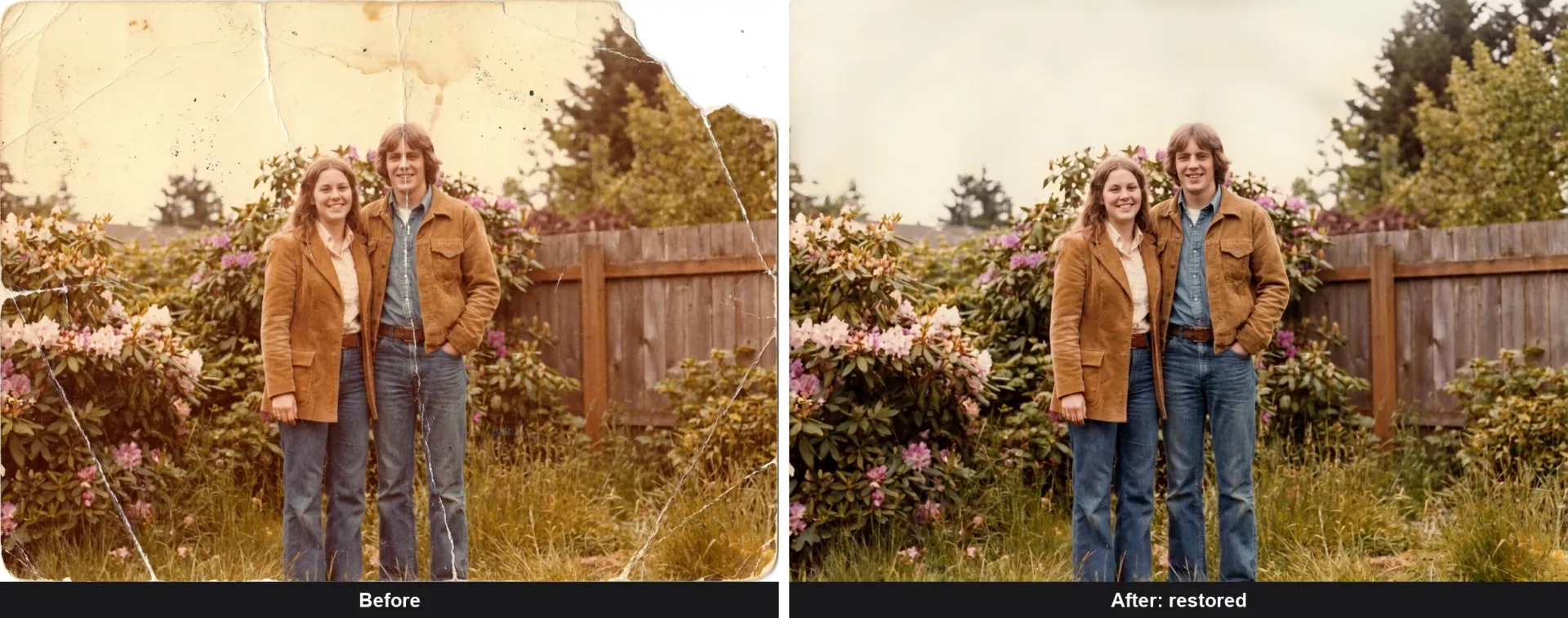
這正是「不要虛構原本不存在的細節」這句話不可少的地方。修復模型會想填補缺口,而缺口靠近臉部時,就可能憑空補出五官。要求模型僅重建原本存在的內容,可以降低這種虛構情況,但無法保證重建區域符合歷史事實。任何重建過的臉部,都應拿另一張該人物的照片交叉比對。
5:把商品照整理成電商主圖
Place this [product] on a clean, seamless white studio background for an
e-commerce listing. Remove all clutter. Add soft, even lighting and a
subtle contact shadow. Keep the product's exact shape, color, texture,
and proportions. Do not restyle or replace it.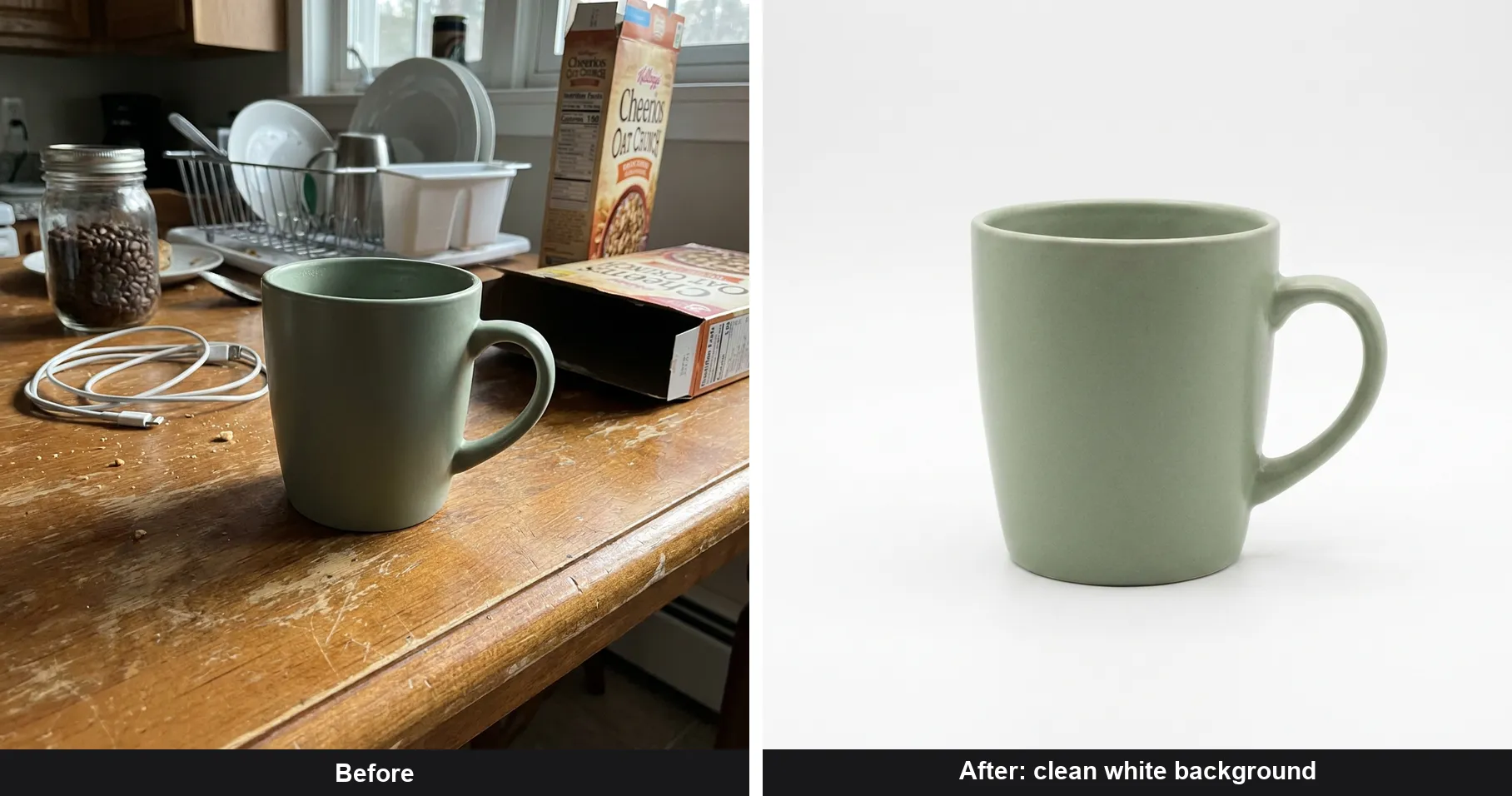
一張雜亂桌面上的馬克杯手機照,變成了白底商品照。這裡的保留條件和人物修圖同樣重要:若不加上它,「乾淨的商品照片」很容易讓模型換上一個更亮、更通用,卻不是你要賣的馬克杯。還有一點要注意:模型會重新打光並重建商品材質,可能悄悄改掉 logo 或標籤;若要正式上架,發布前請與實物仔細核對。
6:移除物件或人物
Remove [the person on the left / the trash can / the reflection] from this
photo. Reconstruct the area behind it to match the surrounding
[wall / grass / sky] seamlessly. Keep everything else, including the
lighting and the main subject, unchanged.
7–8:只改一個元素,其餘不動
7. Change only [the mug's color] to [matte black]. Keep its shape,
   position, lighting, and the entire rest of the photo identical.

8. Change the person's shirt to [a plain white button-down]. Keep their
   face, hair, pose, body, and the background exactly the same.
只改單一屬性,是 AI 編輯器最擅長的任務之一,也是寫太多最容易壞事的情境。指定唯一要改的部分,再把其餘內容鎖住即可。
9:換風格,但不改畫面內容
Restyle this photo with [a cinematic teal-and-orange grade, soft film grain,
lifted shadows], like a still from a modern drama. Keep the subject,
composition, and all facial features identical. Change only color and mood,
not content.
10:加入符合場景的物件
Add [a steaming cup of coffee] to [the empty desk]. Match the perspective,
lighting, and shadow direction of the scene so it looks like it was there.
Keep everything else identical.
11:移除文字、浮水印或時間戳記
Remove the [watermark / date stamp / on-image text] from this photo and
reconstruct the area behind it to match the surroundings. Keep everything
else identical.
12:延展畫面邊界(outpaint)
Extend this photo to a [16:9] frame, continuing the existing background
naturally on both sides. Keep the subject and all existing content
unchanged; only add new background at the edges.
13–16:沿用相同結構的更多修圖需求
13. Replace the sky with [a dramatic sunset / a clear blue sky]. Keep the
    foreground, subject, and their lighting consistent with the new sky.

14. Colorize this black-and-white photo with natural, realistic color.
    Keep every face, feature, and detail exactly as-is; do not restyle.

15. Restage this empty room with [a modern sofa, a rug, and a floor lamp].
    Keep the walls, windows, floor, and proportions of the room unchanged.

16. Change the season in this photo to [autumn], adjusting foliage color
    and daylight. Keep the people, buildings, and composition identical.
近期流行的變身提示詞
大家真正願意分享的修圖,通常不是修正瑕疵,而是徹底變身。它們仍採用相同結構,只是把「其他內容完全不變」改成列出少數必須保有辨識度的特徵,剩下的就交給模型自由發揮。以下兩組,都是以本頁最上方同一張照片實測:
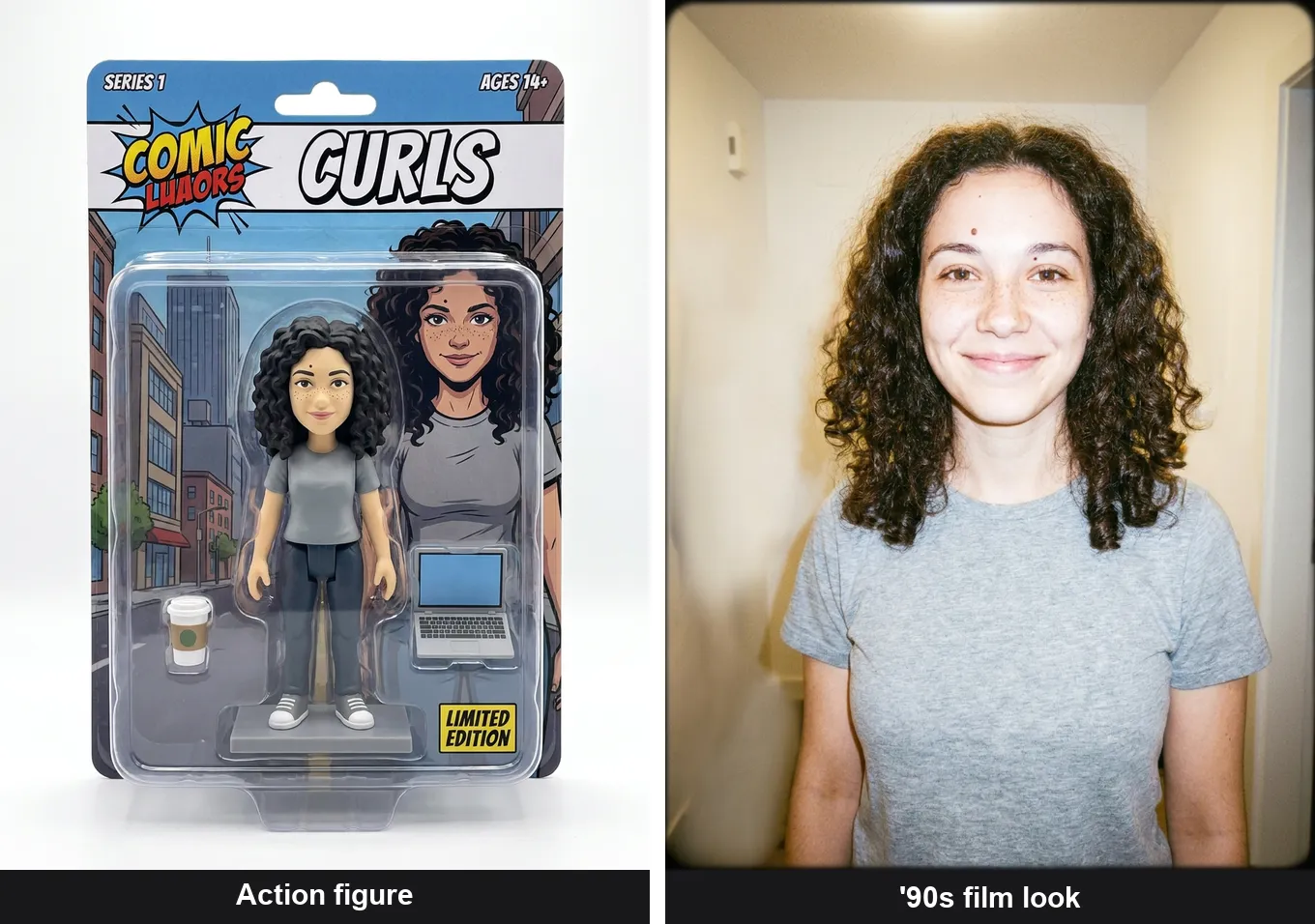
收藏級動作人偶:
Turn the person in this photo into a collectible action figure of
themselves, sealed in blister packaging on a printed backer card, with a
brand logo and a couple of mini accessories in the tray. Keep them
recognizable: same hair, face, and outfit. Studio product-photo look.
1990 年代底片人像:
Restyle this photo as a 1990s analog film portrait: direct on-camera
flash, slight overexposure, warm faded colors, fine grain, and a plain
wall background. Keep the face, hair, and features recognizable.
另外兩組同類型提示詞:
Turn this into a soft plush-toy version of the person, keeping the hair,
colors, and outfit recognizable, on a plain studio background.

Restyle this as a glossy magazine-cover portrait with studio lighting and
cover text, keeping the face and hair recognizable.
風格重塑愈強,人物身分保留就會愈鬆。請點名兩三個讓人認得出來的特徵,例如髮型、配件或穿著,並確認產出結果。如果臉部必須完全一致,應改用前面的身分鎖定型修圖提示詞。
為什麼模型不聽指令?三個寫法減少失控
即使提示詞本身正確,模型若以錯誤順序執行或自行覆寫指令,結果還是可能失敗。以下三個習慣能避免多數問題。
有些模型會先改寫你的提示詞再執行。 有使用者看過 Meta AI 先生成正確的預覽,接著說要「改寫提示詞並加入更多光線」,最後交出一張不再符合需求的圖片。你無法阻止它改寫,但可以限制範圍:在最後補上 Do not add, remove, or change anything I did not mention。
一次只改一件事。 同一段提示詞裡同時換背景、修頭髮、提亮照片,等於給模型空間重新協調三件事。把它們拆成不同次修圖,每一步都先檢查,才能清楚知道是哪一項指令出了問題。
提示詞要短,結構要硬。 冗長又華麗的描述,對模型來說像是創作授權;短而明確、帶有強制保留條件的指令,才像真正的限制。若身分仍然跑掉,可把原始照片重新作為模型要比對的參考圖輸入。
這些提示詞該用哪個模型跑?
同一段提示詞在不同編輯器上的表現並不相同,因此模型也是配方的一部分。以下以完全相同的換背景提示詞與相同保留條件,在 Nano Banana Pro 和 Seedream 5 Pro 上執行:
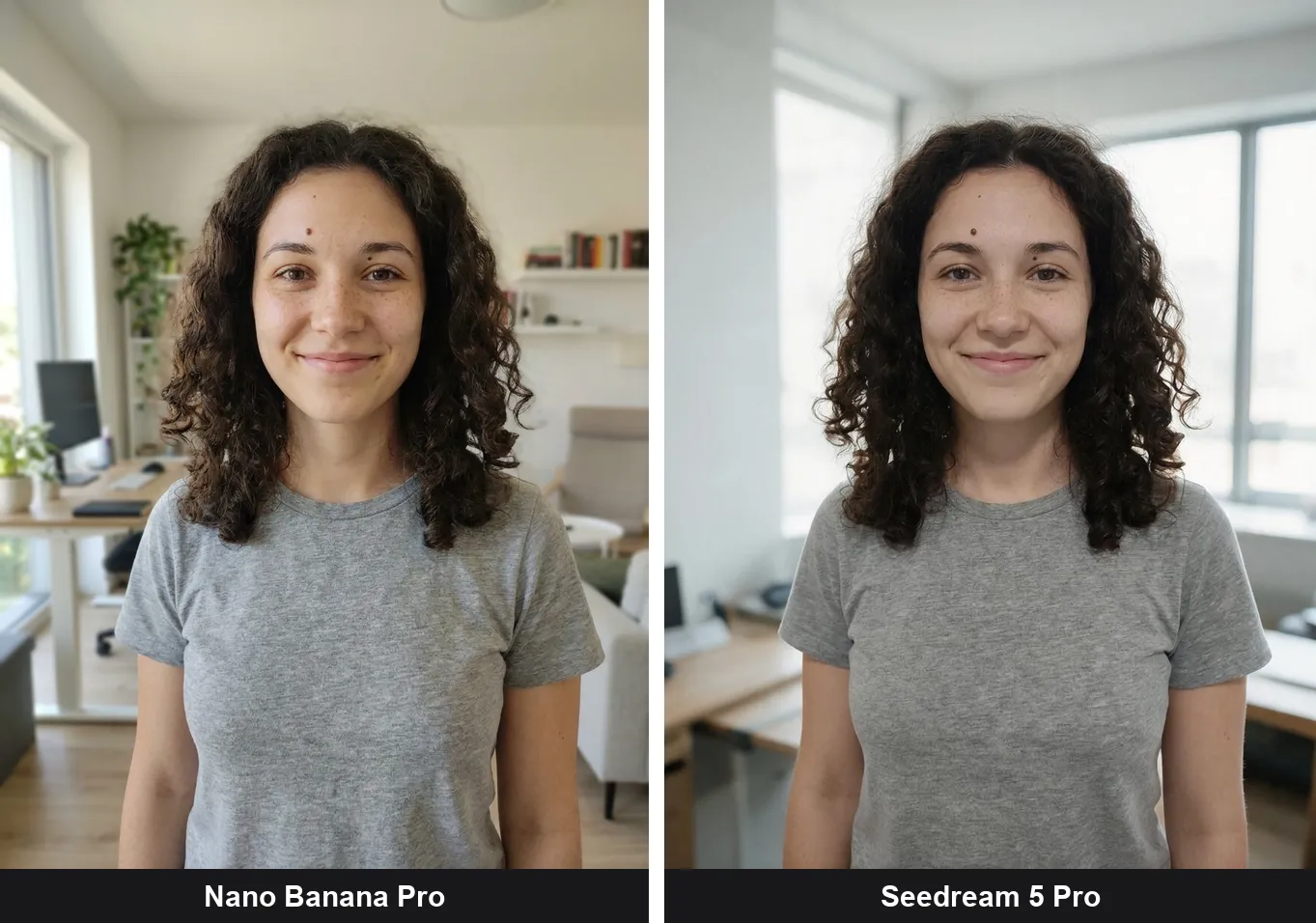
兩者都保住了她的身分特徵:痣、雀斑與捲髮都還在(這項差異可參考這篇 Nano Banana 2 vs Seedream 5 comparison)。不同之處在於成品的氣質。
- Nano Banana Pro 保留了隨拍照片自然、略帶不完美的感覺。若修圖後仍要看起來像原始照片,例如要呈現為未修圖的人像、紀實照片或商品列表,適合選它。
- Seedream 5 Pro 保留了相同識別特徵,但把皮膚處理得更接近光澤感棚拍人像。當你的目標就是更乾淨、更精緻的視覺效果,例如行銷素材或社群裁切圖,適合選它。
兩者沒有誰對誰錯。但有一條規則不變:遇到偏向美化人物的模型,身分鎖定句不是選配。
這組比較是在 2026 年 7 月 21 日,以相同輸入圖片與相同提示詞,對比 nano_banana_pro 與 seedream_v5_pro;Seedream 每次修圖約 7.5 credits,Nano Banana Pro 則約 6 credits。
不需要為每個模型分別申請帳號。Nano Banana Pro、Seedream 5 與 GPT Image 等編輯模型,都能透過如 AIReiter 這類平台的單一 API 存取;本頁修圖就是以這種方式完成,每次約 $0.06。若想深入了解單一模型的提示詞模式,這份 Nano Banana Pro prompt guide 比本文的入門範例更完整。
常見問題
什麼是 AI 修圖提示詞?
AI 修圖提示詞是一段簡短文字指令,用來告訴 AI 模型如何修改既有照片,例如「將背景替換成純白色攝影棚牆面」。它不同於從零生成畫面的圖片生成提示詞;修圖提示詞是針對你上傳的照片進行修改,因此除了說明要改什麼,也應清楚交代哪些內容必須保留。
可以把這些提示詞直接貼進 ChatGPT 嗎?
可以。這些提示詞適用於大多數能以文字修改上傳圖片的工具,包括 ChatGPT 的圖片工具、Gemini 與專門的修圖工具;不過各模型的確切語法與遵從指令的嚴格程度仍有差異。貼上提示詞、附上照片,若畫面中有人,再加入身分鎖定句。一次只固定修改一件事的寫法,通常最能跨工具通用。
有免費、支援提示詞的 AI 修圖工具嗎?
有數個工具提供提示詞修圖的免費方案,但通常會限制解析度、加入浮水印,或限制每日修圖次數。免費方案適合測試提示詞與偶爾修一張圖。若需要大量修圖,或需要無浮水印的完整解析度,透過 API 使用編輯模型每張圖只要幾美分;一旦超過隨興使用階段,往往是更實際的選擇。
現在最熱門的 AI 修圖提示詞有哪些?
目前廣為流傳的多是變身型效果,而不是修瑕疵:收藏級動作人偶、絨毛玩偶版本、復古底片閃光燈人像,以及雜誌封面風格。它們沿用同一套提示詞結構,但只列出必須保有辨識度的特徵,因為重點就是重塑其他所有元素。
我只想換背景,為什麼 AI 卻改了我的臉?
因為提示詞沒有明確要求它不要改。編輯模型會重新渲染整個畫面,若沒有保留條件,它會把臉也視為可以「改善」的部分。加入列舉要保留特徵、禁止美化的指令,並限定只修改背景,就能大幅減少這個問題。
保持人物身分一致,最好的提示詞是什麼?
每次修圖最後都加上一段列出具體特徵的保留條件,例如:「Keep the face, facial structure, freckles, moles, hairline, and expression exactly the same; do not beautify, smooth, or slim.」點名具體特徵能讓模型有明確錨點可保護。若你打算把臉部呈現為未經修圖,使用前應在完整尺寸下與原圖比較,因為漂移最先會出現在眼睛與下顎線。若模型持續把臉修得太平滑,請改用更能保留皮膚質感的模型,或將原圖再次作為參考圖輸入。
延伸閱讀:使用 Nano Banana Pro 將人物替換到照片中的提示詞指南,以及 Nano Banana 2 photo editor guide。