 AIREITER
Sora 2 has never shipped a 4K frame: the API outputs 720×1280 by default, and even the Pro tier tops out at 1792×1024. Since the Sora app closed on April 26, 2026, each new clip starts life as an API render billed at $0.10–$0.50 per second. The fix for soft, low-resolution output is a two-stage pass, enhancement first and upscaling second, and the tool you run it with depends almost entirely on how many clips you process per month.
What Sora 2 Actually Outputs in 2026 (and Why Clips Look Soft)
Sora 2 output comes from the API now, and the official model page pins down exactly what you get: sora-2 renders 720×1280 portrait or 1280×720 landscape at $0.10 per second, sora-2-pro renders the same sizes at $0.30 per second, and only sora-2-pro reaches 1024×1792 or 1792×1024 at $0.50 per second, in fixed 4-, 8-, or 12-second clips (OpenAI model page).
| Tier | Resolution | Price/second | 8-second clip |
|---|---|---|---|
| sora-2 | 1280×720 / 720×1280 | $0.10 | $0.80 |
| sora-2-pro | 1280×720 / 720×1280 | $0.30 | $2.40 |
| sora-2-pro | 1792×1024 / 1024×1792 | $0.50 | $4.00 |
Two timeline facts define the workflow today: the Sora web and app products were discontinued on April 26, 2026, and the API itself is scheduled to shut down on September 24, 2026 (OpenAI Help Center). App-era downloads were capped at 1080p, and the r/aivideo author quoted below reported his downloaded clips at roughly 1280×704 - his workflow: keep 720p for online posting, send selected projects through Topaz for a 1080p finish (r/aivideo workflow thread).
Before upscaling, inspect your clip for the three defect types Sora 2 creators report most often: compression smoothing fine texture, temporal flicker between frames, and motion warping edges - a bare "upscale to 4K" pass enlarges the flicker along with the picture.
The Workflow: Enhance First, Upscale Second
Order of operations decides whether your export looks cinematic or just bigger:
- Export the cleanest source available. Generate at the highest size your budget allows, download the original file, and avoid any intermediate re-encode - each re-compression pass bakes artifacts in that the enhancer then has to remove.
- Enhance at native resolution. Run denoise, artifact cleanup, and flicker reduction before any scaling. At 720p, cleanup models work on fewer pixels, run faster, and avoid amplifying defects into the upscaled frame.
- Upscale 2× by default; go 4K only when the destination demands it. 720p to 4K multiplies the pixel count 9×, and a 4× pass infers texture rather than recovering it from the source. A 2× pass to 1440p (2560×1440 landscape, 1440×2560 vertical) is usually sufficient for social delivery.
- Add frame interpolation and grading last, if at all. Taking 30fps source to 60fps is a separate lever from resolution - tools like Topaz's Apollo/Chronos models and Wondershare's interpolation (advertised up to 240 FPS) sell it as a distinct feature for good reason. Grade after scaling so noise reduction doesn't fight your color choices.
One provenance note: OpenAI's Sora 2 system card describes a visible moving watermark on first-party downloads and C2PA provenance metadata on outputs (Sora 2 system card, PDF) - treat watermark removers as a legal question, not a workflow step.
Sora 2 Video Enhancer Tools Compared (2026)
Four variables pick your tool: local versus cloud, published versus hidden pricing, volume, and whether footage can leave your machine. Here is the full field, with pricing verified on vendor pages in August 2026:
| Tool | Type | Verified pricing | Limits that matter | Best for |
|---|---|---|---|---|
| Topaz Video | Desktop (Win/Mac), local render | Personal $299/yr prepaid ($39–59/mo monthly); Pro $699/yr | "Limited commercial use" under $1M revenue on Personal; cloud credits expire monthly | Volume, client work, privacy |
| TensorPix | Cloud | Standard $5.50/mo (10 credits); Premium $12.42/mo (35); extra credits $0.80–1.50 each | Free tier capped at 720p input, 1 concurrent job | Occasional creators |
| Vmake | Cloud | $9.90/mo full plan (vendor-claimed, no per-video fees) | Trial terms unspecified | Bundled editing + enhance |
| Media.io | Cloud | Free signup credits, then 1 credit per video - no dollar price published | MP4/MOV, 15-min max; output hedged as "4K-like" | Zero-budget one-offs |
| VidMage | Cloud | "Free to try" - no price on page | 2×/4× presets; MP4/MOV/M4V | Quick 2× social passes |
| Wondershare UniConverter | Desktop + web | Pricing behind "See Pricing" link | 4K–8K targets, 240 FPS interpolation claim | Interpolation-heavy fixes |
| HitPaw VikPea | Desktop | Price not listed on its Sora guide page | Face/Anime/Sharpen model picker | Face-heavy footage |
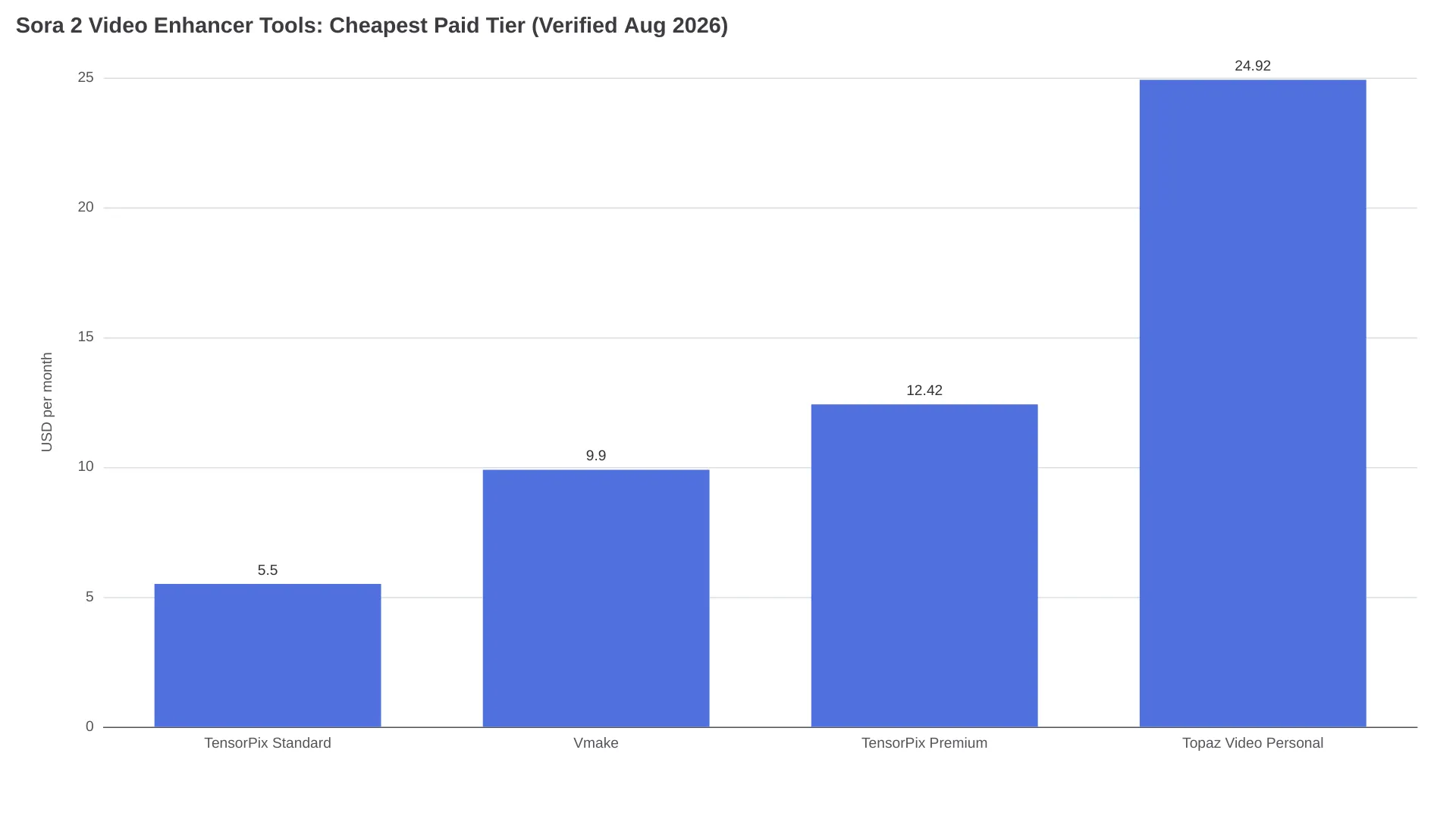
TensorPix bills by credits, and the exchange rate matters more than the sticker price: per the vendor's pricing page, one credit covers about two minutes of enhanced video - roughly fifteen 8-second Sora clips - so the $5.50 plan alone absorbs about 150 clips a month. Topaz inverts that model: a flat $299/year (about $25/month equivalent) for unlimited local rendering minutes. Derived from TensorPix's overage rates ($0.80–1.50 per credit by plan), the crossover lands around 350 clips a month on Standard overage or 680 on Premium - past that, Topaz's flat rate is the cheaper enhancer:
| Cloud (TensorPix et al.) wins when | Desktop (Topaz) wins when |
|---|---|
| Volume under ~350–680 clips/month, depending on plan | Volume past that range - flat rate beats per-credit overage |
| Footage can be uploaded | Client contracts or NDAs forbid uploading footage |
| Occasional or trial use | You need unlimited local minutes or commercial licensing above $1M revenue (Topaz Pro) |
Sora creators also report CapCut handling quick free resolution bumps (r/HiggsfieldAI thread).
One expectation-setting quote from the community:
"We got 1080p and higher frame rates, 4k in 6 months." - commenter, r/aivideo Sora 2 workflow thread (reddit.com)
Half of that prediction arrived; native 4K generation still isn't on any OpenAI price list, so the upscaler remains the bridge.
Standard Plus an Upscaler vs. Pro: The Actual Math
The question every cost-conscious Sora creator ends up asking: pay 3× for Pro at generation, or render standard and upscale? Using the official API rates and TensorPix's cheapest paid tier (10 included credits ≈ 20 minutes ≈ 150 eight-second clips, per the vendor's credit table):
- An 8-second standard clip costs $0.80; the same clip on Pro 720p costs $2.40 - the upscaler subscription ($5.50) costs less than the Pro premium on four clips.
- At 100 clips a month: $80 generation + $5.50 upscaling = $85.50 vs $240 all-Pro.
- At 200 clips: $160 generation + $5.50 + about $5 in overage credits = ~$170.50 vs $480.
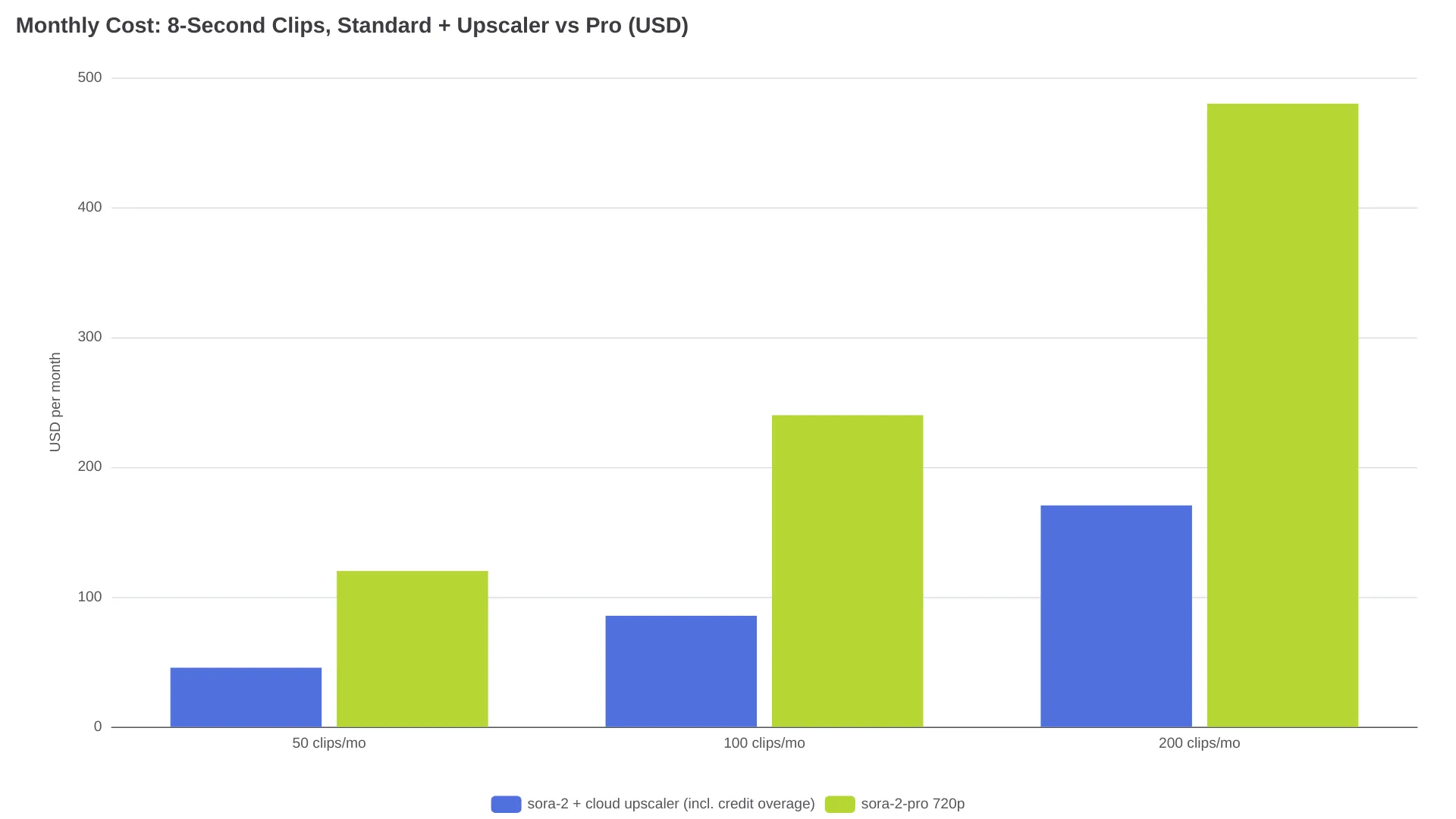
The price lines don't cross - but Pro buys native detail at generation time: real model-drawn texture instead of inferred pixels, while upscaling buys pixel count and cleanup (Media.io's own FAQ hedges its output as "4K-like"). The practical split: for large-screen or client deliverables, generating at 1792×1024 ($0.50/s) and then upscaling 2× is the strongest combination priced in this guide; for social feeds, the standard-plus-upscaler route keeps the bill around a third of all-Pro.
Three Things No Sora 2 Video Enhancer Can Fix
Enhancement is a polish pass, not a rescue. These failure classes are cheaper to regenerate than to repair:
- Wrong generations. Sora occasionally renders the wrong person or an uncanny likeness - the r/aivideo thread author estimated wrong-person generations at roughly 5% of his Cameo shots. No upscaler knows who you meant to draw; regenerate.
- Motion warp. Severely warped limbs and melting backgrounds get amplified by upscaling, because the model faithfully reconstructs the defect at higher resolution. If a frame is broken at 720p, it is broken at 4K.
- Identity drift across shots. Flicker reduction smooths within a clip; it does not make character B of shot 7 match character B of shot 2. That is a generation or edit-suite problem.
FAQ
Can Sora 2 export 4K natively?
No. The API's maximum output is 1792×1024 on sora-2-pro at $0.50/second; standard sora-2 is 1280×720. Anything labeled 4K from a Sora 2 workflow was upscaled after generation.
Is it cheaper to generate at 720p and upscale, or pay for Pro?
Upscaling wins on price at any volume - an 8-second Pro clip costs $2.40 versus $0.80 standard, and a $5.50/month plan covers about 150 clips' worth of enhancement. Pro's edge is native detail, which matters most for large-screen deliverables.
Should you use 2x or 4x upscaling on Sora clips?
Start at 2×: from 720p that lands at 1440p, usually sufficient for social delivery. Reserve 4× for destinations that display 4K - the 4× pass infers texture rather than recovering it, and fidelity drops as the multiplier climbs.
Do Sora 2 video enhancers work on vertical 9:16 clips?
Yes. 720×1280 portrait is a first-class API output; Media.io and VidMage both list portrait-friendly MP4/MOV (VidMage also takes M4V). A 2× pass yields 1440×2560, clearing the 1080×1920 vertical spec with room to spare.
What's the best free Sora 2 video enhancer?
For a one-off, Media.io's signup credits or VidMage's trial handle a clip or two. Recurring use hits limits fast - TensorPix's free plan caps input at 720p with one concurrent job, which is precisely the resolution you are trying to escape.
Which Lane Fits Your Clips
| Your situation | Lane | Next action |
|---|---|---|
| Social-only posting, phone-first | Skip enhancement | 720p already suits phone-first feeds; spend the budget on generation instead |
| YouTube, want "sharp" cheaply | Standard + cloud upscaler | Render 720p, enhance, 2× pass - upscaler from $5.50/mo, generation billed per second separately |
| Client or large-screen deliverable | Pro 1792 + light upscale | Generate at 1792×1024 ($0.50/s), clean, then 2× - the strongest combination priced in this guide |
| High volume or footage that can't be uploaded | Desktop Topaz | Flat $299/yr beats cloud overage past ~350–680 clips/month; also the lane when footage can't leave your machine |
For a solo creator inside the 10-credit allowance, cloud is cheaper; Topaz's flat rate takes over past the ~350–680 clip range, and privacy or commercial licensing above $1M revenue can justify it earlier. And if you are reading this after September 24, 2026, verify the API's status before building a workflow on it.
Related reading: free AI video upscalers compared, building better Sora 2 prompts, and how Sora 2 stacks up against Veo 3.1 and Kling in 2026.