 AIREITER
Plenty of tools ranking for "free video upscaler" are 30-day trials, watermarked exports, or previews you cannot download. The options that stay free run in your browser or on your own GPU. The trade-off: most of them cap you at 2× and lean on your own hardware.
The 7 free video upscalers that are actually free
"Free" splits into three kinds. Truly free tools (open source or browser-based) process video with no account and no cap. Quota tools give you a fixed free allowance per day or per signup, then charge. Trial tools unlock everything for a period or watermark the export until you pay. The table below covers the first two kinds; every limit was checked against the official page or tested directly on July 29, 2026.
| Tool | Kind of free | Watermark | Scale / output cap | Free quota | Signup |
|---|---|---|---|---|---|
| free.upscaler.video | Truly free (open source, in-browser) | No | Fixed 2× | Unlimited | No |
| ArtPlayer upscaler | Truly free (in-browser) | No | Fixed 2× | Unlimited | No |
| Video2X | Truly free (open source, local) | No | Engine-dependent | Unlimited | No |
| SeedVR2 | Truly free (open source, local) | No | Hardware-dependent | Unlimited | No |
| Krea | Free quota (cloud) | Not stated | 1×–8×, source-dependent | 4 videos / 24 h | Yes |
| TensorPix | Free quota (cloud) | Not stated | 720p input cap on free | Signup credits + weekly credits (1 credit ≈ 2 min) | Yes |
| CapCut | Free tier inside an editor | Not stated | Claims up to 4K; specifics unpublished | Not published | Yes |
Two rows deserve a flag. CapCut's official page advertises free upscaling to 4K but publishes no watermark, length, or resolution details; VideoProc's testing reports the online version stops at 2K with 4K reserved for the desktop app, and CapCut has not confirmed that anywhere we could verify. Canva also offers a video upscaler, but its free-plan limits are not published, so it stays out of the table.
Browser-based upscalers: no signup, no upload
free.upscaler.video and ArtPlayer's video enhancer run super-resolution models inside the browser through WebGPU, so footage never leaves your machine: no account, no queue, no server that could add a watermark.
free.upscaler.video, tested
I ran a 320×180 test clip (4 seconds, H.264) through free.upscaler.video on an Apple M3 Pro — a functional test of one short clip, not a cross-tool benchmark. The tool detected the GPU through WebGPU, loaded its default Balanced model, and rendered a live split preview (original left, 2× upscaled right) before any export.
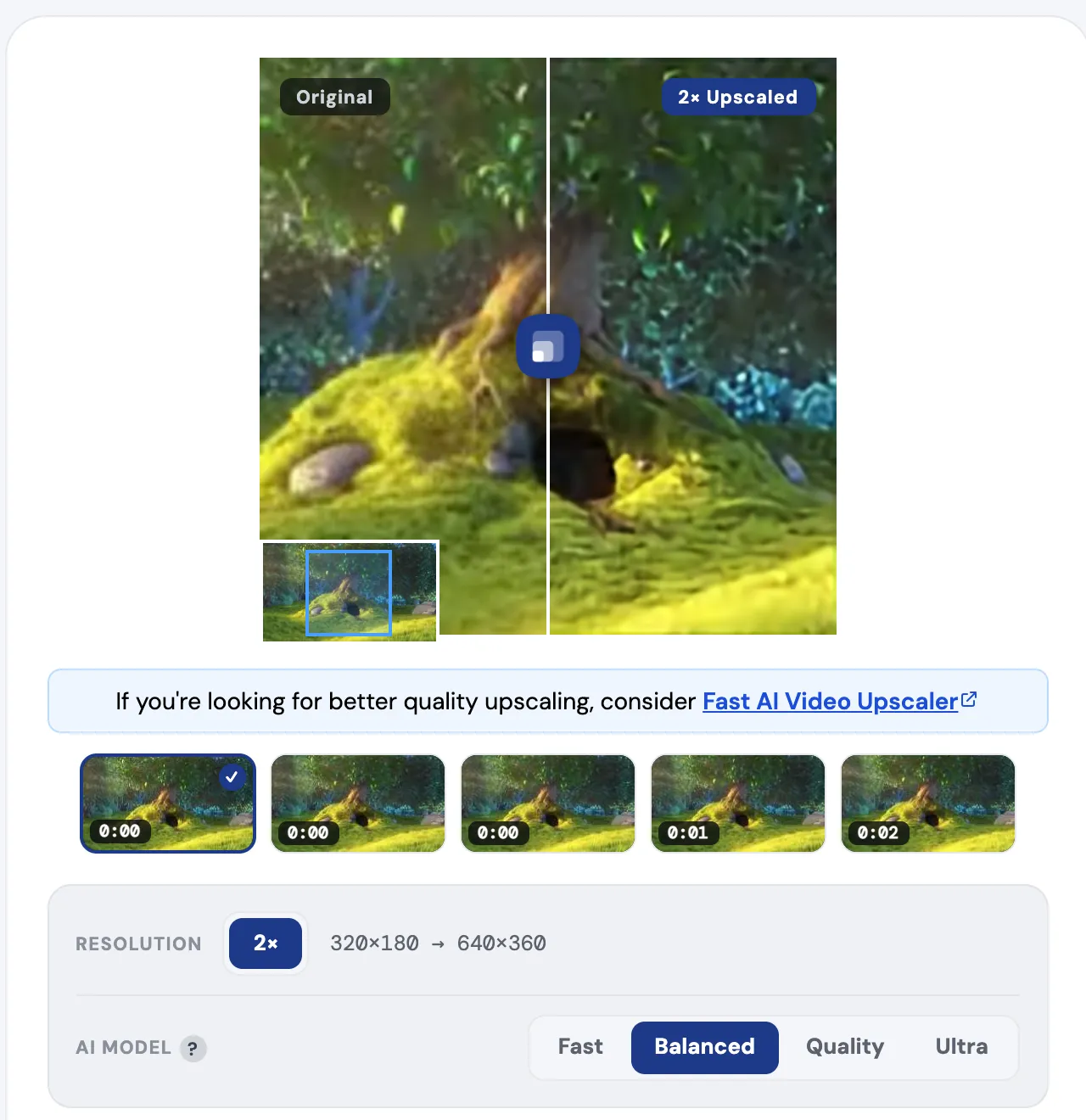
The panel shows what you actually control: resolution is fixed at 2× (my clip went 320×180 → 640×360), and the AI model has four tiers: Fast, Balanced, Quality, Ultra. The models are browser ports of open-source super-resolution networks, including Anime4K and Real-ESRGAN, which is why the site says it works particularly well on animated content.
The limits are real but honest:
- 2× only. 1080p becomes 4K in one pass, but 480p tops out at 960p per run.
- The tab must stay open during processing, per the tool's own FAQ; it supports pause and resume.
- No HDR. 10-bit video can come out with wrong colors.
- Browser codecs decide input support. AVI, MKV, and H.265 files that Chrome cannot decode will not load, and if your device cannot encode H.264, output falls back to WebM.
- Ultra needs a discrete GPU. The site warns it can drop below 1 fps without one.
The tool is open source (sb2702/free-ai-video-upscaler), where its model lineup and local-processing behavior can be inspected.
ArtPlayer video enhancer
ArtPlayer's upscaler works the same way: WebGPU or WebGL, local processing, no upload, no account, 2× output with three quality tiers. Its parent site bundles dozens of free browser video utilities (trim, compress, subtitle), so it fits when upscaling is one step in a longer edit.
Free-quota cloud upscalers: Krea and TensorPix
Cloud upscalers do the work on a server, which means they run fine on weak laptops — and meter you. Krea goes beyond 2× (up to 8× on small sources), which browser tools cannot do; since its free page does not state whether exports carry a watermark, test one clip before relying on it.
TensorPix adds friction the table cannot show: free files sit in a slow single queue, storage is 1 GB, and uploads are deleted after 30 days — fine for occasional short clips, wrong for a backlog of family tapes.
CapCut and Canva bundle upscaling into their editors. If you already edit in CapCut, its enhance step costs nothing extra to try — verify the export resolution against what you expected, since the published claims and third-party test results disagree (see the table above).
The open-source route: Video2X and SeedVR2
The tools that keep coming up in r/software and r/VideoEditing threads are not web apps at all:
"I'm looking for a good Alternative to apps like Topaz AI. I only want to upscale my 1080p Videos to 4k with Ai." — r/software
Video2X is the standard answer to that question. It is a free, open-source framework that wraps several upscaling engines (waifu2x, Real-CUGAN, Real-ESRGAN) behind one pipeline, with a Windows GUI for point-and-click use. It has two practical costs: setup (engine and FFmpeg configuration trip up first-time users) and speed (long videos without a recent NVIDIA GPU are slow). If your machine is the bottleneck, Video2X ships an official Google Colab notebook — its README says you can borrow an NVIDIA T4, L4, or A100 free for up to 12 hours per session.
SeedVR2 is the newer development. It is ByteDance's open-source one-step video restoration model (the repo lists the SeedVR2 paper as accepted to ICLR 2026), and a community ComfyUI node (~2,700 GitHub stars as of July 2026) makes it runnable in a standard ComfyUI workflow. In r/upscaling's 2026 discussion, users rate its 3BQ8 variant above Topaz's Starlight model — a community judgment, not a benchmark, but a strong signal given that one tool is free and the other is a paid subscription. Expect real VRAM requirements; this is the enthusiast tier, not the one-click tier.
FAQ
Is there a completely free video upscaler with no watermark?
Yes. free.upscaler.video, ArtPlayer's enhancer, Video2X, and SeedVR2 add no watermark because nothing is processed on a metered server; the work happens in your browser or on your own GPU. The constraint you accept instead is the 2× cap (browser tools) or the setup effort (open source).
Can I upscale video to 4K online for free?
Rarely in one pass. Free cloud tiers meter hard: Krea allows 4 videos a day, and TensorPix caps free input at 720p. Browser tools output 2×, so only a 1080p source reaches 4K. For unlimited free 4K, the working route is Video2X or SeedVR2 locally, or Video2X on Google Colab.
Do free AI upscalers work on anime?
Anime is the best case for the free tools listed here. Anime4K (used by free.upscaler.video) and waifu2x (in Video2X) were built for animated content, where clean lines and flat colors upscale far more convincingly than live-action grain.
What does Topaz cost if I outgrow free tools?
As of July 29, 2026, Topaz's desktop app is $59/month with unlimited local rendering, its Astra web upscaler starts at $19/month for 400 credits (about 10 minutes of HD enhancement), and the full Studio bundle is $399/year. That is the boundary: free tools cover 2× upscales and patient batch jobs; past that, you are paying for speed, higher scale factors, and codec breadth.