 AIREITER
Real-ESRGAN has held a 36,500-star GitHub repository for five years on a BSD-3-Clause license, and its ncnn-vulkan build runs on AMD, Intel, and NVIDIA GPUs alike. It is still the default free pick for still images and anime - and the wrong pick for long real-footage video.
The 2026 verdict: what Real-ESRGAN still wins, and where it loses
Real-ESRGAN still wins on reach: the whole stack is free, runs offline, and treats AMD, Intel, and NVIDIA GPUs as equals. It loses on video, where every frame is processed independently, and on heavy restoration, because the ICCVW 2021 paper trained a GAN on pure synthetic degradations that sharpens existing detail rather than regenerating it.
The user verdict on Reddit's r/upscaling threads compresses it to one line:
"Slow as crap but looks decent." - u/ChemistryAdorable956, r/upscaling
The weight files, one by one: x4plus, x2plus, anime_6B, and the rest
The model you pick matters more than the software you run it in. All six released weights sit on the official project's Releases page.
| Weight file | Native scale | Best for | Source |
|---|---|---|---|
RealESRGAN_x4plus.pth | 4x | Photos, general images | Release v0.1.0 |
RealESRGAN_x2plus.pth | 2x | Photos that only need doubling | Releases page |
RealESRGAN_x4plus_anime_6B.pth | 4x | Anime, illustration, line art | Release v0.2.2.4 |
RealESRNet_x4plus.pth | 4x | General images, safer texture | Releases page |
realesr-general-x4v3 | 4x | Compressed or noisy sources | Releases page |
realesr-animevideov3 | 4x | Anime video frames | Bundled in the ncnn zip |
The format trap: the ncnn portable build does not use .pth files at all - it ships pre-converted .param/.bin models in its models folder, so .pth downloads only matter for the Python route. One more quirk from the README: the official online demo exposes only the anime 6B model, so do not judge photo quality from it.
Route 1: the ncnn-vulkan portable build (no CUDA, no Python)
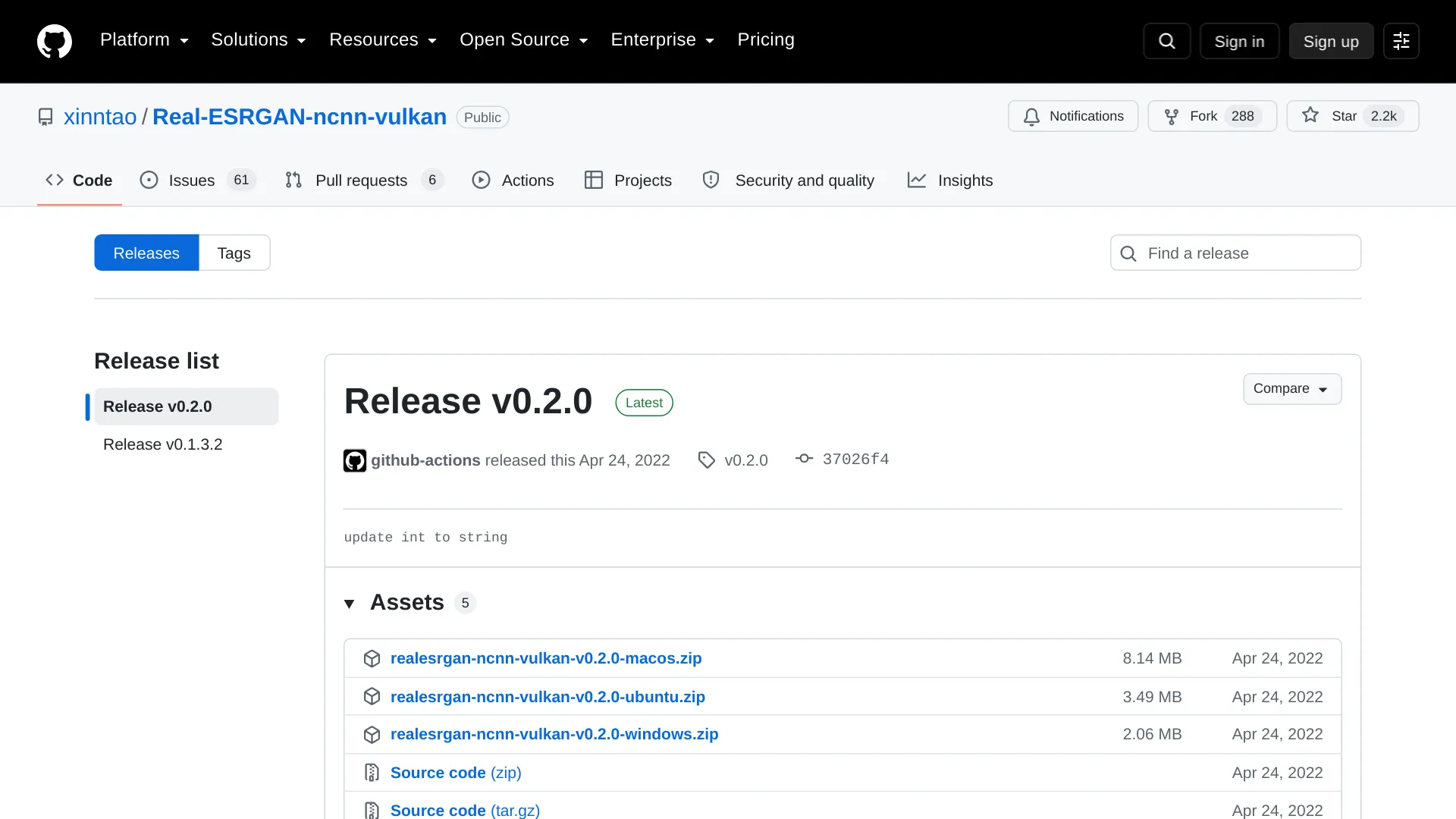
The fastest start is a portable executable from the Real-ESRGAN-ncnn-vulkan releases page. The latest release, v0.2.0 (April 24, 2022), ships three zips: Windows at 2.2 MB, Ubuntu at 3.7 MB, macOS at 8.5 MB. Unzip, open a terminal in the folder, and run:
./realesrgan-ncnn-vulkan -i input.png -o output.png -n realesrgan-x4plus -s 4No CUDA, no PyTorch, no Python - the official README states it works on Intel, AMD, and NVIDIA GPUs through Vulkan. Point -i at a directory instead of a file and it batch-processes every JPG, PNG, and WebP inside.
| Flag | What it does |
|---|---|
-i / -o | Input and output file or directory |
-n | Model name: realesrgan-x4plus, realesrnet-x4plus, realesrgan-x4plus-anime, realesr-animevideov3 |
-s | Scale: 2, 3, or 4 (default 4) |
-t | Tile size, ≥32 or 0 for auto - lower it if VRAM runs out |
-g / -j | GPU id for multi-GPU rigs; load:process:save thread counts |
-x | TTA mode for quality at the cost of speed |
-f | Output format: png (default), jpg, webp |
Two known limits, both documented in that README: the ncnn build has no outscale equivalent, and its tiling-and-stitching can introduce block inconsistencies that make results differ slightly from the PyTorch path. And -s 2 on the 4x-native x4plus weights is a trap: the flag accepts it, but users report the output collapsing.
"realesrgan-ncnn-vulkan where setting scale to anything other than 4 breaks the output - what is this?" - @hogehoge61, X
If 2x output is the goal, take the x2plus weights through a GUI or the Python route instead of fighting the flag.
Route 2: Python and PyTorch, for the full feature set
The Python route is where the project's full feature set lives. The inference_realesrgan.py script ships in the repository itself, so the official README install flow (Python 3.7+, PyTorch 1.7+) is:
git clone https://github.com/xinntao/Real-ESRGAN.git
cd Real-ESRGAN
pip install -r requirements.txt
python setup.py develop
python inference_realesrgan.py -n RealESRGAN_x4plus -i inputs -o results --face_enhance
python inference_realesrgan.py -n RealESRGAN_x2plus -i inputs -o results
What the extra flags buy you:
--face_enhanceruns GFPGAN on detected faces; the second command is the native-2x recipe for photos.--outscalesets arbitrary output sizes like 3.5x, but the README is candid that this is a LANCZOS4 resize of the 4x output, not native scaling.- Alpha-channel, grayscale, and 16-bit images are supported, per the README, only on this Python path.
- Inference runs in fp16 by default; pass
--fp32for full precision.
Route 3: GUI apps - Upscayl and Real-ESRGAN GUI
For folder-dragging without a terminal, Upscayl is the mainstream answer: a free, AGPL-licensed desktop app for Windows, macOS, and Linux built on Real-ESRGAN and Vulkan, with folder batch queues, a "Double Upscayl" second pass for heavily compressed JPEGs, offline operation after install, and output up to 16x in PNG/JPG/WebP. The official site recommends a Vulkan-capable dedicated GPU.

The lighter alternative is TransparentLC's realesrgan-gui, a cross-platform Tkinter front-end that can also drive Real-CUGAN and prefers the newer upscayl-ncnn binary when it finds one. Pick Upscayl for the polished batch experience; pick the CLI routes when you need scripting, ffmpeg pipelines, or exact model control.
Anime or photos? Pick the model by content, not habit
Anime, manga panels, and line art belong on anime_6B - per the official README, it is an anime-image model optimized for a much smaller size, and the project links its own comparison against waifu2x. Photographs belong on x4plus (or x2plus when doubling is enough). Compressed or noisy sources - old scans, heavy JPEGs, screenshots - are the case for realesr-general-x4v3, whose -dn denoising strength (documented for this model in the README) exists precisely to balance cleanup against the over-smoothing this family is known for.
One boundary r/upscaling users keep hitting: anime weights applied to real people are reported to produce unstable, glitchy faces - the first reply in that thread, from u/Green-Cucumber8507, is "What variant of the model?" Portraits with visible faces deserve the Python route with --face_enhance so GFPGAN repairs what the upscale smooths over.
What actually breaks, and the fixes
"Vulkan device not found" or instant crashes
Work through this in order:
- Update the GPU driver first.
- Confirm the card reports Vulkan support; Upscayl's Windows troubleshooting guide walks through the check.
- On dual-GPU laptops and desktops, force the app onto the discrete GPU in the system graphics settings.
Silent exits and the models folder
If the executable segfaults or silently exits instead of printing an error, check -m first: it must point at a folder containing the converted model files. Keep the executable and its models folder together exactly as shipped.
Out-of-memory on video, the 8 GB workflow
Long video is where VRAM dies. A working pattern posted by @bi_9527zx on X on an 8 GB card: unload every other model, split the clip into PNG frames with ffmpeg, upscale frames at 4x individually, then reassemble with ffmpeg scaling and padding. It works, but it re-frames the cost honestly:
"Some flicker may still remain because each frame is processed independently." - u/Dagnarus15, r/upscaling
The speed wall is real
For scale: @zinya2dx on X reports an hour of flat-out GPU time to upscale roughly 20 seconds of SD-quality video to 4K. Still images are far friendlier - one user measured around 2 seconds per image on an 860M-class GPU with NPU, @Tomoari_hsmt on X.
Real-ESRGAN vs Topaz and SeedVR2 in 2026
Real-ESRGAN now competes with subscription suites and open diffusion upscalers that regenerate rather than sharpen.
| Real-ESRGAN | Topaz Gigapixel | ByteDance SeedVR2 | |
|---|---|---|---|
| License and price | BSD-3, free | $149/year Personal, $499/year Pro (official pricing) | Apache-2.0, free |
| Hardware | Any Vulkan GPU via ncnn | Desktop app on your own GPU | NVIDIA with serious VRAM (3B/7B variants) |
| Approach | GAN sharpens existing detail | Commercial GAN/CNN suite, per-model controls | One-step diffusion regenerates detail |
| Reported throughput | 1.7 fps at x4 720p fp16 (RTX 5090) | Proteus: 15 fps @1080p, 7.3 fps @4K | Diffusion 4K class: 0.2–2 fps |
| Watch out for | Flicker on video, flat texture on heavy damage | Subscription pricing | Documented over-sharpening of 720p AI-generated video |
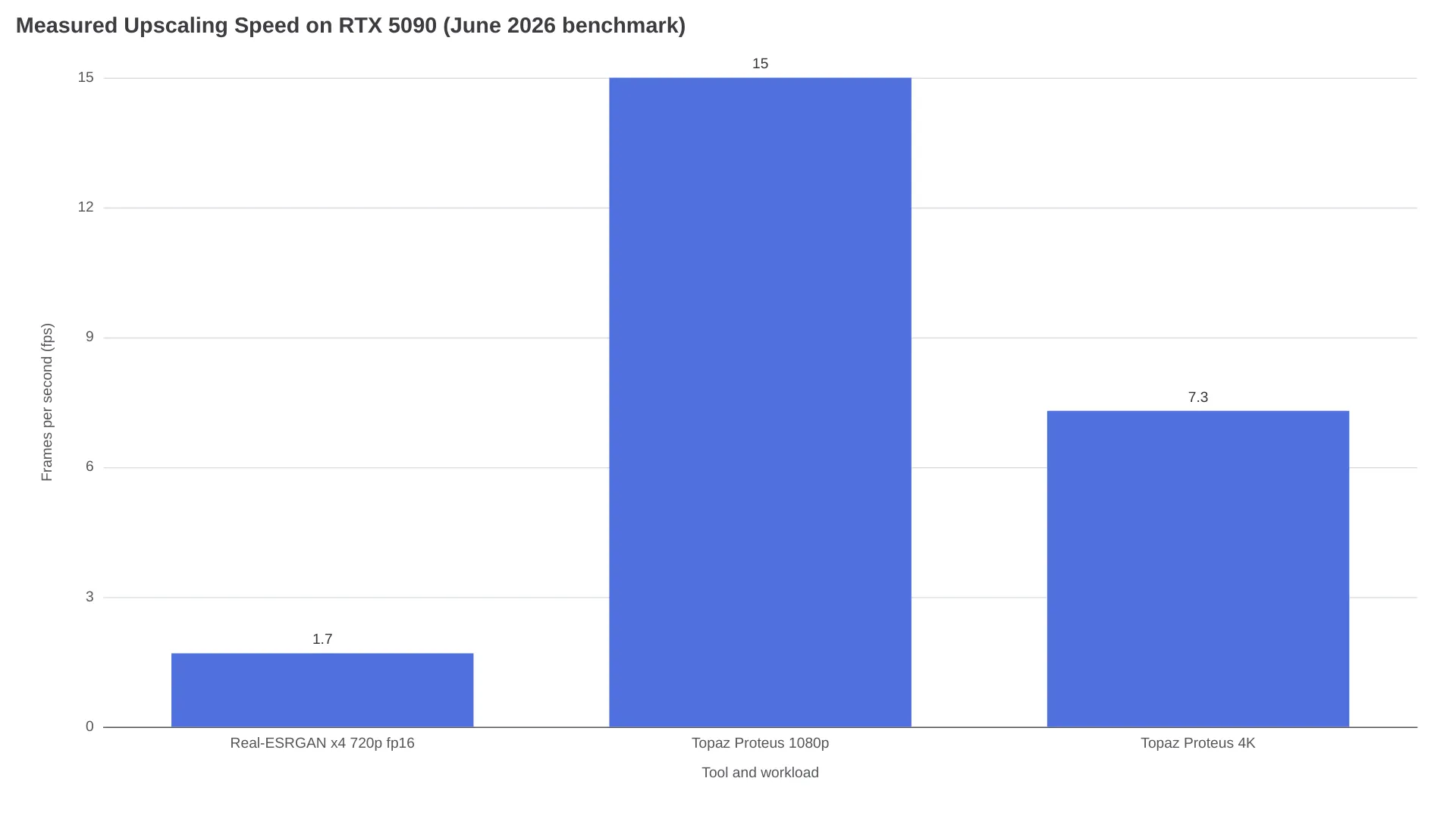
All throughput figures come from one continuously updated open benchmark run on an RTX 5090 in June 2026 - the workloads differ (Real-ESRGAN was measured at x4 on 720p input in fp16, Topaz Proteus at 1080p and 4K), so read them as orders of magnitude and let that benchmark's own picks set the hierarchy: Real-ESRGAN for cheap batches and previews, SeedVR2-7B for cinema-grade 4K.
SeedVR2, published at ICLR 2026 by ByteDance under Apache-2.0, regenerates detail diffusion-style - the reverse trade: per that benchmark's methodology notes, diffusion upscalers fit synthetic input better but can invent a new face and drift across frames. On edges, newer open tools are already ahead - one X user comparing Real-ESRGAN against FlashVSR put it plainly:
"RealESRGAN ends up with less." - @dawidope, X
And long-time users fall off it for detail blowout on difficult sources: "i just notice it blows out details sometimes," wrote @realrebelai on X, before moving to Topaz as a lifeline.
The API route sidesteps all hardware questions. Replicate's hosted nightmareai/real-esrgan charges $2 per 1,000 output images ($0.002 each), supports scale up to 10 with the GFPGAN face toggle, recommends inputs under 1440p, and has been run roughly 97 million times (per the run counter on that page) - a single example prediction on the page completed in about 2.5 seconds. If installing anything locally is the blocker, AIReiter's hosted upscaler covers the same job from a browser.
Quick answers: license, hardware, video, and .pth files
Is Real-ESRGAN free for commercial use?
Yes - the project ships under the BSD 3-Clause license, one of the most permissive in open source. The converted ncnn binaries and released weights travel with the repo; read the LICENSE file in each repository before shipping a commercial product.
Does Real-ESRGAN need an NVIDIA GPU?
No. The ncnn-vulkan build and Upscayl run on Intel, AMD, and NVIDIA through Vulkan. CUDA only matters for the Python/PyTorch route, where an NVIDIA card is the fast path.
Can Real-ESRGAN upscale video?
Only frame by frame. realesr-animevideov3 handles anime clips, and the open benchmark pairs Real-ESRGAN with a vs_temporalfix VapourSynth filter for previews, but temporal flicker never fully disappears because each frame is upscaled independently.
Can I load a .pth file into ncnn-vulkan?
Not directly - ncnn needs converted .param/.bin files. Conversion exists but has hard limits:
"Only works for old-architecture 4x models though." - u/nmkd, r/GameUpscale
Which execution backend is fastest?
The model is constant; the backend is not. One long-term user found the same work far slower off Vulkan: "it's much slower for me than when i use Vulkan," reported u/SouthernVisit3076 on r/software. Benchmark your own card before blaming the model.
Which route to run tonight
Real-ESRGAN sharpens the pixels you have; diffusion tools replace them. Pick the route by whether your source is evidence or aesthetics:
| Your situation | Do this |
|---|---|
| Photos, no terminal | Upscayl with the Real-ESRGAN model |
| Anime or line art | Upscayl or ncnn with anime_6B / realesrgan-x4plus-anime |
| 2x photos | Python route with RealESRGAN_x2plus |
| Old, compressed, noisy scans | realesr-general-x4v3 with -dn tuned up |
| Portraits where faces matter | Python with --face_enhance |
| Anime video clips | ncnn with realesr-animevideov3 |
| Real footage or 4K video | Not Real-ESRGAN - SeedVR2 or Topaz |
| Hundreds of images, no GPU time | API: Replicate at $0.002/image |
Related reading: free AI video upscalers compared and the Replicate review with pricing and alternatives.