 AIREITER
A multi-node Modal job is priced from the full allocation, not from a separate cluster subscription. Modal Clusters is generally available, but the bill still comes from the GPUs, CPU, memory, storage, and network usage consumed by every container.
Modal Clusters pricing in one minute
The official Modal pricing page and general-availability announcement describe usage-based billing and the @modal.clustered entry point for launching multiple containers together. Optional RDMA changes the communication path, not the basic pricing formula.
GPU count × GPU seconds × GPU rate + CPU seconds + GiB-seconds of memory + storage + applicable egress
That formula matters because a cluster multiplies the full-node allocation. A job that requests four nodes with eight H100 GPUs per node is billed for 32 H100s, not for one coordinator plus “free” workers.
What Modal Clusters adds to the rate card
Modal’s October 1, 2026 GA release makes multi-node execution a managed primitive. size sets the number of containers, while rdma=True enables the high-speed communication path where supported (Modal announcement).
The documentation describes gang scheduling: Modal attempts to place the requested group together instead of starting a partial job that cannot make progress. Supported workloads include distributed training, fine-tuning, model-parallel inference, and prefill/decode designs that need synchronized GPU communication.
The cluster documentation also sets practical boundaries: GPU allocation is made by full node, CPU-only clusters are not supported, and a failed or preempted container can fail the clustered call. Only rank 0’s output is returned, so long jobs need checkpoints outside the container.
The GPU rates behind a Modal Clusters bill
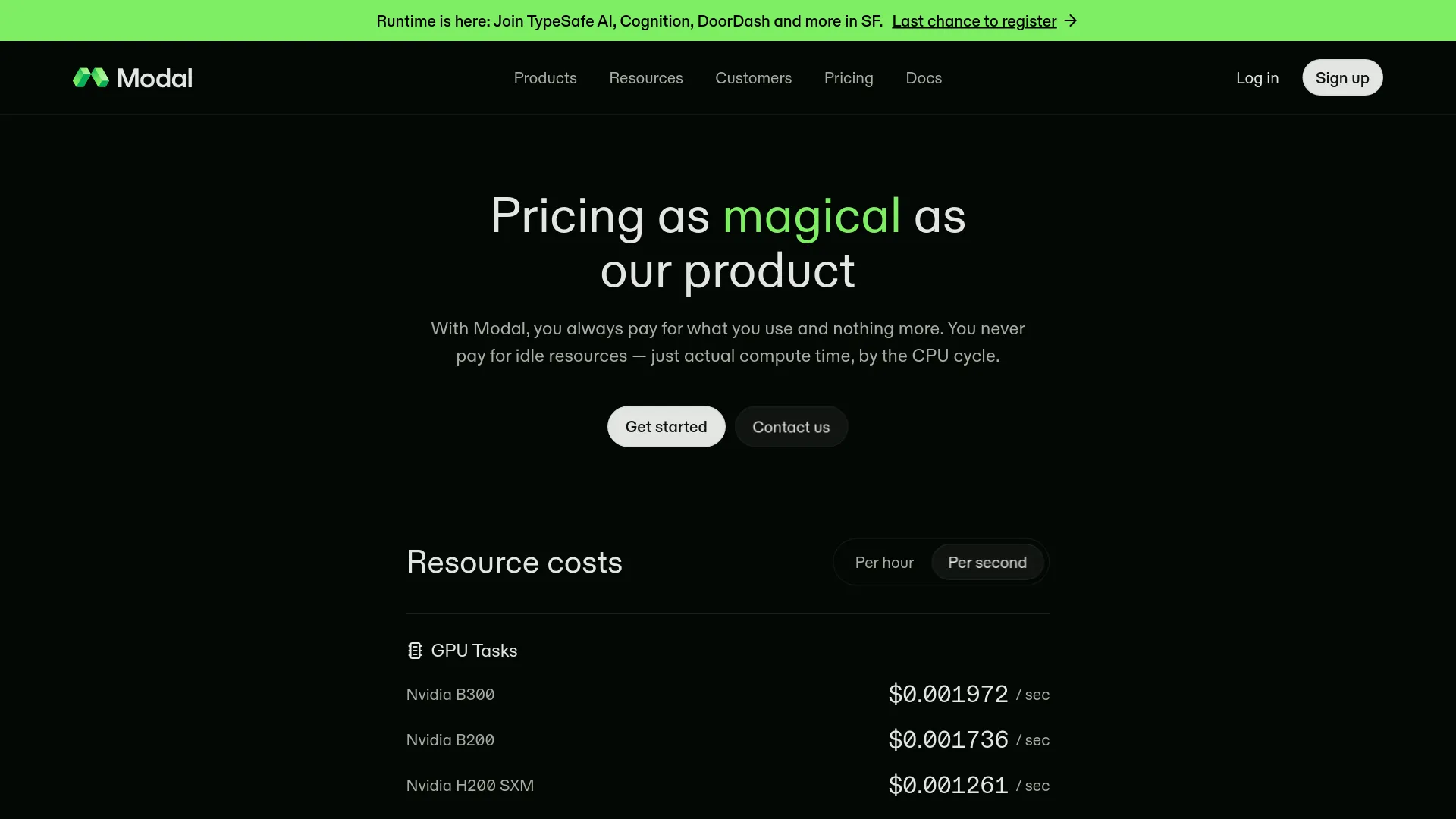
The following public rates are the useful starting point for an estimate. Hourly figures are calculated from the per-second prices and exclude CPU, memory, storage, and possible regional multipliers.
| GPU | Per second | Approx. per GPU-hour |
|---|---|---|
| B300 | $0.001972 | $7.10 |
| B200 | $0.001736 | $6.25 |
| H200 SXM | $0.001261 | $4.54 |
| H100 SXM5 | $0.001097 | $3.95 |
| A100 80 GB | $0.000694 | $2.50 |
| L4 | $0.000222 | $0.80 |
Modal also lists CPU at $0.0000131 per physical core-second and memory at $0.00000222 per GiB-second. Volumes cost $0.09 per GiB per month, with the first 1 TiB free. Network egress is listed at $0.04 per GiB beyond the included allowance. Verify current figures on the official rate card before launching a large job.
Worked example: four nodes with eight H100s
Suppose a distributed training job requests size=4 and H100:8 on each node.
- Four nodes × eight GPUs = 32 H100 GPUs.
- 32 × $3.95 per hour = about $126.40 per hour in GPU cost.
- Treat $126.40 as a GPU-only floor; CPU, memory, storage, and egress are extra.
This is the number to compare with reserved or dedicated capacity. The serverless advantage is that the cluster can scale down after the burst; it does not make a fully occupied cluster cheap.
Plan limits can matter more than the rate card
A general-availability feature is not the same as unlimited capacity. Modal’s published workspace tiers include concurrency and platform constraints that can block a large cluster before price becomes the issue.
| Plan | Platform fee | Included compute credit | Published GPU concurrency |
|---|---|---|---|
| Starter | $0/month | $30/month | 10 GPUs |
| Team | $250/month | $100/month | 50 GPUs |
| Enterprise | Custom | Custom | Custom / higher limits |
A 32-H100 experiment already consumes 32 GPUs, so the Starter tier cannot support the worked example under a 10-GPU concurrency limit. Team can fit the GPU count on paper, but actual availability, region selection, and requested hardware still affect scheduling.
Do not confuse the $30 Starter credit with 30 free GPU-hours. At the listed H100 rate it represents roughly 7.6 H100 GPU-hours, before the rest of the job’s resources are counted.
When Modal Clusters makes economic sense
Modal Clusters is strongest when the job is large, intermittent, and operationally painful to keep provisioned. A training burst that runs for a few hours and then disappears benefits more from scale-to-zero than a cluster that runs continuously for weeks.
Choose it for:
- Distributed fine-tuning where all nodes must start together.
- Short training bursts with expensive GPU capacity.
- Multi-node inference that needs RDMA or model parallelism.
- Python teams that would otherwise operate Kubernetes, SLURM, or manual RDMA setup.
A single-node Modal function is the better fit when the model fits on one machine. Dedicated or reserved infrastructure deserves a serious comparison when utilization is predictable, the workload needs a fixed SLA, or the main goal is the lowest sustained GPU-hour cost.
A real-user discussion also draws a useful boundary. In a computer-vision thread, u/Substantial_Camel735 recommended keeping vector search on a VPS rather than running that part on Modal workers (Reddit discussion). Treat that as one practitioner’s architecture preference, not a platform-wide benchmark.
“We are about to move away from modal but that design sounds about right, wouldn’t use modal workers for performing search though, just do it on your VPS against your vector db.” — u/Substantial_Camel735, r/computervision
The operational checks to make before a large launch
- Multiply the full allocation. Check
size × GPUs per node, then compare that total with workspace concurrency. - Start with the smallest meaningful cluster. A two-node test can expose image, NCCL, rank, and rendezvous problems before a 32-GPU launch multiplies the bill.
- Separate RDMA from application debugging. Validate the distributed job without RDMA if the workload allows it, then enable
rdma=Trueand measure the communication-sensitive path. - Checkpoint to durable storage. A failed or preempted rank can fail the complete call; a retry without a checkpoint may repeat the entire expensive run.
- Budget CPU, memory, and egress. GPU arithmetic is only the first line of the invoice, especially when datasets or outputs cross regions.
- Decide whether regional pinning is necessary. Narrow placement can change the available scheduling pool and price multiplier; treat locality as a measured requirement and verify it against the current regional pricing documentation.
RDMA itself is not listed as a separate charge in Modal’s official pricing. Its value is performance: synchronized training and large KV-cache transfers can become network-bound over ordinary TCP. The trade-off is that RDMA-supported hardware and placement can narrow availability.
Modal Clusters FAQ
Is there a separate Modal Clusters API fee?
No separate cluster surcharge is published. Modal bills the resources used by each container: GPUs, CPU, memory, storage, and applicable network usage.
What is the maximum cluster size?
The GA materials describe public clusters up to 32 nodes or 256 GPUs, with larger requirements handled through Modal (GA announcement). Workspace concurrency and capacity still apply.
Can Modal Clusters run inference?
Yes, but the workload must fit the clustered execution model. Multi-node or model-parallel inference is a stronger use case than a normal HTTP endpoint; clustered web functions have limitations, including traffic being delivered to rank 0 (cluster documentation).
The practical decision
| Your workload | Best starting point |
|---|---|
| Model fits on one GPU or node | Regular Modal function |
| Short, synchronized multi-node training burst | Modal Clusters, after a small test |
| Long-running, predictable full utilization | Compare dedicated or reserved GPU capacity |
| Search/database work next to GPU inference | Keep the data service separate unless measurements justify co-location |
| Strict private-network or self-hosting requirement | Evaluate a different deployment model |
Modal Clusters makes multi-node GPU orchestration easier to start, not cheaper by definition. Serverless placement and Python ergonomics can save engineering time, while sustained utilization, regional constraints, and whole-cluster retries can dominate the bill. Calculate the full node count first; only then compare the convenience premium with dedicated capacity.