 AIREITER
Yes, you can generate finished video clips inside a Claude chat, and the setup is one pasted URL plus a sign-in - but every render draws on your Higgsfield credit balance, individual clips cap at 15 seconds, and heavy users report rate limits plus credits lost to failed jobs. This walkthrough covers both integration paths (chat connector and Claude Code CLI), a public rate card for what generations cost, the hard limits, and when fal or Replicate's MCP servers are the better route.
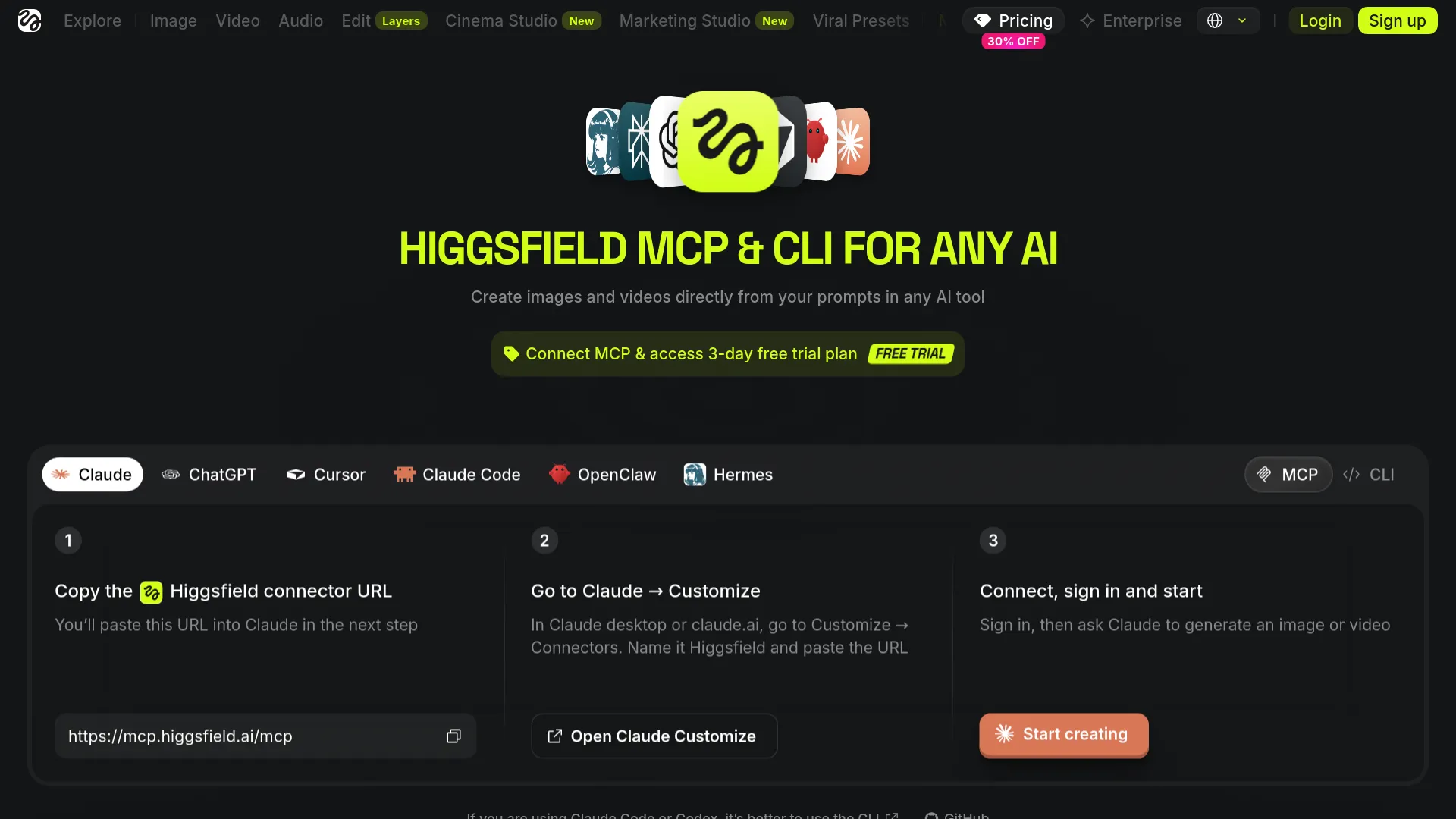
Two Paths Into Claude: Connector or CLI
Higgsfield ships two separate integrations. Both draw from the same Higgsfield account and credit pool across clients, per the official walkthrough, so switching later costs you a few minutes.
The hosted connector, for chat surfaces
The hosted MCP server at https://mcp.higgsfield.ai/mcp is the official route for conversational Claude. No API key is involved - you authenticate through your Higgsfield account inside Claude's connector flow, and Higgsfield states there are "no API keys to manage or configure." The official FAQ lists Claude Web, Claude Cowork, Claude Code, OpenClaw, Hermes Agent, and NemoClaw as supported clients, with the company's blog adding Claude desktop and mobile.
The CLI route, for coding agents
For Claude Code and Codex, Higgsfield explicitly recommends its CLI instead of the visual connector flow, and the unofficial setup guide at higgsfieldmcp.com agrees. The CLI installs globally through npm, authenticates in the terminal, and optionally pulls in Higgsfield's packaged skills. If you live in a terminal rather than a chat window, skip the connector section below and jump to the Claude Code setup.
What You Need Before Connecting
Three prerequisites gate the whole workflow. A Claude account that supports custom connectors (on managed Anthropic plans, an administrator may need to allowlist the Higgsfield MCP URL first, per Higgsfield's setup walkthrough). A Higgsfield account - new accounts include free starter credits, though neither the official pages nor the third-party guide states how many. And credits on that account, because every generation through the connector bills the same credit system as the Higgsfield web app.
Connect Higgsfield MCP to Claude Web and Desktop
Higgsfield's walkthrough promises about a minute of setup:
- Open Claude Desktop or claude.ai and go to Settings -> Connectors (on some builds this appears under Customize -> Connectors).
- Click Add custom connector and name it "Higgsfield."
- Paste
https://mcp.higgsfield.ai/mcpas the server URL. - Click Add, then Connect, and sign in with your Higgsfield account.
- Approve the access prompt - this is a one-time sign-in.
- Optionally set the connector's read/write permissions to Always Allow so Claude can run generations without asking permission on every request.
Verify the connection by asking Claude to generate a simple image before you spend credits on video. One URL detail trips people up: Higgsfield's own materials show both https://mcp.higgsfield.ai (in the May 2026 blog walkthrough) and https://mcp.higgsfield.ai/mcp (on the /mcp page and the Claude landing page). Use the /mcp variant - it's what the current copy button exposes - and only fall back to the root URL if your client rejects it.
Claude Code Setup: The CLI Route
Claude Code doesn't need the connector at all. Three commands cover the full setup:
npm install -g @higgsfield/cli
higgsfield auth login
npx skills add higgsfield-ai/skills   # optional
The first installs the CLI globally, the second opens account authentication in the terminal, and the third pulls in Higgsfield's skill packages - prebuilt workflows like UGC ad factories and faceless-content generators that Claude Code can then invoke. The skills step is optional; generations work without it.
One more option exists for developers who want full control: the open-source QalaLabs bridge is a Python FastMCP server (Python 3.10+) that exposes Higgsfield's raw API - image and video generation, talking heads, upscaling, character CRUD, batch jobs, usage stats - as MCP tools.
Unlike the hosted connector, the bridge does require HF_API_KEY and HF_SECRET credentials, configured in Claude Desktop's claude_desktop_config.json with an absolute cwd path, followed by a restart. The README documents the whole troubleshooting ladder: 401 means wrong keys, 402 means insufficient credits, and a server that doesn't appear in Claude Desktop usually means a relative path where an absolute one was required.
One Conversation, Storyboard to Clip
Once connected, you describe a shot in plain language; Claude picks the model, sets duration and aspect ratio, and launches the render asynchronously. The clip comes back in chat, and a copy lands in your Higgsfield workspace. Images return in a few seconds; video takes seconds to a few minutes depending on model and duration.
The model catalog behind the connector
Higgsfield advertises 30+ image and video models through one connection. The named video models include Veo 3.1, Sora 2, Kling 3.0, Seedance 2.0, Wan 2.6, MiniMax Hailuo, and Higgsfield's own Soul, Soul Cinema, and Cinema Studio; image models include Soul 2.0, Nano Banana Pro, Flux 2.0, and Seedream 4.5.
Output caps at up to 4K resolution for images and 15 seconds per video clip, in 16:9, 9:16, 1:1, or 4:5. The fine print from the Unlimited MCP announcement matters here: on that tier, video models run at 1080p with 8-second caps (Seedance 2.0, Kling 3.0, Kling 3.0 Motion Control, Wan 2.7), 8 seconds for Seedance 2.0 Mini/Fast, and 7 seconds for Gemini Omni Flash - so per-model ceilings sit well below the headline 15-second maximum.
Prompts that work
Three prompt patterns cover most use cases, all drawn from Higgsfield's own documented examples:
- Single shot: "Generate a cinematic 5-second wide shot of a neon-lit Tokyo alley at night, rain on the pavement, one figure walking away from camera. Use Seedance 2.0."
- Model comparison: "Run this scene on Veo, Kling, and Seedance and show me the best result" - the same brief fans out to several models in parallel.
- Multi-shot production: "Train a character from these photos, then generate a 6-shot product reel for TikTok using the UGC preset."
On automatic model selection: Claude can choose a model for you, and Higgsfield's copy leans hard on that, but Reddit users don't trust it for shot-critical work - one r/ClaudeAI commenter's view was that Claude still needs explicit model callouts to reliably honor a specific look. The pragmatic split: let Claude auto-pick for exploration, name the model whenever the shot has to match a brief.
What Each Generation Costs
This is where every official page goes quiet - the landing page, the /mcp page, and the blog walkthrough state that generations consume credits scaled by model, resolution, and duration, but none of them print a number. The clearest public rate card we found is the Higgsfield API pricing documented in the QalaLabs bridge README, at an exchange rate of $1 = 16 credits:
| Operation | Credits | USD |
|---|---|---|
| Image, 720p | 1.5 | $0.09 |
| Image, 1080p | 3 | $0.19 |
| Image, 1080p (first 1,000) | 1 | $0.06 |
| Video, Lite tier | 2 | $0.125 |
| Video, Turbo tier | 6.5 | $0.406 |
| Video, Standard tier | 9 | $0.563 |
| Character creation | 40 | $2.50 |
| Talking head / upscale | varies | - |
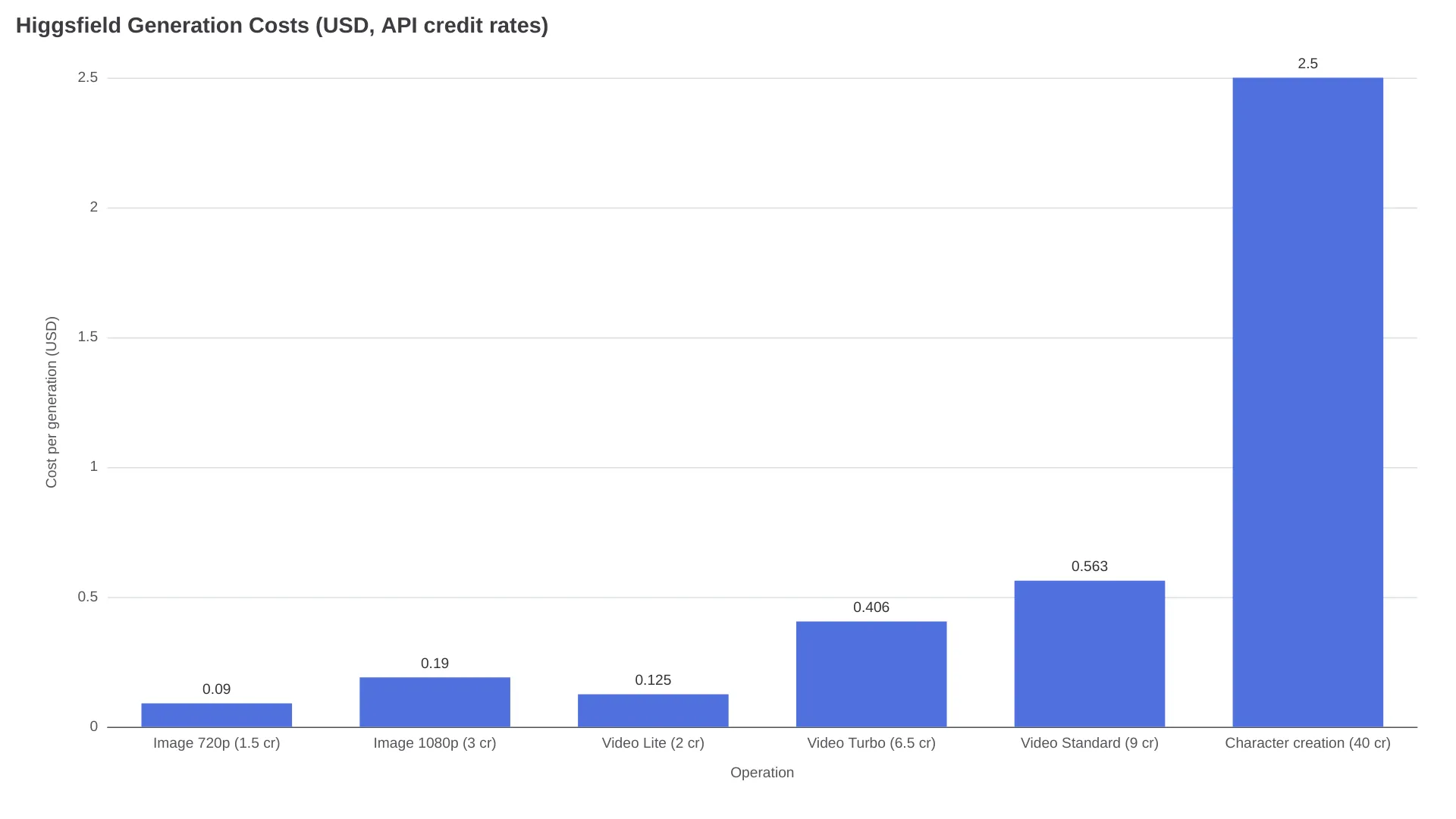
The README publishes no connector prices for individual named models, so treat these as API reference prices, not guaranteed Claude-connector totals. Character creation is the line item to plan around: 40 credits ($2.50) per character, paid once and reusable across every render that references that character.
Higgsfield's Unlimited MCP announcement ran a 24-hour unlimited trial (11 image, 5 audio, 7 video models, one generation at a time) that expired July 31, 2026 - its 1080p/8-second video ceilings are the documented shape of paid Unlimited access. For subscription tiers vs. pay-as-you-go, our Higgsfield pricing breakdown covers the plan side in detail.
Limits and Failure Modes to Plan Around
The documented limits are easy to state: 15 seconds per clip, 4K images, renders from a few seconds to a few minutes, credits charged per generation. The undocumented ones come from users.
"Resubscribed once the MCP dropped... the generations are like 90% better." - u/YoungYang0308, r/ClaudeAI
That same user reported the connector syncing a real product video into a coherent ad clip - and also ignoring a requested camera tilt, regenerating the video as a new billable job without applying the edit. In that report, the regenerated revision was billed like a new generation.
"Use Nano Banana directly, Higgsfield is a scam imo." - u/Wild-Sheepherder3085, r/ClaudeDesign
That comment sits at the harsh end of a real split, and the same user's specifics matter more than the verdict: serious rate limiting, slow image and video renders, and credits consumed by failed generations - directly contradicting the API documentation's "charged only on successful generation" language.
The thread's other camp got better results by calling individual model APIs directly: if you know exactly which model you need, the connector's orchestration layer adds rate-limit surface you may not want.
One security note from r/ClaudeAI: a user reported Claude flagging a connector tool called "Sync Agents" that would upload a profile and saved skills to Higgsfield's servers - unverified, but worth reviewing the connector's tool list before granting Always Allow.
For stuck generations, the documented fixes are mundane: poll the job status (generations queue asynchronously), confirm your credit balance (402 errors mean insufficient credits), and on the CLI bridge, check that HF_API_KEY and HF_SECRET are both set in the environment Claude Desktop loads.
FAQ
Does Higgsfield MCP require an API key?
No - the hosted connector authenticates through your Higgsfield account sign-in; API keys (HF_API_KEY plus HF_SECRET) are only needed for the third-party QalaLabs bridge or direct API access.
Which MCP URL should I use for Claude?
Use https://mcp.higgsfield.ai/mcp - the root URL in Higgsfield's blog is the fallback if your client rejects it.
Can Claude automatically pick the right video model?
Auto-selection is a documented feature, and one brief can fan out to Veo, Kling, and Seedance in parallel, but Reddit users report needing explicit model callouts for shot-critical work.
Does Higgsfield MCP work with Claude Code?
Yes, via the CLI rather than the connector: npm install -g @higgsfield/cli, then higgsfield auth login, with npx skills add higgsfield-ai/skills as an optional add-on.
Why did my generation fail or eat credits?
The documented causes are insufficient credits (402), queued asynchronous jobs that need polling, and rate limits. Users on r/ClaudeDesign additionally report credits lost to failed generations, which contradicts the API's success-only billing language - keep an eye on your balance after failed renders.
Are MCP-generated videos watermark-free and commercially usable?
On paid plans, Higgsfield's FAQ claims watermark-free output and commercial use in ads, client campaigns, and listings. The company still directs users to individual model terms for branded references, copyrighted material, or third-party likenesses.
Higgsfield vs fal vs Replicate: Picking Your Video MCP
Higgsfield isn't the only video-capable MCP server, and for cost-sensitive or developer-heavy workflows it may not be the best one. The two strongest alternatives:
fal's MCP server connects Claude to 1,000+ models through https://mcp.fal.ai/mcp - including Kling, Veo 3.1, Seedance, and MiniMax H3, the same families Higgsfield aggregates. Setup for Claude Code is one command (claude mcp add --transport http fal-ai https://mcp.fal.ai/mcp --header "Authorization: Bearer $FAL_KEY"), the server itself is free, and every run bills at fal's standard API rates. Its standout feature is get_pricing: Claude can check the exact cost of a run before executing it, which Higgsfield offers no equivalent of. See our fal.ai review for the pricing model.
Replicate's remote MCP server at https://mcp.replicate.com/sse supports every operation in Replicate's HTTP API - model search, comparisons, predictions - with browser-based auth that keeps your API token out of the client config (tokens are stored server-side on Cloudflare). A local npx -y replicate-mcp option exists for Claude Desktop, Cursor, and VS Code setups. Our Replicate review covers when that ecosystem makes sense.
| Higgsfield MCP | fal MCP | Replicate MCP | |
|---|---|---|---|
| Endpoint | mcp.higgsfield.ai/mcp | mcp.fal.ai/mcp | mcp.replicate.com/sse |
| Auth | Account sign-in, no API key | API key in header | Browser OAuth or local token |
| Catalog | 30+ curated models | 1,000+ models | Full Replicate model library |
| Cost model | Opaque credits, shared with web app | Standard API rates, price check before run | Standard API rates |
| Best for | UGC ads, character consistency, zero-setup | Cost-controlled pipelines, model breadth | Dev workflows already on Replicate |
Match your workflow against the "Best for" row: chat-first marketing teams get the most from Higgsfield's presets and trained characters, price-sensitive developers from fal's pre-run pricing check, and Replicate-standardized teams from its remote server.
And if you already know your exact model - Kling, Seedance, Veo - calling that model's API directly (for example, Kling 3.0's API page) gives you provider-level pricing control; the connector's value is orchestration, not unit economics.