 AIREITER
Codex reaches models over the Responses API, and DeepSeek answers on that protocol directly, so putting DeepSeek inside Codex is now a config file, not a proxy. The catch is that only one of the two DeepSeek models is wired up for it, and that model cannot see images.
Can Codex use DeepSeek?
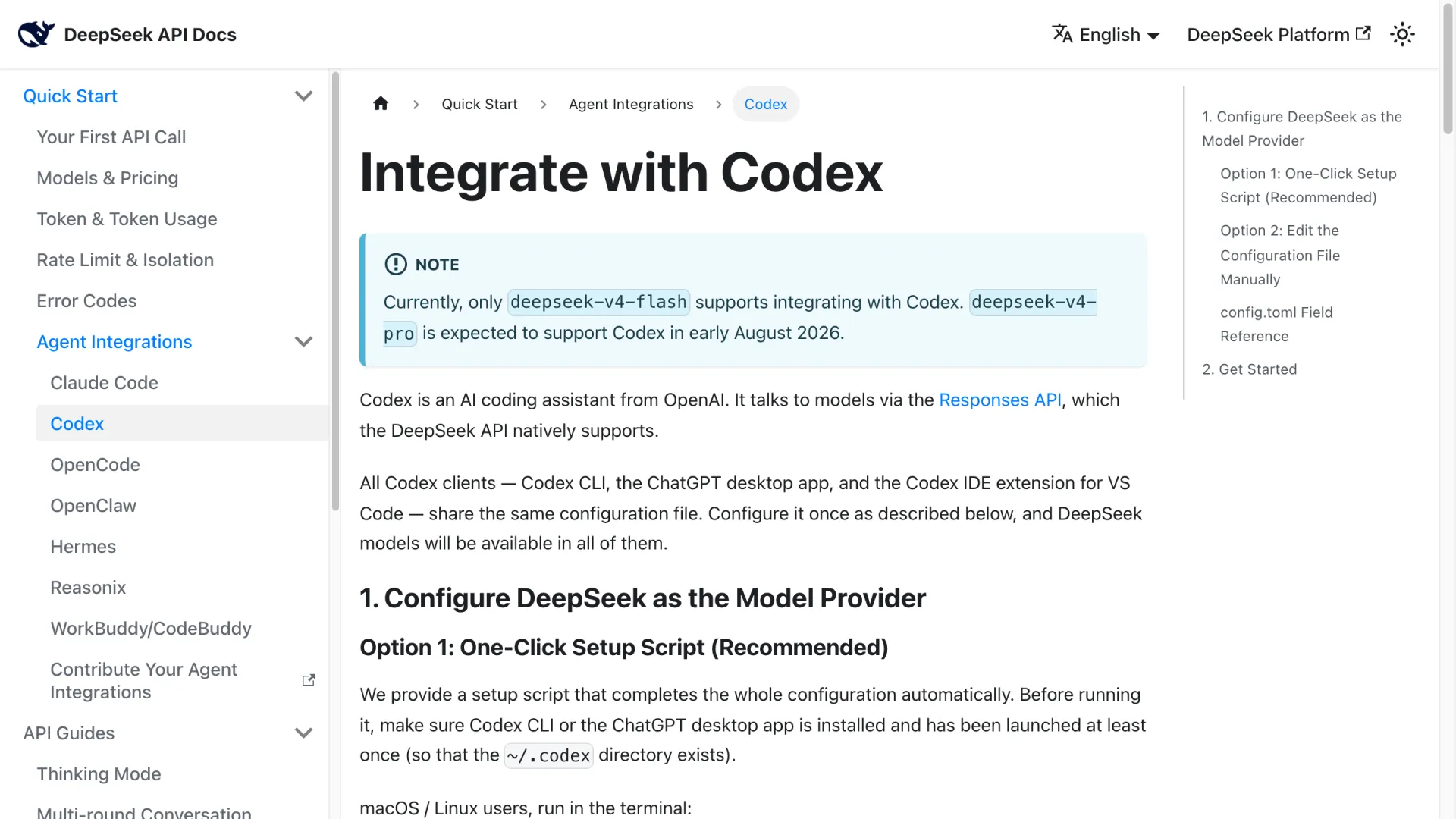
Yes. Codex speaks to models through OpenAI's Responses API, and the DeepSeek API supports that protocol natively, so DeepSeek appears in Codex as a model provider you declare in a config file. DeepSeek publishes the integration itself, under Agent Integrations → Codex in its API docs.
This is a change in what the setup requires. Codex dropped the older wire_api = "chat" path in favor of the Responses API, and for a stretch that left DeepSeek reachable only through a translating layer: LiteLLM, a router with its own Responses implementation, or a hand-written bridge. Those still work, but they are no longer the price of entry. This is provider configuration, separate from adding DeepSeek-related MCP tools to Codex.
One configuration covers every Codex surface. Codex CLI, the ChatGPT desktop app, and the Codex IDE extension for VS Code all read the same ~/.codex directory, so you configure once rather than per client.
Which DeepSeek model works in Codex
Only deepseek-v4-flash. DeepSeek's pricing table marks Responses API support as ✓ for deepseek-v4-flash and ✗ for deepseek-v4-pro, with a footnote promising Pro support in early August 2026. As of 3 August 2026 that footnote is still standing and Pro still shows ✗.
Both models are listed in the models.json catalog that the setup writes, so nothing in your config stops you from selecting Pro; the failure surfaces upstream at request time instead. CC Switch's DeepSeek preset carries the same warning in its preset source: switching to Pro before DeepSeek opens the integration errors out.
If you want the stronger model today, its Anthropic-format endpoint is supported, which is why Pro shows up in Claude Code setups but not Codex ones. The two models differ enough on price and concurrency that the choice is worth making deliberately; see deepseek-v4-flash vs deepseek-v4-pro.
Setup path 1: the official script
DeepSeek ships a setup script that writes the whole configuration, and it is the fastest route if you are not already managing several providers. Codex CLI or the ChatGPT desktop app has to be installed and launched once first, so that ~/.codex exists, and your Codex client must be at least version 0.144.0, which the model catalog declares as its minimum.
# macOS / Linux
bash <(curl -fsSL https://cdn.deepseek.com/api-docs/codex-deepseek-setup-en.sh)

# Windows, in PowerShell
irm https://cdn.deepseek.com/api-docs/codex-deepseek-setup-en.ps1 | iex
The script is a menu: 1 selects deepseek-v4-flash, 2 selects deepseek-v4-pro, 3 restores the configuration you had before installing. Pick 1: option 2 writes a valid config for a model that cannot serve Codex requests yet. It asks for your API key on first run, which you create at platform.deepseek.com.
What it changes in a config you already have
I ran the official script on 3 August 2026 against a throwaway CODEX_HOME seeded with a config that deliberately conflicted: a profile, a stale model_verbosity, a model_reasoning_summary, plus an MCP server and a trusted project entry. Reproduce it with CODEX_HOME=/tmp/probe sh codex-deepseek-setup-en.sh and pick 1. It reported four changes and explained each one:
• Rewrote model: "gpt-5.6-sol" → "deepseek-v4-flash"
• Removed profile = "myprofile"  ← a profile masks model / model_provider / model_catalog_json
• Removed model_verbosity = "high"  ← a stale value may be outside what the model supports
• Removed model_reasoning_summary = "detailed"  ← models.json declares default_reasoning_summary=none
The [mcp_servers.playwright] block, the [projects."..."] trust level, and approval_policy came through untouched, and the original file was copied to ~/.codex/backup-deepseek/ before anything was written. It validated both files before committing them, models.json as JSON and config.toml for parse errors and duplicate keys. That was one run on one machine, so treat it as evidence the backup and restore paths exist, not as a guarantee about every config shape.
Setup path 2: edit config.toml by hand
Editing the file yourself is the route to take if you want the configuration in version control or need to understand each field. Create ~/.codex/models.json with the model catalog published in DeepSeek's docs, then add this to ~/.codex/config.toml:
model = "deepseek-v4-flash"
model_provider = "deepseek"
preferred_auth_method = "apikey"
forced_login_method = "api"
model_reasoning_effort = "high"
model_catalog_json = "~/.codex/models.json"

[model_providers.deepseek]
name = "deepseek"
base_url = "https://api.deepseek.com/"
wire_api = "responses"
experimental_bearer_token = "<your DeepSeek API Key>"| Field | What it does |
|---|---|
wire_api = "responses" | Selects the Responses API rather than Chat Completions. This is the field that makes the integration work at all |
model_catalog_json | Points at models.json, which declares context window, reasoning levels and tool formats. Skip it and Codex falls back to generic metadata |
preferred_auth_method, forced_login_method | Authenticate by API key instead of a ChatGPT account login |
model_reasoning_effort | low, high or max, the three levels the DeepSeek catalog declares |
experimental_bearer_token | Your API key, stored in the file as written text |
Setup path 3: CC Switch, if you switch providers often
CC Switch is a desktop app that manages provider configuration for eight coding tools including Codex, and it ships a built-in DeepSeek preset: endpoint https://api.deepseek.com, deepseek-v4-flash as the default model, and both Flash and Pro in the model catalog. It writes the same fields you would write by hand, from a tray menu instead of an editor.
Two things to know before adopting it. Codex needs a restart after a switch for the change to take effect, unlike Claude Code. And a single app now holds the credentials for every provider you registered and runs a local service to route them, which is a different security posture than one API key in one file.
Verify it took effect
Start Codex CLI in a project and read the startup banner: the model and provider lines are the confirmation. Running it against my test configuration on 3 August 2026 with codex-cli 0.146.0:
OpenAI Codex v0.146.0
model: deepseek-v4-flash
provider: deepseek
reasoning effort: high
A bad key looks distinctive, and it names the endpoint being used, which is the quickest way to confirm your requests are leaving for DeepSeek:
ERROR: unexpected status 401 Unauthorized: Authentication Fails, Your api key: ****r000 is invalid,
       url: https://api.deepseek.com/responses
Codex retried five times before surfacing that, so a typo in the key costs a few seconds of silence first. In the ChatGPT desktop app the model picker reads Custom rather than the model name on macOS, which is the app labelling any locally configured model. It is still using the DeepSeek model you selected. If Codex logs fallback model metadata or Unknown model, models.json was not loaded and the catalog path is wrong.
What changes when DeepSeek runs inside Codex
Four behaviours differ from running Codex on an OpenAI model, and none of them are failures to debug.
No image input. The DeepSeek entries in models.json declare input_modalities: ["text"], so pasted screenshots and image attachments are not available in any Codex client while DeepSeek is the active model. A developer on Hacker News hit the same wall on 2 August 2026 and worked around it by keeping a second provider for vision:
Since DeepSeek V4 doesn't have vision so he got OMP to use GPT 5.6 Luna using the Codex sub.
That workaround is a second [model_providers.*] block pointed at something that does accept images. The wire_api = "responses" shape is identical, so an aggregator endpoint carrying GPT-5.6 drops into the same config and you switch by changing one model line.
Your old sessions look deleted. Codex groups session history by login method, so switching from a ChatGPT subscription to a third-party API key hides the earlier group rather than removing it. Restore the previous configuration and those sessions return, while the DeepSeek ones go quiet.
The key sits in the config file as written text. experimental_bearer_token holds the key itself, not a reference to an environment variable, so ~/.codex/config.toml becomes a secret-bearing file worth checking before you sync that directory or commit a dotfiles repo.
It may call itself ChatGPT. The models.json that the integration installs carries Codex's own harness prompt, which opens with "You are Codex, an agent based on GPT-5." That prompt is doing real work. It defines the tool protocol, the approval rules and the output format the agent follows, so behaviour under it differs from the same model in a bare chat window, and the identity line comes from the harness, not from the model claiming a lineage.
What it costs
deepseek-v4-flash is priced at $0.14 per million input tokens on a cache miss and $0.28 per million output tokens, verified on the DeepSeek pricing page on 3 August 2026. A cache hit costs $0.0028 per million input tokens, fifty times less than a miss, and that gap is the number that decides what long agent sessions cost, since a coding agent re-sends a growing context on every turn.
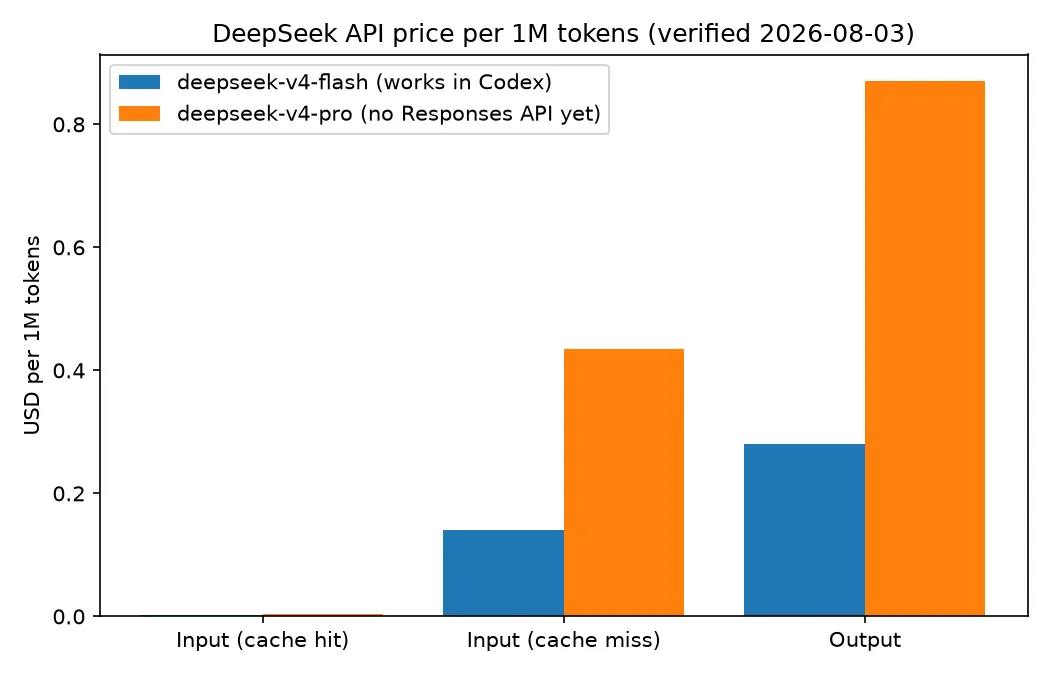
| deepseek-v4-flash | deepseek-v4-pro | |
|---|---|---|
| Works in Codex | Yes | Not yet |
| Version string | DeepSeek-V4-Flash-0731 | DeepSeek-V4-Pro |
| Context / max output | 1M / 384K | 1M / 384K |
| Input, cache hit | $0.0028 | $0.003625 |
| Input, cache miss | $0.14 | $0.435 |
| Output | $0.28 | $0.87 |
| Concurrency limit | 2500 | 500 |
Two things the table does not show. DeepSeek states that peak and off-peak pricing is coming, at 2× the listed rates during peak hours, 09:00–12:00 and 14:00–18:00 Beijing time (UTC+8) daily, with the start date to be announced. And the 1M context window is declared at 95% effective in the catalog, with truncation kicking in per the policy models.json sets.
FAQ
Can Codex use DeepSeek without a ChatGPT subscription?
Yes. preferred_auth_method = "apikey" and forced_login_method = "api" make Codex authenticate with your DeepSeek key and skip the account login entirely.
Do the VS Code extension and desktop app need separate setup?
No. All three Codex clients read the same ~/.codex configuration. Restart the desktop client after switching for it to pick up the change.
How do I switch back to the official model?
Re-run the setup script and pick option 3, which restores the config.toml it backed up before installing. If you configured Codex by hand, delete the DeepSeek fields and the [model_providers.deepseek] block, then log in again.
Can I use deepseek-v4-pro in Codex yet?
Not as of 3 August 2026. Its Responses API support is still marked ✗ on DeepSeek's pricing page; the announced target was early August 2026, so re-check that page rather than trusting a config that lets you select it.
Which path fits you
| Route | Pick it when | Cost of picking it |
|---|---|---|
| Official setup script | You want it working in one command and want the backup/restore path | Rewrites fields in a config you may not have read; key lands in plain text |
Manual config.toml | You keep dotfiles in version control or need to know each field | You maintain models.json yourself, and a wrong catalog path silently degrades metadata |
| CC Switch | You rotate between DeepSeek, an official subscription and other providers | One app holds every credential and runs a local service; Codex needs a restart per switch |
The open question is Pro. Flash is the cheap, fast, text-only half of the lineup, and the model most people want in an agent loop is the one that cannot speak the protocol Codex requires yet. Until that footnote flips, choosing DeepSeek for Codex means choosing Flash on purpose.
Related reading: Codex vs Claude Code · How to use GLM-5.2 in Claude Code