 AIREITER
You can run GLM-5.2 in Claude Code today, and setup takes about two minutes. Claude Code talks to any endpoint that speaks Anthropic's Messages API, and Zhipu ships exactly that for GLM — point Claude Code at z.ai and you're done. There are two ways in: a one-click switcher app (easiest, and it lets you flip back to Claude anytime), or a hand-edited config file. This guide covers both, across macOS, Windows, and Linux, plus how to switch back to Claude when you need it.
The fastest way: CC Switch
If you already juggle more than one provider, skip the manual config and use CC Switch (open-source, MIT-licensed, Windows/macOS/Linux). It's a desktop app that manages provider configs for Claude Code, Codex, Gemini CLI, and a few other CLIs, so you're not hand-editing JSON.
- Install CC Switch from ccswitch.io or its GitHub repo. Click the orange + button in the top-right of the main window to open Add Provider, and select the Claude Provider tab.
- Type
zhipuin the preset search. Two presets show up — Zhipu GLM (mainland endpoint) and Zhipu GLM en. Outside mainland China, pick Zhipu GLM en for the international endpoint.
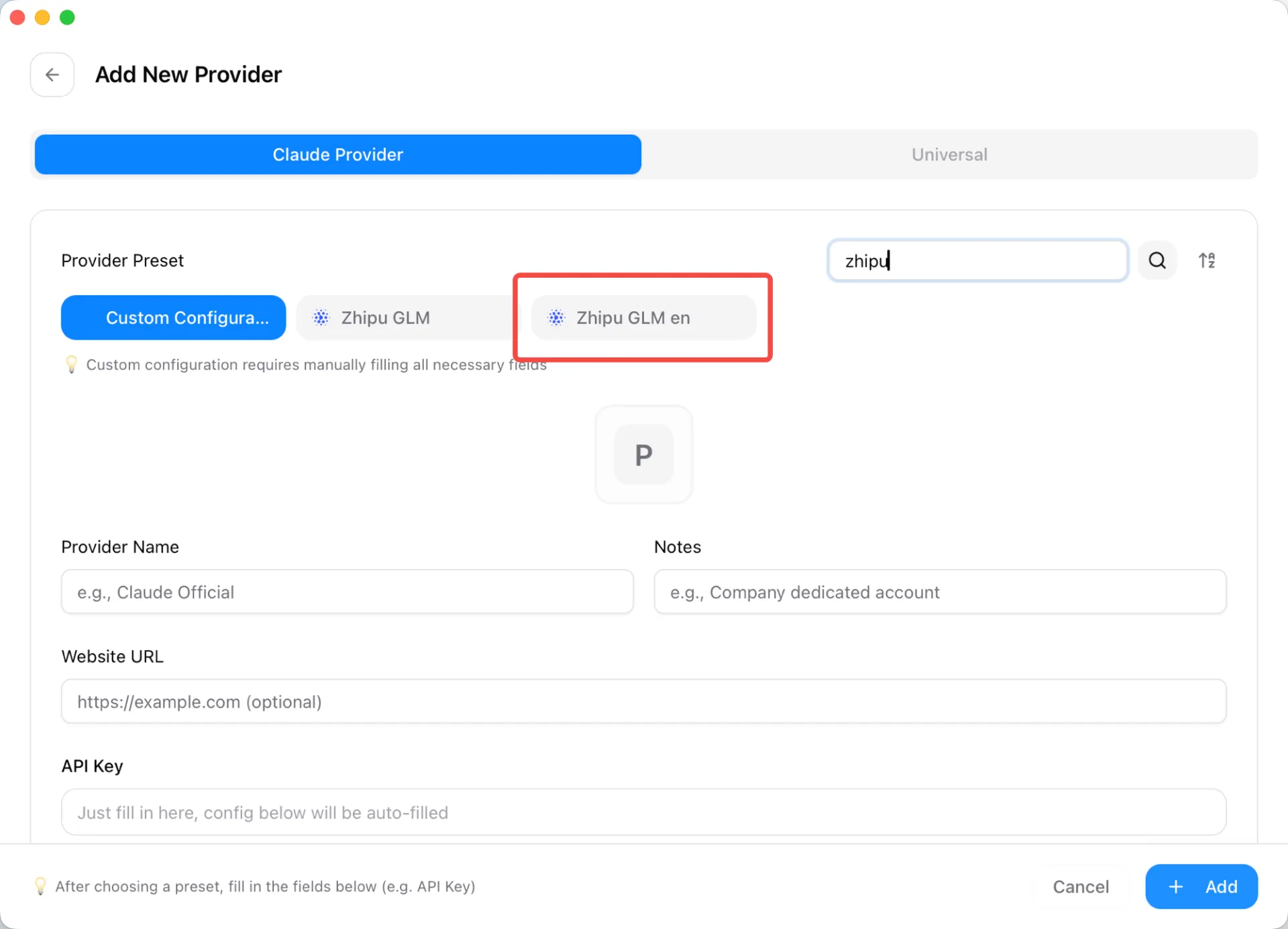
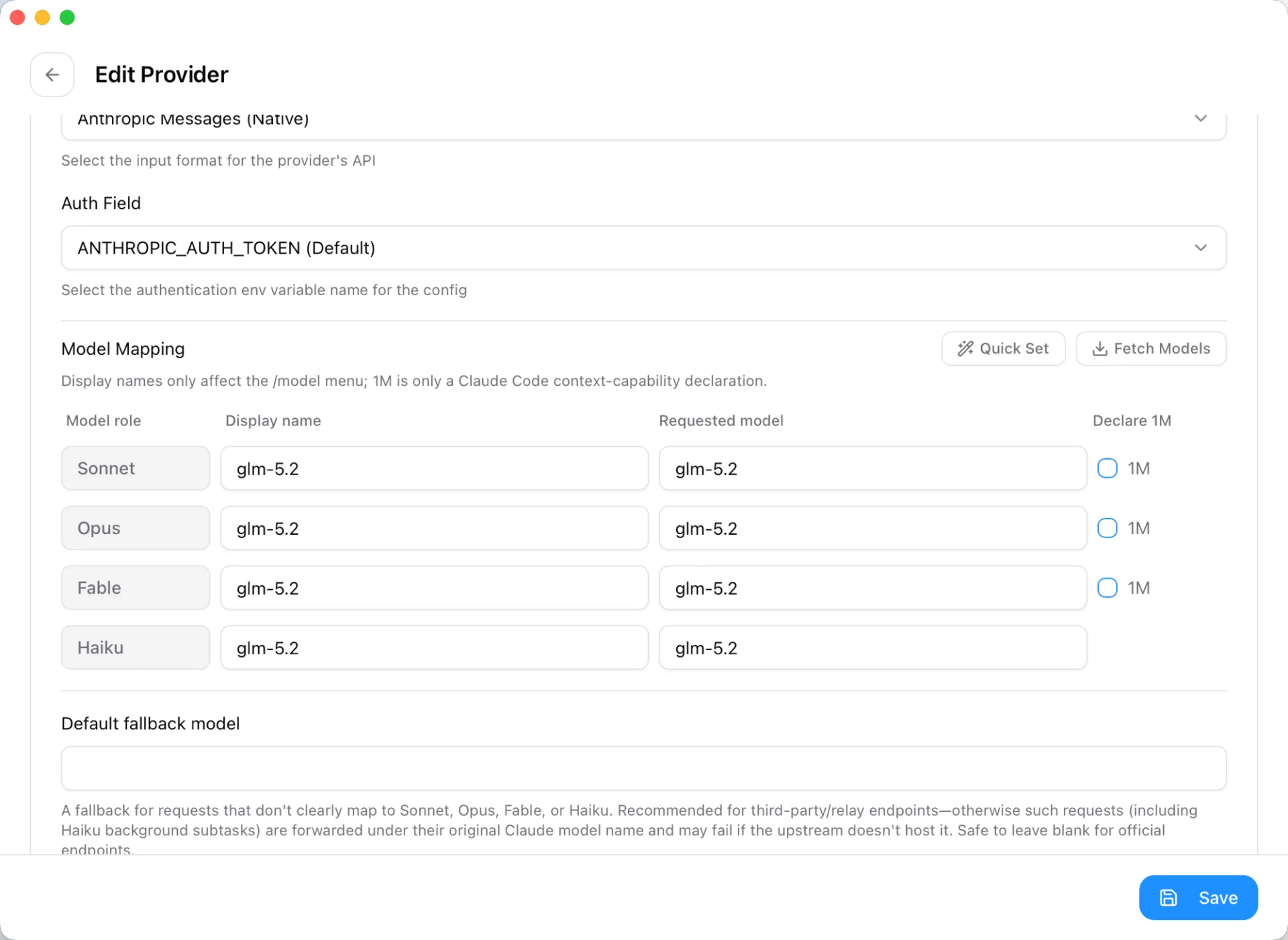
- Scroll down and paste your z.ai API key into the API Key field. The preset auto-fills the rest: Anthropic Messages (Native) format, the
ANTHROPIC_AUTH_TOKENauth field, and the base URL. - In Model Mapping, set the requested model for every role — Sonnet, Opus, Fable, and Haiku — to
glm-5.2, so every request routes to GLM regardless of which tier Claude Code reaches for. Tick the 1M box on a role to declare the million-token context to Claude Code. Save.
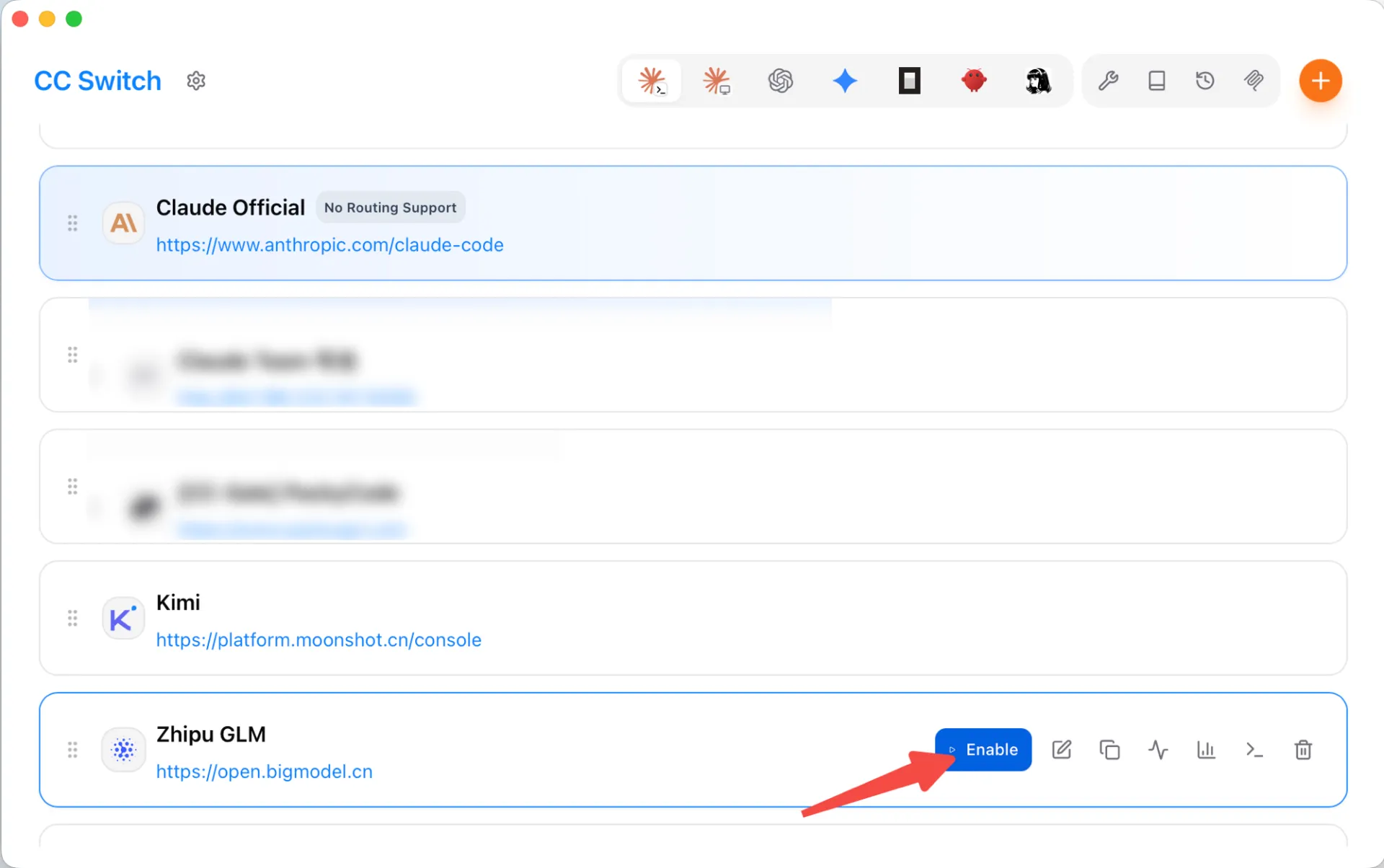
- Back on the provider list, click Enable on the Zhipu GLM entry (an existing provider like Claude Official can stay in the list to switch back to later), then restart Claude Code to be sure it picks up the new provider. Run
/statusto confirm the model readsglm-5.2.
Why bother with the app over a static config: it ships presets for most providers you'd want to try — Kimi, MiniMax, MiMo, Qwen, DeepSeek, and more — so each is a preset-and-key job instead of a config rewrite, and switching between them (or back to Claude) is a couple of clicks. That's the practical basis for the hybrid workflow below.
Manual setup with settings.json
Prefer to configure it yourself, or setting up a CI box with no GUI? Edit the file directly.
- Get an API key from the Z.AI API console. A pay-as-you-go key or a GLM Coding Plan subscription key both work.
- Merge this
envblock into your Claude Code settings file (keep any existing keys — don't overwrite the whole file). The block is identical on every platform; only the path differs:
- macOS / Linux: ~/.claude/settings.json - Windows: %USERPROFILE%\.claude\settings.json
{
  "env": {
    "ANTHROPIC_BASE_URL": "https://api.z.ai/api/anthropic",
    "ANTHROPIC_AUTH_TOKEN": "your_zai_api_key",
    "ANTHROPIC_DEFAULT_OPUS_MODEL": "glm-5.2",
    "ANTHROPIC_DEFAULT_SONNET_MODEL": "glm-5.2",
    "ANTHROPIC_DEFAULT_HAIKU_MODEL": "glm-5.2",
    "API_TIMEOUT_MS": "3000000"
  }
}- Restart Claude Code, then run
/status. The model line should readglm-5.2(orglm-5.2[1m]for the million-token variant). If it still shows a Claude model, the file wasn't picked up — check for JSON syntax errors and confirm the path.
Two shell-based alternatives if you'd rather not touch the file:
- macOS / Linux — export the variables (bash/zsh) for a one-off session, then launch:
export ANTHROPIC_BASE_URL="https://api.z.ai/api/anthropic"
export ANTHROPIC_AUTH_TOKEN="your_zai_api_key"
export ANTHROPIC_DEFAULT_OPUS_MODEL="glm-5.2"
export ANTHROPIC_DEFAULT_SONNET_MODEL="glm-5.2"
export ANTHROPIC_DEFAULT_HAIKU_MODEL="glm-5.2"
claude
Close the terminal and you're back to your normal config.
- Windows — set persistent user environment variables in PowerShell, then restart the terminal:
setx ANTHROPIC_BASE_URL "https://api.z.ai/api/anthropic"
setx ANTHROPIC_AUTH_TOKEN "your_zai_api_key"
setx ANTHROPIC_DEFAULT_OPUS_MODEL "glm-5.2"
setx ANTHROPIC_DEFAULT_SONNET_MODEL "glm-5.2"
setx ANTHROPIC_DEFAULT_HAIKU_MODEL "glm-5.2"
The ANTHROPIC_DEFAULT_* variables remap the model roles Claude Code routes to — Opus, Sonnet, and Haiku (newer builds add a Fable role, which CC Switch also exposes). Setting them all to glm-5.2 sends every request to GLM; if you'd rather keep background tasks cheap and fast, point the Haiku slot at glm-4.5-air instead. Use glm-5.2[1m] for the full million-token window. The long API_TIMEOUT_MS matters more than it looks: GLM responses often run slower than Claude's, and the default timeout will cut off long generations.
Which route: z.ai native, a proxy, or the Coding Plan?
Three practical ways to feed GLM-5.2 into Claude Code, and they are not interchangeable.
z.ai native endpoint (recommended). The https://api.z.ai/api/anthropic URL above. It speaks the Anthropic protocol, so Claude Code connects with no middleware — the default choice.
A translation proxy. Other hosts (Fireworks, NVIDIA NIM, self-hosted weights) serve GLM-5.2 over an OpenAI-compatible API that Claude Code can't read directly, so they need a proxy that converts formats. claude-code-router handles this. Only worth it if you already have credits or hardware on one of those platforms.
GLM Coding Plan subscription. A flat monthly plan (from $18/month, per z.ai's subscribe page) that uses the same z.ai endpoint but bills a fixed fee instead of per token. If you code in Claude Code daily, a subscription is usually cheaper and more predictable than metered tokens; do the math against your monthly token spend to find the break-even. If your usage is spiky, pay-as-you-go wins.
Switching between GLM-5.2 and Claude
Claude Code uses one active provider at a time, so you switch rather than split slots: run GLM-5.2 for routine volume, and enable your Claude Official provider in CC Switch when you need Claude for architecture, security-sensitive code, or review. Any Anthropic-compatible endpoint works for the Claude side — your Anthropic account, or a relay such as AIReiter, one option among several. For automatic per-request routing across providers, a gateway like claude-code-router handles the dispatch.
Troubleshooting
| Symptom | Likely cause | Fix |
|---|---|---|
/status still shows a Claude model | settings.json not loaded | Check JSON is valid; confirm you edited ~/.claude/settings.json; restart Claude Code |
model not found error | Wrong model ID (case-sensitive) | Use exactly glm-5.2, glm-5.2[1m], or glm-4.5-air |
| 401 / authentication failed | Key/endpoint mismatch | Don't pair an OpenRouter key with the z.ai URL; regenerate the key if needed |
| Long generations cut off | Timeout too low | Set API_TIMEOUT_MS high (e.g. 3000000) |
| Tool calls fail or loop | Malformed tool JSON | Reduce parallel subagents; retry; simplify the instruction |
Frequently asked questions
Is GLM-5.2 free in Claude Code?
Not open-endedly, though z.ai has run limited-time free windows on GLM-5.2, and the Coding Plan starts at $18/month. Even at full pay-as-you-go rates ($1.40 / $4.40 per million), light use costs cents.
Does GLM-5.2 support the 1M-token context in Claude Code?
Yes. Set the model ID to glm-5.2[1m] instead of glm-5.2 in your ANTHROPIC_DEFAULT_* variables and Claude Code uses the million-token window.
Is GLM-5.2 or Claude better for coding in Claude Code?
For routine, sequential edits the price difference makes GLM-5.2 the rational default. Claude tends to pull ahead on multi-step architecture, security-sensitive work, and high-concurrency subagent workflows. The switching setup lets you use each where it's strongest instead of picking one.
Can I use GLM-5.2 in tools other than Claude Code?
Yes. The same z.ai endpoint and keys work with other agentic CLIs — OpenCode, Cline, and Kilo Code all accept a custom base URL, and CC Switch manages presets for several of them.
Do I need a paid Claude subscription to use GLM-5.2 in Claude Code?
No. Claude Code is just the client; once you point it at z.ai you're billed by z.ai, not Anthropic. You only need a Claude account if you keep Claude available as a provider to switch to.
Do I need to restart Claude Code after switching providers in CC Switch?
Per CC Switch's docs, Claude Code supports hot-switching of provider data without a restart, while most other CLI tools do need a terminal or app restart. In practice, restarting Claude Code is the reliable way to be sure a switch took effect.
How do I switch back to Claude (official login) in CC Switch?
Add a Claude Official provider from the preset list, enable it, then run Claude Code's normal log out / log in (OAuth) flow once. After that you can freely toggle between your official Claude login and third-party providers like z.ai.
Is CC Switch free and safe to use?
Yes — it's open-source under the MIT license and free. Your configs live locally in a SQLite database with atomic writes, and by design it makes minimal changes to each tool's own config, so your CLIs keep working normally even if you uninstall the app.