 AIREITER
A cafe menu with four prices sounds trivial until a model rewrites one of them. MOSS Image gets that kind of wording right far more often than its size suggests, but only when you feed it structure and proofread like a designer.
That is the trade this review tests: an Apache 2.0, 5B-parameter text-to-image model that accepts up to 4,096-token prompts and optional JSON bounding boxes for text and objects. It was released by the OpenMOSS team on October 16, 2026, with Base and SFT checkpoints, and a hosted API on the MOSI platform went live on October 20. If your job is posters, menus, labels, or infographics with exact copy, it deserves a test. If your job is character consistency or photo editing, keep a closed model.
First outputs decide this review: wording survives, beauty does not always
MOSS Image earns its attention on long, exact text, not on general aesthetics. The vendor's own LongLongTextBench reports 96.3 Mean-6 text coverage overall — 97.1 on long English and 92.4 on long Chinese across 240 tasks averaging roughly 1,340 characters — against 99.0 for GPT Image 2 and 96.6 for Nano Banana Pro. Those are vendor-run numbers on a vendor-designed benchmark, so treat them as a claim to verify, not a guarantee.
Layout obedience is the second number that matters. The technical report as detailed in this review lists 0.88 mIoU and 0.70 Layout AUC on its 7Bench box-following test, roughly double Ideogram 4 at 0.44 and 0.20 and well above GPT Image 2 at 0.30 and 0.16 in the same report. On RealLayoutArena — 61 blind-judged tasks across posters, infographics, and UIs — the full MOSS system with prompt enhancement scores 1,698.70 Elo, second to GPT Image 2 at 1,844.35, while the backbone alone ranks first when every generator gets the same enhanced prompt. Again, vendor-run and pending independent replication.
A small controlled test makes the difference concrete. The team behind mossimage.run ran MOSS Image SFT against FLUX.1 dev once per prompt on the same 1024x1024 canvas, same seeds, with no cherry-picking, and left failures in the set. I did not re-run MOSI hosted latency for this review; results summarized in the table are that team's first outputs via fal endpoints, while the MOSI API itself is reviewed from docs and its free-window billing status:
| Test | What the prompt demanded | MOSS Image SFT first output | FLUX.1 dev first output |
|---|---|---|---|
| Cafe menu | MORNING MENU plus Espresso 3.50, Flat White 4.20, Butter Croissant 3.80, Avocado Toast 8.50 right-aligned | All four items and prices as written | Layout clear but 3.80 became 3.60 |
| Honey label | WILDFLOWER HONEY, Raw & Unfiltered, Net Wt. 12 oz (340 g) following label curve | All three lines as written | Heading and weight OK, middle line became Raw & Unfilterelrd |
| Bilingual poster | 周末市集 / WEEKEND MARKET, Sat 10:00–18:00, Riverside Park, Free entry / 免费入场 | Chinese and English details as written | Strong composition but garbled Chinese and 10.00–178.00 |
Settings were 50 steps and CFG 3 for MOSS versus 28 steps and guidance 3.5 for FLUX, via fal-ai/moss-image and fal-ai/flux/dev. Three examples cannot crown a winner, as that page notes, but the failure mode is the point: convincing-looking images with one changed price or time are worse than obviously broken ones.
"MOSS Image handled the structured layout and English text well for a 5B model. Not perfect on every tiny detail, but the workflow finally felt controllable." — @Olaemmy1200, posting a full poster workflow video
What the API actually serves: small generator, large reader
MOSS Image is a single-stream diffusion transformer with 42 layers, trained from scratch. The 5B figure covers the generator alone. Around it sit a frozen Qwen3.5-9B text encoder that reads the prompt and a FLUX.2 small-decoder VAE that renders pixels. That split explains both the strength and the hardware bill: long bilingual understanding comes from a 9B reader, not from the 5B denoiser.
The context window is the practical edge. Natural language, tag sequences, and JSON layout all share up to 4,096 tokens — long enough to spell out every line of a poster rather than compressing it into a short caption. The MOSI API docs phrase the hosted limit as long text up to 4,000 characters with text rendering, negative prompts, and layout generation supported. Outputs are recommended in the 1–2 megapixel range, extrapolatable from 512x512 to 2K, with dimensions divisible by 16.
Two checkpoints matter for which result you get:
- MOSS-Image-SFT is Base refined with supervised fine-tuning on curated data. The OpenMOSS team recommends it for direct generation, with tidier text grouping and cleaner layouts. The hosted API serves
moss-image-sft-1.0by default, with a pinned snapshotmoss-image-sft-1.0-2026-10-09for reproducibility. - MOSS-Image-Base skips post-training and CFG distillation to preserve the raw training signal. The official guide points fine-tuners here and recommends freezing the text encoder. Pick Base when training a LoRA or chasing a different style distribution, not when you want a poster today.
Both weights and bundled inference code are published under Apache License 2.0 according to the Hugging Face model card and the official project page. That permits commercial use and fine-tuning, but it does not clear every character, logo, or likeness you render for a campaign — keep the license file and exact revision with any commercial project. Code lives in the OpenMOSS GitHub repository.
JSON layout is the reason to tolerate the workflow
Natural language still works, but the layout syntax is why designers test this model. A structured prompt describes the overall scene, then gives individual text or object items their own captions and boxes. Boxes guide generation; they are not vector layers or pixel-perfect guarantees.
The coordinate convention trips almost everyone the first time. With bbox_coord_space: "abs_centralized" and bbox_format: "yxyx", each box is [y_min, x_min, y_max, x_max] in pixels relative to the canvas center. On a 1024x1024 image each axis runs from -512 to +512. Do not paste ordinary top-left coordinates or a community 0–1000 layout into this schema without converting.
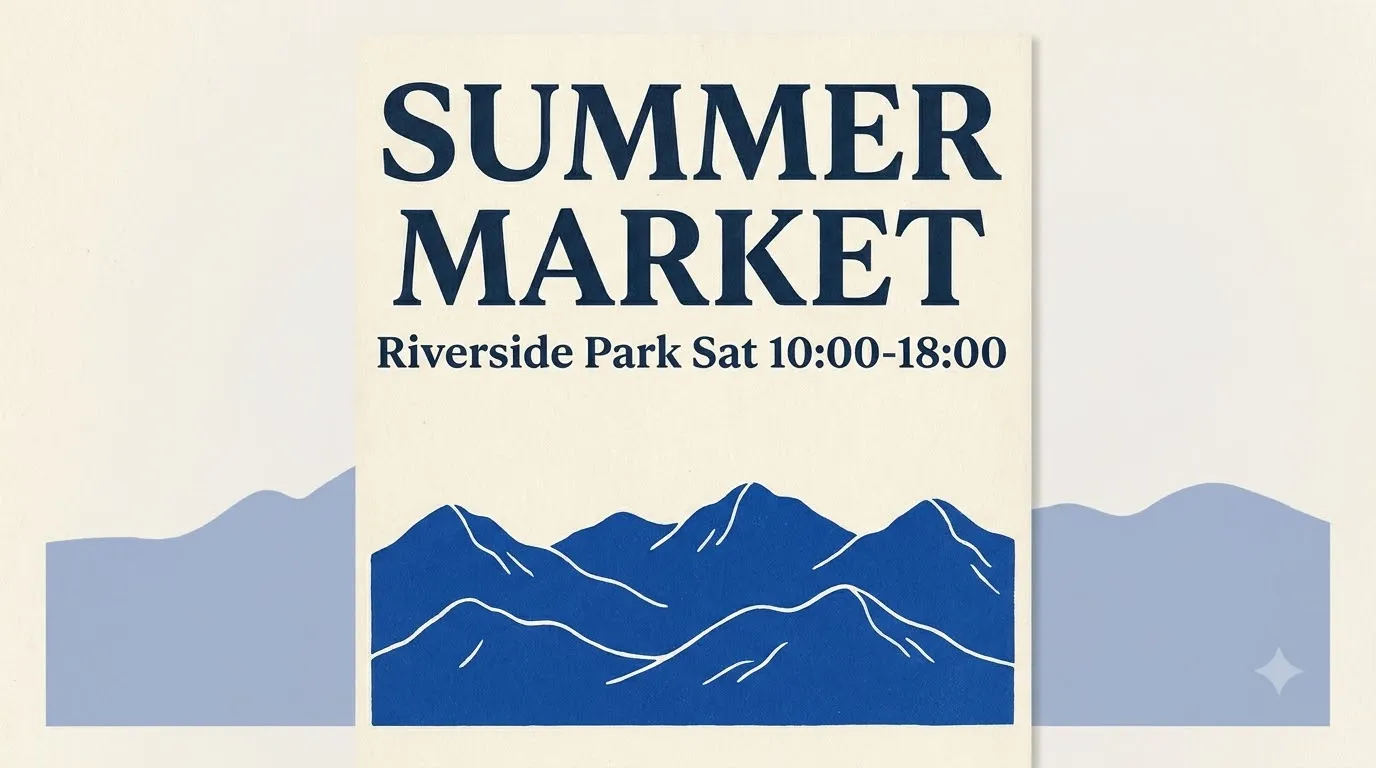
A minimal shape looks like this — title above, illustration below:
{
  "summary": {"meta": ["poster"], "canvas": "single",
    "caption": "A minimalist travel poster with cream background, blue mountain illustration below, and exact title SUMMER MARKET at top."},
  "items": [
    {"label": "text", "caption": "Large dark-blue title centered at top.",
     "text": "SUMMER MARKET", "bbox": [-416, -384, -288, 384]},
    {"label": "object", "caption": "A flat blue mountain illustration in lower center.",
     "bbox": [-192, -288, 384, 288]}
  ],
  "bbox_coord_space": "abs_centralized",
  "bbox_format": "yxyx"
}
Nobody hand-writes these boxes for a 20-element infographic. The working pattern from early users is to have a vision-capable LLM draft the JSON from a brief or a sketch, then fix coordinates before generating. Japanese tester @chimolog7 put it bluntly: the bbox format is too hard for humans, so he generated it with Opus — and then found Japanese rendering with barely 1% perceived typos where Krea 2 still misspelled often (post).
The second trick is controlled regeneration. Because the model is text-to-image only with no reference-image input, you cannot img2img a photo and keep it. What you can do is change one box's text or position, keep the same seed, and regenerate: the rest of the layout largely holds. User @li9292 demonstrated this on a weekly-report cover with thousands of Chinese characters and 20 boxes, editing a single box with the same seed while the remaining layout stayed put (post). For exact-copy work, that single-box-plus-same-seed loop matters more than any style preset.
For broader text-rendering context, our best image models for text rendering in 2026 test shows why this category needed a layout-first option.
Calling it and what free really costs
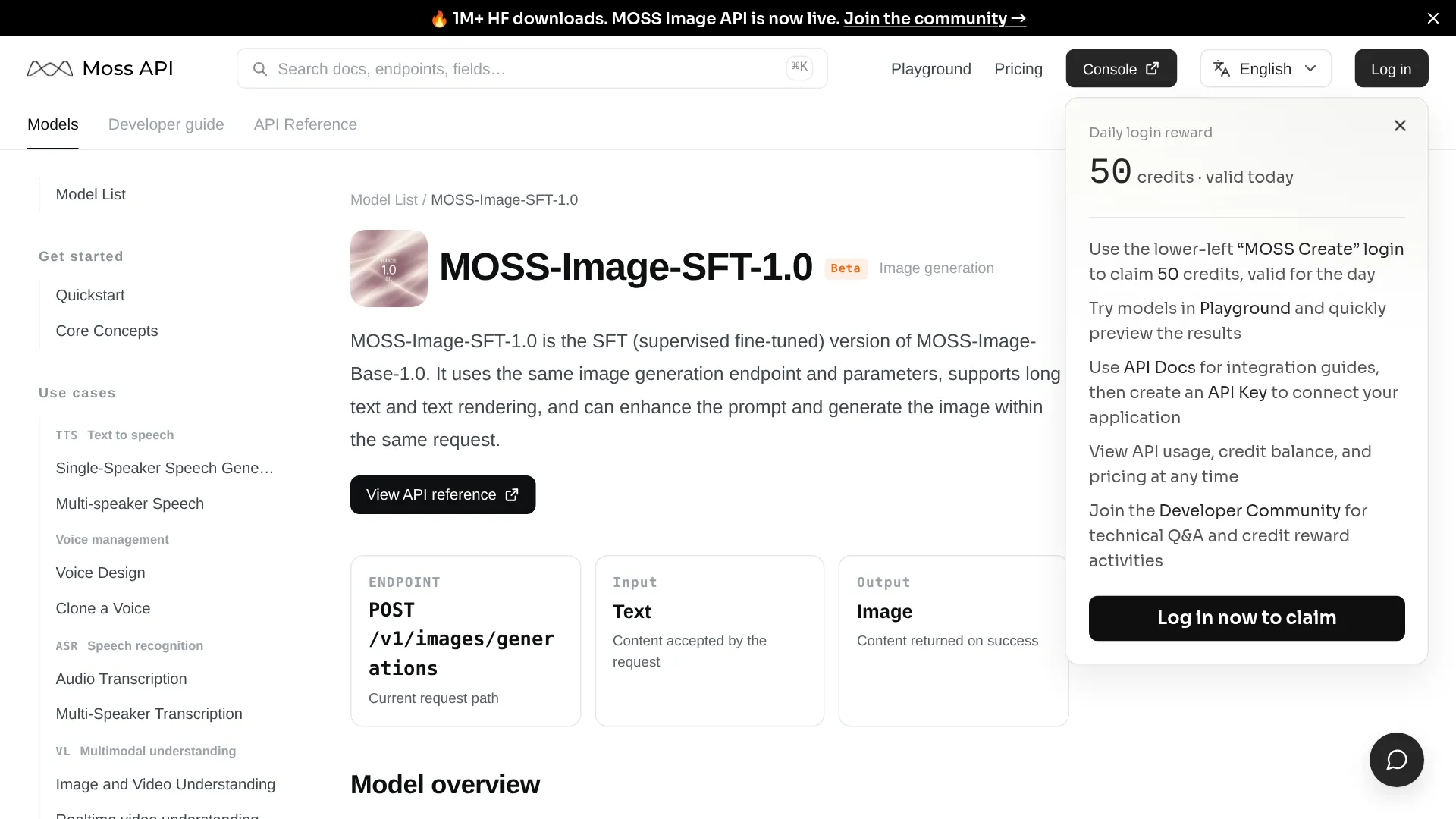
The hosted path is one endpoint. The MOSI API docs list POST /v1/images/generations for moss-image-sft-1.0, with input text and output image only — no image input, no audio or video, no streaming or async task API. Prompt enhancement is built in but off by default; enable it with prompt_enhance: true, with the enhancer version selected server-side.
curl https://platform.mosi.cn/v1/images/generations \
  -H "Authorization: Bearer $MOSI_API_KEY" \
  -H "Content-Type: application/json" \
  -d '{
    "model": "moss-image-sft-1.0",
    "prompt": "A cafe menu card on a light oak table, exact heading MORNING MENU",
    "size": "1024x1024",
    "prompt_enhance": false
  }'
Pass a full JSON layout string as prompt when you need box-level control; the short natural-language form above is the simplest copy-pasteable call.
Billing at the time of checking is Free for a limited time at 0 credits, with a link to full pricing for what comes after. The Base-vs-SFT guide notes the same gap: playground live since October 20, no durable per-image price published. Budget accordingly — free window for prototyping, then provider rates plus your rejection rate for misspelled takes.
Local inference has no per-image fee but a real hardware bill. The Comfy-Org file listing checked October 20 totals about 29.72 GB of BF16 weights before environment and cache: backbone ~10.16 GB, text encoder ~19.31 GB, small VAE ~0.25 GB. INT8 ConvRot roughly halves the transformer footprint (backbone ~5.41 GB, encoder ~9.75 GB), with a W4A8 GPTQ encoder option near 7.34 GB.
| Setup | What to download | Practical note |
|---|---|---|
| Full BF16 | 29.72 GB weights + working memory | Tight even on 32 GB without offload; system RAM and prompt length matter |
| INT8 quantized | ~15 GB class + offload | Documented 12 GB path at ~1 MP, one image per batch (~9.7 GB peak in community test cited here); start here on 8–12 GB cards |
| Community 8-step DMD / 4-step | Adapter + matching workflow | ~24 seconds vs ~137 seconds in that same 1 MP RTX 3060 report, but early adapters lost nuance — establish the 50-step baseline first |
The official sampling baseline is Euler, 50 steps, CFG 3.0, shift 5.0, with skip-layer guidance at layer 22, at 1024x1024. Native ComfyUI support merged October 16 (announced here); update ComfyUI, search templates for MOSS-Image, and use the matching Base or SFT workflow with Comfy-Org files rather than mixing a plugin graph with a native loader.
If you are costing providers more broadly, our cheapest image generation API breakdown is a useful anchor for GPU-time plus rejection math.
Where closed models still beat it
The limits are explicit and worth respecting before you commit artwork to this stack. The release is text-to-image only. There is no image editing and no reference-image input; reference-based generation is listed as future work. If preserving an uploaded photo or locking a character across shots is essential, use an editing-native model such as Qwen Image 2.1 for production editing instead.
People and taste are the second gap. At 5B the faces can feel generic, proportions drift, and hands repeat the usual failures.
"It also can't do character proportions well. Nor is it great with your typical 'bad hands' and similar issues." — @SlipperyGem
The cited hands-on tests support checking the same list before shipping: short prompts, named characters, artist tags and exact constraints stay inconsistent, small print needs a proofread pass, and languages outside the English/Chinese benchmark need manual checks. The official 50-step config is heavy on modest hardware, while fast adapters trade lighting nuance and constraint-following for speed. Record checkpoint, encoder, VAE, precision, prompt, seed, and time including encoding for every keeper.
Speed-focused local serving tells the same story from the hardware side. Lucebox measured 2.7 seconds for 1024x1024 at 8 steps CFG 1 on a Radeon AI PRO R9700 with its own kernels, 1.8x faster end-to-end than ComfyUI on a DGX Spark at the same settings — but its own eye-check found 4 of 8 outputs misshapen at CFG 1 versus 1 of 8 at CFG 2.5, which costs 5.2 seconds. Faster is not automatically more usable.
MOSS Image API FAQ
Is MOSS Image free for commercial use?
Weights and bundled code are released under Apache 2.0, which permits commercial use and fine-tuning with no licensing fee. Hosted endpoints set their own prices and content rules, and third-party quantizations or LoRAs keep their own terms.
Base vs SFT — which should the API use?
The hosted API serves SFT (moss-image-sft-1.0), the fine-tuned checkpoint the team recommends for generation. Download SFT for posters and information graphics now; download Base when fine-tuning or training a LoRA.
Can it run on 12 GB VRAM?
A documented 12 GB setup works with a quantized workflow plus CPU offloading at ~1 MP and one image per batch.
Can it edit a photo or keep a character identical?
No. The released backbone does not condition on reference images. Reusing a seed with edited JSON guides regeneration but does not preserve an uploaded photograph or guarantee identity.
Who should call MOSS Image next
| Your job | Call MOSS Image when | Call something else when |
|---|---|---|
| Poster, menu, slide, or UI mock with exact copy | Long bilingual text plus box-level placement matters more than photoreal people | One-line slogans only — a closed model is faster to prompt |
| E-commerce or editorial pipeline | You can add an LLM-to-JSON step and a proofread pass, and you want Apache 2.0 weights you can self-host or fine-tune | You need img2img, inpainting, or reference-locked characters today |
| Local builder on a budget | 12 GB plus quantization is acceptable, or the MOSI free window covers your prototype | You need guaranteed throughput, streaming, or async tasks — the hosted API offers neither yet |
For text-heavy design work with a layout you can specify, MOSS Image is the rare open model where the constraint system is the product. For everything that needs a face to stay the same face, treat it as a typography engine alongside a closed image model, not a replacement.