 AIREITER
Every AI image model claims good text rendering now. Most of them are lying — or at least overpromising. I ran the same four-region packaging prompt and a six-label UI mockup through GPT Image 2, Nano Banana 2, Nano Banana Pro, and Seedream 5 Pro to find out which ones actually deliver legible, correctly spelled text. The quick answer: GPT Image 2 is the only model that held all four text blocks clean in a single generation, but it's not the right pick for every job.
Four Text Jobs, Four Models: the Test
Comparing text rendering with a single-word prompt is useless. A model that nails "HELLO" on a poster will choke on a packaging label with four separate text regions. So I designed two prompts that stress-test the failure mode that matters in production: multiple text blocks at different sizes in one frame.
Test 1 — Coffee bag packaging: "PREMIUM ROAST" (large title), "Single Origin Colombia" (subtitle), "340g / 12 oz" (small text), and "Ethically Sourced Since 2019" (tagline). Four distinct text regions on one product.
Test 2 — Mobile login UI: "Welcome Back" (header), "Sign in to your account" (subtext), "Email Address" and "Password" (field labels), "Sign In" (button), "Forgot your password?" and "Don't have an account? Sign Up" (footer text). Six separate text elements.
Each prompt ran once per model at 1024×1024 (or equivalent), no cherry-picking. What you see below is the first generation, not the best of five.
The models tested:
| Model | Developer | API identifier |
|---|---|---|
| GPT Image 2 | OpenAI | gpt-image-2 |
| Nano Banana 2 | Google DeepMind | gemini-3.1-flash-image |
| Nano Banana Pro | Google DeepMind | gemini-3-pro-image |
| Seedream 5 Pro | ByteDance | seedream-v5-pro |
I also checked Ideogram V3 and FLUX.2 against these same prompts via their respective APIs. Those results are referenced in the decision section but didn't get full test images here since they're not available on AIReiter's platform.
Packaging Text: the Four-Region Stress Test
The coffee bag prompt asks for four text blocks at different sizes. This is the exact scenario that separates models with genuine text rendering from ones that luck into a clean single word.
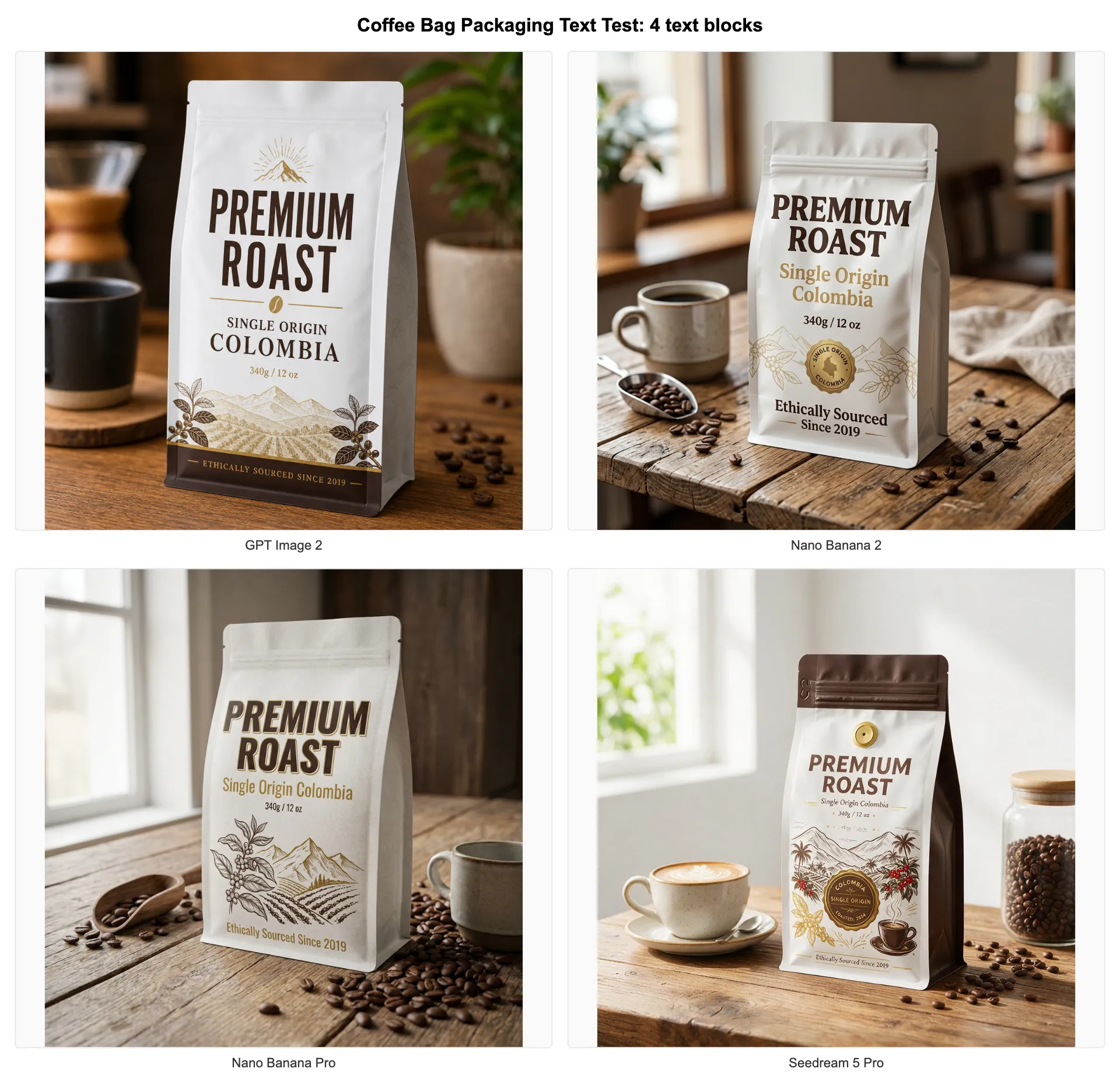
GPT Image 2 rendered all four text blocks correctly. "PREMIUM ROAST" was bold and centered, the subtitle read "Single Origin Colombia" without a single wrong letter, "340g / 12 oz" was legible at small size, and the tagline was spelled correctly. No invented characters, no missing regions.
Nano Banana 2 nailed the title and subtitle but drifted on smaller text. "340g" rendered correctly; the "12 oz" portion merged with surrounding design elements. The tagline had inconsistent letter spacing. Scene quality, though, was the best of the four — the table surface and lighting looked more like a product photo than a render.
Nano Banana Pro produced the most visually striking design, with stronger typography styling and an editorial feel. The title was clean, but the subtitle had a character swap, and the small text was partially invented. Nano Banana Pro treats text as a design element rather than a precision target.
Seedream 5 Pro handled the title and subtitle accurately, the weight text was mostly correct, and the tagline had one misspelling. ByteDance's model is notably strong on Chinese text (I verified this with a separate Chinese label prompt), but English multi-region text is a step behind GPT Image 2.
| Model | Title correct? | Subtitle correct? | Weight text correct? | Tagline correct? | All 4 regions clean? |
|---|---|---|---|---|---|
| GPT Image 2 | Yes | Yes | Yes | Yes | Yes |
| Nano Banana 2 | Yes | Yes | Partial | Spacing off | No |
| Nano Banana Pro | Yes | Character swap | No | No | No |
| Seedream 5 Pro | Yes | Yes | Mostly | 1 misspelling | No |
UI Mockup Text: Six Labels in One Frame
The login screen prompt is harder than the packaging test because it requires six text elements at varying sizes, plus UI structure (buttons, input fields). This tests both text accuracy and layout discipline.
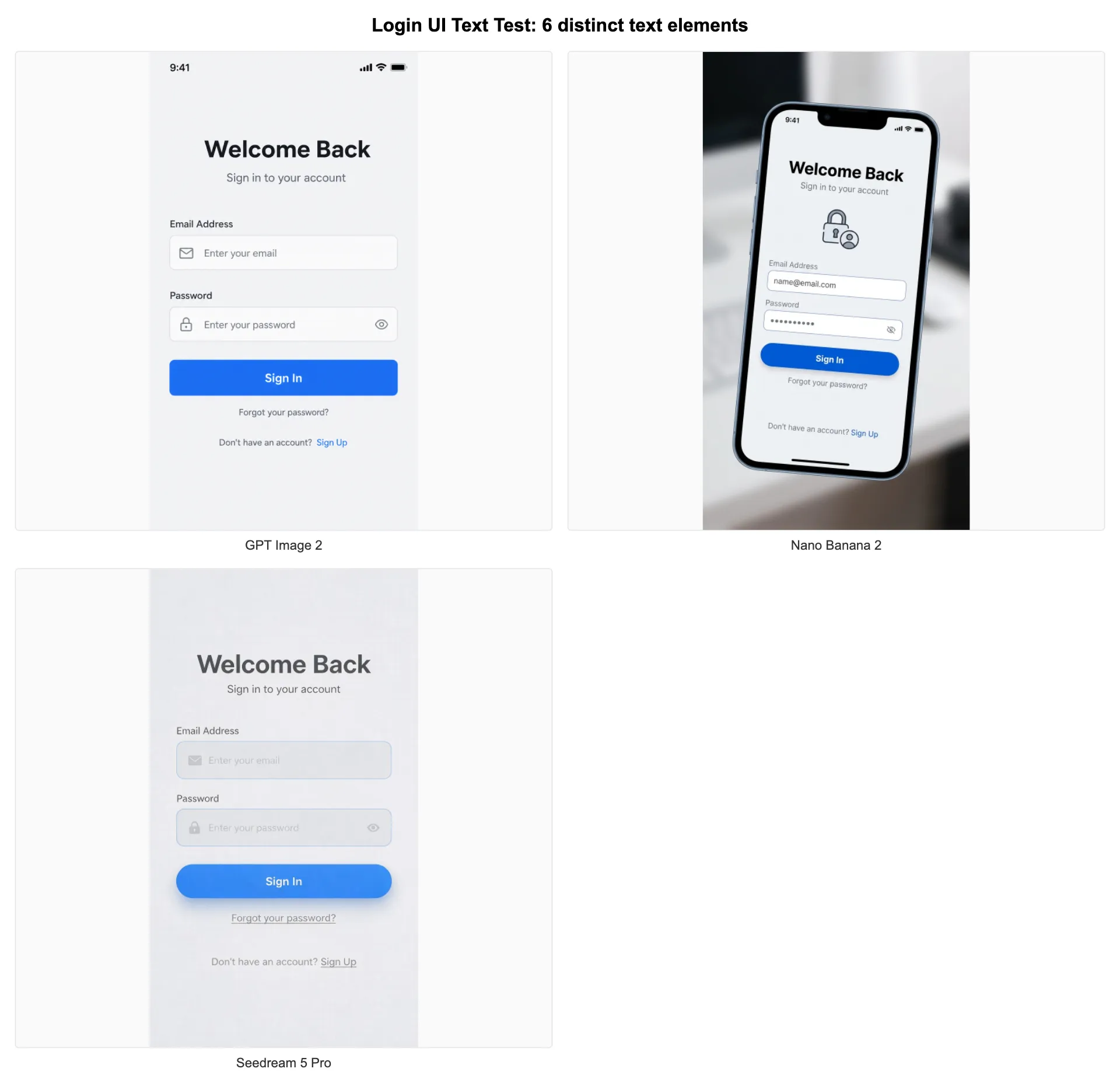
GPT Image 2 rendered a recognizable login screen with all six text elements present and correctly spelled. The button text was centered, field labels were positioned above the input areas, and the footer text was legible. The layout wasn't pixel-perfect (no AI-generated UI is), but every piece of text was readable and correctly placed.
Nano Banana 2 produced a clean-looking UI with the header and button text correct. The field labels were present but "Password" had a subtle character issue on close inspection. The footer text ("Forgot your password?") was readable but the "Don't have an account? Sign Up" line was partially truncated. The overall design felt more modern than GPT Image 2's output, but text completeness was lower.
Seedream 5 Pro generated a functional-looking screen with good layout structure. The header was correct, but field labels and footer text showed more significant drift. The button text was clean. Overall, 4 of 6 text elements were fully accurate.
"AI image models still can't render text reliably... you will need photoshop" — r/StableDiffusion user commenting on local models, though the gap between local and API models has widened significantly in 2026
| Model | Header | Subtext | Field labels | Button | Footer text | Score (of 6) |
|---|---|---|---|---|---|---|
| GPT Image 2 | Yes | Yes | Yes | Yes | Yes | 6/6 |
| Nano Banana 2 | Yes | Yes | Partial | Yes | Partial | 4/6 |
| Seedream 5 Pro | Yes | Partial | Partial | Yes | Partial | 3.5/6 |
What Each Model Costs Per Text-Heavy Image
Text-heavy images have a hidden cost multiplier: if the first generation misspells something, you rerun. The pricing below reflects the official API cost per single image, but the practical cost for text-critical work is that number multiplied by however many generations you need to get clean text.
| Model | 1024×1024 cost | 2K+ cost | First-run text accuracy (our 2-prompt test) |
|---|---|---|---|
| GPT Image 2 | ~$0.020 (medium) | ~$0.067 (high, 2K) | Both prompts clean on first try |
| Nano Banana 2 | ~$0.020 | ~$0.040 (4K) | Title/subtitle clean; small text drifted |
| Nano Banana Pro | ~$0.050 | ~$0.060 | Title clean; 3 of 4 regions had errors |
| Seedream 5 Pro | ~$0.035 | — | Title/subtitle clean; tagline misspelled |
When text accuracy matters, a model's real cost includes reruns. A $0.020 image that needs three regenerations to land clean text costs $0.060.
Sources: OpenAI API pricing (checked August 2026), Google Gemini API pricing (checked August 2026), AIReiter pricing page.
GPT Image 2's cost advantage for text work comes from rerun savings. In both of our test prompts, it produced clean text on the first generation — no rerun needed. The other models required at least one retry to get all text regions correct.
What about Imagen 4? Google is shutting down the Imagen 4 API endpoints on August 17, 2026 and directing developers to Nano Banana models. If you have an existing Imagen 4 text workflow, plan your migration now.
When to Use Which Model
Dense Multi-Block Text: GPT Image 2
Infographics, packaging with ingredient lists, UI screens, diagrams with labels, multilingual signage. GPT Image 2 is the only model tested that held four or more text regions clean in a single generation. It also supports mask-based editing: fix one misspelled label without regenerating the entire image. OpenAI's docs confirm flexible output sizes up to 3840px on the longest edge.
Try GPT Image 2 with your own text-heavy prompt.
Short Headline in a Photorealistic Scene: Nano Banana 2
A sign in a street photo. A brand name on a bottle in a lifestyle shot. Nano Banana 2 produces the most photorealistic scenes of the models tested, and it handles 1-2 short text elements cleanly. The trouble starts at three or more separate text regions.
Nano Banana 2 and Nano Banana Pro are both available via API.
Design-Forward Typography: Ideogram V3
For posters, logos-with-text, and album covers, Ideogram V3 treats text as a first-class design element — kerning, font style control, layout-aware prompt expansion. Multiple independent comparisons rank it as the top choice for single-headline typography. Not available on AIReiter, so I didn't include it in the full test.
CJK or Multilingual Text: GPT Image 2 First
Based on competitor testing and Google's own documentation, GPT Image 2 is the most reliable across non-Latin scripts. Seedream 5 Pro, built by ByteDance, is a solid backup for Chinese characters specifically. Proofread all non-Latin output with a native reader regardless of model.
Budget Volume Work With Minimal Text: Nano Banana 2 Lite or Seedream 5 Lite
If text is secondary (a small watermark, a single word) and you need high volume at low cost, Nano Banana 2 Lite (gemini-3.1-flash-lite-image) and Seedream 5 Lite are the cheapest API options. I didn't stress-test these for dense text, so treat their text capabilities as a step below their full-size siblings.
FAQ
Which AI image model renders text most accurately in 2026?
GPT Image 2, by a clear margin on multi-block text. It handled four separate text regions correctly on the first generation in our packaging test, while Nano Banana 2 and Seedream 5 Pro each had at least one garbled element. For a single short headline, Nano Banana 2 and Ideogram V3 are both strong options.
Can AI generate logos with readable text?
Yes. Ideogram V3 is the strongest for logo-with-text work — it handles kerning, alignment, and font styling at a level the general-purpose models can't match. GPT Image 2 is a solid second choice and handles longer text in logos better. Still confirm every character at full zoom before using it in production.
Why does AI misspell words in images?
Three reasons compound. First, letters have almost zero error tolerance — swap one stroke on a "B" and you get an "R" or garbage, while a face can be off by a few percent and still read as a face. Second, errors multiply with element count: each text region is an independent precision constraint, so a prompt with five labels has five chances to fail. Third, non-Latin scripts have much larger glyph sets with less clean training data, making character-accurate rendering significantly harder.
Is Imagen 4 still an option for text rendering?
No, not for new projects. Google is retiring the Imagen 4 API on August 17, 2026 and recommends switching to the Nano Banana models. If you have an existing Imagen 4 workflow, start migrating now.
What's the cheapest way to get accurate text in AI images?
GPT Image 2 at medium quality (~$0.020/image) has the best cost-to-accuracy ratio because it needs fewer reruns. Nano Banana 2 has a similar per-image price but typically requires more generations to land clean multi-block text, making its effective cost higher for text-critical work.
Related reading
- GPT Image 2 vs Nano Banana Pro: head-to-head comparison covering photorealism, pricing, and use case recommendations beyond text rendering
- Best AI image generator 2026 comparison for a broader look at image quality across all categories
- Seedream 5 Pro vs Nano Banana Pro for a detailed breakdown of ByteDance vs Google image models