
We put GPT Image 2 and Nano Banana Pro through five identical prompts to settle the comparison with output, not opinions. The short version: on pure photorealism they're neck-and-neck, but GPT Image 2 keeps small, dense text legible, costs less, and came back faster in testing. Nano Banana Pro is genuinely beautiful — more cinematic, with a film-like quality — but its fine print falls apart and it costs more per image.
TL;DR
GPT Image 2 — best for text-heavy work (posters, ads, infographics, UI mockups), tight budgets, and volume. The smart default.
Nano Banana Pro — best for cinematic scenes, photo editing, and character consistency, as long as there's no critical small text.
Cost: GPT Image 2 ≈ $0.02–$0.035/image; Nano Banana Pro ≈ $0.05–$0.06.
Watch out: users report free/consumer tiers silently downgrading Nano Banana Pro after a number of images.
At a glance
Specs and official pricing for both models (checked 2026-06-30):
GPT Image 2 | Nano Banana Pro | |
|---|---|---|
Maker | OpenAI | Google (Gemini 3 Pro Image) |
Max resolution | 4K | 4K |
Native aspect ratios | 13 (incl. 16:9, 21:9) | 10 (incl. 16:9, 21:9) |
Reference images | up to 10 | up to 8 |
Batch mode | No | Yes |
Official price | ~$0.01–$0.12 / image (by quality) | $0.134 (≤2K) / $0.24 (4K) |
Speed (our runs) | ~15 s | ~40 s |
Small/dense text | Reliable | Breaks down |
Pure photorealism | Excellent | Excellent |
Worth correcting up front: both do native 4K and both support 16:9 and 21:9. The "GPT can't do widescreen / maxes at 1.5 MP" line described an earlier model, not GPT Image 2.
The test: five identical prompts
Each model got the same five prompts at matching aspect ratios; every image below is the first generation, no retries. Here's how they scored:
Prompt | GPT Image 2 | Nano Banana Pro | Winner |
|---|---|---|---|
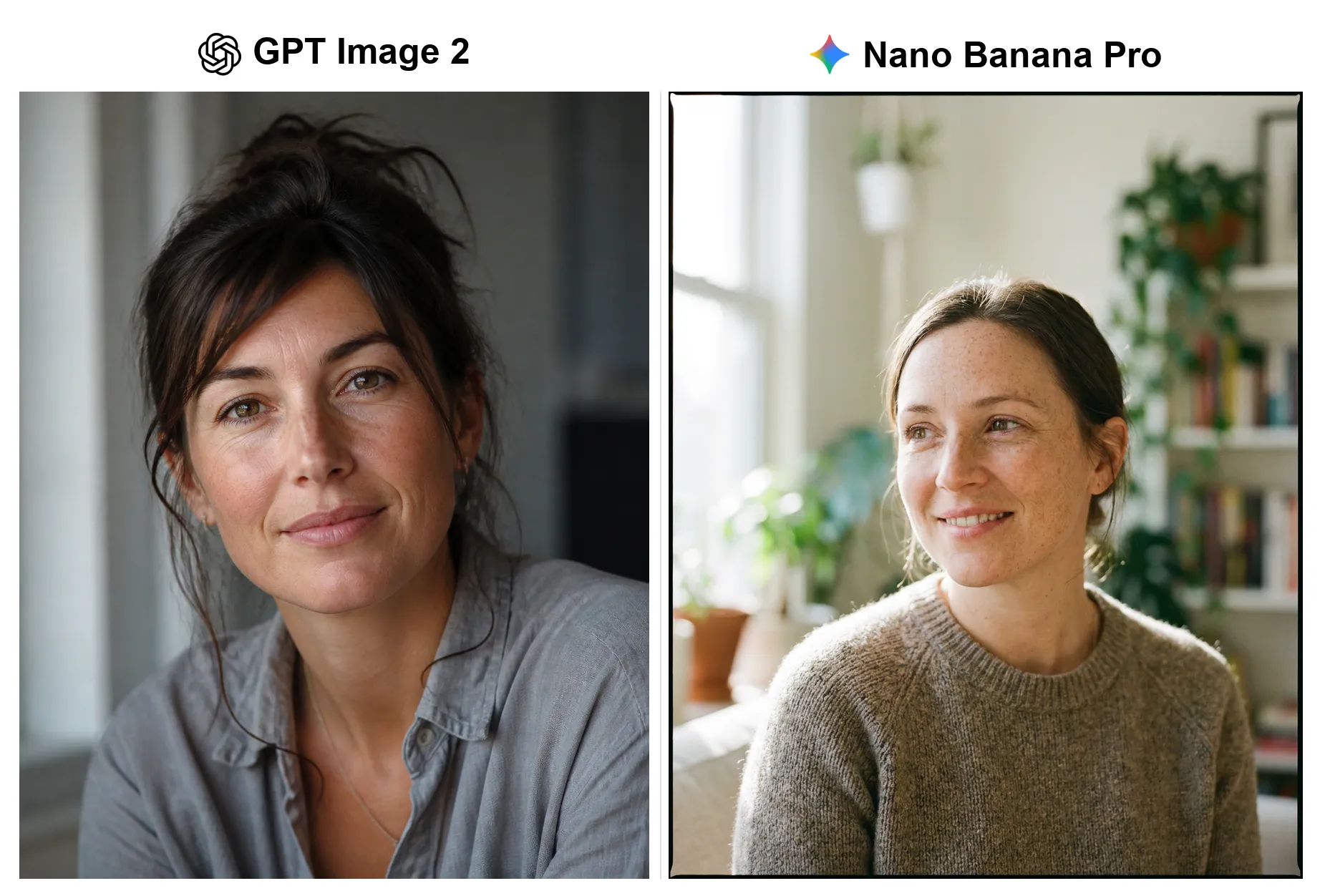
Editorial portrait | Photoreal, studio mood | Photoreal, film-like | Tie |
Mountain sunrise | Photoreal, dramatic | Photoreal, natural | Tie |
Movie poster (dense credits) | Credits legible | Credits garbled | GPT Image 2 |
Product label (fine print) | Label accurate | Label misspelled | GPT Image 2 |
Infographic (moderate text) | Clean | Clean | Tie |
On pure looks, it's a coin flip
Strip the text out and the two trade blows — an editorial portrait:
And a cinematic landscape:
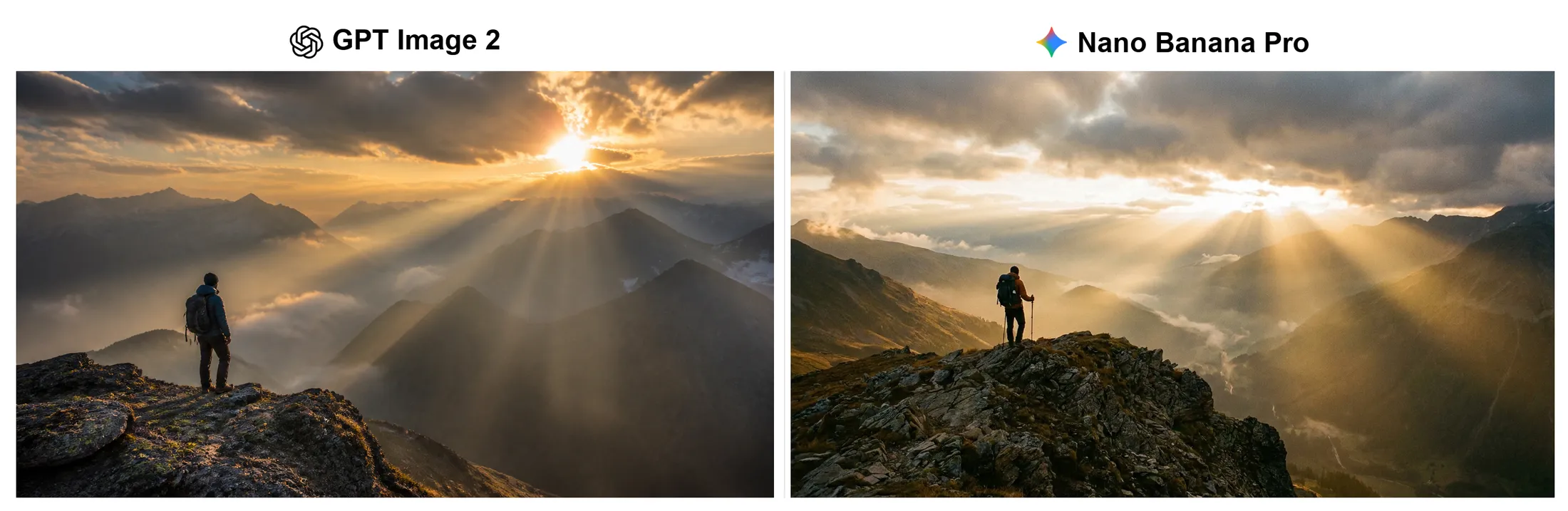
Both are convincingly photographic. GPT Image 2 leans moodier and studio-controlled; Nano Banana Pro leans brighter and more natural, even adding a medium-format film border to the portrait. For realism alone, this is a preference, not a clear win — Nano Banana Pro holds its own.
The gap opens on small text
Add fine print and the split appears. A movie poster with a dense studio-credits block:
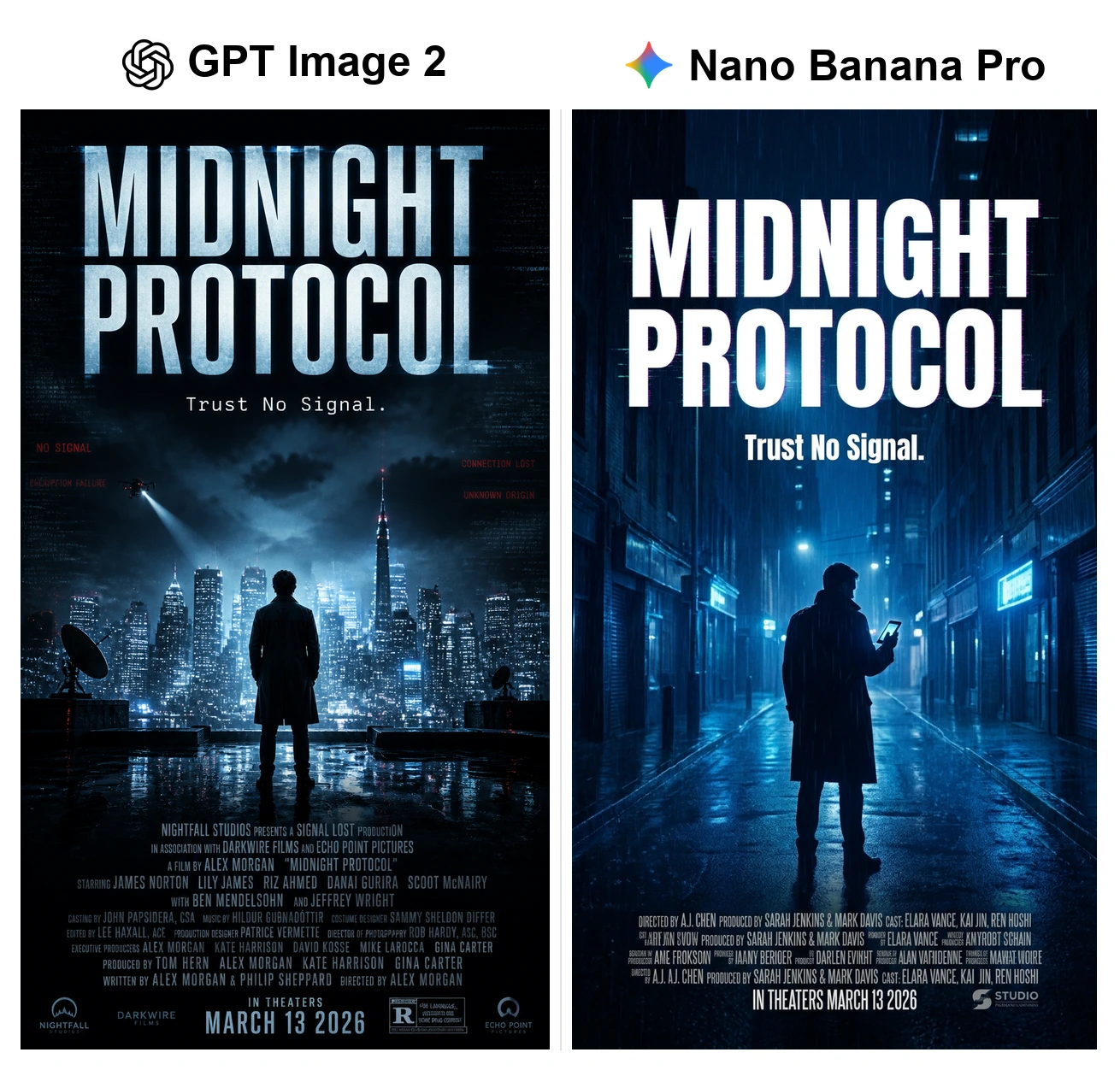
Both nailed the title and mood — Nano Banana Pro's rainy-street version is arguably the better poster. But the credits block tells the story: GPT Image 2 kept the fine print coherent down to the cast list, while Nano Banana Pro's dissolves into gibberish after the first line ("KMYROBT SCHAIN," "AME FROKSOON").
A product label repeats it with a smaller margin:
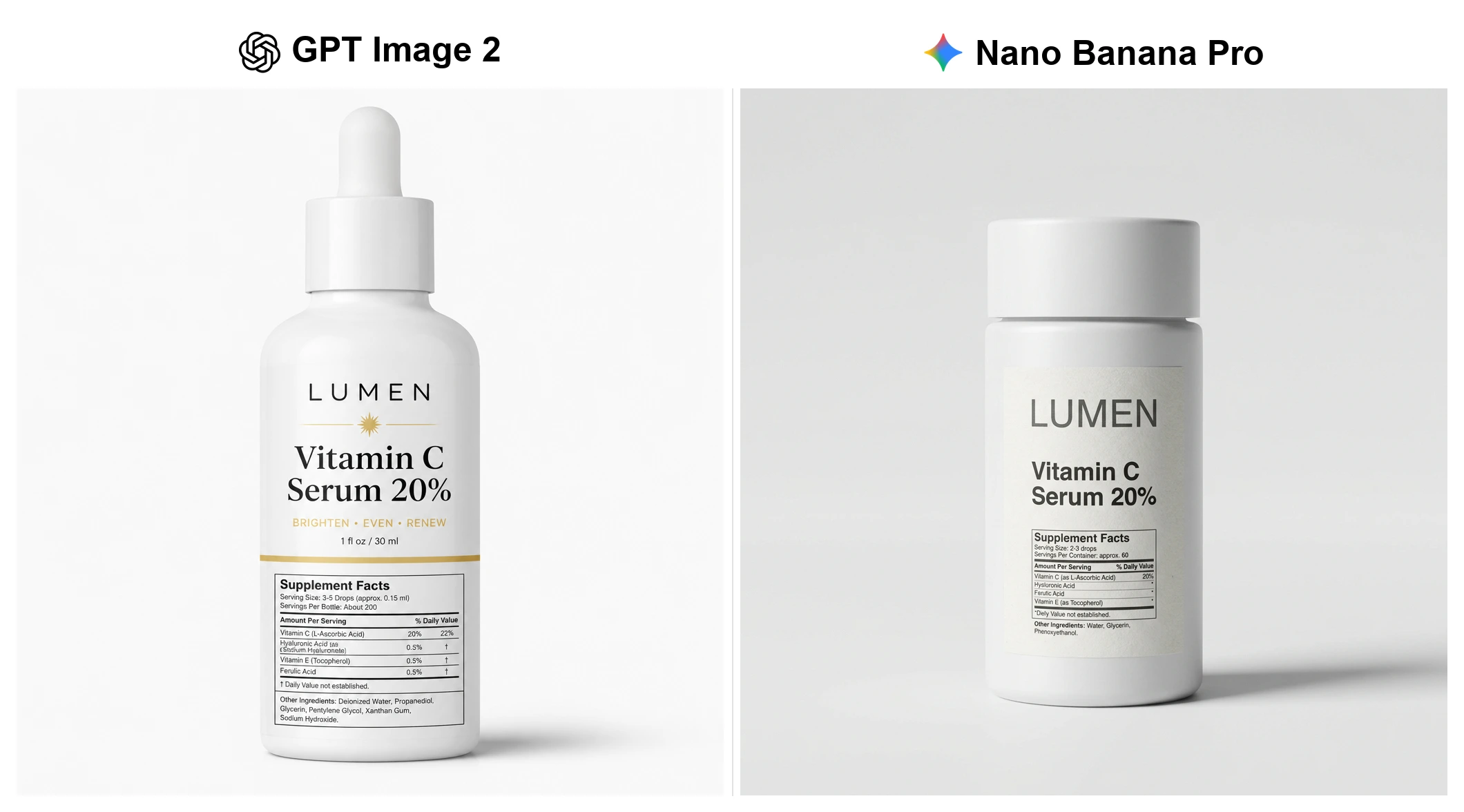
Nano Banana Pro's bottle is the more convincing product photo, but it misspells the fine print ("Hysluronic Acid," "Diely Value"); GPT Image 2 keeps the Supplement Facts panel accurate.
Moderate text is a tie
To be fair, Nano Banana Pro doesn't break on all text — normal-sized labels come out clean:
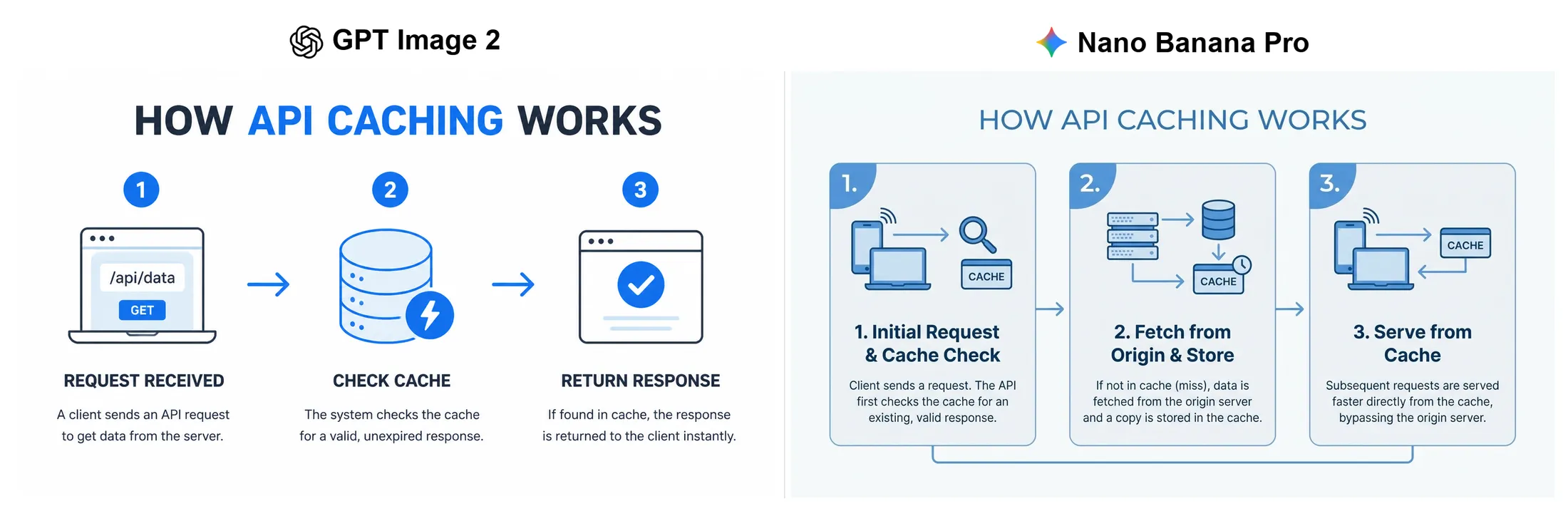
Both produced a usable "How API Caching Works" infographic. The rule: the finer the print, the bigger GPT Image 2's lead.
Which should you pick?
GPT Image 2 — for most work. Text-heavy assets (posters, ads, infographics, UI mockups), the widest aspect-ratio support, up to 10 reference images, lowest cost, and fastest in our runs. Its legible typography is why GPT-rendered text mockups travel so well online.
Nano Banana Pro — for cinematic and editing work. A moody, lifestyle-photographic look, plus plain-English image editing and character consistency across shots (up to 8 reference images and a batch mode — documented strengths we didn't stress-test here). Avoid it for critical small text.
Doing both at volume? Default to GPT Image 2 and switch to Nano Banana Pro for the shots where its look wins. Reaching both through a single API (we used AIReiter) saves juggling two providers.
What they cost — and why "free" can backfire
Both makers publish official pricing, and it confirms the pattern. Nano Banana Pro (Google) is billed per image on the Gemini API pricing page: $0.134 at 1K–2K and $0.24 at 4K on the standard tier. GPT Image 2 (OpenAI) is billed by token on the OpenAI pricing page — $30 per 1M image output tokens — which works out to roughly $0.01 / $0.03 / $0.12 per 1024² image at low / medium / high quality. So at comparable quality GPT Image 2 is the cheaper model, and the gap widens at 4K.
Using a representative medium-quality GPT Image 2 image (~$0.03) versus standard Nano Banana Pro (~$0.134):
Images / month | GPT Image 2 (~$0.03) | Nano Banana Pro (~$0.134) |
|---|---|---|
1,000 | ~$30 | ~$134 |
5,000 | ~$150 | ~$670 |
20,000 | ~$600 | ~$2,680 |
At volume, that ~4× gap is most of the decision. (Speed reports vary — some find Nano Banana Pro quicker on simple prompts in the consumer app — but on the API, GPT Image 2 was faster in every one of our runs.)
If you specifically need Nano Banana Pro, or just want both models under one key for less, a third-party router helps: on AIReiter Nano Banana Pro runs about $0.06 an image (vs $0.134 official) and GPT Image 2 about $0.01 — so 5,000 Pro images is roughly $300 instead of $670.
The free-tier trap
One thing the marketing skips: users report free and consumer tiers quietly degrading. On Google's developer forum, people describe Nano Banana Pro switching to an older, lower-quality model after about 20 images with no warning. Free Gemini users have been capped at as few as two Nano Banana Pro images a day, and OpenAI's forum carries the same kind of complaint about sudden quality drops on the consumer side. These are user reports, not confirmed policy — but for work you're shipping, a paid API gives you the actual model without the surprise fallback.
The honest caveats
GPT Image 2: strict content filtering, edits that get stubborn after the first round, and an occasional warm color cast.
Nano Banana Pro: the small-text breakdown shown above, a higher price at volume, and the reported free-tier downgrade.
Both: still shaky on close-up hands, and both misspell long or invented words — budget a retry for anything text-critical.
FAQ
Is GPT Image 2 better than Nano Banana Pro?
For most work, yes — it ties on realism but wins on small text, cost, and speed. Nano Banana Pro is the pick for cinematic scenes and editing.
Which renders text better?
GPT Image 2, clearly, once text gets small or dense. For normal-sized labels, both are fine.
Why did my Nano Banana Pro images suddenly look worse?
Likely a silent downgrade — users report free and consumer tiers falling back to an older model after a number of images. A paid API avoids it.
How much does each cost?
About $0.02–$0.035 per image for GPT Image 2 and $0.05–$0.06 for Nano Banana Pro.
What about Imagen 4 or Nano Banana 2?
Nano Banana 2 is the faster, cheaper flash model (see our Nano Banana 2 vs Nano Banana Pro review).
Prompts tested (identical for both): (1) editorial close-up portrait, freckles, side window light, 85mm; (2) lone hiker on a ridge over a misty valley at sunrise; (3) movie poster "MIDNIGHT PROTOCOL — Trust No Signal" with a dense credits block; (4) "LUMEN Vitamin C Serum 20%" bottle with a Supplement Facts panel; (5) "How API Caching Works" three-step infographic. Run 2026-06-30.