 AIREITER
Quer transformar uma ideia em um site ou app funcional sem montar infraestrutura, contratar servidor ou configurar um pipeline de deploy? O ChatGPT Sites faz isso dentro do próprio ChatGPT: você descreve o que precisa, o sistema cria a aplicação com o Codex por trás, e o resultado pode ser publicado em uma URL de produção para compartilhar com seu workspace ou com o público. Em julho de 2026, o recurso está em beta público para todos os planos pagos do ChatGPT, exceto Free e Go. Ele também não deve ser confundido com ChatGPT Projects nem Canvas. Neste guia, você verá como usar o ChatGPT Sites, seus limites e em que situações uma API é a escolha mais adequada.
O que é o ChatGPT Sites na prática
O Sites converte um prompt em uma experiência interativa hospedada — como dashboard, rastreador de projetos, landing page, ferramenta interna ou jogo pequeno — em vez de entregar apenas um documento estático ou uma resposta no chat. Tanto a criação quanto a hospedagem acontecem no ChatGPT: não é preciso exportar código, escolher um provedor de hospedagem ou montar uma etapa de deploy.
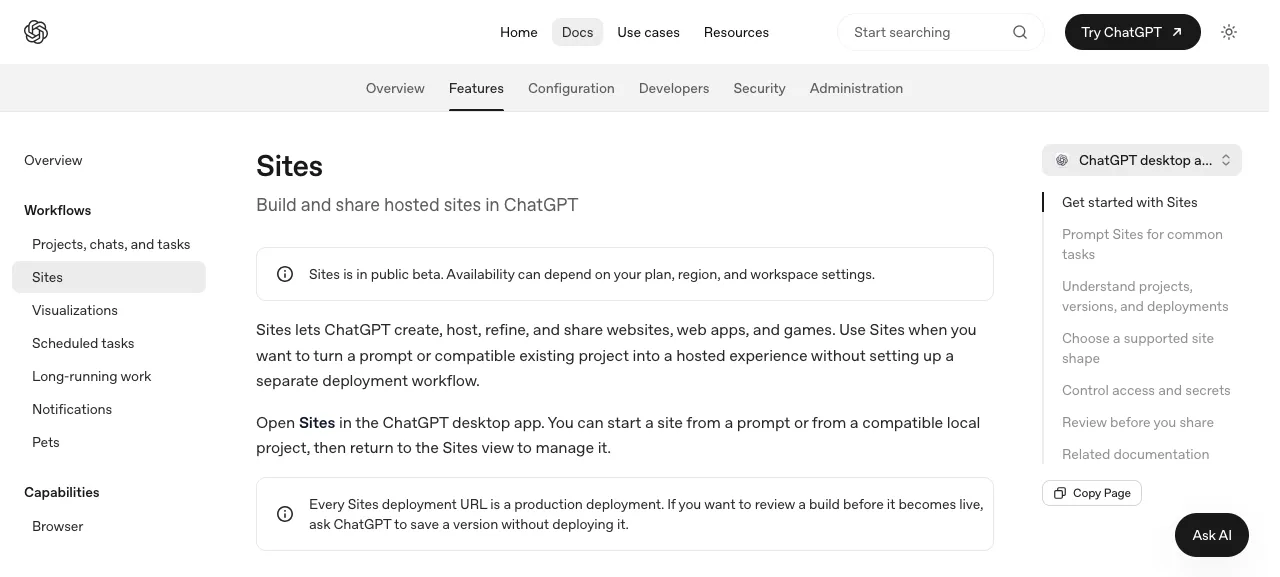
Vale separar três recursos desde o início. O Sites é diferente do ChatGPT Projects, usado para organizar conversas e arquivos, e do Canvas, uma área de edição de documentos e código dentro de uma conversa. Dos três, apenas o Sites gera um app hospedado e compartilhável, com URL própria. Ele é construído sobre o Codex, o mesmo agente por trás dos fluxos de programação da OpenAI, e foi pensado tanto para desenvolvedores quanto para equipes de operações, análise e marketing.
As informações abaixo foram verificadas na documentação oficial do Sites da OpenAI em 15 de julho de 2026. Como o Sites está em beta público, a disponibilidade por plano e região pode mudar.
Quem já pode usar o ChatGPT Sites
O Sites está em beta público, e sua liberação ocorreu gradualmente entre os planos. A regra atual do Help Center da OpenAI é: o recurso está disponível nos planos pagos exceto Free e Go. Isso inclui Plus, Pro, Business, Enterprise e Edu; alguns planos, como Plus e Business, receberam acesso mais tarde que Pro e Enterprise. Administradores de workspaces podem restringir o recurso, portanto, em contas gerenciadas, talvez seja necessário pedir que um administrador o habilite.
Há duas restrições de acesso que costumam gerar dúvidas:
- Região. No lançamento, o Sites não está disponível no Espaço Econômico Europeu, na Suíça nem no Reino Unido, sem prazo anunciado para essas regiões.
- Plataforma. O Sites é aberto pelo aplicativo desktop do ChatGPT ou pelo ChatGPT Work na web, em
chatgpt.com/sites. Ele não é gerenciado pela CLI do Codex nem pelas extensões de IDE.
Para começar, basta pedir ao ChatGPT que crie um site em uma conversa comum ou incluir @Sites no prompt para acionar a criação explicitamente. Também é possível partir de um projeto local existente e compatível, em vez de começar do zero.
Se o Sites não aparece para você, a explicação quase sempre é uma destas três: sua conta está no Free ou Go, que não têm suporte; você está em uma região restrita — EEE, Reino Unido ou Suíça —; ou um administrador do workspace ainda não ativou o recurso para sua conta.
Como criar um site passo a passo
A criação acontece em forma de conversa, não em um formulário. O processo tem quatro etapas:
1. Capriche no prompt inicial. A qualidade da primeira versão acompanha o nível de detalhe do pedido. Informe para quem é o site, qual é o fluxo principal, de quais dados ele precisa, se os usuários farão login e quem poderá acessá-lo. Um prompt que funciona bem seria:
Crie um rastreador interno de projetos para minha equipe de marketing. Os membros da equipe devem entrar com a conta do nosso workspace. Cada projeto precisa ter nome, responsável, status (Não iniciado / Em andamento / Concluído) e data de entrega. Salve os registros para que permaneçam disponíveis. Mostre uma tabela de visão geral e um quadro simples agrupado por status. O acesso deve ser limitado apenas ao nosso workspace.
Esse único prompt informa o público — equipe de marketing —, o fluxo — acompanhar projetos —, o modelo de dados — os campos —, a persistência — salvar registros — e o escopo de acesso — apenas o workspace. Com isso, o Sites consegue tomar decisões sensatas sem precisar adivinhar.
2. Confira o que foi gerado. O ChatGPT mostra o site criado e como ele trata os dados. Antes de compartilhar, verifique o layout, os campos e qualquer comportamento relacionado a login ou armazenamento.
3. Faça ajustes. Peça mudanças em linguagem natural: "adicione um filtro para projetos atrasados", "coloque o quadro acima da tabela" ou "permita que os responsáveis editem apenas suas próprias linhas". Você também pode anexar capturas de tela ou arquivos para orientar o design. A maioria dos sites que vai além do básico exige algumas rodadas de refinamento, especialmente em regras de login e permissões.
4. Gere o link. Quando estiver pronto, faça o deploy e compartilhe a URL. A seguir, veja como funciona a publicação.
Salvar não é publicar: entenda o deploy
Este é o ponto que mais confunde quem está começando. Toda URL de deploy é uma URL de produção. Não há um ambiente de staging separado; por isso, o Sites divide a publicação em duas ações:
- Salvar uma versão cria uma build revisável vinculada a um commit de código-fonte, sem colocá-la no ar.
- Fazer deploy de uma versão publica uma build salva em sua URL de produção.
O fluxo mais seguro é pedir ao ChatGPT para salvar uma versão, revisá-la e só então fazer o deploy. Se você pular direto para o deploy, o que foi criado ficará imediatamente disponível em um endereço compartilhável.
Compartilhamento e controle de acesso
Depois do deploy, você define quem poderá acessar o site. Os modos de acesso são:
- Apenas o proprietário: somente você e os administradores do workspace — uma boa opção enquanto o site ainda está em revisão.
- Usuários ou grupos selecionados: pessoas específicas que você indicar.
- Workspace: todos os usuários ativos no seu workspace.
- Público: qualquer pessoa que tenha o link.
Compartilhar libera a visualização, não a edição: quem recebe o link vê o site, mas não acessa o criador. Administradores podem desativar completamente o compartilhamento público e, em workspaces Enterprise, a publicação pode depender de aprovação administrativa. Quaisquer segredos exigidos pelo app, como chaves de API e tokens, devem ficar no painel Settings do site, e não no código ou em arquivos de configuração, para não serem expostos na build compartilhada.
O que dá — e o que não dá — para criar
Conhecer as limitações antes de começar evita trabalho perdido. O Sites usa hospedagem gerenciada pela OpenAI e compatível com o runtime do Cloudflare Workers, com duas opções de armazenamento: D1, um banco de dados relacional baseado em SQLite para registros estruturados, e R2, armazenamento de objetos para uploads de arquivos como imagens, documentos e vídeos.
| Compatível | Não compatível | |
|---|---|---|
| Tipos de app | Sites de conteúdo, dashboards, rastreadores, planejadores, landing pages, portais internos, jogos pequenos | E-commerce / processamento de cartões de pagamento, apps com dados de saúde, qualquer conteúdo voltado a menores de 13 anos |
| Backend | Lógica serverless gerenciada (runtime Workers), banco D1, armazenamento de arquivos R2, login de workspace ou público | Servidores Node.js, Postgres ou bancos de dados externos, servidores WebSocket, tarefas em segundo plano / serviços de longa execução |
| Dados | Registros persistentes no D1, uploads no R2, variáveis de ambiente via Settings | Controles de residência de dados — indisponíveis no lançamento |
As limitações técnicas são o principal ponto de atenção: se a ideia exige um processo de servidor persistente, uma instância externa de Postgres, conexões WebSocket em tempo real ou tarefas agendadas em segundo plano, o Sites não poderá hospedá-la. Ele foi feito para front-ends interativos com persistência leve e gerenciada, não para backends totalmente personalizados.
Domínios personalizados funcionam onde o recurso estiver disponível, mas há uma condição: o Sites não registra domínios para você. É necessário levar um domínio próprio, ser seu titular e apontar os registros DNS para o site. No lançamento, domínios personalizados também não estão disponíveis em workspaces Enterprise.
Quanto custa usar o Sites
Não existe uma cobrança separada pelo Sites. O recurso está incluído no plano pago do ChatGPT, e a criação ou edição de um site consome a franquia de uso do plano na mesma estrutura do Codex. Na prática, muitas iterações reduzem o mesmo orçamento usado em outros trabalhos com Codex. O uso é limitado por cotas específicas de cada plano, exibidas pela OpenAI dentro do produto. Em julho de 2026, não há uma tabela pública de preços exclusiva para o Sites; o custo é, na prática, "parte da sua assinatura atual, dentro dos limites de uso dela".
Quando usar uma API em vez do Sites
O Sites é o caminho mais rápido entre uma ideia e um app funcional que pode ser compartilhado desde que suas necessidades caibam nas limitações da plataforma. Ele deixa de ser suficiente quando você precisa de algo bloqueado pelo runtime — um servidor backend real, um banco externo como Postgres, conexões WebSocket persistentes ou tarefas em segundo plano —, de um modelo específico chamado diretamente pelo app, de cobrança por uso em vez de consumo dentro de um plano de chat ou de implantação em uma região onde o Sites ainda não está disponível.
Nesse caso, você estará criando uma aplicação convencional sobre uma API de modelo e fazendo a própria hospedagem. Isso troca a conveniência sem configuração do Sites por controle total sobre a stack. O acesso a modelos por API é cobrado por token, em vez de ser descontado de um plano baseado em assentos; gateways como o AIReiter encaminham as principais famílias de modelos, incluindo endpoints Claude compatíveis com Anthropic, com tarifas baseadas em uso. Esse é o modelo de cobrança normalmente desejado por um app independente. São ferramentas para trabalhos diferentes: Sites para apps internos rápidos e autocontidos; API quando você precisa de um backend de verdade.
| Use o ChatGPT Sites quando… | Desenvolva com uma API quando… |
|---|---|
| Você quer um app compartilhável em poucos minutos | Você precisa de um backend personalizado ou persistente |
| Um dashboard, rastreador ou ferramenta interna atende à necessidade | Você precisa de Postgres, WebSockets ou tarefas em segundo plano |
| Seus usuários estão dentro do workspace | Você precisa de uma região ou provedor específico |
| O uso medido no seu plano é suficiente | Você quer controlar custos por token, conforme o uso |
Perguntas frequentes
O ChatGPT Sites é grátis?
Não. Ele exige um plano pago do ChatGPT. Está disponível em todas as categorias pagas, exceto Free e Go, e não há cobrança adicional além da assinatura. O uso conta para os limites do seu plano.
Posso usar um domínio personalizado no ChatGPT Sites?
Sim, onde o recurso estiver disponível: você fornece um domínio que já possui e aponta seus registros DNS para o site. O Sites não registra domínios para você, e domínios personalizados não são oferecidos em workspaces Enterprise no lançamento.
O ChatGPT Sites está disponível no plano Plus?
O recurso está sendo liberado para os planos pagos, exceto Free e Go, o que inclui o Plus. No entanto, Plus e Business entraram na liberação depois de Pro e Enterprise. A disponibilidade também pode depender da sua região e das configurações do workspace.
Qual é a diferença entre ChatGPT Sites e ChatGPT Projects?
O Projects organiza conversas, arquivos e instruções relacionados em um único workspace. O Sites cria um site ou app interativo hospedado, com URL própria para compartilhamento. São recursos separados, feitos para resolver problemas diferentes.
Posso criar uma loja online com o ChatGPT Sites?
Não. O Sites proíbe explicitamente e-commerce e processamento de cartões de pagamento, além de apps com dados de saúde e qualquer projeto voltado a crianças menores de 13 anos. Ele foi pensado para ferramentas interativas e sites de conteúdo, não para comércio transacional.