 AIREITER
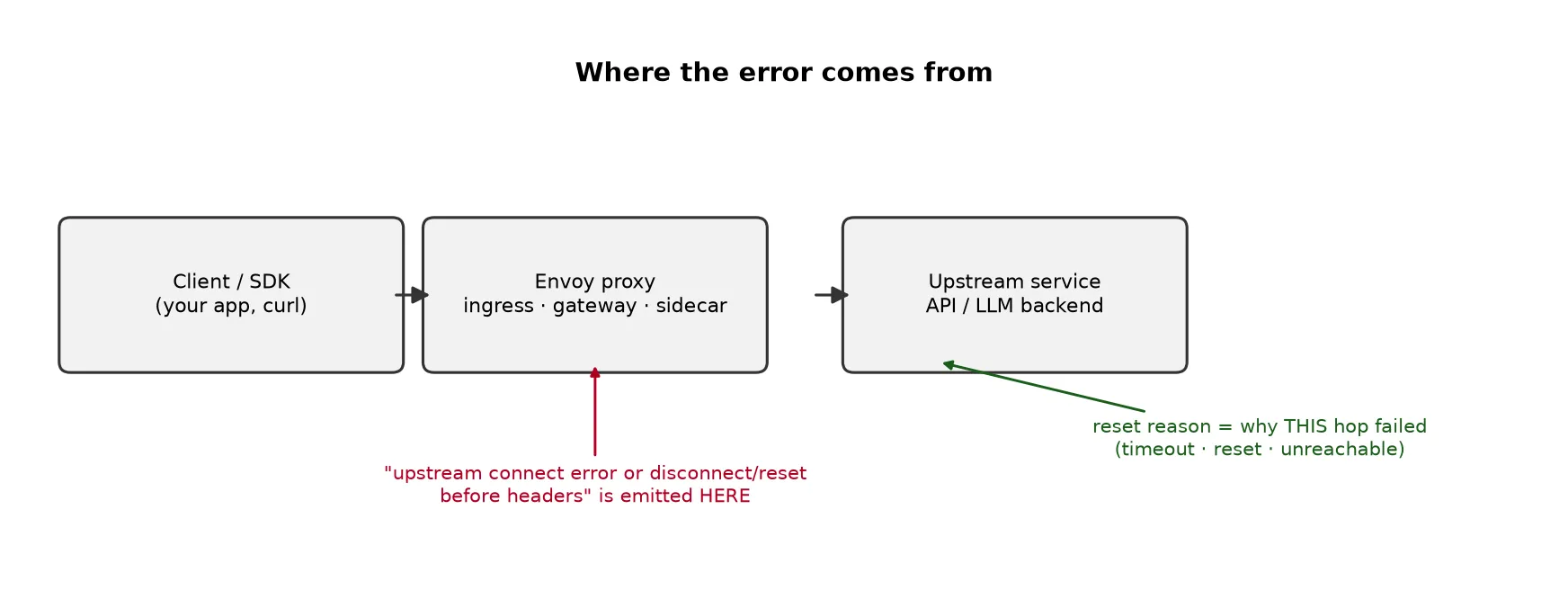
If you are seeing upstream connect error or disconnect/reset before headers on ChatGPT or from the OpenAI API, it is OpenAI's side. The message comes from Envoy, the proxy at OpenAI's edge, and it means Envoy could not get a usable response from OpenAI's backend. On the ChatGPT website this is often labeled Error Code 111. The text after reset reason: is the actual diagnosis, and before headers means the proxy gave up before a single response header arrived — so there is no real response behind that 503, just Envoy's own. You cannot fix OpenAI's infrastructure, but what you do next depends on the reset reason and on whether you hit it in the browser or in code.
Which path are you on:
- ChatGPT web/app: check status.openai.com, then reload or start a new session.
- OpenAI API in code: read the reset reason, capture the request ID, then apply a retry policy.
What the error actually means
Envoy sits between you and OpenAI's backend. When your request arrives, Envoy opens a connection to the backend, forwards the request, and waits for response headers. If that connection fails, resets, times out, or trips a capacity limit before any headers come back, Envoy returns this message with an HTTP 503 (sometimes 502). It shows up on ChatGPT outage screens, in openai.InternalServerError stack traces, and in agent logs.
The wording varies: the retried and the latest reset reason phrasing means Envoy already retried and this was the final attempt's failure. Either way, it is OpenAI's proxy reporting that its own backend did not answer — not a problem with your prompt or your request body.
Decode the reset reason
The reset reason tells you what OpenAI's proxy ran into, and therefore whether retrying is worth it.
| reset reason | What OpenAI's proxy hit | What you can do |
|---|---|---|
connection timeout | Backend too slow to accept the connection in time | Retry with backoff; check status |
overflow | A capacity or rate limit was reached (backend overloaded) | Lower concurrency, back off, then retry |
connection failure / remote connection failure | Backend unreachable or refused the connection | Retry; if persistent, check status and report |
connection termination / connection reset | Backend closed the connection mid-request | Retry; usually lines up with an incident |
protocol error | A protocol problem on OpenAI's side | Retry; report with your request ID if it persists |
overflow and connection timeout are the two that come up most in OpenAI community reports, which fits a backend hitting capacity under bursty load. None of these is fixed by anything on your machine — the useful responses are status checks, backoff, and failover.
On the ChatGPT website or app (Error Code 111)
Check status.openai.com first. If an incident is posted, waiting it out is the main fix, though a persistent account-specific failure is worth reporting to support. If status is green, reload the page, open a new tab, or sign out and back in — a stale session can hold a dead connection. Switching networks or disabling a VPN or corporate proxy only helps if that layer is the thing resetting the connection, so try it before assuming it is OpenAI.
From the OpenAI API in code
Here the error is intermittent and load-dependent. A developer on the openai-python issue tracker reported roughly 5% of calls failing with openai.InternalServerError: upstream connect error or disconnect/reset before headers while making hundreds of requests an hour — the other 95% succeeded. A partial failure rate like that points to backend saturation, and batch-heavy jobs (bulk embeddings, large document ingestion) hit it more because they push concurrency up. The fix is usually a retry policy rather than a payload change, though shaping concurrency and queueing bulk jobs matter just as much at high load.
Before you escalate, capture enough to prove it is provider-side: the timestamp, the endpoint and model, the HTTP status and body, the x-request-id, your SDK version, the in-flight request count, and whether the failures line up with a posted incident. Then apply a retry policy that holds up in production:
import random, time
from openai import OpenAI, APIStatusError, APIConnectionError

client = OpenAI()

def with_retry(fn, max_attempts=5, cap=30.0):
    for attempt in range(max_attempts):
        try:
            return fn()
        except (APIConnectionError, APIStatusError) as e:
            status = getattr(e, "status_code", None)
            # retry connection drops and 5xx (incl. this 503); never blindly retry 4xx
            if isinstance(e, APIStatusError) and status and status < 500 and status != 429:
                raise
            if attempt == max_attempts - 1:
                raise
            retry_after = float(getattr(e, "response", None).headers.get("retry-after", 0)) if getattr(e, "response", None) else 0
            backoff = retry_after or min(cap, 0.5 * 2 ** attempt) * (0.5 + random.random())
            time.sleep(backoff)
The OpenAI SDKs already retry transient errors on their own (max_retries, default 2), so set that deliberately — for example OpenAI(max_retries=0) — before wrapping calls, or your layer and the SDK's will stack. Cap total attempts (3–5) and overall concurrency so retries do not amplify the burst that caused the overflow. Handle 429 by its Retry-After; retry 408/409 only when the operation is safe to repeat. Be careful with non-idempotent or streaming calls — a blind retry can duplicate work or replay a half-consumed stream.
What it looks like from the client side
You often do not even see Envoy's 503 body — the connection dies first. A curl -v against a dead endpoint returns curl: (52) Empty reply from server after Request completely sent off: the request left, nothing came back. Envoy's own version of the error is a 503 carrying the upstream connect error... text as its body. The public reports match: in the OpenAI subreddit a user posted the exact retried and the latest reset reason: connection timeout string with "Network connection lost," and the openai-python tracker carries the same message as an InternalServerError under high request volume.
When to route around it
Because the failing hop is between OpenAI's gateway and its backend, retrying and backing off is all you can do against a single endpoint. The other lever is redundancy: route through a layer that fails over to a different backend when one upstream times out or overflows. Multi-provider gateways such as OpenRouter and AIReiter front several model providers and route around a slow one, the same multi-provider routing model OpenRouter is built on, so a single upstream going slow can become a reroute instead of a surfaced 503. The trade-off is real — an added hop, a dependency on the router's own uptime, and differences in pricing, data handling, and observability to weigh — but it reduces exposure to any one provider's instability.
FAQ
What is ChatGPT Error Code 111?
Some ChatGPT users report seeing this message alongside the label "Error Code 111." It means OpenAI's proxy could not get a response from its backend — a server-side issue. Check status.openai.com and reload.
Why do I only get it under load or at random?
Load-dependent failures usually mean overflow (a capacity or rate limit) or backend saturation pushing connect times past the timeout. Both appear only when concurrency climbs, which is why the same code works most of the time.
Does a VPN or firewall cause it?
Only if that layer is the thing resetting the connection between you and OpenAI. It is worth ruling out by switching networks, but it will not fix a real OpenAI outage or an API-side 503.
Is this the same as a 429 rate-limit error?
No. A 429 is an explicit rate-limit response you received. This 503 means no usable response came back at all. Honor Retry-After on a 429; back off and retry on the 503.
What does "retried and the latest reset reason" mean?
Envoy already retried the request, and this is why the final attempt failed. It points to a persistent backend problem on OpenAI's side, not a one-off blip.