
Should you spend more credits on Seedream 5.0 Pro, or is 5.0 Lite enough? The honest answer is scene-dependent: in our two single-run tests Lite matched Pro on data accuracy and spelling, but Pro pulls ahead on visual polish and dense small text, and Pro alone can edit and separate layers. This guide walks five common scenarios, tells you which model wins each, and works out the price break-even. For launch details and API access, see our Seedream 5.0 Pro preview.
Quick Comparison
Seedream 5.0 Lite | Seedream 5.0 Pro | |
|---|---|---|
Best for | Exploration, volume, simple infographics | Delivery, dense text, editing, layers |
Data accuracy | Matches Pro (our test) | Matches Lite (our test) |
Dense small text | Blurry, letters merge | Sharp, legible |
Pinpoint editing | No (regenerates from scratch) | Yes |
Layer separation | No | Yes (transparent PNG) |
Cost | ~$0.035/image on relays | Not yet published |
How we tested: Pro launched July 8, 2026; at our July 9 test the API was live but not yet wired into third-party relays, so we tested Pro through the Jimeng consumer app and Lite through the AIReiter relay. We ran the same two prompts once each, first generation, not cherry-picked. Note: because the two tiers ran through different access paths, platform-level differences (compression, default settings) may contribute alongside model differences. The data-accuracy and small-text findings below are model-level, but treat the comparison as a two-prompt snapshot, not a controlled benchmark.
What ByteDance Says (and Doesn't)
ByteDance's official Pro vs Lite comparison page positions Pro as the "more advanced" model for polished, delivery-ready work, and Lite for exploration and brainstorming. That framing is correct but thin: the page lists zero hard specs (no Elo gap, no resolution, no speed numbers), zero pricing, and zero side-by-side samples. The scenarios below fill those gaps with same-prompt tests on both tiers.
The Five-Scenario Decision
Scenario 1: You're making data infographics
We ran both models on the same SaaS revenue dashboard:
Generate a SaaS quarterly revenue dashboard infographic. Include: a bar chart of quarterly revenue (Q1 $120K, Q2 $185K, Q3 $240K, Q4 $310K); a line chart of monthly active users from 80K (Jan) to 420K (Dec); a pie chart of revenue mix (subscription 65%, professional services 20%, training 15%); a header title and three KPI cards (ARR, customer count, net retention rate). Professional business style, data values must be accurate.
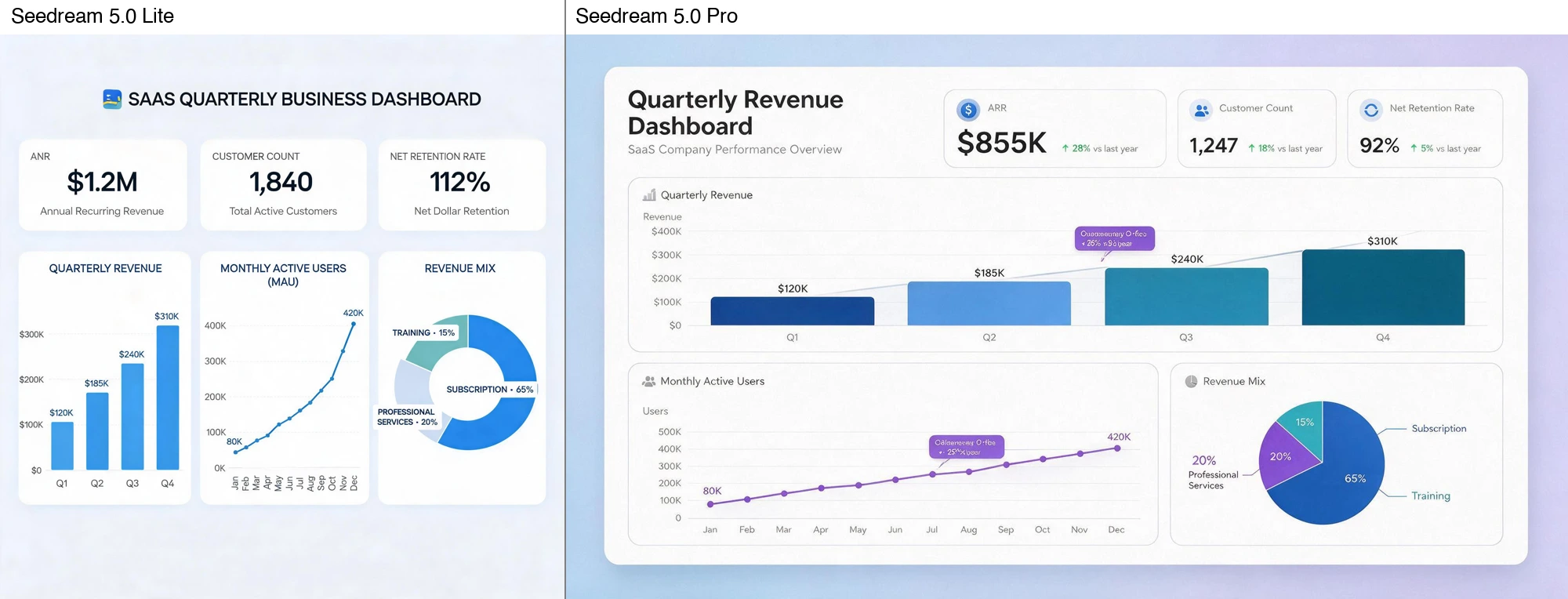
In this single run, Lite's data accuracy matched Pro. Both rendered the bar progression, the line endpoints, and the pie proportions correctly. Both invented plausible KPI card numbers (the prompt left those open), so in either tier you must replace the model-generated filler with your real figures. Visually, Pro's charts look more designed, with better gradients, spacing, and typographic hierarchy; Lite's are clean but flatter.
Verdict: If you need the numbers right, Lite is enough. If the infographic is a client deliverable where visual polish matters, Pro earns it. For a deeper data-accuracy test on Pro specifically, see our Seedream 5.0 Pro infographic test.
Scenario 2: You're making dense-text posters
Same Winter Sale prompt, packed with fine print:
Generate a Winter Sale poster. Include: main title 'WINTER SALE' (large bold), subtitle 'Up to 50% Off Everything', event dates 'Dec 24–31, 2026', discount fine print 'Excludes clearance items. Cannot be combined with other offers.', four products with original and sale prices (Knit Sweater $80→$40, Down Jacket $240→$120, Boots $160→$80, Scarf $50→$25), and a store address and URL at the bottom. Retro scroll style, all English spelling correct, small text legible.

Here Pro pulls clearly ahead. Pro's small text (Excludes clearance items, prices, URL) is sharp and legible; Lite's is blurry and smeared, with letters merging together (the "sc" in "Excludes" and the "mb" in "combined" run into each other). Spelling is correct in both, and both get the prices right, but Lite's small text strains the eye in a way Pro's does not.
Verdict: For dense small text (compliance copy, pricing tables, legal disclaimers), Pro is worth it. For a poster with a few labels and a title, Lite is fine.
Scenario 3: You need to edit or separate layers
This is Pro-only territory. Per the official Dreamina page, Pro adds pinpoint editing (point, box, and anchor selection to modify one element while preserving the rest) and layer separation (exporting background and objects as transparent PNGs for compositing in Figma or Photoshop). Lite regenerates from scratch: change one detail and you redraw the whole image.
Verdict: Need post-generation editing or separable layers? Pro, no contest. This alone justifies the upgrade for any "generate, then iterate" or "generate, then composite" workflow.
Scenario 4: You're exploring or batch-generating
This is Lite's strength. ByteDance positions Lite as the faster exploration tier, and it is cheaper: roughly $0.035 per image on third-party relays such as apiyi (retrieved July 2026; verify current rates). For brainstorming, mood tests, or volume generation where each image is disposable, Lite keeps costs down and iterations fast. We did not benchmark Lite vs Pro on speed under identical conditions.
Verdict: Exploring directions or running volume? Lite. For prompting basics on this tier, see our Seedream 5.0 Lite prompting guide.
Scenario 5: You're delivering to a client
For delivery-grade work (campaign approval, client review, final assets), Pro's first-pass polish is the tie-breaker — the same polish gap visible in Scenarios 1 and 2, now applied where a weak first draft means extra refinement rounds. We did not run a separate delivery-scenario image test; this verdict rests on that polish gap plus ByteDance's own positioning of Pro for final deliverables.
Verdict: Delivery-grade work with a deadline? Pro.
The Price Break-Even
ByteDance hasn't published official per-image API pricing for either model (the Dreamina comparison page lists none, as of July 2026). On third-party relays, Lite runs about $0.035/image (apiyi, retrieved July 2026); Pro's relay pricing isn't established yet because Pro's API is brand new (launched July 8, 2026) and relays haven't published Pro rates. On Dreamina itself, both tiers get free daily credits per account, so you can A/B them without paying upfront.
Since Pro's price is unknown, think in break-even terms against Lite's $0.035. The upgrade pays for itself when Pro's polish saves you one paid revision that Lite would have forced. On a 20-image campaign at Lite's $0.035, generation costs $0.70; here is how the premium scales at hypothetical Pro prices:
Pro price (vs Lite $0.035) | 20-img Pro cost | Premium over Lite | Worth it if Pro saves |
|---|---|---|---|
2x ($0.07) | $1.40 | $0.70 | 1 manual rework |
5x ($0.175) | $3.50 | $2.80 | ~1 rework at a $30/hr rate |
10x ($0.35) | $7.00 | $6.30 | a few reworks or a missed deadline |
The pattern: even at 10x Lite's price, the premium is small next to the cost of your own rework time. Pro clears the bar whenever your output is a deliverable you would otherwise refine by hand. It does not clear it when every image is disposable (see Scenario 4 and the checklist below).
When Pro Is Not Worth It
Pro's premium buys polish, dense-text clarity, and editing. It buys nothing when none of those matter:
Moodboards and early concepts where every image is disposable.
High-volume thumbnail exploration (quantity over finish).
Outputs you will manually redesign anyway (Pro's pixels get discarded).
Images with no small text and no compositing needs.
Decision Matrix
Choose Lite if: data infographics where accuracy beats polish, exploration and brainstorming, batch or volume generation, simple posters with few labels, outputs you'll manually redesign.
Choose Pro if: dense small text, any post-generation editing or layer separation, client or campaign deliverables where first-pass polish saves refinement rounds.
Test both if: your workload is mixed or unclear. Both tiers get free daily credits on Dreamina, so an A/B costs nothing.
FAQ
Seedream 5.0 Lite vs Pro price — which is cheaper?
Lite, around $0.035/image on relays such as apiyi (retrieved July 2026); Pro's relay price isn't set yet (API launched July 8, 2026). Both get free daily credits on Dreamina. See the Price Break-Even above for the upgrade decision.
Is Seedream 5.0 Lite good enough?
In our two single-run tests, yes — Lite matched Pro on the specific data and spelling checks we ran. It falls behind on visual polish and dense small text, and lacks Pro's editing and layer features.
What does Reddit say about Lite vs Pro?
Community discussion (e.g., r/ArtificialInteligence) centers on Seedream 5.0 versus competitors like Nano Banana Pro rather than Lite versus Pro directly. The practical split that emerges matches our tests: Lite for speed and volume, Pro for polish and editing.
Is Seedream 5.0 Pro free to try?
On Dreamina, both Lite and Pro get free daily credits per account, so you can compare them without paying upfront. API access is priced per image; official Pro pricing isn't published yet.