 AIREITER
MiniMax's own model card calls H3's preprocessing layer "critical to the quality of the final output"; a 220-upvote Reddit thread on H3 prompting is a bug report about gibberish dialogue. This MiniMax H3 prompt review lines the official format up against cited creator tests and failure reports: across those reports, camera and reference control are more reliable than dialogue and audio, and the best results sometimes come from deviating from the syntax on purpose.
What the MiniMax H3 Prompt Format Actually Is
The official MiniMax H3 prompt is a three-field structured document — integrated_multimodal_description, overall_soundscape, non_diegetic_music — with timecoded shots, persistent speaker IDs, and <d> dialogue tags. It exists because H3 expects a structured intermediate representation normally produced by a hosted preprocessor, H3-Context-IR, that MiniMax kept out of the open-weights release: on the hosted API it rewrites loose requests for you, while the 33B open weights run locally (SGLang, vLLM, Diffusers, ComfyUI) leave you hand-writing that structure yourself.
MiniMax also ships a portable h3-prompt-writing skill in the official GitHub repo: two guide files (base-en.txt, ref-en.txt) that any coding agent can read, with no external API calls. Creators run it inside Claude or Cursor to convert plain-language briefs into the full format — @AI__TSUBAKI documents exactly that workflow for cinematic clips.
The specs that bound every prompt
| Constraint | Value | Prompting consequence |
|---|---|---|
| Clip length | 4–15 seconds, 24 FPS | Timestamps must be strictly increasing and inside the duration |
| Audio | 32 kHz stereo, generated jointly | Soundscape and score fields are mandatory, N/A allowed |
| Resolution | 768p default; 2K via H3-Regenerate-2K (API-only) | Test at 768p, pay for 2K after the prompt is locked |
| Task types | T2VA (text), I2VA (first frame at 0.00 s), FL2VA (first + last frame), L2VA (last frame), Ref2VA (omni-reference) | Each type has its own alignment sentence |
| Reference caps | 9 images + 3 video clips + 3 audio clips, 12 files total, ≤15 s total per media type | More references = more routing, not always better |
| Prompt size | Official examples run 300–700 words; pure text-to-video caps at ~7,000 characters | Short no-reference prompts are a failure mode flagged in the official manual |
A complete minimum-viable prompt — three fields, one camera instruction, a visible speaker with quoted dialogue, no score — fits in ten lines:
integrated_multimodal_description: Cinematic, live-action. [Shot 1] A woman in her
late twenties sits on a sunlit sofa, a matte-green skincare bottle in hand. The
camera pushes in, small amplitude, slow speed. She is visible on screen and says:
"This is the one product I repurchase every year." At 00:05.500 she sets the
bottle down.
overall_soundscape: Quiet room tone, faint traffic outside, soft fabric movement,
gentle contact of the bottle on the table.
non_diegetic_music: N/A
The full field-by-field syntax — every tag, alignment sentence, and template — is in our MiniMax H3 prompt guide; this review covers whether that syntax earns its keep.
Claim Check: The Format's Three Big Promises
The official guidance makes three implicit promises. The cited reports are more favorable on the first two than on audio adherence.
Promise 1: "Structure gets you what you expected"
The evidence here is the strongest. X creator @AIWarper posted a before/after comparison after switching to the official structure:
"I STRONGLY encourage you to adhere to the prompting guide released by Minimax. It really helps a lot with getting exactly what you expected.... My last post did not follow the suggested prompt structure." — @AIWarper, 306 likes
The third-party test log shows the same pattern at detail level: it requested a cut at exactly 00:05.000 and got it, transcribed a scripted testimonial verbatim, and held a first-frame composition stable across a 6-second I2VA clip. Storyboard reports match — @aimikoda's boards are followed as sequential shot guidance, and @nanyuan0412's board was followed without improvising, except the sound fields they forgot to write, which came out as near-silence.
The recurring limit is pacing, not refusal: "Biggest problem has been pacing," writes u/Relevant_One_2261 — dialogue that doesn't fit the runtime and timestamps spaced too tightly are the repeated structural failures.
Promise 2: "Camera commands beat outcome descriptions"
Confirmed by a framing failure that got fixed. A r/StableDiffusion user asked H3 to keep a walking subject's full body in frame using the plain instruction "entire subject remains visible throughout" — it failed repeatedly. The fix was to translate the outcome into H3's native camera grammar:
"The camera pulls out with large amplitude at the same speed as the subject walks forward, maintaining a full-body composition." — u/Powerful-Goal52, confirmed working by the original poster
That maps directly onto H3's three camera dimensions — motion type, amplitude, speed — and its rule of one camera instruction per shot. A quick translation table:
| Outcome you want | Command H3 follows |
|---|---|
| Subject stays fully visible while walking | Pull Out with large amplitude at subject's walking speed |
| Gentle emphasis without breaking framing | Push In, small amplitude, slow speed |
| Reveal the environment around a stationary subject | Truck Left or Truck Right, medium amplitude |
| Height change without tilt | Pedestal Up / Pedestal Down at slow speed |
The official prompting guidance names 13 motion-type families — Zoom, Push, Pull, Pan, Tilt, Truck, Pedestal, Arc, Tracking, Static, Shake, Roll, POV — each modulated by amplitude and speed. The distinction between a zoom (focal length change) and a push (physical camera movement) matters in practice; the terms are not interchangeable.
Promise 3: "Separate your audio fields and it stays clean"
This is the weak layer. Splitting diegetic soundscape from non-diegetic score is good design, but adherence is inconsistent:
"I use this, but about 20% of the time it adds music anyway lol" — u/TheElectriking on
non_diegetic_music: N/A
The 220-upvote thread that quote comes from catalogs the rest of the pattern: audio artifacts at clip boundaries, characters saying random gibberish, and the wrong person delivering a line. u/krigeta1 reports passing three custom audio references and getting "a random voice or not the audio I assign to the characters." A separate thread fixed on-screen dialogue that kept being read off-screen by binding the speaker ID explicitly to the visible character.
On-screen text has the same fragility — the community wiki calls it "exact text is fragile," with brand-critical lettering better supplied as an image reference or composited in post. One dissenting report: @web4miko states that in their tests H3 "can't even beat Seedance 2.0" on text and context understanding. In the cited reports, audio routing, exact text, and dense context are the recurring weak points.
When to Break the Official Syntax
Three deviations from the official format appear in the cited side-by-side comparisons and first-hand reports. All three are worth knowing before you commit to the full structure.
Quotes sometimes beat <d> tags. In a side-by-side comparison posted to r/StableDiffusion (~105 upvotes, 81 comments), the original poster found that removing the guide's <d>[Language]...台词...</d> tagging and using plain quoted dialogue produced clean speech, while the tagged form added unrequested audio. A commenter who ran comparable tests agreed:
"the official dialogue prompting is buggy as hell... quotes approach is still not nearly as buggy as the
<d></d>tagging." — u/networking_noob
Practical reading: try <d> first because it is the trained path, but treat garbled or over-generated speech as a signal to retry the same line in quotes, not to rewrite the whole prompt.
non_diegetic_music: N/A works as a standalone control. u/Nextil reports it prevents music "even if you ignore most of the other structure." If you do nothing else structured, do this — unwanted score is a recurring complaint in the cited reports.
Reference-heavy jobs need less text, not more. When images carry identity and a video carries motion, the prompt's job shrinks to routing and the new action. @aimikoda's most-shared templates (one drew over 1,300 bookmarks) are minimalist for exactly this reason, and @CharaspowerAI demonstrated MiniMax's own Design agent expanding a single line — "act as an expert FPV director and turn this into something viral" — into a full structured prompt automatically. A reference routing block looks like this:
@Image 1 is the character reference: preserve the face, short black hair, red silk jacket.
@Video 1 supplies the sword-draw rhythm.
@Audio 1 sets the mood with quiet traditional strings.
After that, the prompt only describes the new shot. The practical workflow in these reports: lock stills first, let references carry the load, spend words only on what changes.
Failure Triage: What the Manual Doesn't Debug
The official prompting guidance stops at syntax. It does not tell you what to do when a generation comes back broken. This table is assembled from the failure reports above:
| Symptom | Likely cause | Fix |
|---|---|---|
Music added despite N/A | One user observed leakage in roughly 20% of their runs | Regenerate; avoid requesting a music "mood" anywhere in the prompt |
| Wrong character speaks a line | Speaker-audio routing conflict | Bind the speaker ID to the visible, on-screen character explicitly |
| On-screen line read as off-screen voiceover | Missing lip-sync association | State the speaker is visible; for true voiceover add "lips remain closed" |
| Audio reference ignored | Over the 3-clip / 15-second caps, or unassigned | Assign each clip a role; trim total reference audio |
| Local model ignores Chinese dialogue | ComfyUI reused the Qwen tokenizer; shell encoding mangled the text | Repo tokenizer (official requirement) + Unicode-safe submission + <d>[Chinese] 台词</d> (community-reported fix) |
| Long one-shot (>15 s) falls apart | Outside the 4–15 s design envelope; objects flatten, continuity drifts | Split into 15-second segments and plan continuity between them |
The local-deployment row is worth a second look: in @eternityspring's report, "H3 won't speak Chinese" traced back to tokenizer reuse and encoding, not to the prompt.
The Cost Side: Tokens, Iterations, and Portability
Structure is not free. The official repo publishes Context-IR token usage for its three reproducible cases, and the numbers grow steeply with reference count:
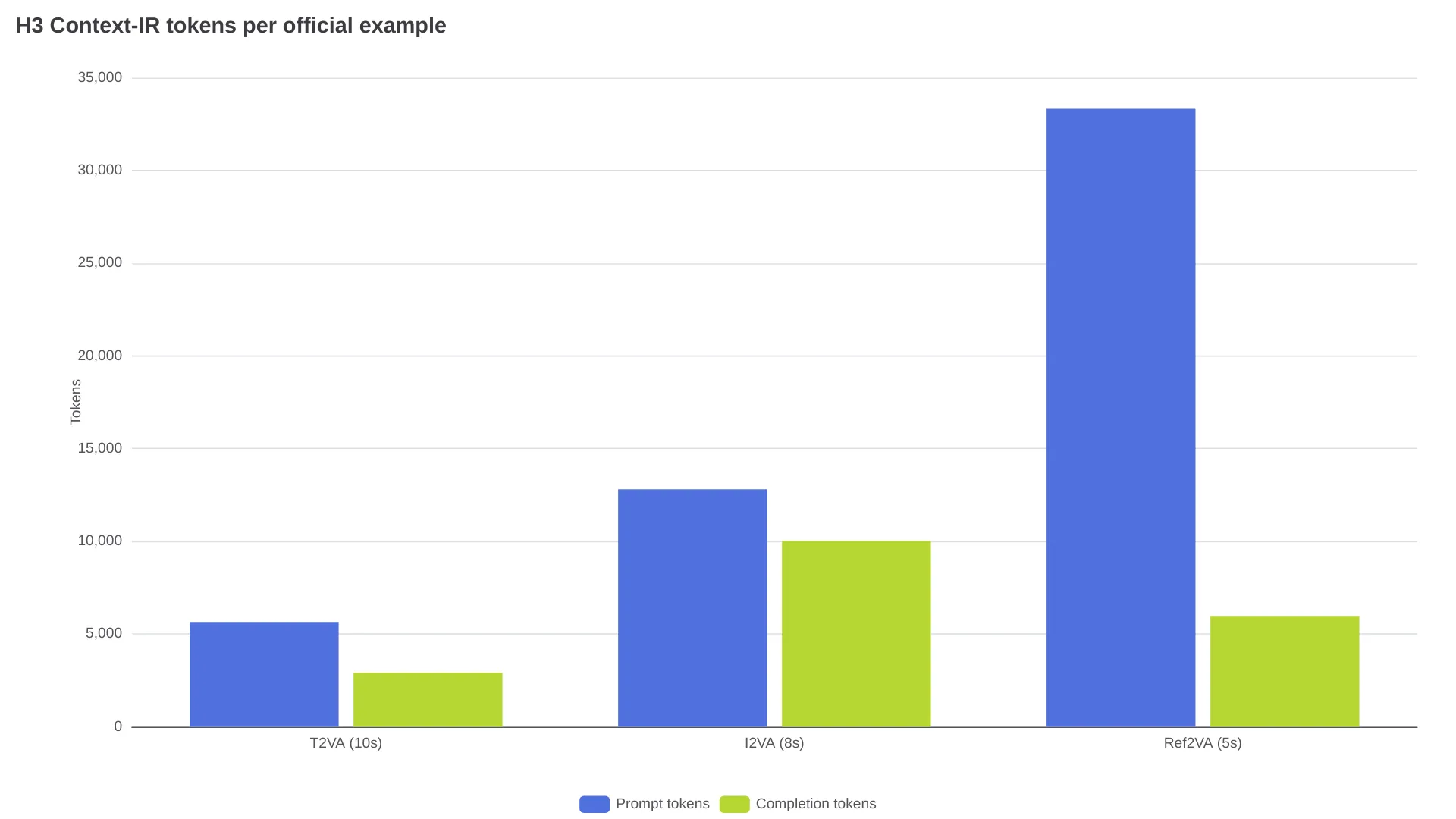
A text-only generation consumes 8,565 preprocessing tokens; a multimodal reference job consumes 39,299, of which 33,323 are prompt-side. On local runs, those tokens add preprocessing latency; on hosted workflows, they add processing overhead even where pricing is quoted per generated second. Time cost is real too — one X creator documented spending 48 hours polishing a single three-person orbiting-camera prompt before it landed (@LoveUolanda). The cheap way to iterate: draft at 768p, where a 6-second test costs about $0.68, and only send the locked prompt through 2K — the $0.1125/s 768p and $0.1825/s 2K rates for MiniMax H3 are listed on the relay's model page.
Portability is the last hidden cost. H3's fields, speaker IDs, and tags are a dialect, not a standard: one cross-model walkthrough finds Veo 3.1 wants plain paragraphs with inline SFX: labels and Seedance 2.0 uses a six-slot description, and neither accepts H3's fields, speaker IDs, or tags. A prompt library built for H3 is a rewrite, not a copy-paste, everywhere else.
MiniMax H3 Prompt Review FAQ
Is the structured prompt format mandatory for MiniMax H3?
No. On the hosted API, Context-IR rewrites loose natural-language requests into the internal representation; structure matters most for local open-weights runs and exact cuts, timestamps, and speaker routing.
How do I stop MiniMax H3 from adding background music?
End with non_diegetic_music: N/A and never request a music mood elsewhere; leaks still happen, so a regen is normal.
How long should a MiniMax H3 prompt be?
MiniMax's own examples run 300–700 words, and pure text-to-video accepts up to about 7,000 characters; with references carrying identity and motion, prompts should shrink, not grow.
Can I reuse H3 prompts with Seedance or Veo?
No. H3's named fields, speaker IDs, and tags are model-specific; Seedance uses a six-slot format and Veo takes plain paragraphs, so each target model needs its own rewrite.
Why does my local H3 deployment ignore non-English dialogue?
Usually toolchain, not the model: setups reusing the Qwen tokenizer or shells that mangle Unicode break dialogue before generation. Use the repo's official tokenizer and the <d>[Language] dialogue format.
Verdict: Who Should Learn the Format
| Your job | Verdict |
|---|---|
| Multi-shot film with dialogue | Learn the full format; budget audio retries and the quotes fallback |
| Product / still-image animation (I2VA) | Learn the light version: alignment sentence + motion + sound fields |
| Storyboard or character-consistency series | Yes — references do the heavy lifting; keep prompts minimal and routable |
| One-off single clips, casual use | Skip most of it: plain description + non_diegetic_music: N/A covers you |
| Building one cross-model prompt library | No — each model's dialect needs its own version; write per model |
Learn the format for multi-shot, timestamped, or reference-driven work — that is where its adherence is documented and reproducible. Skip it for one-off clips, and expect retries rather than obedience on dialogue-heavy audio.
The community itself is split down the middle of this trade: the same month produced a 48-hour camera-prompt grind and an 880-upvote post where one commenter wrote that "reading the manual was actually exciting." Until the model's audio-field adherence catches up with its camera adherence, the workable position is: let an agent draft the structure, verify the audio fields yourself, and test cheap at 768p before committing to 2K.