 AIREITER
At $0.02 per second, Decart's Lucy 2.5 sounds cheap — until a four-hour stream bills $288. Lucy 2.5 realtime video is a broadly available API route for live AI video transformation, but the 1080p in the launch material is not the resolution the API documents, and the headline latency is a model-side number, not capture-to-screen. This guide separates the marketing layer from the documented layer, then prices it per hour and walks through the access routes.
What Lucy 2.5 realtime video actually is
Lucy 2.5 is a real-time video-to-video editing model from Decart, released July 16, 2026 as "Raising the Bar for Live AI". Video enters over a WebRTC connection, text prompts and optional reference images steer the transformation, and edited frames come back at a claimed 30 fps. The key word is transformation: Lucy restyles, swaps, adds, and removes things inside an existing live feed rather than generating finished clips from nothing. Tim Simmons at Theoretically Media draws the distinction sharply: this is live effects and compositing over a stream, not non-linear editing, and it is API-only for now — "There's no app version yet," and the phone-held product in Decart's launch video "is not an available product."
The API documentation supports both live and recorded input, and fal's model page states commercial use is permitted under its terms. Decart has raised over $450M, including a $300M round led by Radical Ventures in May 2026.

The resolution claim you need to unlearn
The launch material and the fal model page advertise Lucy 2.5 at 30 fps and 1080p. Decart's own API documentation specifies 1280 × 720 output, in 16:9 landscape or 9:16 portrait. Until a 1080p endpoint is publicly documented, plan around 720p: that is what the API contract says, and 720p is also the resolution the pricing examples are built on.
The same audit applies to the frame rate. "30 FPS" appears in marketing copy without a published measurement methodology, and Decart has not disclosed serving hardware, model size, or a capture-to-playback test. A useful external reference point: SANA-Streaming, a research preprint from May 2026, reports 24 end-to-end fps at 1280 × 704 on a single RTX 5090, with its diffusion-transformer core at 58 fps. That does not benchmark Lucy — it shows why a bare "30 FPS" claim without a defined measurement point is an incomplete signal of anything.
Latency: what "near-zero" covers and what it doesn't
Three latency figures circulate for Lucy 2.5, and they measure different things. Decart's DOS 2.0 infrastructure post, published alongside its $300M round, cites under 30 ms model response; the community write-up on Hugging Face attributes sub-40 ms inference at 720p to Decart's inference stack (MXFP8/NVFP4 quantization, dynamic sparse attention, deep kernel fusion, with a claimed 4× speedup scoped to compute-bound operations). What none of them publish is end-to-end delay from camera capture to pixels on a viewer's screen — that path adds WebRTC transport, encode, and the player, and it varies with network conditions. To estimate it for your own deployment, record a visible timestamp in the camera feed and compare it against the displayed output over your target network and player path.
Controllability: eight edit modes and when Self-Anchoring breaks
Lucy 2.5's documented edit surface covers eight operations, each controllable with text prompts, reference images, or both:
| Edit mode | Typical live use |
|---|---|
| Character replacement | VTuber avatar or brand mascot swap |
| Virtual try-on | Clothing changes during live commerce |
| Object addition | Interactive elements in a product demo |
| Object replacement | Swapping background items |
| Object removal | Removing clutter with reconstructed background |
| Attribute change | Color, size, position adjustments |
| Background replacement | Live setting changes without a green screen |
| Global style transfer | Day-to-cyberpunk restyling, live VFX |
Two control details matter more than the mode list. First, Self-Anchoring — the mechanism that feeds the model's own recent output back as a reference to prevent identity drift over long streams — is enabled by default and can only be changed at connection time. Decart's documentation warns that it should be disabled when the camera cuts hard, a new person enters the frame, or the scene changes substantially; in those moments the anchor points at a world that no longer exists. That means a reconnect, so multi-camera setups need to plan for it.
Second, reference images have documented requirements: clear, well-lit, unobstructed, at least 512 × 512 pixels, with framing matched to the source video. Poorly lit or mismatched reference images can cause a swap to fail outright.
Realtime vs offline generation: picking the right route
Offline generators (Runway, Pika, Sora-class tools) and Lucy 2.5 solve different problems, and the honest answer to "which is better" is route-dependent. Four dimensions decide it:
- Interaction. Need the audience or a camera to influence the video while it happens? Realtime is the only route; offline tools run a prompt-then-wait loop.
- Duration. Offline tools typically work in 5–60 second clips with render times of seconds to minutes for Runway- and Pika-class products, per the Hugging Face comparison. Lucy streams continuously — fal claims multi-hour runs without identity collapse, though no long-session stress test is published.
- Quality floor. For final deliverables at 1080p+, offline rendering still wins today, given the documented 720p API output. A practical hybrid workflow, proposed by Tim Simmons, is live previs: shoot on a phone, apply the treatment live with Lucy to judge the shot, then run a final-quality pass through an offline video-to-video model.
- Cost shape. Offline tools bill per generated clip; Lucy bills per active second of stream — which compounds hourly (next section).
What are people actually reaching for? On r/generativeAI, u/TastyFooting described the core appeal plainly:
"Real-time video-to-video generation with text prompt. No more render times." (source)
Community threads echo two open questions — u/ai_art_is_art's "Is there any use for this kind of model? VTubing?" and an r/AINewsAndTrends creator's "if it works as well outside of demos." The documented direction set comes from fal's model page: live shopping and virtual try-on, real-time product placement, interactive streams, in-app scene transformation, gaming, and virtual staging on live walkthroughs — with VTubing and ad-variation workflows added by the Hugging Face write-up. For a broader look at how realtime generation is changing the video API landscape, see our SeedRealtime coverage.
What a stream actually costs: $0.02/sec is not the number that matters
Two published routes, two prices:
| Route | Rate | One active hour | Notes |
|---|---|---|---|
| Decart direct API | $0.02/sec (720p) | $72 | New accounts get testing credits; volume pricing negotiable |
| fal serverless | $0.04/sec | $144 | Playground included, no minimums |
Decart's own pricing examples anchor the small end: a 30-second real-time session costs $0.60, and a 5-second offline 720p edit costs $0.20. Both platforms meter active generation seconds rather than viewer time, per their pricing pages. The decision-relevant math is at the other end:
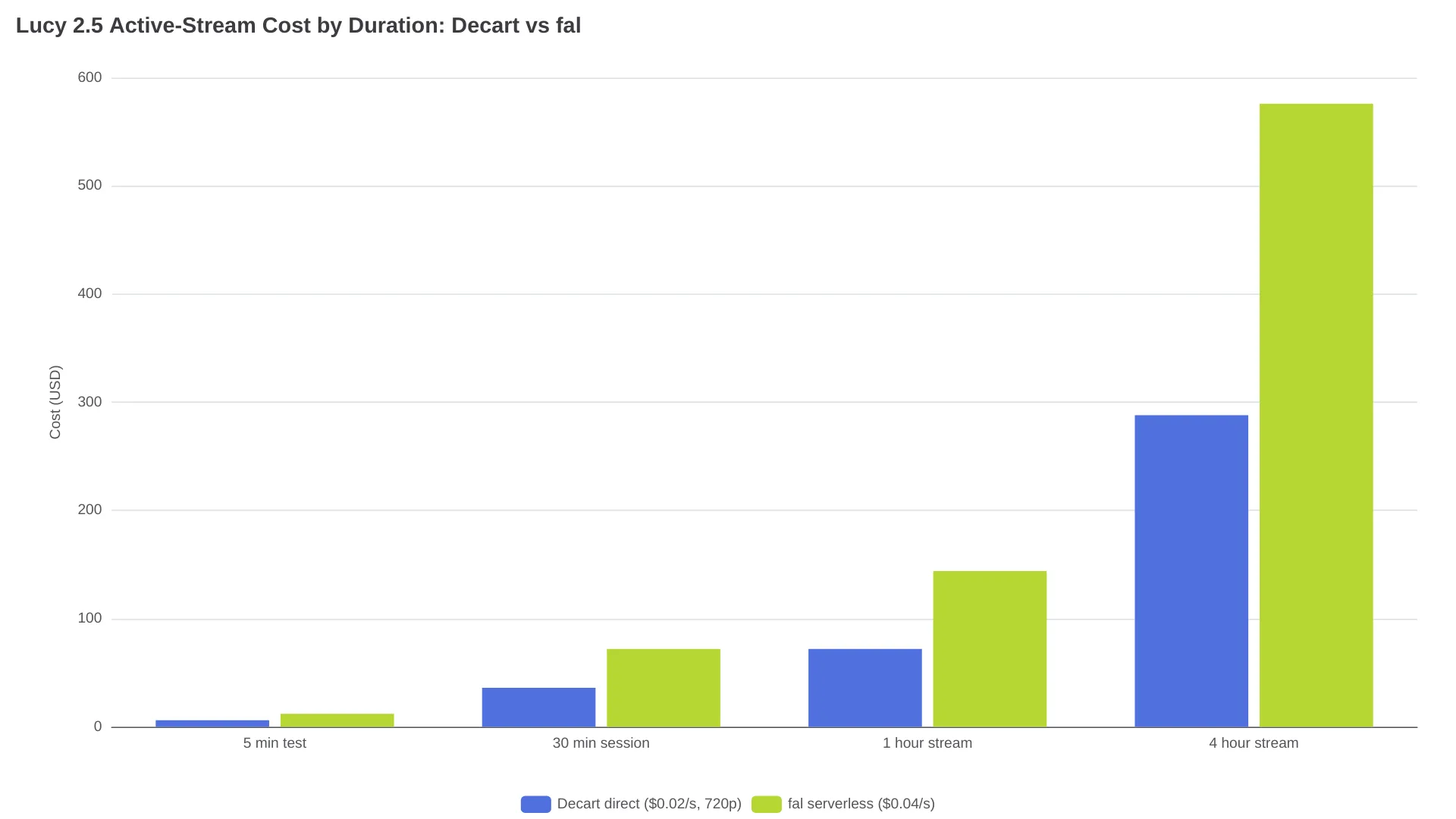
At four active hours per weekday, fal bills about $576 per day, or roughly $12,700 over a 22-weekday month, before networking and moderation costs. Continuous generation turns a low unit price into an hourly concurrency problem: an app where each viewer opens an independent Lucy stream multiplies the per-hour figure by concurrency. If you're comparing this against other generation APIs, the billing-dimension differences (per-second vs per-clip vs per-token) are covered in our video generation API pricing guide.
Two mitigations are structural. Idle camera time doesn't have to be active generation time — gate the stream on actual content. And the route choice itself halves the bill: for the same documented 720p output, Decart direct is half of fal's rate, while fal bundles its playground, commercial terms, and ecosystem. Which one wins depends on what you need around the model, not the model itself.
Getting access: Decart direct, the playground, and fal
The fastest path to seeing Lucy 2.5 react to your own face is Decart's browser experience at lucy.decart.ai or the demos playground at demos.decart.ai — new accounts receive testing credits, which may cover an initial test session. Use it to test reference images and prompt phrasing before writing any code.
The direct Decart API route, per the realtime Lucy 2.5 documentation, follows the standard WebRTC flow:
- Get API credentials and create a realtime session for the
lucy-2.5model - Establish the WebRTC connection, configuring Self-Anchoring and prompt enhancement at connect time (changing Self-Anchoring later requires a reconnect)
- Attach your live or recorded input media to the session
- Send text prompts and reference images over the active connection — references can be updated mid-session
- Consume the edited output track, and rely on the built-in auto-reconnect (exponential backoff, up to 5 retries) for dropped sessions
For integration through fal, the route is five steps:
npm install --save @fal-ai/client- Create a fal account and get an API key from the dashboard
- Open a WebRTC connection to
decart/lucy-2-5/realtime - Serve short-lived JWTs from your backend via a
tokenProvider(fal's sample uses a 10-second token expiration) — this is not a browser-only, key-in-frontend setup - Handle results and errors through
onResult/onError, then send prompts over the live connection
JavaScript, Python, and plain REST are all supported client paths on fal, per its model page. For OBS, distinguish prototype from production: browser-source or window capture of the Decart experience is fine for testing a look, while a production pipeline should ingest the WebRTC output of your own API integration. The Hugging Face write-up reports OBS use over WebRTC without changing the existing broadcast setup — validate ingest, latency, and reconnect behavior in your own stack — and the same write-up reports Android and iOS SDKs for mobile apps. Lucy 2.1 remains live on fal if you need to compare behavior across versions. For a broader assessment of fal as a platform, see our fal.ai review.
Before you go live: disclosure rules already apply
A model that can restyle people, clothing, and environments in live video makes compliance an engineering requirement, not a policy footnote. Decart's acceptable-use policy (updated February 12, 2026) prohibits impersonating a real person without clear, conspicuous disclosure and verifiable consent, and requires deployers to disclose AI-generated or manipulated content, run suitable moderation, and preserve machine-readable marks where technically feasible. Separately, EU transparency obligations in force from August 2, 2026 require machine-readable marking of detectable AI-generated content and deployer disclosure for deepfake-class uses. For EU-facing deployments, confirm the applicable transparency and provenance obligations before launch rather than after.
Should you build on Lucy 2.5 today?
| Your project | Call |
|---|---|
| Live stream effects, VTubing, audience-interactive video | Build now — this is the route's home turf |
| Live commerce try-on, product placement demos | Build now, prototype at 720p, verify edit isolation on your own footage |
| Ad variation/localization from one base asset | Pilot now — a plausible early use case with clear economics |
| Live previs before an offline final render | Build now — $0.60 for a 30-second look test beats a reshoot |
| Final-quality 1080p+ deliverables | Wait — documented API output is 720p |
| Budget-sensitive continuous streams at scale | Wait or gate hard — hourly billing compounds faster than per-clip pricing |
The trade-off to watch: if Decart ships a public 1080p route, the offline-versus-realtime quality gap narrows meaningfully; until then, treat 720p as the contract and the higher number as intent.
Lucy 2.5 realtime video FAQ
Is Lucy 2.5 actually real time?
It is real-time in the sense that edits apply to a live WebRTC stream at a claimed 30 fps, with model-side latency cited at under 30–40 ms. No independent end-to-end (capture-to-playback) measurement has been published, so "real time" currently means demo-verified, not benchmark-verified.
What resolution does the Lucy 2.5 API output?
The API documents 1280 × 720 output in 16:9 or 9:16. Launch material advertises 1080p, but no public 1080p endpoint is documented as of late August 2026.
How much does Lucy 2.5 cost per hour?
Decart's direct API bills $0.02 per active second at 720p — $72 per active hour. On fal, the same model is $0.04 per second, or $144 per active hour. Both meter active generation time, not viewer time.
Does Lucy 2.5 work with OBS?
Yes, for prototyping: the browser experience works as an OBS source via browser-source or window capture. For production, test a WebRTC ingest workflow in your own broadcast stack before committing.
Lucy 2.5 or Lucy 2.1?
Per fal's version comparison, Lucy 2.5 broadens the edit surface (objects, clothing, characters, attributes, backgrounds, style, VFX) and claims better prompt adherence, edit isolation, and reference fidelity. Lucy 2.1 remains available on fal as the earlier real-time endpoint if you need a stability-known baseline — test both against your own footage.