
Google Stitch went from Galileo AI to a Gemini-powered design canvas polished enough that people started asking whether Figma should worry. The honest verdict is narrower than the hype: Stitch gets you from a sentence to a shippable-looking UI in minutes, but what comes out is a first draft for a coding agent, not a screen you ship.
What you're actually getting
- What it is: describe an app, or paste a screenshot or wireframe, and Stitch generates an editable UI (visual canvas + exportable HTML/CSS).
- Cost: free, Google account only, at stitch.withgoogle.com. Nothing to install.
- The catch: it's tuned to hand off to code, not to be your final design tool.
The model behind it moved fast. As of July 2026, the live model picker offers four modes:
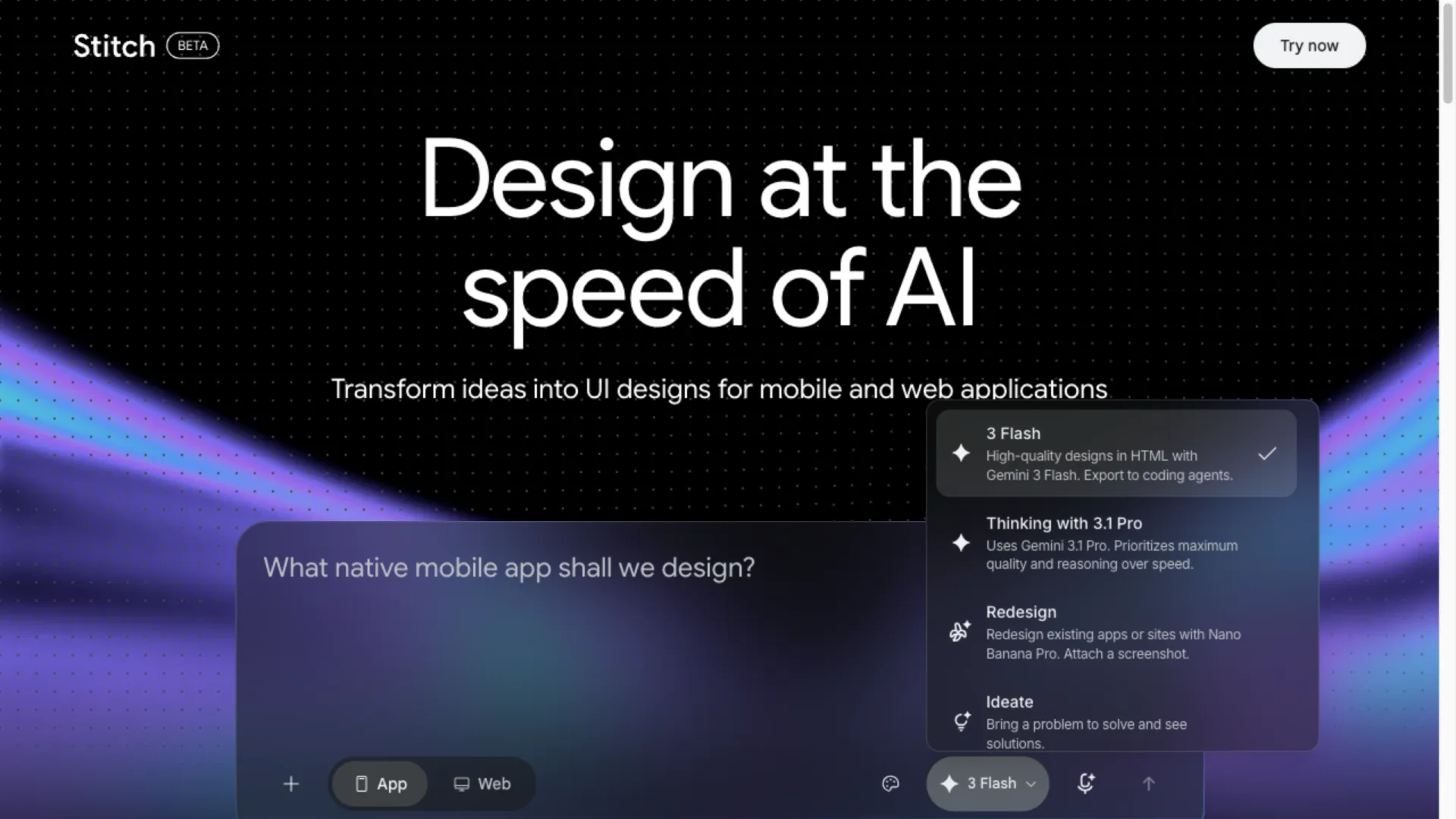
- 3 Flash (default) — Gemini 3 Flash. Fast first drafts, built to "export to coding agents."
- Thinking with 3.1 Pro — Gemini 3.1 Pro. For multi-screen flows that need to stay coherent.
- Redesign — Nano Banana Pro. Rebuild an existing screen from a screenshot.
- Ideate — explore directions before you've picked one.
What the 2026 update changed
The March 18, 2026 "vibe design" update turned Stitch from a screen generator into a project-aware agent:
- Infinite canvas — every generation sits side by side; drop images, text, or code as context.
- A design agent that reasons across the whole project, plus a manager for parallel ideas.
- DESIGN.md — a Markdown file holding your design system (colors, type, layout) that travels between tools.
- Interactive prototyping — link screens, hit Play, click through.
- Voice — talk to the canvas, it edits live.
It also shipped an MCP server, an SDK, and exports to AI Studio and Antigravity. That export layer is the point: it lets Stitch slot into a build pipeline instead of dead-ending.
Is Google Stitch really free?
Yes, no paid tier. The murky part is quotas, and Google stays quiet here.
| Claim | Status |
|---|---|
| Free, no paid plan, Google account only | Confirmed on the official site |
| Exact monthly/daily quota | Not published; third-party numbers conflict (350+200, 350+50, ~400/day) |
| Credits reset on a cycle, can't be topped up | Reported, not documented |
Practical read: trust the in-app counter, expect a cap, and don't plan a deadline around a quota figure from a blog. Simple prompts cost little; multi-screen flows drain it fast.
The multi-screen consistency problem
This is Stitch's most-cited weakness, and it has an arc worth knowing:
- At launch: r/UXDesign users called it good for variations but said it "sucks at making flows with many screens." Testers hit a "colored wireframe rather than a polished mockup" and an exported form whose submit button did nothing.
- April 9, 2026: the official account listed fixes — the agent now respects an existing design system, DESIGN.md edits sync back, layouts overlap less.
- Still open: one developer summed up the gap in late April — the UI-to-production handoff "is still the interesting unsolved problem, Stitch 2.0 helps but doesn't close it entirely."
What happens after you export
The real 2026 workflow isn't "design in Stitch, ship from Stitch." It's a relay:
1. Generate the UI + DESIGN.md in Stitch. 2. Pipe the code (export or MCP) into a coding agent — Claude Code, Codex, or Cursor. 3. The agent turns it into a running React app. One developer called piping Stitch into Claude Code via MCP "the pipeline that kills 'AI slop' for good."
Before trusting exported code, check what Stitch tends to skip: responsiveness, working forms, loading/error states, routing, and whether components are reused or duplicated.
One cost note: the coding agent runs on an LLM API, metered separately from Stitch's free canvas. That step needs a model like Gemini or Claude — Stitch stays free, the agent behind it is where usage adds up.
Stitch vs v0 vs Figma Make
| Tool | Approach | Best output | Cost |
|---|---|---|---|
| Google Stitch | Design-first: prompt → UI + code | Fast multi-screen concepts | Free |
| v0 by Vercel | Component-first: prompt → React | Drop-in shadcn/ui components | From ~$20/mo |
| Figma Make | In-canvas: AI inside Figma | Edits without leaving your file | Figma plan |
They're complementary, not rivals: explore in Stitch, generate components in v0, assemble in Cursor or Claude Code.
Who should use it
- Use it: founders, PMs, and devs who need a concept fast; non-designers who want a credible UI without learning Figma; teams already in Google's stack.
- Skip it (as your finisher): enterprise teams needing a governed component library, or designers needing pixel control and production-ready output.
Bottom line: for getting from idea to a designed, code-backed UI in minutes, Google Stitch is one of the strongest free options in 2026 — as long as a coding agent does the finishing.
FAQ
Is Google Stitch free?
Yes, no paid plan, just a Google account. Usage is capped by an unpublished quota, so watch the in-app counter.
What AI model does Google Stitch use?
As of July 2026: Gemini 3 Flash (default), Gemini 3.1 Pro (Thinking mode), and Nano Banana Pro (Redesign). This replaced the older Gemini 2.5 setup.
Does Google Stitch generate working code?
It generates front-end HTML/CSS, but as a starting point — testers have hit dead buttons and missing logic, so refine it in a coding tool before shipping.
Does it keep an existing design system?
Since April 2026 the agent tries to respect one you've defined, and DESIGN.md carries the rules in and out. Better than launch, still worth checking across screens.
Is Google Stitch better than Figma?
Faster to a concept; Figma still wins on collaboration, design systems, and production control. Most people start in Stitch and finish elsewhere.