 AIREITER
Google Flow is Google's AI filmmaking studio, a workspace rather than a bare clip generator, that bundles Veo 3.1, Nano Banana, and Gemini Omni into one app for turning text, images, and reference footage into short cinematic video with synced audio. It launched at I/O 2025 on May 20, and Google confirmed to CNET that creators have produced more than 100 million videos with it since.
The short verdict: for short, polished clips with native audio and consistent characters, Flow is the tool to beat right now, especially for storyboarding, social, or pitch reels. It gets expensive fast once you lean on Veo 3.1 Quality renders, and Google cut the top Ultra plan from $249.99 to $199.99 at I/O 2026 while adding a new $99.99 mid-tier. This overview covers what is inside, what it costs per video, and where it falls short, current as of July 8, 2026.
What Is Google Flow?
Flow is what happened when Google Labs folded its image and video models into a single creative studio. Instead of typing a prompt and hoping, you generate a clip and then edit it by prompting: change the lighting, remove an object, extend the shot, swap the weather. Three model families do the heavy lifting:
Veo 3.1 — the video model, with native audio (dialogue, Foley, soundtrack) generated in sync. Variants: Lite, Fast, and Quality.
Nano Banana — the image model (Pro, 2, and 2 Lite), used for stills, reference frames, and ingredient images.
Gemini Omni (Gemini Omni Flash inside Flow) — multimodal video that starts from any reference, real or generated, and handles conversational edits.
The whole studio centers on consistency: keeping a character's face and voice stable across clips. Elias Roman, senior director of product for Flow at Google Labs, told CNET that consistency is "the Achilles heel of AI video," and Flow's Characters, Ingredients, and Scene Builder tools exist to attack exactly that problem. You define a character once, cast them with @name, and they hold across scenes.
Google Flow Pricing & Real Cost
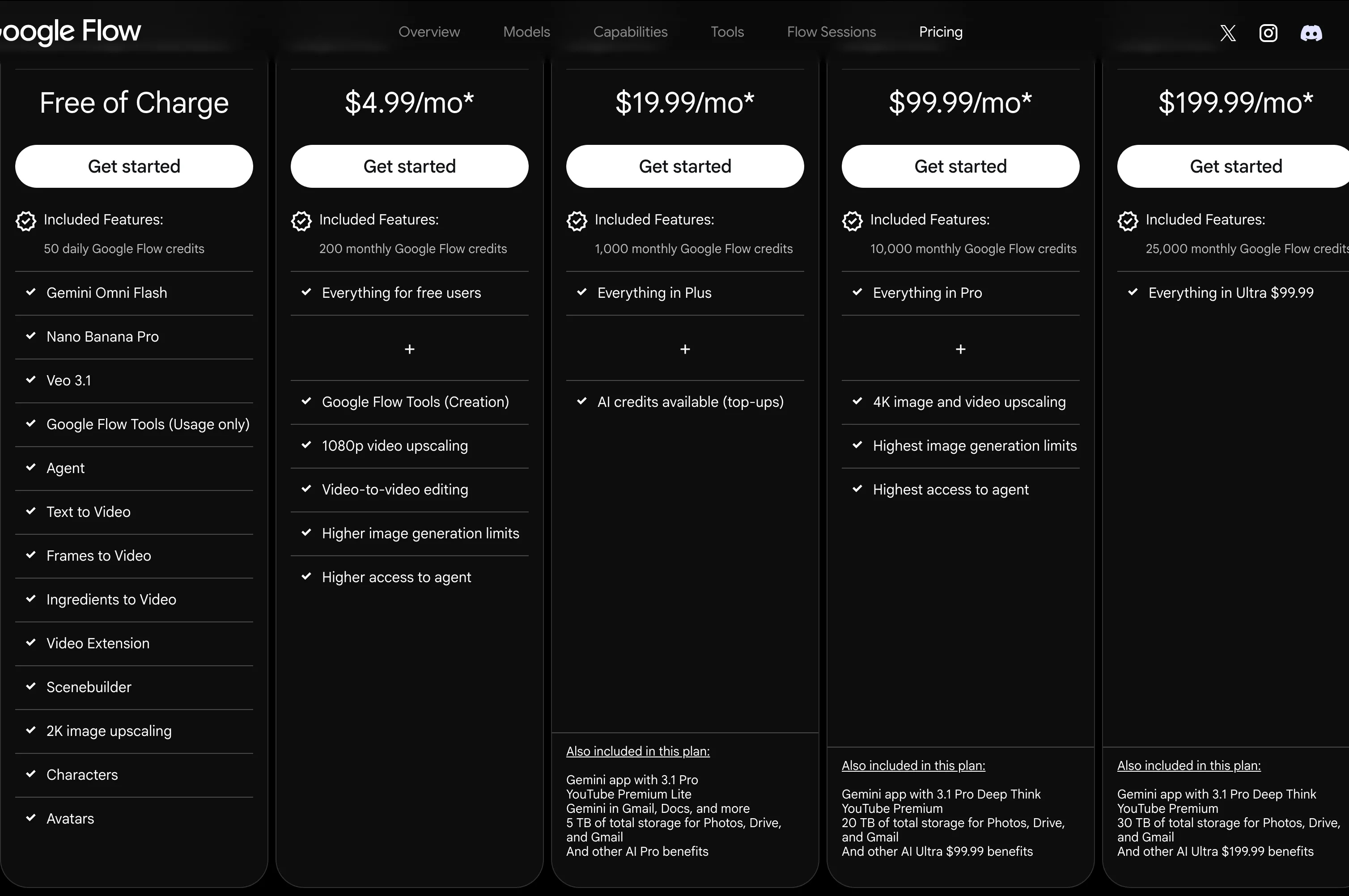
Google restructured pricing at I/O 2026 (May 2026): the top Ultra plan dropped from $249.99 to $199.99 per month, a new $99.99 mid-Ultra tier appeared, and a cheaper Google AI Plus tier ($4.99) was slotted in below Pro. Verified against the official Flow page on July 8, 2026 (pricing section screenshotted above):
Plan | Price/mo | Google Flow credits | Storage |
|---|---|---|---|
Free (no subscription) | $0 | 50 per day | — |
Google AI Plus | $4.99 | 200 / month | 400 GB |
Google AI Pro | $19.99 (first month free) | 1,000 / month | 5 TB |
Google AI Ultra (5x) | $99.99 | 10,000 / month | 20 TB |
Google AI Ultra (20x) | $199.99 | 25,000 / month | 30 TB |
Credits do not roll over. Daily free credits reset each day, monthly credits reset at your billing cycle. The free 50 per day can only be spent on Veo 3.1 Lite, Fast, and Quality generations, not Gemini Omni Flash. Google also notes that prices vary by market; one Nigerian user reported the local equivalent rising from about N7,000 to N28,000 per month after the third month (@deekor_v, July 4, 2026).
The per-generation cost, from Google's own support page:
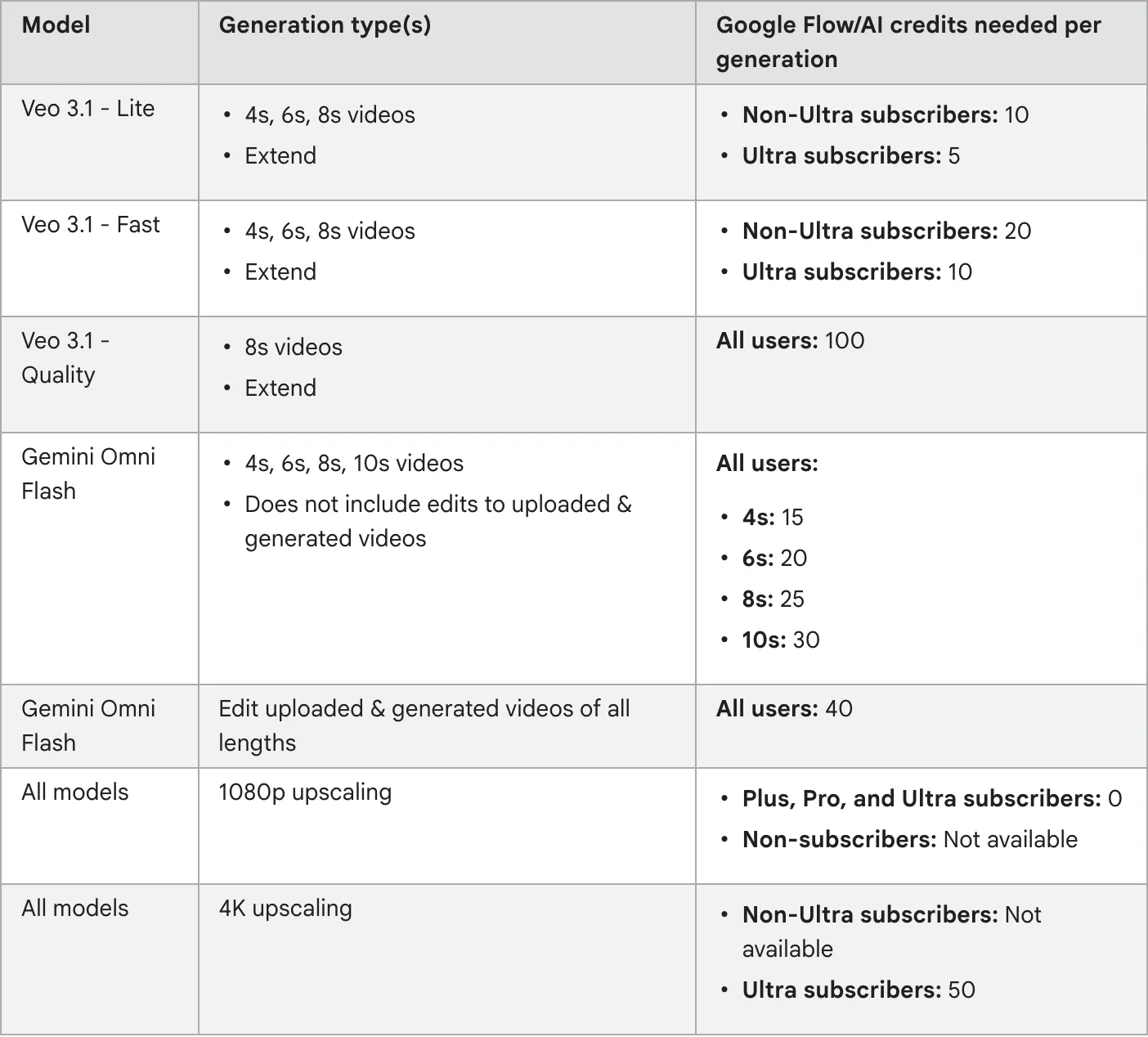
Veo 3.1 Lite (4s/6s/8s, Extend): 10 credits (5 on Ultra)
Veo 3.1 Fast (4s/6s/8s, Extend): 20 credits (10 on Ultra)
Veo 3.1 Quality (8s, Extend): 100 credits, all users
Gemini Omni Flash (4s/6s/8s/10s): 15 / 20 / 25 / 30 credits
Gemini Omni Flash edits (any length): 40 credits
1080p upscaling: free for Plus / Pro / Ultra
4K upscaling: 50 credits, Ultra only
Do the math and the value question gets concrete. On Pro ($19.99, 1,000 credits), a Veo 3.1 Fast 8-second clip costs 20 credits, so you get 50 clips a month, about $0.40 each. A Quality 8-second clip costs 100 credits, so you get 10 a month, about $2.00 each. On Ultra $199.99 (25,000 credits), Fast drops to 10 credits: 2,500 clips at roughly $0.08 each, and Quality is 250 clips at $0.80 each. The people calling Flow "the most expensive per clip" are the ones reaching for Quality renders on lower tiers.
Which Plan Should You Pick?
Situation | Plan | Why |
|---|---|---|
Just trying it out | Free | 50 credits/day, Veo 3.1 Lite / Fast / Quality only |
A handful of clips a month | Pro ($19.99) | 1,000 credits, about 50 Fast or 10 Quality clips |
Regular production | Ultra 5x ($99.99) | 10,000 credits, half-credit Lite and Fast |
High volume or 4K output | Ultra 20x ($199.99) | 25,000 credits, 4K upscaling access |
Building video into a product | API (Vertex AI or AIReiter) | Pay per generation, no monthly ceiling |
Models & How to Choose
Three Veo 3.1 variants, three jobs:
Veo 3.1 Lite — 4 to 8 seconds, 720p or 1080p, cheapest at 10 credits. Use it for prototyping, storyboarding, and high-volume iteration. A "Lite [Lower Priority]" queue runs at zero credits when you are not in a hurry, trading speed for cost.
Veo 3.1 Fast — the default for most work. 20 credits, a practical balance of speed and quality.
Veo 3.1 Quality — 8 seconds only, 100 credits. Use it when a clip is going in front of clients and has to look right.
Gemini Omni Flash is the pick when you need to start from a reference (an uploaded image, a generated frame, or another clip) and edit conversationally. It runs 4 to 10 seconds (15 to 30 credits) and charges 40 for edits to existing footage.
Nano Banana handles stills: Pro for text rendering and infographics, Nano Banana 2 for speed and multi-character consistency, 2 Lite for sub-2-second batch generation. For a deeper look, AIReiter has a Nano Banana Pro review.
Key Features
The features that change how you work:
Scene Builder — stitch clips on a timeline, the bridge between "cool clip" and "actual scene."
Frames to Video — set start and end frames and let Veo fill the motion between them.
Ingredients — upload characters, props, and backgrounds as assets the model reuses, the core of consistency.
Expand — extend a clip that cuts too early by predicting the next frames.
Object Removal — mask or prompt away unwanted elements.
Camera Controls — direct angles, zoom, and movement paths.
Flow Agent — a Gemini-powered collaborator in the prompt box that brainstorms, organizes assets, and scales edits across a project. Agent queries cost no credits.
Characters & Avatars — a recurring cast with consistent voice. Avatars (your own likeness) is experimental and unavailable in the EEA, UK, or Switzerland.
Flow Tools — custom workflow tools built in natural language, shareable and remixable.
Flow TV — a gallery of clips with the prompts and settings that made them, useful as a reference.
Honest Limitations
Flow's marketing frames each feature as groundbreaking. The user base reports a more mixed picture.
Eight-second hard cap. Each generation tops out at 8 seconds (10 for Gemini Omni Flash). Longer pieces mean multiple generations stitched in Scene Builder. As one user wrote on X: "Most expensive per clip. 8-second cap per generation." (@alindsay77, July 7, 2026)
Failed generations can still burn credits. This is the loudest complaint. Users report that a generation which errors out or produces a broken clip can still deduct credits. "Most gens fail after 3 min, but when they don't, audio is often missing + charged $1/clip… I feel really foolish for spending $125 on this," wrote @nearcyan, May 30, 2025. The same complaint has continued into 2026 on r/GoogleFlow and r/VEO3, including a thread titled "Why Google Flow is just not worth it anymore" on r/GeminiAI.
Prompt adherence is inconsistent, or elite, depending who you ask. Chase Jarvis's review called prompt adherence an issue: "sometimes you have to wrestle with the AI." The same @alindsay77 above called it "elite — what you type is what you get." The honest read: adherence is strong for literal, concrete prompts and weaker for abstract direction, and it varies by model and by how much reference material you give it.
Audio is not production-ready. Native synced audio is Flow's headline feature, but it is not replacing a sound designer. Jarvis's verdict: "not quite ready for high-end client work yet."
Prompt blocking. Reddit users report prompts getting blocked too aggressively, which is frustrating when the requested content is not actually problematic. The r/GeminiAI thread above centers on this.
Consistency is still the challenge. Roman's "Achilles heel" framing holds. Flow's tools help, but longer multi-scene projects still drift without careful ingredient management.
Google Flow vs Alternatives
Flow is not the only option, and "which is best" depends on the job:
Runway — stronger for editing-heavy teams that want frame-level control.
Sora (OpenAI) — strong realism and prompt understanding, different access model.
Kling — strong motion realism, popular for stylized short clips.
Pika — lightweight and fast, good for social iterations.
Pick by priority: editing control points to Runway, raw realism to Sora, stylized motion to Kling, speed and simplicity to Pika, and an all-in-one studio with native audio to Flow. For the full alternatives breakdown, see our Best Google Flow Alternatives for AI Video in 2026; AIReiter's 2026 AI video comparison goes deeper on model specs.
How to Access Google Flow Without a $200 Subscription
Flow itself is a consumer app: you sign in with a Google account and pick a plan from free up to $199.99 per month. That is the only official way to use the Flow studio interface.
The models inside Flow, Veo 3.1 and Nano Banana, are also available as APIs through Google Vertex AI, billed per generation rather than per month. That matters if you are a developer or team that wants Veo 3.1 output without committing to a $99.99 or $199.99 monthly subscription, or if you want to bake video generation into a product. Demand for this is real: when Veo 3 Fast landed, one developer's reaction on X was "I can't wait for the API" (@fofrAI, June 7, 2025). Third-party platforms like AIReiter offer the same models on pay-per-generation terms; AIReiter lists Veo 3.1 and Nano Banana Pro, and its Veo 3 pricing guide compares subscription and API economics.
Who Should Use Google Flow (and Who Shouldn't)
Use Flow if you are a filmmaker or director who wants high-fidelity storyboards and pitch reels, a solo creator making consistent-character B-roll or social clips, or an agency mocking up commercial concepts in an afternoon. The studio workflow (generate, prompt-edit, stitch) is faster than bouncing between a separate generator and editor for short-form work.
Look elsewhere if you need clips longer than 8 to 10 seconds in one go, you run high-volume production where Quality-render costs add up, or you want to integrate generation into a product pipeline. The API route, or Runway and Sora for editing control, serve those cases better than a $199.99-per-month consumer app.
FAQ
Is Google Flow free?
Partly. Without a subscription you get 50 credits per day, enough to try Veo 3.1 Lite, Fast, and Quality generations. The daily credits do not roll over, cannot be spent on Gemini Omni Flash, and are forfeited if you upgrade.
How much does Google Flow cost?
Five tiers: Free ($0, 50 credits/day), Google AI Plus ($4.99, 200 credits), Pro ($19.99, 1,000 credits), Ultra 5x ($99.99, 10,000 credits), and Ultra 20x ($199.99, 25,000 credits). The top tier dropped from $249.99 to $199.99 at I/O 2026.
How many credits does one video cost?
It depends on model and length: Veo 3.1 Lite is 10 credits, Fast is 20, Quality is 100; Gemini Omni Flash is 15 to 30 by length and 40 for edits. Ultra subscribers pay half on Lite and Fast.
Do failed generations still cost credits?
Users report yes. A generation that errors out or produces a broken clip can still deduct credits, and Google's support docs do not mention an automatic refund. It is one of the most common user complaints about Flow.
Can Google Flow make videos longer than 8 seconds?
Not in a single generation. Veo 3.1 caps at 8 seconds (Gemini Omni Flash at 10). For longer pieces you generate multiple clips and stitch them in Scene Builder, or use Expand to extend a clip.
Is there a Google Flow API?
The Flow studio app is subscription-only, but the underlying Veo 3.1 and Nano Banana models are available via API through Google Vertex AI or third-party platforms like AIReiter, with pay-per-generation billing.
What's the difference between Google Flow and Veo 3?
Veo 3 (now Veo 3.1) is the video model; Flow is the studio app that wraps Veo, Nano Banana, and Gemini Omni with editing, scene-building, and consistency tools. You use Veo through Flow, or directly through the API.
Can I use Google Flow without a subscription?
Yes, with the free 50 daily credits, but only for Veo 3.1 Lite, Fast, and Quality, with no Gemini Omni Flash and no rollover. It is enough to evaluate the tool, not to produce with.