
Veo 3 pricing can be confusing because there is no single price that applies to every user. The final cost depends on how you access the model, which version you use, the resolution you choose, and whether you generate through Google Flow, Gemini API, or a third-party platform.
The simple answer: if you use Google’s official Gemini API, Veo 3.1 is priced per second. A short 8-second video can cost from about $0.40 to $4.80, depending on the model and resolution.
If you use AIReiter, the pricing can be easier to understand because the Veo 3.1 page shows a clear per-call credit cost.
You can try Veo 3.1 directly on AIReiter Veo 3.1 if you want a faster way to generate videos without setting up Google API billing first.
Veo 3 vs Veo 3.1 Pricing: Which One Should You Look At?
If you are searching for Veo 3 pricing, you should now pay attention to Veo 3.1 pricing.
Many older Veo 3 pricing guides still mention outdated access methods, older model names, or older credit systems. For a new project, the better question is not only “How much does Veo 3 cost?” but:
How much does Veo 3.1 cost per finished video?
That is the number creators, marketers, and developers actually need before producing ads, YouTube Shorts, TikTok clips, product videos, or API-based video workflows.
Quick Answer: Veo 3.1 Cost Per Video
Here is the practical cost estimate for an 8-second Veo 3.1 video through the official Gemini API.
Model | Resolution | Price per second | Cost for 8 seconds |
Veo 3.1 Lite | 720p | $0.05/sec | $0.40 |
Veo 3.1 Lite | 1080p | $0.08/sec | $0.64 |
Veo 3.1 Fast | 720p | $0.10/sec | $0.80 |
Veo 3.1 Fast | 1080p | $0.12/sec | $0.96 |
Veo 3.1 Fast | 4K | $0.30/sec | $2.40 |
Veo 3.1 Standard | 720p / 1080p | $0.40/sec | $3.20 |
Veo 3.1 Standard | 4K | $0.60/sec | $4.80 |
The formula is simple:
Cost per video = video length in seconds × price per secondSo if you generate an 8-second Veo 3.1 Standard video at 1080p:
8 × $0.40 = $3.20If you generate an 8-second Veo 3.1 Fast video at 720p:
8 × $0.10 = $0.80That is why the model choice matters more than most people expect. Standard mode can be several times more expensive than Fast or Lite.
Veo 3.1 API Pricing Table
Google’s Gemini API pricing separates Veo 3.1 into three main variants: Lite, Fast, and Standard.
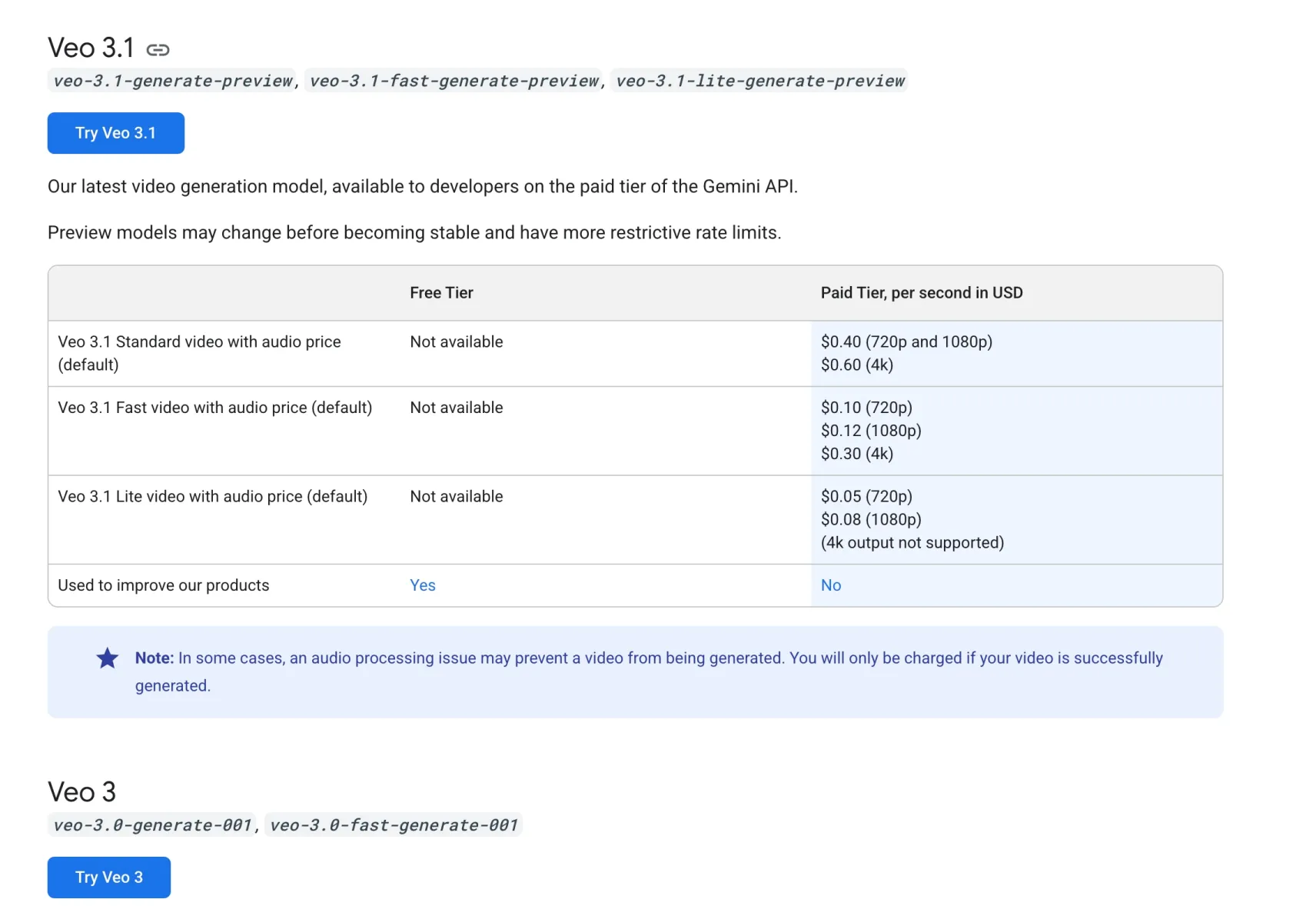
Veo 3.1 Version | Best For | 720p Price | 1080p Price | 4K Price |
Veo 3.1 Lite | Drafts, bulk tests, low-cost workflows | $0.05/sec | $0.08/sec | Not supported |
Veo 3.1 Fast | Prompt testing, social videos, faster iteration | $0.10/sec | $0.12/sec | $0.30/sec |
Veo 3.1 Standard | Final ads, cinematic shots, high-quality output | $0.40/sec | $0.40/sec | $0.60/sec |
For most users, Veo 3.1 Fast is the best starting point. It is much cheaper than Standard, still supports native audio, and is good enough for testing prompts, social clips, and short marketing videos.
Use Standard when the clip is close to final and visual quality matters more than cost.
Use Lite when you want to test many ideas quickly and do not need 4K output.
Cost Per Video Examples
Here is what Veo 3.1 can cost at different video lengths.
Video Length | Lite 720p | Fast 720p | Standard 1080p | Standard 4K |
8 seconds | $0.40 | $0.80 | $3.20 | $4.80 |
15 seconds | $0.75 | $1.50 | $6.00 | $9.00 |
30 seconds | $1.50 | $3.00 | $12.00 | $18.00 |
60 seconds | $3.00 | $6.00 | $24.00 | $36.00 |
This table shows the real tradeoff. A single short video is affordable. A campaign with many tests can become expensive quickly.
For example, if you test 20 prompts and each one creates an 8-second Standard 1080p video, the estimated API cost is:
20 × $3.20 = $64If you test the same 20 ideas with Fast 720p first, the cost is:
20 × $0.80 = $16That means a simple workflow change can save about 75% during the testing stage.
Google Flow Credits vs API Pricing
There are two common ways to access Veo 3.1 through Google:
Google Flow / Gemini subscriptions
Gemini API pay-per-second billing
Google Flow uses credits. Google AI plans may include different monthly Flow credit amounts depending on the plan. The API is easier to calculate because it is priced per second.
For creators, Flow may feel easier because you work inside a video creation interface. For developers, the API is better because you can build Veo 3.1 into your own app, product, or automated workflow.
The problem is that Flow credits do not always translate cleanly into a public “cost per second” number. Credit usage may depend on model choice, quality, generation type, and product rules. Before starting a large video batch, check the live Flow credit screen.
AIReiter Veo 3.1 Pricing
AIReiter gives another way to try Veo 3.1 online or through API access.
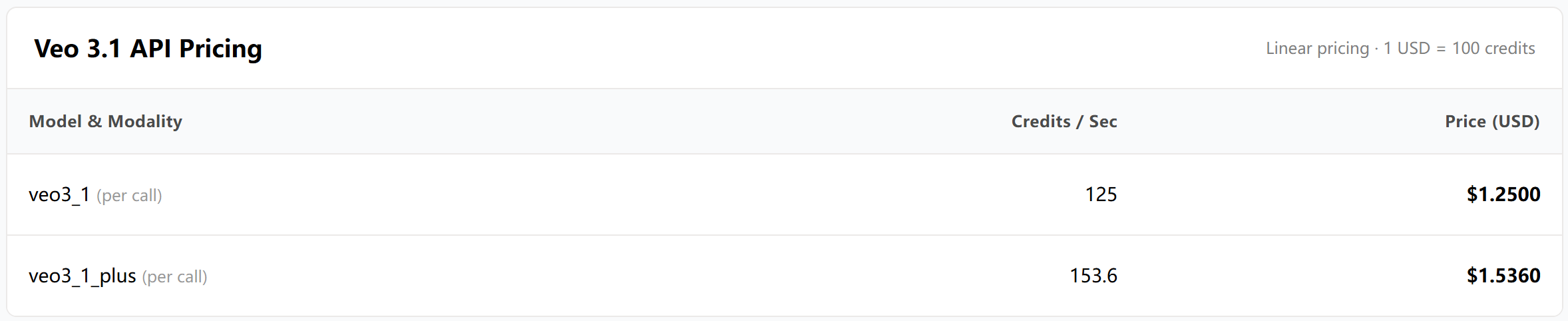
On the AIReiter Veo 3.1 page, the pricing is shown in credits:
Model | Listed Credit Cost | Listed USD Price |
veo3_1 | 125 credits per call | $1.25 |
veo3_1_plus | 153.6 credits per call | $1.54 |
The page also shows a simple conversion rule:
1 USD = 100 creditsThis makes the cost easier to understand if you want to test Veo 3.1 without calculating price per second manually.
AIReiter also supports a playground-style workflow, so you can enter a prompt, choose aspect ratio, upload a reference image, and generate without building your own API setup first.
This is useful if your goal is not to manage Google Cloud billing, but to start creating and testing videos faster.
Try it here: Veo 3.1 AI Video Generator on AIReiter.
Which Veo 3.1 Option Is Cheapest?
The cheapest option depends on what you are trying to do.
Use Case | Recommended Option | Why |
Testing many prompts | Veo 3.1 Lite or Fast | Lower cost per second |
Making short social videos | Veo 3.1 Fast | Good balance of cost and quality |
Producing final ad creatives | Veo 3.1 Standard | Better for polished cinematic output |
Building an app or workflow | Gemini API or AIReiter API | Easier to automate |
Trying Veo without setup | AIReiter Playground | Faster first test |
Creating 4K videos | Veo 3.1 Standard or Fast 4K | Lite does not support 4K |
My recommendation:
Start with Veo 3.1 Fast for most projects. Use it to test prompts, camera movement, scene structure, and audio direction. Once you find a prompt that works, regenerate the best version with Veo 3.1 Standard if you need higher production quality.
This gives you better cost control than using Standard mode for every draft.
Hidden Costs Most Pricing Guides Miss
The visible price per second is only part of the real cost. In practice, AI video costs more because you rarely get the perfect result on the first generation.
Here are the costs to consider:
Cost Factor | Why It Matters |
Failed prompts | A vague prompt can waste several generations |
Multiple takes | You may need 3–10 versions before choosing one |
Higher resolution | 4K costs more than 720p or 1080p |
Longer duration | Every extra second adds cost |
Post-production | Editing, captions, voice cleanup, and music may still be needed |
Team review | Marketing videos often need approval rounds |
A realistic budget should assume multiple attempts.
For example, if your final goal is one 8-second Standard 1080p ad, the direct cost may be $3.20. But if you test 5 versions before getting the final one, the real generation cost is closer to:
5 × $3.20 = $16If you test in Fast first and only upscale or regenerate the winner in Standard, the cost can be much lower.
How to Reduce Veo 3.1 Video Costs
Use this workflow if you want to spend less:
Draft in Lite or Fast
Do not start every idea in Standard mode. Use Lite or Fast to test the core concept first.
Keep early videos short
Start with 8 seconds. Longer clips multiply cost quickly.
Write more specific prompts
A weak prompt creates wasted generations. Include the subject, scene, camera movement, lighting, style, action, and audio cues.
Example:
A cinematic 8-second product ad for a matte black smart speaker on a wooden desk. Slow push-in camera movement, warm morning light, subtle dust particles, realistic reflections, soft ambient room tone, no text on screen.This is better than:
Make a cool video of a speaker.Test one variable at a time
Do not change the product, camera angle, background, style, and audio all at once. Change one thing, compare, then improve.
Save your best prompts
Good prompts become reusable assets. Keep a prompt library for product videos, ads, cinematic shots, UGC-style clips, and vertical social videos.
Use reference images when consistency matters
If your video must preserve a product, character, or visual identity, use reference images instead of relying only on text.
Is Veo 3.1 Worth the Price?
Veo 3.1 is worth the price when the video can create business value: ads, landing page visuals, product demos, social content, app previews, cinematic brand clips, or API-based media generation.
It is less worth it if you are only experimenting casually and generating many random clips without a plan.
The strongest use case is short, high-value video:
8-second product ads
TikTok and YouTube Shorts concepts
app promo videos
website hero videos
visual storyboards
pitch deck video mockups
creative testing for paid ads
For these cases, even a few dollars per finished video can be reasonable.
The weak use case is long-form generation. A 60-second Standard 4K video can cost much more, and you may still need editing afterward.
Final Recommendation
If you want the lowest cost, start with Veo 3.1 Lite.
If you want the best balance, use Veo 3.1 Fast.
If you want the best final quality, use Veo 3.1 Standard only after your prompt is already working.
For most creators and marketers, the smartest workflow is:
Draft with Fast → choose the best version → regenerate final with StandardIf you want to try Veo 3.1 without setting up Google API billing, use AIReiter Veo 3.1. It gives you an online playground and API-ready workflow for cinematic AI video generation with native audio.
FAQ
How much does Veo 3 cost per video?
Through the official Gemini API, Veo 3.1 pricing is based on seconds. An 8-second video can cost about $0.40 with Lite 720p, $0.80 with Fast 720p, or $3.20 with Standard 1080p.
Is Veo 3.1 free?
Some Google accounts may have limited Flow credits, but serious usage usually requires a paid plan, API billing, or a third-party platform.
Why do different sites show different Veo 3 prices?
Because Veo can be accessed through different products: Google Flow, Gemini subscriptions, Gemini API, Vertex AI, and third-party platforms. Each one may use a different billing model.
Is Veo 3.1 cheaper than Veo 3?
For new projects, compare Veo 3.1 variants instead of relying on older Veo 3 pricing. Veo 3.1 Lite and Fast are the cheaper options for testing and high-volume generation.
What is the cheapest Veo 3.1 model?
Veo 3.1 Lite is the cheapest official API option. It starts at $0.05 per second for 720p video.
What is the best Veo 3.1 model for marketers?
Veo 3.1 Fast is usually the best starting point. It is cheaper than Standard and good enough for prompt testing, social media clips, and ad concept drafts.
Does Veo 3.1 include audio?
Yes. Veo 3.1 supports native audio generation, including dialogue, ambient sound, and effects synchronized with the video.
Can I use Veo 3.1 through API?
Yes. Veo 3.1 is available through API options. You can also try it through AIReiter’s Veo 3.1 API workflow.