 AIREITER
Gemini 3.8 Flash is worth testing in Cursor for multi-file, tool-heavy work, but Cursor’s 200K default context, plan-based billing, and High-effort default mean Google’s API specification is not the whole story.
The short answer: use Gemini 3.8 Flash for tool-heavy coding
Gemini 3.8 Flash is worth testing in Cursor when an agent must inspect several files, run commands, recover from errors, and complete a change rather than merely suggest a snippet. It is less compelling for short completions or high-volume traffic that already works reliably on Gemini 3.7 Flash.
Start with a bounded task, the normal context, and the effort level Cursor exposes. Track accepted changes, tool turns, retries, and total usage before making it the default model for a whole team.
| Situation | Starting choice |
|---|---|
| New multi-file feature with tests | Gemini 3.8 Flash at Medium |
| Difficult refactor or long tool chain | Gemini 3.8 Flash at High |
| Small edit or explanation | Low effort or an established fast model |
| Existing, efficient 3.7 workflow | A/B test before switching |
What Cursor actually gives you
Google lists Gemini 3.8 Flash as a stable model with the ID gemini-3.8-flash. Google announced it on September 2, 2026, and positions it for long-horizon software engineering, autonomous agents, and complex enterprise workflows; the model card says it is based on Gemini 3.7 Flash (Google’s launch announcement, Google’s model card).
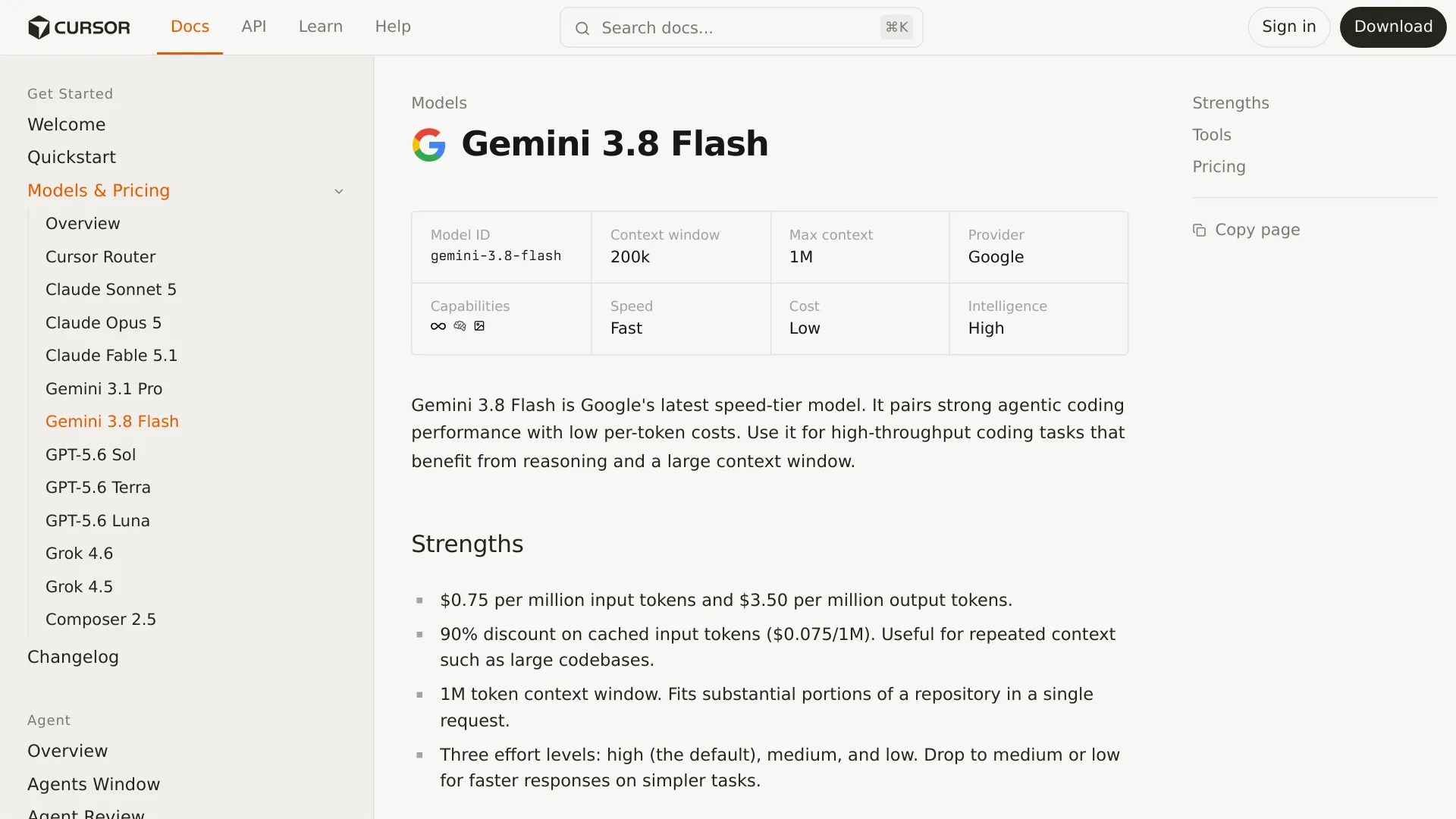
Google’s limits describe the model; Cursor’s settings determine what you actually get in the editor:
| Item | Google documentation | Cursor’s listed integration |
|---|---|---|
| Model ID | gemini-3.8-flash | gemini-3.8-flash |
| Input limit | 1,048,576 tokens | 200K default, up to 1M maximum listed |
| Inputs | Text, images, video, audio, and PDFs | Depends on Cursor’s agent and file workflow |
| Output | Text, up to 65,536 tokens | Text output in the coding agent |
| Thinking | Low, medium, high | High listed as the default; lower levels are listed |
| Tools | Function calling, code execution, file search, URL context, Search and Maps grounding, and computer use in Preview | File search, editing, shell commands, web, browser, screenshots, and other Cursor agent tools |
Google’s API model page confirms the 1,048,576-token input limit, 65,536-token output limit, multimodal input, and text-only output. Cursor’s own model page is the better source for what the editor exposes.
Cursor access and pricing: the plan matters first
Cursor treats Gemini 3.8 Flash as a third-party model. Its usage comes from the Other Models pool rather than the Cursor Models pool used by Cursor’s own models such as Composer and Grok. Pro, Pro Plus, and Ultra include the Other Models pool; Cursor’s India-only Start plan does not (Cursor Models & Pricing).
| Cursor plan | Listed price | Access to Gemini 3.8 Flash |
|---|---|---|
| Start, India only | ₹649/month, tax inclusive | Not included; the plan covers Cursor Models |
| Pro | $20/month | Other Models pool included |
| Pro Plus | $60/month | Other Models pool included |
| Ultra | $200/month | Other Models pool included |
Cursor’s dedicated Gemini 3.8 Flash page lists these rates per million tokens:
| Charge | Cursor-listed rate |
|---|---|
| Input | $0.75 |
| Cached input | $0.075 |
| Output | $3.50 |
Those are Cursor’s listed integration rates, not Google’s direct API rate card. Google lists $0.75 per million input tokens and $3.75 per million output tokens through December 31, 2026, with standard rates of $1.50 and $7.50 beginning January 1, 2027 (Google Cloud pricing). The 15-cent output difference is a route-specific billing difference, so do not mix Cursor estimates with a Google invoice.
On Teams and Enterprise plans, Cursor also documents a $0.25 per million token Cursor Token Rate for third-party model requests (Cursor Models & Pricing). On-demand usage continues at the listed model rates after included usage is exhausted. Cursor says requests are not downgraded in quality or speed.
When you use Cursor’s integrated model picker, you typically do not supply a Google API key. A Google key is relevant when calling gemini-3.8-flash directly through Google AI Studio or the Gemini API; Cursor’s billing and model documentation describes its own connection and usage accounting.
Context in Cursor: 200K by default, 1M only when exposed
Google documents a maximum input context of 1,048,576 tokens, while Cursor lists 200K as the default and 1M as the maximum for Gemini 3.8 Flash (Cursor’s model page).
Cursor’s pricing documentation says Max Mode is available only on legacy request-based plans, extends a model beyond its default context limit, and is billed at the model’s API rate plus 20%. A million-token model limit therefore does not guarantee a million-token Cursor request on every account.
Use the limits this way:
- 200K is enough for a focused feature, bug, or small-to-medium repository slice.
- A larger context is useful when the agent must connect many packages, long specifications, generated files, or a large document set.
- Max Mode deserves a test. Check whether your plan exposes it and whether fewer retries cover the 20% surcharge.
- A larger window is not perfect recall. More input capacity does not guarantee that the agent will use every instruction correctly.
A sensible first pass is to name relevant directories and add files only when the task requires them.
Effort settings: match reasoning to the job
Gemini 3.8 Flash supports low, medium, and high thinking levels. Google does not support minimal; a request using that level returns an error (Google’s migration documentation).
| Effort | Use it for | Main trade-off |
|---|---|---|
| Low | Explanations, small edits, formatting, simple tests | Less reasoning overhead |
| Medium | Ordinary debugging, feature work, and most agent tasks | Balanced quality and latency |
| High | Architecture changes, difficult bugs, large refactors, and long tool chains | More reasoning, tokens, and possible delay |
The defaults are surface-specific. Google’s API documentation describes Medium as the default, while Cursor’s dedicated model page lists High as the default. Check the control shown in the product where the request is running.
Google says Gemini 3.8 Flash may “work harder” on difficult tasks by taking additional reasoning steps, calling tools iteratively, and verifying intermediate work. Google’s pricing table bills response and reasoning tokens as output, so a High-effort task can cost more even when the headline input and output rates have not changed (Google Cloud pricing).
For Cursor, start simple tasks at Low, use Medium for normal implementation, and move to High only when deeper planning has a checkable reason to improve the result.
A Cursor workflow that keeps the model useful
Gemini 3.8 Flash works best in Cursor when the agent has a defined target and a way to prove that it reached it.
Start with a bounded task
Give the agent the outcome, the directories or files it may change, the command that proves the change works, and a stopping condition.
Inspect the authentication middleware in
src/auth/and the failing tests intests/auth/. Identify the smallest cause of the 401 regression, make the smallest safe fix, run the focused test command, and stop if the fix requires a schema change.
This leaves room for inspection and editing without making a broad repository rewrite the definition of success.
Let the agent use tools, but require verification
Cursor documents agent access to file search, file reading, editing, shell commands, web tools, browser control, and screenshots for Gemini 3.8 Flash. Before accepting a change, ask for the root cause, the files changed, the exact test command, the result, and any remaining uncertainty.
Set a maximum-turn rule. More tool calls do not necessarily improve the result; one developer described waiting through more than 100 tool calls for a simple four-line change in an early hands-on report (theo on X).
Control cost per accepted change
Record the Cursor plan, effort level, context mode, usage shown by the editor, tool turns, retries, completion time, and whether the final diff passed its checks. The useful metric is cost per accepted change, not cost per request.
Gemini 3.8 Flash in Cursor versus the Google API
Choose the route based on the workflow you need. Cursor adds an editor, repository tools, plan controls, and its own usage accounting; Google gives you the direct API surface and Google’s rate card.
| Decision point | Cursor | Google Gemini API |
|---|---|---|
| Access | Select the model in Cursor’s Chat or Agent interface | Use a Google API key and gemini-3.8-flash |
| Billing shown in the docs | $0.75 input, $0.075 cached input, $3.50 output per 1M tokens | $0.75 input, $0.075 cached input, $3.75 output through 2026 |
| Context presentation | 200K default, 1M maximum listed; Max Mode depends on plan | Up to 1,048,576 input tokens |
| Effort default | High listed by Cursor | Medium documented by Google |
| Tool harness | Cursor files, shell, web, browser, and editor workflow | Google tools such as function calling, code execution, grounding, URL context, and Preview computer use |
| Best fit | Repository work inside an editor | Applications, services, agents, and custom orchestration |
For a direct API implementation, the Gemini 3.8 Flash API pricing review covers the scheduled January 1, 2027 price change and broader token-cost calculations. Keep Cursor and direct API evaluations separate because the harness, defaults, and billing layer are different.
Migration checklist and 30-minute pilot from Gemini 3.7 Flash
A model selector change in Cursor is not the same as an API migration. Preserve your rules and prompts, then compare both models on the same repository state.
- Pick 10 representative Cursor tasks, including a bug fix, multi-file feature, refactor, test repair, and documentation or configuration change.
- Run five tasks at Medium and five at Low; reserve High for the two hardest tasks.
- Keep normal context first, then repeat one long task with extended context if your plan supports it.
- Record accepted changes, failed tests, retries, tool turns, completion time, and usage.
- Canary Gemini 3.8 Flash on one task class and keep it as the default only where its accepted-result cost beats Gemini 3.7 Flash or your current model.
If you are changing direct Google API code, use Google’s linked migration documentation for thinking_level, unsupported parameters, and stricter turn formatting. Do not assume those direct-API constraints map one-for-one onto Cursor’s adapter.
Gemini 3.8 Flash in Cursor FAQ
Do I need a Google API key to use Gemini 3.8 Flash in Cursor?
Usually no. Cursor provides the model through its own third-party integration and usage pool; a Google API key is for direct Google API or AI Studio usage.
Why do Cursor’s context and effort settings differ from Google’s?
Cursor lists 200K as the default context, up to 1M as the maximum, and High as its default effort; Google documents 1,048,576 input tokens and Medium as the API default. The usable context and effort depend on the product surface and plan.
Is Gemini 3.8 Flash included in Cursor Pro, and is it free?
Cursor lists the Other Models pool as included with Pro, Pro Plus, and Ultra, but the model is metered; the India-only Start plan excludes that pool.
Can Gemini 3.8 Flash generate images or audio?
No documented native output supports that use: Gemini 3.8 Flash accepts text, image, video, audio, and PDF inputs but returns text.
Does Max Mode always provide 1M context?
No. Cursor says Max Mode is limited to legacy request-based plans and adds 20% to the model API rate.