 AIREITER
想做有質感的 3D 網站,網路上的提示詞資源往往不是要付費買文字,就是只放展示影片、不公開內容。這次直接整理 6 組完整提示詞:可原封不動貼進 Claude,也能只調整一行後用於 Lovable、Bolt 或 Cursor。6 組都實際跑過模型,其中 5 組成功產出可運作的 Three.js 頁面;下方每張圖片都是實際生成的渲染畫面,不是示意 mockup。
6 組可立即複製的 3D 網站提示詞
每組提示詞都要求產出一個單檔 HTML 頁面,並透過 CDN 載入 Three.js。這個限制很實用:單一檔案可直接在任何瀏覽器本機開啟,也方便交給開發者或貼進自訂程式碼區塊;同時能迫使模型把場景收在同一份檔案裡,不會把 import 分散到整個專案。
1. 粒子星系 Hero 區塊
Create a single-file HTML page with an interactive 3D particle galaxy hero
section using Three.js (load it from a CDN). Requirements: about 50,000
particles forming a spiral galaxy that slowly rotates; particle colors shift
from warm amber at the core to violet at the outer rim; add OrbitControls so
visitors can drag to rotate and zoom; overlay a centered hero headline that
says "Build Beyond Flat" with a short subline and a CTA button; set
pointer-events: none on the overlay container and pointer-events: auto on
the CTA button so the galaxy stays draggable behind the text; dark
background #0a0616; handle window resize. Output ONLY the complete HTML
file in a single code block.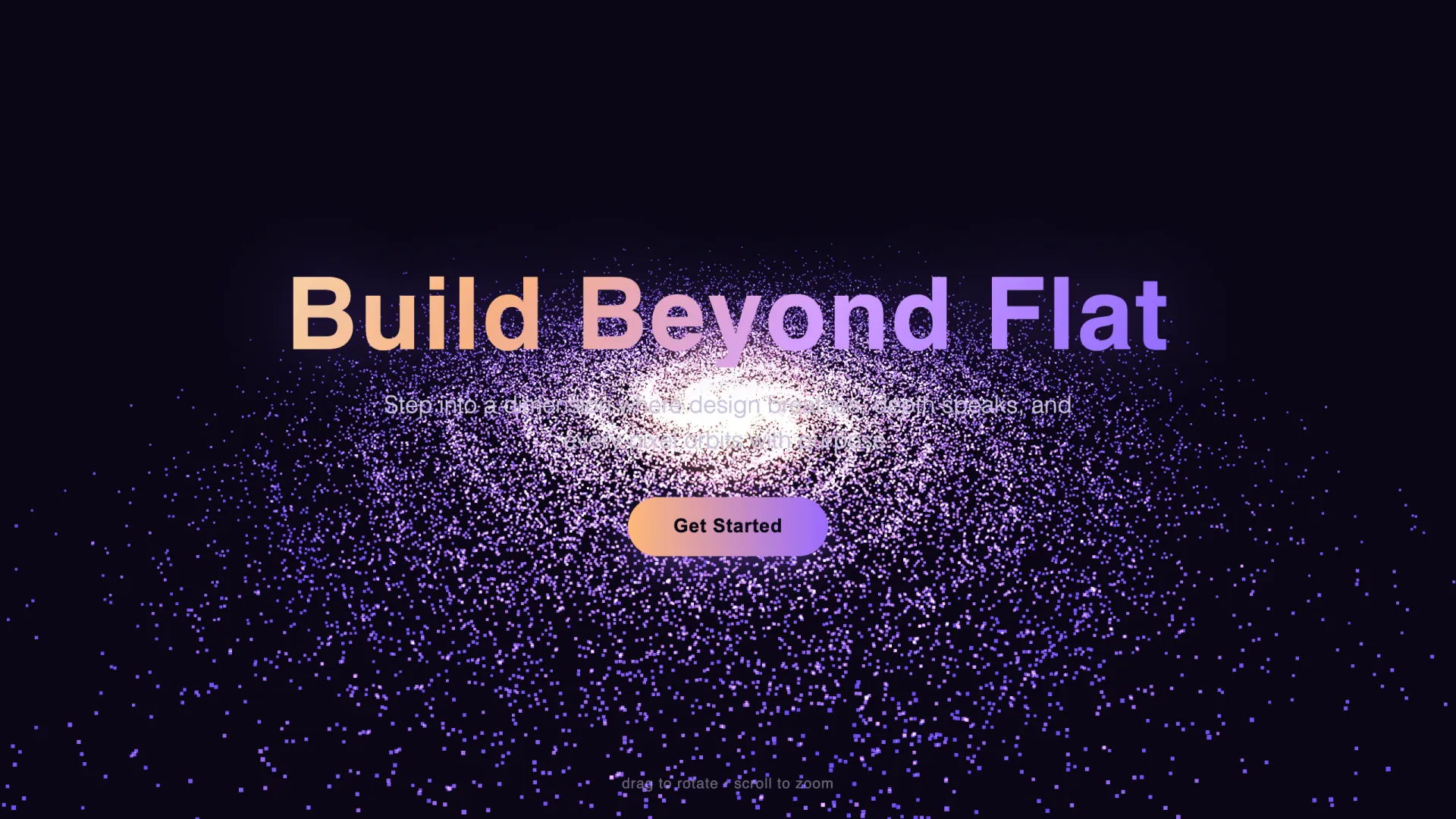
生成耗時 27 秒、輸出 3,692 tokens。星系會旋轉,拖曳環繞視角功能正常,按鈕也能穿過覆蓋層點擊。唯一明顯問題是副標剛好壓在明亮的銀河核心上,可讀性偏低;後面的測試筆記會提供修正方式。
2. 由捲動驅動的產品展示
Create a single-file HTML page: a scroll-driven 3D product showcase using
Three.js loaded from a CDN. Requirements: a floating chrome torus-knot
centered in a fixed full-screen canvas; the page has 4 full-screen scroll
sections, and as the user scrolls the camera orbits the object a full 360
degrees while the object material color smoothly transitions per section
(silver, deep blue, emerald, copper); each section shows a headline and
one-line copy pinned to the left over the canvas; smooth interpolation (lerp)
on scroll so motion feels damped; dark studio look with two colored
spotlights and a soft ground shadow; handle resize. Output ONLY the complete
HTML file in a single code block.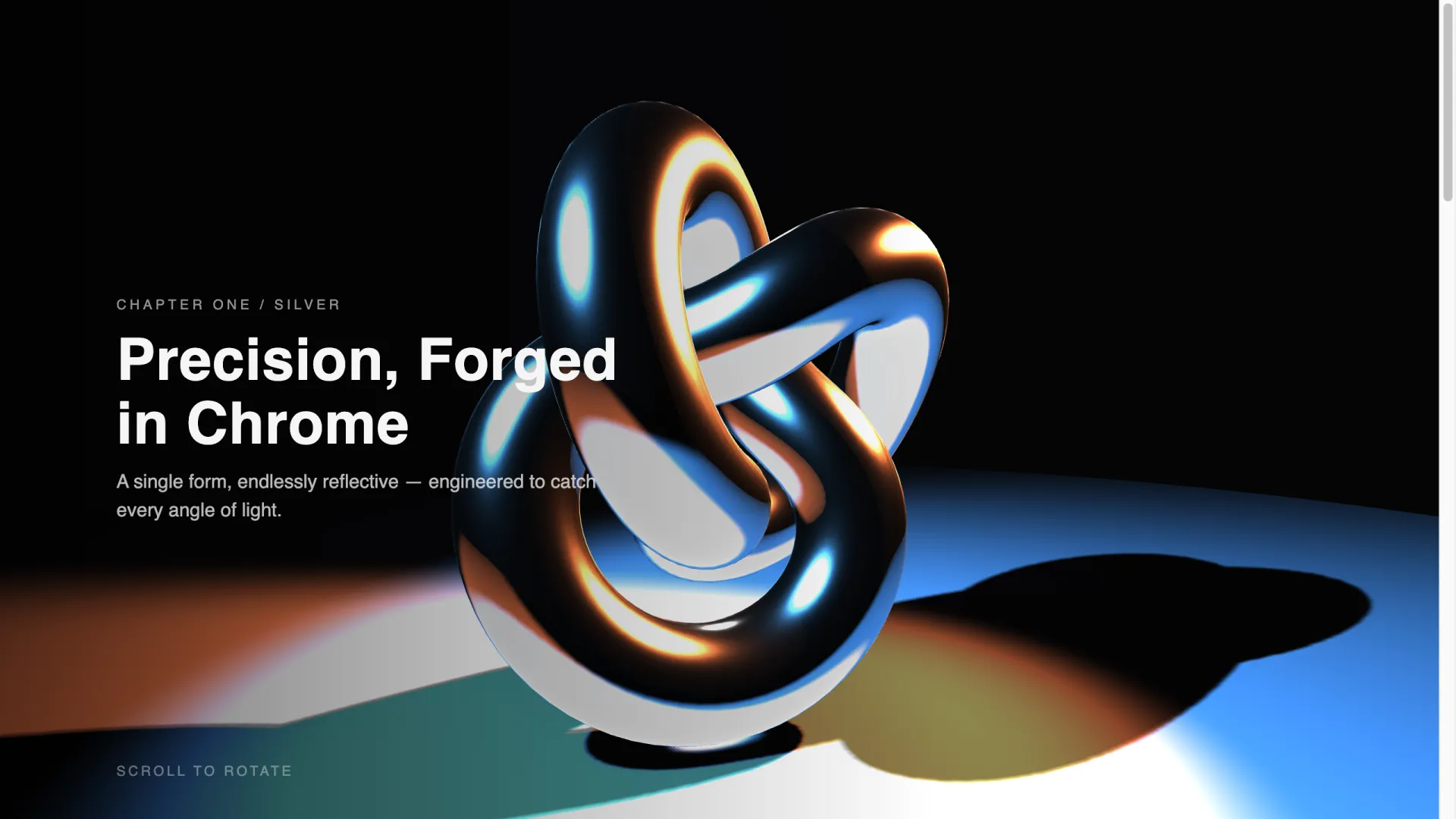
這是 5 個成功案例中最重的一組:耗時 63 秒、輸出 7,023 tokens,同時也是視覺效果最令人驚豔的一組。捲動頁面時,鏡頭會繞著物件移動,材質顏色也完全依照要求在四個區段切換:
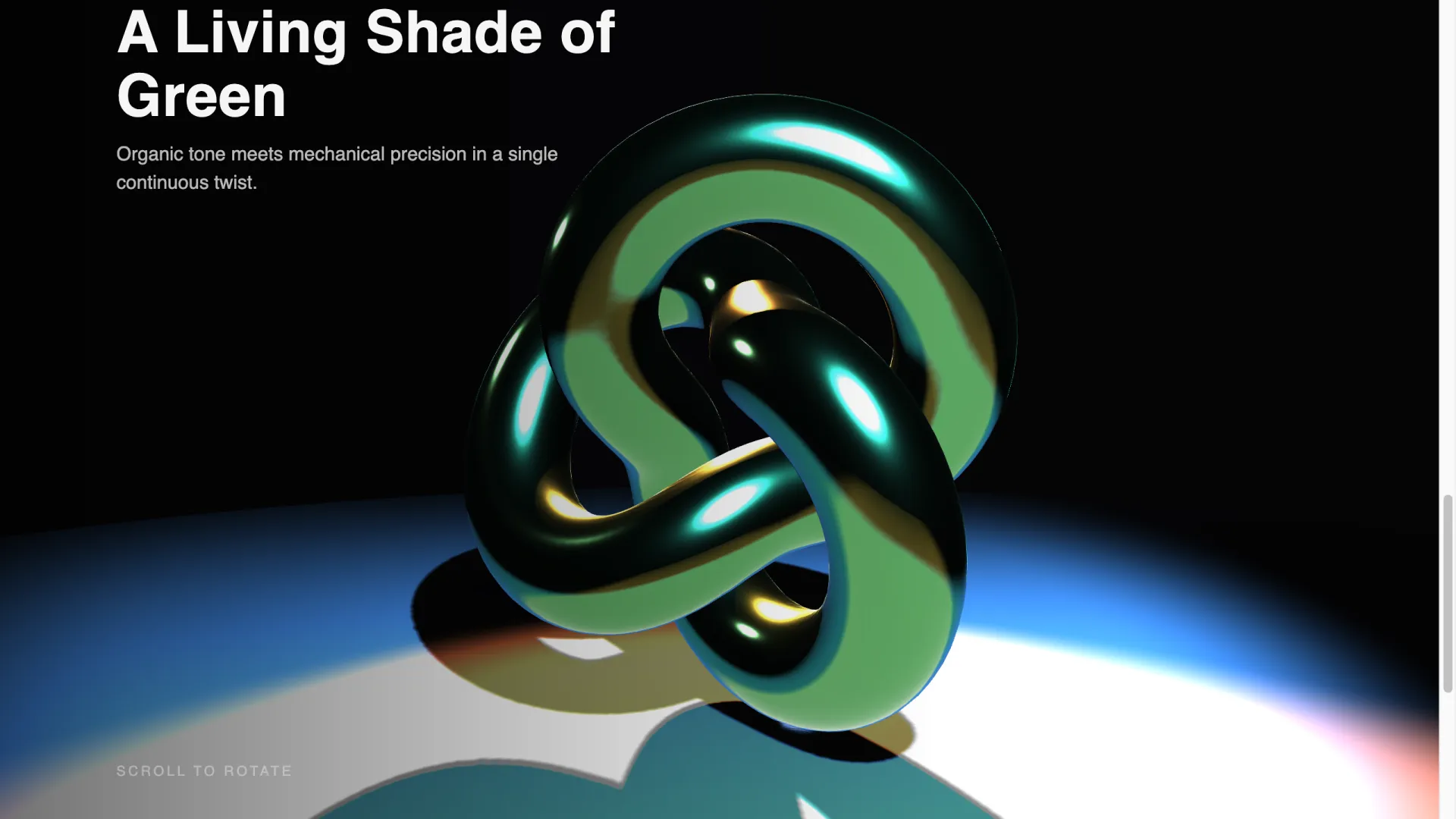
模型也確實採用了帶阻尼感的 lerp 插值。動態不像強制接管捲動的投影片,而更接近品牌代理商網站那種厚重、高級的節奏。
3. GLSL 流體漸層背景
Create a single-file HTML page with a full-screen animated WebGL fluid
gradient background using a custom GLSL fragment shader with Three.js loaded
from a CDN. Requirements: slow-moving organic blobs blending deep blue,
purple and coral, driven by a time uniform and simplex-style noise in the
fragment shader; add subtle film grain in the shader; overlay a centered
glass card (backdrop blur) with a white headline "Ship Immersive Sites", one
subline, and two buttons; the animation must stay smooth on a laptop (single
quad, no postprocessing passes); handle resize. Output ONLY the complete
HTML file in a single code block.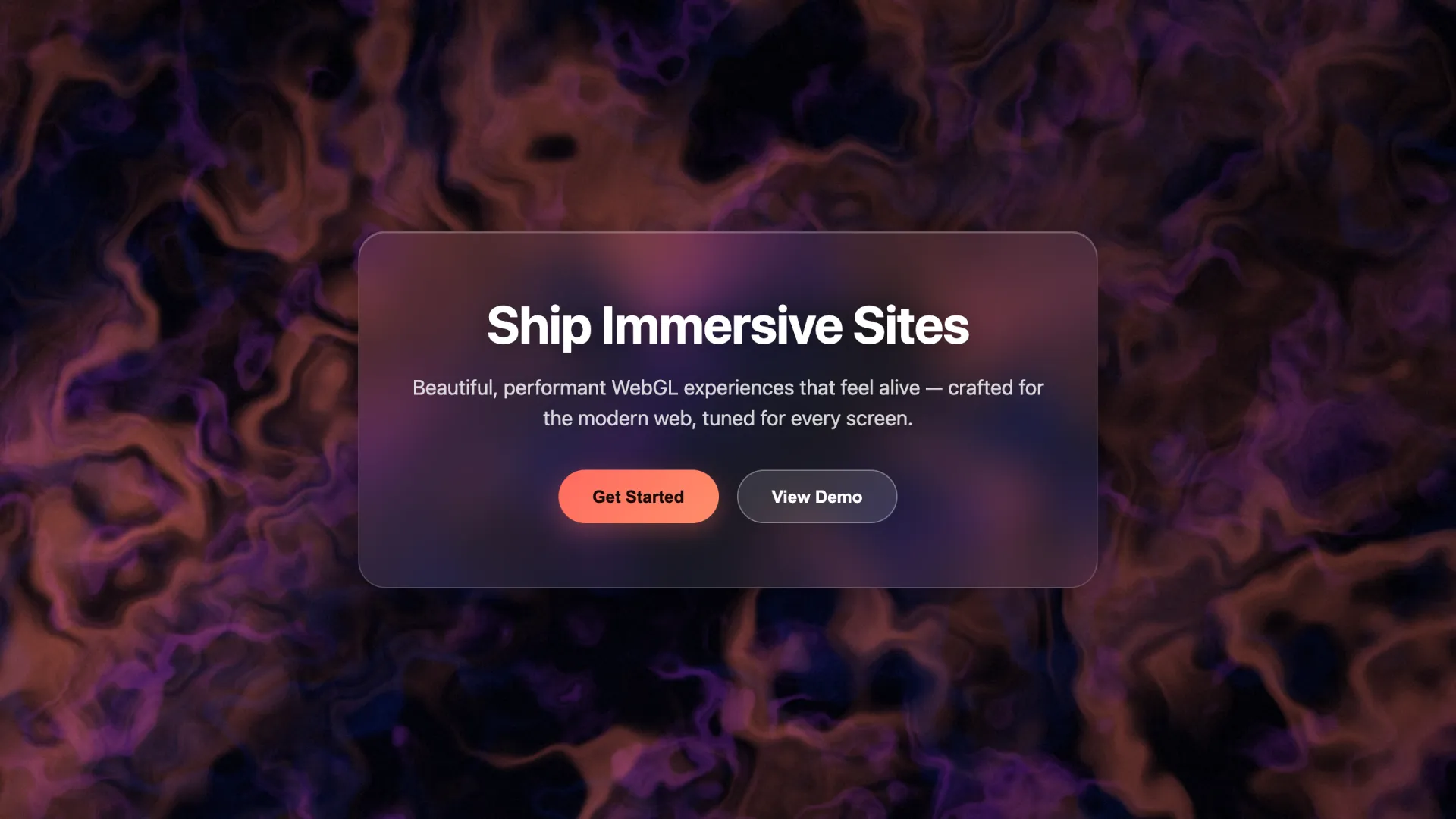
31 秒、3,830 tokens,一次就成功。提示詞中的「single quad, no postprocessing passes」是重要的效能護欄:少了這句,模型很容易加入 EffectComposer 和 bloom passes,讓內建 GPU 的幀率大幅下滑。
4. 3D 作品集飛行導覽:最難搞的一組
Create a single-file HTML page: a 3D portfolio using Three.js from a CDN.
Six floating project cards (rounded planes with placeholder gradient
textures and project titles rendered onto the card texture) arranged along
a gentle curve in 3D space. As the user scrolls, the camera flies forward
along the curve, bringing each card into focus one at a time; the camera
must keep the focused card fully in frame with comfortable margin and never
pass through a card; the focused card scales up slightly. Neighboring cards
stay partially visible for depth. Add subtle fog, a dark background, damped
scroll interpolation. Clicking a focused card opens a link. Handle resize.
Keep the code compact: reuse one card-building function, no comments.
Output ONLY the complete HTML file in a single code block.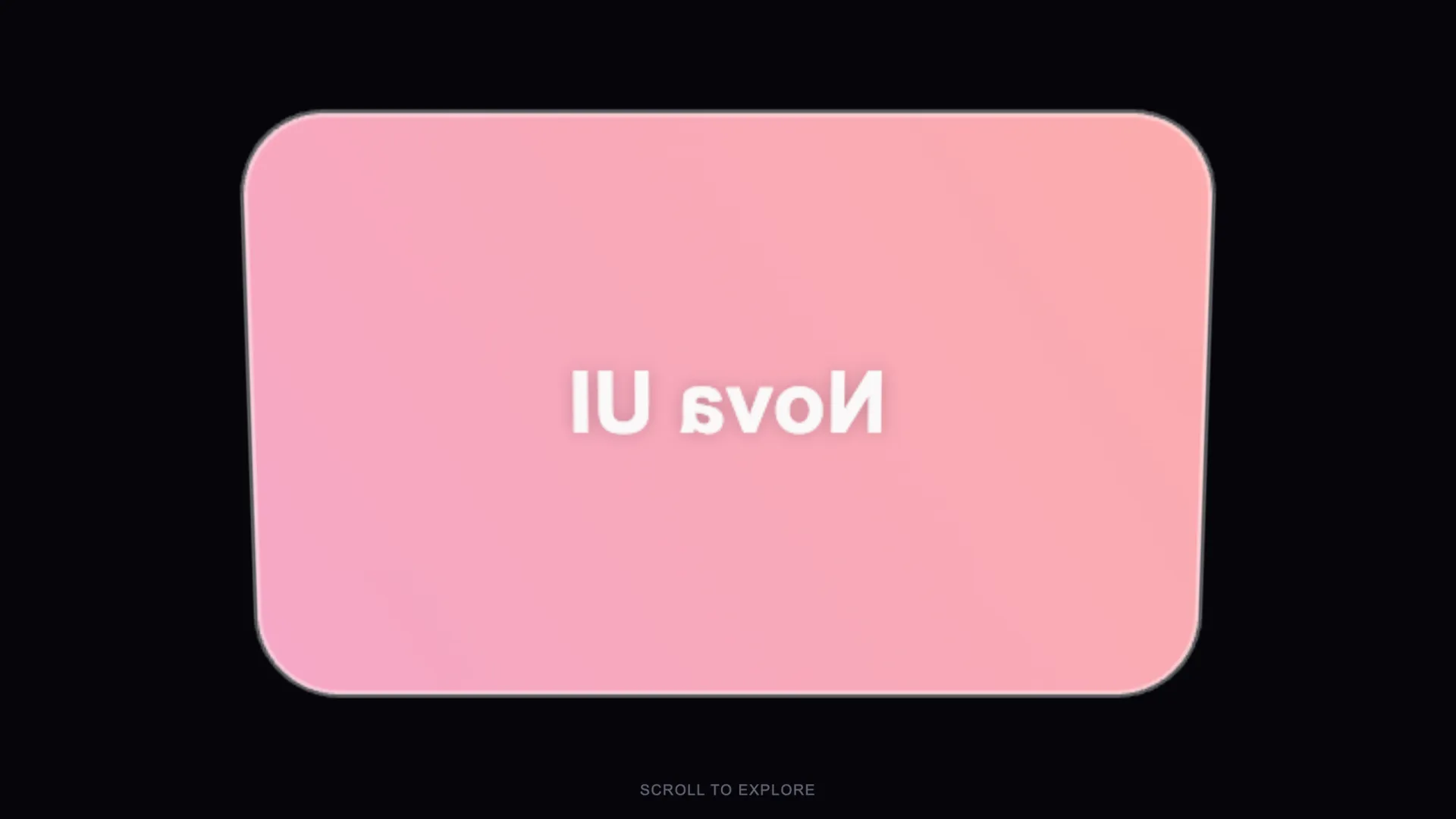
這組跑了 3 次仍無法直接上線,但正因如此才值得公開。從截圖可以看出,卡片成功生成了,但鏡頭位在卡片後方,標題因而變成鏡像文字。第一次執行在檔案尚未完成前就超過 16,000-token 輸出上限。第二次加入「keep the code compact」這句後,也就是這句會出現在提示詞中的原因,卡片雖然渲染出來了,鏡頭卻直接穿過卡片。第三次修好了穿模問題,卻失去鏡頭與捲動的連動。鏡頭路徑編排加上每張卡片的貼圖,確實比前面的場景更難讓模型處理;建議預留一段除錯時間,或簡化成固定的彎曲卡片網格,再搭配 hover 狀態。
5. 互動式產品檢視器
Create a single-file HTML page: an interactive 3D product viewer using
Three.js from a CDN. Center a stylized wireframe-free geometric product
stand-in (a beveled cube or capsule) on a pedestal. Right-side panel with
three color swatches and a metal/matte toggle that update the material live;
OrbitControls limited to horizontal rotation; soft three-point studio
lighting and a contact shadow. Keep the panel plain HTML/CSS overlaying the
canvas. Handle resize. Output ONLY the complete HTML file in a single code
block.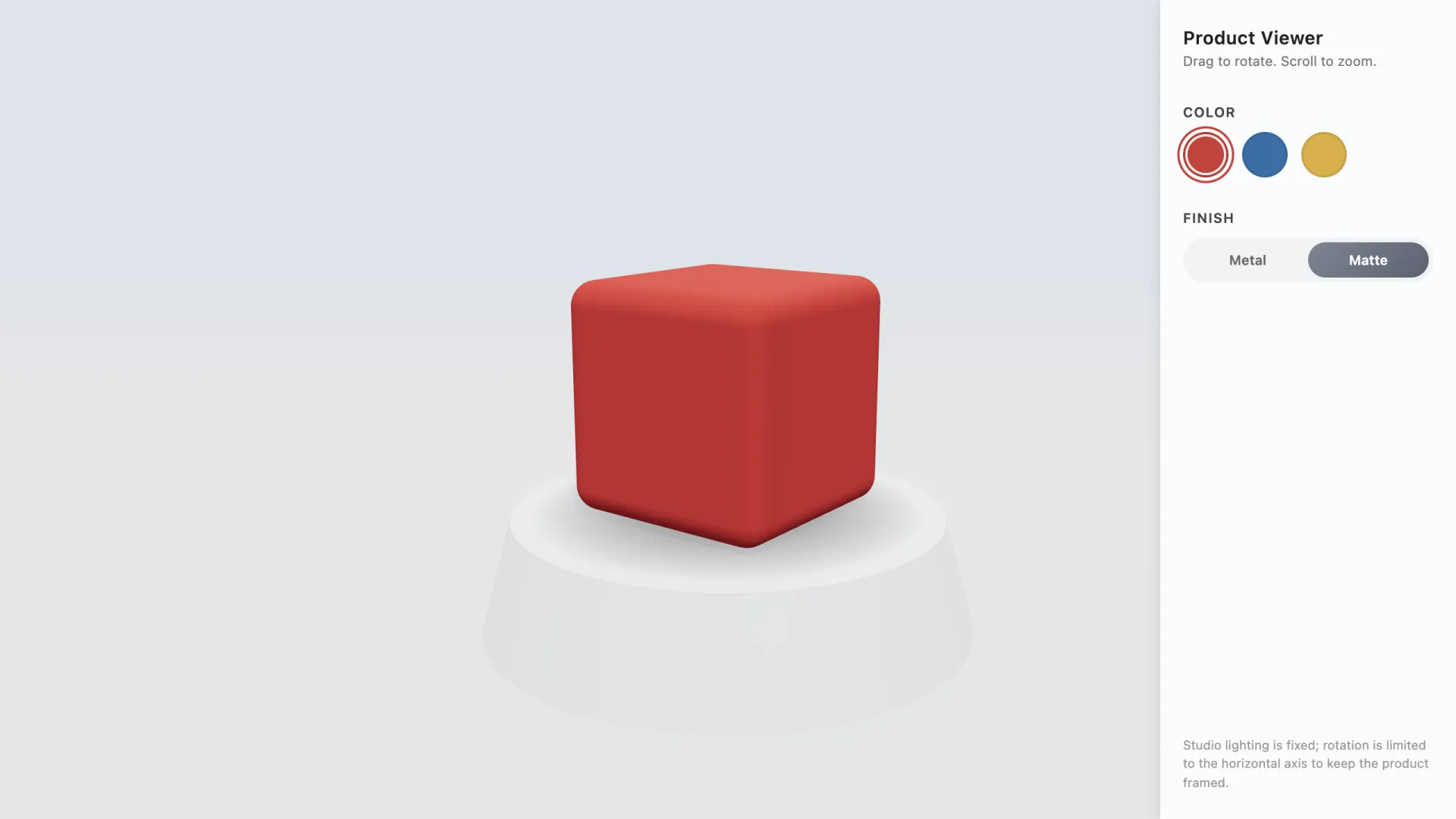
一次成功,耗時 66 秒、輸出 7,719 tokens。色票和金屬/霧面切換都能即時更新材質;模型還額外加了一個貼心細節:用註腳說明旋轉被鎖定在水平軸,以確保產品始終維持在畫面中。
6. 單頁式 3D 商業網站
Create a single-file HTML page: a one-page site for a design studio with
Three.js from a CDN. Sections: hero, services, work, contact. A single
low-poly abstract shape floats top-right of the hero and slowly rotates;
as the user scrolls into each section the shape morphs its scale and color
to match that section accent. Sections otherwise use clean HTML/CSS
(no heavy 3D per section) so the page stays fast. Smooth scroll, mobile
friendly, handle resize. Output ONLY the complete HTML file in a single
code block.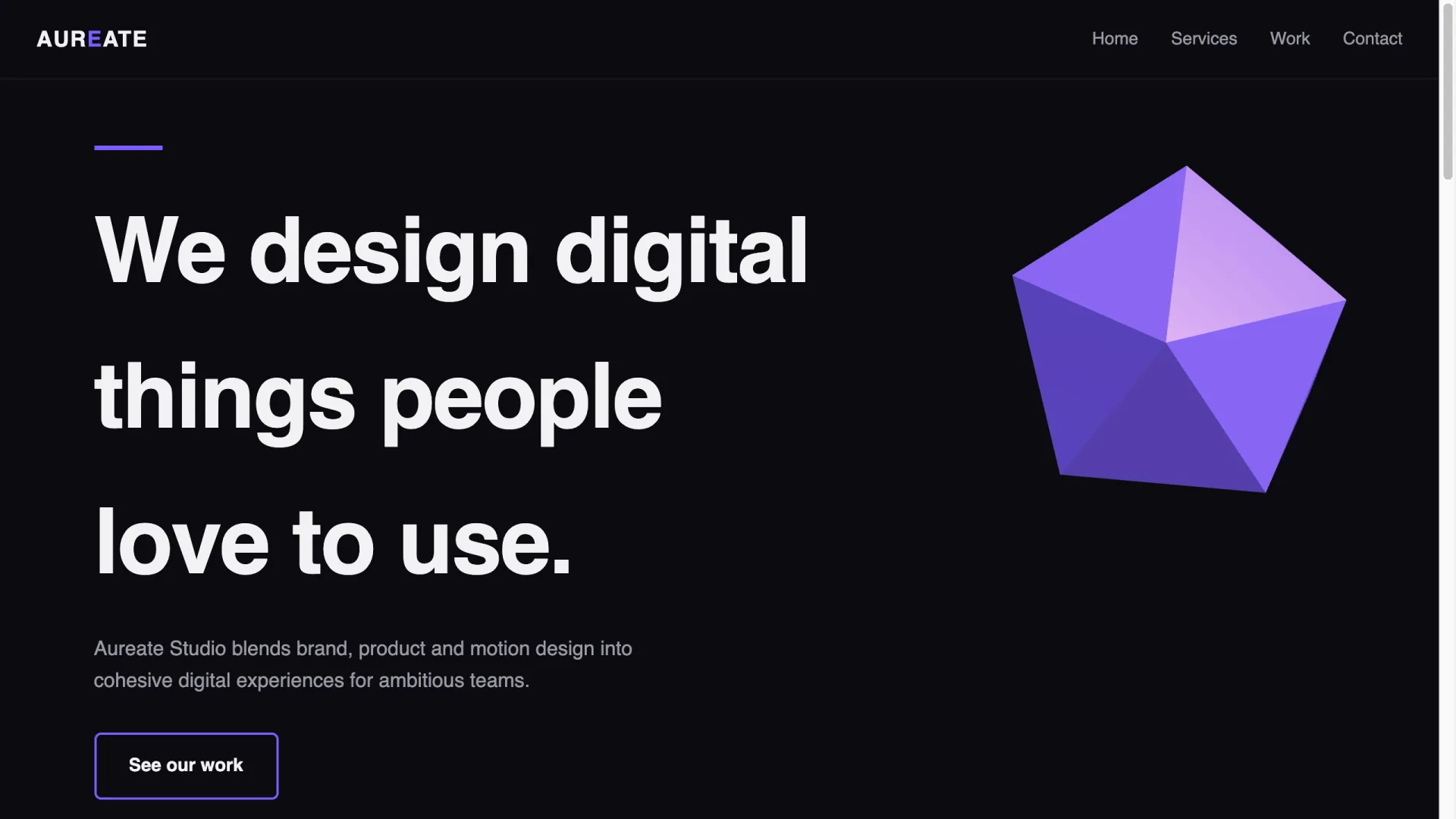
耗時 62 秒、輸出 7,419 tokens。模型自行取了一個工作室名稱,建立四個頁面區段,並依要求在 Hero 右上方放置緩慢旋轉的低多邊形二十面體。這組提示詞第一次嘗試時撞上 8,000-token 輸出上限,結果只拿到截斷內容;若透過 API 呼叫模型,完整頁面類型的提示詞最好將輸出上限設為 16,000 tokens 以上。
實跑後的結果整理
每組提示詞只在同一個模型上跑了 3 次,這不是嚴謹的效能基準;比較適合把它看成 2026 年中期 prompt-to-3D 生成能力的一次抽樣觀察。測試方法如下:2026 年 7 月 17 日,透過 API 使用 claude-sonnet-5,採用預設設定、沒有 system prompt;結果在 Apple-silicon MacBook 的桌面版 Chrome 中,以 1280×720 渲染。成功案例裡,模型自行選用了公開 CDN 上的 Three.js r128 UMD build。
| 提示詞 | 輸出 tokens | 時間 | 結果 |
|---|---|---|---|
| 粒子星系 Hero | 3,692 | 27.4s | 第一次即成功;副標對比不足 |
| 捲動式產品展示 | 7,023 | 63.4s | 第一次即成功,4 個顏色階段皆正確 |
| GLSL 流體漸層 | 3,830 | 31.6s | 第一次即成功,測試 MacBook 上未見掉幀 |
| 作品集飛行導覽 | 3 runs | 84–163s | 無法直接上線:先是 token 溢出,接著鏡頭穿模,最後標題鏡像 |
| 產品檢視器 | 7,719 | 65.8s | 第一次即成功,可即時切換材質 |
| 單頁式商業網站 | 7,419 | 62.4s | 提高輸出 token 上限後重跑一次即成功 |
5 個可用頁面中唯一的視覺瑕疵,是提示詞 1 的副標剛好落在星系最亮處,幾乎難以閱讀。只要補上一句追問就能修正:Give the subline a subtle dark text-shadow and raise its font weight so it stays readable over the bright galaxy core. 這也是整批測試最明顯的模式:3D 場景本身通常能順利生成,真正需要迭代的多半是字體排版、覆蓋層對比,以及作品集案例中的鏡頭編排。
以這個規模來說,成本幾乎不是問題。整輪測試共 9 次生成,包括作品集的重試,總計約 46,000 output tokens,成本遠低於 1 美元;我們透過 AIReiter 執行,它以官方每 token 價格五分之一轉售 Claude API 存取權,因此就算反覆調整好幾輪,花費也只是零錢等級。
自己寫 3D 網站提示詞的 5 個要素
成功的提示詞都包含五個部分。五項都保留,第一次就過關的機率會明顯提高。
- 一個明確的場景主體。例如星系、環面結或漸層場。在本次測試與多數社群分享案例中,只要同一頁要求多個彼此無關的 3D 功能,模型就開始漏掉需求。
- 指定動態驅動方式。選擇時間驅動,例如
slowly rotates、driven by a time uniform,或捲動驅動,例如as the user scrolls, the camera orbits。一定要直接說清楚;只寫「animated」會讓模型自行選一種可能很無聊的動畫。作品集失敗案例也帶來一個觀察:用捲動驅動物件很可靠,但讓捲動驅動鏡頭沿路徑穿梭於多個物件之間,就很容易出錯。 - 說明互動方式。本次測試所有成功案例中的
OrbitControls拖曳旋轉都正常運作。如果 canvas 上方要覆蓋文字,請明確要求覆蓋容器使用pointer-events: none,按鈕使用pointer-events: auto;否則文字層會攔截原本應該交給場景的拖曳與點擊事件。 - 提供覆蓋層文案。標題文字請用引號給出完整內容。未指定的文案,模型通常會填入日後仍得自行替換的通用口號。
- 加上效能與尺寸護欄。粒子數量、
single quad, no postprocessing或low-poly有助於維持頁面流暢;keep the code compact則能讓輸出留在 API 的 token 上限內。9 次執行裡有 2 次還沒出現程式碼品質問題,就先死在輸出上限。
以下詞彙能引導模型產出真正的 3D,而不是平面的 CSS 模仿:Three.js、particle system、GLSL fragment shader、OrbitControls、scroll-driven camera、torus-knot、lerp、fog、point lights。這些字很重要,因為它們對應到實際 API 名稱,模型能依照訓練資料中見過的函式庫寫程式,而不是從零即興拼湊。
直接貼程式碼的捷徑
如果你想要的效果已經超出文字描述能力,還有第二種做法:在 CodePen 找到完成的 Three.js 特效,把原始程式碼貼進 AI 工具,然後只下 Add this 3D animation to the hero. 這個指令。模型會將片段轉進你的技術堆疊,包括 React 元件、建置設定和區段結構;這往往才是最繁瑣的部分。Builder.io 曾以 50,000 粒子的行星動畫示範這個技巧,並同樣提到 pointer-events: none 的圖層修正方式,詳見他們的教學文章。
想做出得獎網站般的完成度,這是槓桿最高的路線:shader 的數學與調校來自真正打磨過效果的人,而 AI 只負責整合。
哪些工具能吃下這些提示詞?
上面 6 組提示詞不綁定特定工具,任何能撰寫並預覽 HTML/JS 的工具都能執行。差異主要在輸出形式與程式碼所有權,以下資訊查核於 2026 年 7 月 17 日:
| 工具 | 免費使用途徑 | 產出內容 | 程式碼所有權 |
|---|---|---|---|
| Claude(聊天或 Claude Code) | 免費方案 | 原始單檔 HTML 或完整 repo | 完全屬於你,提供完整原始碼 |
| Lovable | 免費方案 | 託管式 React 應用程式 | 可匯出 |
| Bolt | 免費方案 | 託管式全端應用程式 | 可匯出 |
| Cursor | 免費方案 | 直接寫入你自己的 repo | 完全屬於你,提供完整原始碼 |
| VULK | 沒有免費方案——3 天入門方案 €3.99 起,方案 €19.99/月起 | 生成 React Three Fiber 網站、PostgreSQL 後端 | 可完整匯出至 GitHub |
| Spline Omma | 候補名單/有限開放 | 在既有網站上加入 3D 圖層 | 由平台託管 |
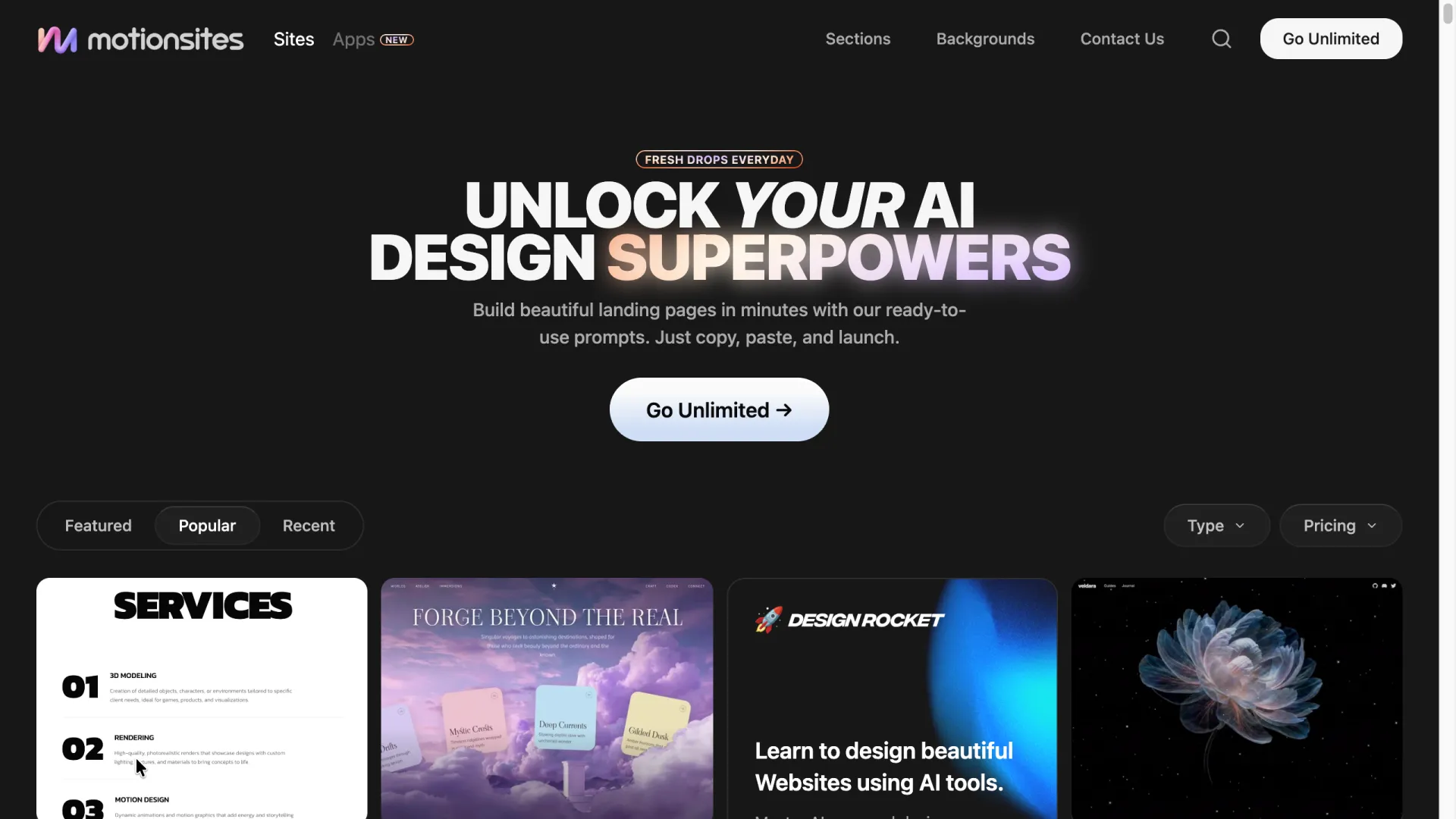
其中兩項特別值得一提。VULK 主打產出真正的 React Three Fiber 程式碼,也就是可互動的 WebGL 場景,而不是循環播放的影片頁首;它展示的網站也確實符合這項主張。在付費購買任何「AI 3D website builder」前,應先確認它提供的是實際程式碼還是影片頁首,這兩者差異很大。如果你偏好先瀏覽提示詞再動手寫,MotionSites 維護了一個針對 Lovable、Bolt、Cursor 和 Claude 分類的提示詞資料庫。部分內容可免費複製,其餘則需訂閱:
提示詞能力的上限在哪裡?
r/lovable 與 r/web_design 討論串裡常見一個問題:只靠正確提示詞,能否重現 mont-fort.com 或 Noomo Agency labs 頁面這類網站?坦白說,單靠提示詞不行。這些網站使用客製 GLTF 模型、經藝術指導的燈光,以及專門製作的 shader;文字提示詞無法憑空生出這些素材。提示詞能帶來的是這類網站的機制,例如捲動驅動鏡頭、shader 背景、阻尼動態,但搭配的是佔位幾何物件。換成真正的模型檔案能縮小部分差距,但燈光、材質及行動裝置備援仍是實際的設計工作。上面的作品集飛行導覽失敗案例正是縮影:越接近經編排的多物件場景,就越需要人工迭代。
多數失敗生成都可歸納為以下 3 種狀況,每種都有一句話的修正方式:
- 黑畫面,卻看不到錯誤訊息。通常是 ES module 與 CDN import 格式不相容。修正提示詞:
Use a single non-module script tag with the Three.js r128 UMD build from a CDN, no import maps.(r128 是本次測試中模型自行選用的版本,現在仍可正常使用;較新的 Three.js 版本已捨棄 UMD 路徑,固定版本可避開這種不相容。) - 桌機流暢,手機卻嚴重卡頓。通常是粒子數量對筆電沒問題,對手機卻太高。修正提示詞:
Halve the particle count on screens narrower than 768px and cap devicePixelRatio at 2. - 3D 場景正常,但頁面上什麼都點不到。canvas 或覆蓋層攔截了事件。修正提示詞:
Set pointer-events: none on the full-screen overlay and re-enable pointer-events: auto on buttons and links.
另外還有本次測試遇到的一種問題:3D 卡片上的文字呈鏡像顯示。原因是鏡頭正在看平面的背面。修正提示詞:Make card materials double-sided with the texture mirrored correctly, or rotate cards to always face the camera.
FAQ
有免費的 3D 網站提示詞嗎?
有。本文的 6 組提示詞都完整公開,可免費複製;DocsBot 和 MotionSites 的免費方案也提供更多選擇。付費提示詞庫主要買到的是數量與經過測試的多樣性,而不是另一種本質不同的提示詞。
這些提示詞能用在 Lovable 或 Bolt 嗎?
可以,只要調整一點:移除「single-file HTML」這項要求,因為這些平台會建立 React 專案骨架。其餘內容都能直接沿用,包括場景主體、動態驅動、互動方式與效能護欄。
使用 3D 網站提示詞前,需要懂 Three.js 嗎?
生成時不需要,迭代時懂一點會更好。上面的提示詞已經包含必要的 Three.js 詞彙;了解 OrbitControls 或 fragment shader 是什麼,能讓你提出精確修改,而不是盲目重新生成。
做 3D 網站最好用的 AI 工具是什麼?
如果只要單檔特效或 Hero 區塊,直接用 Claude 最合適:你保有原始碼,並按 token 付費。若需要帶後端的託管網站,可使用 Lovable 或 Bolt 的免費方案;如果明確想要可匯出的 React Three Fiber 程式碼,則可選 VULK。
3D Hero 會影響效能或 SEO 嗎?
只有在你不設限制時才會。把 3D 控制在單一場景、加入前述行動版護欄,並像這 6 組提示詞一樣,將標題和內文以真正的 HTML 疊在 canvas 上。爬蟲能讀取文字圖層,而 Core Web Vitals 主要取決於頁面另外載入了什麼內容。