 AIREITER
Du suchst einen Gemini AI Foto-Prompt zum direkten Kopieren? Entscheidend ist zuerst die Aufgabe, nicht der Stilbegriff: Für die Bearbeitung eines hochgeladenen Fotos braucht es eine klare Identitätssicherung. Soll ein neues Bild entstehen, muss der Prompt die gesamte Szene beschreiben. So vermeidest du vage Anweisungen, die schnell zu beliebigen Ergebnissen führen.
Googles offizieller Nano Banana Prompt Guide empfiehlt, Motiv, Umgebung, Stil und Gesamtwirkung zu beschreiben und Bearbeitungen oder Text anschließend präzise festzulegen. Außerdem habe ich am 11. August 2026 drei kleine Tests auf Modellebene über AIReiters Nano Banana Pro Bildmodell durchgeführt. Die folgenden Ergebnisse sind brauchbare Beispiele, aber kein allgemeingültiger Benchmark. Je nach Gemini-Oberfläche oder Account können die Resultate anders ausfallen.
In 30 Sekunden zum passenden Gemini Foto-Prompt
Ein Prompt für hochgeladene Fotos ist die richtige Wahl, wenn eine reale Person, ein Objekt oder ein alter Abzug erkennbar bleiben soll. Mit einem reinen Text-Prompt erstellst du dagegen fiktive Szenen oder generische Motive von Grund auf – dann muss der Prompt sämtliche visuellen Informationen liefern.
| Dein Ziel | Foto zuerst hochladen? | Womit starten? |
|---|---|---|
| Dein Gesicht behalten, aber Kleidung oder Ort ändern | Ja | Mit den Prompts für hochgeladene Fotos unten |
| Alten Abzug restaurieren oder Schäden reparieren | Ja | Mit dem Restaurierungs-Prompt |
| Zwei Personen aus getrennten Fotos zusammenführen | Ja, eine oder mehrere Referenzen | Mit dem Prompt für Paare und Familien |
| Neuen Headshot oder ein Reisebild erstellen | Nein | Mit den Text-Prompts unten |
| Produktbild mit Beschriftung erstellen | Nein, außer du hast eine Produktreferenz | Mit dem Produkt-Prompt und der Text-Korrekturzeile |
Die Gemini Apps-Hilfe von Google dokumentiert sowohl Bilderzeugung als auch Bildbearbeitung. Ist das Ausgangsgesicht stark verdeckt oder die Vorlage sehr niedrig aufgelöst, beginne besser mit einer kleineren Änderung statt direkt eine vollständige Transformation zu verlangen. Auch Modellbezeichnungen und Verfügbarkeit können sich je nach Gemini-Produktoberfläche unterscheiden.
Prompts für vorhandene Fotos zum Kopieren
Diese Gemini AI Foto-Prompts sind für Bilder gedacht, die du im selben Chat hochlädst. Das bewährte Muster ist einfach: Zuerst festlegen, was unverändert bleiben muss, danach genau eine gewünschte Änderung nennen.
Kleidung und Hintergrund ändern – Person beibehalten
Kopiere diesen Prompt und ersetze die Felder in eckigen Klammern. Den Identitätsblock solltest du auch dann unverändert lassen, wenn du Outfit oder Ort austauschst.
Use my uploaded photo as the identity reference. Keep my exact facial features, age, skin tone, hairline, hairstyle, body proportions, and natural expression unchanged. Change only my outfit to [describe the outfit] and the background to [describe the location]. Keep the same person, pose, camera angle, and approximate body position. Match the new lighting to the background so the edit looks like one natural photograph. Do not beautify, slim, de-age, add accessories, or change my identity. Photorealistic result, [aspect ratio].Verändert das erste Ergebnis dein Gesicht, nutze lieber diese gezielte Nachkorrektur, statt den kompletten Prompt erneut einzufügen:
Edit the current result only. Restore the facial geometry, age, skin tone, hairline, and expression from my uploaded reference photo. Keep the outfit and background exactly as they are. Change nothing else.Altes Foto restaurieren und kolorieren
Eine Restaurierung ist keine Verschönerung. Gemini sollte fehlende Informationen behutsam reparieren, während Ausdruck, Gesichtsform, Kleidung und Bildausschnitt des Originals erhalten bleiben.
Restore the uploaded old photograph. Remove scratches, tears, dust, stains, fading, and small film damage. Reconstruct missing edges conservatively and preserve the original facial geometry, expression, age, hairstyle, clothing, pose, camera angle, and composition. Colorize it with restrained, period-appropriate colors and natural skin tones. Do not modernize the clothing, smooth the face, change the background, add details that are not supported by the photo, or make the person look younger. Keep the result photographic and faithful to the source.Bei einer unscharfen Vorlage ergänzt du diese Zeile, statt ein erfundenes „perfektes“ Gesicht zu verlangen:
Improve clarity only where the source contains recoverable detail; do not invent a new identity or sharpen facial features beyond what the reference supports.Paar- oder Familienszene aus Referenzfotos erstellen
Sind mehrere Personen beteiligt, benenne jede Referenz und gib die Anzahl der Personen im finalen Bild an. Dadurch lassen sich vertauschte Gesichter oder zusätzlich eingefügte Personen leichter erkennen und korrigieren.
Use the uploaded images as identity references. Place the person from photo 1 and the person from photo 2 together in [describe the setting], naturally [describe the action]. Preserve each person's exact facial features, age, skin tone, hair, body proportions, and recognizable expression. Keep the clothing from photo 1 and photo 2 unless I explicitly request a change. Include exactly two people. Do not add, remove, merge, or swap identities. Use [lighting and photographic style], [camera framing], and [aspect ratio].Für drei oder mehr Personen ersetzt du „exactly two people“ durch die korrekte Zahl und beschriftest jede Vorlage als Foto 1, Foto 2, Foto 3 und so weiter. Prüfe das Ergebnis auf Gesichter und Hände, bevor du den Stil erneut veränderst.
Porträt zum Abschluss oder Geburtstag
Diese kompakte Vorlage eignet sich für glaubwürdige Fotos zu einem Anlass, statt lediglich eine generische Stiländerung zu erzeugen.
Use my uploaded photo as the identity reference and place me in a natural [graduation / birthday] portrait. Keep my exact facial features, age, skin tone, hair, body proportions, and expression unchanged. Add [cap and gown / birthday outfit], [simple celebration setting], and [warm natural lighting]. Keep one person, a believable pose, and realistic hands. Do not beautify, de-age, add extra people, or change my identity. Use a [4:5 / 3:2] composition, no text, no watermark.Prompts für neue Gemini-Bilder zum Kopieren
Text-Prompts ohne Referenzbild brauchen Angaben zu Motiv, Handlung, Umgebung, Komposition, Licht und Ausgabeformat – denn kein Foto verankert die Szene.
Realistischer professioneller Headshot
Ersetze Person, Kleidung und Hintergrund nach Bedarf, behalte aber die Vorgaben für Licht und Komposition bei. Das ist ein Test-Prompt auf Modellebene, kein Screenshot aus der Gemini-App.
Create a realistic professional headshot: a woman in her early 30s with natural skin texture and shoulder-length dark hair, wearing a navy blazer over a white shirt, facing slightly toward a large window in a quiet modern office. Use soft window light from camera left, a neutral background, an 85mm portrait-lens look, and a shallow depth of field. Keep realistic proportions and a clean 4:5 composition. No text, no watermark.
AIReiter-Test mit nano_banana_pro im Format 4:5: Dieses Beispiel erzeugte natürliches Fensterseitenlicht und eine klare Trennung zwischen Motiv und Hintergrund.
Cineastisches Reiseporträt mit Freiraum im Bild
Negativraum funktioniert besser, wenn er mit einer konkreten Komposition und Position des Motivs verknüpft ist. Sage, wo die Person im Bild stehen soll und wofür die freie Fläche vorgesehen ist.
Create a photorealistic travel portrait: a person in a rust-colored jacket standing on a quiet coastal cliff at blue hour, with wind moving the fabric slightly and distant sea haze behind them. Use a restrained teal-and-amber color grade, documentary travel photography, a 35mm lens perspective, and natural skin texture. Place the subject on the right third with open negative space on the left. Use a 3:2 landscape composition. No text, no watermark.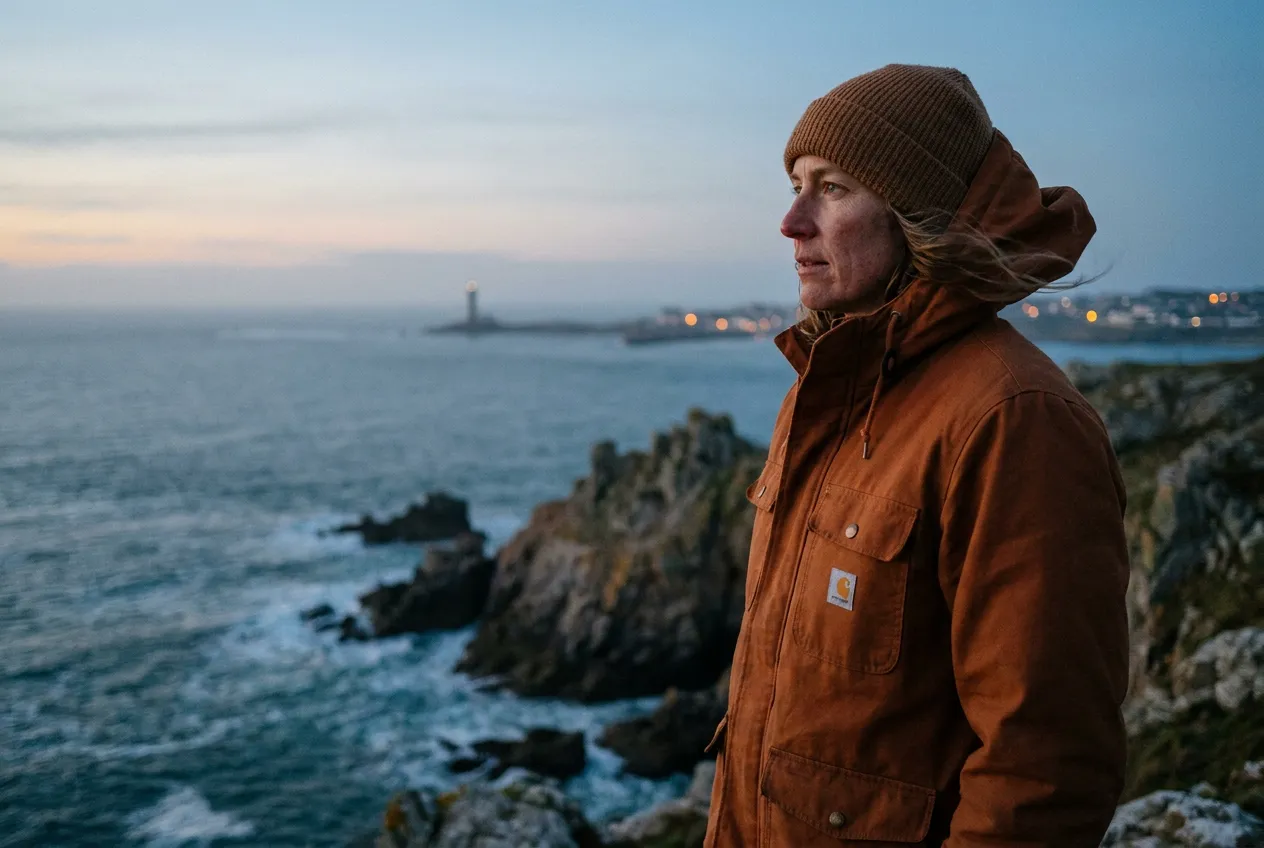
AIReiter-Test mit nano_banana_pro im Format 3:2: Das Motiv blieb im rechten Drittel, die linke Seite war frei für einen Titel oder Beschnitt.
Produktfoto mit lesbarem Etikett
Setze exakten Text in Anführungszeichen und definiere seine Position. Halte die Formulierung kurz: Generierte Bilder können Text weiterhin falsch schreiben oder verzerren, insbesondere bei kleinen Etiketten.
Create a clean photorealistic product hero image for a matte black reusable water bottle on a pale stone table, with one green leaf beside it and soft morning window light. Add a believable contact shadow, a minimal warm-grey background, premium studio product photography, a front three-quarter view, and a 4:5 portrait composition. Add the exact readable label text "FIELD / 01" on the bottle, centered and spelled exactly. No other text, no watermark.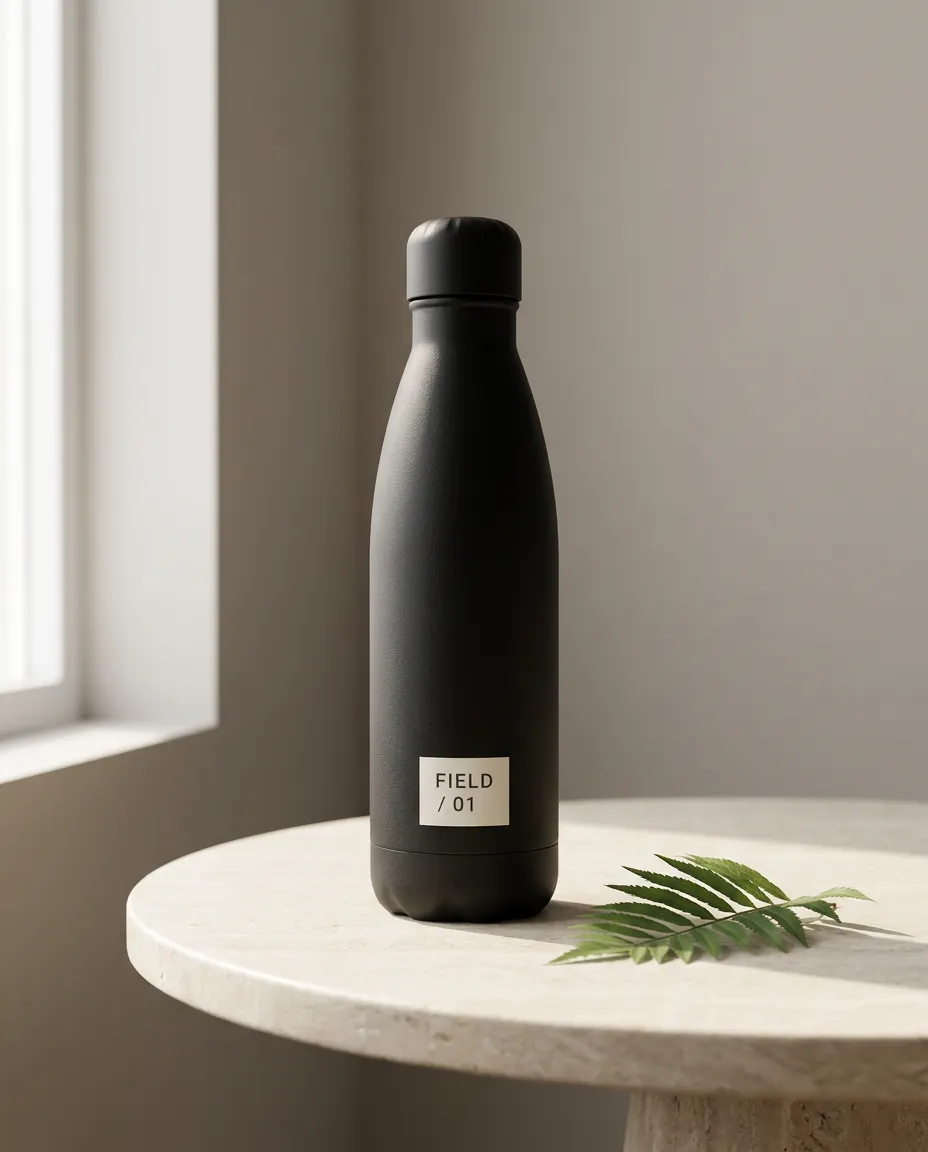
AIReiter-Test mit nano_banana_pro im Format 4:5: Die gewünschte Beschriftung war in diesem Beispiel lesbar – das ist keine Garantie für eine perfekte Textdarstellung.
Ist die Beschriftung falsch, füge diese Nachkorrektur ein:
Edit only the label. It must read exactly "FIELD / 01" on two lines, with FIELD on line 1 and / 01 on line 2. Keep the bottle shape, lighting, leaf, table, framing, and every other pixel unchanged. Check the spelling before returning the image.Editorial-Porträt im Filmlook
Die Stilreferenz kommt erst nach Motiv und Komposition. So verändert „Film“ die Bildanmutung, ohne Person oder Szene zu ersetzen.
Create a realistic editorial portrait of [subject] in [specific location], standing [describe pose or action]. Frame the subject as a [close-up / waist-up / full-body] portrait with [camera angle] and [aspect ratio]. Use [light source and direction], natural skin texture, and believable fabric detail. Give it a restrained 1990s film-photography look with subtle grain, gentle highlight roll-off, and slightly faded colors. Keep the scene photographic, not illustrated; no text, no watermark.Y2K-Schnappschuss mit Digitalkamera
Dieser Prompt ist für einen glaubwürdigen Schnappschuss im Stil der frühen 2000er gedacht, nicht für ein geschniegelt wirkendes Studioporträt.
Create a realistic early-2000s compact-digital-camera snapshot of [subject] at [specific place], wearing [outfit] and [natural pose]. Use direct on-camera flash, slight motion softness, modest sensor noise, imperfect framing, cool night colors, and a small amount of authentic red-eye. Keep the subject's face and body proportions natural. Make it feel like a real candid photo, not a polished fashion image. Use a 4:5 portrait composition, no watermark.Miniatur- oder Figurenfoto
Maßstabsanker machen diese Art der Transformation verständlicher als das Wort „Miniatur“ allein.
Turn [the subject or uploaded photo] into a highly detailed collectible figurine displayed inside a backlit glass cabinet. Make it clearly miniature, about 15 cm tall, standing on an engraved base with a human hand reaching in to adjust it for scale. Keep the subject's recognizable facial features and clothing details. Show softly blurred figurines on shelves behind it, warm display lighting, shallow depth of field, and a photorealistic finish. No text except the small engraved base, no watermark.Korrektur-Prompts für typische Gemini-Fotofehler
Wenn das erste Ergebnis eine konkrete Vorgabe verfehlt, füge anschließend einen Korrektur-Prompt ein. Beschränke dich auf eine eng gefasste Änderung, damit du jede Anpassung einzeln prüfen kannst.
Das Gesicht ähnelt der Referenz nicht mehr
Use the uploaded reference as the source of truth for identity. Restore the person's facial geometry, age, skin tone, hairline, hairstyle, and natural expression. Keep the current pose, clothing, background, lighting, and composition unchanged. Change only the face so it matches the reference; do not beautify, slim, de-age, or reinterpret the person.Das Bild wirkt flach oder wie ein Cartoon
Refine the current image without changing the subject or composition. Replace the flat, illustrated look with physically believable light, natural material texture, realistic lens perspective, soft but directional shadows, subtle depth of field, and small photographic imperfections. Keep the person's identity, clothing, pose, and background unchanged. Do not add a glossy filter or extra detail that is not supported by the scene.TechRadar zitierte einen Reddit-Nutzer, der genau dieses Problem schilderte:
"Now, almost every image looks flat or cartoonish, no matter how detailed my prompt is." - TechRadar, 5. August 2026
Das ist ein Nutzerbericht, kein Benchmark. Der Korrektur-Prompt oben ist der praktisch relevante Teil.
Gemini hat Personen hinzugefügt oder Kleidung verändert
Edit the current result only. Keep exactly [number] people, with the same identities, faces, hair, body proportions, and clothing as the reference. Remove any extra person or duplicate limb. Do not change the background, pose, lighting, or camera framing. Apply only this requested correction: [one correction].Text im Bild ist falsch
Edit only the visible text. The text must read exactly "[YOUR TEXT]". Keep the same number of lines, spelling, punctuation, font style, position, perspective, and contrast needed for legibility. Do not change the object, background, lighting, or composition. Perform a final spelling check before returning the image.Die anpassbare Prompt-Formel hinter den Vorlagen
Der wiederverwendbare Kern eines Gemini AI Foto-Prompts besteht aus sechs Feldern: Motiv, Handlung, Umgebung, Komposition, Licht/Stil und Einschränkungen.
| Feld | Welche Frage beantwortet es? | Beispiel |
|---|---|---|
| Motiv | Was oder wer ist im Bild? | Eine Frau im marineblauen Blazer |
| Handlung | Was macht das Motiv? | Sie blickt zu einem Fenster und steht natürlich da |
| Umgebung | Wo spielt die Szene? | In einem ruhigen modernen Büro |
| Komposition | Wie ist das Bild angeordnet? | Ab Taille, Motiv im rechten Drittel, 4:5 |
| Licht und Stil | Welche visuelle Anmutung soll das Bild haben? | Weiches Fensterlicht, zurückhaltendes Filmkorn |
| Einschränkungen | Was muss erhalten bleiben oder ausgeschlossen werden? | Identität bewahren; kein Text und kein Wasserzeichen |
Der offizielle Google-Guide empfiehlt denselben Ansatz: Beschreibe Charaktere, Umgebung, Stil und Stimmung und formuliere Bearbeitungen, mehrere Bilder oder exakten Text ausdrücklich.
Erst bewahren, dann verändern
Bei einem hochgeladenen Foto funktioniert dieses Satzmuster am besten gleich am Anfang:
Keep [identity, object, or layout facts] unchanged. Change only [the requested field].„Keep my exact facial features“ ist für sich genommen schwächer als eine vollständige Einschränkung wie „keep my facial geometry, age, skin tone, hairline, hairstyle, body proportions, and expression unchanged.“ Ändere bei der nächsten Überarbeitung immer nur ein Feld, damit gelungene Teile des Bildes nicht versehentlich neu generiert werden.
FAQ zu Gemini Foto-Prompts
Muss ich ein Foto hochladen, um einen Gemini AI Foto-Prompt zu verwenden?
Nein. Reine Text-Prompts können neue Personen, Produkte oder Szenen erstellen. Lade ein Foto hoch, wenn Gemini eine bestimmte Person, ein Objekt oder einen alten Abzug bearbeiten oder erhalten soll.
Wie verhindere ich, dass Gemini mein Gesicht verändert?
Nutze die Identitätssicherung aus dem Outfit-Prompt: Gesichtsgeometrie, Alter, Hautton, Haaransatz, Frisur, Körperproportionen und Ausdruck. Weicht das erste Ergebnis ab, fordere eine reine Gesichtskorrektur an und sperre gleichzeitig Kleidung, Umgebung und Licht des aktuellen Bilds.
Kann ich diese Prompts mit Nano Banana verwenden?
Ja, sofern Nano Banana in der von dir verwendeten Gemini-Oberfläche als Modell zur Bildgenerierung oder Bildbearbeitung verfügbar ist. Der Prompt Guide von Google DeepMind nutzt den Namen Nano Banana, während die Gemini-Hilfe den aktuellen Bild-Workflow in Gemini Apps dokumentiert. Modellbezeichnungen und Verfügbarkeit können sich je nach Produktoberfläche ändern.
Warum liefert Gemini ein fast unverändertes Bild zurück?
Die gewünschte Änderung ist möglicherweise zu subtil, oder der Prompt enthält mehr Anweisungen zum Bewahren als zum Verändern. Benenne eine sichtbare Änderung, ihren genauen Ort und alles, was erhalten bleiben soll. Fordere diese einzelne Bearbeitung dann in einer Nachkorrektur an.
Wie viele Referenzfotos sollte ich hochladen?
Verwende die kleinste Anzahl an Bildern, die die gewünschte Bearbeitung ausreichend belegt. Für die Transformation einer einzelnen Person ist eine klare Referenz meist leichter zu prüfen. Bei einer Montage für Paare oder Familien solltest du jedes Foto benennen und die exakte Zahl der gewünschten Personen im Ergebnis angeben.