 AIREITER
Within a day of Qwen Image 3.0's launch, third-party sites were already quoting per-image prices for it. None has an official source: as of July 22, 2026, the model isn't on Alibaba Cloud's official price list at all.
What is confirmed: Qwen Image 3 is free to use at chat.qwen.ai, API pricing is unpublished, and there are no weights to download (as of July 22, 2026). The draw is third-generation text rendering that survives at tiny sizes — Qwen's official sample below keeps small labels and 0.5mm scale bars sharp.
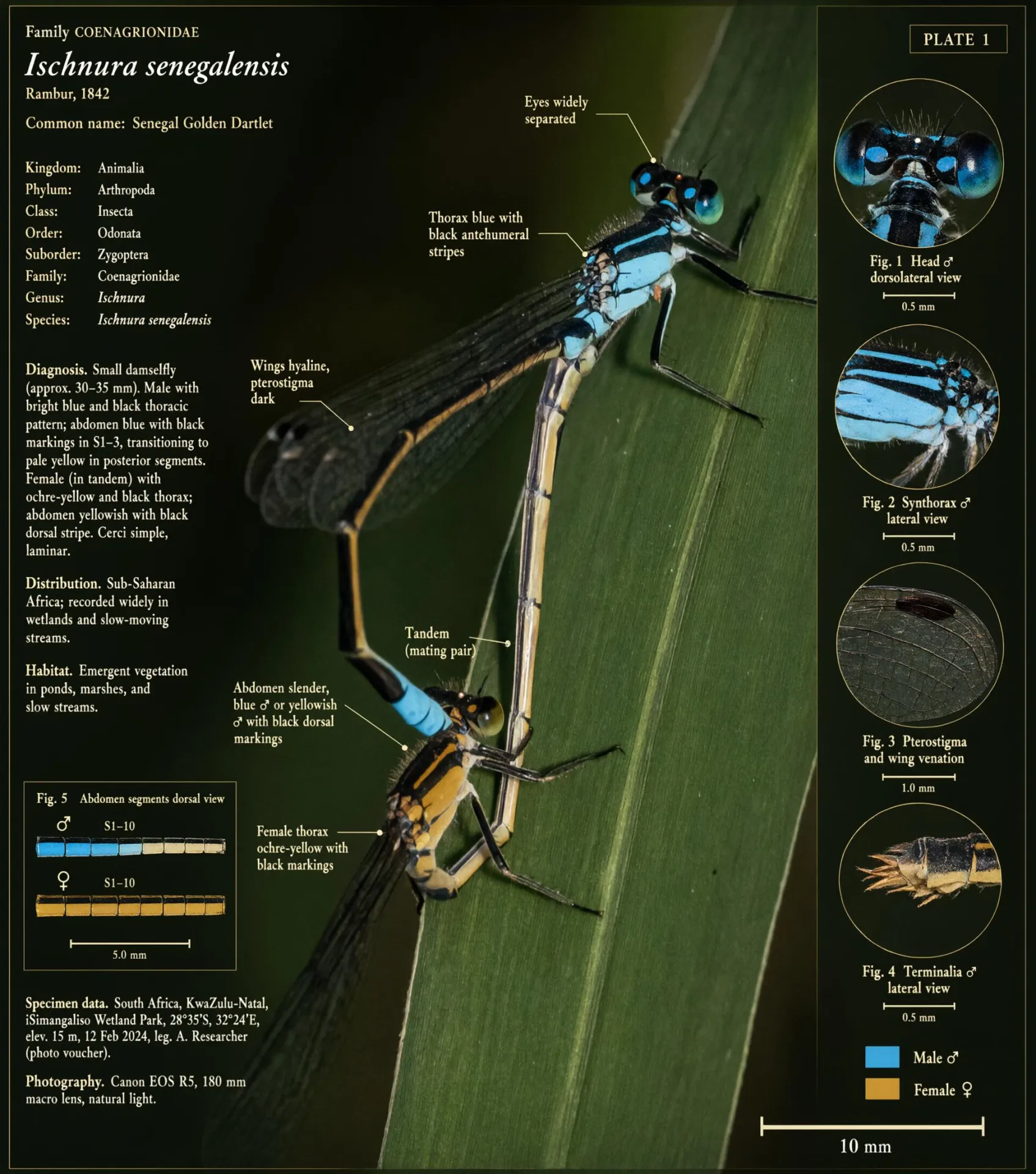
Official Qwen-Image-3.0 example (via qwen.ai): a taxonomy-style plate built around a photo, with small labels and 0.5mm scale bars that stay sharp.
How to use Qwen-Image-3.0 free today
The verified route is Qwen's own platform:
Qwen Studio at chat.qwen.ai, on web, iOS, Android, macOS, and Windows. Open the image tool and prompt it there; this is the route Qwen's own announcement points to. When I checked on July 22, the image tool worked on a free account with usage limits, though Qwen hasn't published what those limits are.
Qwen's API platform (Qwen Cloud) for programmatic access, once 3.0 appears there. As of July 22 it isn't on the official model price list yet, so treat API availability as still rolling out.
The Qwen-Image model cards on Hugging Face for the earlier generations' technical details.
One warning about third-party access. When I checked the Kie marketplace catalog on July 22, its Qwen image endpoints still covered only the earlier generations (qwen/text-to-image, qwen2/text-to-image), with no 3.0 model. A third-party endpoint labelled "Qwen image 3" this early deserves suspicion, because it may route to an older model.
There's also a stability angle. On launch day, July 21, the qwen/text-to-image endpoint there returned repeated 500 errors after accepting my jobs. One provider's failures don't prove an outage, but they're another reason to start from Qwen Studio.
Pricing: what's confirmed and what's a guess
Qwen has published no API rate card for 3.0, so any specific per-image cost you see quoted for Qwen Image 3 right now has no official source behind it.
The previous generation is the best available anchor. On the official price list, the 2.0 family runs:
Model | Official price | Free quota (Singapore region) |
|---|---|---|
qwen-image-plus | $0.03 / image | 100 images, 90 days |
qwen-image-2.0 | $0.035 / image | 100 images, 90 days |
qwen-image-2.0-pro | $0.075 / image | 100 images, 90 days |
qwen-image-max | $0.075 / image | 100 images, 90 days |
If 3.0 follows the family pattern, expect it to land at or above the pro tier. That is inference, not an announcement. Until the real number appears, the no-cost route through Qwen Studio is the only price you can rely on.
Who should use it, and who shouldn't
Worth adopting now if your work looks like this:
Information-dense layouts: infographics, exam papers, posters, storyboards, and multi-panel explainers where structure and small text must survive. This is the capability 3.0 was built around, and none of the models in the comparison table below advertises a comparable instruction budget.
Multilingual text in images: 12 languages rendered in their real scripts, useful for localized e-commerce and education material.
UI mockups and nested scenes: the depth-nesting demos are directly aimed at product and design work.
Hold off if this describes you:
You need self-hosting or fine-tuning. There are no 3.0 weights to download (checked on Hugging Face, July 22, 2026), and no stated plan to release them.
You're building a production API pipeline. With no published pricing, no rate limits, and no SLA, 3.0 isn't ready to be a dependency. The 2.0 family and rivals like Nano Banana Pro are, today.
Your deliverable must stay editable. A generated newspaper page or slide is flat pixels. If the client will ask for revisions, a layout tool plus a conventional image model is still the safer workflow.
How it compares to other text-strong image models
If you're choosing a model for text-heavy or layout-heavy work, these are the realistic alternatives. The ratings below are directional, not benchmarked: Qwen has published no scores for 3.0, so treating any head-to-head number as fact would be guessing.
Model | Text rendering | Complex layouts | Editing | How to access |
|---|---|---|---|---|
Very strong; 10px legible (per Qwen), LaTeX-grade | Very strong; 4.5k-token, 9-panel one-shot | Yes (annotations, restoration) | Qwen Studio; API pending | |
Qwen-Image-2.0 | Strong | Good; ~1k-token | Yes (unified) | Qwen Studio, third-party endpoints |
Good | Good | Yes | Google; unified API | |
Good | Good | Yes | ByteDance; unified API | |
Good | Good | Yes | OpenAI; unified API |
When you compare these yourself, three tests separate a "text-capable" model from a reliable one:
Does small type stay legible at poster scale?
Do multi-panel layouts hold their structure instead of blurring together?
Does the model keep a language's real script rather than approximating it?
If you already run Nano Banana Pro, Seedream 5, or GPT-Image-2 through a single API such as AIReiter, note that Qwen-Image-3.0 isn't in that catalog yet; as of July 22 the only route I could verify is Qwen's own platform.
What's actually new in 3.0
Qwen frames the generations as a progression: 1.0 was "accurate," 2.0 was "accurate, varied, complete, beautiful, real," and 3.0 is "substantial" (Qwen's one-word summary: "实"). The target is output that drops straight into a design, education, e-commerce, or content workflow instead of serving as a rough draft.
The release is organized around three pillars.
Rich content: 4.5k-token prompts and one-shot complex layouts
The headline number is prompt length. Qwen-Image-3.0 accepts up to 4.5k tokens of input, a large jump over the roughly 1k-token instruction length Qwen cites for the previous generation. A token is a chunk of text the model reads, so more tokens means you can describe a denser, more structured scene in one go.
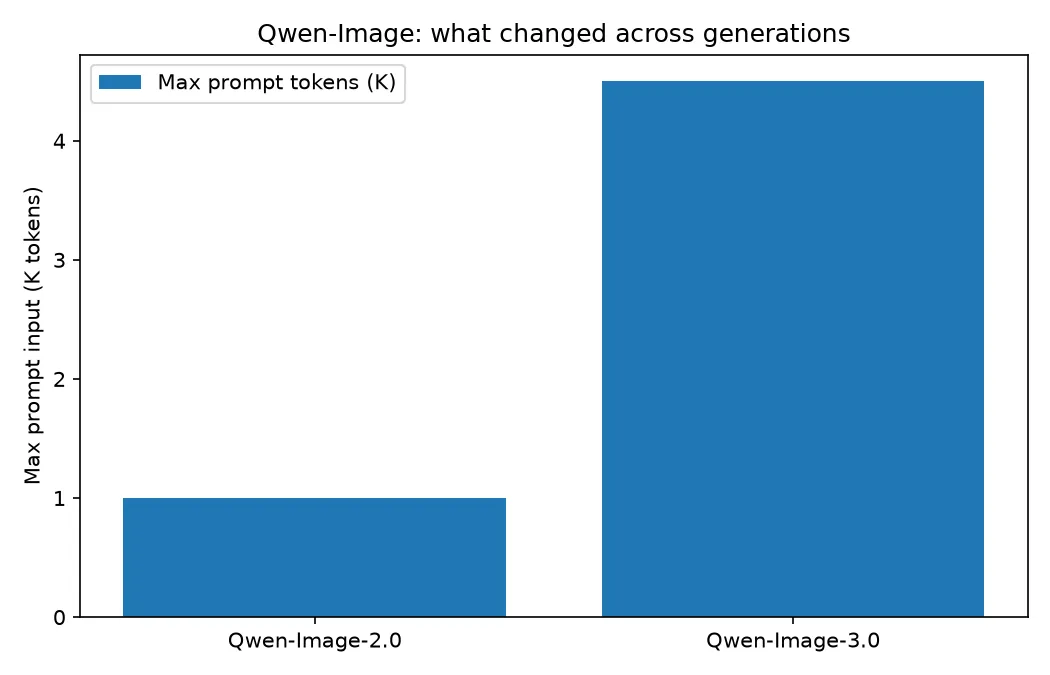
That budget unlocks two things. The first Qwen calls horizontal layout: the nine-panel demo in Qwen's announcement, where each cell is its own detailed infographic and, per Qwen, the whole thing came out of one generation pass. By Qwen's account, fully describing that grid took about 3.7k tokens — the old limit could not hold the instruction.
The second is depth: nesting interfaces inside interfaces. Qwen's example renders a VS Code window containing a Qwen chat window containing a WeChat chat containing a coffee poster, each layer keeping its own realistic UI. If your work involves mockups, dashboards, or layered scenes, that is the upgrade to watch.
To exercise the 4.5k-token strength, write a prompt that specifies structure explicitly: name each panel, its heading, and the exact text you want inside it. A skeleton to adapt:
Create a single 2x2 infographic poster, "Coffee Brew Methods".
Top-left — "Pour Over": 3 steps with labels (rinse filter, bloom 30s, pour in circles), small caption "1:16 ratio, 92°C".
Top-right — "French Press": labelled diagram, caption "4 min steep, coarse grind".
Bottom-left — "Espresso": cross-section of a shot with layers labelled (crema, body, heart), caption "9 bar, 25-30s".
Bottom-right — "AeroPress": numbered steps, caption "inverted method".
Consistent flat-illustration style, legible small captions, white background.
Realistic detail: small text that stays legible
Text rendering has long been the Qwen series' strongest trait, and Qwen claims 3.0 keeps text readable down to 10px.
Its samples back that with the hard cases: a full page of academic LaTeX with correct superscripts, subscripts, Greek letters, and theorem numbering; a newspaper with dense body copy; and the research plate at the top of this article, whose annotation labels stay readable at thumbnail-caption size. These are curated launch demos, not independent tests, but they show captions, footnotes, and axis labels holding their shape at sizes where garbled text is the usual failure mode.
Detail extends past text: Qwen shows pore- and hair-level skin texture approaching photographic realism, and an edit that restores a damaged traditional ink painting while preserving the original brushwork.
Rich knowledge: 12 languages, 100+ styles, and web-connected output
The third pillar is breadth. Qwen-Image-3.0 renders 12 languages natively (Japanese, Korean, and Spanish among the demos), supports 100+ art styles and multiple fonts, and produces convincing simulated UIs for web, games, and livestreams.
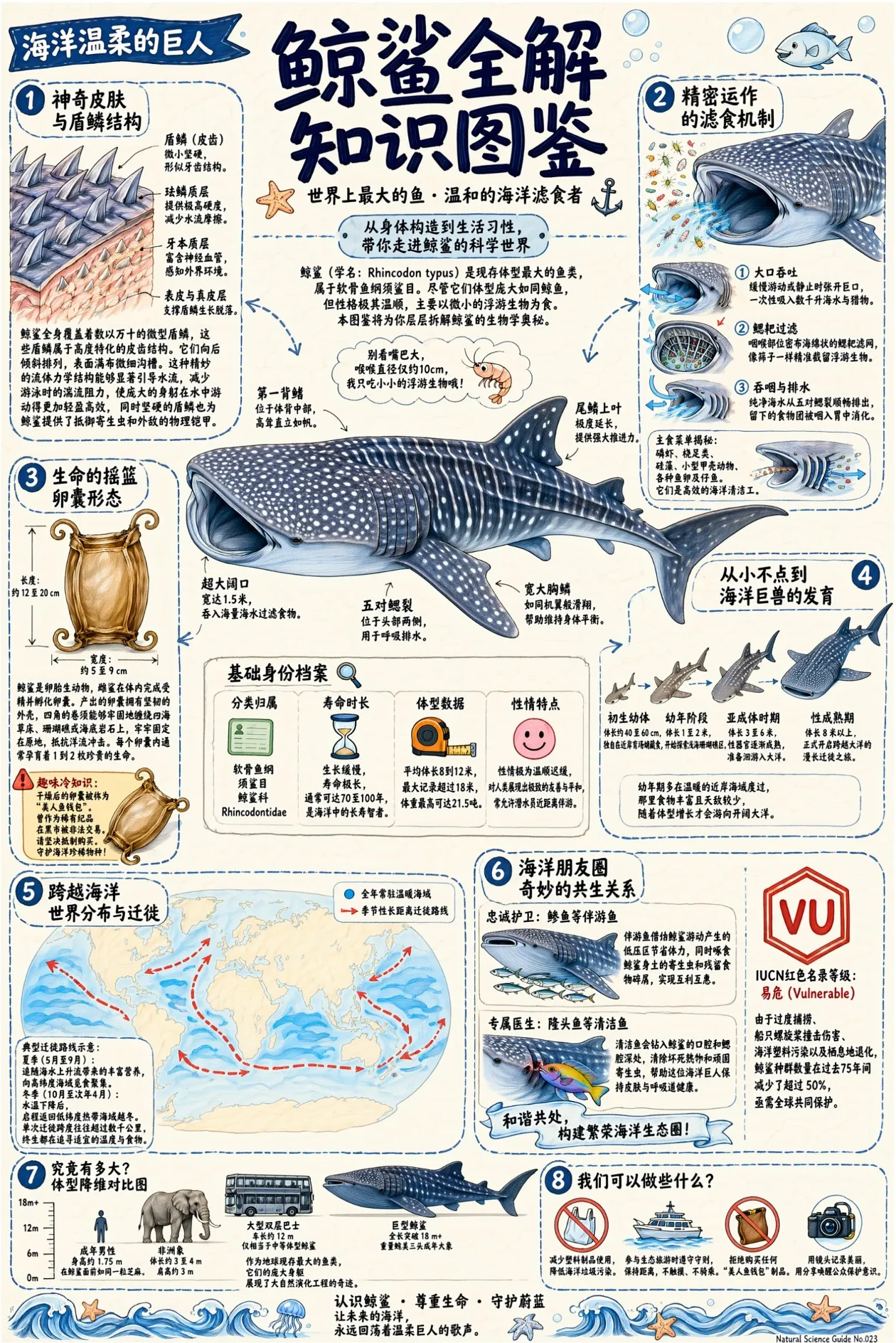
Official Qwen-Image-3.0 example (via qwen.ai): a single-image knowledge poster with eight sections and dozens of small labels, all legible.
Two demos stood out. In one, the model builds a reference infographic around a real photo, adding taxonomy labels, morphology callouts, a zoomed detail view, and a scale bar. In another, Qwen shows it pulling live information from the web to generate a weather-forecast graphic for a specific city and date.
Both are Qwen-produced demos. Qwen hasn't documented whether photo input and web retrieval are exposed in every public Qwen Image 3 interface, so verify they exist in yours before planning around them.
What we still don't know
A few things remain unpublished, and you should be skeptical of anyone stating them as fact:
API pricing. Covered above: nothing official as of July 22. The 2.0 price band is the only grounded reference point.
Open weights. Earlier Qwen image models were downloadable (1.0 shipped as an open 20B MMDiT), but Qwen has not said whether 3.0's weights will be released, and nothing has appeared on Hugging Face since launch.
Parameters and benchmarks. No parameter count or benchmark score accompanied this release, and 3.0 hasn't shown up on public text-to-image arenas yet. Numbers floating around usually belong to 2.0.
FAQ
Is Qwen Image 3 free?
Yes, through Qwen Studio at chat.qwen.ai, where the image tool works on a free account with usage limits (checked July 22, 2026). Qwen has not published API pricing; the 2.0 family's official range is $0.03-0.075 per image.
Can I download Qwen-Image-3.0?
No. As of July 22, 2026 there are no 3.0 weights on Hugging Face, and Qwen's launch post doesn't commit to releasing them. Prior versions remain downloadable, but treat 3.0 as cloud-only until Qwen says otherwise.
How is Qwen Image 3 different from 2.0?
The prompt budget grows from roughly 1k to 4.5k tokens, small text stays legible at sizes Qwen puts at 10px, and generation adds native text in 12 languages plus web-connected output. Qwen frames it as the shift from "good-looking" to "useful."
Does Qwen Image 3 handle non-English text?
Yes. Qwen says it renders 12 languages natively, and the demos include Japanese, Korean, and Spanish rendered in each language's real script rather than approximated characters.
Where can I use Qwen Image 3 online?
Qwen Studio (chat.qwen.ai) is the official online route, with web and mobile apps. API access hasn't reached the official price list yet, and the third-party marketplace I checked doesn't carry 3.0, so Qwen Studio is currently the only verified way in.