 AIREITER
Qwen Audio 3.0 Realtime is the real-time audio capability in Qwen's current lineup: a model you can talk to and that talks back in the same breath, with latency low enough to feel like a phone call. On Alibaba's platform it ships through the Qwen3-Omni / Qwen3.5-Omni Realtime API (model IDs like qwen3-omni-flash-realtime), with Qwen-TTS-Realtime for pure text-to-speech and qwen3-asr-flash for transcription. The hosted omni Realtime models recognize 100-plus languages, run full-duplex with interruption, and cost a fraction of a cent per minute of conversation.
The fastest way in is qwen3-omni-flash-realtime over WebSocket. Below is what each model does, what it costs, how it compares to OpenAI Realtime and Gemini Live, and how to start. Every spec, price, and model ID is linked to its primary source, mostly Alibaba's Model Studio Realtime documentation and the Qwen3-Omni model card; vendors move fast here, so trust the linked source if a number has drifted.
How the Qwen audio models are named
The Qwen audio line runs through a few generations, and knowing the lineage makes it easy to land on the right model:
Qwen-Audio(2023) andQwen2-Audiowere audio understanding models: audio in, text out. They did not speak back.- The current generation folds audio into the omni models.
Qwen3-OmniandQwen3.5-Omnitake text, images, audio, and video, and generate both text and natural speech. - Real-time behavior is a delivery tier: the same omni models, called through the Realtime API, with model IDs that end in
-realtime.
So "Qwen Audio 3.0 Realtime" (however you punctuate it) points at the Qwen3-Omni family used in real time, and that is the stack the rest of this guide covers.
The Qwen real-time audio stack, in three layers
It helps to stop thinking about a single model and instead think about a pipeline. A production voice app usually touches three Qwen models, and you can use them together or independently.
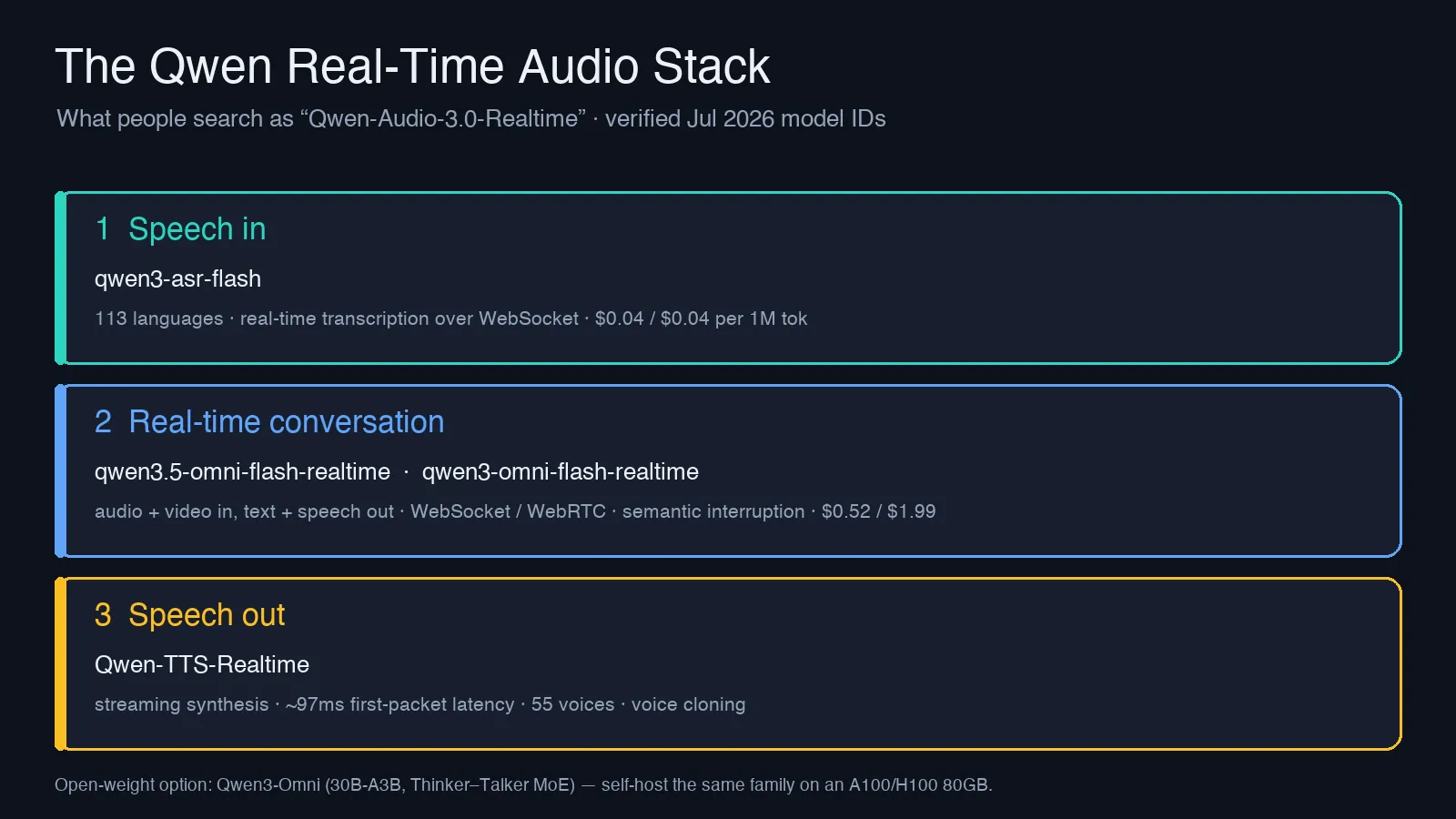
- Speech in —
qwen3-asr-flash. Streaming speech recognition over WebSocket, tuned for live captions and voice-agent front ends. It transcribes across a very wide language range and is priced as a cheap transcription workhorse. - Real-time conversation —
qwen3.5-omni-flash-realtime,qwen3-omni-flash-realtime,qwen3.5-omni-plus-realtime. This is the core: audio (and video frames) go in, text and synthesized speech come out, over a persistent connection that stays open across turns rather than reopening per request. - Speech out —
Qwen-TTS-Realtime. A dedicated streaming text-to-speech model for when you only need to turn text into voice, for example reading out an answer that a text LLM produced.
If you use the omni Realtime model for the middle layer, you often don't need separate ASR and TTS calls, since it handles speech-in and speech-out end to end. The separate models exist for when you want to mix and match (say, your own STT plus Qwen TTS).
The specs that actually matter
Here are the numbers from the Model Studio Realtime documentation, not from marketing pages.
| Attribute | Qwen Realtime API (omni family) |
|---|---|
| Audio input | PCM, 16 kHz |
| Audio output | PCM, 24 kHz |
| Other input | Image / video frames (JPG, up to 1080p, 256 KB after encoding) |
| Speech recognition | 113 languages and dialects (hosted API) |
| Speech generation | 36 languages and dialects |
| Voices | 55 total (47 multilingual, 8 dialectal), plus voice cloning on the 3.5 models |
| Connections | WebSocket (Bearer auth, manual or server-side VAD) and WebRTC (SDP negotiation) |
| Max session | 120 minutes over WebSocket |
| Extras | Semantic interruption, function calling, autonomous web search, voice control for volume / rate / emotion |
A few of these deserve emphasis. Semantic interruption means the model can tell when a user is cutting in versus just backchanneling with "mm-hmm," which is the difference between a natural and an annoying voice agent. WebRTC support matters if you are building in the browser, because it handles echo cancellation and jitter for you. And the 113-language recognition figure is for the hosted API; the open-weight release covers a narrower set, as noted below.
On latency: the dedicated Qwen-TTS-Realtime streaming path targets roughly 97 ms first-packet latency, per the Qwen3-TTS streaming docs, which is the number that decides whether speech feels instant. That figure is the time to the first audio chunk, not a full response. For the full conversational loop, the Thinker–Talker design is built for streaming; the Qwen3-Omni technical report describes a multi-codebook design aimed at minimizing latency, and community testing puts audio-to-audio response in the sub-250 ms range with full-duplex, interruptible turns. Real numbers depend on your region, network, and load, so measure on your own traffic rather than trust a single headline figure.
Qwen real-time audio pricing, in plain numbers
Qwen's hosted realtime prices are materially lower than the closed realtime APIs. These are per-million-token rates (input / output), as listed on Portkey's DashScope model directory (a third-party aggregator that mirrors Alibaba's rates; confirm the live number in the Model Studio console before you commit):
| Model | Input / 1M tok | Output / 1M tok |
|---|---|---|
qwen-omni-turbo-realtime | $0.27 | $1.07 |
qwen3-omni-flash-realtime | $0.52 | $1.99 |
qwen3-asr-flash (transcription) | $0.04 | $0.04 |
What that means per call. Audio is token-heavy: roughly 427 tokens per minute of audio. Take a 10-minute voice conversation where the user talks for 5 minutes and the model replies for 5 minutes. On qwen3-omni-flash-realtime that is about 2,135 input tokens and 2,135 output tokens, so roughly $0.001 in + $0.004 out ≈ half a cent per 10-minute call. Even at scale, real-time audio is cheap; the cost that surprises people is talk time on the output side, since spoken replies are priced ~4x the input.
Two more things before you budget:
- A free quota exists, but it is regional. The Singapore (international) endpoint has offered 1 million input and 1 million output tokens free for 90 days; the US endpoint has not. Quotas change, so confirm the current offer in the Model Studio console for your region before you plan around it.
- The
qwen3.5-omnitier uses request-size pricing brackets, not a flat rate, so a single large-context request can land in a different price band than several small ones. Test this with your real traffic shape before committing.
How it compares to OpenAI Realtime and Gemini Live
Among the general-purpose frontier LLM vendors, the three obvious real-time speech-to-speech options in mid-2026 are OpenAI's Realtime API, Google's Gemini Live, and Qwen's omni Realtime family. (Specialist voice providers such as ElevenLabs, Deepgram, Cartesia, and Hume compete hard on TTS and STT specifically; this comparison is about the full multimodal-model route.) Rather than quote competitor prices that change monthly, here is how to reason about the choice:
- Cost. At the per-call rates shown above, Qwen's realtime pricing lands at the low end of the hosted frontier-model options. For contrast, OpenAI's Realtime audio has run around $0.06 per minute of input and $0.24 per minute of output (pricing breakdown here); on that basis the same 10-minute call that costs about half a cent on
qwen3-omni-flash-realtimelands closer to $1.50 on OpenAI. Confirm the live rates on both sides before you rely on the gap, since all of these change, but the spread is large. Qwen is also the only one of the three with an open-weight version you can self-host to drop marginal cost toward zero. - Openness. OpenAI Realtime and Gemini Live are closed APIs only. Qwen3-Omni ships open weights, so you can move from hosted to self-hosted without rewriting your app around a new model's behavior.
- Quality. Third-party coverage reports the top
qwen3.5-omni-plustier matching or beating Gemini 3.1 Pro on some audio-understanding benchmarks; treat any single benchmark as a starting hypothesis and test on your own audio. - Ecosystem. OpenAI and Google have deeper tooling, SDKs, and community examples today. Qwen's docs are solid but you will lean more on the raw WebSocket/WebRTC spec.
The practical read: if cost or the option to self-host matters, Qwen is the strongest pick. If you want the most mature SDK experience and are willing to pay for it, the OpenAI and Google options still lead on polish. For a full cost breakdown of the closed alternatives, see the related reading below.
Which variant should you pick?
| Your situation | Use |
|---|---|
| Cheapest hosted full voice loop | qwen3-omni-flash-realtime |
| Best hosted quality, longer sessions, voice cloning | qwen3.5-omni-plus-realtime |
| You only need transcription | qwen3-asr-flash |
| You only need text-to-speech | Qwen-TTS-Realtime |
| Data must stay on your own hardware | Self-host open-weight Qwen3-Omni (30B-A3B) |
The 3.5 tiers add voice cloning and longer context and dialog limits (up to 100 turns and 600 seconds of retained audio) versus the leaner qwen3-omni-flash (8 turns). If you are prototyping, start on Flash; move to Plus only when you hit a limit you can name.
How to access it
Hosted, the direct way. Provision an API key in Alibaba Cloud Model Studio, then open a WebSocket connection with Bearer authentication (or negotiate WebRTC via an SDP POST for browser apps). You stream PCM audio up and receive PCM audio plus text down. The DashScope Python SDK wraps the Realtime interface if you would rather not manage the socket by hand. The bare connection is short (sketch, error handling omitted):
import os, json, base64, websocket

MODEL = "qwen3-omni-flash-realtime"
url = f"wss://dashscope-intl.aliyuncs.com/api-ws/v1/realtime?model={MODEL}"
ws = websocket.create_connection(
    url, header=[f"Authorization: Bearer {os.environ['DASHSCOPE_API_KEY']}"]
)

# 1. configure the session: voice, output format, server-side turn detection
ws.send(json.dumps({
    "type": "session.update",
    "session": {
        "voice": "Cherry",
        "output_audio_format": "pcm24",
        "turn_detection": {"type": "server_vad"},
    },
}))

# 2. stream microphone audio up as base64 PCM 16 kHz frames
ws.send(json.dumps({
    "type": "input_audio_buffer.append",
    "audio": base64.b64encode(pcm_frame).decode(),
}))

# 3. read events back; response.audio.delta carries PCM 24 kHz to play
while True:
    event = json.loads(ws.recv())
    if event["type"] == "response.audio.delta":
        play(base64.b64decode(event["audio"]))
With server-side VAD the model decides when the user has stopped talking; switch to manual if you want to control turn boundaries yourself. The event flow tracks the OpenAI Realtime shape closely, so existing Realtime client code ports with small changes. Confirm the exact field names, voice list, and regional endpoint host against the Realtime docs before you ship, since they differ between the Singapore and US deployments and evolve with the API.
Self-hosted. The open-weight Qwen3-Omni uses a Thinker–Talker Mixture-of-Experts design (30B total, ~3B active). Alibaba recommends vLLM over plain Transformers for it. For BF16 inference of the full 30B model, third-party deployment guides put the floor at a single 80GB card (A100 or H100); a 24 GB card like an RTX 4090 is not enough for the full weights, though quantized builds lower that bar.
The catch is that real-time serving is harder than batch inference. Self-hosters report having to bound the KV cache to avoid stalls under concurrent load, and single-card token throughput that trails the hosted API. Serving stacks tuned for streaming close much of that gap: engineers working on Red Hat AI and vLLM have reported that overlapping the pipeline stages cuts speech generation for a 3-second clip from roughly 8 seconds to about 0.5. That is real gain, but it is extra engineering. Self-hosting removes per-token cost while adding GPU and ops cost, so it pays off at high, steady volume rather than for prototypes.
For real-time omni voice today, the DashScope endpoint is the canonical route. If your stack already routes several providers through one gateway, an aggregator can sit in front of it, but confirm the specific Qwen realtime model IDs are in its catalog first, since many relays carry text and image models without the realtime audio tier.
Limits worth knowing before you build on it
- Sessions cap at 120 minutes. For anything longer, such as a support line or a long tutoring session, you need reconnection logic that carries context across sockets.
- Region affects both free quota and availability. Test against the endpoint you will deploy to, not whichever one you signed up on first.
- Hosted and open-weight are not identical. The hosted API advertises 113-language recognition and 36-language generation; the open-weight Qwen3-Omni release covers a narrower set (19 speech-input and 10 speech-output languages). If a specific language is your requirement, verify it on the exact variant you plan to ship.
- Real-time cost scales with talk time, not requests. Because audio is token-heavy, a chatty user costs more than a terse one. Model your bill on minutes of conversation, not number of calls.
Frequently asked questions
Does Qwen 3 support audio?
Yes. The Qwen3-Omni models are natively multimodal: they take audio, text, images, and video as input and can respond in real-time text or speech.
Can Qwen generate audio (not just understand it)?
Yes. Unlike the original Qwen-Audio, which only produced text, the omni Realtime models and Qwen-TTS-Realtime generate spoken audio output, including cloned voices on the 3.5 tier.
Is Qwen real-time audio free?
There is a free trial quota, historically 1 million input and 1 million output tokens for 90 days on the international (Singapore) endpoint. Beyond that it is pay-per-token, and the fully open-weight Qwen3-Omni is free to run if you supply your own GPU.
How do I run Qwen audio locally?
Download the open-weight Qwen3-Omni (30B-A3B) and serve it with vLLM. For the full model in BF16 you will need roughly an 80GB card (A100 or H100); smaller consumer GPUs handle only quantized builds, not the full weights.
Related reading
Primary sources:
How the alternatives price out: