 AIREITER
Searching for an OpenRouter CLI leads to two different answers. OpenRouter’s official ori command configures and launches existing coding agents, while community clients provide one-shot prompts, REPL chat, JSON output, or broad API coverage. If you only need a shell pipeline, the OpenRouter API and curl are enough.
What “OpenRouter CLI” means in practice
“OpenRouter CLI” is not the name of one universal official terminal client. It describes three separate workflows: launching an agent through OpenRouter, calling the API directly from a shell, or using a third-party terminal workbench such as llm or aichat.
| Your terminal job | Start here | Why |
|---|---|---|
| Run Claude Code, Codex, OpenCode, or another supported agent | Official Ori Harness | OAuth, model selection, and OpenRouter settings are applied around the existing agent |
| Send one prompt or process stdin | curl plus jq | No extra CLI dependency and full control of the request |
| Inspect many OpenRouter endpoints and return JSON | @aaronjmars/openroutercli | Broad command coverage, JSON mode, and a generic request escape hatch |
| Use a chat REPL with model search | @letuscode/openrouter-cli | One-shot prompts, REPL chat, fuzzy model search, and configuration profiles |
| Run multi-model prompts, batches, or prompt chains | orc | Profiles, templates, batch processing, chaining, and code analysis |
| Keep logs, schemas, attachments, and plugins | llm-openrouter | Adds OpenRouter models to the extensible llm CLI |
| Combine chat, shell assistance, RAG, agents, and local providers | aichat | A broader Rust-based terminal workbench, not an OpenRouter-only client |
The important distinction is ownership and scope. OpenRouter’s ori integration and @openrouter/cli DevTools package are official, but neither is a general-purpose openrouter ask client: the DevTools package focuses on an SDK telemetry viewer and a Claude Code status line, while Ori launches existing harnesses.
The official path: install and use Ori Harness
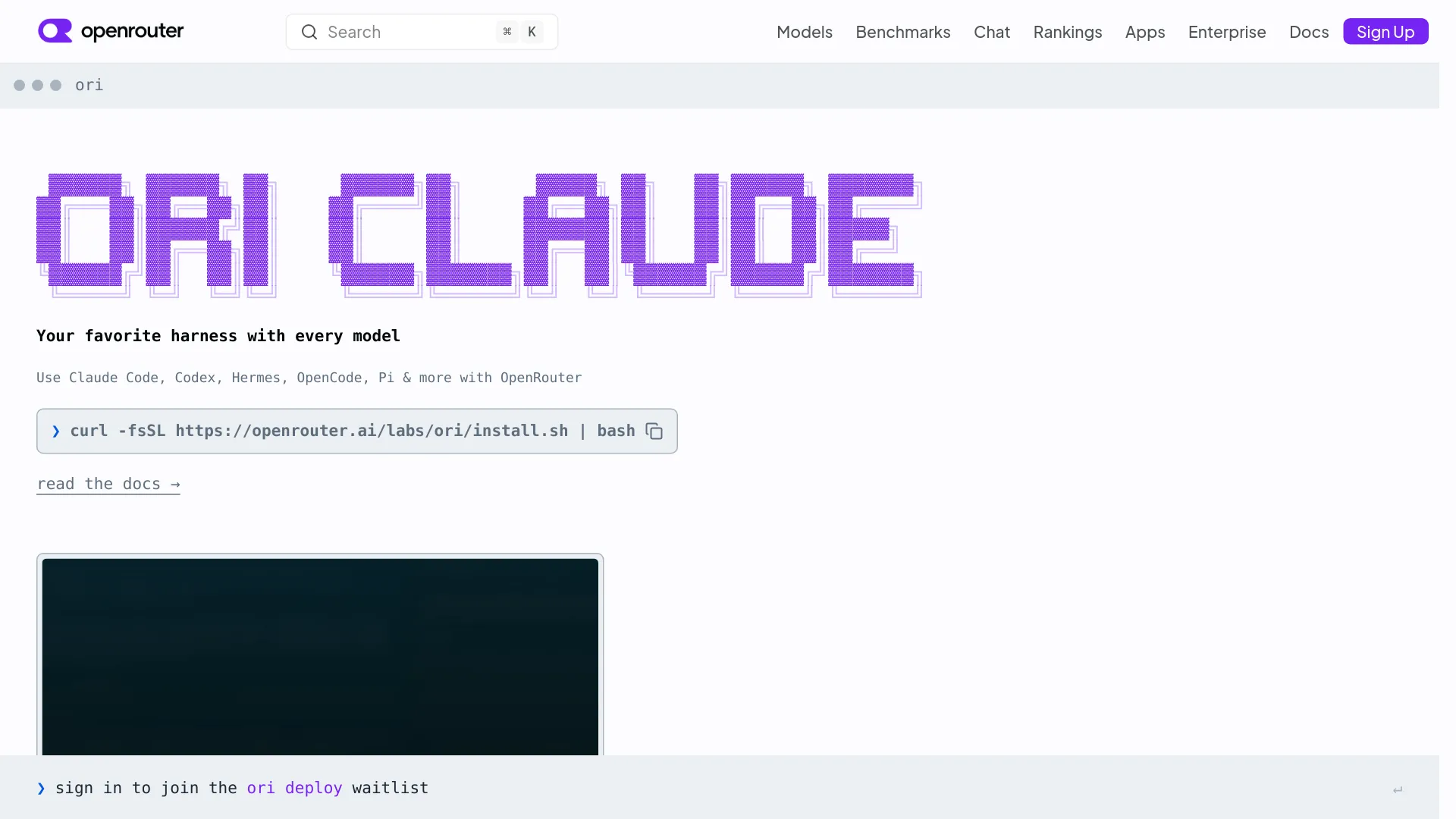
Ori is OpenRouter’s official CLI for configuring supported coding-agent harnesses. It authenticates with OpenRouter, passes a selected model into the underlying agent, and keeps that agent’s normal commands and flags in place; it does not replace Claude Code, Codex, OpenCode, or the other harnesses.
Install it with the command in OpenRouter’s announcement and guide:
curl -fsSL https://openrouter.ai/labs/ori/install.sh | bashThen authenticate and launch an agent:
ori login
ori claude
ori codex
ori opencode
ori hermes
The current Ori documentation also lists grok, pi, prime-agent, and dsh among supported commands. ori dsh configures DeepSeek Harness but does not start it; run dsh afterward. You can update Ori with ori update.
Choose a model without changing your agent
Ori accepts an OpenRouter model ID and forwards unrecognized arguments to the underlying harness:
ori claude --model anthropic/claude-sonnet-4.6
ori codex --model openai/gpt-5.2 --full-auto
ori opencode --model openrouter/auto
ori hermes --model openrouter/auto
The endpoint details are not identical across agents. For example, OpenRouter’s Claude Code guidance uses the Anthropic-compatible base URL https://openrouter.ai/api, while OpenAI-compatible clients such as Codex use https://openrouter.ai/api/v1; Ori exists partly to hide those per-harness configuration differences.
Ori uses browser-based OAuth PKCE, so the normal path does not require pasting an OpenRouter API key into every agent. OpenRouter’s Ori Harness documentation says requests use standard OpenRouter billing and activity reporting, with no separate Ori bill; the selected model and the underlying harness still determine inference cost.
Ori is not a standalone chat REPL
Use Ori when you already want an agent’s tools, file operations, or approval model. Use curl, a direct client, llm, or aichat when the task is a prompt, a structured response, or a shell pipeline that should not start a coding agent.
That boundary matters because the official launch material presents Ori as a compatibility and configuration layer. The official @openrouter/cli package is another source of confusion: its current documented commands are openrouter devtools and openrouter statusline, and its version 1.0 line removed earlier proxy commands such as start, stop, restart, and code.
Community OpenRouter clients worth knowing
Community clients differ by the terminal surface they expose. The practical choice is whether you need an interactive picker, complete API coverage, a small binary, multi-model automation, or predictable machine-readable output.
| Client | Install or launch shape | Strongest use | Constraints to check |
|---|---|---|---|
@aaronjmars/openroutercli | npm install -g @aaronjmars/openroutercli | Broad OpenRouter API access, OAuth PKCE, --json, usage data, media jobs, and request METHOD path | Unofficial; requires Node.js 20+; management commands need a management key |
@letuscode/openrouter-cli | npm i -g @letuscode/openrouter-cli | openrouter ask, repl, fuzzy model search, profiles, templates, and Markdown/plain output | README describes MVP development; requires Node.js 18.17+; Polyform Noncommercial 1.0.0 |
orc | npm install -g openrouter-cli | Multi-model prompts, profiles, templates, batch processing, prompt chaining, and code analysis | Requires Node.js 22+; uses the orc command; separate project and package name from the scoped client above |
ort | cargo +nightly-2026-03-25 install --locked ort-openrouter-cli | Fast Linux terminal use, provider selection, stdin, images, tmux-aware continuation, and latency/cost stats | Linux/x86_64 only; the README discloses that it does not validate TLS certificates |
llm-openrouter | llm install llm-openrouter | Logs, aliases, schemas, attachments, tools, and a mature plugin-based workflow | Uses the OPENROUTER_KEY convention; the model catalog is cached for one hour |
aichat | Package-manager or binary install | REPL, shell assistant, RAG, agents, MCP, local providers, and a local HTTP server | Broad abstraction; the README does not provide a provider-by-provider feature or security matrix |
These are documented capabilities, not comparable performance benchmarks.
The smallest reliable workflow: curl and jq
If curl and jq are already installed, the raw OpenRouter API is the smallest and most transparent terminal path. OpenRouter’s Quickstart documents Bearer authentication, the OpenAI-compatible /api/v1/chat/completions endpoint, a model field, a messages array, and optional streaming.
Set a key and a model in the shell session:
export OPENROUTER_API_KEY='sk-or-v1-...'
export OR_MODEL='openai/gpt-4o'
Then send one prompt:
curl -sS https://openrouter.ai/api/v1/chat/completions \
  -H "Authorization: Bearer ${OPENROUTER_API_KEY}" \
  -H "Content-Type: application/json" \
  -d "$(jq -n \
    --arg model "$OR_MODEL" \
    --arg prompt "Explain Unix pipes in three sentences." \
    '{model: $model, messages: [{role: "user", content: $prompt}], stream: false}')" \
  | jq -r '.choices[0].message.content // .error.message'
Use an environment variable for the model rather than copying a model ID into every script. The official Models API exposes id, context length, pricing, supported parameters, provider limits, and optional benchmark metadata.
Wrap the request in reusable shell functions
These functions keep the request body JSON-safe by letting jq encode the prompt. orask is for an argument; orpipe reads the complete standard input as one prompt.
orask() {
  local prompt="$*"
  local model="${OR_MODEL:?Set OR_MODEL to an OpenRouter model ID}"

  jq -n \
    --arg model "$model" \
    --arg prompt "$prompt" \
    '{model: $model, messages: [{role: "user", content: $prompt}], stream: false}' \
  | curl -sS --fail-with-body \
      https://openrouter.ai/api/v1/chat/completions \
      -H "Authorization: Bearer ${OPENROUTER_API_KEY:?Set OPENROUTER_API_KEY}" \
      -H "Content-Type: application/json" \
      -d @- \
  | jq -r '.choices[0].message.content // .error.message // "Unknown OpenRouter error"'
}

orpipe() {
  orask "$(cat)"
}
Examples:
orask "Turn this error message into a likely diagnosis: connection reset by peer"
cat README.md | orpipe
For scripts that need metadata, keep the JSON instead of extracting only the text:
orjson() {
  local prompt="$*"
  local model="${OR_MODEL:?Set OR_MODEL to an OpenRouter model ID}"

  jq -n \
    --arg model "$model" \
    --arg prompt "$prompt" \
    '{model: $model, messages: [{role: "user", content: $prompt}], stream: false}' \
  | curl -sS --fail-with-body \
      https://openrouter.ai/api/v1/chat/completions \
      -H "Authorization: Bearer ${OPENROUTER_API_KEY:?Set OPENROUTER_API_KEY}" \
      -H "Content-Type: application/json" \
      -d @-
}
This leaves the response’s usage object available for cost accounting and makes API errors distinguishable from an empty model response.
Discover compatible models from the command line
A model in the catalog does not necessarily support every request parameter. OpenRouter’s Models API supports filtering by supported_parameters, including tools, and sorting by pricing, context, throughput, latency, popularity, or recency.
List tool-capable models from the cheapest end of the documented sort order:
curl -sS -G https://openrouter.ai/api/v1/models \
  --data-urlencode 'supported_parameters=tools' \
  --data-urlencode 'sort=pricing-low-to-high' \
| jq -r '.data[] | [.id, .context_length, .pricing.prompt, .pricing.completion] | @tsv' \
| head -20
Inspect one model before putting it into a production script. OpenRouter documents the singular model-detail route as /api/v1/model/{author}/{slug}:
curl -sS \
  "https://openrouter.ai/api/v1/model/${OR_MODEL}" \
| jq '.data | {id, context_length, architecture, pricing, supported_parameters, top_provider}'
The pricing values are expressed per token or unit, so do not read a raw decimal as a dollar-per-million figure without converting it. The response usage field is the safer source for seeing how many input and output tokens a request actually consumed.
Batch processing in a shell pipeline
A useful batch workflow is one prompt per line in a text file and one JSON object per result. The script below records the original prompt, answer, usage, and an error field without mixing model prose with machine-readable output.
Create prompts.txt:
Summarize the release notes in one paragraph.
List three security risks in this configuration.
Extract the names and versions from this sentence.
Run the batch:
#!/usr/bin/env bash
set -u

: "${OPENROUTER_API_KEY:?Set OPENROUTER_API_KEY}"
: "${OR_MODEL:?Set OR_MODEL}"

while IFS= read -r prompt || [[ -n "$prompt" ]]; do
  [[ -z "$prompt" ]] && continue

  request=$(jq -n \
    --arg model "$OR_MODEL" \
    --arg prompt "$prompt" \
    '{model: $model, messages: [{role: "user", content: $prompt}], stream: false}')

  response=$(curl -sS --fail-with-body \
    https://openrouter.ai/api/v1/chat/completions \
    -H "Authorization: Bearer ${OPENROUTER_API_KEY}" \
    -H "Content-Type: application/json" \
    -d "$request" || true)

  if jq -e '.choices[0].message.content' >/dev/null 2>&1 <<<"$response"; then
    jq -c --arg prompt "$prompt" \
      '{prompt: $prompt, answer: .choices[0].message.content, usage: (.usage // null)}' \
      <<<"$response"
  else
    jq -c --arg prompt "$prompt" \
      '{prompt: $prompt, answer: null, error: (.error.message // "Request failed"), usage: (.usage // null)}' \
      <<<"$response"
  fi
done < prompts.txt > results.jsonl
The script runs sequentially; add concurrency only after checking rate limits and budget because parallel requests can increase costs quickly. OpenRouter’s pricing page lists 50 requests per day for the free plan and a 5.5% platform fee for pay-as-you-go, so a free model is not unlimited batch capacity.
Where llm and aichat fit
llm and aichat are general terminal workbenches that support OpenRouter. They make more sense than a small wrapper when you want reusable prompts, sessions, attachments, tools, local models, or a record of previous work.
llm-openrouter: the logged and extensible option
Install the base llm command first, then add the OpenRouter plugin:
llm install llm-openrouter
llm keys set openrouter
The plugin documents OPENROUTER_KEY as its environment-variable name. It exposes OpenRouter models with names such as openrouter/anthropic/claude-sonnet-5, caches the model list for one hour, and refreshes it with:
llm openrouter refresh
llm models list
A normal prompt and a shell pipeline look like this:
llm -m openrouter/anthropic/claude-sonnet-5 \
  "Give me five short names for a pet tarantula"

cat app.py | llm -m openrouter/anthropic/claude-sonnet-5 \
  -s "Review this code for a security bug"
The plugin documents schemas, attachments, tool calls, reasoning options, provider-routing JSON, OpenRouter web tools, and key inspection. It is a middle ground between raw curl and an autonomous coding harness, but its model cache can lag behind the live catalog.
aichat: the broader terminal workbench
aichat is a Rust-based CLI that supports OpenRouter alongside more than 20 named providers and OpenAI-compatible endpoints. Its documented surface includes CMD mode, a Chat-REPL, shell assistance, sessions, macros, RAG, function calling, MCP tools, agents, and a local server with chat, embeddings, and reranking endpoints.
Its OpenRouter configuration is an OpenAI-compatible client pointing at https://openrouter.ai/api/v1, and the project’s examples use an openrouter:<model> model form. Choose it when the terminal is becoming your application surface; choose curl or llm when you want a smaller, more inspectable request path.
Troubleshooting the failures that look like a CLI problem
OpenRouter CLI failures can occur at the boundary between the shell, the client, the selected model, and the account. Diagnose those layers separately before changing tools.
| Symptom | First check | Likely layer |
|---|---|---|
401 or missing-key error | Print the variable name expected by the client; llm-openrouter uses OPENROUTER_KEY, while raw API examples use OPENROUTER_API_KEY | Shell or client authentication |
| Ori opens an agent but the model is rejected | Confirm the model ID and the underlying harness’s API expectations | Harness/model compatibility |
| A model is missing from a picker | Refresh llm’s one-hour cache; for other harnesses, compare against /api/v1/models | Client catalog |
| A tool or schema request fails | Filter /models with supported_parameters=tools or inspect the model metadata | Model capability |
| A free request stops unexpectedly | Check the current free-plan request limit and whether the model is still offered as free | Account or platform policy |
| Cost is higher than expected | Capture .usage, selected provider, routing options, and cache behavior | Request and provider routing |
In a Reddit discussion about OpenCode and Kilo Code, user u/GrevireDev wrote:
“Both Kilo Code and OpenCode maintain a hard-coded/preloaded list of OpenRouter models instead of dynamically fetching the full catalog.” — r/openrouter
User u/DrunkenRobotBipBop made this cost-and-cache observation in another OpenRouter discussion:
“Take care of how you handle caching in openrouter. Everytime the provider changes, the cache is gone and you are going to pay full price.” — r/openrouter
Treat these as troubleshooting leads, not billing rules; verify costs with request usage, provider data, and current OpenRouter pricing.
OpenRouter CLI FAQ
These are the recurring setup and selection questions behind the openrouter cli query. The short answers below point to the right layer: official launcher, raw API, community client, or model catalog.
Is there an official OpenRouter CLI?
Yes, OpenRouter officially documents the ori CLI, but Ori is a launcher and configuration layer for existing coding harnesses. OpenRouter’s @openrouter/cli npm package is a separate DevTools utility, while direct chat/API CLIs such as @aaronjmars/openroutercli are community projects.
Can I use OpenRouter from a terminal without installing a CLI?
Yes. A Bearer-authenticated curl request to https://openrouter.ai/api/v1/chat/completions is enough for a one-shot prompt, and jq can extract text or preserve JSON for a pipeline.
What is the best OpenRouter CLI for JSON piping?
For a small script, raw curl gives the fewest hidden behaviors. For a broader command surface, choose a client that documents a JSON mode, such as @aaronjmars/openroutercli, or use llm and explicitly preserve the response data you need.
Why does my CLI show fewer models than OpenRouter’s website?
A client may cache its catalog or ship a preloaded model list. Compare the picker with curl https://openrouter.ai/api/v1/models, refresh the client’s cache where supported, and pass the exact returned model ID rather than a display name.
Does Ori require an OpenRouter API key?
OpenRouter’s Ori documentation says the normal login path uses OAuth PKCE, so users do not need to create and paste a separate API key. Raw curl, llm-openrouter, and most community clients still need a key or their own authentication configuration.
Before you automate an OpenRouter CLI workflow
Query the live Models API before pinning a model, record the model ID and response usage, and set an account or key budget. The CLI is only the front end: OpenRouter’s model, provider route, context size, and account limits remain the variables that determine whether the workflow is reliable and affordable.