 AIREITER
OpenAI's php2shell-checker is useful for a first pass, but it does not prove that a server is safe. It compares a PHP version exposed by HTTP headers or php -v with embedded patch cutoffs, so a hidden header can produce UNKNOWN and a distribution backport can make a patched server look vulnerable.
Start with the result states
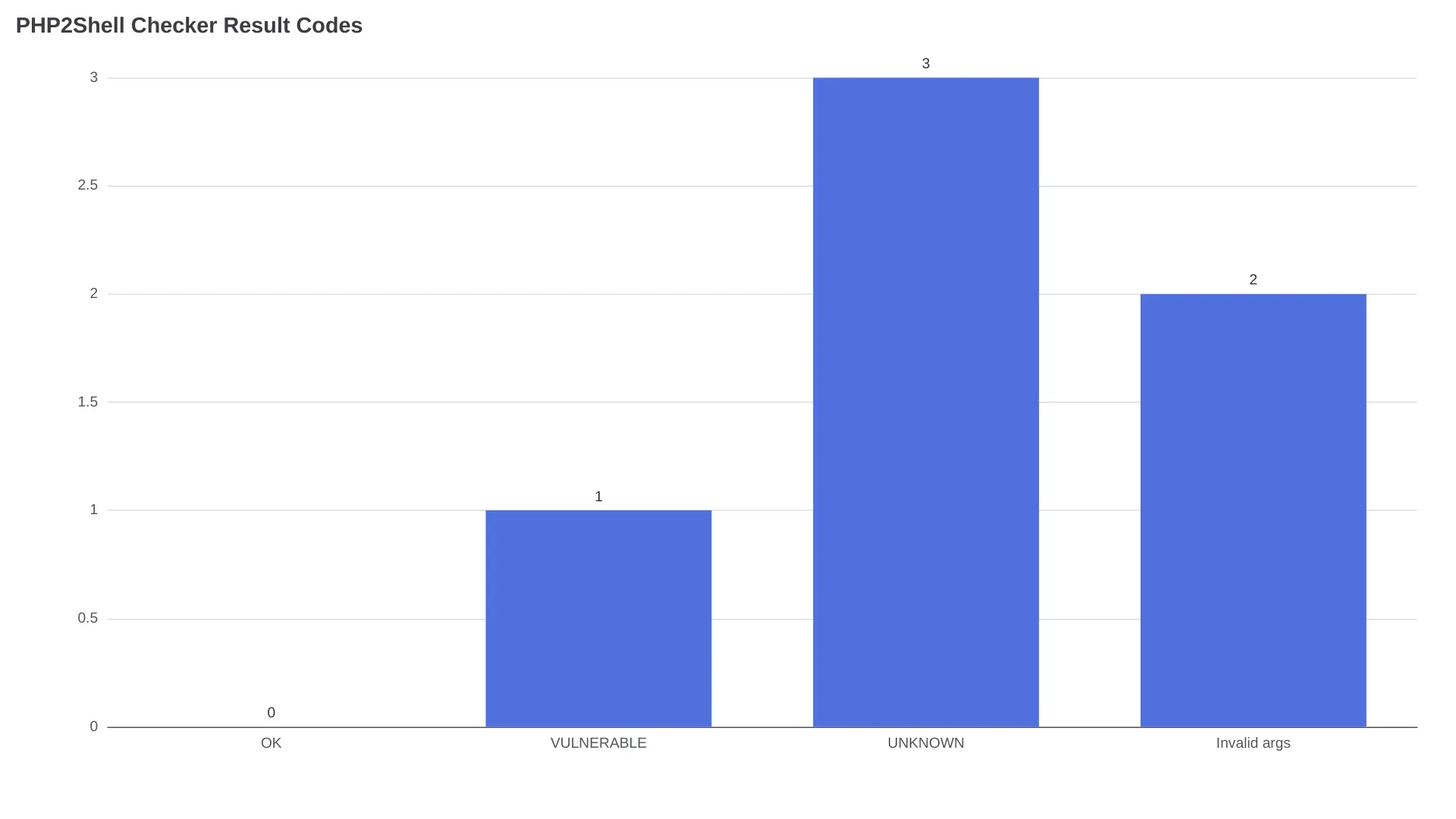
The official OpenAI repository reports three meaningful states. Treat them as triage signals, not as a complete vulnerability assessment.
| Output | Exit code | What it tells you | Next action |
|---|---|---|---|
OK | 0 | A recognized branch is at or above its minimum fixed version | Verify that the PHP process serving web traffic uses that version |
VULNERABLE | 1 | The detected version is below the minimum fixed version | Patch the serving runtime, restart its workers, and rerun both checks |
UNKNOWN | 3 | The checker could not establish a recognized version or response | Inspect the server locally; do not treat this as patched |
| Invalid arguments | 2 | The command itself was not valid | Correct the command and run it again |
What OpenAI shipped
The public php2shell-checker repository contains a Node.js script, tests, and two Codex skills: phpcheck-url for a reachable site and phpcheck-server for a server where you have access. It inventories version evidence; it does not exploit a target or scan application code.
Run the check in the right mode
Check a public URL
Clone or download the repository, then run its Node.js script against a site:
node phpcheck.js "https://example.com"The remote check sends an HTTP HEAD request and falls back to GET only when the server returns 405 or 501. It reads X-Powered-By and Server, does not follow redirects, and does not inspect the response body.
A CDN, reverse proxy, expose_php=off, or custom server configuration can remove the PHP version before the response reaches the checker. A VULNERABLE result needs patching; an absent header needs local evidence.
Check a local PHP binary
On a machine with PHP installed, use:
node phpcheck.js --localThis runs php -v on the binary available on the current PATH. It does not prove that the same binary serves your website: one host can have separate CLI, PHP-FPM, CGI, Apache module, container, or source-built installations.
Identify the runtime connected to the web server after the local check. In a containerized deployment, inspect the running container rather than only its image tag. For a packaged service, check the relevant PHP-FPM pool or Apache module and the vendor package changelog.
Install and use the Codex skills
The official README installs both skills with one Codex command:
$skill-installer install both skills from https://github.com/openai/php2shell-checkerThen choose the interface that matches your access:
$phpcheck-url check https://example.com
$phpcheck-server check the PHP version serving my site
Codex is optional. The Node.js command remains the direct interface for CI jobs and minimal hosts. For automation, add --json; its patch_status field returns ok, vulnerable, or unknown instead of requiring a script to parse terminal prose.
Verify the downloaded checker
The repository uses Node's built-in test runner:
node --test phpcheck.test.jsThe suite exercises the CLI against local HTTP servers and uses a fake PHP executable for local scenarios. It requires neither a real PHP installation nor access to an external website, according to the README.
Read UNKNOWN as a debugging result
Treat UNKNOWN as incomplete evidence. The target may hide its PHP version, use an unrecognized branch, fail to respond, or run a newer prerelease; those outcomes do not establish that the fix is present.
A real user, @jvr0x, summarized the limitation this way:
“It's just a version compare against their Oct 20 cutoffs, so hidden headers come back UNKNOWN.”
The remote command sees an HTTP response, not the process behind the reverse proxy. A hidden header requires a server-side check rather than repeated URL probes.
Use this sequence after UNKNOWN:
- Run
node phpcheck.js --localon the host serving the site. - Identify whether the request reaches PHP-FPM, CGI, Apache
mod_php, or a container. - Check the vendor package changelog for backported patches.
- Restart the relevant PHP-FPM or Apache workers after updating.
- Verify through the serving path, not only the shell's default
phpbinary.
Without SSH, URL mode may be the only first pass. If a shared host suppresses its version header, the hosting provider must confirm the serving runtime, package revision, and restart status.
The version table is not the whole patch decision
The checker treats PHP 8.5.12, 8.4.27, 8.3.36, and 8.2.35 as the minimum fixed upstream releases for their branches. Its official tests confirm that 8.4.26 is VULNERABLE while 8.4.27 is OK; PHP identifies 8.5.12, 8.4.27, 8.3.36, and 8.2.35 as security releases.
| Branch | Minimum fixed upstream release | Previous release classified vulnerable |
|---|---|---|
| PHP 8.5 | 8.5.12 | 8.5.11 |
| PHP 8.4 | 8.4.27 | 8.4.26 |
| PHP 8.3 | 8.3.36 | 8.3.35 |
| PHP 8.2 | 8.2.35 | 8.2.34 |
| Deployment situation | Why a simple version comparison can mislead | Evidence to use |
|---|---|---|
Hidden X-Powered-By or Server header | The remote checker cannot identify PHP | Local runtime inventory |
| Debian or Ubuntu security package | A vendor may backport the fix under an older upstream version string | Vendor advisory and package changelog |
| PHP-FPM and CLI on one host | php -v may describe the CLI, not the HTTP worker | Web-server and FPM configuration |
| Cached container or pinned digest | The registry tag may be current while the running container remains old | Running container image ID and version |
| Apache or FPM workers not restarted | Fixed files may be on disk while older workers remain active | Process start time and post-restart check |
| Unsupported branch or prerelease | The checker may not recognize vendor-specific patch state | PHP or vendor security notice |
The repository's limitations section says the tool assumes later stable patches in a listed branch contain the fix and cannot verify the fix independently. A distribution can apply a security backport without changing the upstream version number, making its changelog stronger evidence than the displayed number alone.
Updating WordPress, Drupal, Laravel, or another PHP application does not patch the PHP engine. Patch the runtime package or image, restart the workers, and verify the process that accepts web requests.
FAQ
Which output can close a production remediation ticket?
No output should close a ticket by itself. Pair OK with the serving SAPI, vendor backport status, all relevant vhosts or containers, and confirmation that workers restarted after patching.