 AIREITER
OpenRouter's Auto Router (openrouter/auto) classifies each prompt into roughly 30 task types and selects a model based on what the platform's 55T+ weekly token spend routes to - not a static leaderboard. As of August 10, 2026, OpenRouter replaced the previous NotDiamond-based routing with a system driven by a rolling 7-day community spending signal, promising lower costs at the default tier and frontier-level quality at the max tier. The catch: there's no per-request surcharge, but the model it picks determines your bill, and without configuration, a simple prompt can land on an expensive model.
What the new OpenRouter Auto Router does
Auto Router is a meta-router: you send a request to openrouter/auto as the model name, and it forwards your prompt to a specific underlying model. You pay that model's standard rate - no routing fee on top. The response includes a model field showing which model was selected, so you can audit each request.
The August 2026 update replaced the old routing engine (previously powered by NotDiamond) with what OpenRouter calls "wisdom of the market." Instead of a fixed classification model deciding which model is "best," the router now looks at anonymized spending data from the preceding 7 days. If thousands of developers shifted their coding workload from one model to another last week, the router follows that migration within days.
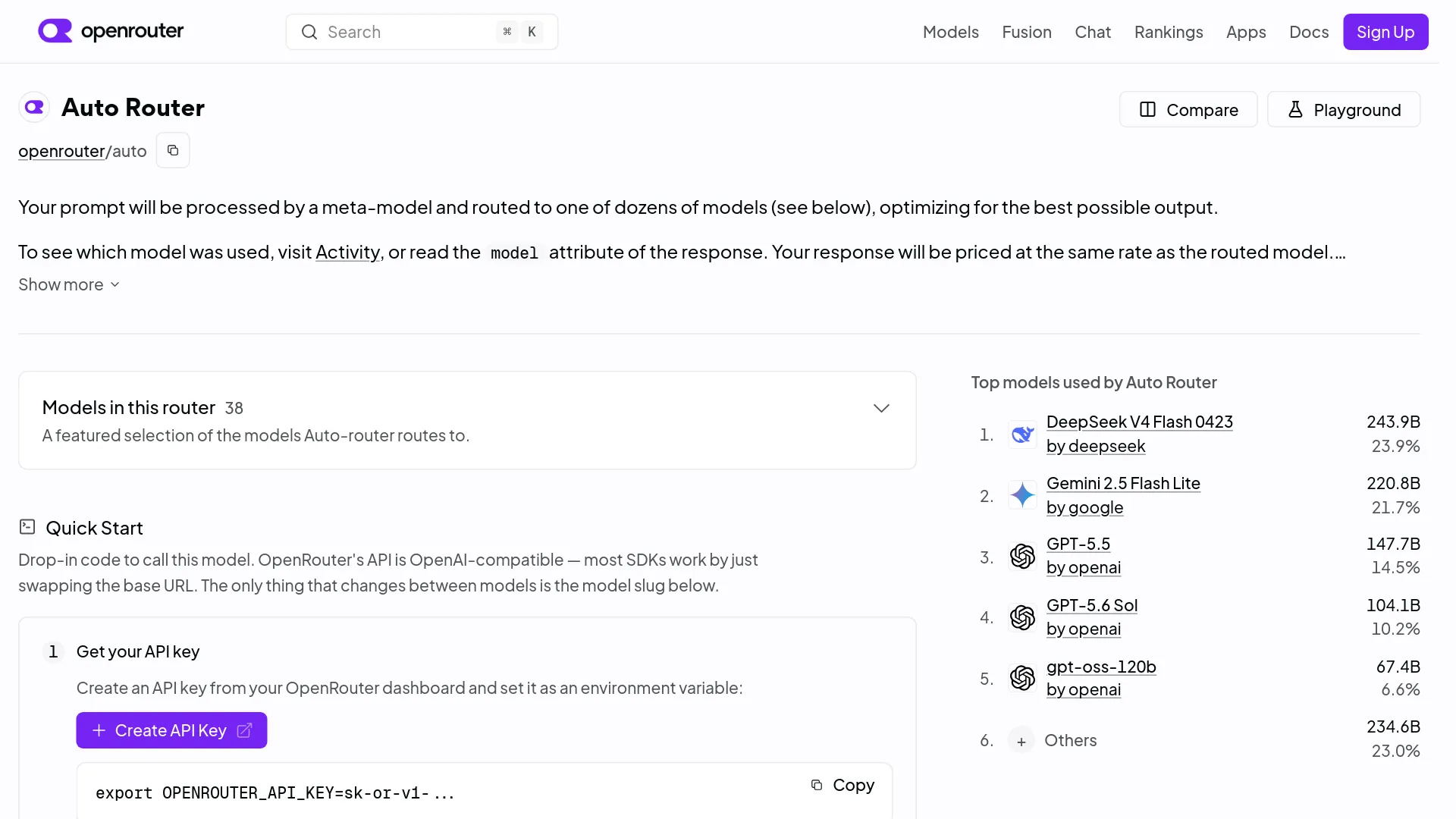
The router classifies prompts in flight - no prompt retention required - into approximately 30 categories, including code generation, debugging, multi-step agent planning, knowledge Q&A, math, customer support, and research reports. If classification or ranking data is unavailable, it falls back to a default model set so routing failure doesn't fail your request.
Two slugs are available:
| Slug | Purpose | Plugin ID |
|---|---|---|
openrouter/auto | Stable router, generally available | auto-router |
openrouter/auto-beta | Early-access channel for routing updates | auto-beta-router |
The new router ran on auto-beta for a couple of weeks before moving to the stable slug on August 10, 2026. If you send configuration under the wrong plugin ID, it's silently ignored - a common setup pitfall.
How model selection works: 30 task types and 5 cost tiers
The router's selection logic has two inputs: task classification and cost tier. First, it identifies the task type from your prompt. Then, within that task type, it ranks candidate models by community usage share from the past 7 days, filtered by your account restrictions (allowed models, guardrails, privacy settings, ZDR policies).
Cost tiers control how far up the price ladder the router is willing to go. There are five bands, cheapest to most capable: low, medium, high, xhigh, and max. The default is low. A tier is a band, not a ceiling - models both cheaper and more expensive than that band are excluded.
The routing matrix OpenRouter published on August 10, 2026 covers all ~30 task types. The 15 representative examples below show how task type and cost tier determine model selection:
| Task type | Low | Medium | High | Xhigh | Max |
|---|---|---|---|---|---|
| Code generation | glm-5.2 | claude-4.6-sonnet | kimi-k3 | claude-opus-5 | claude-5-fable |
| Debugging | deepseek-v4-pro | glm-5.2 | gemini-3.6-flash | claude-4.8-opus | claude-opus-5 |
| Code review | glm-5.2 | claude-sonnet-5 | kimi-k3 | gpt-5.6-sol | claude-opus-5 |
| SQL & database | deepseek-v4-flash | glm-5.2 | claude-sonnet-5 | kimi-k3 | claude-opus-5 |
| Frontend & UI | glm-5.2 | claude-sonnet-5 | gpt-5.6-sol | kimi-k3 | claude-5-fable |
| DevOps & config | deepseek-v4-flash | glm-5.2 | gpt-5.6-sol | kimi-k3 | claude-opus-5 |
| Multi-step planning | deepseek-v4-pro | glm-5.2 | claude-4.8-opus | kimi-k3 | claude-5-fable |
| Web search | deepseek-v4-flash | glm-5.2 | gpt-5.6-sol | kimi-k3 | claude-4.6-opus |
| Math | deepseek-v4-pro | glm-5.2 | gemini-3.1-pro | kimi-k3 | claude-4.6-opus |
| Content writing | glm-5.2 | gemini-3.6-flash | claude-4.8-opus | claude-4.6-opus | gpt-5.6-sol |
| Research reports | deepseek-v4-pro | glm-5.2 | claude-sonnet-5 | gpt-5.6-sol | claude-opus-5 |
| Q&A & knowledge | glm-5.2 | gemini-3.6-flash | claude-sonnet-5 | kimi-k3 | gpt-5.6-sol |
| Translation | deepseek-v4-flash | gemini-3-flash | gemini-3.5-flash | claude-sonnet-5 | gpt-5.6-sol |
| Classification | gemini-3-flash | gemini-3.5-flash | gemini-3.6-flash | gemini-3.1-pro | gpt-5.6-sol |
| Customer support | gemini-3-flash | gpt-4.1 | gemini-3.6-flash | claude-4.6-sonnet | claude-opus-5 |
The low tier favors cheaper models like GLM-5.2 and DeepSeek V4 Flash for coding tasks, Gemini Flash variants for classification and support. The max tier routes to Claude Opus 5, Claude 5 Fable, or GPT-5.6 Sol depending on the task.
Cost tier vs. the deprecated cost_quality_tradeoff
The old numeric parameter cost_quality_tradeoff (0-10, where 0 was quality-first and 10 was cost-first, default 7) is deprecated but still accepted. The new cost_tier parameter uses named bands instead. If you send both, cost_quality_tradeoff takes precedence - a backward-compatibility decision that can cause unexpected routing if you're migrating old code. Strip the old parameter when adopting cost_tier.
Configuration via API request:
{
  "model": "openrouter/auto",
  "messages": [{ "role": "user", "content": "Debug this Python function" }],
  "plugins": [{
    "id": "auto-router",
    "cost_tier": "max",
    "allowed_models": ["anthropic/*", "openai/*"]
  }]
}
allowed_models accepts wildcard patterns like anthropic/* to limit to a provider. An excluded_models list runs after allowed_models and can further narrow the pool. If no model remains after filtering, the API returns a 404.
Benchmark results: new vs. old Auto Router
OpenRouter benchmarked the new and old routers across five diverse benchmarks, comparing both default and max settings. The old router's default was cost_quality_tradeoff=7; the new router's default is cost_tier=low.
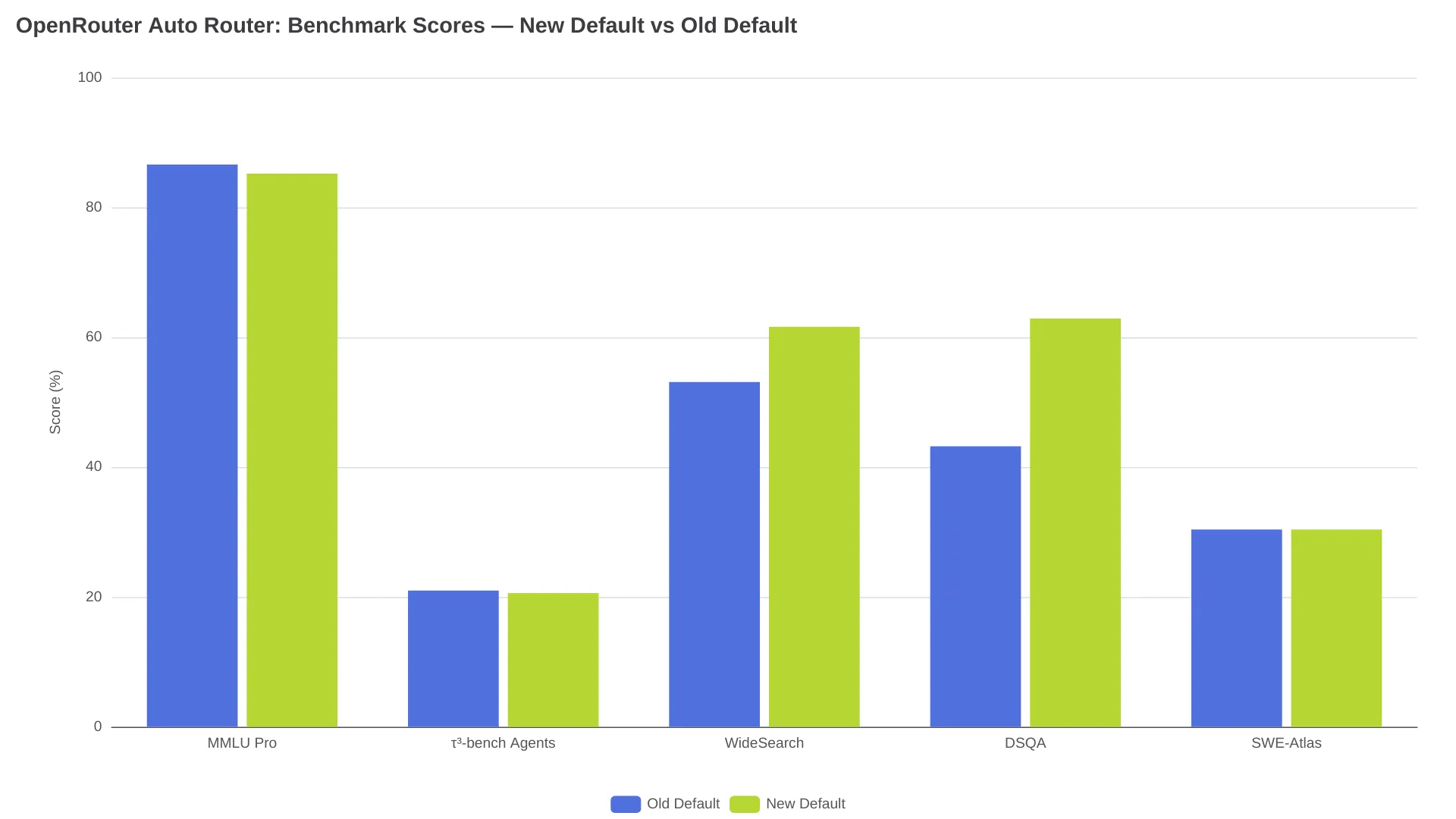
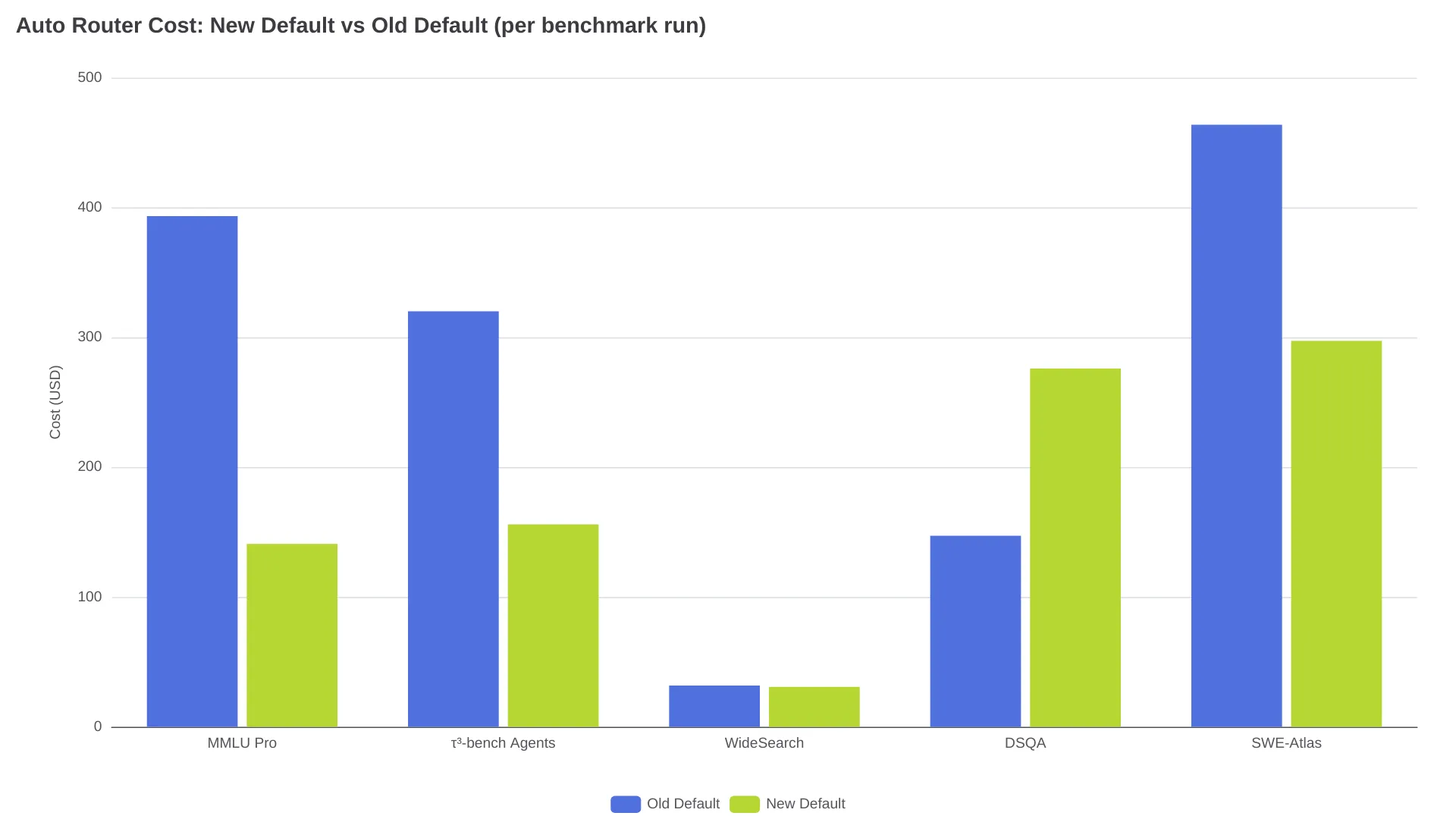
At the default tier, the new router matches or beats the old one on 3 of 5 benchmarks - strongest gains on DSQA (research, +45.6%) and WideSearch (search, +16.0%), slight drops on MMLU Pro (-1.6%) and tau-bench Banking (-1.9%), tied on SWE-Atlas QnA. Default-tier costs are lower on MMLU Pro (-64.2%), tau-bench (-51.3%), and SWE-Atlas (-35.9%), but 87.6% higher on DSQA ($276 vs. $147.11). At max tier, the new router wins all 5 benchmarks - tau-bench Banking jumped from 7.2% to 31.6% (+338.9%), and SWE-Atlas QnA from 2.4% to 60.7% (+2429.2%) - but max-tier costs are higher in 4 of 5 benchmarks, with SWE-Atlas running $1,325 vs. $205. These are point-in-time results; OpenRouter cautions that routing behavior shifts as community preferences evolve.
Cost control: avoiding surprise bills with Auto Router
A common concern with Auto Router is unexpected charges. As one r/openrouter user put it:
"It might just keep using Opus." - u/xtekno-id, warning about uncontrolled expensive-model selection in an engineering team context.
Five concrete steps keep costs predictable:
1. The :free suffix doesn't do what you think. openrouter/auto:free does not constrain Auto Router to free models - it can still route to paid ones. If you need zero-cost routing, use openrouter/free instead, which restricts the pool to free-tier endpoints only. This is confirmed in OpenRouter's help center.
2. Combine cost_tier with allowed_models. Setting cost_tier=low alone doesn't prevent the router from picking a model that's expensive for your volume. Layer on allowed_models to restrict to specific families: ["deepseek/*", "google/*"] keeps you in the budget tier for most task types.
3. Use provider.max_price for hard ceilings. This parameter filters eligible endpoints by price, giving you a per-token cost cap that works independently of the router's tier selection.
4. Watch the 5.5% platform fee. OpenRouter charges a 5.5% fee when purchasing credits (minimum $0.80), not per token. A $20 credit deposit costs $21.10. This fee applies regardless of whether you use Auto Router - it's the platform's monetization layer, not a routing surcharge.
5. Mind session stickiness and cache costs. When the router switches models mid-conversation, the input cache must be rebuilt, adding token cost. The router addresses this with session stickiness: it identifies conversations by an explicit session_id or a message fingerprint, then re-ranks candidates each turn but prefers the previous model when it remains a top candidate. If the task changes materially, the router will switch - and you'll pay the cache-rebuild cost.
When to use Auto Router vs. pinning a specific model
Auto Router fits variable workloads - different task types at different times, where manual model selection becomes a bottleneck. The routing matrix gives you a starting point for which models the community trusts for each task type.
| Scenario | Recommendation |
|---|---|
| Variable workloads, general-purpose use | openrouter/auto with cost_tier=low |
| Cost-sensitive production at scale | Pin specific models or use fallback lists |
| Multi-turn coding with context | openrouter/auto with session_id for stickiness |
| Need frontier quality regardless of cost | openrouter/auto with cost_tier=max |
| Zero-cost requirement | openrouter/free (not auto:free) |
| Want routing updates before stable release | openrouter/auto-beta |
For engineering teams, the practical middle ground is a constrained auto-router setup: cost_tier set to your budget band, allowed_models restricted to your approved vendors, and provider.max_price as a hard ceiling.
FAQ
Does OpenRouter Auto Router cost extra?
No. There's no surcharge for using Auto Router. You pay the standard rate of whichever model it selects. OpenRouter's revenue comes from the 5.5% fee charged when purchasing credits.
Is openrouter/auto:free actually free?
No. The :free suffix does not restrict routing to free models. Use openrouter/free instead - the dedicated free-only router.
Can I restrict Auto Router to specific providers?
Yes. Use the allowed_models parameter with wildcard patterns like ["anthropic/*", "openai/*"] in the auto-router plugin.
How do I see which model was selected?
Check the model field in the API response. It contains the model identifier of the model that processed your request, not openrouter/auto.
What's the difference between auto and auto-beta?
openrouter/auto is the stable router. openrouter/auto-beta receives routing improvements before they reach stable.
Does Auto Router support streaming and tool calling?
Yes. The selected model's full feature set - streaming, tool calling, vision - is available.