 AIREITER
After testing OpenChamber v1.18.1 (released August 4, 2026) across desktop and CLI installs with multiple model providers, the core finding is that it fills a genuine gap between raw agent power and the supervision layer developers need - but it is not an IDE, and the single-maintainer architecture is a real consideration before betting a production workflow on it.
OpenChamber Is a Control Layer, Not Another Coding Agent
OpenChamber is a free, MIT-licensed visual workspace that runs on top of the OpenCode SDK, the open-source AI coding agent. It does not replace OpenCode - it wraps it. Where OpenCode's terminal interface gives you a linear chat with your agent, OpenChamber adds branching conversations, parallel model runs, visual diff review, remote access, and GitHub-integrated workflows. OpenChamber itself does zero code generation; all inference runs through your configured OpenCode providers.
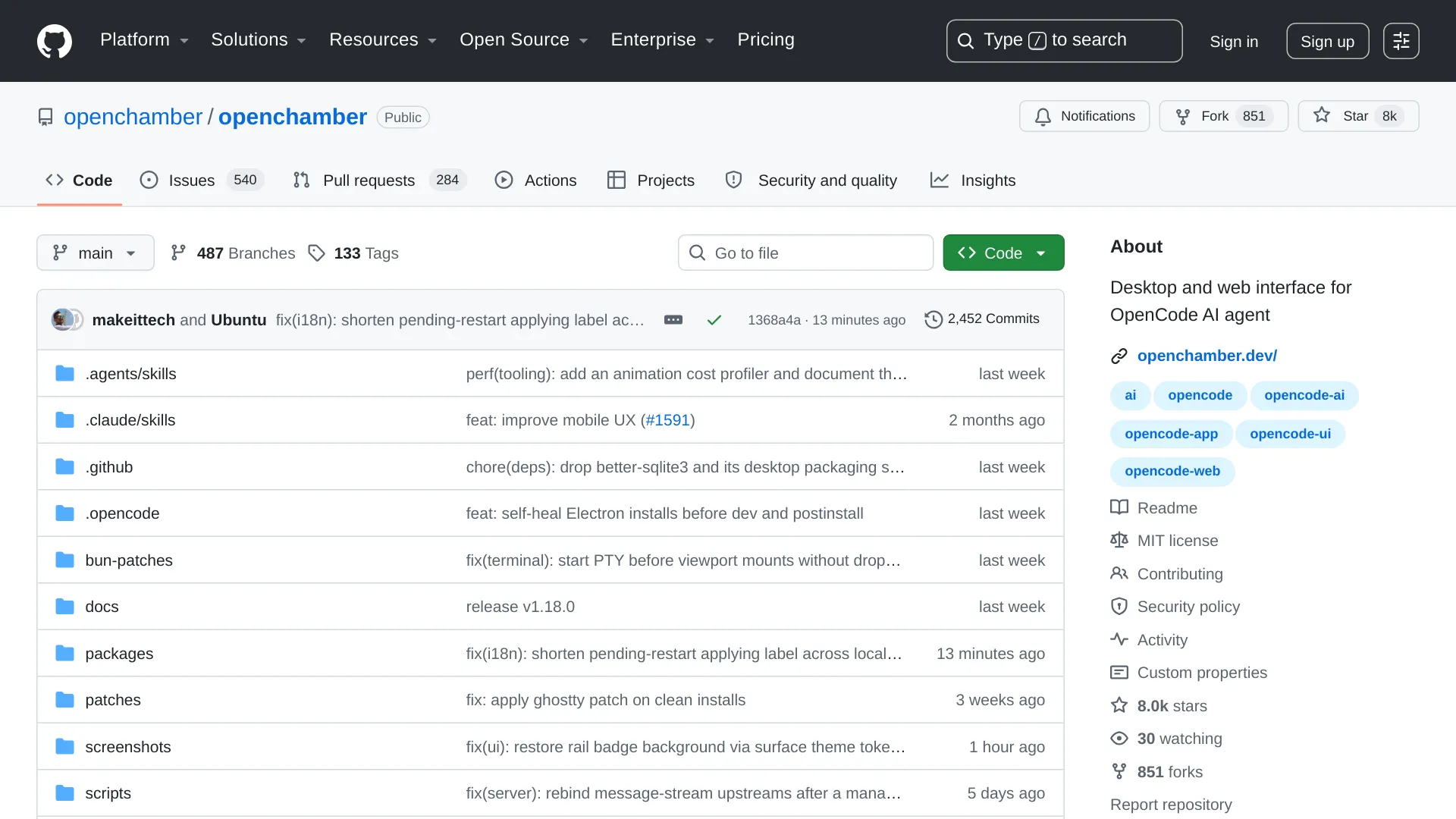
The project is built primarily in TypeScript with a Rust shell (via Tauri) for the desktop app. At the time of writing, the GitHub repository shows 2,450 commits, roughly 8,000 stars, 850 forks, and an active release cadence. The footer notes that OpenChamber is an independent project, not affiliated with the OpenCode team.
The Six Features That Define OpenChamber
Session Goals - Persistent Agent Work
Session Goals let you define a finish line for an agent task. After every turn, OpenChamber evaluates the result against that goal and keeps the agent working until the task is complete, blocked, or hits a configured limit - including after you close the app. This is the headline feature for developers who want to kick off a complex refactor and come back to a finished result rather than a half-done conversation that timed out.
Multi-Run and Fusion - Up to Five Models, One Task
Multi-run is the feature that separates OpenChamber from terminal-based agent tools like the OpenCode TUI and Aider. You dispatch one task to up to five models simultaneously. Each run executes in its own session and can optionally get its own Git worktree, so changes never collide. Once results come back, you either pick the best output or use the Fusion feature to combine the strongest parts of multiple runs into a new session.
The cost trade-off: running five models on the same task multiplies your token spend fivefold, though OpenChamber itself adds no markup on top of what your providers charge.
Changes Walkthrough - Diff Review That Explains Itself
When an agent produces a large diff, reviewing it in a standard Git viewer is painful. OpenChamber's Changes Walkthrough uses AI to group related edits and order them into a narrative sequence, explaining how the pieces fit together. Instead of scrolling through 40 changed files alphabetically, you get a guided tour: "First, the API endpoint was modified to accept pagination params. Then, the database layer was updated to handle the new query shape. Finally, the test suite was adjusted."
Preview - Point at a Running UI Element, Give the Agent Context
Preview places your running application next to the agent conversation. You can select a specific UI element and send the agent a screenshot, the element's CSS styles, its on-screen position, and any browser console errors - without manually copying context. The Desktop app extends this to any web page through an integrated browser, so you can point at a broken layout and immediately give the agent everything it needs to fix it.
From Issue to Pull Request
OpenChamber integrates with GitHub at the session level. You can start a session from a GitHub issue or pull request, carrying the full issue context into the agent's workspace. When CI checks fail, the error output goes back to the agent automatically. Once changes are ready, you can update or merge the PR from within OpenChamber - no switching to a browser.
Scheduled Work - Cron-Based Agent Tasks
You can schedule agent prompts on a one-time, daily, weekly, or cron basis. Combined with Session Goals, a scheduled task doesn't just fire once and stop - it can pursue an outcome repeatedly until the goal is met. Practical use: schedule a nightly task that checks for dependency vulnerabilities and opens a PR with fixes when found.
Getting Set Up: What the Docs Don't Emphasize
There are three installation paths, and they have very different friction levels.
| Path | Requires | Friction Level |
|---|---|---|
| Desktop app (macOS, Windows, Linux) | Nothing extra - bundles OpenCode CLI | Low |
| CLI / Web / PWA | Node.js 22+ + separate OpenCode CLI install | Medium |
| VS Code extension | OpenCode CLI installed separately | Medium |
The Desktop app is the path of least resistance. It bundles the matching OpenCode CLI, so you download one installer and you're running. On macOS and Windows, this is straightforward. On Linux, the AppImage requires FUSE (libfuse.so.2); without it, the documented fallback is APPIMAGE_EXTRACT_AND_RUN=1, and the README recommends keeping the AppImage in a writable location for in-app updates.
The CLI/PWA path has a gotcha: Node.js 22 or newer is a hard requirement, and you must install the OpenCode CLI yourself first. The install command is curl -fsSL https://opencode.ai/install | bash. If you're on an older Node.js LTS, the CLI will fail silently or throw cryptic errors - the troubleshooting docs do address this, but it's the kind of friction that stops people who expect a one-click experience.
For model providers, OpenChamber inherits whatever you configure in OpenCode. You bring your own API keys - whether that's an Anthropic key for Claude, an OpenAI key for GPT models, or a local model running through Ollama. OpenChamber adds no provider cost and doesn't proxy your requests through its own servers.
Remote Access and Privacy: The Private Relay Architecture
OpenChamber's privacy model is one of its strongest selling points for developers working with proprietary code. Per the official README:
- All code, prompts, diffs, and session content stay on your machine. OpenChamber's servers never see your source code.
- Private Relay enables remote access through end-to-end encrypted, QR-code-paired connections with no open ports. You scan a QR code once to pair a device, and connections can be revoked at any time.
- Other remote options include Cloudflare or Ngrok tunnels, direct connections, LAN/VPN, and SSH.
- Browser UI access can be gated with a password, and tunnel links can be rotated.
The server binds to localhost by default. The --lan flag opens it to your local network, which the README explicitly warns should only be used on trusted networks with --ui-password protection.
These are first-party claims, not independently audited - but because OpenChamber is MIT-licensed and open source, the encryption and data-handling implementation is inspectable in the code.
Where OpenChamber Falls Short
Single-maintainer risk. A third-party analysis identifies OpenChamber as a single-developer project. With 2,450 commits and a rapid release pace, the code is active - but bus factor matters. If the maintainer steps away, you're depending on community forks.
It's not an IDE. OpenChamber manages agent sessions, reviews diffs, and connects to GitHub, but it does not provide a code editor. You still need VS Code, Neovim, or another editor for manual work. The VS Code extension bridges this gap partially, but if you're expecting a Cursor replacement, you'll be disappointed.
Mobile is beta. Native iOS and Android apps exist but are explicitly in beta. A Reddit discussion surfaced by the TermBridge blog highlighted that switching between concurrent AI agent sessions on mobile proved difficult - a real pain point if your workflow depends on supervising multiple runs from your phone.
"Switching between different agents on mobile proved difficult." - Reddit user via TermBridge
Overkill for quick tasks. The same ailinklab analysis recommends OpenChamber when sessions exceed 10 minutes and involve multi-file work. For a one-line fix or a quick question, the overhead of setting up a session goal and managing the workspace adds friction without value.
Linux FUSE dependency. If your Linux distribution doesn't have libfuse.so.2 pre-installed (some minimal containers don't), you'll need to install it manually or use the extraction workaround.
OpenChamber vs OpenCode TUI vs Cline vs Aider
| Feature | OpenChamber | OpenCode TUI | Cline | Aider |
|---|---|---|---|---|
| Interface | Desktop, web/PWA, VS Code, mobile beta | Terminal only | VS Code extension | CLI |
| Conversation model | Branching tree | Linear stream | Linear | Linear |
| Multi-model runs | Up to 5 in parallel with worktree isolation | No | No | No |
| Diff review | AI-guided narrative walkthrough | Raw diff | Inline in editor | Git diff |
| Remote access | E2E encrypted relay, tunnels | SSH only | No | SSH only |
| GitHub integration | Issue -> PR -> merge in-app | Manual | Manual | Git commits |
| License | MIT | MIT | Apache 2.0 | Apache 2.0 |
| Price | Free | Free | Free / paid plans | Free |
OpenChamber's sweet spot is multi-agent, multi-file projects where you need to compare approaches, review complex changes, and manage the workflow remotely. OpenCode's own TUI is fine for single-agent terminal work. Cline excels for developers who want an agent embedded in their existing VS Code setup without leaving the editor. Aider is a strong fit for terminal-first workflows that integrate directly with Git.
Should You Use OpenChamber?
| Your situation | Recommendation |
|---|---|
| Multi-agent projects, comparing model outputs | Yes - Multi-run and Fusion are unique |
| Complex refactors needing review before merge | Yes - Changes Walkthrough saves real time |
| Remote supervision from phone/tablet | Yes, with caveats - mobile is beta |
| Quick one-line fixes | No - use OpenCode TUI or Cline instead |
| Single-model VS Code workflow | Cline is lighter weight |
| Terminal-first, Git-native workflow | Aider is more ergonomic |
| Production-critical dependency | Wait - single-maintainer risk is real |
FAQ
Is OpenChamber really free?
Yes. MIT-licensed, no paid tiers, no markup on inference. You only pay your model providers directly.
Does OpenChamber work without OpenCode?
No. OpenChamber is a visual workspace that runs on top of the OpenCode SDK. The Desktop app bundles the OpenCode CLI automatically, but the CLI/PWA and VS Code paths require a separate OpenCode installation.
Can I use OpenChamber with Claude, GPT, or local models?
Yes, through OpenCode's provider configuration. OpenCode supports 75+ providers including Anthropic (Claude), OpenAI (GPT), Google (Gemini), and local models via Ollama. You configure API keys in OpenCode, and OpenChamber uses whatever providers are available.
Is OpenChamber safe to use with proprietary code?
OpenChamber keeps all code, prompts, diffs, and session content on your local machine. Remote access uses end-to-end encrypted Private Relay with QR-code pairing and no open ports. The implementation is open source and inspectable, though no independent security audit has been published.
What's the difference between OpenChamber and OpenCode Desktop?
OpenCode's own desktop app provides the agent engine with a linear terminal-style UI. OpenChamber adds branching conversations, parallel multi-model runs with Git worktree isolation, AI-guided diff walkthroughs, visual application preview, GitHub issue-to-PR workflows, scheduled tasks, and encrypted remote access. OpenChamber is an independent project, not affiliated with the OpenCode team.