 AIREITER
Nano Banana 2 Lite is the cheaper, faster sibling Google shipped alongside Nano Banana 2 — but "cheaper and faster" undersells what's actually different. At 1K resolution, Lite costs $0.034 per image versus $0.067 for standard Nano Banana 2, roughly half. Speed is close, not dramatic: Google claims "as little as four seconds" for Lite, and our own Google AI Studio testing landed at 4-6 seconds — nowhere near the "60x faster" claims circulating online. The real trade-off shows up in instruction-following on complex prompts, not in speed or text rendering. We ran the same four prompts through both models to see exactly where.
Official Pricing and Specs, Side by Side
Among the comparisons we found, most focus on Nano Banana 2 vs Pro rather than Lite vs standard Nano Banana 2, so here's Google's own numbers from the Gemini API pricing page (checked July 1, 2026):
Nano Banana 2 Lite | Nano Banana 2 | |
|---|---|---|
Model | Gemini 3.1 Flash-Lite Image | Gemini 3.1 Flash Image |
Max resolution | 1K only | 512px / 1K / 2K / 4K |
Price at 512px | Not available | $0.045 / image |
Price at 1K | $0.034 / image | $0.067 / image |
Price at 2K | Not available | $0.101 / image |
Price at 4K | Not available | $0.15 / image |
Input (text/image/video) | $0.25 / 1M tokens | $0.50 / 1M tokens |
Claimed speed | "As little as 4 sec" | 4-8 sec (third-party benchmarks) |
Batch/Flex pricing | ~50% off standard | ~50% off standard |
The resolution cap is the detail most coverage skips. Lite doesn't just default to 1K — the pricing page lists no 512px, 2K, or 4K tier for it at all, just the one 1K price point. If your output needs to survive a print job or a 4K display, that's a hard wall, not a setting you can toggle.
At volume, the per-image gap compounds fast: 1,000 images at 1K runs about $34 on Lite versus $67 on standard Nano Banana 2; at 10,000 images that's $340 vs $670 — a $330 difference for the same batch.
Both models watermark output by default with C2PA content credentials and invisible SynthID, and both retired the original Nano Banana (Gemini 2.5 Flash Image) as their upgrade path.
Real Speed Test: The "60x Faster" Claims Don't Hold Up
Google's own number for Lite is "as little as four seconds." We tested it directly in Google AI Studio rather than trust a vendor's number, and our runs landed at 4-6 seconds per image — consistent with what Google claims, not faster. Even the prompt that required a reference image (the try-on test below) only took about 6 seconds, so passing in a reference doesn't meaningfully slow Lite down.
Standard Nano Banana 2 isn't slow either. Third-party benchmarking from fal.ai puts it at roughly 4-8 seconds per image — overlapping with Lite's range, not multiples behind it. In our own research into early user reactions on X, we saw anecdotal posts describing the gap as "4 seconds vs 4 minutes" or "60x faster" — we couldn't verify those specific figures, and they don't match Google's published numbers, fal.ai's benchmark, or our own tests. The real gap is in price, not latency.
Head-to-Head: Four Prompts, Same Settings
Numbers only tell you so much. We ran each of four prompts once through both models — same wording, same reference image for the try-on test, first output kept with no retries or cherry-picking — to see where the outputs actually diverge. Treat these as directional spot-checks, not a statistically significant benchmark; one run per prompt shows you failure modes, not hit rates. All eight images came back at the same output size, 1408×768 — "1K" in Google's own pricing footnote means roughly 1 megapixel, not a specific pixel dimension, and 1408×768 lands in that bucket — except one Lite generation at 1379×752, a minor variance we didn't chase down further. One limitation worth flagging directly: Nano Banana 2's images were generated through the AIReiter API, while Lite's were generated directly in Google AI Studio, since Lite isn't in AIReiter's model lineup yet. The prompts and reference image were identical, but we can't rule out small platform-level defaults (compression, aspect-ratio handling) differing between the two — worth keeping in mind if you retest this yourself on a single platform.
Test 1: Complex Scene With Legible Text
Same prompt for both: a night market stall with a menu board reading "BEEF NOODLES $12 / BUBBLE TEA $6 / FRIED CHICKEN $9," plus a crowd and steam.
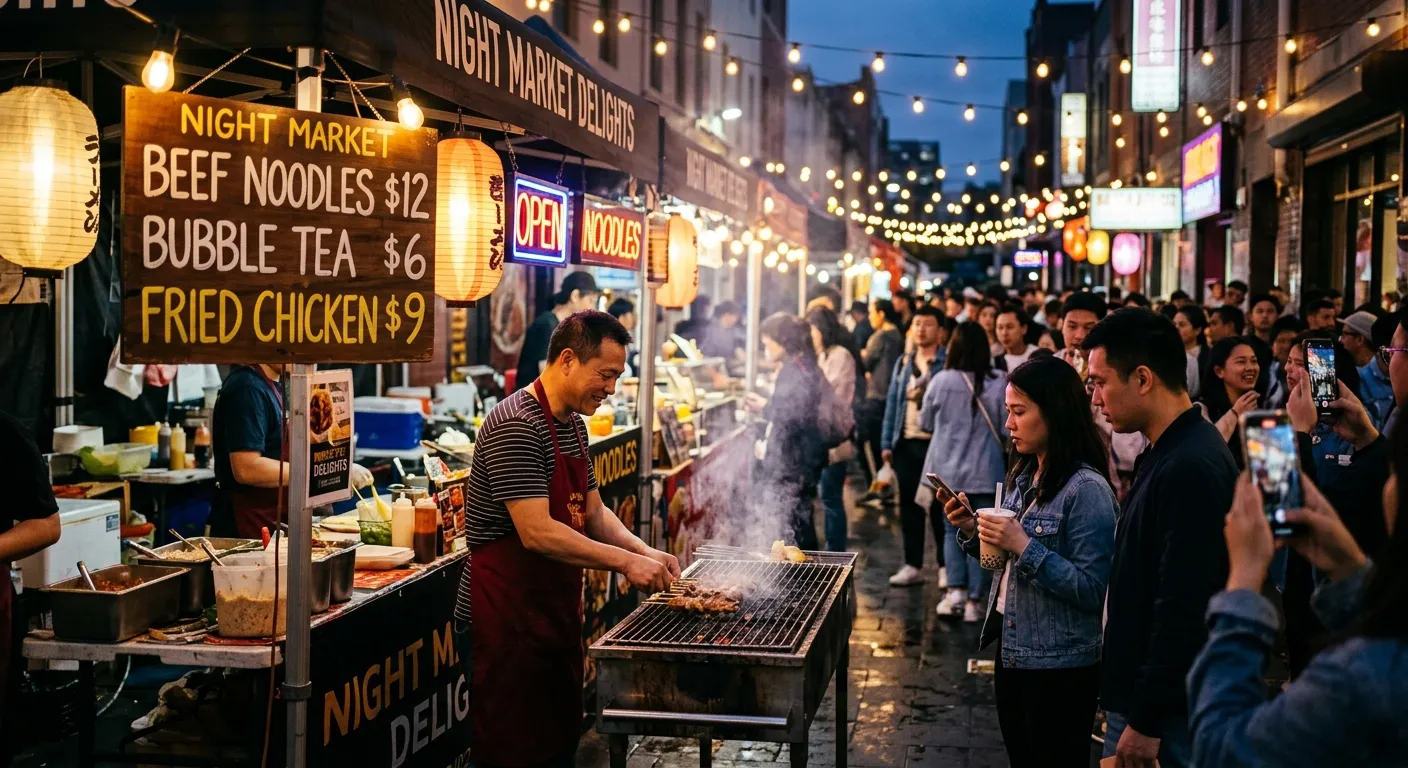
Nano Banana 2
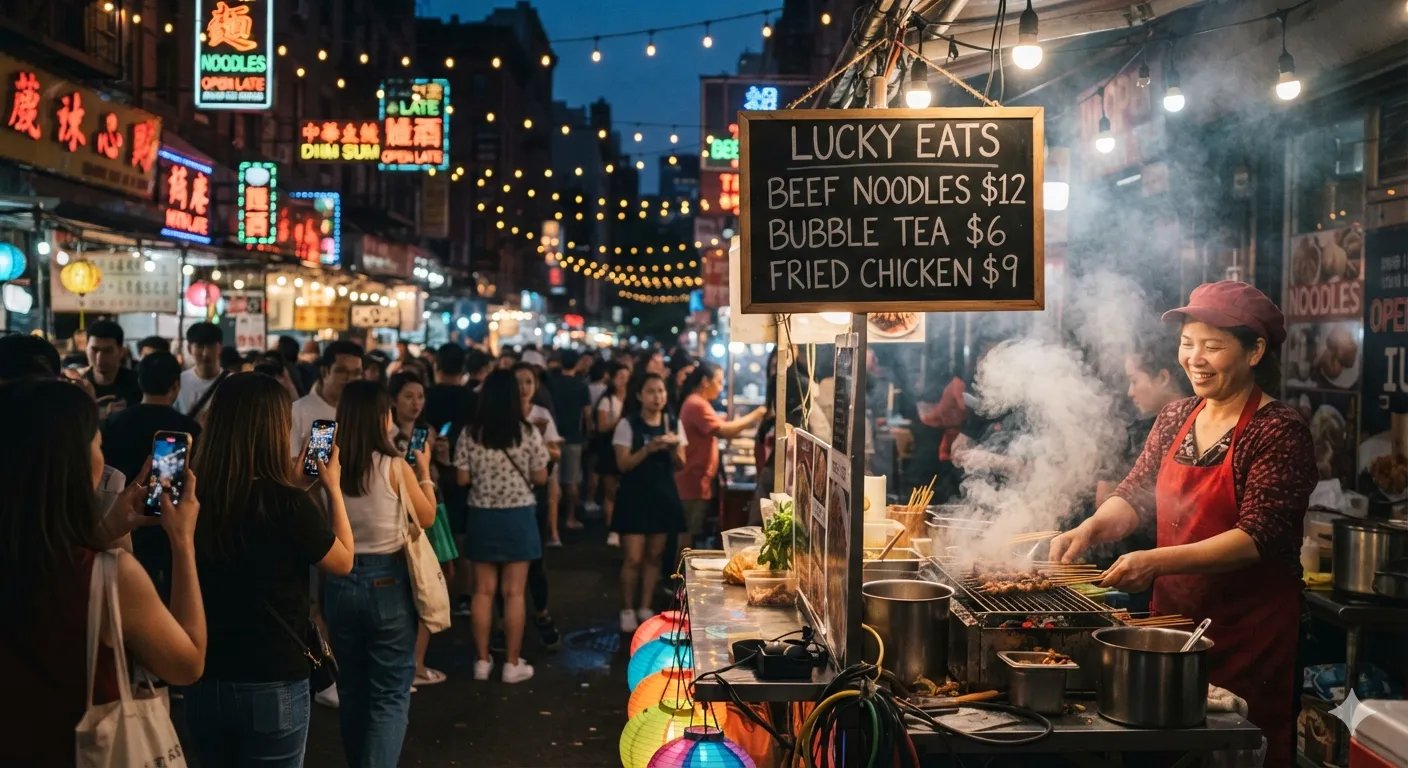
Nano Banana 2 Lite
This is the test we expected Lite to lose. It didn't. Both models rendered every line of the menu board perfectly legible, correctly spelled, correctly priced. If your workflow needs short, clean signage text, Lite's typography isn't the bottleneck — that reputation doesn't hold up under an actual side-by-side.
Test 2: Fine Realistic Detail
Same prompt for both: close-up of weathered hands kneading dough, flour dust in natural light.
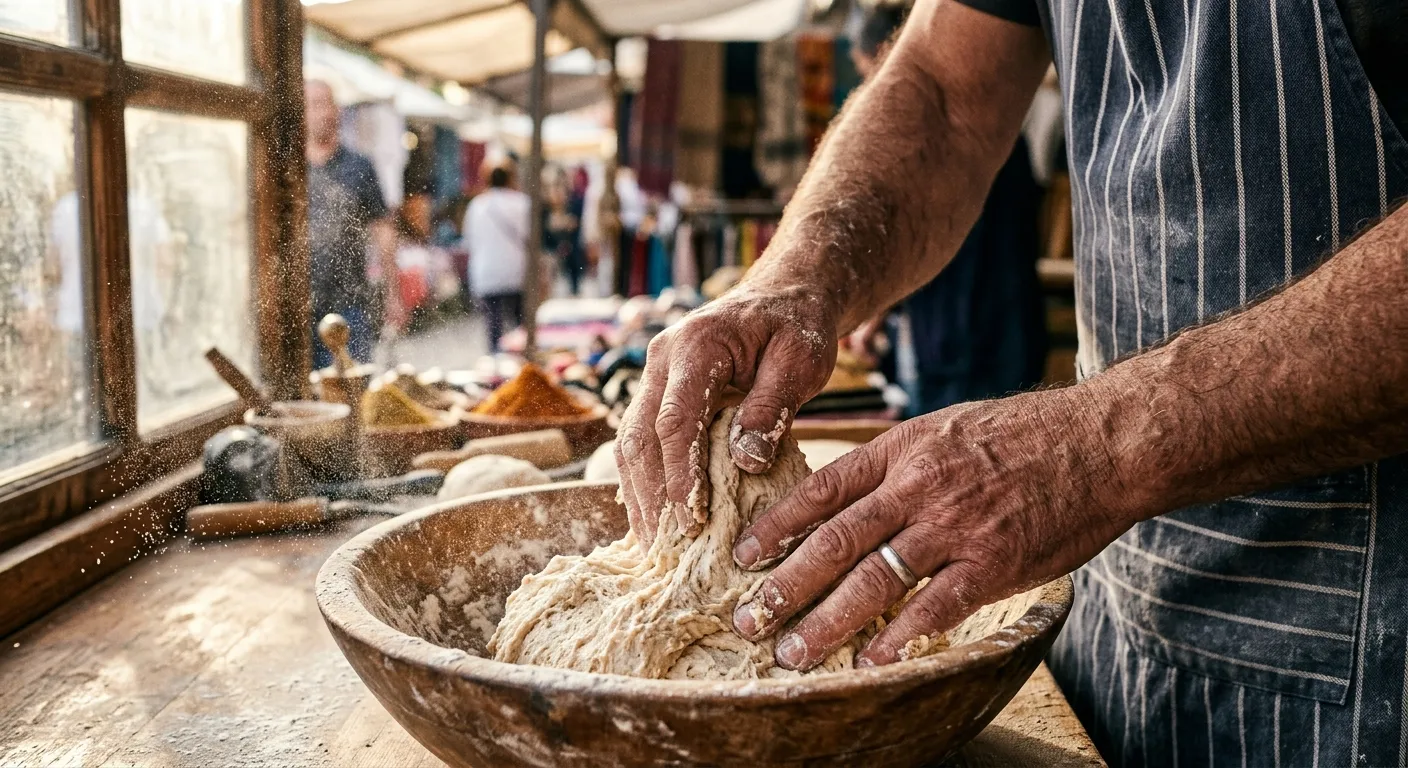
Nano Banana 2
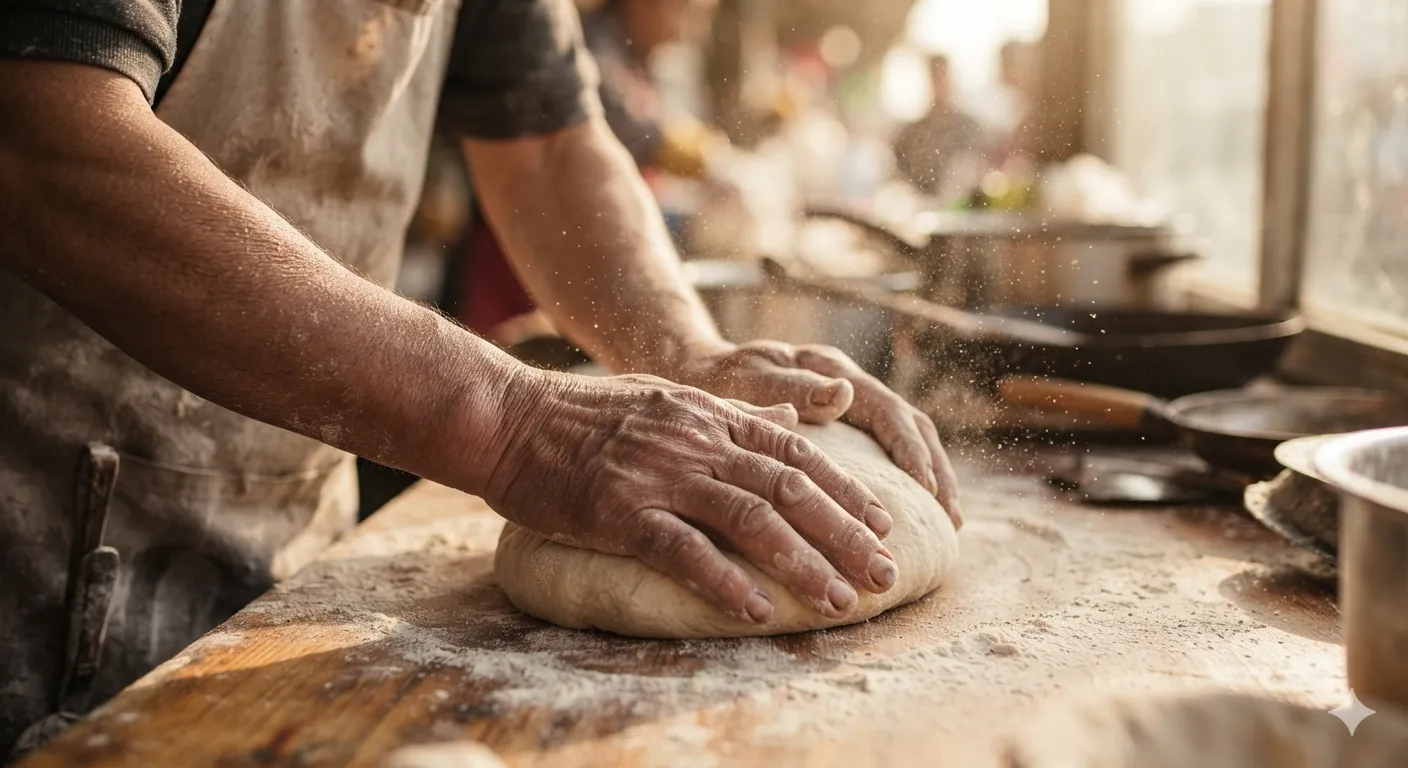
Nano Banana 2 Lite
Skin texture, flour particles, and lighting are close to a toss-up here. Both models render believable pores and fine dust — the fidelity gap that's supposed to separate Lite from full Nano Banana 2 is much smaller than the marketing framing suggests, at least for this kind of close-up detail shot.
Test 3: Multi-Object Instruction Following
Same prompt for both: seven named objects in a specific left-to-right order — telescope, red rotary phone, three books, a vase with sunflowers, glasses on a map, a compass, an alarm clock — with the Eiffel Tower in the background.
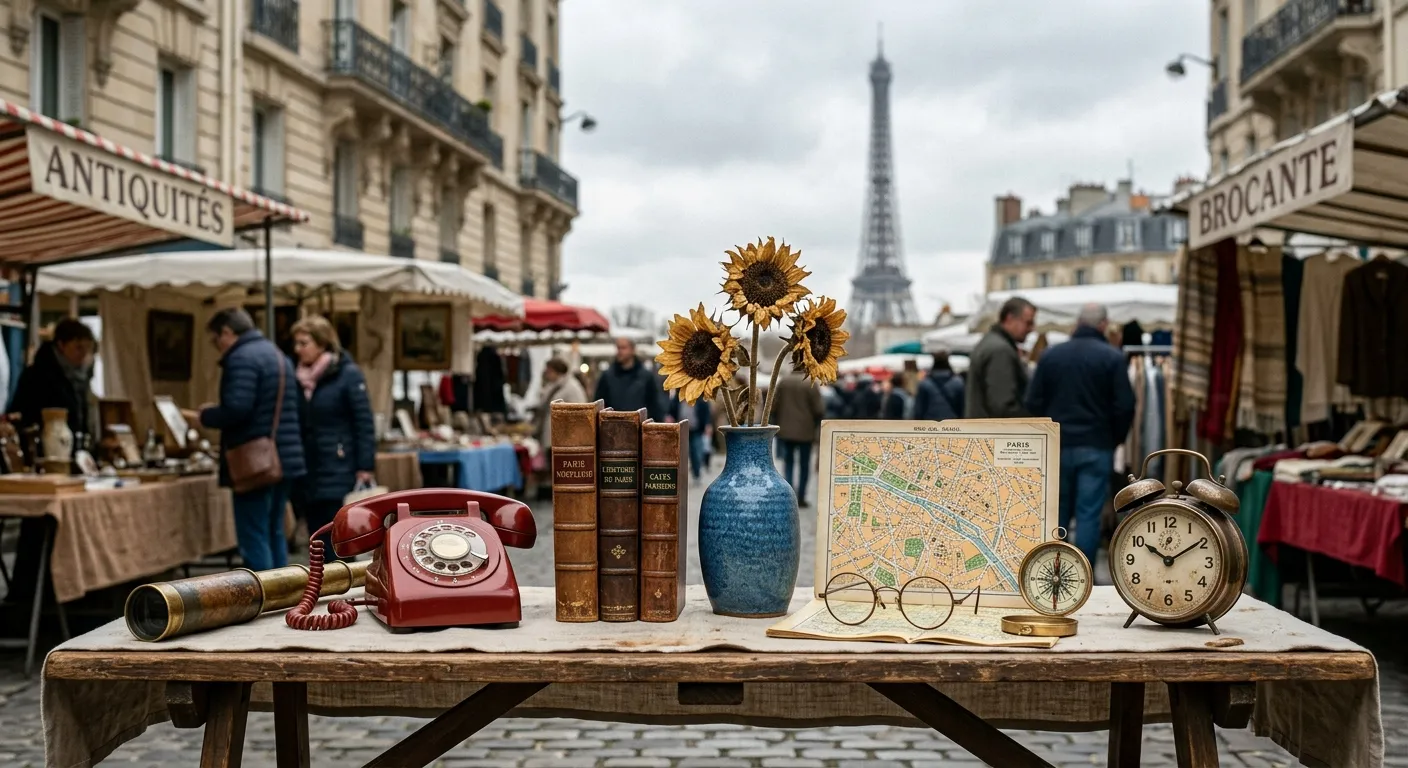
Nano Banana 2

Nano Banana 2 Lite
This is where the gap actually showed up. Nano Banana 2 placed all seven objects in close to the requested order and kept the "busy market" framing from the prompt, with vendors and browsers still in the background. Lite added picture frames nobody asked for and swapped the crowded market backdrop for an empty street — the core objects are recognizable, but the model took more liberties with a dense, multi-constraint prompt. If your work depends on precise counts or exact layouts, that's the failure mode to test for before committing to Lite.
Test 4: Reference-Image Consistency (Virtual Try-On)
Same reference garment photo, same prompt for both: a model wearing the exact jacket shown in the reference image (shown as the inset in each result below).
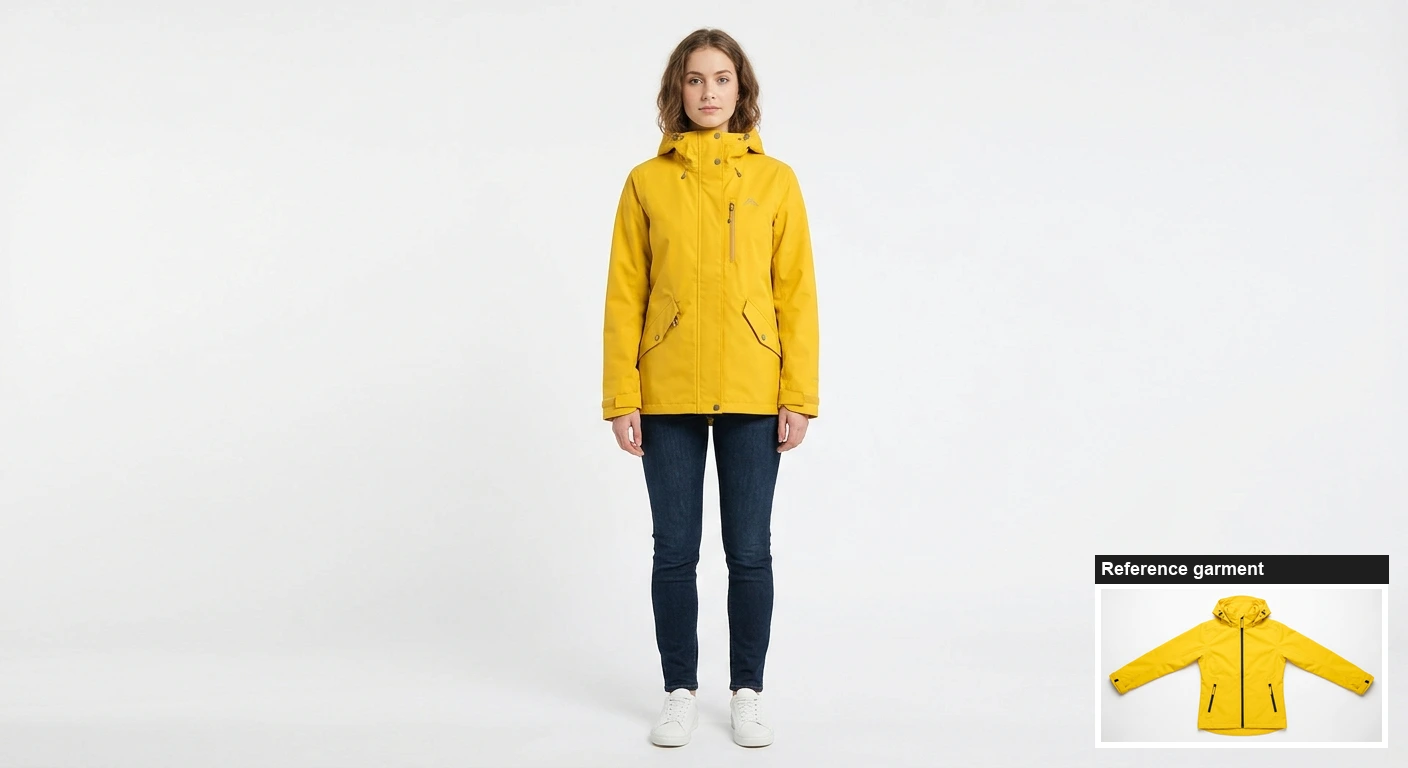
Nano Banana 2
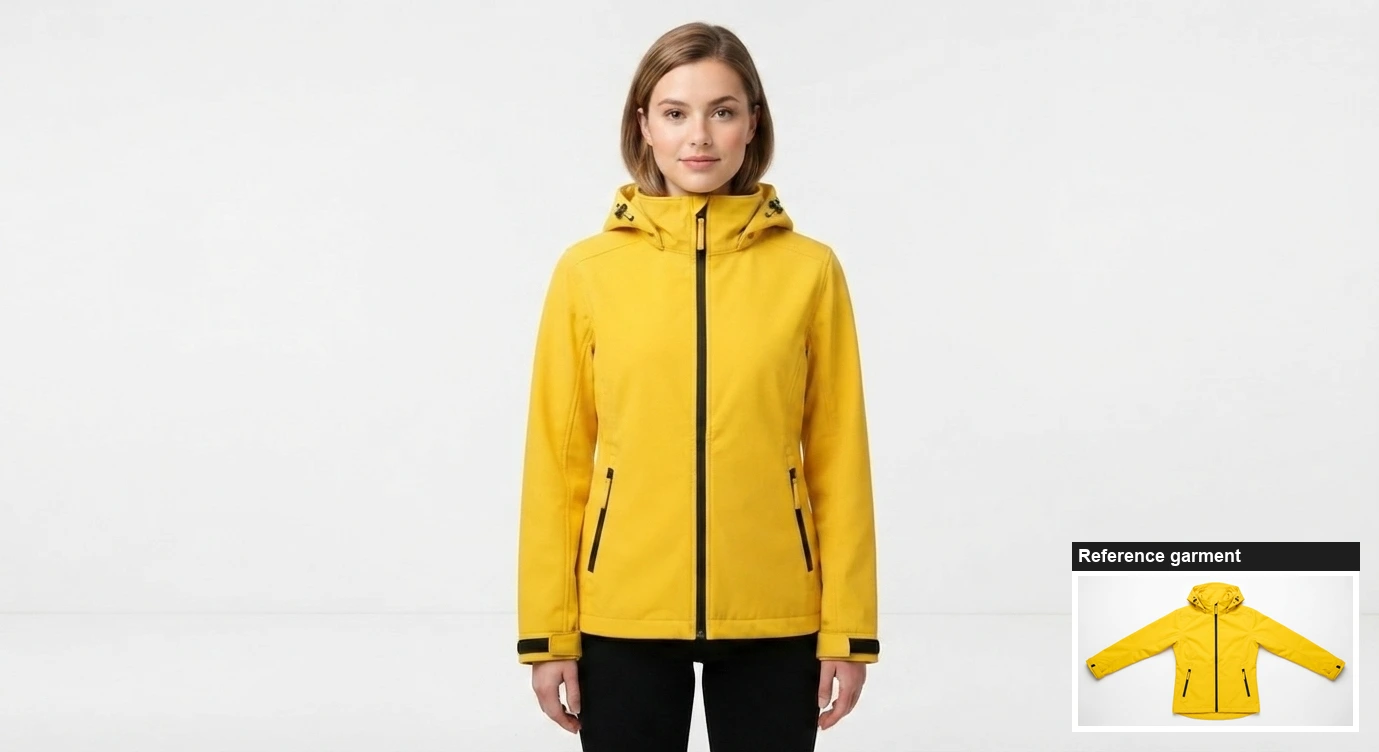
Nano Banana 2 Lite
This is the use case Google specifically markets Lite for — ecommerce try-ons, ad variants — and it's a fair fight. Both models kept the jacket's color, hood, and zip placement close to the reference. Nano Banana 2's silhouette tracked the flat-lay reference slightly more precisely; Lite's version is still clearly recognizable as the same product and would pass for a real product listing. For quick catalog mockups, Lite holds up.
Quick Verdict
Test | Result |
|---|---|
Legible text in a complex scene | Tie — both fully legible |
Fine realistic detail (skin, dust) | Near-tie — small edge to Nano Banana 2 |
Seven-object count and layout | Nano Banana 2 wins — Lite added unrequested objects, dropped the busy backdrop |
Reference-image try-on consistency | Tie — both usable for catalog mockups |
When to Use Which
Use Nano Banana 2 Lite for high-volume iteration where you're generating dozens of variants and picking the best few — ad A/B tests, storyboard drafts, social content at scale, or first-pass ecommerce mockups. The 1K cap and looser instruction-following on complex, multi-object prompts are the price of speed and cost.
Use standard Nano Banana 2 when you need above 1K resolution (it covers 512px through native 4K), or when your prompt has several specific constraints that all need to land correctly — exact object counts, specific spatial arrangement, or scenes with a lot of competing detail.
Neither is the right call if what you actually need is Nano Banana Pro's tighter typography control on dense, text-heavy layouts — that's a separate tier from both of these.
Where to Access Both Models
Both are live in Google AI Studio with a free tier for testing, and through the Gemini API / Gemini Enterprise Agent Platform at the prices above. They're also built into the Gemini app, NotebookLM, and Google Photos at no extra cost for existing subscribers.
We generated this piece's Nano Banana 2 test images through AIReiter, an API that also routes to Seedream, GPT Image 2, and other current-gen models — Lite wasn't available there yet at test time, which is why we ran it directly in Google AI Studio instead.
For more on standard Nano Banana 2's own tradeoffs against the Pro tier, see our Nano Banana 2 vs Nano Banana Pro review. For a deeper dive into Lite specifically — official launch details and hands-on speed tests across different access channels — see our Nano Banana 2 Lite pricing guide.
FAQ
Is Nano Banana 2 Lite better than Nano Banana 2?
Not on quality — our tests showed Nano Banana 2 following complex, multi-object prompts more precisely. Lite wins on price (about half the cost at 1K) and matches Nano Banana 2's speed range closely enough that speed alone isn't a reason to pick either one.
Is Nano Banana 2 Lite free?
Not as a standalone API call — it's $0.034 per image through the Gemini API. It's free to use inside the Gemini app, NotebookLM, and Google Photos if you already have access to those products, and Google AI Studio offers a free tier for testing.
What's the difference between Nano Banana 2 and the original Nano Banana?
The original Nano Banana (Gemini 2.5 Flash Image) has been retired in favor of Nano Banana 2 and Nano Banana 2 Lite, both of which improved on world knowledge, character consistency across generations, and legible text rendering.
Can Nano Banana 2 Lite do 4K images?
No. Its pricing and documentation only list a 1K output tier. For 2K or 4K, you need standard Nano Banana 2 or Nano Banana Pro.
Which one should I use for virtual try-on or product mockups?
Either works — our reference-image test showed both models keeping garment color and shape consistent with the source photo. Lite is the cheaper choice for running many variants at once.