 AIREITER
On August 19, 2026, Liquid AI added a second 1.59 GB Q4_0 file next to the old one in the LFM2.5-2.6B repo: same size, nearly the same name, a very different model. QAD, short for quantization-aware distillation, recovers most of what 4-bit quantization breaks in these checkpoints, and the retention numbers are strong. Download the wrong one of those two files and you are running the unpatched version.
What QAD changes under the hood
QAD stands for quantization-aware distillation. Liquid AI trained these four models - LFM2.5-230M, LFM2.5-350M, LFM2.5-1.2B-Instruct, and LFM2.5-2.6B - to live with Q4_0 rounding while a high-precision teacher model distills into the quantized student during training. The weights see the quantization error coming and adapt around it.
The old Q4_0 files sitting in the same repos are post-training quantization (PTQ): a finished BF16 model gets rounded down afterward, and nothing ever compensates for the error. Per Liquid AI's release post, all four QAD checkpoints "reach roughly 97% of their BF16 averages" across a suite covering reasoning, instruction following, tool use, and agentic behavior, measured as the mean across five runs. QAD is a training-side fix, not a new file format. The output is still a standard GGUF Q4_0 that llama.cpp already runs.
The file-naming trap (and the exact commands)
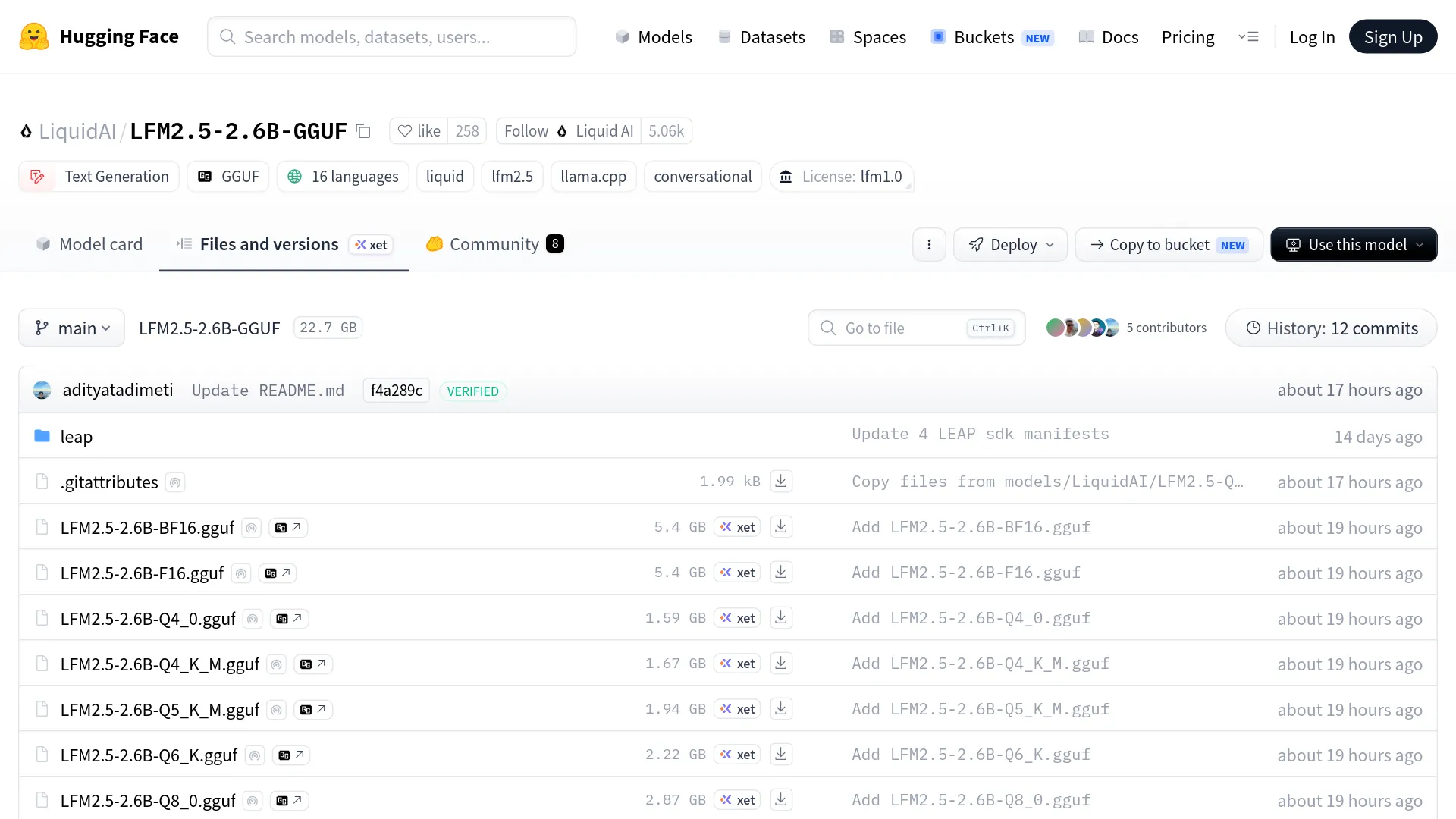
The LFM2.5-2.6B repository contains both LFM2.5-2.6B-Q4_0.gguf and LFM2.5-2.6B-QAD-Q4_0.gguf, listed at the same 1.59 GB. The repo's default snippets point at Q4_K_M, not QAD, so a copy-paste install pulls neither QAD file. You have to name the file explicitly.
The confusion showed up within hours of the release:
"Where to download it? I am seeing it in the huggingface, but not sure it's regular version or QAD. Could you please instruct?" - @Chitacc72 on X
One early user, @MarMarLabs, compared the repo files and found the old and new Q4_0 builds differ by about 4 KB, indistinguishable in a file browser. The workaround is pointing --hf-file at the exact QAD filename:
# official example from Liquid AI's release post
llama-cli -hf LiquidAI/LFM2.5-350M \
  --hf-file LFM2.5-350M-QAD-Q4_0.gguf \
  -p "What is C. elegans?"

# 2.6B, with the sampling flags from the official model card
llama-cli -hf LiquidAI/LFM2.5-2.6B-GGUF \
  --hf-file LFM2.5-2.6B-QAD-Q4_0.gguf \
  -c 4096 --temp 0.1 --top-k 50 --repeat-penalty 1.1
The same --hf-file pattern applies to the 230M and 1.2B-Instruct repos. For server use, @nicolasembleton posted the working shorthand after finding the HF-generated commands incomplete: llama serve -hf LiquidAI/LFM2.5-2.6B-GGUF:QAD-Q4_0. The qualifier after the colon is what selects the QAD build.
What the official numbers say - and what they don't
Liquid AI's benchmark table has each QAD checkpoint retaining between 96.5% and 97.4% of its BF16 baseline. The suite is GPQA Diamond, MMLU-Pro, IFEval, IFBench, Multi-IF, and BFCLv4, plus GSM8K for the two small models and AIME25 for the two larger ones, averaged over five runs.
| Checkpoint | BF16 quality retained | Quality claim | Decode throughput |
|---|---|---|---|
| LFM2.5-230M | 97.1% | matches Q5_K_M within variance | +4–33% vs Q5_K_M |
| LFM2.5-350M | 96.5% | matches Q5_K_M within variance | +4–33% vs Q5_K_M |
| LFM2.5-1.2B-Instruct | 97.4% | matches Q4_K_M | +3–14% vs Q4_K_M |
| LFM2.5-2.6B | 96.6% | matches Q4_K_M | +3–14% vs Q4_K_M |
Throughput was measured on four targets: MacBook Pro and NucBox EVO-X2 on GPU, Samsung Galaxy S26 Ultra and Raspberry Pi 5 on Arm CPU. For the 230M and 1.2B models, Liquid AI also reports QAD Q4_0 matching Unsloth's UD-Q4_K_XL, which the post calls a strong external PTQ checkpoint.
The post gives you no per-benchmark scores, no raw tokens-per-second per device, no file sizes, no RAM figures, no variance bars. Everything is percentage ranges and parity claims. The community filled in the size math immediately:
"So you're telling me I can swap my local LFM2.5-2.6B from F16 to QAD Q4_0 and go from: 5.4 GB -> 1.6 GB, 21 -> 64 tok/s … while keeping ~97% of BF16 performance?" - @firedUp_Neyu, reading Liquid's launch charts
The file-size half of that arithmetic checks out: F16 is 5.4 GB and QAD Q4_0 is 1.59 GB in the official repo. The tok/s values are his reading of the charts, not numbers Liquid AI printed in text.
What the launch post leaves out
Three gaps matter if you are deciding whether to redeploy on these files.
Coverage is exactly four checkpoints. No QAD builds exist for LFM2.5-VL-450M or LFM2.5-8B-A1B as of the release, and the release thread on X has users asking Liquid AI for an 8B version. If your device targets one of those, QAD changes nothing for you today.
The imatrix question is open. The QAD files were trained for Q4_0 but produced without an importance matrix, and quantization watchers flagged it immediately:
"The QAD Q4_0 GGUF was created without an imatrix, which would've also helped with the quality of QAD-trained models." - u/Chromix_, r/LocalLLaMA
A sub-3B model is still a sub-3B model. Quantization recovery does not move the capability ceiling, and the LocalLLaMA thread has the receipts. One NPU user:
"I just implemented LFM2.5 2.6B on my NPU for meeting summaries and - while impressive for the size - the summaries are so much worse than what bigger models do." - u/DerDave
That ceiling is model-side, not quantization-side: the KikoCis quantization report recorded 0/6 SWE-bench Verified instances resolved at Q8_0, and 1.2B users report quality swinging with the runtime - gibberish on 9 of 10 prompts in one Ollama setup, productive sub-5W operation on a single-board computer in another. If frontier quality matters for a given task, cross-checking your local output against a large model through a low-cost LLM API costs cents for a full test set.
QAD Q4_0 vs Q4_K_M: which file to grab
For RAM-tight llama.cpp deployments on these four checkpoints, QAD Q4_0 is the vendor-supported 4-bit default to test first. Same 1.59 GB footprint as plain Q4_0, trained to match Q4_K_M quality (1.2B, 2.6B) or Q5_K_M (230M, 350M) at 3–14% or 4–33% faster decode respectively. If you already run Q4_K_M with RAM to spare, stay put; 80 MB is not the problem you are solving.
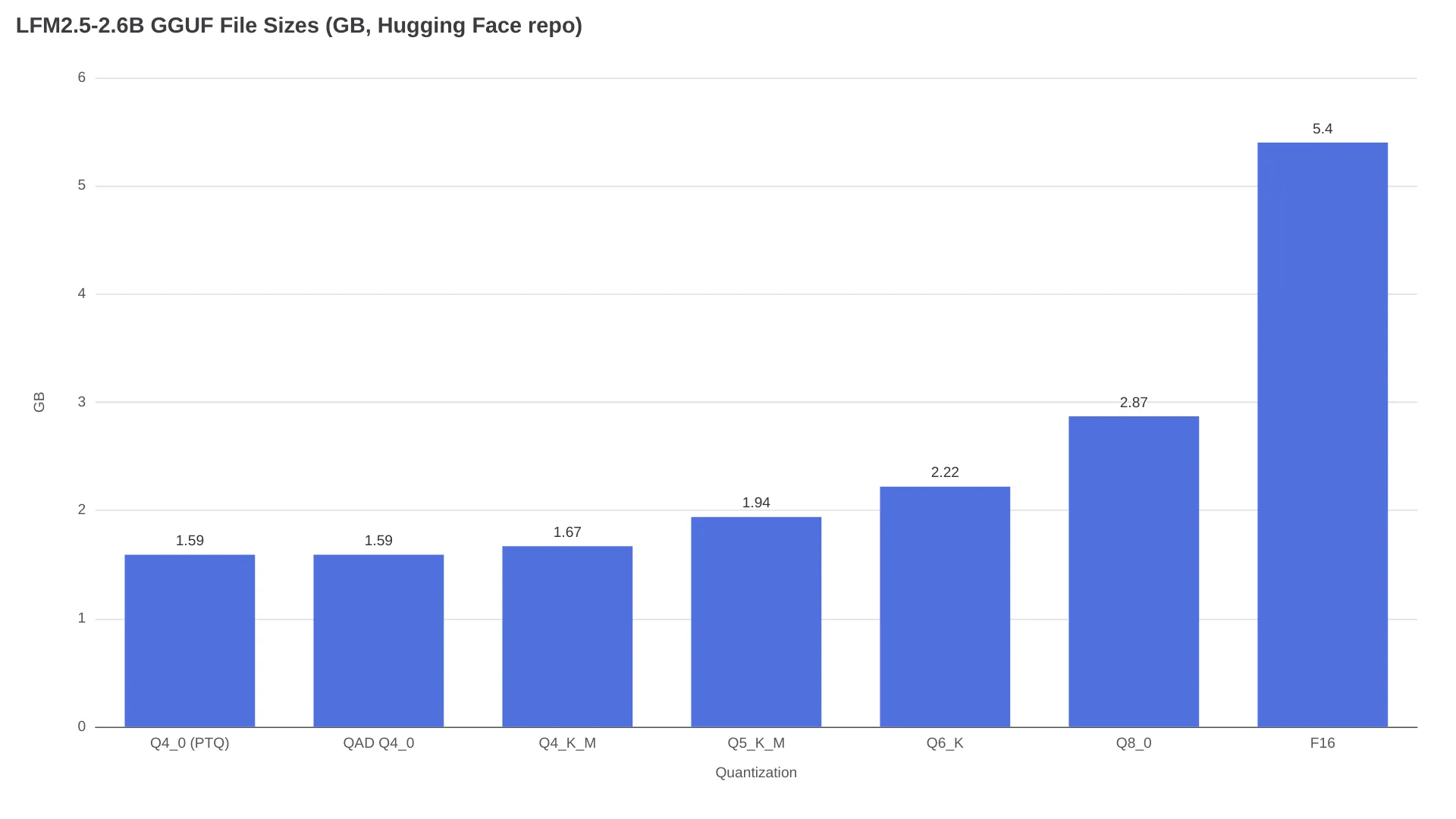
| File (2.6B) | Size | Positioning | Pick it when |
|---|---|---|---|
| Q4_0 (old PTQ) | 1.59 GB | unpatched baseline | skip it, QAD exists now |
| QAD Q4_0 | 1.59 GB | 96.6% of BF16, matches Q4_K_M | 3–4 GB RAM budget, CPU decode, phones, Pi |
| Q4_K_M | 1.67 GB | Liquid docs' default pick | your runtime can't select the QAD file |
| Q5_K_M | 1.94 GB | 91.4% top-1 vs F16, per KikoCis | 6 GB+ RAM |
| Q6_K / Q8_0 | 2.22 / 2.87 GB | near-lossless | 8 GB+, quality-first |
Context for those parity claims: the KikoCis PTQ ladder measured Q4_K_M at 84.36% top-1 token agreement against F16 on this model, versus 95.07% for Q6_K and 98.23% for Q8_0. Liquid's claim is that QAD closes the 4-bit fidelity gap at the same byte count - their numbers, five runs, no independent replication yet. One calibration from the release-day discussion:
"This is not 'Q4_0 beats K-quants.' It's that these four checkpoints were trained for Q4_0." - @MarMarLabs
Do not generalize the win. Other models' Q4_0 files are still ordinary PTQ.
On memory, the launch post gives no RAM figures, so use the KikoCis repo's calculations: the 2.6B KV cache runs about 16 KB/token in f16, roughly 0.54 GB at 32K context and 2.15 GB at the native 128K window, halved by --cache-type-k q8_0 --cache-type-v q8_0. QAD Q4_0 weights at 1.59 GB plus a 32K window is about 2.13 GB before runtime overhead, and 128K pushes past 3.7 GB - treat 4 GB as marginal and verify allocation on your target runtime.
FAQ
Is QAD Q4_0 better than Q4_K_M?
For these four checkpoints, Liquid AI's numbers say QAD Q4_0 matches Q4_K_M quality (or Q5_K_M for the two smallest) at higher decode speed in a smaller file, so on a RAM budget, yes. The figures are vendor-run, five repeats, with no independent replication yet.
Does Ollama or LM Studio pick up the QAD file automatically?
No. Ollama's documented route is ollama run hf.co/LiquidAI/LFM2.5-2.6B-GGUF:Q4_K_M, per the official repo page, and Hugging Face's default snippets also target Q4_K_M. Any GGUF-capable runtime can load the QAD file, but you must select it by explicit filename or the :QAD-Q4_0 qualifier.
How much RAM does LFM2.5-2.6B QAD Q4_0 need?
Weights are 1.59 GB; the KikoCis calculations put the f16 KV cache at ~0.54 GB for 32K context and ~2.15 GB at 128K. Weight-plus-cache math lands near 2.13 GB at 32K and 3.74 GB at 128K before runtime overhead, and Q8_0 KV-cache quantization halves the cache cost.
Which LFM2.5 models have QAD checkpoints?
Only LFM2.5-230M, LFM2.5-350M, LFM2.5-1.2B-Instruct, and LFM2.5-2.6B as of August 19, 2026. The VL-450M and 8B-A1B variants have none, though users have asked Liquid AI for an 8B QAD build on the release thread.
Can I use LFM2.5 QAD checkpoints commercially?
The repos are tagged LFM Open License v1.0. Community repos summarize the terms as permitting commercial use for entities under $10M USD annual revenue, with a separate Liquid AI commercial license required at or above that threshold (KikoCis's summary). Read the license text itself before shipping.
Is the 97% claim independently verified?
Not yet. The 96.5–97.4% retention figures are Liquid AI's own five-run averages published with the release; no third-party benchmark of the QAD files had appeared when this was written, and the imatrix question is still open on r/LocalLLaMA.
Run your own A/B tonight
What you care about is your task's error rate, not a benchmark average. Take ten of your real prompts - tool-call JSON, your extraction schema, your language - and run both files with identical settings:
llama-cli -hf LiquidAI/LFM2.5-2.6B-GGUF \
  --hf-file LFM2.5-2.6B-QAD-Q4_0.gguf \
  -c 4096 --temp 0.1 --top-k 50 --repeat-penalty 1.1 \
  -p "<your prompt>"

llama-cli -hf LiquidAI/LFM2.5-2.6B-GGUF \
  --hf-file LFM2.5-2.6B-Q4_K_M.gguf \
  -c 4096 --temp 0.1 --top-k 50 --repeat-penalty 1.1 \
  -p "<your prompt>"
Count parse failures and wrong tool picks per file, not vibes. The unresolved trade-off is real: quality-per-gigabyte averages favor QAD Q4_0 on paper, but your deployment's failure modes - empty answers when reasoning eats the token budget, format drift at temperature - depend on the runtime and the task. Only your own ten prompts can price that.