 AIREITER
Close the laptop and a normal chat session is over. Grok Bot is built for the opposite: a named agent can keep role context, files, browser sessions, and routines on a cloud computer. That makes it more than a better chatbot, but early-beta reliability and shared state still rule out unsupervised critical work.
What Grok Bot is—and what it is not
Grok Bot is an early-beta agent product that xAI announced on August 11, 2026. The official description is not “Grok with a longer prompt”; it is a set of named AI teammates that can use a cloud computer, connected tools, websites, and files to carry work forward.
The important distinction is the unit of work. A regular Grok 4.6 chat experience is primarily a conversation in which the user asks, reviews, and acts. A Grok Bot is a persistent worker with an assigned role, an execution environment, and a history of work that can continue after the user leaves.
| Capability | Normal chat session | Grok Bot |
|---|---|---|
| Identity | A model responds within the current conversation | A named Bot has a job, title, description, and its own conversation |
| Memory | Context is mainly supplied through the session and available memory features | The Bot can retain role context, stable preferences, work summaries, files, and browser sessions |
| Tools | Tools may help answer the current request | Connectors, MCP tools, browser interaction, terminal, and filesystem can be used to complete work |
| Computer state | The user normally opens the target app and applies the answer | A persistent cloud computer can hold files, logins, sessions, and unfinished work |
| Time | The user waits for a response or starts another turn | Background turns, scheduled routines, and event-triggered work can continue while the device is closed |
| Risk | The user usually performs the consequential action | The Bot may propose or perform actions in real systems, so approvals and narrow boundaries matter |
This is why the right comparison is not “Which chatbot writes better?” It is “Which parts of the job remain after the chat turn ends?” The official Grok Bot overview and launch announcement support that product-level distinction, while also making clear that the product is still beta software.
The four state changes that make it agentic
Grok Bot feels different from a chat session because four kinds of state persist beyond a single answer: the Bot’s identity, its working memory, its tool access, and its computer environment. Each one adds useful continuity, but each one also increases the cost of a mistake.
Persistent identity: a role with ownership
A Grok Bot is designed to own a continuing responsibility rather than answer unrelated prompts. The Bot-management documentation describes a Bot as a durable teammate with a name, a job, its own conversation, and working context that develops over time.
That makes a role such as “Weekly account health” more useful than a generic “General Helper.” The profile can hold durable instructions such as “prepare a linked watch list, but never contact a customer without approval,” while the conversation can contain the current account list and one-off assignment.
Identity here does not mean consciousness or an independent legal actor. It is an operational identity: a stable owner that tells the system which context, skills, routines, and boundaries should apply.
There is an important limit. A named Bot is not a permission boundary. All Bots under one user account use the same persistent cloud computer, so creating separate Bots does not create separate security compartments.
Memory: continuity, not truth
Grok Bot can retain stable working preferences, important facts, role context, and summaries of earlier work. That reduces the need to restate a recurring process, but the official documentation explicitly warns that memory is not a substitute for an authoritative, current source.
The practical split looks like this:
- Put durable behavior in the Bot description.
- Keep changing facts in the source system.
- Ask the Bot to reopen current records for consequential decisions.
- Correct stale assumptions directly instead of trusting an old summary.
Memory also has a lifecycle that differs from a chat transcript. The Bot documentation says duplication copies a Bot’s profile, settings, enabled skills, routines, and avatar, but not conversation history, learned memory, or chat attachments. Deleting a Bot removes its profile, conversation, and routines, but shared files and browser sessions may remain on the cloud computer.
That is more useful than starting every task from zero, but it is not the same as a reliable database. A chat session can be forgetful; a persistent Bot can be persistently wrong if its source data and instructions are not maintained.
Tools: acting inside the user’s systems
A normal chat response gives the user text, code, or a recommendation to apply elsewhere. Grok Bot is designed to use connectors or MCP where available and to operate websites through a browser when a clean API or integration does not exist.
That difference matters for old supplier portals, internal dashboards, browser-only administration tools, and workflows that are difficult to integrate. It also changes the failure mode: a weak answer wastes review time, while a wrong browser action can create or alter real data.
The current security and privacy guidance says users should take over for passwords, passkeys, two-factor codes, CAPTCHAs, and payment confirmations. It recommends narrow approval rules for sending, publishing, purchasing, deleting, changing permissions, accepting legal terms, or modifying production systems.
Those controls are useful, but they are not a promise that every action is harmless. A user still needs to inspect the target, scope, and values in an approval request before allowing it.
Computer state: a place where work continues
The persistent computer is Grok Bot’s clearest difference from a chat session. The official overview describes a user-scoped cloud virtual machine with a browser, filesystem, and terminal; the FAQ says background work can continue after the desktop app, laptop, or phone is closed.
The state can include:
- Files in the shared workspace.
- Browser sessions and application logins.
- Terminal-side credentials and generated artifacts.
- A routine’s partially completed work.
- The setup needed for a later Bot or handoff.
This persistence removes a great deal of setup friction. You do not have to reopen every page, upload the same working files, or explain the same role before each task.
It also creates a larger blast radius. The official FAQ is explicit that all Bots belonging to one account share one cloud computer, including files, browser sessions, and logins. Separate Bot screens support parallel work, but they are not separate security boundaries.
From chat reply to delegated workflow
Grok Bot turns continuity into automation through skills, routines, and Bot-to-Bot handoffs. A skill describes how a task should be done; a routine tells a particular Bot when to run it, such as on a schedule or after a supported event.
The documented workflow is intentionally incremental:
- Do the task once and check the result.
- Save the method as a reusable skill with inputs, validation, output, and approval rules.
- Test it with safe data.
- Convert it into a scheduled or event-triggered routine only after the process is reliable.
The skills and routines documentation says a routine can run while the laptop is closed. It also says a Bot can own up to 50 routines and that the system retains the 20 most recent run records for each routine.
“Teach a task” lowers the setup barrier further. When available, it records visible browser interaction for up to 10 minutes and turns the demonstration into a draft skill. That draft still needs decision rules, failure handling, and approval boundaries; one successful demonstration does not cover every branch of a messy website.
Multiple Bots can work in parallel and exchange messages. Group chats support 2–6 Bots, and the collaboration documentation says handoffs are visible in the conversation. The benefit is delegation without manually relaying every result; the cost is duplicated work or noisy loops when too many Bots respond to the same request.
One detail deserves more attention than the marketing phrase “test run.” The official routine guide says a test run can navigate websites, change files, and call connected tools. It is a check of real behavior, not a guaranteed simulation.
Where the agent model breaks down
Grok Bot’s architecture is compelling when the work is repetitive and reviewable, but the same persistence that makes it useful also makes mistakes durable. The current evidence points to four practical limits: shared computer state, incomplete policy enforcement, fragile web automation, and unpredictable consumption for some users.
The shared environment is the first constraint. Files, browser sessions, and logins are available across a user’s Bots, so a “Finance Bot” and a “Marketing Bot” should not be treated as isolated workers. The official security guide recommends least privilege, scoped service accounts, regular connector review, and cleanup of files and sessions when a project ends.
Approval also has a precise boundary: it controls a proposed upcoming action. It does not undo work the Bot already completed. The documentation says Auto Review evaluates tool calls and computer actions before execution, but it is model-based and should supplement—not replace—least privilege and explicit human review.
Websites add another source of uncertainty. A site can block automation, expire a login, present a CAPTCHA, change its layout, or require a human confirmation. Browser access is powerful precisely because it reaches systems that lack APIs; it is also less stable than a narrowly defined structured integration.
Real-user reports reinforce the gap between an interesting agent and a dependable digital employee. In a Reddit discussion about actual Grok Bot usage, one user described the current experience this way:
“Right now it makes a fun little concierge, a glorified personal information manager.” — u/BoddhaFace in r/grok
That is a useful description of the product’s current sweet spot: collecting, organizing, monitoring, and preparing work rather than owning an irreversible business process. The same thread includes a concrete consumption complaint:
“I started today with the Grok integration. I did basic stuff. I saw 11% of usage. That’s pretty insane.” — u/SubtleFuryTuesday in r/grok
These are user reports, not platform-wide measurements. They do matter for a review because official billing documentation does not publish a simple quota table for every workload; it says usage depends on agent steps and tokens, resets weekly, and can continue through on-demand usage when enabled.
Grok Bot review: who should use it now?
Grok Bot is worth testing when the bottleneck is a repeatable, multi-step workflow inside tools you already use, especially when the output can be reviewed before anything external happens. It is not worth buying a high-tier subscription solely because a launch demo makes autonomous work look finished.
| Situation | Verdict | Safer operating boundary |
|---|---|---|
| Research briefs, monitoring, sorting, and draft preparation | Good fit to test | Request sources, timestamps, and a reviewable deliverable |
| Browser-only tools with no useful API | Best fit | Start read-only; use a scoped account and expect UI breakage |
| Repetitive internal operations | Conditional | Keep writes, messages, and approvals human-controlled at first |
| Customer support replies, refunds, or outbound sales | Wait or draft-only | Let the Bot prepare responses; a person sends or commits them |
| Production systems, purchases, permission changes, or deletion | Do not run unsupervised | Require approval and use a reversible staging workflow where possible |
| Regulated or highly confidential work | Wait for governance evidence | Cloud storage and shared per-user state need explicit security review |
| Casual questions and writing help | Use normal chat | A persistent computer and routine layer add little value here |
Access is part of the value calculation. Cursor’s current official pricing page lists the following monthly plans and positions Grok Bot as an included feature on paid plans:
| Cursor plan | Listed price | Grok Bot position |
|---|---|---|
| Hobby | Free | Grok Bot is not listed among the included features |
| Pro | $20/month | Includes Grok Bot |
| Pro+ | $60/month | Includes higher usage than Pro |
| Ultra | $200/month | Highest individual usage tier listed |
| Teams Standard | $40/user/month | Includes Grok Bot and team administration |
| Teams Premium | $120/user/month | Includes higher usage than Standard |
| Enterprise | Custom | Advanced organization controls and managed access |
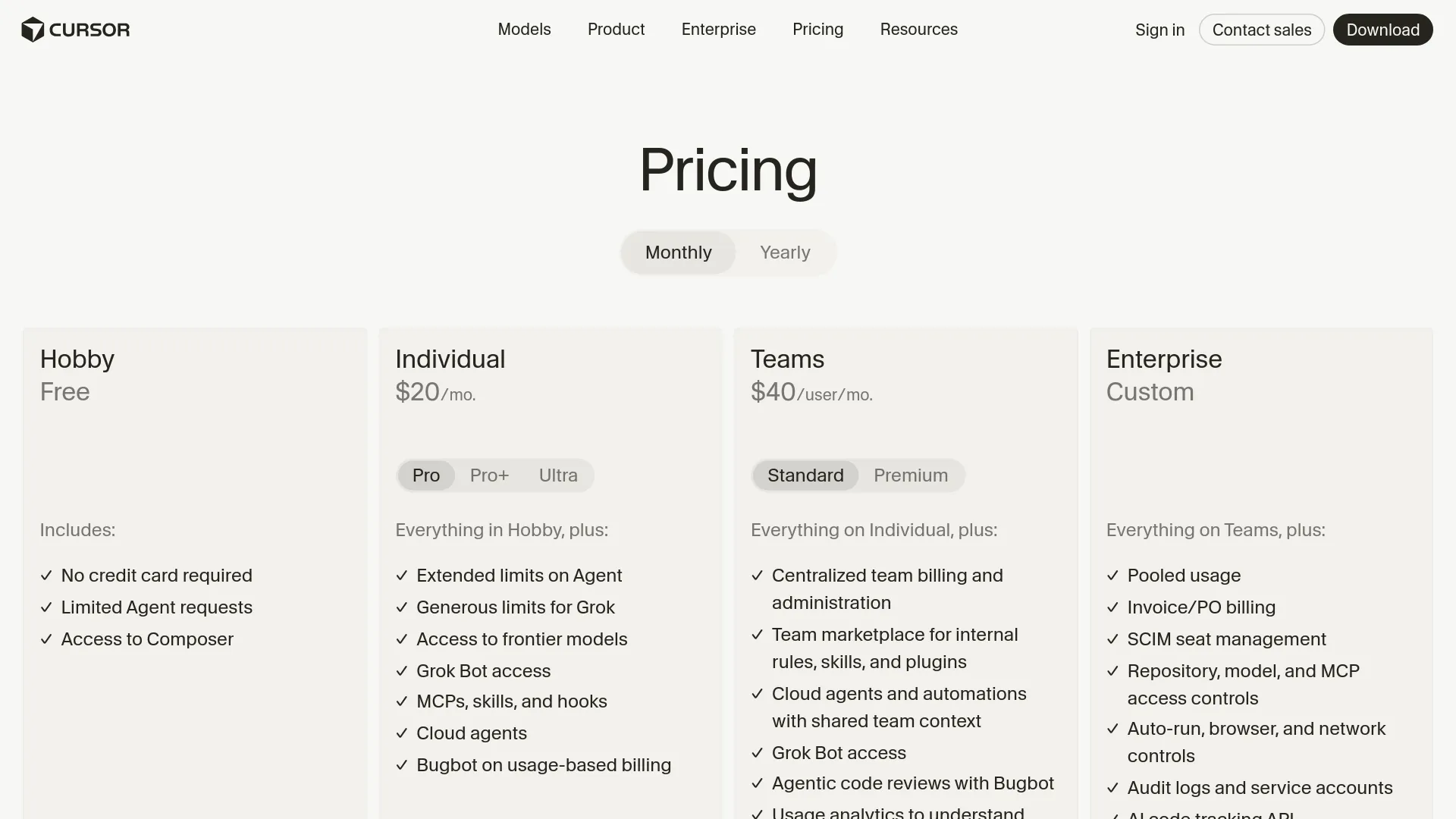
The Grok Bot billing guide says usage is separate from ordinary message count: agent steps and tokens drive consumption. Paid access resets weekly, and a free trial is a usage credit within a 7-day window rather than a guarantee of seven days of unrestricted work. Exact weekly quotas and the cost of every workflow are not stated on that page, so check the plan screen before starting a long autonomous job.
The practical buying rule is simple: if you already have an eligible plan, run one narrow, reversible workflow and measure the time saved after correction. If you would need to purchase a $200 plan just to see whether the concept works, wait for more reliable usage data and stronger controls.
FAQ
Is Grok Bot the same as regular Grok chat?
No. Regular Grok chat is centered on a live conversation and user-directed follow-through; Grok Bot is designed around named agents that retain working context, use tools, operate a cloud computer, and run background workflows.
Does Grok Bot remember between sessions?
Yes, official documentation says a Bot can retain role context, stable preferences, important facts, summaries, files, and browser sessions. That memory supports continuity but is not an authoritative source for changing facts, so important decisions should be checked against current records.
Can Grok Bot keep working when my laptop is closed?
Yes. Its background turns and routines run on the cloud computer rather than on the local device. Closing the laptop does not remove the need to review approvals or deal with failures when the Bot reaches a human-only step.
Are separate Bots isolated from each other?
No. Bots under one account share one persistent cloud computer, including its files, browser sessions, and logins. Their separate screens and conversations organize work, but they are not security boundaries.
Can Grok Bot use websites without APIs?
Often, yes. It can use browser-based services without a dedicated connector, but login prompts, CAPTCHAs, anti-automation controls, layout changes, and human confirmations can interrupt the workflow.
Is Grok Bot worth paying for?
It is worth testing for an existing eligible subscriber with a repeatable, low-risk workflow and a measurable deliverable. It is not a strong reason by itself to buy a high-priced plan, and it is a poor fit for unsupervised production, financial, customer-facing, or regulated work.
The decision in one sentence
If Grok Bot access is already available, start with a read-only or draft-first task that has a clear finish line; if it is not, do not buy the demo before the persistent-state risks and real workload cost make sense for you.