 AIREITER
Looking for a Gemini AI photo prompt you can copy and paste? Start with the job, not a style name: an uploaded-photo edit needs a clear identity lock, while a new image needs a full scene description. This split helps avoid vague prompts that can produce generic results.
Google's official Nano Banana prompt guide recommends describing the subject, setting, style, and overall feel, then adding precise instructions for edits or text. I also ran three small model-level tests through AIReiter's Nano Banana Pro image model on August 11, 2026. The outputs below are useful examples, not a universal benchmark, and a different Gemini surface or account can produce different results.
Choose the right Gemini photo prompt in 30 seconds
Use an uploaded-photo prompt when a real person, object, or old print must remain recognizable. Use a text-only prompt when you are creating a fictional scene or a generic subject from scratch; in that case, the prompt must carry all of the visual information.
| Your goal | Upload a photo first? | Start with |
|---|---|---|
| Keep your face but change clothes or location | Yes | The uploaded-photo prompts below |
| Restore an old print or repair damage | Yes | The restoration prompt |
| Combine two people from separate photos | Yes, one or more references | The couples and family prompt |
| Create a new headshot or travel image | No | The text-only prompts below |
| Make a product image with a label | No, unless you have a product reference | The product prompt and text repair line |
Google's Gemini Apps Help documents both image generation and editing. If the source face is heavily obscured or very low quality, start with a smaller edit before attempting a full transformation; model labels and availability can also vary by Gemini product surface.
Copy-and-paste prompts for photos you already have
These Gemini AI photo prompts are for an image you upload in the same chat. The reliable pattern is simple: state what must stay unchanged first, then name the one thing you want to transform.
Change the outfit and background without changing the person
Copy this prompt, then replace the bracketed fields. Keep the identity block intact even when the requested outfit or location changes.
Use my uploaded photo as the identity reference. Keep my exact facial features, age, skin tone, hairline, hairstyle, body proportions, and natural expression unchanged. Change only my outfit to [describe the outfit] and the background to [describe the location]. Keep the same person, pose, camera angle, and approximate body position. Match the new lighting to the background so the edit looks like one natural photograph. Do not beautify, slim, de-age, add accessories, or change my identity. Photorealistic result, [aspect ratio].If the first result changes your face, use a narrow follow-up instead of pasting the full prompt again:
Edit the current result only. Restore the facial geometry, age, skin tone, hairline, and expression from my uploaded reference photo. Keep the outfit and background exactly as they are. Change nothing else.Restore and colorize an old photo
Restoration is different from a makeover. Tell Gemini to repair missing information while preserving the original expression, face shape, clothing, and framing.
Restore the uploaded old photograph. Remove scratches, tears, dust, stains, fading, and small film damage. Reconstruct missing edges conservatively and preserve the original facial geometry, expression, age, hairstyle, clothing, pose, camera angle, and composition. Colorize it with restrained, period-appropriate colors and natural skin tones. Do not modernize the clothing, smooth the face, change the background, add details that are not supported by the photo, or make the person look younger. Keep the result photographic and faithful to the source.For a blurry source, add this line rather than asking for an invented "perfect" face:
Improve clarity only where the source contains recoverable detail; do not invent a new identity or sharpen facial features beyond what the reference supports.Make a couple or family scene from reference photos
When several people are involved, name each reference and count the people in the final frame. This makes face swaps and extra-person errors easier to spot and correct.
Use the uploaded images as identity references. Place the person from photo 1 and the person from photo 2 together in [describe the setting], naturally [describe the action]. Preserve each person's exact facial features, age, skin tone, hair, body proportions, and recognizable expression. Keep the clothing from photo 1 and photo 2 unless I explicitly request a change. Include exactly two people. Do not add, remove, merge, or swap identities. Use [lighting and photographic style], [camera framing], and [aspect ratio].For three or more people, replace "exactly two people" with the correct count and label each reference as photo 1, photo 2, photo 3, and so on. Review the result for faces and hands before making another style change.
Graduation or birthday portrait
Use this compact occasion template when the goal is a believable celebration photo rather than a generic style transformation.
Use my uploaded photo as the identity reference and place me in a natural [graduation / birthday] portrait. Keep my exact facial features, age, skin tone, hair, body proportions, and expression unchanged. Add [cap and gown / birthday outfit], [simple celebration setting], and [warm natural lighting]. Keep one person, a believable pose, and realistic hands. Do not beautify, de-age, add extra people, or change my identity. Use a [4:5 / 3:2] composition, no text, no watermark.Copy-and-paste prompts for new Gemini images
Text-only prompts need a subject, action, setting, composition, lighting, and output format because no reference photo is anchoring the scene.
Realistic professional headshot
Replace the person, clothing, and background while keeping the lighting and composition constraints. This is a model-level test prompt, not a screenshot of the Gemini app.
Create a realistic professional headshot: a woman in her early 30s with natural skin texture and shoulder-length dark hair, wearing a navy blazer over a white shirt, facing slightly toward a large window in a quiet modern office. Use soft window light from camera left, a neutral background, an 85mm portrait-lens look, and a shallow depth of field. Keep realistic proportions and a clean 4:5 composition. No text, no watermark.
AIReiter nano_banana_pro test at 4:5: this sample produced natural window-side light and clear subject separation.
Cinematic travel portrait with negative space
Negative space is more useful when it is tied to a composition and a subject position. Say where the person sits in the frame and what the empty area is for.
Create a photorealistic travel portrait: a person in a rust-colored jacket standing on a quiet coastal cliff at blue hour, with wind moving the fabric slightly and distant sea haze behind them. Use a restrained teal-and-amber color grade, documentary travel photography, a 35mm lens perspective, and natural skin texture. Place the subject on the right third with open negative space on the left. Use a 3:2 landscape composition. No text, no watermark.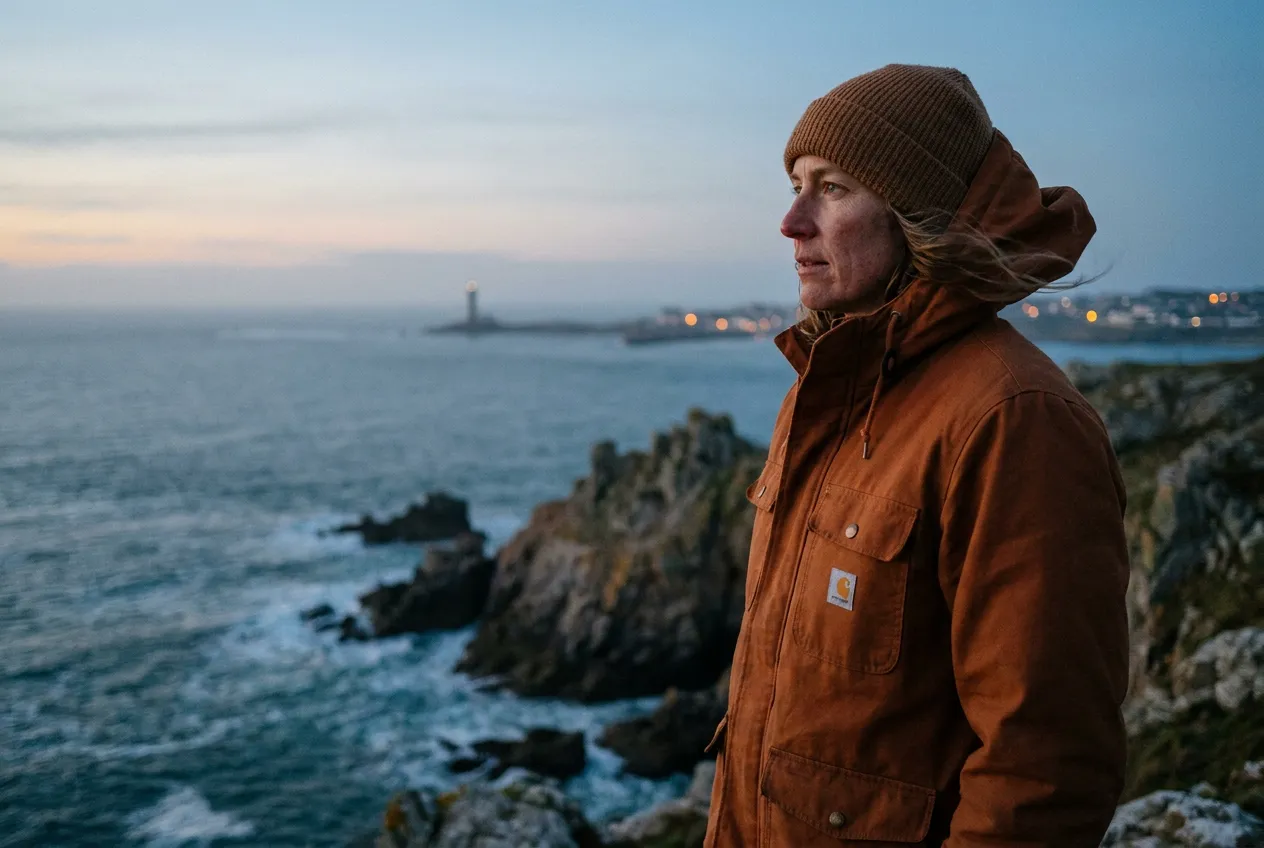
AIReiter nano_banana_pro test at 3:2: the subject stayed on the right third and the left side remained open for a title or crop.
Product photo with a readable label
Put exact text in quotation marks and specify its placement. Keep the wording short; a generated image can still misspell or distort text, especially when the label is small.
Create a clean photorealistic product hero image for a matte black reusable water bottle on a pale stone table, with one green leaf beside it and soft morning window light. Add a believable contact shadow, a minimal warm-grey background, premium studio product photography, a front three-quarter view, and a 4:5 portrait composition. Add the exact readable label text "FIELD / 01" on the bottle, centered and spelled exactly. No other text, no watermark.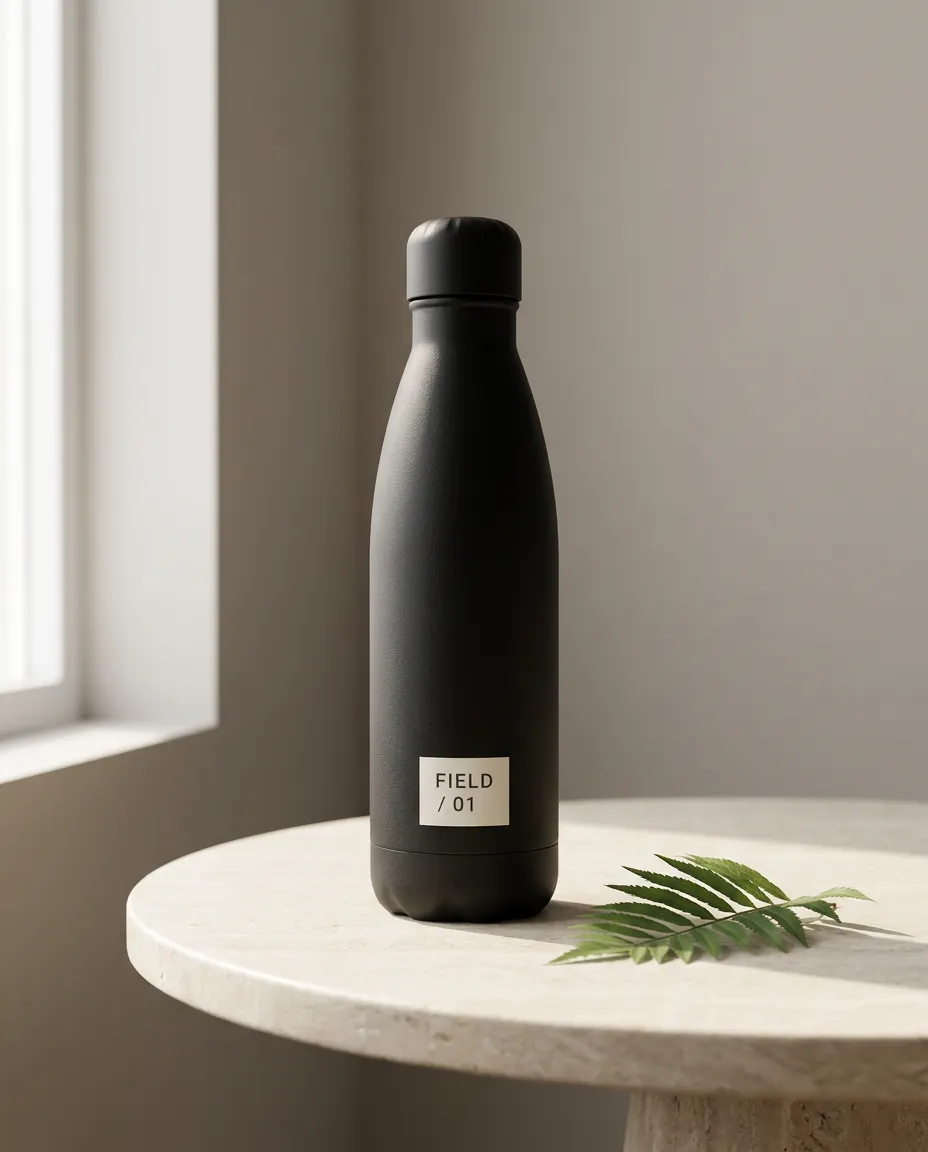
AIReiter nano_banana_pro test at 4:5: the requested label was legible in this sample, not a guarantee of perfect text rendering.
If the label is wrong, paste this follow-up:
Edit only the label. It must read exactly "FIELD / 01" on two lines, with FIELD on line 1 and / 01 on line 2. Keep the bottle shape, lighting, leaf, table, framing, and every other pixel unchanged. Check the spelling before returning the image.Editorial film portrait
Use a style reference after the subject and composition, so "film" changes the treatment without replacing the person or scene.
Create a realistic editorial portrait of [subject] in [specific location], standing [describe pose or action]. Frame the subject as a [close-up / waist-up / full-body] portrait with [camera angle] and [aspect ratio]. Use [light source and direction], natural skin texture, and believable fabric detail. Give it a restrained 1990s film-photography look with subtle grain, gentle highlight roll-off, and slightly faded colors. Keep the scene photographic, not illustrated; no text, no watermark.Y2K digicam snapshot
Use this when you want a recognizable early-2000s snapshot rather than a polished studio portrait.
Create a realistic early-2000s compact-digital-camera snapshot of [subject] at [specific place], wearing [outfit] and [natural pose]. Use direct on-camera flash, slight motion softness, modest sensor noise, imperfect framing, cool night colors, and a small amount of authentic red-eye. Keep the subject's face and body proportions natural. Make it feel like a real candid photo, not a polished fashion image. Use a 4:5 portrait composition, no watermark.Miniature or figurine photo
Scale anchors make this kind of transformation easier to read than the word "miniature" by itself.
Turn [the subject or uploaded photo] into a highly detailed collectible figurine displayed inside a backlit glass cabinet. Make it clearly miniature, about 15 cm tall, standing on an engraved base with a human hand reaching in to adjust it for scale. Keep the subject's recognizable facial features and clothing details. Show softly blurred figurines on shelves behind it, warm display lighting, shallow depth of field, and a photorealistic finish. No text except the small engraved base, no watermark.Repair prompts for common Gemini photo failures
Paste a repair prompt after the first result misses one specific requirement. Use a narrow correction so you can verify one changed requirement at a time.
The face no longer looks like the reference
Use the uploaded reference as the source of truth for identity. Restore the person's facial geometry, age, skin tone, hairline, hairstyle, and natural expression. Keep the current pose, clothing, background, lighting, and composition unchanged. Change only the face so it matches the reference; do not beautify, slim, de-age, or reinterpret the person.The result looks flat or cartoonish
Refine the current image without changing the subject or composition. Replace the flat, illustrated look with physically believable light, natural material texture, realistic lens perspective, soft but directional shadows, subtle depth of field, and small photographic imperfections. Keep the person's identity, clothing, pose, and background unchanged. Do not add a glossy filter or extra detail that is not supported by the scene.TechRadar quoted a Reddit user reporting this failure mode:
"Now, almost every image looks flat or cartoonish, no matter how detailed my prompt is." - TechRadar, August 5, 2026
It is a user report, not a benchmark; the repair prompt above is the actionable part.
Gemini added people or changed the clothing
Edit the current result only. Keep exactly [number] people, with the same identities, faces, hair, body proportions, and clothing as the reference. Remove any extra person or duplicate limb. Do not change the background, pose, lighting, or camera framing. Apply only this requested correction: [one correction].Text in the image is wrong
Edit only the visible text. The text must read exactly "[YOUR TEXT]". Keep the same number of lines, spelling, punctuation, font style, position, perspective, and contrast needed for legibility. Do not change the object, background, lighting, or composition. Perform a final spelling check before returning the image.The editable prompt formula behind these templates
The reusable part of a Gemini AI photo prompt is a six-field brief: subject, action, setting, composition, light/style, and constraints.
| Field | Question it answers | Example |
|---|---|---|
| Subject | What or who is in the image? | A woman in a navy blazer |
| Action | What is the subject doing? | Facing a window, standing naturally |
| Setting | Where is the scene? | A quiet modern office |
| Composition | How is the frame arranged? | Waist-up, subject on the right third, 4:5 |
| Light and style | What visual treatment should it have? | Soft window light, restrained film grain |
| Constraints | What must stay or be excluded? | Preserve identity; no text or watermark |
Google's official guide makes the same recommendation: describe the characters, setting, style, and feel, then be explicit about edits, multiple images, or precise text.
Preserve first, transform second
For an uploaded photo, use this sentence pattern near the beginning:
Keep [identity, object, or layout facts] unchanged. Change only [the requested field]."Keep my exact facial features" is weaker by itself than a complete constraint such as "keep my facial geometry, age, skin tone, hairline, hairstyle, body proportions, and expression unchanged." For the next revision, change one field at a time so a successful part of the image is not accidentally regenerated.
Gemini photo prompt FAQ
Do I need to upload a photo to use a Gemini AI photo prompt?
No. Text-only prompts can create new people, products, or scenes. Upload a photo when you need Gemini to edit or preserve a specific person, object, or old print.
How do I keep Gemini from changing my face?
Use the identity-lock clause in the outfit prompt: facial geometry, age, skin tone, hairline, hairstyle, body proportions, and expression. If the first result drifts, ask for a face-only correction while locking the current clothing, setting, and lighting.
Can I use these prompts with Nano Banana?
Yes, when Nano Banana is the image-generation or editing model available in the Gemini surface you are using. Google DeepMind's prompt guide uses the Nano Banana name, while Gemini Help documents the current Gemini Apps image workflow; model labels and availability can change by product surface.
Why did Gemini return an image that looks almost unchanged?
The requested change may be too subtle, or the prompt may contain more preservation instructions than transformation instructions. Name one visible change, where it should appear, and what must stay; then ask for that single edit in a follow-up.
How many reference photos should I upload?
Use the smallest set that proves the edit. For a single-person transformation, one clear reference is usually easier to inspect; for a couple or family composite, label each photo and state the exact number of people you want in the result.