 AIREITER
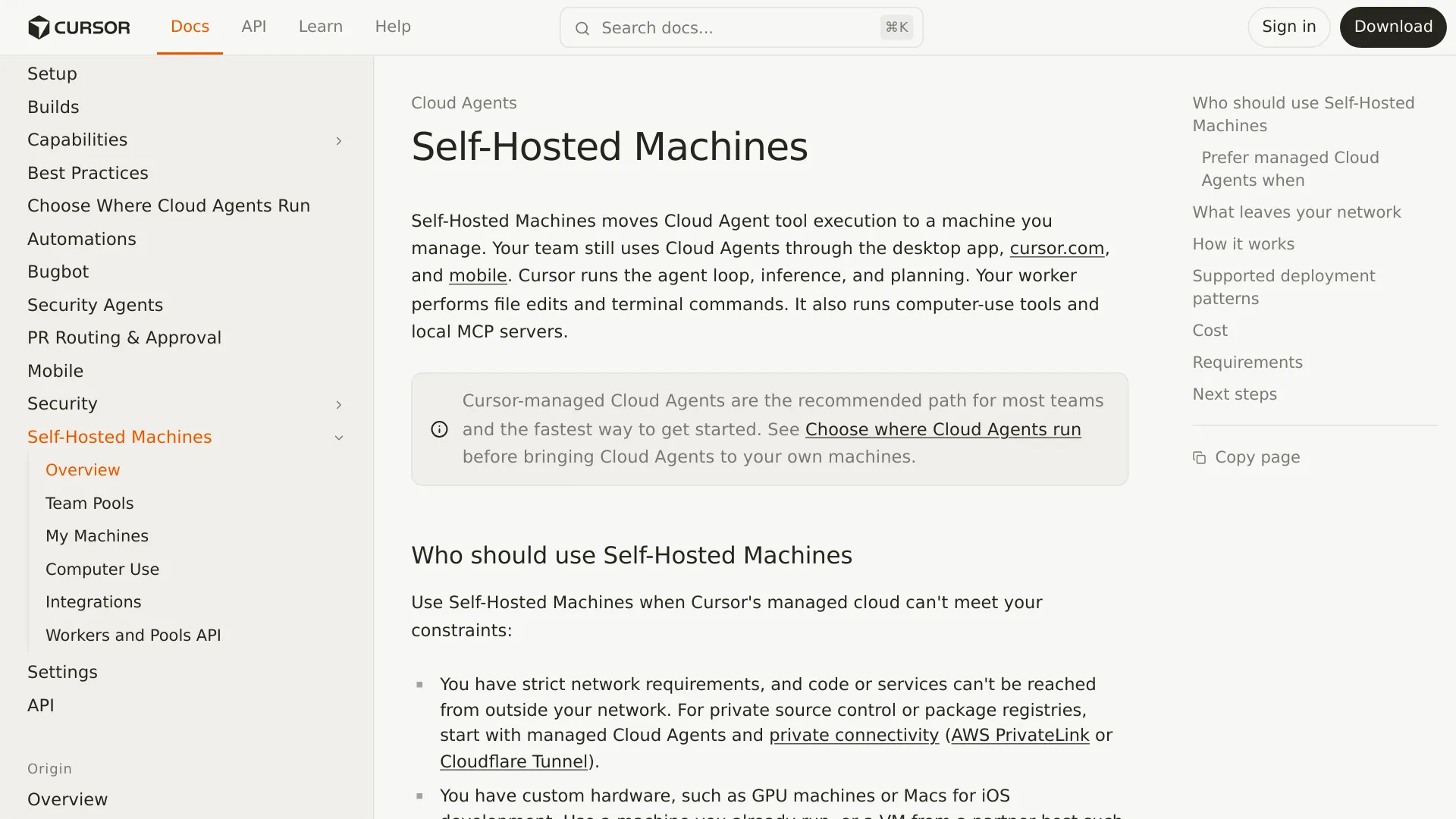
A worker can sit behind your firewall and still send source-code fragments, terminal output, diffs, and screenshots to Cursor. Cursor Self-Hosted Machines are self-hosted execution, not a self-hosted agent or an air-gapped Cursor deployment.
This review focuses on what crosses the boundary and what the controls actually change, using Cursor’s September 2, 2026 announcement, Self-Hosted Machines documentation, and data-use policy.
The data-boundary answer in one table
Cursor splits a Cloud Agent run between its cloud and a worker that you manage. “Self-hosted” describes the execution location, not every system or data path involved.
| Data or system | Where it runs or stays | Can it reach Cursor? | Relevant control or limit |
|---|---|---|---|
| Agent loop, inference, and planning | Cursor cloud | Already in Cursor | Not moved by Self-Hosted Machines. |
| File edits and terminal commands | Your worker | Results can be returned | The worker executes the tools. |
| Full checkout and build cache | Your worker | Not inherently transferred | The complete working copy remains local. |
| Machine-local credentials | Your worker | Not inherently transferred | Keep secrets out of commands, outputs, and artifacts. |
| File contents and diffs | Your worker, then agent context/results | Yes, when needed | Privacy Mode addresses training use, not transfer. |
| Terminal output and local MCP results | Your worker, then tool results | Yes, when returned | Results can contain code or sensitive data. |
| Screenshots and desktop stream | Your worker, then Cursor when produced/shared | Yes | Computer-use sessions can stream the agent desktop. |
| Videos, screenshots, and log references | Cursor-managed artifact storage | Yes, by default | Block the artifact host to disable uploads. |
| API-key model requests | Cursor’s processing path | Yes | BYOK does not bypass Cursor’s backend. |
The important distinction is simple: the full repository can remain on your machine while selected context from that repository still crosses the network for inference. That is partial execution control, not a no-egress guarantee.
What Cursor is actually moving to your infrastructure
Self-Hosted Machines move tool execution to a customer-controlled machine. The worker can edit files, run commands, access internal services, operate a browser, and connect to local MCP servers. Cursor keeps the agent loop, inference, planning, and session orchestration in its cloud.
The worker starts with the Cursor CLI command agent worker start. It opens a long-lived outbound HTTPS connection to Cursor. Cursor states that the connection is outbound from the worker: no inbound port, public IP address, or VPN tunnel is required.
The documented session flow is:
- A Cloud Agent session starts in the Cursor interface.
- Cursor’s cloud agent loop plans the next action.
- Cursor sends a tool call over the worker connection.
- The worker runs the command, edit, browser action, or MCP operation.
- The worker returns the result for the next inference step.
The worker still needs outbound access to api2.cursor.sh and api2direct.cursor.sh; CLI updates and some computer-use setup can also require downloads.cursor.com. The outbound-only design avoids inbound access to your network, but it does not make the worker an offline model runtime.
Cursor positions this split for private repositories or services that hosted workers cannot reach, specialized hardware such as GPUs or Macs, and custom operating systems or build images. If the only requirement is private connectivity, Cursor’s runtime decision guide says to consider managed Cloud Agents with allowlists, Tailscale-like networking, AWS PrivateLink, or Cloudflare Tunnel first.
What can leave the worker—and what Privacy Mode changes
Cursor’s documentation explicitly lists file contents, terminal output, diffs, screenshots, local MCP results, and routing metadata as data the worker may send. The privacy question has three separate parts: what is transferred, whether it is used for training, and how long it is retained.
Privacy Mode is a training control, not a no-egress switch
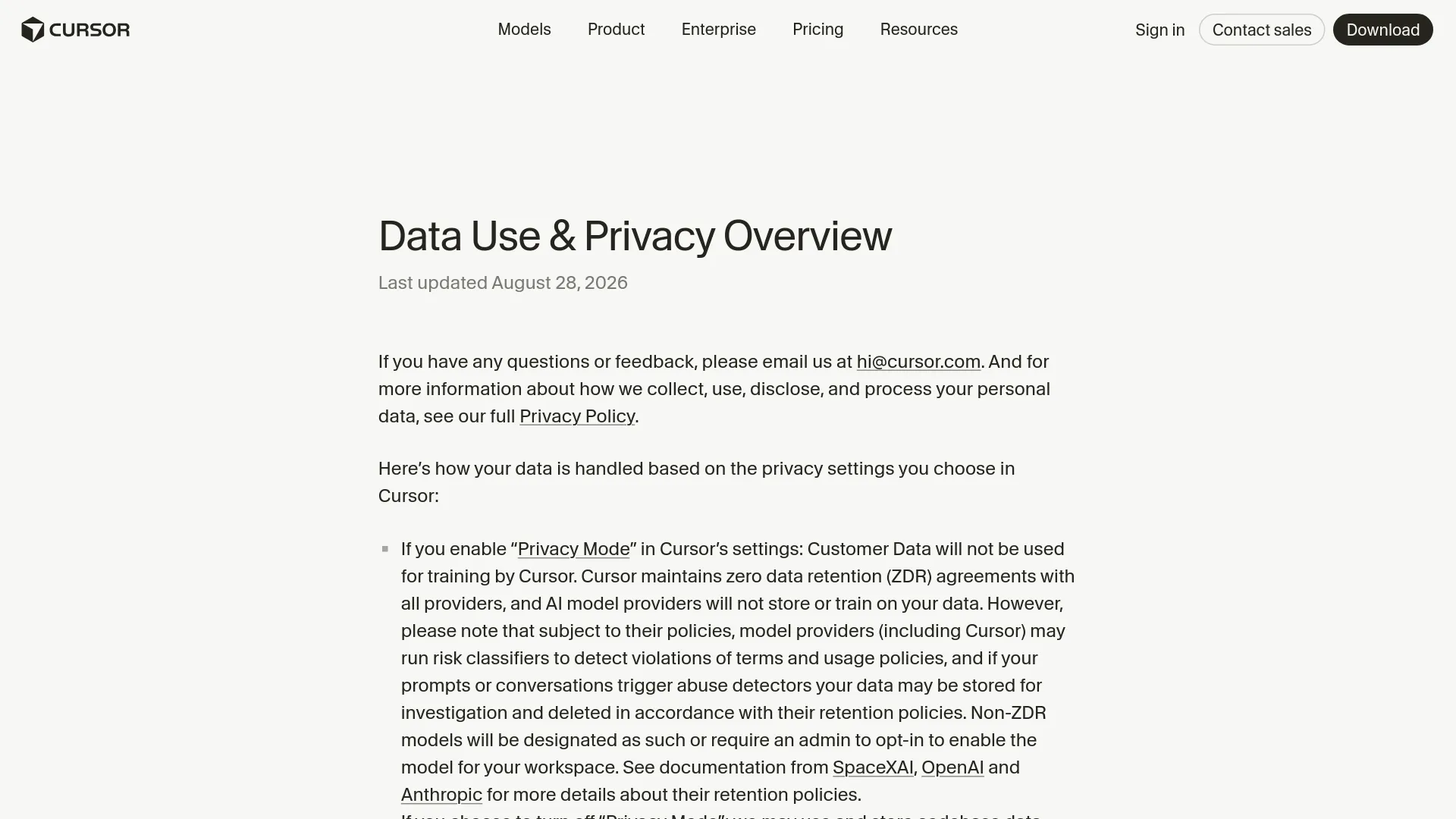
Cursor’s Data Use & Privacy Overview, updated August 28, 2026, says that Privacy Mode prevents Customer Data from being used for training by Cursor and says Cursor maintains zero-data-retention agreements with its providers. The same page qualifies that statement: risk classifiers may retain prompts or conversations for investigation, and temporary file caching can occur for latency and network-efficiency reasons.
Cursor describes cached files as encrypted with client-generated keys, with the keys held on Cursor’s servers for the duration of a request. That is a retention and protection claim from Cursor, not evidence that the request never reaches Cursor’s servers.
The API-key detail matters too. Cursor states that using your own provider API key does not bypass its backend because requests still pass through Cursor for final prompt construction. BYOK can change who authorizes model usage; it should not be treated as a direct, client-to-provider privacy route.
A real user made the same architecture distinction when reviewing the feature:
“Important boundary: Cursor’s self-hosted machines move execution, not the whole agent. Cursor says inference + planning stay in its cloud; tool outputs flow back and may contain code. For security review, treat this as self-hosted execution—not a self-hosted agent.” — @ham_zax, X
The artifact switch is not a data-air-gap switch
Cursor documents a narrow way to stop artifact uploads: block outbound HTTPS traffic to cloud-agent-artifacts.s3.us-east-1.amazonaws.com. Tool calls and tool results continue to work, but screenshots, videos, and log references will not appear in pull requests or the Cursor dashboard.
This is useful when an organization does not need visual artifacts. It is not a complete privacy solution because file contents, terminal output, diffs, screenshots used during inference, and MCP results can still be returned through the agent session connection.
MCP transport creates another practical distinction. Cursor’s Team Pools documentation says command-based, or stdio, MCP servers run on the worker and can reach private networks. HTTP/SSE MCP servers are handled by the Cursor backend for OAuth, session caching, and authentication. A private MCP endpoint therefore needs a transport review, not just a host-location review.
Pick the runtime by your constraint, not by the label
Cursor offers three runtime choices. Self-hosting is the best fit when the execution boundary, hardware, or environment is a written requirement rather than a preference.
| Runtime | Where tool calls run | Best fit | Main responsibility |
|---|---|---|---|
| Cursor-managed Cloud Agents | Cursor-managed isolated VM | Most teams that can use managed networking and standard Ubuntu-based environments | Cursor manages VM lifecycle, capacity, isolation, and teardown after your environment configuration. |
| My Machines | An individual user’s laptop, devbox, Mac, or VM | A personal workflow, a repository with local state, or a quick proof of concept | You manage uptime, credentials, dependencies, cleanup, and the checkout. |
| Team Pools | Organization-managed workers | Enterprise fleets, GPUs, Macs, Kubernetes, labeled routing, and centralized capacity | Your team manages hosts, images, secrets, scaling, monitoring, resets, and failures. |
Choose managed Cloud Agents when the requirement is only private access
Managed Cloud Agents may be enough if your organization can express its boundary through repository permissions, network allowlists, a Tailscale-like client, or supported private connectivity. Cursor’s runtime guide recommends managed infrastructure for most teams and describes it as the lower-operations path.
This avoids operating a worker fleet while retaining Cursor’s managed VM lifecycle and elastic concurrency. It does not mean that managed agents are data-free; it means the execution environment is operated by Cursor rather than by your team.
Choose My Machines for one user and one controlled environment
My Machines connects a personal machine to an individual Cursor account. It is practical when a developer already has a configured Mac, devbox, or remote VM with local dependencies and network access that would be tedious to reproduce elsewhere.
The trade-off is operational. The machine must stay online for active sessions, and the user owns cleanup, checkout freshness, disk state, credentials, and dependency repair. Cursor’s self-hosted documentation says multiple agents can run on the same machine, but this is not the centralized team-fleet model.
Choose Team Pools only when fleet control is worth the overhead
Team Pools are aimed at Enterprise teams. They use service-account authentication, shared worker capacity, labels, and controller-based scaling. A gpu pool can route work to GPU machines; an ios pool can route it to Macs. Cursor documents up to 200 workers per user and 1,000 workers per team, with larger deployments requiring a scaling discussion.
Pools can scale to zero and use persistent, containerized, Kubernetes, or partner-hosted workers. Cursor says restoring a released workspace can take several minutes. The flexibility is useful for bursty jobs, but image management, worker resets, capacity planning, secret rotation, and monitoring shift to the customer.
The cost trade-off is infrastructure plus model usage
The Self-Hosted Machines documentation and Cursor Models & Pricing page describe model, plan, and infrastructure responsibilities but do not list a separate Self-Hosted Machines per-worker fee. The stated cost model is that you still pay for the selected model through Cursor and additionally pay for the machine, container, cluster, storage, networking, monitoring, and operations that you run.
That makes self-hosting a weak cost-saving argument when no special network or hardware requirement exists. Dynamic pools and hibernation may reduce idle compute, but the break-even point depends on workload shape, startup time, and how much state must be rebuilt; Cursor does not publish a universal number.
A security review checklist before enabling it
Use this checklist with your security, platform, or compliance owner rather than treating the word “self-hosted” as an approval signal.
- Write the boundary requirement precisely. Decide whether policy requires the full checkout, tool execution, credentials, inference requests, artifacts, or all of them to remain inside the perimeter. Self-Hosted Machines only places the execution worker and full local state under your control.
- Classify returned context. File contents, diffs, terminal output, screenshots, and MCP results may be sent to Cursor. Test whether those outputs can contain source code, customer data, tokens, internal URLs, or production responses.
- Enable Privacy Mode deliberately. It changes Cursor’s stated training and provider-retention posture; it does not prevent request processing, temporary caching, or risk-detection handling.
- Treat BYOK correctly. An API key does not remove Cursor’s backend from the request path, according to Cursor’s data-use page.
- Decide on artifact egress separately. Allow or block
cloud-agent-artifacts.s3.us-east-1.amazonaws.combased on whether PR and dashboard screenshots, videos, and log references are acceptable. Prefer an exact-host rule when the firewall supports it. - Use an outbound-only allowlist. Permit only the documented Cursor endpoints and any intentionally enabled update or computer-use hosts. No inbound port or public IP should be necessary for the worker.
- Review MCP transport. Use worker-side stdio MCP when a server must reach a private service, and assess the returned results. Do not assume an HTTP/SSE MCP endpoint stays inside your network merely because the service is private.
- Isolate and reset workers. For Team Pools, define how machines are wiped or recreated between agents, how credentials are injected, and how logs are monitored. Cursor’s guides and templates are reference architectures, not a fully managed production fleet.
- Test the failure path. Confirm what happens when Cursor endpoints, artifact storage, the worker, a private registry, or an MCP server becomes unavailable. A blocked artifact host should not be confused with a blocked agent session.
- Reject it for air-gapped workloads. If the requirement is no outbound transfer of model context or no third-party cloud inference, this architecture does not meet it. The agent loop remains in Cursor’s cloud.
| Your actual requirement | Decision |
|---|---|
| Commands, local state, or custom hardware must run in your environment | Use Self-Hosted Machines, with context and artifact egress controls. |
| Agents need private services, but execution can occur in a managed VM | Start with managed Cloud Agents and supported private connectivity. |
| No model context may leave the network, or inference must be offline | Reject this architecture; it still depends on Cursor’s cloud. |
Cursor Self-Hosted Machines privacy FAQ
Is Cursor Self-Hosted Machines fully self-hosted?
No. Cursor keeps the agent loop, inference, planning, and orchestration in its cloud. Your machine hosts tool execution and local working state.
Does source code leave the self-hosted machine?
Selected file contents, diffs, terminal output, screenshots, and local MCP results may leave the worker as inputs or tool results for the agent. Cursor says the full checkout and build cache remain on the worker, so the boundary is partial rather than all-or-nothing.
Does Privacy Mode stop data from crossing the network?
No. Privacy Mode is described as preventing training use by Cursor and model providers under Cursor’s stated retention arrangements. It does not stop the worker from sending context required for inference.
Does BYOK bypass Cursor?
No. Cursor’s data-use page says API-key requests still go through its backend for final prompt construction. BYOK should not be treated as a direct connection from your worker to a model provider.
Can I stop screenshots and videos from being uploaded?
You can block outbound access to cloud-agent-artifacts.s3.us-east-1.amazonaws.com. Tool execution continues, but artifacts will not appear in pull requests or the Cursor dashboard. Other agent-session data can still be returned to Cursor.
Does a worker need an inbound firewall rule or VPN?
Cursor documents an outbound HTTPS model. It says no inbound port, public IP, or VPN tunnel is required, although the worker still needs outbound access to the documented Cursor endpoints and any services it must use.
Can I use Team Pools on a personal or lower-tier plan?
Cursor’s documentation positions Team Pools for Enterprise and requires a service-account API key. My Machines is the personal-worker option; do not assume that a personal API key can start a Team Pool worker.
Can I run Cursor Self-Hosted Machines completely offline?
No. The agent loop and inference remain in Cursor’s cloud, and the worker requires an outbound connection. An offline or air-gapped requirement calls for a different architecture with locally hosted orchestration and model inference.
Use Cursor Self-Hosted Machines when your team needs customer-controlled execution, private-network reach, custom hardware, or a persistent environment. If the requirement is to keep AI traffic out of the cloud, choose another design: this feature changes where commands run, not where the agent thinks.