 AIREITER
On July 14, 2026, Anthropic launched Claude for Teachers. Verified K-12 educators in the United States now get a full year of premium Claude for free if they sign up by June 30, 2027 - including the paid-tier tools most teachers never see on the free plan: Claude Code, Claude Cowork, a Learning Commons connector carrying academic standards for all 50 states, and a set of teaching skills built with learning scientists.
This guide covers what you get, who qualifies (and who doesn't), how the privacy terms work, and how to use Claude for the jobs that eat your week: lesson planning, differentiation, IEPs, grading, and parent communication.
What Claude for Teachers is, and who gets it free
Claude for Teachers is an individual-educator offering, not a school-wide contract. If you are a verified K-12 teacher in the US, you get one year of premium access at no cost. Verification requires an 18+ account, which is also why students under 18 can't use Claude directly.
Here is what the free year includes:
- Claude Code and Claude Cowork. These are the paid-tier tools. Claude Code can build interactive materials (a browser-based vocabulary drill, a flippable flashcard set); Cowork runs scheduled and multi-step tasks, like turning a rough plan into finished worksheets on your template.
- A Learning Commons connector that gives Claude the academic standards for all 50 states, so a lesson plan can be aligned to your standard by name rather than by your paraphrase of it.
- A teaching skills library co-developed with Learning Commons and grounded in learning science, built around the tasks teachers said mattered most.
- Integrations with nine K-12 tools: ASSISTments, Brisk Teaching, Canva Education, Coteach, Diffit, Eedi, MagicSchool, Snorkl, and TeachFX.
One distinction trips people up. This is not the same thing as Claude for Education, which Anthropic launched in April 2025 for universities and includes a Socratic "learning mode" and campus-wide agreements. Claude for Education is a higher-ed program; Claude for Teachers is the new K-12 one. If you teach at a college, the free K-12 program isn't for you, and educators have said so plainly - one of the first reactions to the launch was a college instructor asking "why only k through 12?"
How to get access, and what to do if you don't qualify
Getting in is a verification step, not a purchase. You create a Claude account, verify your status as a US K-12 educator, and the premium features activate for a year. The application window runs through June 30, 2027.
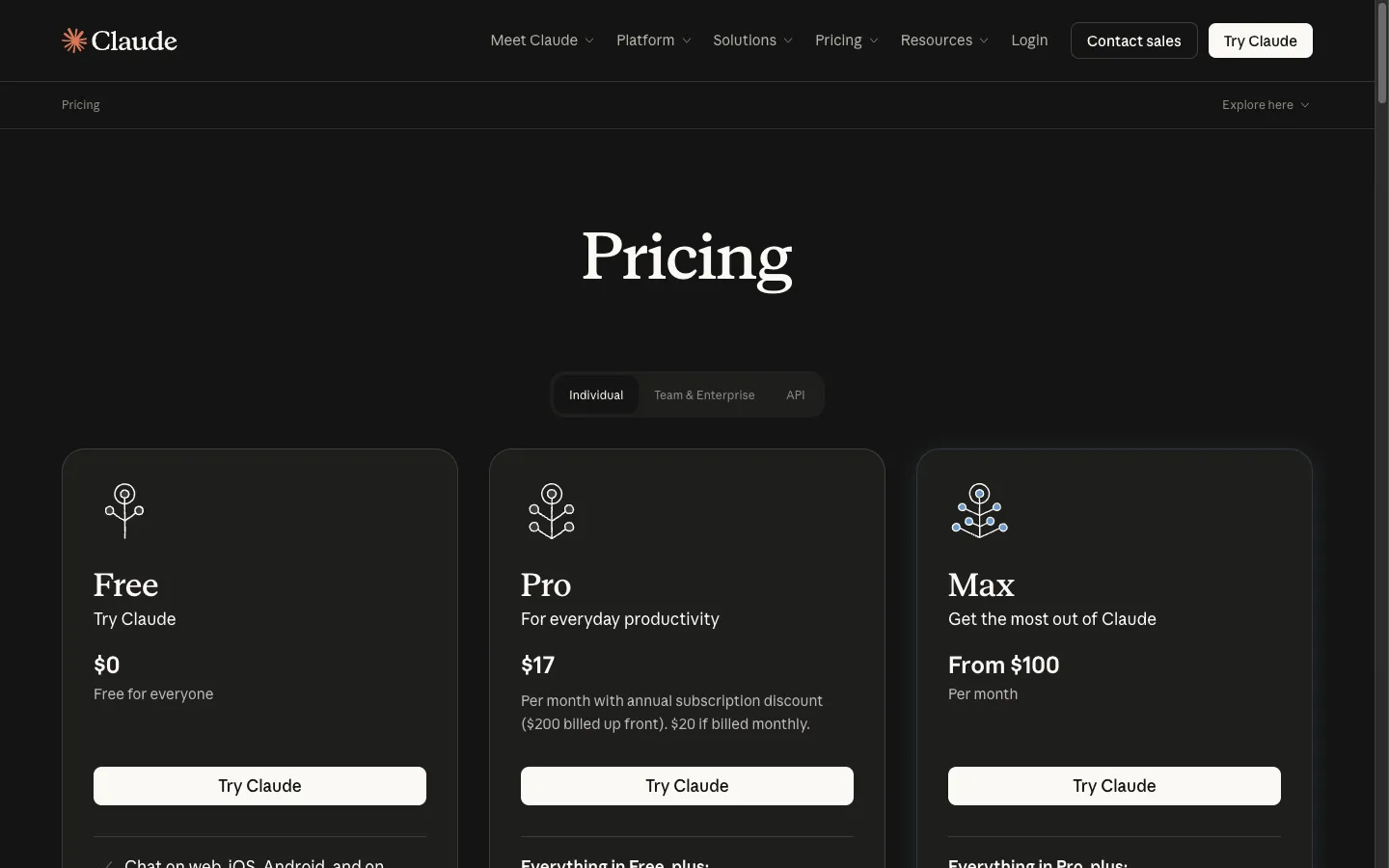
If you fall outside that window - you teach higher ed, you're outside the US, or you can't verify - Claude is still usable, just not free at the premium tier. The consumer plans are Free ($0, all models, standard limits), Pro ($17/month billed annually, or $20 monthly, which is the tier that unlocks Cowork), and Max (from $100/month). For most planning and writing tasks, the Free tier is a real starting point and Pro is the upgrade that matters.
There's also an API route for the smaller group of teachers who want to build their own classroom tools programmatically rather than work in the chat interface. Anthropic's API is pay-as-you-go, and Anthropic-compatible relay platforms such as AIReiter resell the same Claude models at a lower per-token rate - relevant mainly if you're outside the US and scripting your own tools. Keep student data out of any such pipeline unless it's covered by an approved district agreement. For everyone the free program covers, the program itself is the better deal.
Lesson planning aligned to your actual standards
Lesson planning is where Claude earns its place first, and the standards connector is what separates it from a generic chatbot. You can ask for a plan aligned to a specific state standard and get output that references the standard rather than inventing one.
The setup that pays off: create a Project and load it with your scheme of work, your school's lesson-plan template, and one example of your own best plan. Claude then drafts in your format and voice instead of a generic one. A prompt with real constraints beats a vague one every time:
"Write a 50-minute Year 8 lesson on solving two-step equations, aligned to [your standard]. Class of 28 with 5 students reading below grade level. Include a 5-minute hook, guided practice, and an exit ticket. No printed resources."
Save the five to seven prompts you reach for weekly as a document inside the Project so you're not rewriting them each time.
A caution from teachers already doing this: generating more worksheets isn't the win it looks like. As one educator put it on r/edtech, "worksheets are pretty weak pedagogy, so making better worksheets isn't a very high-reaching goal." Use the time Claude saves to design better tasks, not just faster versions of weak ones.
Differentiation and IEP drafting
Differentiation is the task teachers most want handed off, and it's one Claude handles well. Give Claude one core text or task and ask for versions at three reading levels, or a scaffolded version for students who need it and an extension for those who don't. Because the same Project holds your class context, the tiers stay consistent with what you're teaching.
The higher-value use is special education paperwork. Teachers are already using Claude to draft IEPs and Prior Written Notices - describe the student, the need, and the timeframe, and Claude produces a first draft in minutes rather than an evening. One special-education teacher described building skills specifically to help draft IEPs and PWNs.
The rule that keeps this safe and honest: Claude drafts, you sign off. Every generated goal, accommodation, or notice is a starting point you review and own, not a final document - the team review your district already requires for IEPs still applies, and a district-approved-tool rule doesn't change because the writing was faster. And anonymize first - replace student names with roles ("Student A," "the target learner") and strip identifying details before anything goes into a prompt.
Grading, feedback, and rubrics
Claude is more useful for the scaffolding around grading than for the grade itself. It's good at building a rubric from your assignment description, drafting feedback comments you then edit for each student, and turning a rubric into a consistent feedback template. Within the free program it can also work with class data - rosters, diagnostic results, attendance notes - to help you spot patterns, like which sub-skill a cluster of students is missing.
Where it belongs on the mechanical side and where it doesn't: use it to draft and standardize feedback language and to summarize where a class is struggling. Keep the judgment - the grade, the call on a borderline student - with you. The feedback reads better when you write the verdict and let Claude help phrase the supporting detail, not the other way around.
Parent communication and admin tasks
Two everyday jobs Claude handles well. The first is translating register: paste a professional document - a behavior plan, an assessment summary - and ask for a plain-language version a parent without an education background can act on. The second is the volume of routine writing: newsletter blurbs, permission-slip copy, the third polite email of the day chasing a form.
This is also where Cowork shows its value. Instead of copy-pasting from chat, Cowork can take your lesson plan and output a finished document on your school's template, batch a set of worksheets, and produce real .docx or PDF files. One caveat teachers hit: a fresh Cowork session "starts from scratch and knows nothing about your projects," so it's much less useful until you've fed it your context. The Project-plus-knowledge-base setup from the lesson-planning section is what makes Cowork save time.
Student data privacy: what's actually protected
Privacy is the question that decides whether any of this is usable in a real school, so it's worth being precise. Under Claude for Teachers, Anthropic states that teacher conversation data is not used for model training, student data is handled under a K-12 Data Processing Addendum, the program is FERPA-compliant, and teachers get custom terms of service written without legal jargon. Anthropic worked with the American Federation of Teachers on aligning those privacy practices to what the union called a "gold standard."
That covers the platform. It doesn't cover your habits, and the habit that matters is de-identification. Even with FERPA-grade terms, the safe default is to strip student names and unique identifiers before you paste anything - use roles instead of names. Platform compliance and your own anonymization are two different layers, and you control the second one.
How Claude compares to the other classroom AI tools
Plenty of tools now target teachers - MagicSchool, Brisk Teaching, Diffit, and others, several of which now connect to Claude directly. Rather than rank them, use this checklist when you pick one:
- Standards alignment. Can it align to your specific state standard by name, or only produce generic "aligned-sounding" output? Claude's Learning Commons connector does the former.
- Privacy terms you can read. Look for explicit no-training-on-your-data language, a stated student-data agreement, and FERPA compliance - not a vague privacy page.
- Long-document handling. If you work with full units, long PDFs, or dense policy documents, test how well the tool holds a large file in context. This is a consistent Claude strength.
- How it fits your existing stack. Most teachers don't use one tool. A common pattern is Claude for text and reasoning, with a separate image or design tool - teachers on r/edtech describe using Claude for writing and OpenAI or Canva for visuals, and note that Claude's Canva connection "doesn't do much" for graphics yet.
Claude's clearest edges are standards-aligned planning, long-document work, and the learning-science teaching skills. Its weakest spots are anything visual, where a dedicated design tool still wins.
A realistic first week
If you're starting from zero, don't try to use everything at once. A workable first week:
- Onboard Claude to you. Open a chat and ask it to interview you: "Ask me 10 questions about my role, subjects, grade levels, and school context so you can help me well." Its answers get sharper immediately.
- Build one Teaching Project. Load your standards reference, your lesson template, and one strong example plan.
- Run your two heaviest tasks through it - next week's lesson plan and one round of differentiation - and edit the output rather than accepting it.
- Save your reusable prompts in the Project so week two is faster.
By the end of the week you'll know which tasks Claude speeds up for you and which you'd rather keep by hand. Most teachers land on planning, differentiation, and first-draft communication as the reliable wins.
Frequently asked questions
Is Claude for Teachers free?
Yes, for verified K-12 educators in the US. You get a full year of premium access (including Claude Code and Cowork) at no cost if you sign up by June 30, 2027.
Who qualifies for Claude for Teachers?
Verified K-12 educators in the United States, with an 18+ account. Higher-ed instructors and teachers outside the US are not covered by this free program.
How is Claude for Teachers different from Claude for Education?
Claude for Education (launched April 2025) is a university program with campus-wide agreements and a Socratic learning mode. Claude for Teachers (launched July 2026) is the K-12 individual-educator program with a free year, standards connector, and K-12 tool integrations.
Can students use Claude?
Not directly if they're under 18 - Claude requires an 18+ account, which is why the teacher program is built for educators rather than students.
Is my students' data safe?
Under Claude for Teachers, teacher conversations aren't used for training, student data is covered by a K-12 Data Processing Addendum, and the program is FERPA-compliant. As a practice, still anonymize student information before entering it.
What if I'm not a US K-12 teacher?
You can use Claude on the consumer plans - Free, Pro ($17-20/month), or Max - or via the API. The free premium program is US K-12 only.