 AIREITER
GPT Image 2 leads the three largest blind-vote image arenas with an Elo of 1,340 on Artificial Analysis, 78 points ahead of GPT Image 1.5. But it costs up to $0.21 per image at high quality, while gpt-image-1-mini drops below $0.01. The right GPT image model depends on whether you're rendering campaign assets, prototyping at scale, or editing product photos — this guide compares all current OpenAI image models on quality, cost, resolution, and editing power so you can pick without guessing.
Scope: this page only covers OpenAI's own image generation lineup (GPT Image 2, GPT Image 1.5, gpt-image-1-mini, and legacy GPT-4o). For cross-ecosystem comparisons including Midjourney, FLUX, and Stable Diffusion, see our 2026 AI image generator comparison.
OpenAI's Current Image Model Lineup
OpenAI offers four image generation models through its API, documented in its prompting guide. Each targets a different quality-cost tier.
GPT Image 2 launched on April 21, 2026 as OpenAI's flagship. Per OpenAI's guide, it is "the strongest overall model" with a built-in reasoning step, flexible resolution up to experimental ~4K, and support for any aspect ratio within its pixel constraints. OpenAI recommends it "as the default for most production workflows."
GPT Image 1.5 shipped in December 2025. It lacks the reasoning step but supports an input_fidelity parameter (low/high) that lets you control how much source-image detail is preserved during edits. Resolution is limited to fixed sizes: 1024×1024, 1024×1536, 1536×1024, or auto. OpenAI's guide recommends keeping it "only for backward compatibility while you validate prompt migrations."
gpt-image-1-mini is the budget tier, optimized for "cost and throughput" per OpenAI's docs — batch variant generation, rapid ideation, previews, and draft assets that don't require top-tier quality.
GPT-4o image generation (the original ChatGPT Images) still works in the consumer app. The API model behind it, GPT Image 1, is classified by OpenAI as "legacy compatibility only" with an explicit recommendation to migrate to GPT Image 2.
Quality and Prompt Adherence: The Elo Gap
Blind-vote arenas are the closest thing to an objective image quality score — human evaluators pick the better output without knowing which model produced it.
As of August 2026, GPT Image 2 holds #1 on all three major leaderboards:
| Arena | GPT Image 2 | GPT Image 1.5 | Gap |
|---|---|---|---|
| Artificial Analysis (13,289 votes) | 1,340 Elo | 1,262 Elo | 78 pts |
| arena.ai (LMArena) | 610–631 Elo | Not separately ranked | — |
| llm-stats.com (13,552 votes) | 661 Arena score | 333 Arena score | 328 pts |
The 78-point Artificial Analysis lead is the largest first-to-second gap that leaderboard has recorded.
Text rendering is where the gap hits hardest. GPT Image 2 handles multilingual text (Latin, CJK) accurately enough that Artificial Analysis rates it "near-perfect" — this makes it the default for logos, infographics, and any image containing words. GPT Image 1.5 renders text well for simple layouts but drops characters in dense, multi-font compositions.
"GPT-Image-2 is out the model is insanely good at rendering text and generating all the tiny details in complex software interfaces" — u/Glittering-Neck-2505, r/singularity
Photorealism improved, with a trade-off. Reddit users noted that GPT Image 2 produces striking first-impression realism but sometimes generates "repeating patterns/textures" in natural elements. One Redditor described rock textures as looking "like procedural generated textures in a video game." GPT Image 1.5 doesn't share this specific artifact but produces lower overall detail.
Here's a GPT Image 2 test I ran — a Tokyo cafe scene with a "COFFEE" neon sign to stress-test text rendering (gpt-image-2, high quality, 16:9):
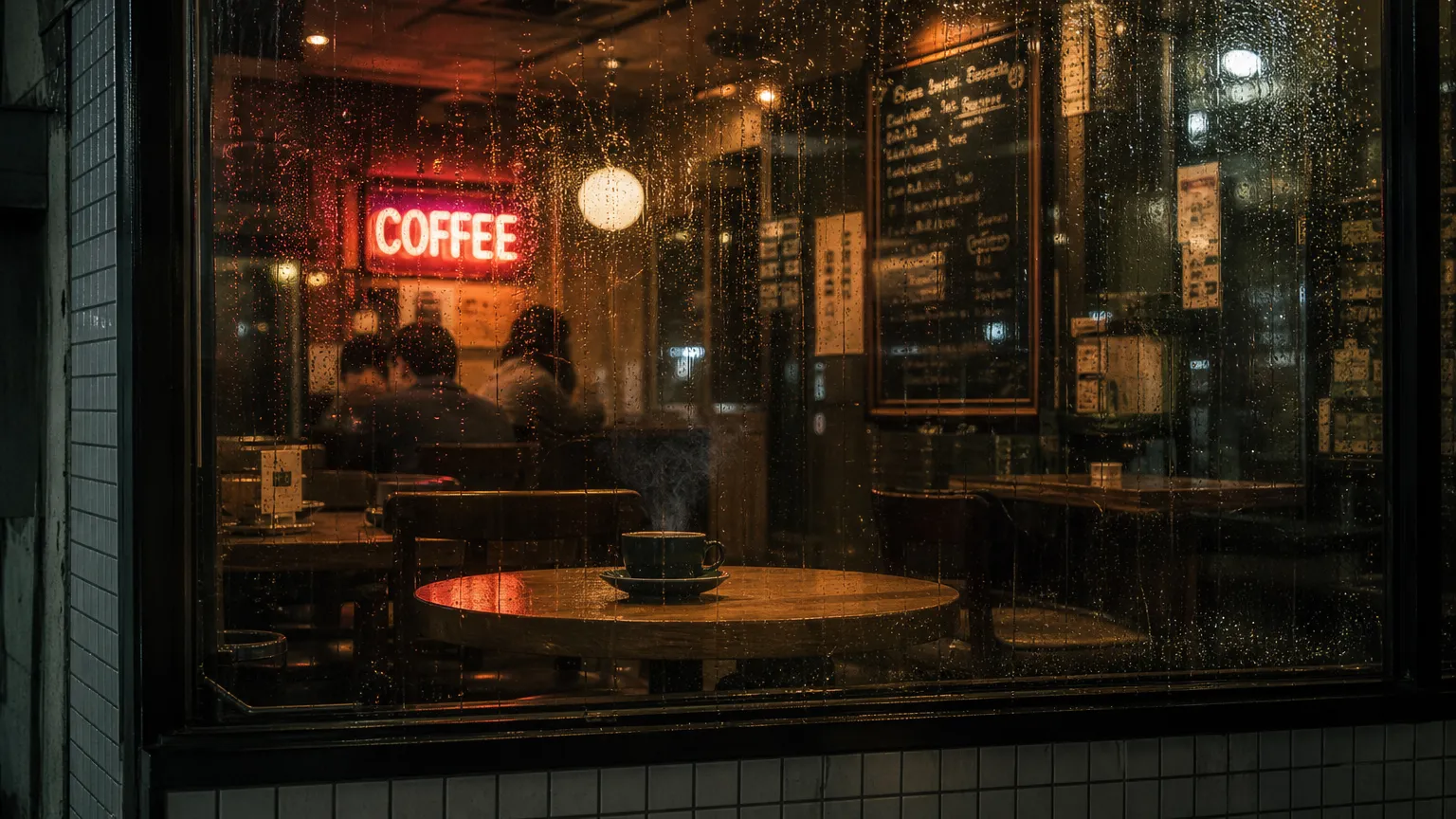
The neon text rendered correctly on the first attempt, and the rain droplets show individual detail rather than a uniform blur.
What Each GPT Image Model Costs Per Image
OpenAI prices image models per token, not per image. Below are the token rates from OpenAI's pricing page (verified August 2026) alongside estimated per-image costs.
Token Rates (per 1M tokens)
| Model | Text Input | Image Input | Cached Image Input | Image Output |
|---|---|---|---|---|
| gpt-image-2 | $5.00 | $8.00 | $2.00 | $30.00 |
| gpt-image-1.5 | $5.00 | $8.00 | $2.00 | $32.00 |
| gpt-image-1-mini | $2.00 | $2.50 | $0.25 | $8.00 |
Estimated Per-Image Cost by Quality
Estimates assume text-to-image at 1024×1024 with a 50–100 word prompt. Actual costs scale with resolution and prompt complexity.
| Quality | gpt-image-2 | gpt-image-1.5 | gpt-image-1-mini |
|---|---|---|---|
| Low | ~$0.006 | ~$0.009 | ~$0.003 |
| Medium | ~$0.03–0.07 | ~$0.04–0.08 | ~$0.01 |
| High | ~$0.10–0.21 | ~$0.10–0.20 | ~$0.03–0.05 |
"Low," "medium," and "high" correspond to the quality parameter in the API request (e.g., quality="low"). Each setting controls the token budget the model allocates to rendering detail — low generates fewer output tokens and thus costs less.
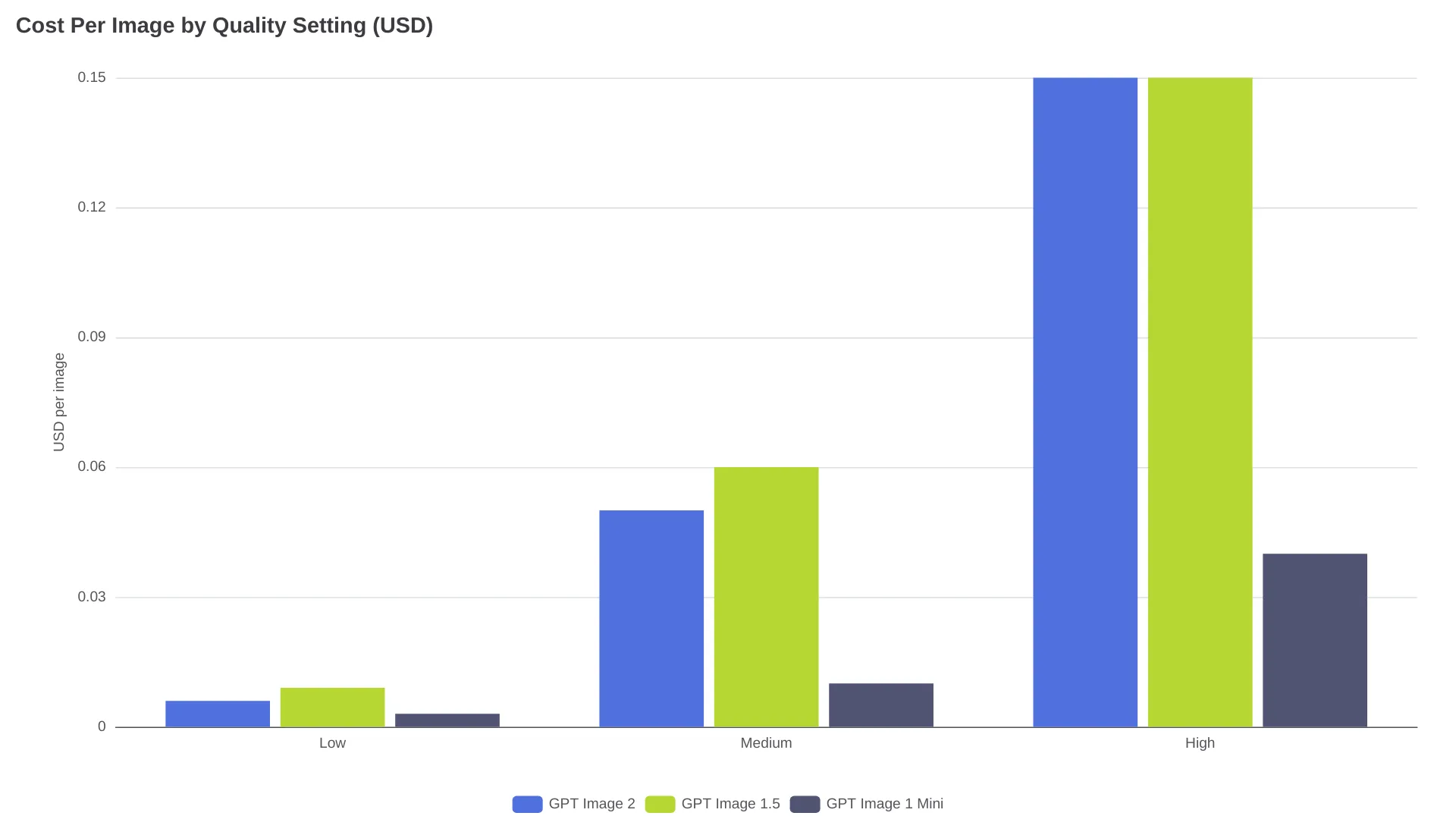
A counterintuitive detail: GPT Image 1.5's output tokens cost $32/1M versus GPT Image 2's $30/1M. For low-quality rapid prototyping, GPT Image 2 at $0.006 per image is cheaper than GPT Image 1.5 at $0.009.
gpt-image-1-mini runs at roughly one-third the price. For high-volume workflows — 10,000 product variant previews, for example — the $0.003 vs $0.006 difference saves $30 per batch.
Resolution and Editing Capabilities
GPT Image 2 accepts any resolution via the size parameter, provided it meets these constraints (from OpenAI's docs):
- Maximum edge < 3,840px
- Both edges are multiples of 16
- Aspect ratio ≤ 3:1
- Total pixels between 655,360 and 8,294,400
Common targets: 1024×1024 (square), 2560×1440 (reliable 2K), 3824×2144 (experimental near-4K). OpenAI notes results above 2K are "more variable."
GPT Image 1.5 is locked to four fixed sizes: 1024×1024, 1024×1536, 1536×1024, or auto. No custom resolutions.
On the editing front, GPT Image 2 leads the Artificial Analysis image-editing arena at Elo 1,255, ahead of Google's Nano Banana Pro at 1,247. GPT Image 1.5's input_fidelity parameter gives explicit control over source-image preservation during edits — GPT Image 2 doesn't support this parameter because, per OpenAI, "output is already high fidelity by default."
| Feature | gpt-image-2 | gpt-image-1.5 | gpt-image-1-mini |
|---|---|---|---|
| Max resolution | ~4K (experimental) | 1536×1024 (fixed) | 1536×1024 (fixed) |
| Custom aspect ratios | Yes | No (4 presets + auto) | No (4 presets + auto) |
| Reasoning step | Yes | No | No |
| input_fidelity | Disabled (always high) | Low / High | Low / High |
| Editing arena Elo | 1,255 (#1) | Not separately ranked | Not ranked |
Which GPT Model for Which Job
Marketing and Ad Creative
Use GPT Image 2 at medium or high quality. The reasoning step produces more accurate layout and text from creative-brief-style prompts. OpenAI's guide recommends writing prompts "like a creative brief rather than a purely technical image spec" for this model.
Product Mockups and E-commerce
GPT Image 2 for hero shots, gpt-image-1-mini for variant previews. Use GPT Image 2 at high quality for your primary product image (flexible resolution matches exact storefront dimensions), then gpt-image-1-mini for color/angle/background variants at $0.003 each. A 50-SKU product line with 5 variants each runs about $0.75 total at mini low quality.
Infographics and Text-Heavy Images
GPT Image 2. Near-perfect text rendering across Latin and CJK scripts per Artificial Analysis. GPT Image 1.5 handles simple text but misses characters in dense multi-font layouts. Set quality to medium or high — text legibility drops at low quality across all models.
High-Volume Batch Generation
gpt-image-1-mini at low quality. At $0.003 per image, 100,000 images cost $300. GPT Image 2 at low ($0.006) is reasonable when quality matters more than throughput. GPT Image 1.5 has no cost advantage here — its output tokens run $2/1M higher than GPT Image 2.
Iterative Editing Workflows
GPT Image 2 for general editing, GPT Image 1.5 when you need input_fidelity control. GPT Image 2 leads the editing arena, but GPT Image 1.5's fidelity toggle lets you switch between "preserve everything" and "reimagine loosely." If your pipeline depends on that control, GPT Image 1.5 has a structural advantage.
FAQ
Is GPT Image 2 always better than GPT Image 1.5?
Not for every workflow. GPT Image 1.5 offers input_fidelity control for editing, and its output avoids the repeating-texture artifacts that users have reported with GPT Image 2 in natural scenes (rocks, foliage, fur). For tight source-image preservation, GPT Image 1.5 can be better. For text rendering, prompt adherence, and photorealism, GPT Image 2 wins.
Should I still use GPT-4o for image generation?
No, unless you need the consumer ChatGPT interface without API access. OpenAI classifies GPT Image 1 (behind GPT-4o) as "legacy compatibility only" and recommends migration to GPT Image 2.
Can I use GPT Image 2 for free?
Limited image generation is available on ChatGPT's free tier and the $8/month Go plan. For API access, new OpenAI accounts receive $5 in free credits, enough for roughly 25–800 images depending on quality setting.
What is gpt-image-1-mini good for?
High-volume, cost-sensitive work: rapid ideation, A/B test variants, placeholder assets, thumbnail previews, batch personalization. At ~$0.003 per image (low quality), it's roughly 10× cheaper than GPT Image 2 at medium quality. Avoid it for text-heavy images or client-facing assets where first-pass quality reduces review cycles.