 AIREITER
If you just want one or two portraits and don't mind a sign-up, Fotor (8 free credits) and Canva (free tier) are the fastest starting points, and Adobe Firefly gives you a monthly credit pool with a commercial-safe license. If you want a headshot built from your own photo, most text-to-image tools won't help; you need a photo-input tool like Fotor or Facewow.
The catch worth knowing before you start: "free" almost always comes with a watermark, a small credit cap, a forced account, or output you can't use commercially. Very few tools give you all four for nothing.
And if you care about realism, no watermark, and running as many portraits as you want, the best-value answer isn't a consumer app. It's running a top image model (Nano Banana Pro, Seedream) directly. That route isn't free, but it costs only a few cents per image, and it's covered at the end.
First, what "free" actually hides
Every tool in the "best AI portrait generator free" search results uses the word free. The differences are in the fine print, and there are four traps:
Watermark. Fotor's free tier, for example, stamps output. A watermark makes the portrait useless for a LinkedIn photo or a client deliverable.
Credit caps. "Free" usually means a handful of generations. NightCafe lists 5 credits a day; Fotor starts you with 8. You'll burn through those fast, because portraits need several tries to get right.
Forced sign-up. Some tools generate instantly with no account; others require registration (and an email) before you see a single result.
No commercial license. This is the sneaky one. NightCafe's free credits, for instance, don't grant commercial rights; only a paid subscription does. A free portrait you can't legally use for work isn't free for that purpose.
One more thing: a few tool pages advertise "unlimited, free, no watermark, no sign-up." Treat those claims as marketing until you've generated an image yourself and checked the download. Self-reported "unlimited free" is the least reliable label in this category.
The best free AI portrait generators, grouped by what they do
Before the list, the single most useful distinction, and the one most roundups skip:
From your photo → the tool takes selfies and produces a portrait or headshot that looks like you. This is what people usually want for a profile picture or professional headshot.
From text → the tool paints a person from a prompt. Great for characters and concept art, less reliable if you need your own face. Midjourney and ChatGPT sit here: they accept image references in some workflows, but they aren't built as headshot-from-your-photo tools and won't reliably preserve your likeness. Treat them as fictional-portrait generators.
From your photo (headshots and avatars)
Fotor — Free tier gives 8 credits (8 images) to start, with up to about 30 free credits earnable through rewards. Supports both photo-to-portrait and text-to-portrait. Wide style range (professional, scenes, anime, creative; family, couple, full-body). The catch: the free tier includes watermarks and limited credits, and it's not suitable for official ID photos. Upload at least three photos for a good likeness; per its page, uploads are deleted within 24 hours. Best free pick for a portrait of your own face, if you can live with the watermark.
Facewow — Advertises free, unlimited, no sign-up, and no watermark, with both photo and text input and styles like business, vintage, and Ghibli-anime. If those claims hold up when you test them, it's the lowest-friction option here. Verify the watermark and any hidden download step yourself before trusting it for anything important; the "unlimited/no-watermark" promise is the tool's own, not independently confirmed.
Canva — The free plan includes an AI portrait generator, convenient if you already design in Canva. Free usage is capped by Canva's overall credit system, and the strongest features sit behind Canva Pro.
From text (fictional people, concept portraits)
Adobe Firefly — Credit-based, with a limited monthly free allowance. The standout is licensing: Adobe positions Firefly as commercially safe and offers indemnification on some business plans (check whether it applies to your account type). If you need a portrait you can use at work without legal worry, that matters more than raw image quality. Best free pick for a commercially-safe fictional portrait.
Leonardo AI — A generous free tier that resets daily, plus fine control over models and styles. A favorite for anyone who wants to tune the look instead of accepting one output.
NightCafe — 5 free credits every 24 hours. Fine for occasional use, but remember the commercial-license limitation on free output.
ChatGPT — Image generation works on both the free and paid tiers, so it's one of the few with a real free entry point. It's slow for iterative portrait work, and it builds fictional faces rather than a reliable likeness of you.
Two more from-photo names worth a line each: HeadshotPro is a dedicated business-headshot tool, paid (one-time packages) with a refund guarantee rather than a real free tier. Artbreeder is freemium, with a small monthly free credit allowance and strong control over blending faces.
A note on Lensa and Remini: both are freemium, and the parts people actually want (Lensa's Magic Avatars, Remini's AI enhancement) sit behind a purchase or paywall. The free editor is real; the AI portrait magic mostly isn't.
The "actually free" comparison table
Tool | Free allowance | Watermark (free) | Sign-up | Photo input (your face) | Free commercial use |
|---|---|---|---|---|---|
Fotor | 8 credits, ~30 via rewards | Yes | Yes | Yes | No |
Facewow | "Unlimited" (vendor claim) | "None" (vendor claim) | "None" (vendor claim) | Yes | Unclear — verify terms |
Canva | Capped by Canva credits | No | Yes | Yes | Free tier: personal use; check license |
Adobe Firefly | Monthly free credits | No | Yes | No | Yes (positioned commercial-safe) |
Leonardo AI | Daily reset credits | No | Yes | No | Depends on plan — check current terms |
NightCafe | 5 credits / 24h | No | Yes | No | No (paid only) |
ChatGPT | Free + paid tiers | No | Yes | No (fictional faces) | Check OpenAI terms |
Artbreeder | Small monthly free credits | No | Yes | Yes (blend) | Check plan |
Lensa | No free AI portraits | n/a | Yes | Yes | Paid packs only |
Remini | Core AI behind paywall | n/a | Yes | Yes | Paid only |
HeadshotPro | No free tier (refund guarantee) | n/a | Yes | Yes | Paid, commercial |
Free-tier details compiled from each tool's official pages, checked 7 July 2026, plus cross-referenced third-party sources. Facewow's row reflects the tool's own claims, which I did not independently test. These figures (credit counts, watermark, licensing) change often, so confirm on the tool's own site before relying on commercial rights.
The low-cost route: run the top models yourself
The consumer roundups miss this part. On Reddit, when people ask for actually good, actually free realistic AI portraits, the recommendations that keep coming back aren't apps. They're models: Google's Nano Banana Pro and ByteDance's Seedream for realistic headshots, if you prompt them well. (See, for example, this r/generativeAI thread on getting realistic AI portraits.)
To be clear, this route isn't free. But it's the cheapest way to get watermark-free, reproducible portraits at any volume, with commercial use you can usually clear (each model sets its own license, so confirm the terms for the one you pick). These top-tier image models are available directly through an API, with no daily cap and full control over the output.
To show the difference, I ran one identical corporate-headshot prompt through both models, first attempt each, no cherry-picking or re-rolls:
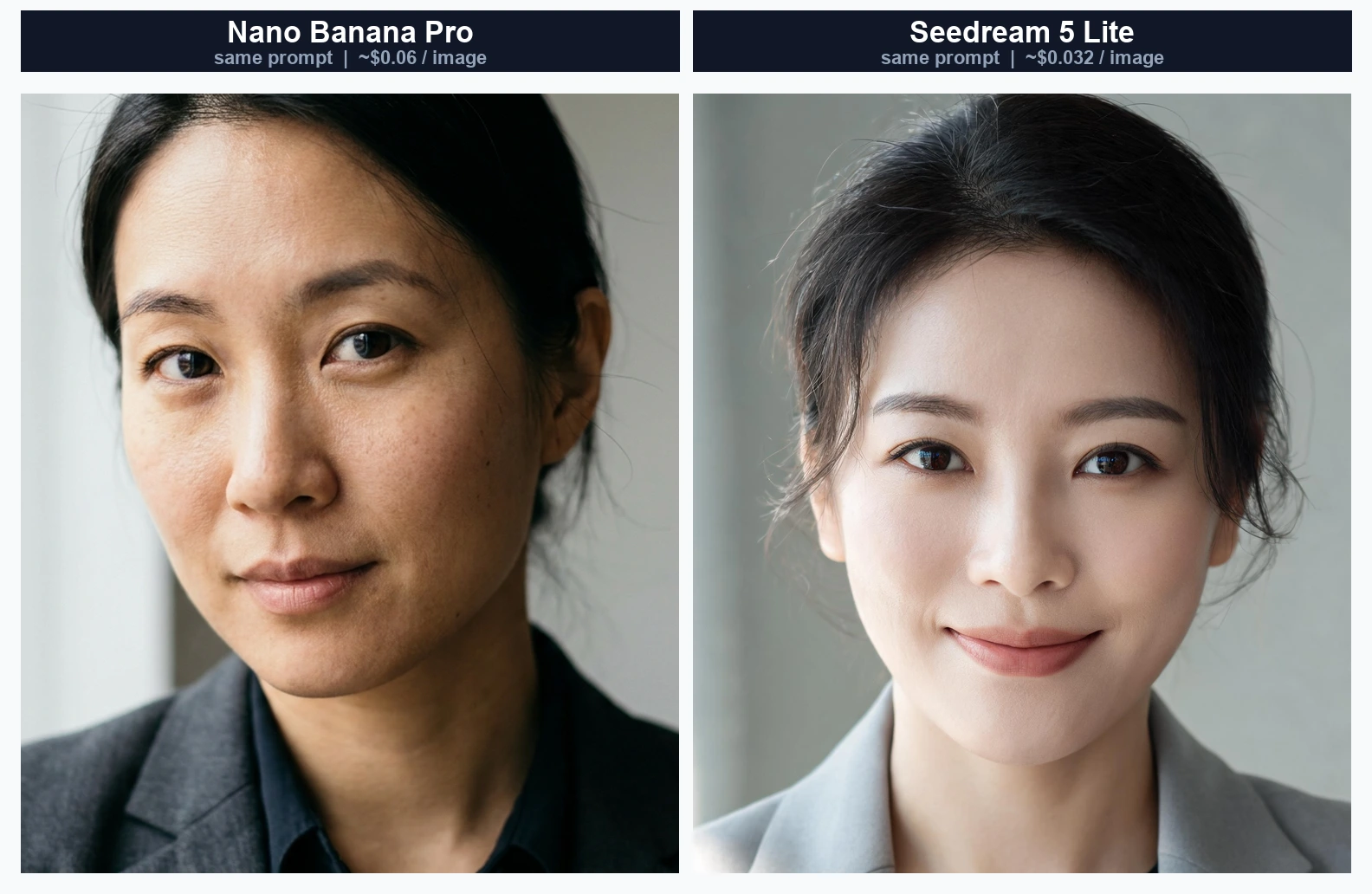
The difference is easy to read. Nano Banana Pro produced a documentary-style result with realistic skin texture, subtle imperfections, and a natural off-center gaze; it looks like a captured photo. Seedream 5 Lite went warmer and more polished, closer to a classic flattering LinkedIn headshot, with slightly smoother skin. Neither is "wrong" for one prompt: Nano Banana Pro leaned realistic, Seedream leaned flattering and cost less.
The economics are the point. On that test run the actual charges were about 6 cents for the Nano Banana Pro image and 3 cents for the Seedream one, and you can generate as many as you like with no watermark and clear commercial use. Ten polished headshots land under a dollar, cheaper than most "unlimited" subscriptions, without the paywall on the good features.
The friction is that you're calling an API instead of clicking a button. Platforms like AIReiter route these image models through a single API so you pay per image at model cost rather than a monthly plan, which helps if you want batches, no watermark, and reproducible results. If you only need one avatar, this is overkill. If you generate portraits regularly, it's the cheapest paid path. For a wider view of what's cheap right now, AIReiter's best free AI image generators guide covers the broader model lineup.
How to choose
One or two portraits, don't want to think about it → Canva or Fotor's free tier. Accept the watermark, or a Pro upgrade if you need it clean.
A headshot that looks like you → a photo-input tool (Fotor, Facewow). Text-only tools can't reliably reproduce your face.
Commercial use, no legal worry → Adobe Firefly's commercially-safe positioning (confirm it covers your account type).
Batches, no watermark, reproducible, cheapest at volume → run Nano Banana Pro or Seedream via API. Not free, but a few cents per image.
FAQ
Is there a 100% free AI portrait generator?
Sort of. ChatGPT, Leonardo AI (daily free credits), and NightCafe (5/day) all have real free entry points with no payment required. But "100% free" usually still means a watermark, a daily cap, or no commercial rights. A tool that is free, unlimited, watermark-free, and commercially licensed all at once is rare.
Can I make an AI portrait from my own photo for free?
Yes, but you need a photo-input tool such as Fotor, Facewow, or Canva. Text-to-image tools like Midjourney and ChatGPT generate faces from a prompt and won't reliably recreate your actual face.
Is there a free AI family portrait generator?
Fotor supports family and couple portraits in its style categories, and several from-text tools can compose group scenes. Expect the same free-tier limits (credits, watermarks) to apply.
Can I use free AI portraits commercially?
Not always. Adobe Firefly is positioned as commercially safe; NightCafe's free credits are not licensed for commercial use. Check the specific tool's terms before using a free portrait for work.
What do people on Reddit actually recommend?
For realistic headshots, threads repeatedly point to running strong models like Nano Banana Pro and Seedream rather than consumer apps, because they give better realism and no watermark when you prompt them well.