 AIREITER
Most 3D website prompt libraries either charge for the prompt text itself or show you a demo video and keep the words to themselves. Here are six complete prompts: paste them into Claude as-is, or adapt one line for Lovable, Bolt, and Cursor. All six went through a live model; five came back as working Three.js pages, and every screenshot below is one of those renders, not a mockup.
Six 3D website prompts you can copy right now
Each prompt asks for a single-file HTML page with Three.js loaded from a CDN. That constraint matters: a single file opens locally in any browser and is easy to hand to a developer or paste into a custom-code block, and it forces the model to keep the scene self-contained instead of scattering imports across a project.
1. Particle galaxy hero
Create a single-file HTML page with an interactive 3D particle galaxy hero
section using Three.js (load it from a CDN). Requirements: about 50,000
particles forming a spiral galaxy that slowly rotates; particle colors shift
from warm amber at the core to violet at the outer rim; add OrbitControls so
visitors can drag to rotate and zoom; overlay a centered hero headline that
says "Build Beyond Flat" with a short subline and a CTA button; set
pointer-events: none on the overlay container and pointer-events: auto on
the CTA button so the galaxy stays draggable behind the text; dark
background #0a0616; handle window resize. Output ONLY the complete HTML
file in a single code block.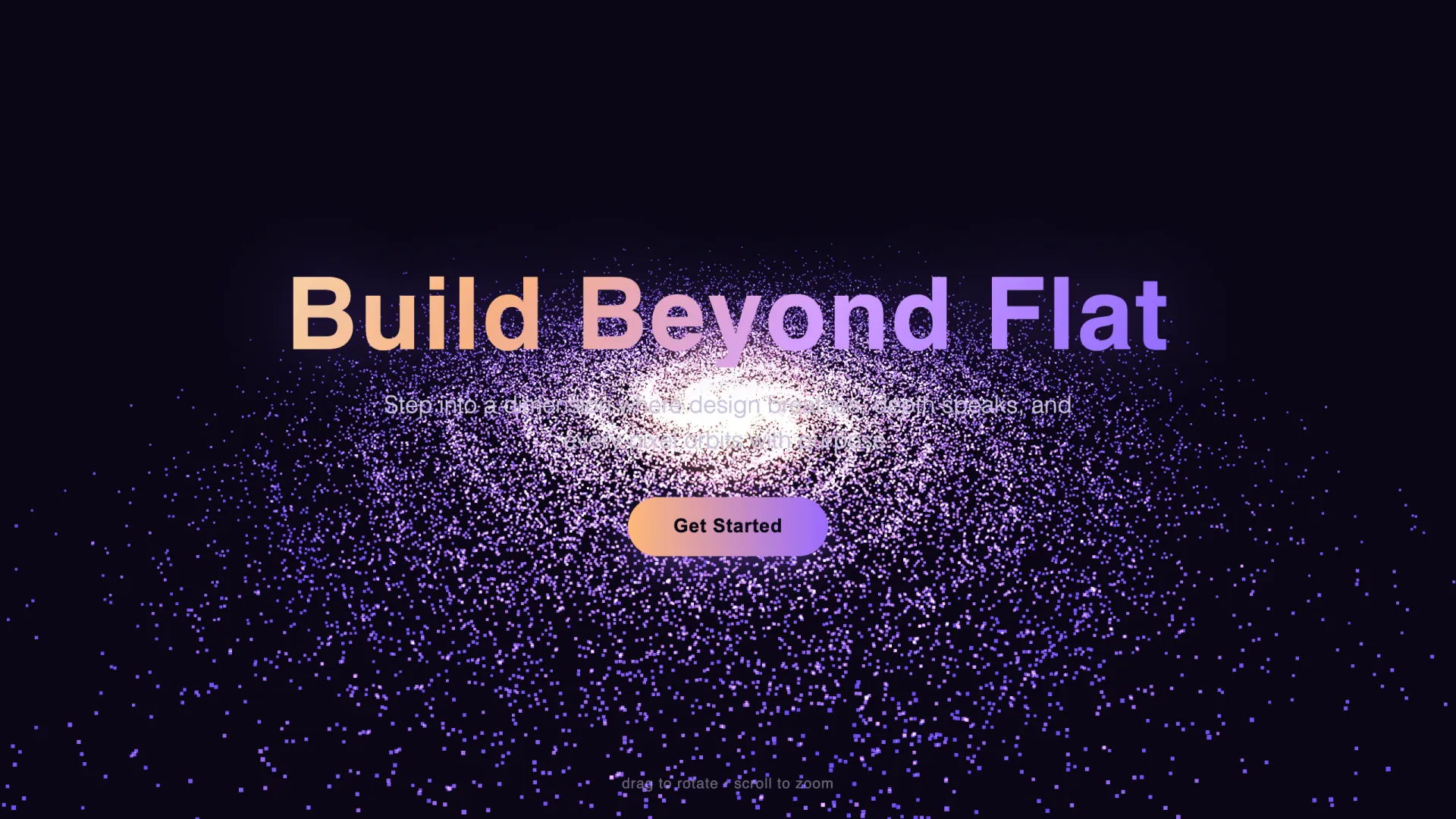
Generated in 27 seconds and 3,692 output tokens. The galaxy rotates, drag-to-orbit works, and the button stays clickable through the overlay. One real flaw: the subline lands on the bright galactic core and is hard to read. The fix is in the test notes below.
2. Scroll-driven product showcase
Create a single-file HTML page: a scroll-driven 3D product showcase using
Three.js loaded from a CDN. Requirements: a floating chrome torus-knot
centered in a fixed full-screen canvas; the page has 4 full-screen scroll
sections, and as the user scrolls the camera orbits the object a full 360
degrees while the object material color smoothly transitions per section
(silver, deep blue, emerald, copper); each section shows a headline and
one-line copy pinned to the left over the canvas; smooth interpolation (lerp)
on scroll so motion feels damped; dark studio look with two colored
spotlights and a soft ground shadow; handle resize. Output ONLY the complete
HTML file in a single code block.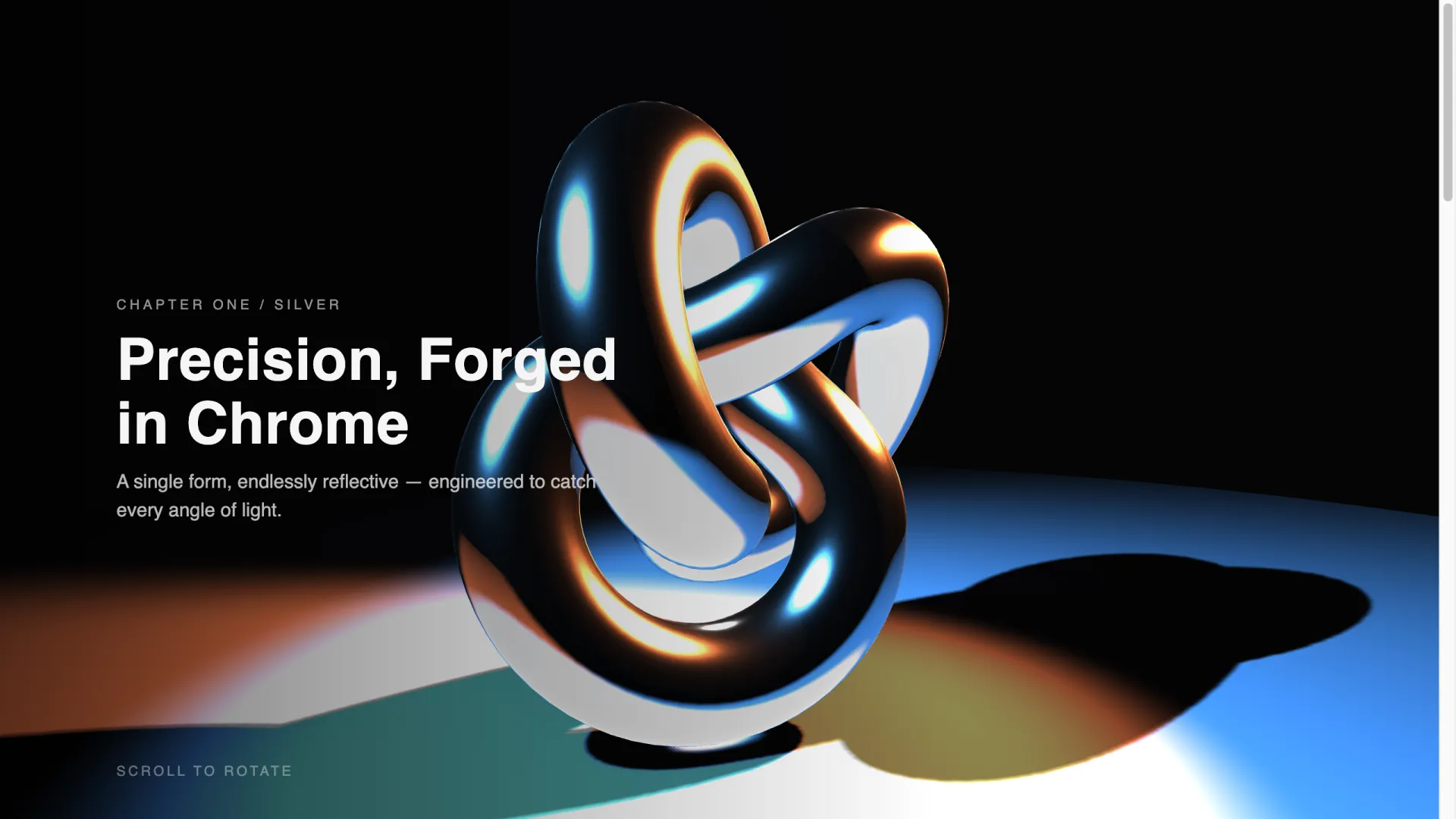
This was the heaviest of the five working generations (63 seconds, 7,023 output tokens) and the most impressive result. Scrolling drives the camera around the object, and the material re-colors per section exactly as asked:
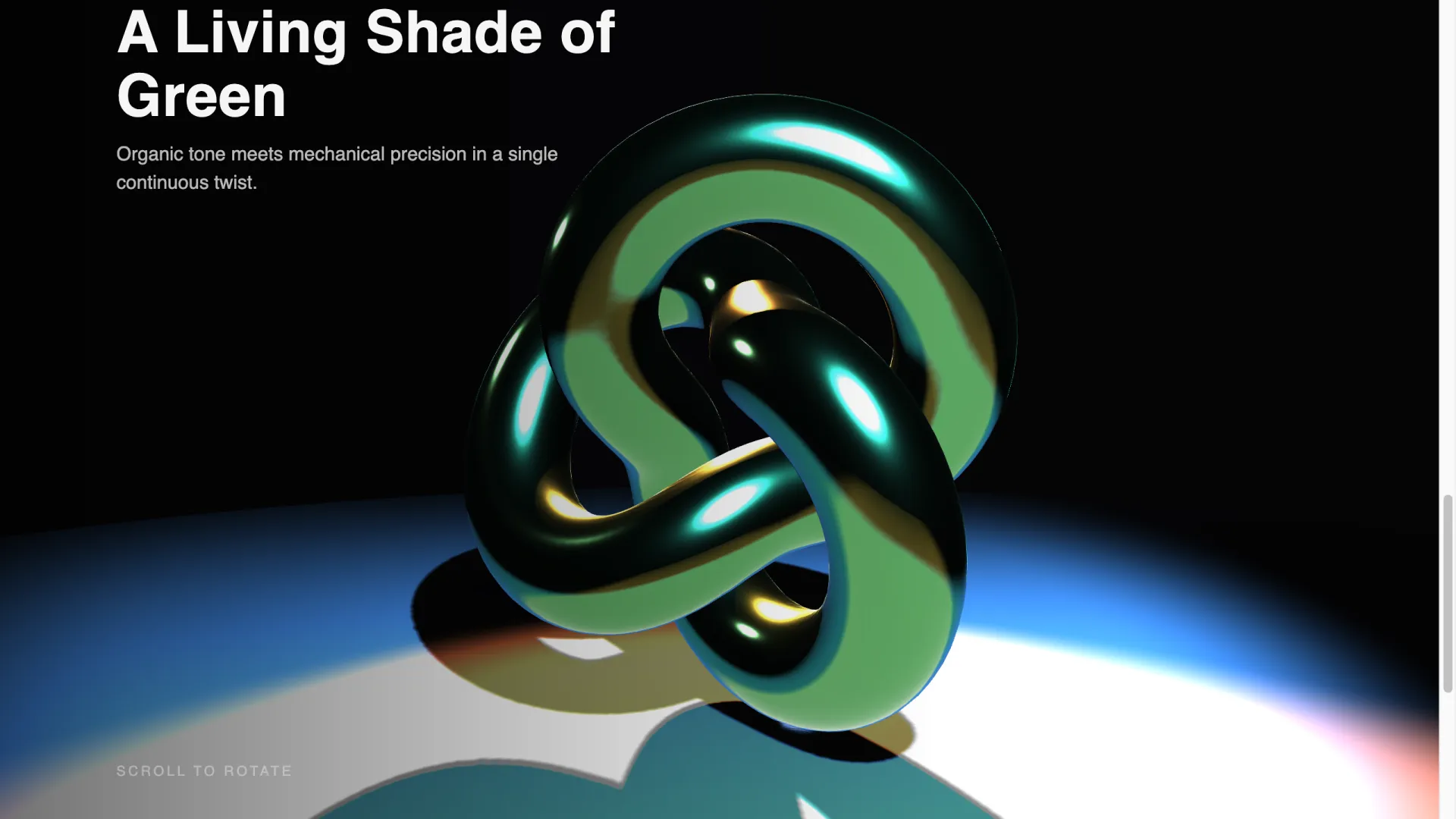
The damped lerp interpolation was respected too; the motion has the heavy, expensive feel of an agency site rather than a scroll-jacked slideshow.
3. GLSL fluid gradient background
Create a single-file HTML page with a full-screen animated WebGL fluid
gradient background using a custom GLSL fragment shader with Three.js loaded
from a CDN. Requirements: slow-moving organic blobs blending deep blue,
purple and coral, driven by a time uniform and simplex-style noise in the
fragment shader; add subtle film grain in the shader; overlay a centered
glass card (backdrop blur) with a white headline "Ship Immersive Sites", one
subline, and two buttons; the animation must stay smooth on a laptop (single
quad, no postprocessing passes); handle resize. Output ONLY the complete
HTML file in a single code block.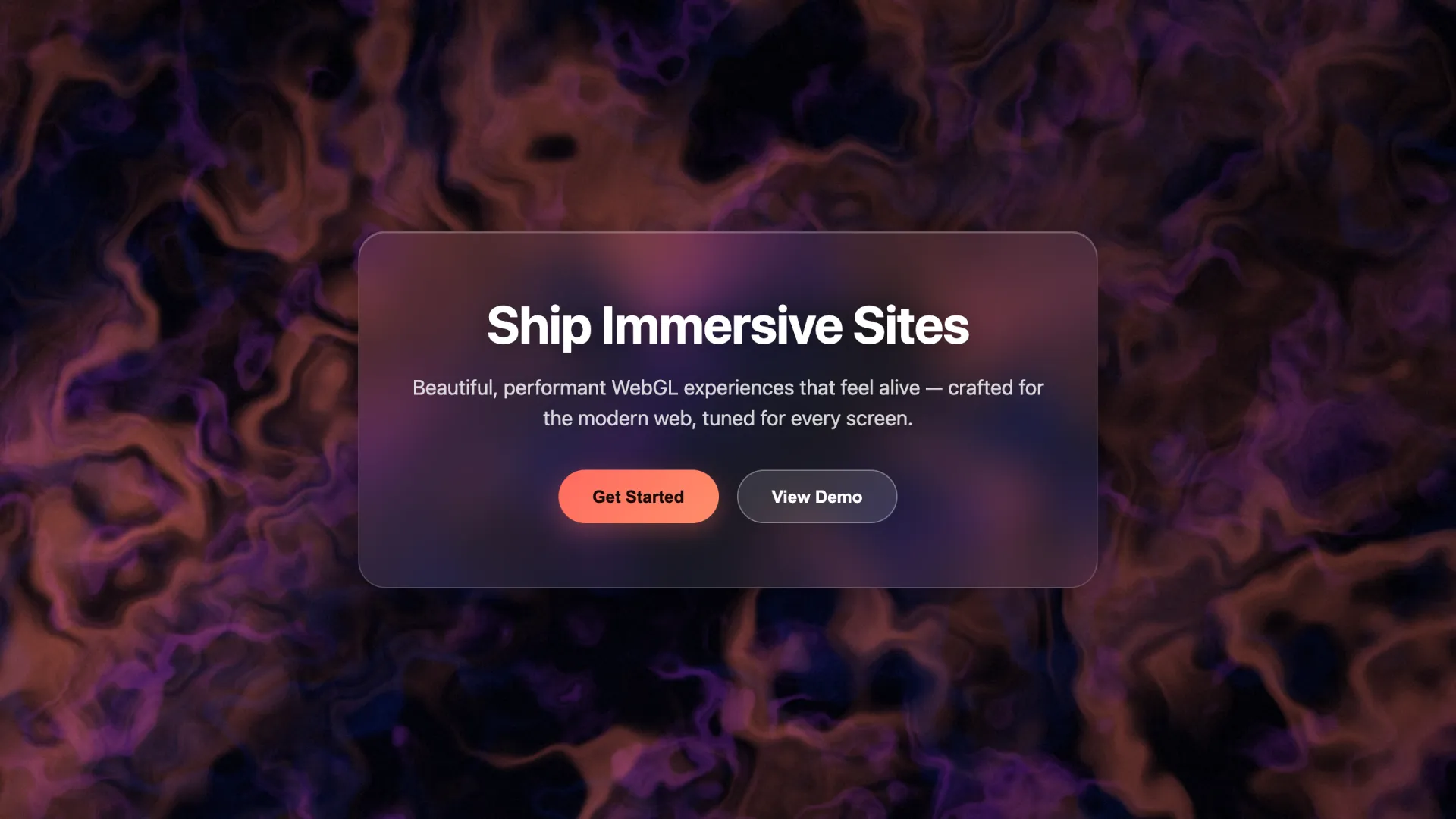
31 seconds, 3,830 tokens, first-try pass. The "single quad, no postprocessing passes" line is the performance guardrail: without it, models tend to reach for EffectComposer and bloom passes that tank frame rates on integrated GPUs.
4. 3D portfolio fly-through (the one that fought back)
Create a single-file HTML page: a 3D portfolio using Three.js from a CDN.
Six floating project cards (rounded planes with placeholder gradient
textures and project titles rendered onto the card texture) arranged along
a gentle curve in 3D space. As the user scrolls, the camera flies forward
along the curve, bringing each card into focus one at a time; the camera
must keep the focused card fully in frame with comfortable margin and never
pass through a card; the focused card scales up slightly. Neighboring cards
stay partially visible for depth. Add subtle fog, a dark background, damped
scroll interpolation. Clicking a focused card opens a link. Handle resize.
Keep the code compact: reuse one card-building function, no comments.
Output ONLY the complete HTML file in a single code block.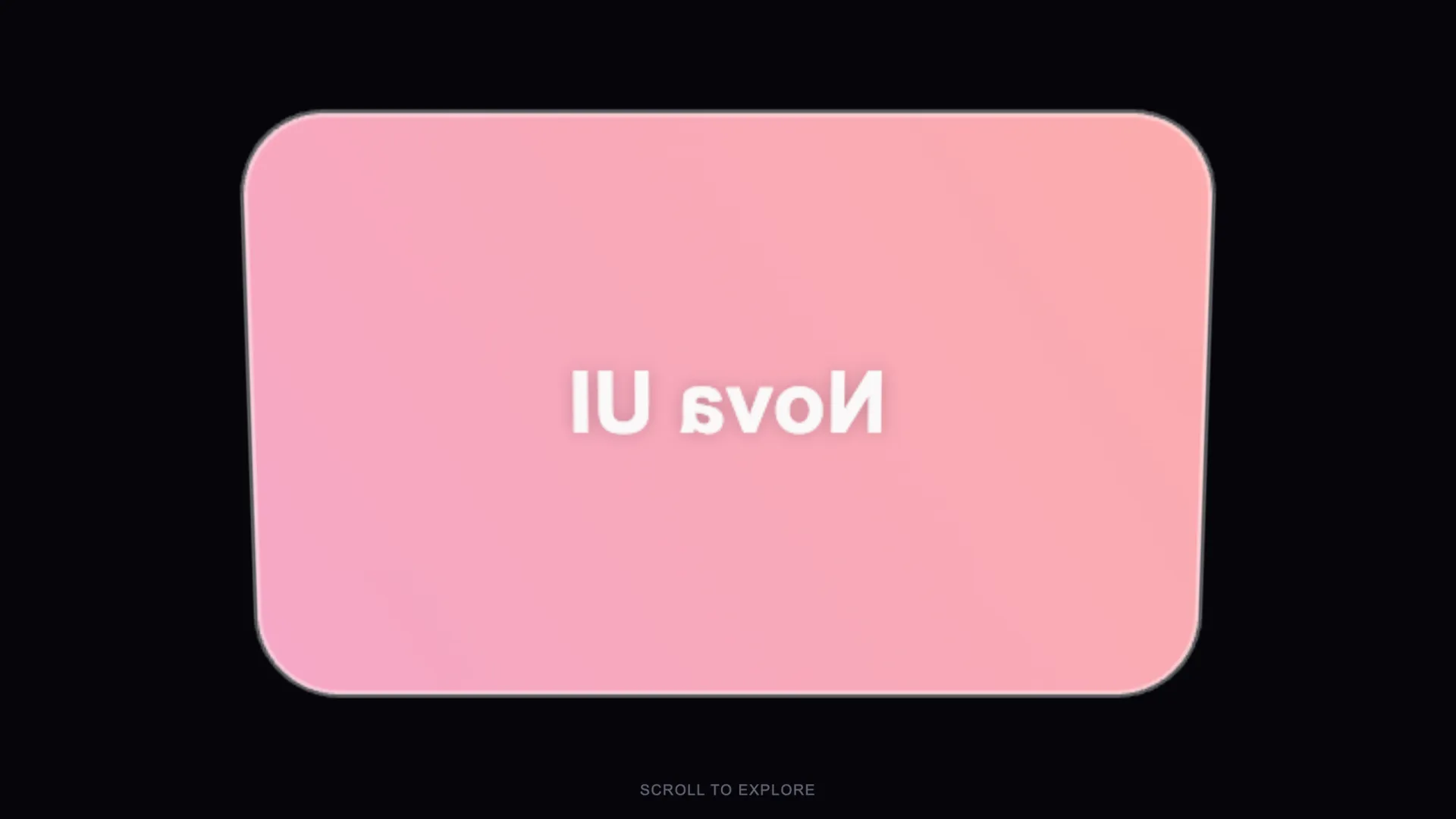
This one took three runs and still isn't shippable, and the screenshot above shows why we're publishing it anyway: the card renders, but the camera sits behind it, so the title reads mirrored. Run one overflowed our 16,000-token output cap mid-file. Run two (with the "keep the code compact" line, which is why that line is in the prompt) rendered cards but flew the camera straight through them. Run three fixed the clipping and lost the camera's scroll coupling. Camera-path choreography plus per-card textures is genuinely harder for models than the scenes above; budget a debugging session, or simplify to a static curved grid with hover states.
5. Interactive product viewer
Create a single-file HTML page: an interactive 3D product viewer using
Three.js from a CDN. Center a stylized wireframe-free geometric product
stand-in (a beveled cube or capsule) on a pedestal. Right-side panel with
three color swatches and a metal/matte toggle that update the material live;
OrbitControls limited to horizontal rotation; soft three-point studio
lighting and a contact shadow. Keep the panel plain HTML/CSS overlaying the
canvas. Handle resize. Output ONLY the complete HTML file in a single code
block.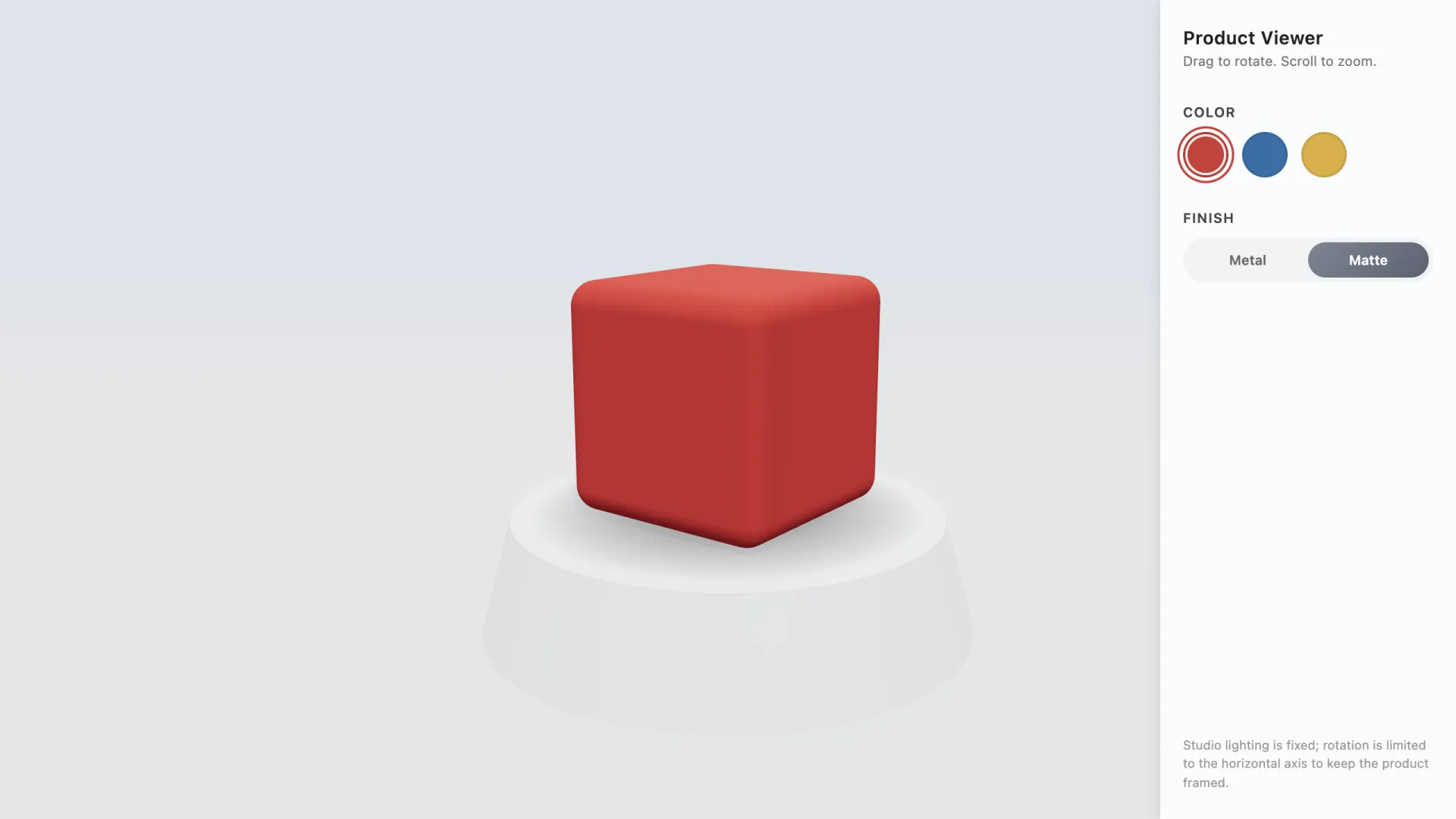
First-try pass, 66 seconds, 7,719 tokens. Swatches and the metal/matte toggle update the material live, and the model added an unprompted nicety: a footnote explaining that rotation is locked to the horizontal axis to keep the product framed.
6. One-page 3D business site
Create a single-file HTML page: a one-page site for a design studio with
Three.js from a CDN. Sections: hero, services, work, contact. A single
low-poly abstract shape floats top-right of the hero and slowly rotates;
as the user scrolls into each section the shape morphs its scale and color
to match that section accent. Sections otherwise use clean HTML/CSS
(no heavy 3D per section) so the page stays fast. Smooth scroll, mobile
friendly, handle resize. Output ONLY the complete HTML file in a single
code block.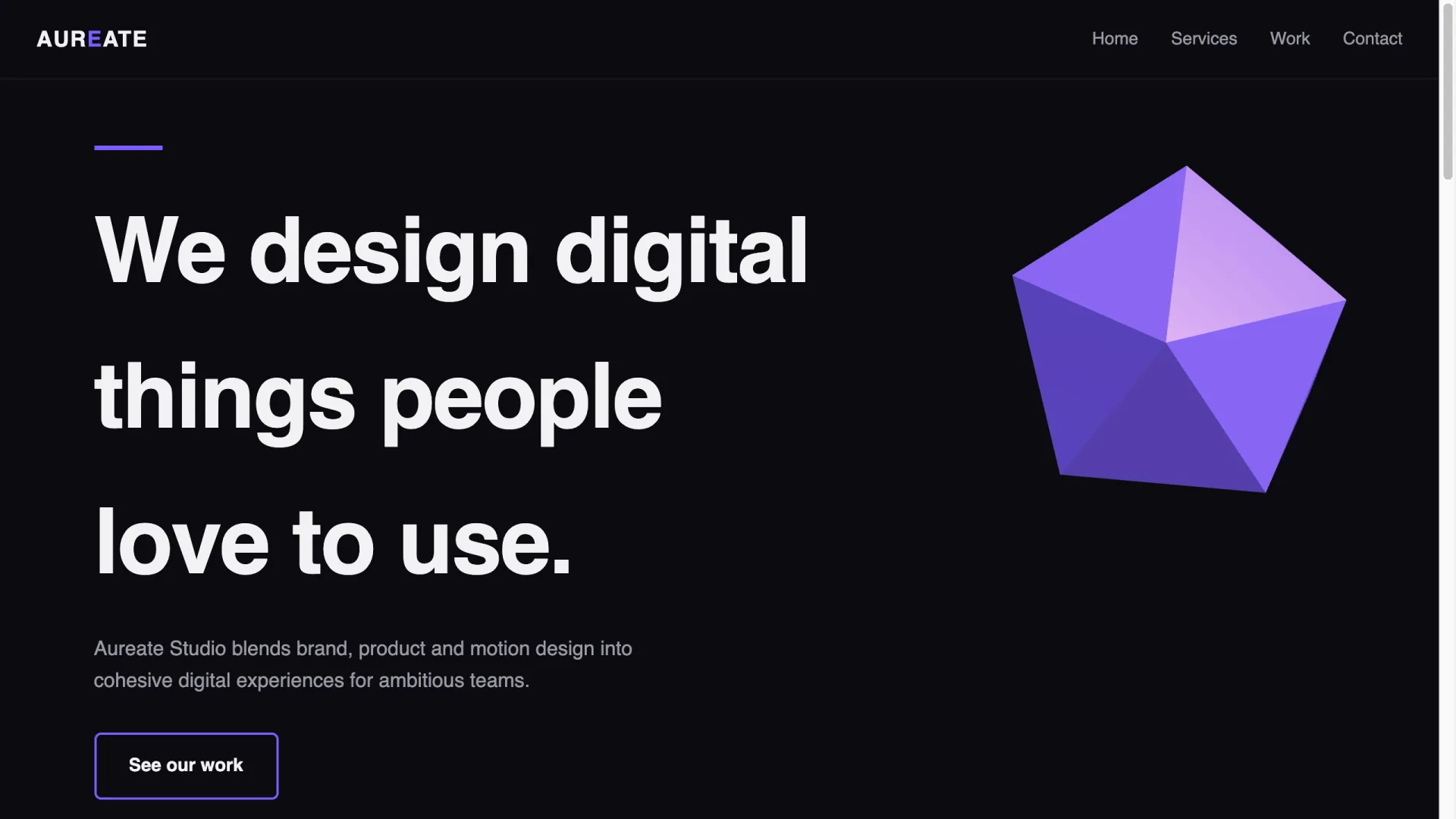
62 seconds, 7,419 tokens. The model invented a studio name, built the four sections, and floated a low-poly icosahedron exactly where asked. Our first attempt at this prompt hit an 8,000-token output cap and arrived truncated — if you call a model through an API, set the output limit to 16,000 tokens or more for full-page prompts.
What happened when we ran them
Three runs on one model per prompt is an anecdote, not a benchmark; read it as a spot check of where prompt-to-3D generation stands in mid-2026. Method notes: claude-sonnet-5 through its API on July 17, 2026, default settings, no system prompt, results rendered in desktop Chrome at 1280×720 on an Apple-silicon MacBook; in the successful runs the model chose the Three.js r128 UMD build from a public CDN on its own.
| Prompt | Output tokens | Time | Result |
|---|---|---|---|
| Particle galaxy hero | 3,692 | 27.4s | Working first try; subline contrast too low |
| Scroll-driven showcase | 7,023 | 63.4s | Working first try, all 4 color stages correct |
| GLSL fluid gradient | 3,830 | 31.6s | Working first try, no dropped frames visible on the test MacBook |
| Portfolio fly-through | 3 runs | 84–163s | Not shippable: token overflow, then camera clipping, then mirrored titles |
| Product viewer | 7,719 | 65.8s | Working first try, live material switching |
| One-page business site | 7,419 | 62.4s | Working after one rerun with a higher output-token cap |
The one visual defect among the five working pages: prompt 1's subline sits on the brightest part of the galaxy and becomes near-unreadable. One follow-up line fixed it — Give the subline a subtle dark text-shadow and raise its font weight so it stays readable over the bright galaxy core. That's the pattern across these runs: the 3D scene itself tends to come out right, and the iteration budget goes to typography, overlay contrast, and (in the portfolio case) camera choreography.
Cost is a non-issue at this scale. The full test run — nine generations including the portfolio retries, about 46,000 output tokens — cost well under a dollar; we ran it through AIReiter, which resells Claude API access at a fifth of the official per-token price, so even a stubborn iteration session stays in pocket-change territory.
How to write your own 3D website prompt
The prompts that passed share five parts. Keep all five and your odds of a first-try pass go up sharply.
- One scene subject. A galaxy, a torus-knot, a gradient field. In our runs and in most shared community examples, prompts that ask for several unrelated 3D features in one page are where models start dropping requirements.
- A motion driver. Either time (
slowly rotates,driven by a time uniform) or scroll (as the user scrolls, the camera orbits). Say which one explicitly; "animated" alone lets the model pick something boring. Note from the portfolio failure: scroll-driving an object is reliable, scroll-driving a camera along a path between objects is where things break. - The interaction.
OrbitControlsfor drag-to-rotate worked in every successful run of our test. If you overlay text on the canvas, ask forpointer-events: noneon the overlay container andpointer-events: autoon buttons — otherwise the text layer eats the drags and clicks meant for the scene. - The overlay content. Give exact headline text in quotes. Models fill unspecified copy with generic slogans you'll have to replace anyway.
- Performance and size guardrails. Particle count,
single quad, no postprocessing, orlow-polykeeps the page fast;keep the code compactkeeps the output inside API token limits — two of our nine runs died to an output cap before any code quality issue appeared.
Vocabulary that pushes the model toward real 3D rather than a flat CSS imitation: Three.js, particle system, GLSL fragment shader, OrbitControls, scroll-driven camera, torus-knot, lerp, fog, point lights. The words matter because they map to real API names, so the model writes against libraries it saw in training instead of improvising.
The paste-code shortcut
For effects beyond what you can describe, there is a second technique. Find a finished Three.js effect on CodePen, paste the raw code into your AI tool, and prompt only Add this 3D animation to the hero. The model translates the snippet into your stack — React components, your build setup, your section structure — which is usually the tedious part. Builder.io documented the trick with a 50,000-particle planet animation, including the same pointer-events: none layering fix, in their walkthrough.
This is the highest-leverage path when you want award-site polish: the shader math comes from a human who tuned it, and the AI only does integration.
Which tools take these prompts
The six prompts above are tool-agnostic; anything that writes and previews HTML/JS will run them. Where the tools differ is output form and code ownership (checked July 17, 2026):
| Tool | Free path | What you get | Code ownership |
|---|---|---|---|
| Claude (chat or Claude Code) | Free tier | Raw single-file HTML or a full repo | Yours, full source |
| Lovable | Free tier | Hosted React app | Export available |
| Bolt | Free tier | Hosted full-stack app | Export available |
| Cursor | Free tier | Code in your own repo | Yours, full source |
| VULK | None — 3-day intro from €3.99, plans from €19.99/mo | Generated React Three Fiber site, PostgreSQL backend | Full export to GitHub |
| Spline Omma | Waitlist/limited | 3D layer added onto an existing site | Platform-hosted |
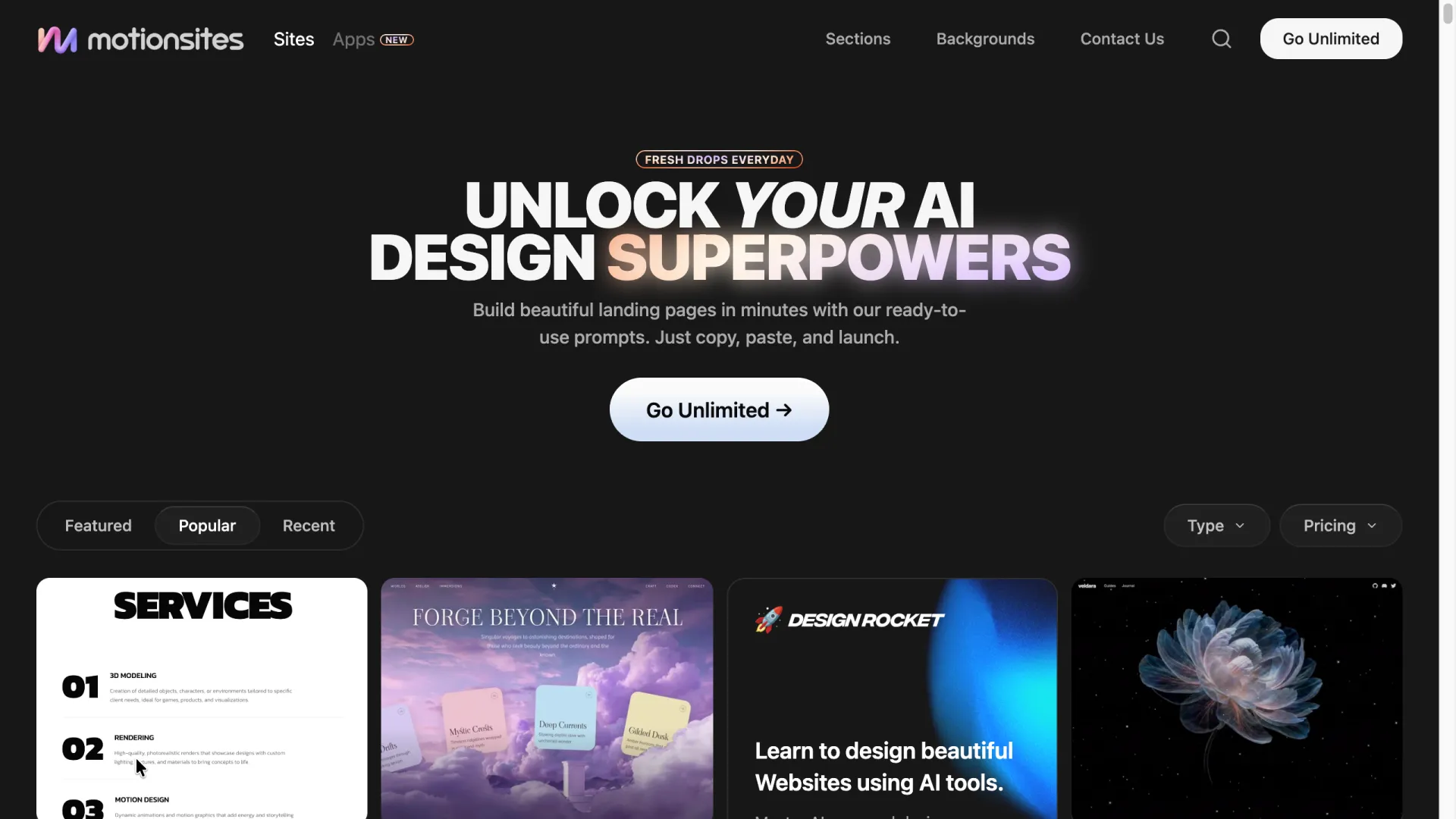
Two of these deserve a note. VULK's pitch is that it generates real React Three Fiber code — interactive WebGL scenes rather than a looping video header — and its showcase sites back that up. Real code output versus a video header is exactly the distinction to check before paying for any "AI 3D website builder." And if you'd rather browse prompts than write them, MotionSites maintains a categorized library aimed at Lovable, Bolt, Cursor, and Claude. A portion is free to copy, the rest sits behind a subscription:
Where prompts hit their ceiling
A recurring question in r/lovable and r/web_design threads is whether the right prompt can reproduce sites like mont-fort.com or the Noomo Agency labs pages. Honest answer: not from a prompt alone. Those sites are built on custom GLTF models, art-directed lighting, and bespoke shader work — assets a text prompt cannot conjure. What a prompt gets you is the mechanics of those sites (scroll-driven cameras, shader backgrounds, damped motion) with placeholder geometry. Swapping in a real model file closes part of that gap, but lighting, materials, and mobile fallbacks for it remain real design work. Our portfolio fly-through failure above is the same lesson in miniature: the closer a prompt gets to choreographed, multi-object scenes, the more human iteration it takes.
Three failure modes cover most broken generations, each with a one-line fix:
- Black screen, no errors visible. Usually an ES module/CDN import mismatch. Fix prompt:
Use a single non-module script tag with the Three.js r128 UMD build from a CDN, no import maps.(r128 is the version our test runs picked unprompted, and it still works; newer Three.js versions dropped the UMD path, so pinning avoids the mismatch.) - Smooth on desktop, stuttery on phones. Particle counts that were fine on a laptop. Fix prompt:
Halve the particle count on screens narrower than 768px and cap devicePixelRatio at 2. - 3D scene works but nothing on the page is clickable. The canvas or an overlay is swallowing events. Fix prompt:
Set pointer-events: none on the full-screen overlay and re-enable pointer-events: auto on buttons and links.
And one from our own runs: text on a 3D card renders mirrored. The camera is looking at the plane's back face. Fix prompt: Make card materials double-sided with the texture mirrored correctly, or rotate cards to always face the camera.
FAQ
Are there free 3D website prompts?
Yes. The six in this post are complete and free to copy, and DocsBot and the free tier of MotionSites offer more. Paid libraries mainly buy you volume and pre-tested variety, not a different kind of prompt.
Do these prompts work in Lovable or Bolt?
Yes, with one adjustment: drop the "single-file HTML" requirement, since those platforms scaffold React projects. Keep everything else — the scene subject, motion driver, interaction, and performance guardrail transfer directly.
Do I need to know Three.js to use a 3D website prompt?
No for generating, a little for iterating. The prompts above embed the necessary Three.js vocabulary. Knowing what OrbitControls or a fragment shader is helps you ask for precise changes instead of regenerating blind.
What's the best AI tool for a 3D website?
For a single-file effect or hero section, Claude directly: you keep the source and pay per token. For a hosted site with a backend, Lovable or Bolt on their free tiers, or VULK if you specifically want exported React Three Fiber code.
Will a 3D hero hurt performance or SEO?
Only if you let it. Keep the 3D to one scene, add the mobile guardrails above, and keep your headline and body copy in real HTML over the canvas, as all six prompts do. Crawlers read the text layer, and Core Web Vitals depend mostly on what else the page loads.