 AIREITER
Seedance 2.0 Mini is the cheapest and fastest model in ByteDance's Seedance 2.0 family — roughly half the cost and twice the speed of the existing tiers. We ran a handful of test generations — text-to-video with different scene types — to get a feel for where it holds up and where it doesn't. Combined with what users are reporting on Reddit and X, the picture is clear: it's good enough for most short-form video work, and the cost savings are real. But there are specific situations where you should still reach for Standard.
What Is Seedance 2.0 Mini?
ByteDance launched Seedance 2.0 Mini on June 15, 2026, as the third tier in the Seedance 2.0 lineup:
Tier | Max Resolution | Speed | Cost |
|---|---|---|---|
Seedance 2.0 (Standard) | 1080p | Baseline | Baseline |
Seedance 2.0 Fast | 720p | ~2x Standard | ~70% of Standard |
Seedance 2.0 Mini | 720p | ~2x Fast | ~50% of Standard |
Mini isn't just a stripped-down version. It's actually a Pareto improvement over the Fast tier — better quality at lower cost. It keeps the full multimodal reference system (up to 12 inputs: 6 images, 3 video clips, 3 audio files), native audio-video sync, and camera control from text prompts. The trade-off is a 720p resolution cap and clips limited to 4–15 seconds at 24fps.
Real Pricing: What Mini Actually Costs
There's significant confusion around Seedance 2.0 Mini pricing online. ByteDance's official rate is approximately ¥0.5 per second at 720p — that's Chinese yuan, not US dollars. Several English-language articles incorrectly report "$0.50/second," which is roughly 7x the actual cost.
Here's what it actually costs across platforms:
Platform | 480p | 720p | Notes |
|---|---|---|---|
Volcano Ark (official) | — | ~$0.07/s | Token-based: ¥0.023/k tokens (img2vid) |
— | $0.056/s | Lowest third-party rate found | |
AIReiter | $0.0325/s | $0.0825/s | Linear pricing, 1 USD = 100 credits |
— | $0.23–0.33/s | Higher, includes platform features |
Token calculation formula: (height × width × duration × 24) / 1024
For a 5-second 720p clip (1280×720), that's roughly 108k tokens. At the official rate, about ¥2.5 (~$0.35). On AIReiter, the same clip costs 41.25 credits — $0.41. Platforms vary significantly, so check rates before committing to high-volume work.
Audio generation is free across all tiers, including Mini. Enabling synchronized sound, dialogue, or music doesn't change the price. Based on our clips and user reports, ambient sound matching (rain, traffic, crowd noise) works well. Dialogue lip-sync is more hit-or-miss — users on Reddit note that it's "okay for conversation or low movement scenes" but shows more artifacts in complex motion. This limitation exists on Standard too, but Mini's lower resolution makes any misalignment more visible.
Speed and Quality: Hands-On Results
The marketing claim is "2x faster than Fast at comparable quality." We ran several test clips on AIReiter's playground at 720p, 5 seconds, 16:9 to check.
Speed: Our clips came back in roughly 3–4 minutes each. XMK's testing reported similar numbers — about 3 minutes for a 5-second 720p anime clip. Not instant, but fast enough that you can iterate on prompts without losing momentum.
Quality: Even from a small sample, Mini's output quality is closer to Standard than the pricing gap suggests. Motion coherence and color grading held up well; the differences show mainly in fine detail at full-screen viewing.
Here's one of our test clips — a Mediterranean market scene. The prompt we used:
A young woman in a flowing white linen dress walks through a sunlit Mediterranean village market. She picks up a ripe orange from a wooden cart overflowing with colorful fruits. Golden hour sunlight streams through the archways, casting long warm shadows on cobblestone streets. Slow tracking shot following her from the side, shallow depth of field, natural film grain, warm color palette.
Two frames pulled from that clip show what Mini can do at 720p:
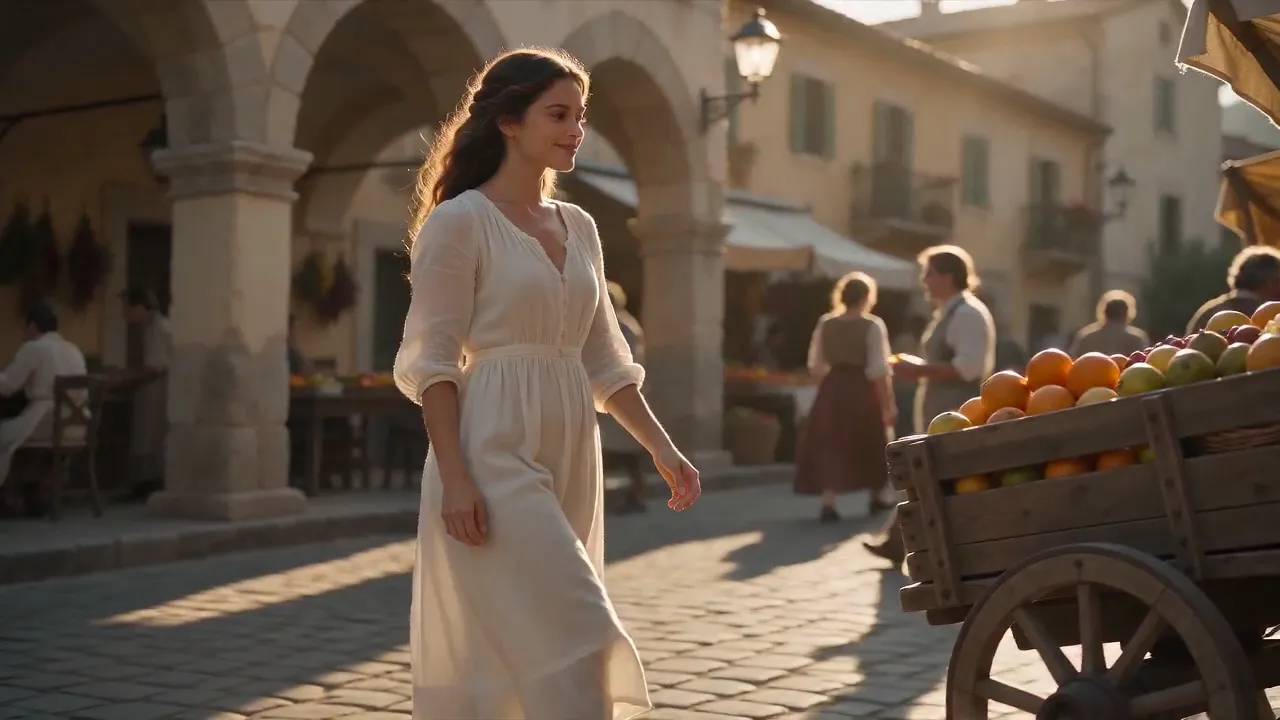
Notice the golden hour light wrapping around the character's face, the distinct background figures staying consistent, and the cobblestone texture in the shadows. At 720p, this level of detail is strong for a model at half the cost of Standard.

In this later frame, Mini handles the hand-object interaction cleanly — fingers maintain correct proportions while reaching for the fruit, and the shallow depth of field separates the subject from the background naturally. The fruit textures and fabric folds are where you'd start to see differences from Standard at full-screen, but on mobile or in social feeds, the gap is negligible.
Where Mini Matches Standard
Character consistency via references: We took a frame from the market clip above and used it as an image reference to generate the same character in a completely different scene — a rooftop terrace at sunset. The result maintained facial features, hairstyle, and clothing accurately:

For single-reference setups, Mini's character consistency is strong — this is one area where the quality gap with Standard is minimal.
Stylized and animated content: Nearly indistinguishable from Standard. Character consistency, line work, and color handling are all strong.
Low-to-medium motion scenes: Conversations, slow pans, establishing shots — Mini handles these with the same coherence as Standard.
Lighting and atmosphere: Neon scenes, golden hour, rain effects — the rendering quality holds up well.
Where Mini Falls Short
Complex multi-subject motion: When three or more characters interact simultaneously, Mini produces more artifacts — odd limb positions, subjects merging briefly.
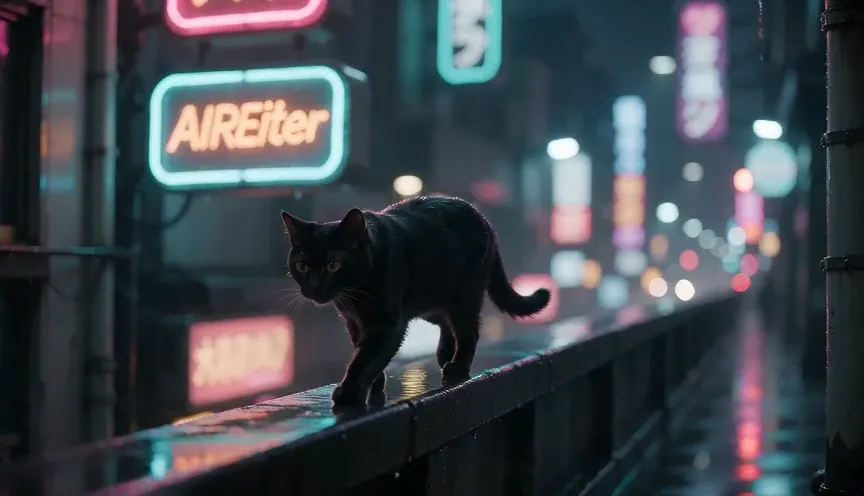
Text rendering: Any shot with visible text is unreliable. We tested this deliberately with a neon alley scene, prompting a sign to read "AIReiter":
A cinematic tracking shot through a neon-lit Tokyo alley at night. A black cat walks along a rain-soaked ledge, passing glowing shop signs. At 0:03, one of the signs briefly flickers to read "AIReiter" in warm amber neon before returning to Japanese characters. Camera slowly dollies forward, shallow depth of field, film grain, moody cyan and magenta lighting.
Mini rendered the sign as "AIREiter" — close, but with inconsistent casing. That's actually better than most text attempts. Signs, logos, and on-screen text frequently appear garbled or incomplete across the Seedance family, but it's more pronounced in Mini.
Reference control in complex scenes: With 4+ references mixing different subject types (e.g., characters and vehicles in the same prompt), Mini can occasionally ignore one of the references and substitute random elements. Simple reference setups (1–2 images) work reliably.
Mini vs Competitors: Kling 3.0, Veo 3, Sora 2
How does Seedance 2.0 Mini stack up against other AI video generators in mid-2026?
Feature | Seedance 2.0 Mini | Kling 3.0 | Veo 3.1 | Sora 2 |
|---|---|---|---|---|
Cost per second | ~$0.07 | ~$0.05 | ~$0.15 | ~$0.10 |
Max resolution | 720p | 1080p | 1080p | 1080p |
Max duration | 15s | 10s | 8s | 12s |
Native audio sync | Yes (free) | No | Yes | Yes |
Reference inputs | 12 (img+vid+audio) | Limited | Limited | Limited |
Best for | Volume drafting | Budget production | Cinematic quality | Physics simulation |
Mini's edge: No other model at this price point accepts 6 images, 3 videos, and 3 audio files in a single generation. For character-consistent content across multiple clips, this reference system is a major advantage.
Mini's weakness: Resolution. At 720p max, Mini is the lowest-resolution option in this comparison. Kling 3.0 offers 1080p at a lower price point. If resolution is non-negotiable, Kling is the better budget option.
Best Workflow: Draft on Mini, Finish on Standard
The most cost-effective approach isn't choosing one model — it's using both strategically:
Step 1 — Explore on Mini: Generate 10–20 variations of your concept. Test different prompts, camera angles, reference combinations. At Mini pricing, this costs $0.70–$3.50 total instead of $1.40–$7.00 on Standard.
Step 2 — Lock your prompt: Identify the 2–3 best outputs. Refine the prompt wording based on what worked.
Step 3 — Render on Standard: Re-generate only your final shots at 1080p on Standard. You're now paying premium rates only for proven concepts.
Step 4 — Fill gaps with Mini: B-roll, transitions, and supplementary footage can stay on Mini — viewers rarely notice 720p in fast-cut sequences.
This workflow typically saves 40–60% compared to running everything through Standard. The savings compound on longer projects: a 50-clip social campaign that would cost ~$350 on Standard drops to ~$150 with this approach.
How to Try Seedance 2.0 Mini
The easiest way is through Dreamina, ByteDance's official creative platform. If you need API access, AIReiter offers both API and a playground for quick tests, at $0.0825/s for 720p.
Who Should (and Shouldn't) Use Mini
Use Mini when:
You create short-form content at volume (social media, ads, product clips)
You're prototyping and testing prompts before committing to expensive renders
Your delivery format is mobile-first (720p is fine on phone screens)
You work with anime, illustration, or stylized aesthetics
Budget matters more than maximum fidelity
Skip Mini when:
Your final deliverable needs 1080p or higher
The project involves photorealistic human faces
Text or logos must be readable in the frame
You need perfect multi-character choreography
You're delivering for large-screen display (TV, cinema, presentations)
The bottom line: For iterative, high-volume workflows — social content, ad variations, concept testing — Mini delivers 80–90% of Standard's quality at half the cost. Use it for drafts and volume work, switch to Standard for final hero renders.
FAQ
Is Seedance 2.0 Mini free? No, but most platforms offer free trial credits.
Can Mini generate audio? Yes. Native audio sync (ambient sound, dialogue, music) is included at no extra cost — same capability as Standard.
What's the difference between Mini and Fast? Mini is newer, cheaper, and produces better quality than Fast. It's a direct upgrade — there's little reason to use Fast if Mini is available.
Does Mini support the reference system? Yes, the full multimodal reference system works on Mini: up to 6 images, 3 videos, and 3 audio references per generation.
Is the Mini API available? The API launched via BytePlus and Volcengine around June 22, 2026. Third-party platforms like AIReiter also provide API access.