 AIREITER
On July 9, 2026, OpenAI announced three changes at once: the Codex desktop app turned into the new ChatGPT desktop app (the old ChatGPT app got renamed ChatGPT Classic), a new agent called ChatGPT Work launched on top of GPT-5.6, and the standalone Atlas browser started getting phased out. If you opened ChatGPT today and didn't recognize it, that's why.
What Changed on July 9
Codex became the new ChatGPT desktop app. If you already had the Codex app installed, updating it turns it into the new unified ChatGPT desktop app. Developers can still set Codex as the default view and keep the Codex icon. Mac users got it today; Windows users are getting it in the next few days.
The old ChatGPT app didn't disappear. It got renamed. It's now called ChatGPT Classic, and you can keep using it with no forced migration. It still receives model updates, bug fixes, security patches, and its existing Enterprise capabilities. OpenAI's own note is that new agent features may only land in the new app going forward, not in Classic.
The new app bundles three modes in one window: Chat (conversations and search), Work (research, documents, spreadsheets, presentations, Sites), and Codex (coding with local files, repos, and terminals). All three modes are visible on every plan, including Free, but the Work agent feature itself and the higher model tiers have separate access gates (covered below).
Atlas is being sunset, not killed outright. OpenAI is folding the standalone agentic browser's capabilities into the new ChatGPT desktop app's built-in browser and an updated Chrome sidebar extension. Existing Atlas users are being transitioned rather than cut off immediately.
Rollout is staged. Pro, Enterprise, and Edu accounts get ChatGPT Work today. Plus and Business accounts follow within the next few days, according to both OpenAI's announcement and early hands-on coverage.
What Is ChatGPT Work, Specifically
OpenAI describes ChatGPT Work as an agent that gathers information across your apps and workflows to produce finished materials — spreadsheets, slides, docs, and web apps — and can stay on a complex project for hours by breaking it into smaller steps.
The oversight model matters here: it's not a black box. Work runs on an approval architecture with Plan mode before it starts a task, configurable check-ins partway through, and actions gated on your sign-off. That's the mechanism OpenAI is using to argue a human stays in the loop while the agent handles the volume of work.
Under the hood, Work runs on the new GPT-5.6 model family, split into three named tiers: Sol (flagship, for the hardest coding and reasoning work), Terra (balanced, positioned near GPT-5.5 quality at roughly half the price), and Luna (cheap, for high-volume drafting and summarizing). Which tier you can use depends on your plan: Free and Go accounts are limited to Terra, while Sol requires a paid plan with medium-or-higher effort settings.
Sites, a feature that started life under the Codex brand, is now folded into the main ChatGPT product in beta — it's for generating shareable interactive web apps and dashboards without leaving the chat.
OpenAI has published early pilot data from a small set of enterprise customers: Zapier reported automating a 35–45 minute lead qualification task into a workflow that now contributes seven figures in monthly pipeline, while NVIDIA and RingCentral are testing Work for research automation and customer support workflows. These are vendor self-reported figures from early pilot programs, not independently audited results. The company also claims internal red-team testing blocked 100% of attempts to extract protected data through Work's approval gates, though those are lab results rather than production guarantees.
What ChatGPT Work Costs
Here's the part OpenAI didn't spell out clearly at launch: ChatGPT Work doesn't have its own price tag. It follows the same usage structure as Codex, so longer, more involved tasks consume more of your plan's included usage. No per-task prices, credit rates, or hard limits were published at launch, so budgeting for it means treating it like an API workload riding on top of your subscription, not a flat add-on fee.
Since there's no official number to quote, the closest thing to real pricing is what the underlying GPT-5.6 models cost via the API, verified directly against OpenAI's own pricing page on July 10, 2026:
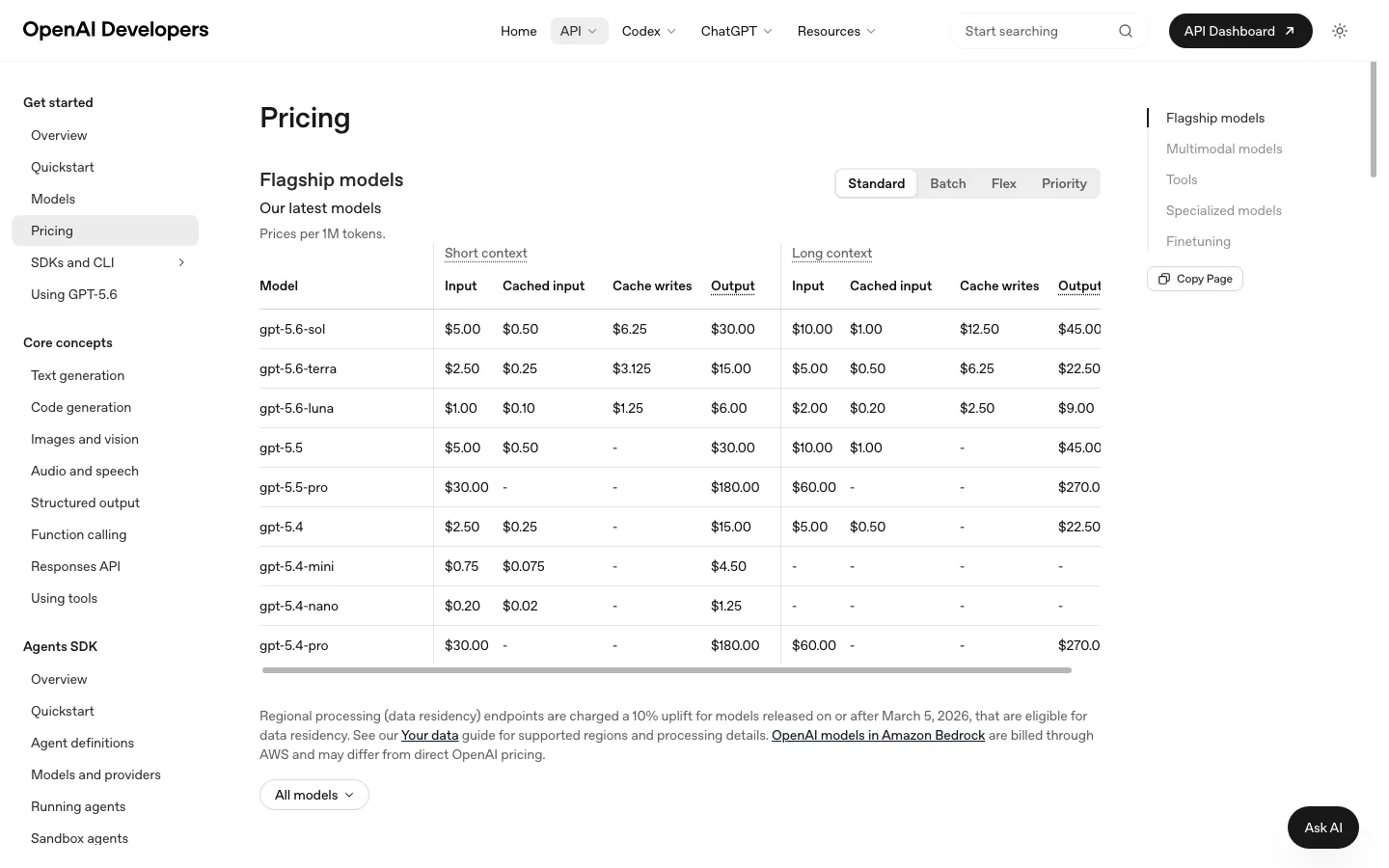
Pricing source: OpenAI official pricing page (developers.openai.com/api/docs/pricing), verified July 10, 2026
Model | Input (short context) | Output (short context) |
|---|---|---|
GPT-5.6 Sol | $5.00 / 1M tokens | $30.00 / 1M tokens |
GPT-5.6 Terra | $2.50 / 1M tokens | $15.00 / 1M tokens |
GPT-5.6 Luna | $1.00 / 1M tokens | $6.00 / 1M tokens |
One detail the launch-day coverage skipped entirely: OpenAI's pricing page also lists a separate long-context rate that's nearly double the short-context price across all three tiers. Sol jumps to $10.00 input / $45.00 output once a request crosses into long-context territory. If ChatGPT Work is chewing through large documents or long agent runs, that's the rate that applies, not the headline short-context number most articles quoted.
So what does a real Work session cost in practice? No exact numbers have been published yet, but you can sanity-check the scale using Codex's own reported usage: agentic coding sessions on Codex commonly run several hundred thousand to a few million tokens across a multi-step task once tool calls, file reads, and retries are counted. At Sol's rate, a single involved task in that range plausibly lands somewhere in the $2–$15 range in raw token cost alone, before OpenAI's usage-based plan multiplier is factored in. Treat that as a rough estimate, not an official figure; OpenAI hasn't confirmed how Work's usage counts against your plan limits.
For a full breakdown of how the three tiers compare against GPT-5.5 and what each is built for, see AIReiter's GPT-5.6 pricing guide. And if what you want is the GPT-5.6 model itself, not the Work agent wrapper, the subscription gate, or the desktop app, accessing it directly through an API relay like AIReiter keeps the cost tied to token usage instead of a seat-based plan.
Real Users Are Not Happy With the New Desktop App
This is the part launch-day coverage mostly skipped in favor of polished enterprise pilot data. Worth being clear this reflects the first 24 hours after launch, not a long-term usability verdict — but the complaints are real, dated, and specific.
Developers who relied on the standalone Codex app are the loudest. One user summed up the core complaint: "Codex app update and the attempt to combine chatGPT and codex into one is really unpolished IMO. Who thought overlaying chatGPT chats in a floating window on top of codex was better UX than what codex had before" (@_smorgan).
Another echoed the same friction point: "This merging of the ChatGPT app and the Codex app is rough. The Work/Codex distinction is confusing and now regular chats are in this little pop-over and feel like they are deprecated" (@stolton).
A third framed it as a branding problem more than a features problem: "The new ChatGPT desktop app feels like Codex rebranded as ChatGPT, not a ChatGPT-first app... ChatGPT feels very marginalized here — this is clearly Codex-first" (@AdamMichailow).
And one described the practical cost to daily workflow: "It seriously break[s] good UX and makes it feel vibe coded... Surprisingly renders Chat nearly unusable in a temporary popup window" (@jb510).
The common thread across these complaints isn't that Work or Codex individually got worse — it's that cramming Chat, Work, and Codex into one window has made plain conversation feel like an afterthought for people who used Codex as a dedicated coding tool.
ChatGPT Work vs Claude Cowork
Worth saying upfront: ChatGPT Work just launched, so there's no independent long-term test data comparing the two yet. This is a comparison of positioning and known capabilities, not a head-to-head benchmark.
Claude Cowork established itself earlier around a narrower premise: automating file-based workflows on your own machine without much technical setup, organizing local documents, running scripts, and chaining multi-step tasks tied to files already on your computer.
ChatGPT Work covers a wider surface. It shares Codex's plugin system and computer-use capabilities, adds a built-in browser that inherits Atlas's agentic browsing as that product winds down, and folds in Sites for producing shareable web apps. The pitch is one desktop app spanning research, documents, and code rather than a single-purpose local automation tool.
Access also differs right now: Work is rolling out to Pro, Enterprise, and Edu first, with Free and Go accounts capped at the Terra tier — so most people can't yet test the flagship Sol tier even if they want to.
Neither is a wholesale replacement for the other today. Cowork's pitch is still narrower and more mature for pure local file automation; Work is broader but newer, and its rough desktop rollout (see above) suggests the polish hasn't caught up to the ambition yet.
If your work is mostly local files and scripts with minimal browser research, Cowork is the more polished choice today. If you need browser automation plus document and spreadsheet generation alongside code in one agent, Work covers more surface area despite the rougher UX.
What To Do Right Now
If you're an existing Codex user: your app will update automatically into the new unified desktop app. You can set Codex as your default view to keep something close to your old workflow, but expect some UX friction in the transition based on the feedback above. It's not just you.
If you're a regular ChatGPT Plus user: Work is still a few days out for your plan. In the meantime, Free and Go accounts (and Plus, once Work arrives) are capped at the Terra tier; Sol access requires a higher-tier plan with medium-or-higher effort settings selected.
If you're a developer or team trying to control cost: decide first whether you need the Work agent wrapper (the approval flow, the cross-app orchestration, the subscription gate) or just the GPT-5.6 model underneath it. If it's the latter, calling GPT-5.6 directly through the API, or a relay that prices it at the token level, like AIReiter, is more predictable to budget than a seat-based plan with an unpublished usage multiplier.
FAQ
Is ChatGPT Work free?
No flat price is published. It consumes usage from your existing ChatGPT plan, following your plan's included usage rather than a fixed per-task fee.
What happened to the Codex app?
Updating it turns it into the new unified ChatGPT desktop app (Chat, Work, and Codex modes in one window). The previous app is still available separately, renamed ChatGPT Classic.
Is ChatGPT Work available yet?
Yes for Pro, Enterprise, and Edu accounts as of July 9, 2026. Plus and Business accounts get it within the next few days.
Is ChatGPT Work better than Claude Cowork?
Too early to say definitively — Work just launched. Cowork is narrower and more established for local file automation; Work is broader in scope but newer and rougher on desktop.
Is the Atlas browser shutting down?
It's being sunset rather than shut off immediately. Its capabilities are moving into the new ChatGPT desktop app's built-in browser and an updated Chrome sidebar extension.