 AIREITER
Farklı dil konuşan biriyle sohbet ederken her cümleden sonra telefona bakıp çevirinin tamamlanmasını beklemek, konuşmanın ritmini bozuyor. Gemini 3.5 Live Translate tam da bu kesintiyi azaltmayı hedefliyor: Siz konuşurken çeviri birkaç saniye geriden geliyor ve sesinizin temposunu, tonlamasını koruyor. Google’ın 9 Haziran 2026’da duyurduğu model, 70’ten fazla dilde gerçek zamanlı konuşma çevirisi için geliştirilmiş bir sesten sese sistem. Şu anda Google Translate uygulamasında, Google Meet’te ve geliştiricilere yönelik Gemini Live API’de kullanıma sunuluyor. Ücretsiz katmanı var; ücretli kullanımın maliyeti ise ses için dakika başına yaklaşık $0.037. Eski “konuş, bekle, dinle” akışından temel farkı, sohbeti her cümlede durdurmak zorunda bırakmaması.

Gemini 3.5 Live Translate tam olarak ne yapıyor?
Google, bu modeli eski araçlardaki “önce yazıya dök, sonra çevir, ardından seslendir” zinciri yerine doğrudan çevrilmiş sesi akış halinde üreten bir ses-ses modeli olarak tanımlıyor. Eski yöntemde konuşmanız önce metne dönüştürülür, metin çevrilir ve son olarak metinden ses üretilirdi; her aşama da ek gecikme yaratırdı. Gemini 3.5 Live Translate ise sesi akarken işleyip çevrilmiş sesi sürekli üretiyor. Cümlenin bitmesini beklemek yerine konuşmacıyı birkaç saniye geriden takip ediyor.
Onu temel bir çeviri aracından ayıran üç nokta var. İlk olarak, konuşulan dili otomatik algılıyor; böylece kimsenin ayar değiştirmesine gerek kalmadan tek bir sohbet 70’ten fazla dil arasında ilerleyebiliyor. Grup ortamında bu, 2.000’i aşkın dil kombinasyonuna çıkıyor. İkinci olarak konuşmacının tonlamasını, konuşma hızını ve perde yapısını korumaya çalışıyor; sonuç mekanik bir seslendirmeden çok doğal bir konuşma hissi veriyor. Son olarak, ürettiği tüm sesler Google’ın yapay zekâ üretimi medyayı işaretlemek için kullandığı SynthID ile filigranlanıyor. DeepMind model kartına göre sistem, 131,072 tokenlık giriş penceresine sahip Gemini 3 Pro mimarisi üzerine kurulu.
Şu anda hangi platformlarda kullanılabiliyor?
Gemini 3.5 Live Translate tek başına sunulan bir ürün değil. Aynı model üç farklı Google hizmetinde karşınıza çıkıyor; nasıl kullanacağınız da seçtiğiniz ortama göre değişiyor.
Google Translate uygulamasında
Günlük kullanım tarafında özellik, Android ve iOS için Google Translate uygulamalarında dünya genelinde kullanıma açılıyor. Live translate modunu açıp dilleri seçmeniz ya da uygulamanın dilleri algılamasına izin vermeniz yeterli; ardından konuşmaya başlayabilirsiniz. Android’deki yeni dinleme modu, çeviriyi telefonun ahizesinden oynatıyor. Böylece bire bir konuşma, telefonu sürekli karşılıklı uzatmaktan ziyade tercüman kulaklığı kullanmaya daha yakın bir deneyim sunuyor.
Google Meet’te
Google Meet içindeki bu modele dayalı konuşma çevirisi, kurumsal müşteriler için özel önizleme aşamasında. Aradaki fark büyük: Meet’in önceki çeviri özelliği yaklaşık beş dili desteklerken yeni sürüm, tek toplantıda 70’ten fazla dile ve 2.000’i aşkın dil çiftine çıkıyor. Katılımcılar konuşma kesilmeden görüşmeyi kendi dillerinde dinleyebiliyor.
Gemini Live API üzerinden
Geliştiriciler için model, Gemini Live API ve Google AI Studio’da herkese açık önizleme olarak yer alıyor. Çeviriyi kendi uygulamanıza, çağrı merkezinize veya canlı yayın ürününüze eklemek istiyorsanız kullanacağınız yol bu. Google; Agora, LiveKit, Fishjam, Pipecat ve Vision Agents dahil gerçek zamanlı ses platformlarıyla entegrasyonlar hazırlamış durumda. Grab ise ayda 10 milyondan fazla sesli çağrıyı yöneten ağı üzerinde, sürücü-yolcu aramalarında modeli test ediyor.
Live API ile kullanıma başlama
Model kimliği gemini-3.5-live-translate-preview. Live API’nin WebSocket bağlantısı üzerinden, doğrudan ya da Python ve JavaScript için GenAI SDK kullanarak iki yönlü ses akışı kuruyorsunuz. Temel bir Python kurulumu şöyle görünüyor:
from google import genai
from google.genai import types

client = genai.Client()
config = types.LiveConnectConfig(
    response_modalities=["AUDIO"],
    translation_config=types.TranslationConfig(
        target_language_code="es-US",       # BCP-47 target
        output_audio_transcription={},        # also return text
    ),
)

async with client.aio.live.connect(
    model="gemini-3.5-live-translate-preview", config=config
) as session:
    await session.send_realtime_input(audio=mic_chunk)   # 16 kHz PCM, ~100 ms
    async for msg in session.receive():
        play(msg.data)                                    # 24 kHz translated audio
Hata ayıklamaya geçmeden önce ses biçimini doğru ayarlamak önemli. Giriş, 16 kHz’de mono ve little-endian biçiminde ham 16 bit PCM olmalı. Çıkış ise 24 kHz’de mono ham 16 bit PCM olarak dönüyor. Mikrofon sesini yaklaşık 100 ms’lik parçalar halinde göndermeniz gerekiyor. Çeviri davranışı, translationConfig bloğuyla belirleniyor (Google dokümanlarındaki tam referans):
targetLanguageCode: Çıktı için kullanılacak BCP-47 dil kodu. Zorunludur.echoTargetLanguage: Hâlihazırda hedef dilde olan sesin tekrar edilip edilmeyeceğini belirler.inputAudioTranscription/outputAudioTranscription: Giriş ve çıkışın metin dökümlerini de almak için bu seçenekleri etkinleştirin.
Bu model çeviri odaklı olduğu için genel Gemini araç setinin önemli bölümü devre dışı bırakılmış durumda: function calling, thinking, structured outputs, caching ve search grounding yok. Model yalnızca sesi alıyor, çevrilmiş sesi ve isteğe bağlı metin dökümlerini döndürüyor. Oturumlar 30 dakikalık geçerlilik penceresine sahip geçici token’lar kullanıyor; özellikle tarayıcı istemcisine kimlik bilgisi veriyorsanız bu ayrıntı önemli.
Gemini 3.5 Live Translate fiyatlandırması
Herkese açık önizleme süresince gerçekten ücretsiz bir katman bulunuyor: olağan önizleme hız sınırları dahilinde giriş ve çıkış için ücret alınmıyor. Bu da ücretli kullanıma geçmeden önce tüm akışı prototiplemek için yeterli.
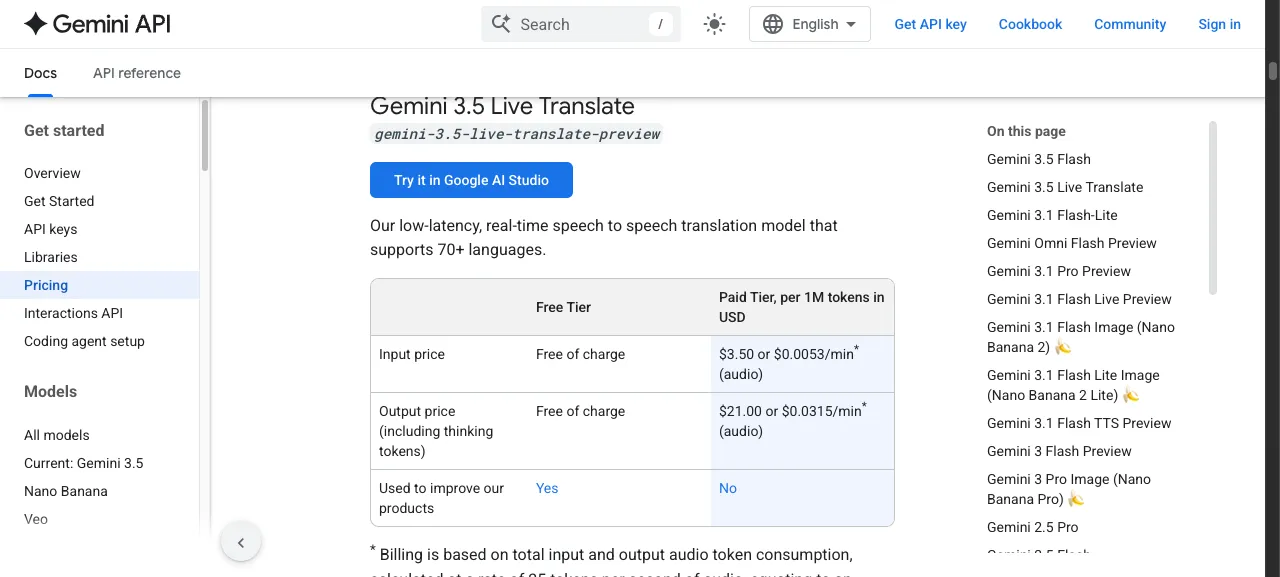
Ücretli katmanda faturalandırma, sesin saniyesi başına 25 token üzerinden ses token’ı bazında yapılıyor:
| Model | Giriş (1 milyon token başına) | Çıkış (1 milyon token başına) |
|---|---|---|
| Gemini 3.5 Live Translate | $3.50 (~$0.0053/dk) | $21.00 (~$0.0315/dk) |
| Gemini 3.1 Flash Live | $3.00 (~$0.005/dk) | $12.00 (~$0.018/dk) |
| Gemini 2.5 Flash Native Audio | $3.00 | $12.00 |
Toplamda Live Translate, çevrilen ses için dakika başına yaklaşık $0.037 maliyete geliyor. Bunun her bir ses akışı için ücretlendirildiğini unutmayın: 30 dakikalık çift yönlü bir konuşmada hem gelen hem de giden akış faturalandırılır. Bu nedenle sabit bir arama ücreti gibi düşünmek yerine, bütçenizi bir veya iki dolar düzeyinde planlamalısınız. Daha ucuz Gemini 3.1 Flash Live modeli de mevcut, ancak bu genel amaçlı bir canlı ses modeli; Live Translate’in korumaya odaklandığı tonlama ve düşük gecikmeli çeviri için özel olarak ayarlanmış değil. Fiyat farkı yalnızca token değil, çeviri kalitesi için ödeniyor. Rakamlar Google’ın geliştirici fiyatlandırma sayfasından alınmış ve 15 Temmuz 2026’da kontrol edilmiştir.
Güvenmeden önce bilmeniz gereken sınırlar
Google’ın kendi model kartı bu konuda alışılmadık derecede açık. Bunlar göz ardı edilecek küçük ayrıntılar değil, kullanım planınıza dahil etmeniz gereken gerçek sınırlamalar.
Sentezlenen ses her zaman tutarlı kalmayabiliyor. Uzun sessizliklerin ardından değişebilir, algılanan cinsiyet farklılaşabilir ya da hızlı çok konuşmacılı diyaloglarda tek bir seste takılı kalabilir. Bu nedenle hızlı geçen dört kişilik bir toplantı, sakin iki kişilik bir sohbetten daha zorlayıcı bir senaryo. Dil algılama da zayıf noktalardan biri: güçlü yabancı aksanlar, birbirine yakın diller ve cümle ortasında hızla dil değiştirme modelin yanlış tahminde bulunmasına yol açabiliyor. Arka plan gürültüsü filtreleniyor ancak tamamen ortadan kalkmıyor; yoğun gürültü çevrilmiş seste bozulmalar yaratabiliyor. Ayrıca API önizlemesi şu anda yalnızca ses girdisi kabul ediyor, metin girişi desteklenmiyor. Ürün hâlâ önizleme statüsünde olduğu için davranışı ve erişilebilirliği de değişebilir.
Bunların hiçbiri sessiz bir ortamda yapılan bire bir görüşme için anlaşmayı bozan sorunlar değil. Ancak sistemi gürültülü bir toplantı odasına ya da çağrı merkezine koymadan önce test etmeniz gereken noktalar.
Diğer seçeneklere göre nerede duruyor?
Hangi çözümü tercih edeceğinizi belirlemek için üç soru yeterli:
- Gündelik, yüz yüze bir konuşma mı yapıyorsunuz ve iki kişinin de telefonu var mı? Google Translate uygulamasındaki sürüm ücretsiz, kurulum gerektirmiyor ve en mantıklı tercih.
- Çok dilli bir toplantı mı düzenliyorsunuz? Kuruluşunuz önizlemeye erişim sağladığında Google Meet’in kurumsal çevirisi doğru yol.
- Çeviriyi kendi ürününüze mi ekliyorsunuz? Programatik kontrol sağlayan tek seçenek Live API; bütçenizi de yukarıdaki fiyatlar üzerinden oluşturmalısınız.
Eski sıra tabanlı yaklaşımla karşılaştırıldığında — konuş, bip sesini bekle, dinle — sürekli çeviri modeli sohbet akışında gerçek bir sıçrama yaratıyor. İnsan tercümanla kıyaslandığında çok daha ucuz ve onlarca dilde anında erişilebilir; ancak nüans, deyim ve yüksek riskli doğruluk gerektiren durumlarda profesyonel tercüman hâlâ üstün. Yukarıdaki sınırlamalar da bunu açıkça gösteriyor.
Bu özelliği bir ürüne ekliyorsanız konuşma katmanı ile metin katmanının ayrı faturalandırıldığını unutmayın: çeviri Google’ın Live API’sinden gelirken, sonrasında yapacağınız özetleme veya aksiyon maddesi çıkarma işlemleri bağımsız seçtiğiniz bir metin modeli üzerinde çalışır. Burada da API fiyatları sağlayıcıya göre büyük farklılık gösterir.
İlgili içerikler
- Google’ın diğer gerçek zamanlı çok modlu modeli için Gemini Omni Flash fiyatlandırma ve API rehberi.
- Canlı ses sağlayıcıları arasındaki dakika başı maliyetleri karşılaştırmak için OpenAI Realtime API fiyatlandırması.
Sık sorulan sorular
Google Translate’de canlı çeviriyi nasıl açarım?
Android veya iOS’ta Google Translate uygulamasını açın, Live ya da konuşma modunu seçin ve iki dili belirleyin; isterseniz uygulamanın dilleri otomatik algılamasına da izin verebilirsiniz. Android’de çeviriyi ahizeden dinlemek için dinleme modunu etkinleştirin.
Gemini 3.5 Live Translate kaç dili destekliyor?
Model 70’ten fazla dili otomatik olarak algılıyor. Grup ortamında tek bir konuşma içinde 2.000’den fazla dil çiftini işleyebiliyor.
Gemini 3.5 Live Translate ücretsiz mi?
Evet. Hem giriş hem çıkış için ücretsiz bir katman sunuluyor. Live API’de ücretli kullanım ses için dakika başına yaklaşık $0.037; yani 1 milyon giriş token’ı için $3.50, 1 milyon çıkış token’ı için $21.00.
iPhone ve Android’de kullanabilir miyim?
Evet. Google Translate uygulamasının dağıtımı hem iOS’u hem Android’i kapsıyor. Ancak ahizeden dinleme modu, kullanıma sunulduğu sırada Android’e özgü bir özellik.
Yanlış dili algılarsa ne olur?
Dil algılama otomatik olduğu için güçlü aksanlar, birbirine yakın diller veya hızlı dil değişimleri sohbet sırasında yanlış tahmine neden olabilir. Uzun sessizliklerden sonra çevrilmiş ses de değişebilir ya da algılanan cinsiyet farklılaşabilir. Sessiz bire bir görüşmelerde bu sorunla nadiren karşılaşılır; gürültülü veya hızlı çok konuşmacılı ortamlarda ise sisteme güvenmeden önce test yapın.
Kişisel görüşmeler için Translate uygulamasını, çok dilli ekipler için Meet’i, kendi kontrolünüzdeki yazılımlara çeviri eklemek içinse Live API’yi seçin. Hangi seçeneği kullanırsanız kullanın, taahhütte bulunmadan önce ücretsiz katmanda prototip geliştirin.